Accessibility Quality Gate 

Extension key

a11y_quality_gate

Package name

priebera/typo3-a11y-quality-gate

Language

en

Author

Patrik Priebera and contributors

License

GPL-2.0-or-later, like the extension itself.


Accessibility Quality Gate (AQG) is a TYPO3 extension that brings accessibility checks into the editorial workflow. It analyses RTE content, structured TCA field values and server-rendered HTML, reports findings in a dedicated backend module, highlights problems directly in CKEditor and can warn or block editors when a page is published above a configured issue threshold.

AQG helps teams find common accessibility problems early. It does not certify accessibility and does not replace a manual accessibility audit. See Known limitations for the exact scope of the automated checks.


Introduction 

What AQG checks, which parts are free, which parts require a licence and where automated testing stops.

Installation 

System requirements, Composer installation and the first-run steps in the TYPO3 backend.

Configuration 

Scanned fields, rules, quality gate thresholds, licence activation, remote scan access, AI suggestions and TSconfig.

Usage 

CKEditor highlighting, the Accessibility backend module, rendered page checks, remote scans and report exports.

Automation 

Running scans from the command line and with the TYPO3 Scheduler.

Rule reference 

All built-in RTE, structured and rendered HTML rules with their severities and WCAG references.

Privacy and security 

Which data leaves the installation, how secrets are stored and which settings are security relevant.

Known limitations 

Automated versus manual accessibility testing and the documented boundaries of every scan type.

Upgrade 

Version scheme, database updates and things to check after an update.

Troubleshooting 

Common problems with scans, licences, remote access and the quality gate.

How to get help 

Support channels, issue templates and security contact.
Introduction 

Accessibility Quality Gate (AQG) is a TYPO3-native accessibility checker. It runs inside the TYPO3 backend and stores its findings in TYPO3 tables. Findings from the content scan carry the source record and field that produced them. Rendered and crawler findings are mapped back to a TYPO3 record where enough mapping information is available, and otherwise fall back to the page or URL they were found on.

What AQG checks 

AQG runs three different kinds of checks.

Content scan (local)
Rules are applied to data that is already stored in TYPO3: RTE bodytext ( rte.* rules) and structured TCA field values such as file reference metadata, content element headers and form field configuration ( structured.* rules). No frontend request is required.
Rendered page check
AQG requests the final server-rendered HTML from the TYPO3 frontend and applies the rendered.* rules to it. This finds problems that only exist in the assembled page, for example a missing lang attribute or duplicate id values across content elements. The checker evaluates one page at a time; a site scan repeats it for the supported pages of the subtree. See Rendered page checks for which scans include it.
Frontend scan (remote)
A hosted browser-based crawler renders pages with Chromium, executes JavaScript and runs axe-core. This is the only check type that sees client-side rendered content.

Findings from all three check types appear in the Accessibility backend module, share the same ignore workflow and use stable fingerprints so that a finding keeps its state across rescans.

Free and licensed features 

The extension is licensed under GPL-2.0-or-later and installs without a licence key. Some features contact the AQG service at https://api.priebera.sk and require an active licence key.

Feature Free Trial / PRO / Agency
CKEditor inline highlighting yes yes
Content scan (RTE and structured rules) yes yes
Rendered page check yes yes
Backend overview, page detail, ignore workflow yes yes
CLI and Scheduler scans yes yes
CSV export of local findings yes yes
CSV export of frontend scan results no yes
Quality gate, warning mode yes yes
Quality gate, blocking mode no yes
Free Remote Preview (limited daily browser scans) yes not applicable
Full frontend crawler scans with axe-core no yes
Remote screenshots and TYPO3 record mapping no yes
Scan history and diff tracking no yes
PDF export no yes
Accessibility statement generator no yes
AI-assisted text suggestions (bring your own OpenAI key) no yes
Per-site rulesets and multi-site support no yes

Plan details, trial access and pricing are documented on the product website:

Scope and non-goals 

Automated checks can only detect machine-detectable problems. Colour meaning, reading order, focus order, keyboard operability, plain language, correct alternative text content and assistive technology behaviour still require human review. Some rules encode best practices and may not be a hard failure in every context, so every finding needs to be reviewed in its context.

See Known limitations for the detailed boundaries of each check type.

Terminology 

Finding / issue
A single rule violation, bound to a rule ID, a page, a source record and a field. Stored in tx_a11y_issue for local and rendered checks, and in tx_a11y_remote_issue for frontend scans.
Ruleset
A configuration record ( tx_a11y_ruleset ) holding quality gate thresholds, enabled rules and remote scan access settings. One default ruleset is created automatically; further rulesets can be bound to a site identifier.
Quality gate
The check that runs when an editor publishes or unhides a page. Depending on the configured publish_mode it does nothing, warns, or blocks the action.
Fingerprint
A stable identifier derived from the rule, the source record and the matched context. It lets AQG recognise the same finding across rescans and keep its ignore state.

Installation 

Requirements 

Requirement Supported
TYPO3 13.4 LTS and 14.3 or later. TYPO3 14.0 to 14.2 are explicitly declared as conflicting and are not supported.
PHP 8.2 or later ("php": "^8.2")
Required TYPO3 system extensions typo3/cms-core, typo3/cms-backend, typo3/cms-frontend, typo3/cms-rte-ckeditor, typo3/cms-scheduler
Third-party libraries mpdf/mpdf (PDF export)
Optional PHP extension ext-sodium — required for encrypted remote-access passwords and per-site AI provider keys
Outbound network access Only for licensed features and Free Remote Preview (https://api.priebera.sk). The content scan and the rendered page check work without internet access.

Installation with Composer 

Install the extension in a Composer-based TYPO3 installation:

composer require priebera/typo3-a11y-quality-gate
Copied!

Then run the extension setup and flush the caches:

vendor/bin/typo3 extension:setup
vendor/bin/typo3 cache:flush
Copied!

extension:setup creates the AQG database tables ( tx_a11y_issue , tx_a11y_scan , tx_a11y_ruleset , tx_a11y_field_config , tx_a11y_source_state , the tx_a11y_remote_* tables and tx_a11y_ai_configuration ) and adds the tx_a11y_is_decorative column to sys_file_reference .

See also Installing extensions.

Installation in Classic mode 

In a Classic (non-Composer) installation, download the extension from the TYPO3 Extension Repository and install it in the Extension Manager. Run the database analyser afterwards so that the AQG tables are created.

First steps after installation 

  1. Open the Accessibility backend module. On TYPO3 13 it is located below Web, on TYPO3 14 below Content. The backend route identifier stays web_a11y on both versions.
  2. Open Settings and run Re-scan TCA once. This discovers the RTE and file fields that AQG can analyse and writes them to tx_a11y_field_config . AQG does not run the discovery automatically, so until you do this the field configuration is empty and field-based rules produce no findings.
  3. Review the discovered fields on the Scanned fields tab. Newly discovered fields are enabled by default; disable the ones you do not want to check and press Save settings. Changes take effect only after saving.
  4. Optional: review the Rules tab and disable rules that do not apply to your project.
  5. Optional: configure the quality gate on the Publishing rules tab, see Quality gate (publishing).
  6. Run a first scan, either with Scan site in the module or with the CLI command.
  7. Optional: activate a licence key, see Licence activation.

Backend user access 

The module is registered with access: user, so it is available to administrators and to backend users whose groups have the module enabled. Grant access to the module web_a11y in the backend user group configuration.

All AJAX routes used by the module inherit their access from the same module identifier, so no additional permission configuration is required.

Editors additionally need edit permissions on the records they are asked to fix. The image remediation actions (applying alternative text, marking an image as decorative) additionally require the User TSconfig option described in User TSconfig.

Configuration 

Almost all configuration is done in the Settings view of the Accessibility backend module. The tabs of that view map to the chapters below. Two settings live outside the module: the extension configuration (licence key) and User TSconfig.

Scanned fields 

AQG does not hardcode a list of fields. It discovers them from TCA and stores the result in tx_a11y_field_config .

Field discovery 

AQG does not discover fields on its own. Open Settings and press Re-scan TCA. AQG then inspects TCA and registers:

  • RTE-enabled text fields of tt_content (rendered by CKEditor),
  • file reference fields of tt_content (FAL relations, used by the structured.file_reference_* rules),
  • further structured fields evaluated by the structured.* rules, such as content element headers and form configuration.

Run the discovery again after installing extensions that add RTE or file fields, after changing TCA, and after upgrading AQG to a version that adds new rules.

Enabling and disabling fields 

The Scanned fields tab lists all discovered fields grouped by table. For each field you see the table, field name, label and detected type, and a toggle that includes or excludes the field from future scans. Fields are enabled when they are first discovered, so a discovery run turns on newly found fields unless you disable them.

Disabling a field stops AQG from producing new findings for it. Existing findings are not deleted automatically; they disappear after the next scan of the affected pages.

Enabling rules 

The Rules tab lists all built-in rules with their category, severity and WCAG reference, and lets you enable or disable each rule individually. The enabled state is stored as JSON in the rules_json column of the active ruleset.

Disabled rules are skipped during content scans, rendered page checks, CLI runs and Scheduler runs. Findings that were produced by a rule before it was disabled are removed on the next scan of the affected pages.

For the full list of rule identifiers see Rule reference.

When to disable a rule 

Typical reasons to disable a rule:

  • The rule targets a markup pattern that your site templates never produce.
  • A rule reports a best practice that conflicts with an agreed editorial convention, for example rte.link_to_document_missing_notice.
  • A rule produces findings that are handled by another tool in your workflow.

If a rule is generally useful but wrong on a single page or for a single site, prefer the ignore workflow instead of disabling the rule globally; see Ignoring findings.

Site settings (site sets) 

AQG ships the site set priebera/a11y-quality-gate. Add it to a site configuration to control the language handling of the phrase-based rules and to customise their phrase lists.

Including the site set 

In config/sites/<identifier>/config.yaml:

config/sites/my-site/config.yaml
dependencies:
  - priebera/a11y-quality-gate
Copied!

The set also imports EXT:a11y_quality_gate/Configuration/TypoScript/setup.typoscript, which adds the optional frontend markers that let AQG map findings back to tt_content records. In installations without site sets, include the static template Accessibility Quality Gate instead.

The markers are not rendered for normal visitors. They are only emitted when the request carries a valid scanner token, when a rendered page check supplies a valid nonce, or when a logged-in backend user calls the page with ?aqgDebug=1. See Frontend exposure for details.

Available settings 

The settings can be edited in the TYPO3 backend under Site Management > Sites, or written directly to settings.yaml.

a11yQualityGate.dictionary.mode

a11yQualityGate.dictionary.mode
type

string

Default

auto

Allowed values

auto, force, disable

Controls which language the phrase lists of the text-based rules use. auto follows the language of the scanned page, force always uses a11yQualityGate.dictionary.forceLanguage, and disable turns the phrase-based checks off.

a11yQualityGate.dictionary.forceLanguage

a11yQualityGate.dictionary.forceLanguage
type

string

Default

(empty)

Language code used when the dictionary mode is force, for example en, de, sk, fr or pl.

config/sites/my-site/settings.yaml
a11yQualityGate:
  dictionary:
    mode: force
    forceLanguage: de
    rte_non_descriptive_link:
      additionalPhrases:
        - 'hier klicken'
        - 'mehr'
Copied!

Quality gate (publishing) 

The quality gate evaluates the open findings of a page when an editor publishes or unhides it. It is configured on the Publishing rules tab of the Settings view and stored in the ruleset record tx_a11y_ruleset .

Ruleset fields 

publish_mode

publish_mode
Type
int
Default
0

Behaviour of the gate when a page is published or unhidden.

0
Disabled. Nothing happens on publish.
1
Warn. The editor sees a warning listing the blocking findings and can continue after reviewing it. Available in all editions.
2
Block. The publish action is rejected while the thresholds are exceeded. Requires an active licence.

threshold_critical

threshold_critical
Type
int
Default
0

Maximum number of open findings with severity critical that a page may have. 0 means no critical finding is tolerated.

threshold_warning

threshold_warning
Type
int
Default
-1

Maximum number of open findings with severity warning. -1 disables the warning threshold, so warnings never trigger the gate.

site_identifier

site_identifier
Type
string
Default
(empty)

Restricts the ruleset to one TYPO3 site. Must match the identifier of the site configuration. An empty value marks the global default ruleset.

How the gate behaves 

  • The gate only evaluates findings that are open. Ignored findings do not count towards the thresholds.
  • An ignore with an expiry date is temporary. Once the date has passed, AQG sets the finding back to the open status, and it counts towards the thresholds again exactly like any other open finding. Expect a page that passed the gate to start failing it when an ignore expires. See Ignoring findings.
  • The gate uses the findings that are currently stored. A page that has never been scanned has no findings and therefore always passes. Schedule regular scans so that the gate works on current data; see Automation.
  • In warn mode the editor is informed but keeps control over the publication. In block mode the DataHandler operation is rejected.

Per-site rulesets 

With an active licence, additional rulesets can be created and bound to a site identifier. The Settings view then offers a site selector, and each site can have its own thresholds, publish mode, enabled rules and remote scan access settings. Installations without a licence use the single global default ruleset.

Licence activation 

The Free feature set works without any licence key. A licence key unlocks the features listed in Free and licensed features.

Entering the licence key 

The licence key is stored in the extension configuration of a11y_quality_gate.

licenceKey

licenceKey
Type
string
Default
(empty)

The AQG licence key, for example aqg_live_xxxxxxxx-xxxx-xxxx-xxxx-xxxxxxxxxxxx. Trial keys use the aqg_trial_ prefix.

showProHints

showProHints
Type
boolean
Default
1

Whether the backend module shows hints about features that require a licence. Can be overridden per ruleset from the Settings view.

There are two ways to set the key:

  • In the Licence tab of the AQG Settings view. The tab is only available to administrators and writes into the extension configuration.
  • In Admin Tools > Settings > Extension Configuration > a11y_quality_gate, or directly in config/system/settings.php under EXTENSIONS/a11y_quality_gate/licenceKey.

After saving, press Validate in the Licence tab. AQG contacts the licence service, shows the resolved plan, the bound domains, the expiry date and the limits of the plan.

How validation works 

  • The extension calls https://api.priebera.sk with the licence key and a site fingerprint derived from the domain of the installation.
  • The result is cached. Valid results are cached for one hour, invalid results for five minutes, trial results for fifteen minutes.
  • Licences are bound to domains. A key that was activated for another domain is reported as domain_mismatch; a key that has used all its domain slots is reported as domain_limit_reached.
  • Trial keys do not start their runtime when they are issued. The trial window starts on the first successful validation from a production domain; validating from a development host such as localhost or a *.ddev.site domain does not start it. The Licence tab shows the start time and the remaining trial time once the window is running.

If the licence service cannot be reached, AQG reports api_unreachable and falls back to the Free feature set until the next successful validation. Local content scans, rendered page checks, CLI and Scheduler runs are not affected by licence service outages.

Overriding the service endpoint 

For staging or isolated test environments the endpoints can be overridden with environment variables:

A11Y_QUALITY_GATE_PRO_API_BASE_URL="https://api.example.org"
A11Y_QUALITY_GATE_PRO_CRAWLER_BASE_URL="https://api.example.org"
Copied!

Both default to https://api.priebera.sk. Only change them if you were explicitly told to do so; a wrong value disables all licensed features.

Licences, invoices and domain assignments are managed in the customer portal at typo3.priebera.sk/portal.

Remote scan access 

The Remote scan access tab configures how the hosted crawler reaches your site. The tab is only available to TYPO3 administrators and requires an active licence. All values are stored in the ruleset record tx_a11y_ruleset of the selected site.

Scanner token 

The scanner token lets the crawler and the rendered page check see content that is not publicly visible. A request that carries the header X-AQG-Scanner-Token with a valid token is served with hidden pages and hidden content elements included.

Use Generate token to create a token, or Regenerate token to replace an existing one. The token is a random 64-character hexadecimal string stored in scanner_token.

If no token is configured, the module shows the notice Hidden pages will not be scanned and remote scans only reach publicly visible pages.

HTTP basic authentication 

For password-protected staging environments, enter the credentials the crawler should use. The username is stored in http_auth_user, the password encrypted in http_auth_pass. Encryption requires the PHP sodium extension.

Use a dedicated account with read-only frontend access. Do not reuse backend or production credentials.

Excluded URL patterns 

One path pattern per line. Matching URLs are never requested by the crawler. Use this for administration areas, file storages and internal tools:

/typo3/*
/fileadmin/*
/typo3temp/*
/_assets/*
Copied!

Priority URLs 

One path per line. These pages are crawled first, so that findings for the most important pages appear early in the report even when the page budget of the plan is reached:

/
/contact
/products
Copied!

AI-assisted text suggestions 

AQG can propose alternative text, link text and iframe titles for selected findings. The feature is optional, disabled by default, review-only and requires an OpenAI API key that you provide yourself. It is configured on the AI tab of the Settings view and requires an active licence.

Principles 

  • Bring your own key. AQG does not proxy AI requests through the AQG service. Requests go from your TYPO3 installation directly to OpenAI with your own project key.
  • Review only. AQG never applies a suggestion automatically. An editor must review and explicitly accept every suggestion.
  • Opt in. Both the AI configuration and the individual suggestion types are switched off until an administrator enables them.
  • No storage on the provider side. Requests are sent with store=false.

Configuring the API key 

The key can be provided in two ways:

Per site
Enter an OpenAI project key on the AI tab. The key is stored encrypted in tx_a11y_ai_configuration and only ever displayed as a masked hint. Encryption requires the PHP sodium extension.
Globally
Set the environment variable AQG_OPENAI_API_KEY. It is used as a fallback when no site-specific key is configured. The tab shows that an environment key is active.

Selecting and verifying a model 

  1. Press Refresh models. AQG asks OpenAI which models the project key may use and filters them through the AQG compatibility registry. Models that are available to your project but not supported by AQG are listed separately and cannot be selected.
  2. Select a supported model.
  3. Press Test connection. AQG verifies the key, the selected model, the prompt version and the structured-output contract. Only a verified combination can be used for suggestions.

The tab shows the last test time, the last verification time and, on failure, a machine-readable error code such as insufficient_quota, model_not_permitted or connection_rate_limited.

Which findings get suggestions 

Alternative text suggestions are offered for FAL image findings:

  • structured.file_reference_alt
  • structured.file_reference_alt_quality

Link text and iframe title suggestions must be enabled separately with the Text suggestions toggle (disabled by default). They are offered for:

  • rte.non_descriptive_link
  • rte.empty_link
  • rendered.empty_link
  • rendered.iframe_missing_title

Rules whose fix is a template or markup change, for example rendered.main_landmark_missing, rendered.duplicate_id or rendered.html_lang_missing, never receive AI suggestions.

What is sent to the provider 

The browser sends only a findingId to TYPO3. The extension resolves the context server-side and sends the minimum required data to OpenAI:

  • for alternative text: the referenced image and the surrounding content context,
  • for link text and iframe titles: the identified element and its immediate context.

User content is always passed as content, never as instructions. Suggestions that contain HTML, encoded HTML, raw URLs, multiline text, control characters or generic link text are rejected before they are shown. When the model cannot produce a safe suggestion, AQG reports that no suggestion is available instead of guessing.

Accessibility statement 

The Statement tab generates a draft accessibility statement from a completed remote scan and from the information you enter. It requires an active licence.

Input 

The generator collects, among others:

  • the referenced standard: WCAG 2.1 AA, WCAG 2.2 AA, EN 301 549 or a custom value,
  • the declared conformance status: not conformant, partially conformant or mostly conformant, with an explicit confirmation checkbox,
  • the applied measures, for example quality assurance, editor training, release checks, automated scans, manual reviews and a feedback channel,
  • known limitations and the planned remediation,
  • contact details for accessibility feedback: email, phone, address, expected response time and an optional note,
  • compatible and incompatible assistive technologies,
  • the technical specifications used, for example HTML, WAI-ARIA, CSS, JavaScript, PDF, media and third-party content,
  • the assessment method: AQG scans, axe-core results, manual review or an external audit, with an optional URL to the evaluation report,
  • the approval metadata: organisation, person, role and date,
  • the enforcement procedure: none, generic, Germany, Austria or custom.

Output 

The result can be copied as HTML, downloaded as plain text or exported as PDF, and is meant to be published on a dedicated accessibility statement page of your site. AQG does not publish the statement for you.

User TSconfig 

AQG evaluates a small number of options from User TSconfig. It reads them through BackendUserAuthentication::getTSConfig() , so set them in the TSconfig field of a backend user group or of a backend user record. Page TSconfig is a different configuration scope and is not evaluated for these options.

User TSconfig
options.a11y_quality_gate {
    showToolbarItem = 1
    showScanAll = 1
    showScanNow = 1
    allowImageRemediation = 0
}
Copied!

options.a11y_quality_gate.showToolbarItem

options.a11y_quality_gate.showToolbarItem
Type
boolean
Default
1

Shows the AQG item in the TYPO3 backend toolbar.

options.a11y_quality_gate.showScanAll

options.a11y_quality_gate.showScanAll
Type
boolean
Default
1

Shows the Scan site button in the overview module.

options.a11y_quality_gate.showScanNow

options.a11y_quality_gate.showScanNow
Type
boolean
Default
1

Shows the Scan this page button in page-related and record-related views.

options.a11y_quality_gate.allowImageRemediation

options.a11y_quality_gate.allowImageRemediation
Type
boolean
Default
0

Allows non-administrator backend users to use the image remediation actions (apply reviewed alternative text, mark an image as decorative or informative). Administrators always have the capability.

CKEditor integration 

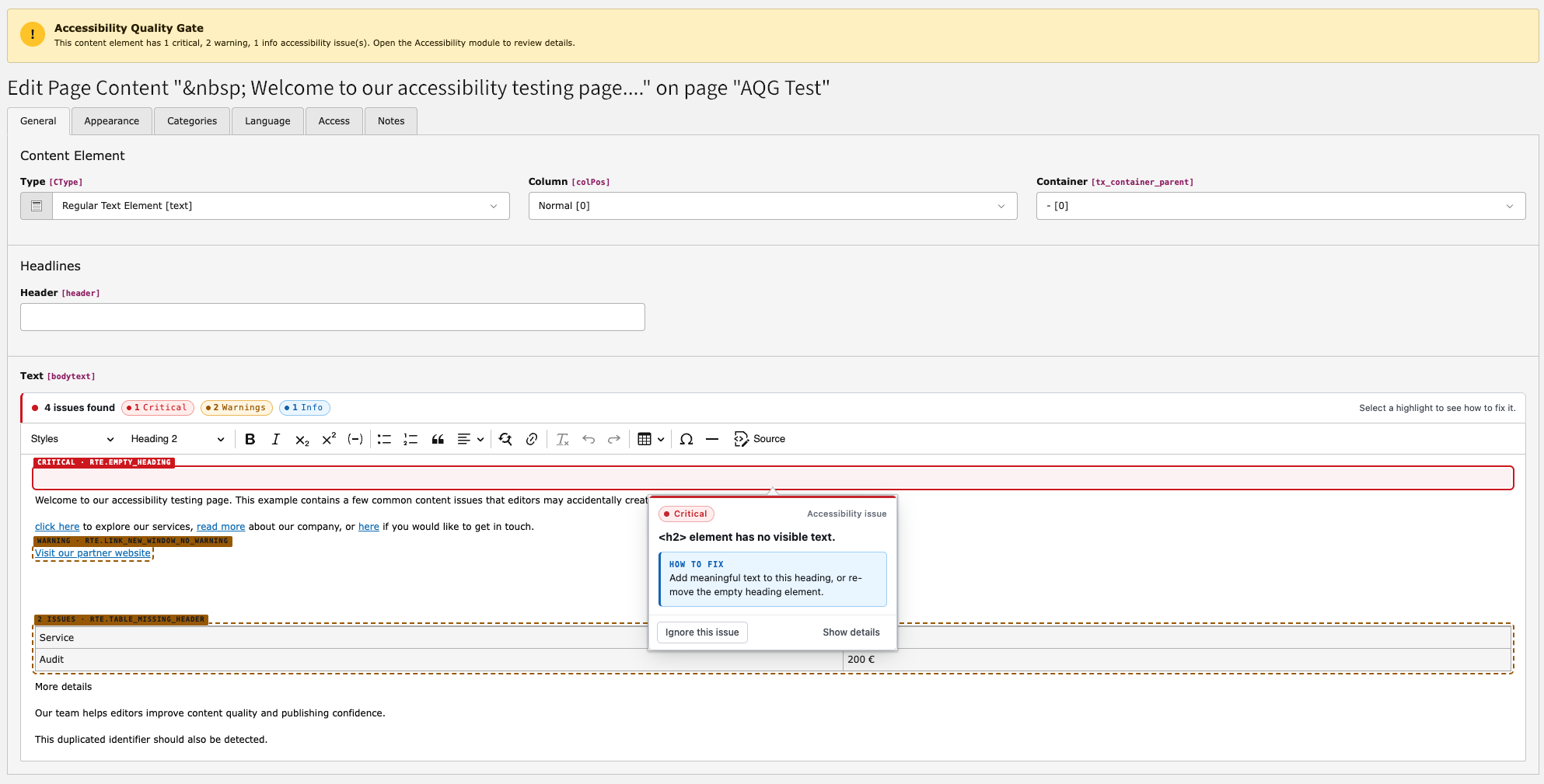
AQG registers a CKEditor 5 plugin that highlights accessibility problems while an editor writes RTE content. Highlighting happens in the editor, in the browser, and needs no scan and no server round trip.

A CKEditor text area in which an image without alternative text and a link with non-descriptive text are marked with a coloured underline.

Inline highlighting of accessibility problems in CKEditor.

The plugin applies a supported subset of the rte.* rules described in RTE rules — currently 15 of them, covering images, headings, links, tables, buttons, SVG titles and duplicate IDs. It marks the affected element and explains the problem, so that the editor can fix it before saving.

Rules outside that subset are evaluated only by a scan, not live in the editor. The rule reference is the authoritative list of everything a scan applies.

Registration 

The plugin is added automatically. AQG listens to the TYPO3 event BeforePrepareConfigurationForEditorEvent and injects its CKEditor module and stylesheet for tt_content RTE fields. No change to your RTE YAML preset is required.

For plain HTML fields rendered with CodeMirror, AQG registers the passive t3editor addon a11y-quality-gate/html-markers, which reuses the same markers.

Highlighting is limited to the live subset described above, further restricted to the rules that are enabled in Enabling rules.

Overview module 

Open the Accessibility module in the TYPO3 backend. On TYPO3 13 it is below Web, on TYPO3 14 below Content.

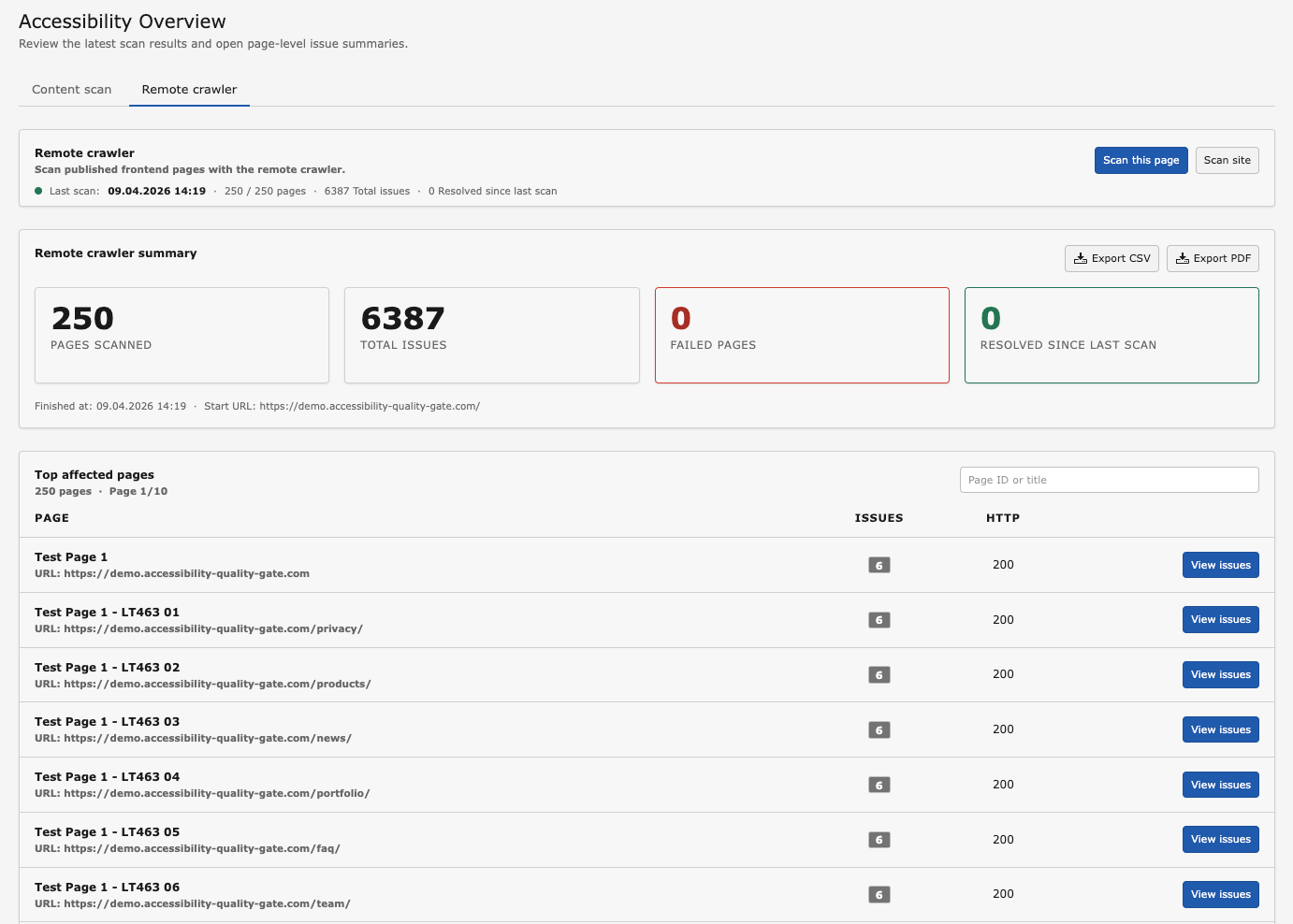
The AQG overview module showing issue counts by severity and a table of pages with their critical, warning and info findings.

The overview lists every scanned page with its open findings.

Content scan and Frontend scan 

The overview has two tabs:

Content scan
Findings produced by the local rules (rte.*, structured.*) and by the rendered page check (rendered.*). Available in all editions.
Frontend scan
Findings produced by the hosted browser crawler. Shows the Free Remote Preview status in the Free edition and the full scan history with an active licence. See Frontend scans (remote crawler).

Both tabs offer filtering by site, language, status and severity, a search over pages, and paging. New findings compared to the previous scan are marked as new.

Actions 

Scan site
Scans the whole page tree of the selected site: the local rules for every page, plus the rendered page check for the supported frontend pages of that subtree. Can be hidden for non-administrators with the TSconfig option options.a11y_quality_gate.showScanAll.
Scan this page
Scans a single page with the local rules and the rendered page check, see Rendered page checks. Can be hidden for non-administrators with options.a11y_quality_gate.showScanNow.
Settings
Opens the configuration described in Configuration.

Export buttons produce CSV of local findings in all editions. CSV of frontend scan results and PDF of either require an active licence, see Reports and exports.

Toolbar item and page module indicator 

AQG also adds an item to the backend toolbar that shows the accessibility state of the current page and offers a direct scan. It can be hidden for non-administrators with options.a11y_quality_gate.showToolbarItem.

In the Page module, an indicator on content elements links directly to the findings of that element.

Page detail 

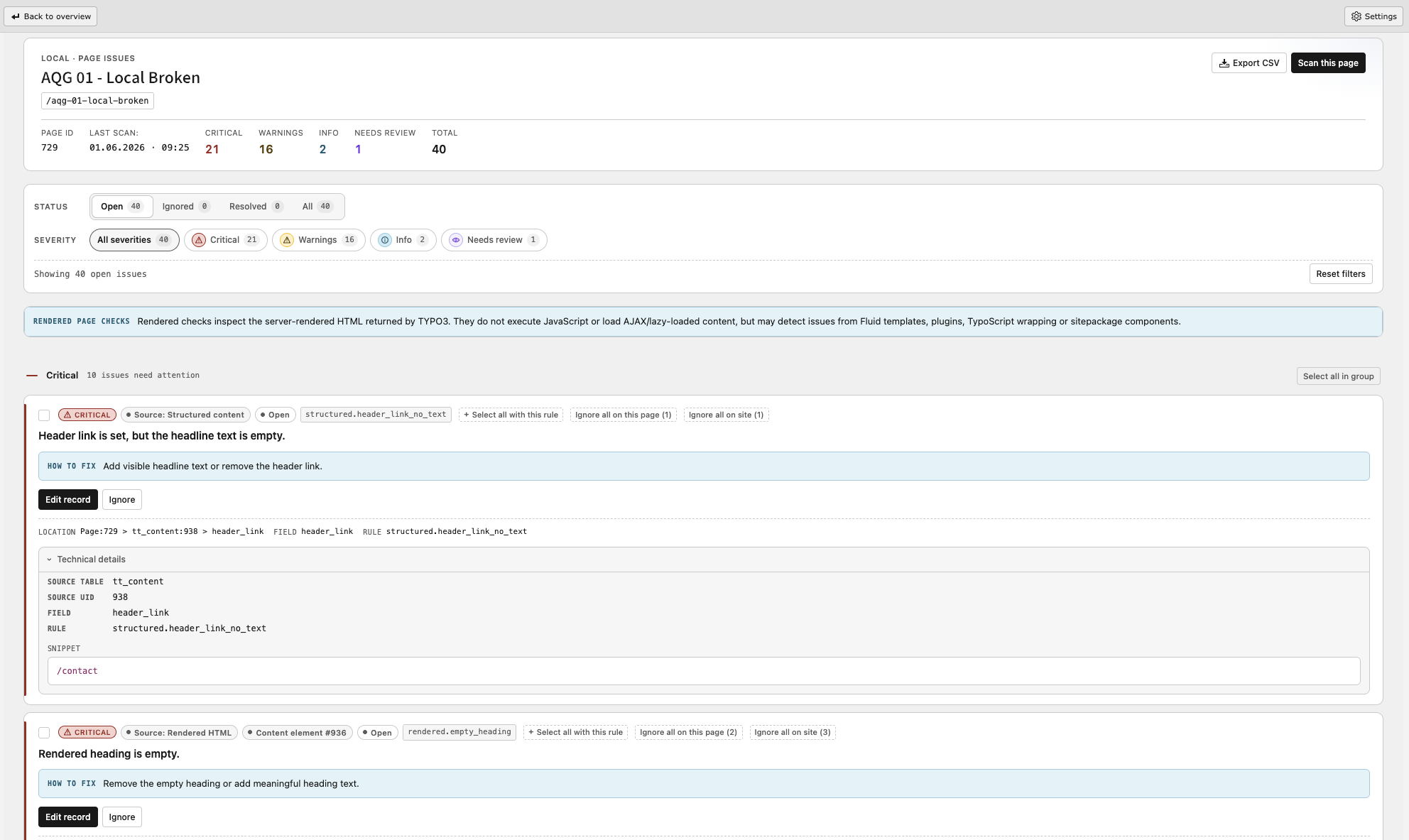
The page detail view lists every finding of one page, grouped by source, with its severity, rule, the affected record and field, and a code snippet of the matched markup.

The AQG page detail view listing findings of a single page with severity badges, rule names and actions per finding.

Findings of a single page with the available actions.

Guidance panel 

Each finding can be expanded to show the AQG rule metadata:

  • who normally owns the fix (editor, integrator or developer),
  • the fix type,
  • the referenced WCAG success criteria,
  • which users are affected,
  • why it matters,
  • how to fix it.

When no richer metadata exists for a rule, the short rule hint is shown instead.

Ignoring findings 

A finding that is a false positive or that is accepted for a documented reason can be ignored. AQG offers:

Ignore
Ignores a single finding, with an optional expiry date. When the date is reached the finding becomes open again.
Batch ignore
Ignores several selected findings at once. A reason must be confirmed.
Ignore rule on this page
Ignores all current and future findings of one rule on this page.
Ignore rule on this site
Ignores all current and future findings of one rule across the site.
Unignore
Returns a finding to the open state.

Ignored findings do not count towards the quality gate thresholds. Because findings are matched by a stable fingerprint, the ignore state survives rescans as long as the underlying content does not change.

Image remediation 

For FAL image findings, AQG offers actions that write directly to the file reference:

Mark as decorative
Sets tx_a11y_is_decorative = 1 and clears alternative in one DataHandler operation. Use this only for images that carry no information.
Mark as informative
Sets tx_a11y_is_decorative = 0 and leaves alternative untouched.
Apply alternative text
Writes the reviewed alternative text to alternative.

These actions are available to administrators, and to other backend users only when options.a11y_quality_gate.allowImageRemediation is enabled and the user may edit the affected records. See User TSconfig.

AI suggestions 

With AI suggestions configured and enabled, supported findings additionally offer a Suggest action, see AI-assisted text suggestions. AQG shows the suggested text and the reason, and lets the editor copy or apply it after review. Nothing is written automatically.

Rendered page checks 

The rendered page check evaluates the final HTML that TYPO3 delivers for one page. It is available in all editions and finds problems that do not exist in a single content record, such as a missing lang attribute, a missing page title, a missing main landmark or duplicate id values produced by different content elements.

Running a rendered check 

Whether a scan includes the rendered page check depends on how it was started.

Scan Rendered page check
Scan this page in the backend module yes, for the selected page
Scan site in the backend module yes, for the supported pages of the scanned subtree
CLI a11y:scan --page-uid=... yes, for that page
CLI a11y:scan --root-pid=... no
Scheduler task with a page UID yes, for that page
Scheduler task with a root page (subtree) no

Independently of the entry point, the rendered page check is skipped when:

  • the scan runs in changed-only mode,
  • the rendered page check is disabled in the ruleset settings,
  • the page has a doktype that does not deliver a frontend page, for example a folder, a shortcut or a link to an external URL.

AQG requests each page from its own frontend with a one-time nonce, so that the check runs against exactly the page and language that was scanned. If a scanner token is configured, hidden pages and hidden content are included; see Scanner token.

What the rendered check does not do 

The rendered check evaluates static, server-rendered HTML. It does not:

  • execute JavaScript,
  • wait for AJAX requests or lazy-loaded content,
  • interact with cookie banners or other overlays,
  • take screenshots,
  • run axe-core,
  • follow links or crawl further pages — the checker evaluates one page at a time, and a subtree scan simply repeats it per page.

For checks that need a real browser, use the frontend scan described in Frontend scans (remote crawler).

Frontend scans (remote crawler) 

Frontend scans are executed by a hosted crawler that renders pages with Chromium, executes JavaScript and runs axe-core in addition to the AQG rules. They are managed on the Frontend scan tab of the overview.

Free Remote Preview 

Installations without a licence key can run a limited number of remote single-page scans without a licence key, registration or email address. The tab shows the scans and pages used today, the remaining scans and the time of the next reset.

The allowance is not defined by the extension. AQG reads the current quota, usage and reset time from the AQG service and displays them; treat the values shown in the module as authoritative.

The preview scans the TYPO3 page that is currently selected in the page tree. Results are stored separately from licensed scan results. Features that are not part of the preview — page screenshots, TYPO3 record mapping, scan history, diff tracking and PDF export — are shown as locked.

Licensed frontend scans 

With an active Trial, PRO or Agency licence both scan scopes are available: a site scan that crawls the site within the page budget of the plan, and a single-page scan of one selected TYPO3 page. The scope of each run is recorded and shown in the scan history. Additional features become available:

  • screenshots of the scanned pages,
  • mapping of findings back to TYPO3 records, if the AQG frontend markers are active (see Site settings (site sets)),
  • scan history with comparison between scans,
  • new and resolved findings per scan,
  • a remediation plan grouped by rule,
  • remote CSV and PDF export.

Before the first licensed scan, configure the crawler access as described in Remote scan access: scanner token for hidden content, basic authentication for protected environments, excluded URL patterns and priority URLs.

How a scan is started 

Start a scan with the scan button on the Frontend scan tab. The target is always resolved on the server from the selected TYPO3 page; the browser never supplies a scan URL, installation identifier, licence key or access token.

Only one remote scan per site can run at a time. A second submit while a scan is active is rejected with a conflict message; wait for the running scan to finish.

Reports and exports 

CSV export 

CSV export of local findings — content scan and rendered page check — is available in all editions, for the overview and for a single page. The export contains the finding data as shown in the module: page, rule, severity, status, source record and field.

CSV export of frontend scan results requires an active licence that includes the remote crawler. Free Remote Preview results cannot be exported.

PDF export 

PDF export requires an active licence and the mpdf/mpdf library. It is available for the overview and for the page detail of local and remote results, and produces a formatted accessibility findings report with summary figures and a per-page breakdown.

Accessibility statement 

The accessibility statement generator is described in Accessibility statement.

Automation 

Content scans can be automated with the TYPO3 command line interface and with the TYPO3 Scheduler. Both are available in all editions.

Command line usage 

AQG registers the Symfony console command a11y:scan.

vendor/bin/typo3 a11y:scan --root-pid=1
Copied!

Options 

--root-pid

--root-pid
Type
int

Root page UID of the subtree to scan. Either --root-pid or --page-uid must be given.

--page-uid

--page-uid
Type
int

Scan a single page by UID.

--depth

--depth
Type
int
Default
99

Maximum page tree depth for a subtree scan.

--language

--language
Type
string
Default
all

sys_language_uid to scan, or all for every language.

--changed-only

--changed-only
Type
flag

Process only content that changed since the last scan. Uses the stored source state in tx_a11y_source_state .

Examples 

# Scan a subtree
vendor/bin/typo3 a11y:scan --root-pid=1

# Scan a single page
vendor/bin/typo3 a11y:scan --page-uid=42

# Incremental rescan of changed content only
vendor/bin/typo3 a11y:scan --root-pid=1 --changed-only

# Scan one language of a subtree
vendor/bin/typo3 a11y:scan --root-pid=1 --language=1

# Limit the depth of the subtree scan
vendor/bin/typo3 a11y:scan --root-pid=1 --depth=3
Copied!

The command exits with a non-zero status when neither --root-pid nor --page-uid is supplied.

Scheduler task 

AQG registers the Scheduler task Accessibility Quality Gate with the class \Priebera\A11yQualityGate\Scheduler\A11yScanTask .

Create it in System > Scheduler and configure the same parameters as for the CLI command:

Field Description
Page UID Scan a single page. 0 means no single page.
Root page Root page of the subtree to scan, selected from the available site roots. 0 means no subtree.
Depth Maximum page tree depth, default 99.
Language All languages (default), the default language, or one specific site language.
Changed content only Process only content that changed since the last scan.

Rule reference 

AQG ships 48 built-in rules in three categories. Every rule can be enabled or disabled individually, see Enabling rules.

The severity column shows the default severity. Some rules adjust their severity depending on the detected case, for example a missing alternative text versus a title-only fallback. The WCAG column names the success criteria a rule relates to. A rule that does not report a finding does not prove conformance with that criterion.

Severities 

Critical
A problem that very likely blocks users of assistive technology. Counted against threshold_critical of the quality gate.
Warning
A problem that degrades accessibility or is a likely failure in most contexts. Counted against threshold_warning.
Info
A recommendation. Not counted against the quality gate thresholds.
Needs review
A case the automated rule cannot decide. A person has to look at it.

RTE rules 

Applied to RTE bodytext of tt_content during content scans, and used for the inline highlighting in CKEditor.

Rule ID Default severity WCAG 2.1 / 2.2 reference
rte.img_alt_missing Critical 1.1.1
rte.img_alt_is_filename Warning 1.1.1
rte.img_alt_too_long Warning 1.1.1
rte.img_alt_redundant_phrase Warning 1.1.1
rte.image_in_link_missing_alt Critical 1.1.1, 2.4.4
rte.svg_missing_title Warning 1.1.1
rte.empty_heading Critical 1.3.1
rte.heading_hierarchy_jump Warning 1.3.1
rte.empty_link Critical 2.4.4
rte.non_descriptive_link Warning 2.4.4
rte.link_text_is_url_or_filename Warning 2.4.4
rte.link_text_duplicate_different_targets Warning 2.4.4
rte.link_to_document Needs review 2.4.4
rte.link_to_document_missing_notice Info 2.4.4
rte.link_new_window_no_warning Warning 3.2.2
rte.button_label_missing Critical 4.1.2
rte.form_control_missing_label Critical 4.1.2, 3.3.2
rte.iframe_missing_title Critical 4.1.2
rte.table_missing_header Warning 1.3.1
rte.table_th_missing_scope Warning 1.3.1
rte.table_missing_caption Info 1.3.1
rte.duplicate_id Warning 1.3.1
rte.marquee_or_blink Critical 2.2.2

Structured rules 

Applied to structured TCA field values during content scans, for example file reference metadata, content element headers and form field configuration.

Rule ID Default severity WCAG 2.1 / 2.2 reference
structured.file_reference_alt Critical 1.1.1
structured.file_reference_alt_quality Warning 1.1.1
structured.header_ctype_empty Warning 1.3.1
structured.header_link_no_text Critical 2.4.4, 4.1.2
structured.header_level_is_h1 Needs review 1.3.1
structured.uploads_file_missing_description Warning 2.4.4
structured.table_missing_caption Info 1.3.1
structured.form_placeholder_as_label Warning 1.3.1, 3.3.2
structured.form_field_label_missing Critical 1.3.1, 3.3.2
structured.form_autocomplete_missing Warning 1.3.5
structured.media_no_transcript_hint Needs review 1.2.1

Rendered HTML rules 

Applied to the server-rendered HTML of a page. They run for Scan this page, for Scan site and for single-page CLI or Scheduler runs, but not for subtree CLI or Scheduler runs and never in changed-only mode. See Rendered page checks for the full matrix.

Rule ID Default severity WCAG 2.1 / 2.2 reference
rendered.img_missing_alt Critical 1.1.1
rendered.svg_missing_accessible_name Warning 1.1.1
rendered.empty_heading Critical 1.3.1
rendered.empty_link Critical 2.4.4
rendered.empty_button Critical 4.1.2
rendered.iframe_missing_title Critical 4.1.2
rendered.form_control_missing_label Critical 4.1.2, 3.3.2
rendered.duplicate_id Warning 1.3.1
rendered.table_missing_header Warning 1.3.1
rendered.table_empty_header Warning 1.3.1
rendered.html_lang_missing Warning 3.1.1
rendered.page_title_missing Warning 2.4.2
rendered.main_landmark_missing Needs review 1.3.1
rendered.landmark_unique Needs review 1.3.1

Rules of the frontend crawler 

Frontend scans additionally run axe-core in a real browser. Their findings use the axe rule identifiers, for example color-contrast, target-size or region, and are shown on the Frontend scan tab. They are not part of the rule list above and cannot be toggled in the Rules tab.

Privacy and security 

This chapter documents which data leaves the installation, how secrets are stored and which settings are security relevant. It is meant to support your own data protection assessment; it is not legal advice.

What works without external services 

The content scan, the rendered page check, the CKEditor highlighting, the CLI command, the Scheduler task, the ignore workflow, the quality gate in warn mode and the local CSV export do not send scan data to AQG-hosted services or to any other third party. Findings are computed and stored inside the TYPO3 installation.

One qualification: the rendered page check performs a real HTTP request, not an in-process call. AQG sends that request only to the configured site's frontend URL. Depending on the site's DNS and network architecture, the request may pass through infrastructure such as a CDN, reverse proxy or load balancer before it reaches TYPO3.

Outbound connections 

Feature Endpoint Transferred data
Licence validation https://api.priebera.sk Licence key and a site fingerprint derived from the domain.
Frontend scan and Free Remote Preview https://api.priebera.sk The scan target resolved on the server, plus the crawler access settings needed to reach it. The crawler then requests your public frontend and stores the findings and, for licensed plans, screenshots of the scanned pages.
AI text suggestions OpenAI, with your own project key The content context of the individual finding. Requests are sent with store=false. Disabled by default.

Both base URLs can be redirected with the environment variables described in Overriding the service endpoint. If you must not contact any external service, do not enter a licence key, do not use the Free Remote Preview and do not configure AI suggestions.

Stored secrets 

Secret Storage
Licence key Extension configuration (EXTENSIONS/a11y_quality_gate/licenceKey in config/system/settings.php).
Scanner token scanner_token in tx_a11y_ruleset , 64 hexadecimal characters.
Remote basic authentication password http_auth_pass in tx_a11y_ruleset , encrypted with ext-sodium.
OpenAI project key encrypted_api_key in tx_a11y_ai_configuration , encrypted with ext-sodium, displayed only as a masked hint. Alternatively the environment variable AQG_OPENAI_API_KEY.

Treat database dumps that contain tx_a11y_ruleset or tx_a11y_ai_configuration as secret material. Regenerate the scanner token after restoring a production dump into a less protected environment.

Frontend exposure 

  • The scanner token grants access to hidden pages and hidden content elements through the X-AQG-Scanner-Token request header. It is the only mechanism by which AQG changes frontend visibility. See Scanner token.
  • The AQG frontend markers used for record mapping are not rendered for normal visitors. They are emitted only for a request with a valid scanner token, for a rendered page check with a valid one-time nonce, or for a logged-in backend user calling the page with ?aqgDebug=1.
  • Screenshots taken during licensed frontend scans show the page as the crawler rendered it. If the crawler can authenticate into protected areas, the screenshots may contain data from those areas. Restrict what the crawler may reach with the excluded URL patterns.

Backend permissions 

  • The module and all its AJAX routes share the identifier web_a11y, so module access is the single access control point.
  • The Licence, Remote scan access and AI tabs are restricted to administrators.
  • Image remediation requires the capability from options.a11y_quality_gate.allowImageRemediation and TYPO3 edit permissions on the affected records. Writes are limited to the alternative and tx_a11y_is_decorative fields of sys_file_reference .
  • Remote scan targets are always resolved server-side from a page UID. The browser never supplies a scan URL, installation identifier, licence key or access token.

Reporting a vulnerability 

Do not report security issues publicly. Use GitHub private vulnerability reporting or write to support@priebera.sk.

Known limitations 

Automated testing does not replace a manual audit 

Automated tools can only detect problems that are machine-detectable. Depending on the site, automated checks typically surface a minority of the barriers that a full audit finds. The following always require human judgement and cannot be decided by AQG:

  • whether alternative text actually describes the image in its context,
  • whether link text is meaningful for the target,
  • reading order, focus order and keyboard operability,
  • visible focus indication and interaction states,
  • correct use of headings as a document outline rather than as styling,
  • whether colour is the only carrier of meaning,
  • whether captions, transcripts and audio descriptions exist and are correct,
  • error prevention, error identification and form usability in practice,
  • behaviour with screen readers, magnification and speech input,
  • plain language and comprehensibility.

Use AQG to remove the mechanically detectable problems early and continuously, and plan a manual accessibility audit, including assistive technology testing, for the conformance statement itself.

Some rules encode best practices and are not a hard WCAG failure in every context. Rules with the severity Needs review are explicitly undecidable by the automated check. Review every finding in its context.

Content scan 

  • Only fields that are discovered from TCA and enabled in the settings are analysed, see Scanned fields. Run Re-scan TCA after TCA changes.
  • The content scan works on stored records. Problems that only appear when TYPO3 assembles the page — duplicate id values across content elements, a missing main landmark, a missing lang attribute — are found by the rendered page check, not by the content scan.
  • Content produced by extensions that do not store its text in scanned TCA fields is not covered.
  • The phrase lists of the text-based rules are English by default. Configure the dictionary settings for other languages, see Site settings (site sets).

Rendered page check 

The rendered page check analyses server-rendered HTML only. It does not execute JavaScript, does not wait for AJAX or lazy-loaded content, does not interact with cookie banners, does not take screenshots and does not run axe-core. It evaluates one page at a time and never follows links: a site scan repeats the check per page instead of crawling.

It is skipped for changed-only runs, for subtree CLI and Scheduler runs, for page doktypes that do not deliver a frontend page, and when it is disabled in the ruleset settings.

Frontend scan 

  • The crawler requests the site from the public internet. Installations behind a VPN, an IP allowlist or a bot filter cannot be scanned.
  • Free Remote Preview is limited to a small daily allowance of single-page scans and does not include screenshots, TYPO3 record mapping, scan history or PDF export. The extension does not define the allowance itself: the scans and pages used, the remaining quota and the next reset time are reported by the AQG service and displayed in the module.
  • Licensed scans are limited by the page budget of the plan.
  • Only one remote scan per site can run at a time.
  • Mapping crawler findings back to TYPO3 records requires the AQG frontend markers, see Site settings (site sets). Without them, findings are reported per URL.

Quality gate 

  • The gate evaluates stored findings. A page that has not been scanned since its last change is evaluated against outdated data. Schedule regular scans, see Automation.
  • Blocking mode requires an active licence. Without one, the gate can only warn.
  • The gate is an editorial safeguard. It is not a security control and not a statement about the accessibility of the published page.

AI suggestions 

Suggestions are proposals that an editor must review. AQG rejects unsafe outputs, but it cannot verify that a suggested text is factually correct for the image or link it describes. Suggestions are never applied automatically and never write to RTE bodytext.

Upgrade 

Versioning 

AQG follows semantic versioning (MAJOR.MINOR.PATCH):

MAJOR
Incompatible or breaking changes.
MINOR
Backwards-compatible new functionality.
PATCH
Backwards-compatible bug fixes.

The changelog of every release is maintained in CHANGELOG.md in the repository.

Updating the extension 

composer update priebera/typo3-a11y-quality-gate
vendor/bin/typo3 extension:setup
vendor/bin/typo3 cache:flush
Copied!

In Classic installations, update the extension in the Extension Manager and run the database analyser.

After an update 

  1. Run Re-scan TCA in the Settings view if the release adds rules or supports new field types.
  2. Check the Rules tab. New rules are available for the first time and may need to be reviewed for your project.
  3. Run a full scan so that existing pages are re-evaluated with the new rules. Expect additional findings after a release that adds rules; this does not mean the site got worse.
  4. If the quality gate runs in blocking mode, run the full scan before the next editorial cycle, so that editors are not blocked by findings they have not seen yet.

TYPO3 version upgrades 

AQG supports TYPO3 13.4 LTS and TYPO3 14.3 or later. TYPO3 14.0 to 14.2 are declared as conflicting.

When upgrading TYPO3 13 to 14:

  • The backend module moves from Web to Content. The route identifier stays web_a11y, so backend user group permissions, bookmarks and AJAX routes keep working.
  • Scheduler task parameters are unchanged. On TYPO3 14 the fields are registered through TCA on tx_scheduler_task , on TYPO3 13 through the additional field provider of the task.
  • Rulesets, findings, ignore states and field configuration are kept.

Findings and fingerprints 

Findings are matched across scans by a stable fingerprint. Ignore states survive rescans as long as the underlying content is unchanged. Editing the content that produced a finding creates a new finding, which is open again — this is intentional, because the changed content has to be re-evaluated.

Troubleshooting 

A scan finds nothing 

  • Open Settings and check whether any fields are enabled on the Scanned fields tab. Directly after installation no fields are enabled. Run Re-scan TCA, enable the fields and press Save settings.
  • Check the Rules tab for rules that were disabled earlier.
  • Verify that the scanned page really is inside the site you selected in the module filter.

A field is not offered for scanning 

Run Re-scan TCA. AQG discovers RTE and file fields from TCA, so a field that was added by an extension or by a TCA override appears only after a new discovery run. Fields whose TCA type AQG does not support are not listed.

CKEditor does not highlight anything 

  • Highlighting is registered for tt_content RTE fields of saved records. It is not active for a record that has never been saved.
  • Clear the TYPO3 caches and reload the backend after an update, so that the JavaScript modules are re-read.
  • Check the browser console for module loading errors.

The rendered page check fails 

  • The check requests the page from your own frontend. Make sure the TYPO3 frontend is reachable from the web server itself, including any HTTP basic authentication or IP restriction in front of it.
  • Pages that return an error page instead of the expected content are detected and reported as failed instead of being analysed.
  • Hidden pages are only rendered when a scanner token is configured, see Scanner token.
  • Page types that do not deliver HTML, for example feeds or downloads, are skipped.

The licence is not accepted 

The Licence tab reports a machine-readable reason:

invalid_key
The key does not exist. Check for copy and paste errors.
expired / trial_expired
The licence or the trial has ended. Renew it in the customer portal.
inactive / trial_revoked
The licence was deactivated. Contact support.
domain_mismatch / trial_domain_mismatch
The key is bound to a different domain. Assign the current domain in the customer portal.
domain_limit_reached
All domain slots of the plan are used. Release a domain or upgrade the plan.
api_unreachable
The licence service could not be reached. Check outbound HTTPS access to https://api.priebera.sk, and whether an endpoint override is set by mistake. AQG falls back to the Free feature set until the next successful validation.
licence_project_mismatch / trial_project_mismatch
The key belongs to a different product.

Validation results are cached: valid results for one hour, invalid results for five minutes, trial results for fifteen minutes. After fixing a problem it can take a moment until the new state is visible; pressing Validate re-checks immediately.

Remote scans do not start or find nothing 

  • Only one remote scan per site can run at a time. A parallel submit is rejected with a conflict; wait for the running scan.
  • Hidden pages need a scanner token, see Scanner token.
  • A protected environment needs the basic authentication credentials, see HTTP basic authentication.
  • Check the excluded URL patterns. Too broad a pattern removes most of the site from the scan.
  • Verify that the site is reachable from the internet. The crawler is a hosted service and cannot reach installations that are only available internally.
  • Findings that are not mapped to TYPO3 records usually mean the AQG frontend markers are missing, see Site settings (site sets).

AI suggestions are not offered 

  • AI requires an active licence and a configured provider key.
  • Link text and iframe title suggestions have their own toggle, which is off by default.
  • The connection must be verified with Test connection for the current key, model and prompt version.
  • Suggestions are only offered for the supported rules listed in Which findings get suggestions.
  • unsupported_context means AQG could not identify exactly one supported element from the stored finding, so it refuses instead of guessing.

The quality gate does not react 

  • Check publish_mode. 0 disables the gate.
  • Blocking mode requires an active licence; without one the gate can only warn.
  • The gate uses stored findings. Scan the page before testing.
  • Ignored findings do not count towards the thresholds.
  • With threshold_warning = -1 warnings never trigger the gate.

PDF export is unavailable 

PDF export requires an active licence and the mpdf/mpdf library. In Classic installations the library must be provided by the installation.

Encrypted values cannot be saved 

The remote basic authentication password and the AI provider key are encrypted with the PHP sodium extension. Install and enable ext-sodium on the web server and on the CLI.

Where to get help 

Documentation 

  • This manual describes the extension itself.
  • Additional guides, product information and plan details are published at typo3.priebera.sk/docs.

Questions 

Installation and usage questions belong in GitHub Discussions, Q&A.

Bugs, false positives and missed issues 

Report them as a GitHub issue. The repository provides templates for bug reports, false positives, missed issues and feature requests. A false positive report is most useful with the rule ID, the affected markup and the TYPO3 and extension versions.

Licensing and billing 

Use the support form or the customer portal.

Security 

Do not report security issues publicly. Use GitHub private vulnerability reporting or write to support@priebera.sk.

What not to post publicly 

Do not post client domain names, email addresses, licence keys, scanner tokens or screenshots containing private data in issues or discussions.

Contributing 

Contribution guidelines are in CONTRIBUTING.md in the repository. The source of this manual is in the Documentation folder; every page has an Edit on GitHub link.