A very easy to use extension to display content elements (tt_content), pages and content elements or
news elements as an accordion. Put some text-content-
elements (with pictures) or news-records into a folder and this
extension will display them all as an accordion. The extension is
flexible too, because it can be configured and you can use other
JavaScript plugins too (e.g. jQuery UI Accordion).
Supported tt_content elements: text, textpic, textmedia and table.
By default every template can be used with TinyAccordion or jQuery UI Accordion (you need to include this file by your own).
Could be used for FAQs. It uses the TinyAccordion-JavaScript file from a website, that does not exist anymore.
You find a demo here:
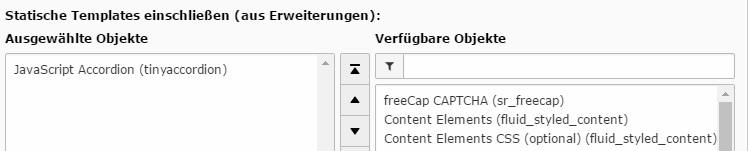
Install the extension and include the static TypoScript (from extensions). The static TypoScript loads the default settings.
They can be changed later (see chapter Configuration).
Create a folder with several content elements (text or text with
picture; the header should be hidden) or news elements and
categories. Note: you can select pages or tt_content elements from everywhere.
Add the plugin to the page where the accordion should
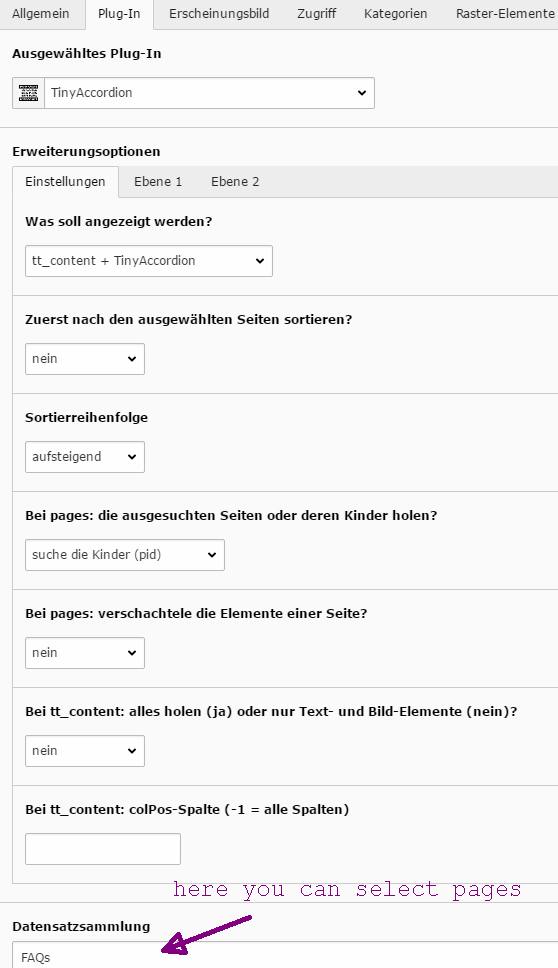
appear. Select some pages or the folder with the tt_content or news elements at the bottom of the plug-in-settings.
Select in the plug-in what you want to display: pages, tt_content, news or Camaliga as db-table
I don´t want to select a folder on every page. Is there no other way?
If you don´t specify a “Record Storage Page”, the extension will
select the first sub-folder of the current page for you.
The news are not displayed properly.
You will need the categories. They are displayed first.
I see the header of the content element twice! Whats wrong?
You must set one header to “hidden” (Type).
I don't see the header of the content element! Whats wrong?
Its hidden by default. Make it visible via StyleSheets.
Administration
You can configure many things of this extension:
TypoScript: see chapter Configuration/Reference.
JavaScript file: you can use other JavaScript plugins too. Default
path: Resources/Public/Scripts. See chapter Configuration/Reference.
CSS file: you find an example in the TypoScript configuration of this
extension. Path: Configuration/TypoScript/setup.txt. See chapter
Configuration/Reference.
HTML file: you find several examples in the
Resources/Private/Templates/Selection folder of this extension. See
chapter Configuration/Reference.
Copy the HTML file and/or the CSS to your fileadmin/extension-folder and edit
them. Then change the path to that files via TypoScript. See next
chapter...
I can see text/images in the background. Whats wrong?
In this case you need to add the style "opacity:0;" to <div class="acc-section">.
I get a JavaScript error. Whats wrong?
The JavaScript is not included properly. See next chapter...
Configuration
You can configure this extension to use tt_content, pages + tt_content, news or Calamiga-elements as
database table. You should think about how the result should looks
like. If you need a result like in “Example 1” (flat hierarchy), you
must use tt_content else you must use pages, news or Camaliga elements. See chapter Reference
below for the whole TypoScript configuration.
If you want to change the styles: copy them from the TypoScript-file
(Configuration/TypoScript/setup.txt) to your own css-file and remove
the default-styles:
plugin.tx_tinyaccordion._CSS_DEFAULT_STYLE >
Copied!
Note: the default JavaScript-file is included like this in the templates via a new ViewHelper:
If this doesn´t work or if you want to include another JavaScript-
file, copy the JavaScript-file to your fileadmin-folder and remove the
default JavaScript and include your own JavaScript via TypoScript like this:
They are used e.g. in the News.html and Camaliga.html template.
Examples
Here you can see how you can use another HTML-file
(Selection/News.html or Selection/Content.html in that folder).
Changes the default template folder in the Constants:
This second example shows you, how you can use the jQuery UI Accordion
instead of the TinyAccordion. Remove the default styles:
plugin.tx_tinyaccordion._CSS_DEFAULT_STYLE >
Copied!
If you want to edit the template, copy the example-file (Resources/Private/Templates/Selection/News-
ui-accordion.html) to your fileadmin-folder in a folder named
“Selection”, edit it and include it like this in TypoScript Setup:
Note: the path to the file is then like this: fileadmin/template/files/Selection/News-ui-accordion.html
Note furthermore: you need to include jQuery UI Accordion by your own.
Tutorial
You should think first about the layout of the accordion.
If you use tt_content elements, only the header and the bodytext will be displayed.
If you use pages and tt_content elements, then the page title will be displayed first.
After clicking at the page title, you will see the content elements of that page.
If you use news, the categories are displayed first, that´s why every news needs at least one category.
After clicking at a category, all news-titles are shown. Than you can click at a news-title.
Put your content elements to a folder and select that folder in the plugin.
You can change the layout of the result. See chapter “Administration”.
Known problems
In some cases you will see the title twice.
Solution: hide one title with a CSS class or style.
Updating to ver. 6.0.0
If you are updating from a version < 6.0.0, you must change your custom template-file or your TypoScript, because this TypoScript line was removed:
New rewritten in Extbase. See chapter Updating! You must configure
everything new!
Version
1.1.0
Changes
Uid of the content element added to the UL-ID. Code cleaning.
Version
1.1.2
Changes
Titles of content elements are now hidden by default.
Version
2.0.0
Changes
FlexForms and templates extended. Maybe you need to save your plugin-
settings again if you use the templates from typo3conf...
Version
2.1.1
Changes
The extension can be configured to use the extension key from version
0.1.0.
Version
2.2.0
Changes
New documentation format.
The UI Accordion template can be selected directly without moving the file to fileadmin.
Camaliga-elements can be used now too.
Version
2.2.1
Changes
HTML5 problem solved.
Version
3.0.0
Changes
Moved to namespaces. Now compatible to TYPO3 7. Note: you need to change the TypoScript in TYPO3 7.6.
See chapter Configuration.
Version
3.0.1
Changes
TYPO3 7 related bugfix.
Version
3.0.2
Changes
TypoScript for TYPO3 7 added.
Bugfix: {uid} was empty in TYPO3 7.
Version
3.0.3
Changes
sys_language_uid will now not be ignored.
Version
3.0.5
Changes
Actions pages, pages_ui_accordion and content_ui_accordion added.
Sorting option added: first sort by pid (Record Storage Page).
New variables: {pids} and {element.pid}.
Version
4.0.0
Changes
Redesigned for TYPO3 7. TYPO3 6 compatibilty removed. You need to run the update script in the extension manager after installing.
Extension manager configuration and TypoScript for TYPO3 6 removed. The extension key changed.
New templates: Pages and templates for UI accordion.
Several new FlexForm settings.
Version
5.0.0
Changes
Rewritten for TYPO3 8 by Ingo Pfennigstorf.
The Layout Default.html removed because of a major bug in TYPO3 8. It is not allways possible to use a layout-file called Default.html in TYPO3 8.
Version
6.0.0
Changes
Removed the includeJS: page.includeJS.tx_tinyaccordion.
The JavaScript-file for a TinyAccordion is now included in the template by a ViewHelper. If you use custom templates, you need to add the ViewHelper to your template!
Version
6.1.0
Changes
Runs now with TYPO3 9, if the extension typo3db_legacy is installed.
Version
7.0.0
Changes
Old update-script removed.
tt_news-support replaced by news-support (maybe not working correct).
Runs now with TYPO3 9 and 10; typo3db_legacy not needed anymore.
Version
7.1.0
Changes
Runs now with composer too.
Documentation update.
Version
7.2.1
Changes
Runs now with TYPO3 10 and 11.3.
Can display now table elements too.
Bugfix: news template.
Version
7.3.0
Changes
Runs now with TYPO3 11.5 too.
Directory Scripts renamed to JavaScript.
Replacement of the Viewhelper tiny:addPublicResources. It is now deprecated. Use f:asset.script instead.
Version
8.0.0
Changes
Breaking: all plugins must be changed via an update-script (in the install-tool)!
Breaking: the Viewhelper cam:addPublicResources was removed.
Breaking: removed the templates for Camaliga (can be solved with Camaliga).
Version
8.1.0
Changes
Refactored with the rector-tool.
setup.txt and constants.txt renamed to .typoscript.
Version
8.2.0/1
Changes
Compatibility to TYPO3 13 added.
Documentation.
Sitemap
Reference to the headline
Copy and freely share the link
This link target has no permanent anchor assigned.The link below can be used, but is prone to change if the page gets moved.