It is useful for content publisher in TYPO3 because some browsers cache the files extremely and after updating the file in TYPO3 the changes can't bee seen.
Useful for editors e.g. in Intranet systems or Corporate websites.
Because most of the time it's not useful to change the public url of all files, the default configuration will only change public url of docx, doc, pdf, xls, xlsx, odt, ods, ppt and pptx documents in frontend.
The changed public url is done in backend for all files in the filelist module.
Example of a usecase with problems:
Editor opens pdf-file in frontend in Internet Explorer -> browser is caching this file
Editor replaces the file in TYPO3 backend with a new file with the replace function in filelist module
Editor reopens the pdf-file in frontend in Internet Explorer -> browser is loading the cached file and not the new file
For problems my preferred contact channel is to create an issue on Github.
It will NOT:
modify the file itself, it only modifies the public URL of the file when the URL will be created in TYPO3 frontend or backend
modify the public URL if a file is processed through the image processor via TYPO3. A timestamp for processed URLs isn't needed because if the file was changed, a new processed file will be created
Administrator Manual
Target group: Administrators
This extension should be installed via "composer require renolit/reint-file-timestamp".
There are no dependencies to other extension, only to TYPO3 core.
The package could be activated via extension manager or via TYPO3 console plugin.
Installation
To install the extension, perform the following steps:
Add package on command line via "composer require renolit/reint-file-timestamp"
Install the extension via extension manager or use the TYPO3 console plugin to activate it
Configuration
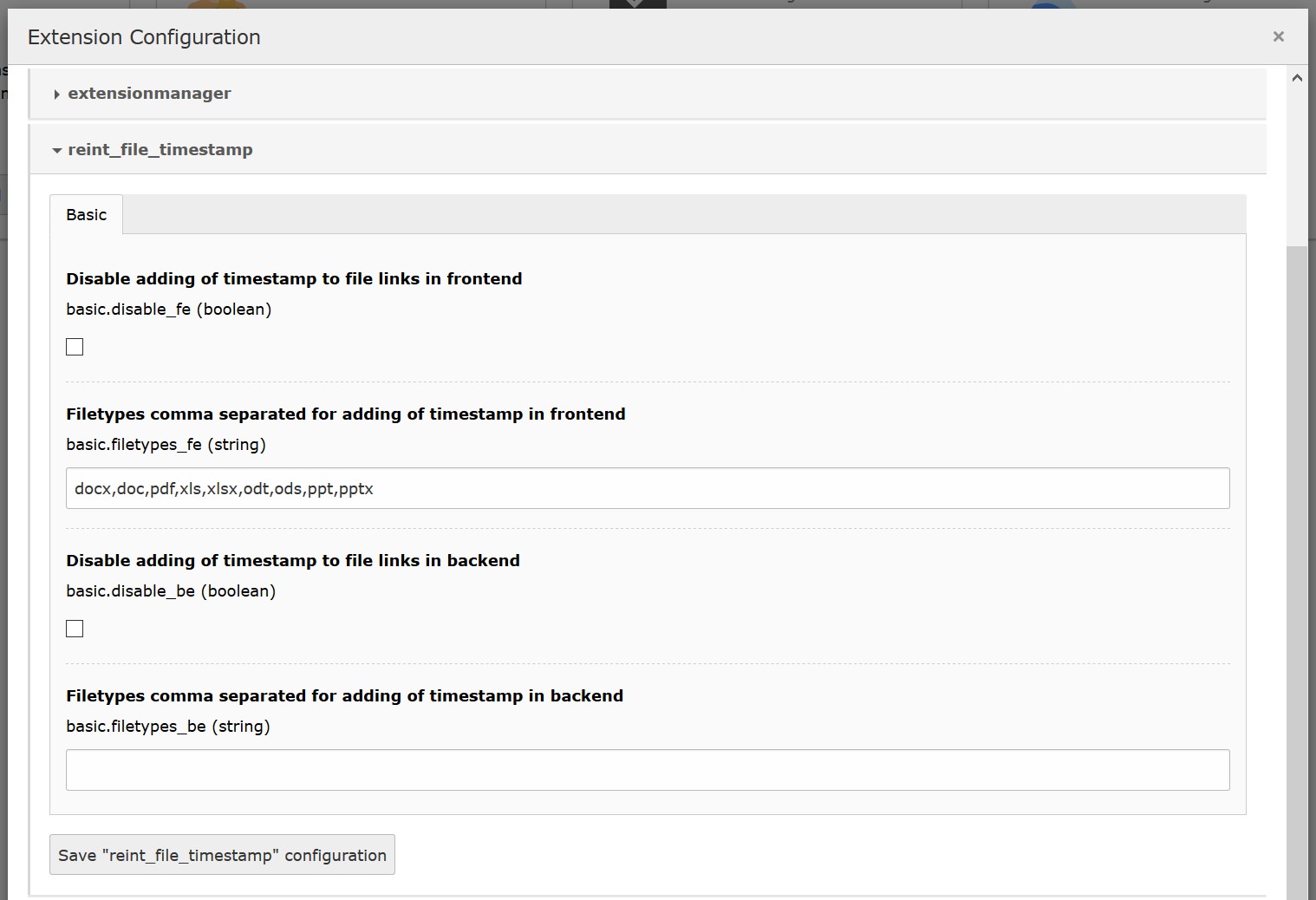
Configure the extension via "Admin tools->Settings->Extension configuration->reint_file_timestamp"
Extension configuration
Extension configuration in admin tools
FAQ
What to do if I have problems with this extension?
Please write a bug report on Github and report the problem
via Github to me.
Configuration Reference
Just install the extension and check your file downloads and the filelist in backend to see if it all works fine.
Go to "Admin tools->Settings->Extension configuration->reint_file_timestamp" to configure the following options:
Completely disable adding of timestamp to files in TYPO3 frontend
Define some file extensions comma separated for adding of timestamp in TYPO3 frontend
Completely disable adding of timestamp to files in TYPO3 backend
Define some file extensions comma separated for adding of timestamp in TYPO3 backend
If you disable adding of timestamps to files in frontend or backend the setting of special file extensions will have no effect.
Developer Corner
Target group: Developers
At the moment there are no signal slots or hooks available.
Please contact me if there is a need for it.
This extension uses the signal slot "PreGeneratePublicUrl" in TYPO3CMSCoreResourceResourceStorage to overwrite the
public uri of a file.
Known Problems
At the momement there are no known problems.
Please use the bugtracker system on Github and report every bug you will find.
I will fix the problems as soon as possible (asap) ;-).
To-Do list
If there are milestones visit Github, if you want to add something, write a pull request or a mail to me.
ChangeLog
27.07.2026 -> 5.0.0
new version for TYPO3 14.3
updated documentation
27.07.2026 -> 4.0.1
new version for compatibility with TYPO3 13.4
updated documentation
03.05.2024 -> 4.0.0
new version for TYPO3 12.4
updated documentation
01.06.2022 -> 3.0.1
added PHP 8 compatibility, thanks to jp1987
updated documentation
10.01.2022 -> 3.0.0
full update to use with TYPO3 11.5
completely switched from signal hooks to PSR-14 event listener
25.06.2020 -> 2.0.1
cleaned up coding
added check if public url still contains a parameter in uri
24.06.2020 -> 2.0.0
new version for TYPO3 9.5 and 10.4
13.09.2017 -> 1.1.4
fixed composer.json and added TYPO3 8 compatibility
12.09.2017 -> 1.1.3
fixed composer.json
12.09.2017 -> 1.1.2
added composer.json and updated dependencies
02.12.2016 -> 1.1.1
added check for public storage, only change public uri if file is public available
13.07.2016 -> 1.1.0
added configuration options in extension manager
19.01.2016 -> 1.0.3, 1.0.4
small documentation update
18.01.2016 -> 1.0.2
small documentation update
15.01.2016 -> 1.0.1
bugfix: fixed bug in setting and decoding public uris, please update!
12.01.2016 -> 1.0.0
first release of this extension on GitHub and TER
Reference to the headline
Copy and freely share the link
This link target has no permanent anchor assigned.The link below can be used, but is prone to change if the page gets moved.