gridtocontainer 

This extension can be used to migrate a project from EXT:gridelements to EXT:container.

A quick introduction in how to use this extension.

What does this extension do? See some screenshots

Learn how to use this extension in detail.

See the CLI command options for this extension.

What are the limitations of this extension? Where can you report problems?

About this extension, the author, the project etc
Quick start 

We assume you have composer-based TYPO3 installation with extension EXT:gridelments ( gridelementsteam/gridelements) installed.

  1. Make Backups or work on a development system

  2. Install EXT:container

    composer req b13/container
    Copied!

    Keep EXT:gridelements installed for now.

  3. Install EXT:gridtocontainer

    composer req --dev sbublies/gridtocontainer
    Copied!

    See the chapter on Installation. Make sure the TypoScript template is included. We install the extension as a dev-requirement as it should not be used on productive systems.

  4. Check which of the available grid elements are in use

    Go to the module Admin tools > Grid migration provided by this extension. See also What grid elements do i have on my site?.

  5. Create alternative containers for each grid element

    See the EXT:container documentation.

  6. Migrate all grid elements to containers

    Using the module Admin tools > Grid migration migrate all grid elements to the respective containers. See also Migrate grid elements from gridelements layout key.

  7. Optional: Migrate FlexForm content

    If your grid elements used FlexForms you have to migrate the values stored in the FlexForms by other means. See chapter Known problems.

  8. Check the migration

    Is everything being displayed as expected in frontend and backend?

  9. Remove EXT:gridelements and this extension

    Remove or replace all extensions that require EXT:gridelements and remove the requirement from your sitepackage. Then remove EXT:gridelements. You can also remove EXT:gridtocontainer after successfully migrating all containers:

    composer remove gridelementsteam/gridelements sbublies/gridtocontainer
    Copied!
  10. Clean up the database

    Search in the database for content elements that still use the colpos -1 and resolve them. See chapter Clean up the database for details.

  11. Make a database compare

    Got to Admin tools > Maintenance > Analyze Database and undo all changes that EXT:gridelements made to your database.

Introduction 

What does it do? 

This extension can be used to migrate a project from EXT:gridelements to EXT:container.

For each gridelement used in your installation you can manually chose to which container element it should be migrated. By default the column numbers are kept. However, it is also possible to adjust the column number of the related content elements.

This extension should only be used on development systems. It is not recommended to use it on productive systems. It can only be used by administrators with system maintainer rights.

The migration module

The migration module

See the Quick start to get started in the TYPO3 CMS Backend or get started with the command line, see Command Reference

Installation 

It is not recommended to use this extension on productive systems. If you do make sure you have a current database backup and no editors working on your page.

After installation you need to include the TypoScript template in your root pages template.

TYPO3 11, composer-based 

In a current composer-based TYPO3 installation you can install this extension like this:

composer req sbublies/gridtocontainer
Copied!

The extension will be automatically activated.

TYPO3 10 and below, composer-based 

If you are using TYPO3 version 9 or 10 require the fitting version:

composer req sbublies/gridtocontainer:"^10.4"
Copied!

And activate the extension in Admin Tools > Extension Manager.

Legacy TYPO3 installations without composer 

Download gridtocontainer from the TER (TYPO3 Extension Repository)

Upload it in Admin Tools > Extension Manager and activate it there.

Next steps 

Have a look at the Quick start.

Command Reference 

The following reference was automatically generated from code.

Application Options 

The following options can be used with every command:

-h, --help
Display help for the given command. When no command is given display help for the list command
-q, --quiet
Do not output any message
-V, --version
Display this application version
--ansi|--no-ansi
Force (or disable --no-ansi) ANSI output
-n, --no-interaction
Do not ask any interactive question
-v|vv|vvv, --verbose
Increase the verbosity of messages: 1 for normal output, 2 for more verbose output and 3 for debug

Display help for the command

The -h command displays help for the command:

vendor/bin/typo3 gridtocontainer:migrateall -h
Copied!

Required arguments 

grididentifier
Gridelements identifier to migrate all the elements from this type
containeridentifier
The new EXT:container element-identifier e.g. ce_columns2
flexformidentifier
If you want a clean flexform field, write "clean". If you want a flexform value from the TCA than write the identifier or if you want the old flexform value than write "old".
oldcolumids
The old Column-ID/s, separated with a commar without space
columnids
New Column-ID/s, separated with a commar without space. It must be used at the end of the argument list and it must have the same order as the old columids

Usage 

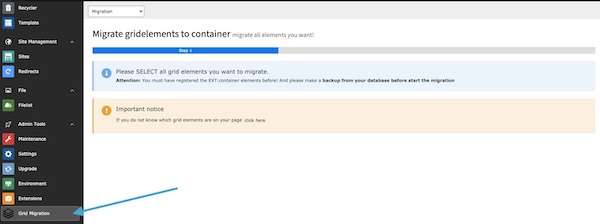
Go to the module Admin tools > Grid migration:

"Grid migration" Module

What grid elements do i have on my site? 

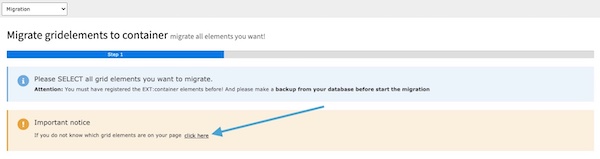
Click on click here in the important notice box in the first step. After that the extension analyzes your page and also gives you first instructions.

Analyse the website

Migrate grid elements from gridelements layout key 

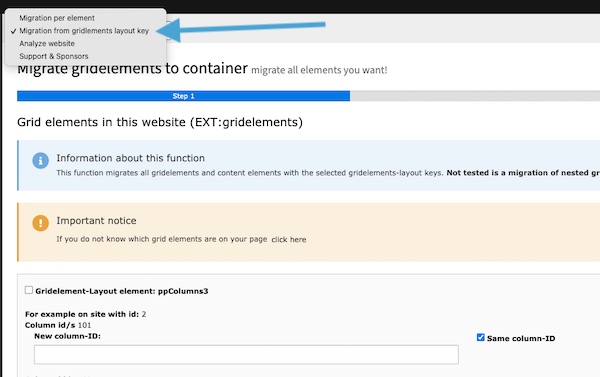
Click on Migration form gridelements layout key in the dropdown to migrate all elements on the web page using layout key.

Migrate all from layout key

Migrate grid elements with upgrade wizard 

You can use the new Abstract Upgrater for an automated migration. For this you only have to register your UpgradeWizards in the Services.yaml.

Load the upgrater into your upgrade function as follows:

EXT:gridtocontainer/Classes/Upgrades/AbstractGridtoCoUpdater.php
use SBublies\Gridtocontainer\Upgrades\AbstractGridtoCoUpdater
Copied!

Add your own upgrater in your own extension as follows:

EXT:your_extension/Classes/Upgrades/GridelementUpdaterExample.php
namespace VENDOR\EXTENSION\Upgrades;

use TYPO3\CMS\Install\Attribute\UpgradeWizard;
   use SBublies\Gridtocontainer\Upgrades\AbstractGridtoCoUpdater
#[UpgradeWizard('gridtocontainer_GridelementUpdaterExample')]

class GridelementUpdaterExample extends AbstractGridtoCoUpdater
{
	protected const GRID_IDENTIFIER = 'updaterexample';
	protected const CONTAINER_IDENTIFIER = 'container_updaterexample';
	protected const FLEXFORM_IDENTIFIER = 'old';
	protected const OLD_COLUMS = '0,1';
	protected const NEW_COLUMS = '10000,10001';
}
Copied!

Clean up the database 

Search in the database for content elements that still use the colpos -1:

SELECT * FROM tt_content where colpos=-1;
Copied!

In most cases all content elements that had been deleted in TYPO3 can also be deleted from the database.

DELETE FROM tt_content where colpos=-1 and deleted=1;
Copied!

Then make a database compare at Admin tools > Maintenance > Analyze Database.

Change log 

Version 12.3.1 

  • new version
  • [BUGFIX] Check if array key in $contentElementResults['parents'] exist, thanks to @christophbolda

Version 12.3.0 

  • new version
  • [FEATURE] also possible to generate code for gridelements defined with PageTS config. Important: Not for Multiside, thanks to @mohsin.qayyum

Version 12.2.1 

  • new version
  • [BUGFIX] Small bugfix: fix php warning

Version 12.2.0 

  • new version
  • [ToDo] breaking change: flexform option from checkboxes to radio, thanks @stephan_bauer
  • Important: If you use your own AbstractUpdater, note the change in the extension

Version 12.1.0 

  • new version
  • [BUGFIX] missing flexform file
  • [BUGFIX] js backend modul broken
  • [FEATURE] get container code and autofill many thansk to @mohsin.qayyum
  • [FIXES] a lot of template fixes

Version 12.0.10 

  • new version
  • task: new documentation rendering

Version 12.0.9 

  • new version
  • bugfix: allow symfony ^7, thanks to @georgringer

Version 12.0.8 

  • new version
  • task: small fixes

Version 12.0.7 

  • new version
  • add feature: AbstractUpdater, more information in the documentation. Thanks to @kaystrobach for the collaboration
  • update documentation: usage

Version 12.0.6 

  • new version
  • bugfix: exception fix, thanks to @georgringer

Version 12.0.5 

  • new version
  • small bugfix: disabled backend.js in FE

Version 12.0.4 

  • new version

Version 12.0.3 

  • new version
  • bugfix: PHP Runtime Deprecation Notice: Creation of dynamic property, thanks to @georgringer

Version 12.0.2 

  • new version
  • bugfix: change backendmodul register

Version 12.0.1 

  • new version
  • change typo3 dependence

Version 12.0.0 

  • refactoring for typo3 12

About 

Version

{release}

Language

en

Authors

Stefan Bublies and all contributors

Email

project@sbublies.de

License

This extension documentation is published under the Creative Commons Attribution 4.0 International (CC BY 4.0) license

TYPO3 and others 

The content of this document is related to TYPO3 CMS, a GNU/GPL CMS/Framework available from typo3.org .

Community documentation 

This documentation is community documentation for the TYPO3 extension gridtocontainer

It is maintained as part of this third party extension.

If you find an error or something is missing, please: Report a Problem

You are welcome to help improve this guide. As this project is hosted on GitLab there is no "Edit on Github" button available.

Attribution 

Thanks to Stefan Bublies, who created this extension and some initial documentation. Thanks to Lina Wolf for creating the initial version of this manual.

Sitemap