Modern Extbase Frontend Edit 

Extension key

modern_extbase_frontend_edit

Package name

sbuerk/modern-extbase-frontend-edit

Version

1.0

Language

en

Author

sbuerk

License

This document is published under the Open Content License.

Rendered

Fri, 14 Aug 2026 16:02:10 +0000


Editing a profile record and its child collections directly on the page: every field, every address, every e-mail address and the profile image, saved without a page reload, from a web component that enhances markup the website already rendered.


Introduction 

What the extension does, and which TYPO3 and PHP versions it supports.

Installation 

Install it, and the four things it needs before anything is visible.

Configuration 

The site set, every setting, the TypoScript, and overriding templates.

Editors 

The three plugins, the profile record, and what editing looks like.

Reference 

Tables, validation rules, the image upload bounds and the endpoints.

Known limitations 

What it deliberately does not do, and why.

Changelog 

Overview of the changes per released version.

Introduction 

What does it do? 

The extension manages a profile record and its two child collections — postal addresses and e-mail addresses — from the website itself, without a backend login and without a full page form.

A visitor who owns a profile sees it rendered as an ordinary page. Once the editing component has loaded, each field gains an Edit affordance that turns it into a control, applies it on its own, and shows the value the server stored. Child records can be added, removed, reordered and hidden, and a profile image can be uploaded and replaced.

Three plugins are placed as content elements:

Plugin Renders
Profiles: list Every profile of the configured storage page, each linking to the detail page.
Profiles: detail One profile, with its addresses and e-mail addresses.
Profiles: edit The profile of the logged-in website user, editable.

A fourth plugin answers the JSON requests the editing surface sends. It is deliberately not placeable as a content element.

What it demonstrates 

The extension exists to show that this can be built with the framework as it is, and to record what that costs. The decisions worth knowing about before reading the code:

  • Records are written with the Extbase persistence manager rather than with DataHandler. That is what makes the write path short, and it is why no sys_history entry is written and no DataHandler hook runs. The reference index is not affected — Extbase maintains it for every row it writes.
  • The record a request may write is resolved from the session, never from an identifier the client sent.
  • Editing is refused while a workspace is active, and the surface says so before anything is typed.
  • The interface degrades: the website renders the whole record, the component replaces it, and a visitor without working JavaScript keeps the rendered version.

Every one of these has a limit attached to it. They are collected in Known limitations.

Core version aware implementations 

Code that has to differ between the supported TYPO3 versions lives below Core13/ and Core14/ in the repository root. Shared code — interfaces, abstract base classes and everything working on both core versions — lives in Classes/.

Only the directory matching the running TYPO3 version is registered in the dependency injection container, so a service asking for an interface always receives the implementation matching the current core version.

Compatibility 

Branch Extension TYPO3 PHP
main 1.x v13 / v14 8.2 - 8.5

Contributing 

Contributions are welcome. The development setup, the quality gates and the commit message rules are described in the CONTRIBUTING.md file of the source repository.

Installation 

Installing the extension is one command. Making it show anything takes four more steps, because it edits records that belong to website users and neither the records nor the users exist yet.

Requirements 

  • TYPO3 v13.4 or v14.3
  • PHP 8.2 up to 8.5
  • A website user login on the site the editing plugin is placed on. This extension ships none — any frontend login solution will do.

No build step is required. The compiled JavaScript and CSS are part of the package.

Install the package 

composer require sbuerk/modern-extbase-frontend-edit
Copied!

Set it up 

  1. Create a storage folder and configure it as the storage page. Profile records are read from it and written next to it. There is no value meaning "every page" — without one, the plugins query page zero and find nothing.
  2. Place the plugins. Profiles: list on a listing page, Profiles: detail on a detail page, Profiles: edit on the page a logged-in user edits their own profile on. Point the settings at the pages holding the detail and edit plugins, otherwise no links to them are rendered.
  3. Create a profile record and assign a website user as its owner. A profile with no owner is visible in the list and the detail view, and can never be edited in the frontend.
  4. Check the upload limits if profile images are wanted. The extension refuses an image above its own limit with a message; a file above the PHP or web server limit never reaches it, and the visitor sees the server's error instead. Keep upload_max_filesize and post_max_size above the extension's limit — see Image upload.

Configuration describes the settings, both spellings of them, and how to override the templates.

Classic mode 

The extension is developed and tested in composer mode. It carries an ext_emconf.php and has no composer-only dependency, so a classic mode installation is expected to work, but it is not part of the test matrix.

Releases are published to the TYPO3 Extension Repository under the extension key modern_extbase_frontend_edit. The archive uploaded there holds the same files as the package composer installs — the developer documentation, the test suites and the build tooling are in neither.

Configuration 

The three plugins Profiles: list, Profiles: detail and Profiles: edit share one set of configuration values. There is no configuration per placement: an editor drops a plugin on a page, and what it reads and where it links to is decided once, for the whole site.

Two ways to configure 

The same five values exist in two spellings, and an installation uses whichever fits how its sites are configured:

  • As site settings of the site set Profiles that this extension ships. Site sets are available since TYPO3 v13.1, and the values are then edited in the backend. See Site set.
  • As TypoScript constants below plugin.tx_modernextbasefrontendedit, for installations that configure their sites with sys_template records or with a site package's TypoScript. See TypoScript.

Both carry the same defaults, and the classic TypoScript is registered in any case. Adding the site set to a site is therefore an option, not a prerequisite — but where it is added, its values win over the classic defaults.

What is mandatory 

Exactly one value has to be set. Everything else has a default that works.

The remaining four values are optional in the sense that the extension renders without them — but two of them decide whether a feature is reachable at all: no detail page means no link from the list to a profile, and no edit page means no edit link anywhere. Both are described with their defaults in Settings.

What is not a setting 

Two things are configured outside that set, and each has a page of its own because neither is a value to fill in.

  • The appearance of the editing surface, which is changed with CSS custom properties and with class names the installation configures, rather than with settings. See Styling and theming.
  • The Content Security Policy the extension declares. Nothing has to be enabled for it, and on an installation without frontend CSP it has no effect at all — but it is worth knowing what it asks for and how to drop it. See Content Security Policy.

In this chapter 

Site set 

The extension ships one site set. Its label is Profiles, its identifier is sbuerk/modern-extbase-frontend-edit — the composer package name, which is the convention for a set identifier — and it is defined in Configuration/Sets/Profiles/config.yaml.

The set does two things: it declares the five settings of the plugins, so they become editable in the backend, and it maps those settings onto the Extbase plugin configuration in its setup.typoscript. It declares no rendering definitions and no templates.

Adding the set to a site 

In the site configuration 

This is the way for a site without a site package. Add the set identifier to the site's dependencies:

config/sites/<identifier>/config.yaml
base: https://example.com
dependencies:
  - sbuerk/modern-extbase-frontend-edit
Copied!

In a site package 

If the installation has a site package with a site set of its own, let that set depend on this one instead. The site then only names the site package's set:

EXT:my_site_package/Configuration/Sets/MySet/config.yaml
name: myvendor/my-site-package
label: My site package
dependencies:
  - sbuerk/modern-extbase-frontend-edit
Copied!

Editing the settings 

Once the set is part of a site, its settings appear in the settings editor of that site, grouped under the category Profiles.

  • On TYPO3 v13 the editor is the module Site Management > Settings.
  • On TYPO3 v14 the backend modules were renamed and restructured (issue #107628): the top level module is called Sites, the former Settings module was merged into Sites > Setup, and the settings are edited from the site itself.

Saving writes the values to config/sites/<identifier>/settings.yaml, so they can equally be written there by hand:

config/sites/<identifier>/settings.yaml
modernextbasefrontendedit:
  persistence:
    storagePid: '42'
  showPageUid: 43
  editPageUid: 44
Copied!

The two page settings are declared as type: page and are offered with a page picker in the editor. The storage page is declared as type: string on purpose: it accepts a comma separated list of page uids, which a page picker could not express.

Every key, its default and its meaning is listed in Settings.

The set is optional 

A site that does not use the set is fully supported. The classic TypoScript constants that ext_localconf.php registers ship alongside the set and carry exactly the same defaults, so nothing is missing without it — see TypoScript.

Where the set is used, the order is settled and not accidental: the classic defaults are also registered in the siteSets scope, which TYPO3 includes before the sets of a site. The set's setup.typoscript is therefore layered on top and its values win.

Settings 

Five values configure the three plugins. This page lists all of them, with the default each one ships with.

Settings of the site set 

These are the settings the site set Profiles declares. They are edited in the settings editor of a site that uses the set — see Site set — or written to config/sites/<identifier>/settings.yaml by hand.

modernextbasefrontendedit

modernextbasefrontendedit
Label
Profiles

modernextbasefrontendedit.persistence.storagePid

modernextbasefrontendedit.persistence.storagePid
Type
string
Default
"0"
Label
Storage page
Category
Profiles

Comma separated list of page uids the profile records are stored on. There is no value meaning "all pages": an empty configuration lists nothing.

modernextbasefrontendedit.showPageUid

modernextbasefrontendedit.showPageUid
Type
page
Default
0
Label
Detail page
Category
Profiles

The page holding the profile detail plugin. The list plugin links its entries to this page.

modernextbasefrontendedit.editPageUid

modernextbasefrontendedit.editPageUid
Type
page
Default
0
Label
Edit page
Category
Profiles

The page holding the profile edit plugin. The list plugin links here for profiles the current frontend user owns, and renders no edit link while this is unset.

modernextbasefrontendedit.ajaxPageType

modernextbasefrontendedit.ajaxPageType
Type
int
Default
1589
Label
Endpoint page type
Category
Profiles

The page type the editing endpoints answer on. Change it only when another extension on this site already uses this number.

modernextbasefrontendedit.imageUploadFolder

modernextbasefrontendedit.imageUploadFolder
Type
string
Default
"1:/user_upload/profiles/"
Label
Image upload folder
Category
Profiles

The folder uploaded profile images are stored in, as a combined storage identifier such as "1:/user_upload/profiles/". It is created on the first upload.

The equivalent TypoScript constants 

An installation that does not use site sets configures the same values as TypoScript constants. The two spellings differ — the site setting is a flat, dotted key, the constant sits below the Extbase plugin namespace — so they are listed side by side:

Site setting TypoScript constant Default
modernextbasefrontendedit.persistence.storagePid plugin.tx_modernextbasefrontendedit.persistence.storagePid 0
modernextbasefrontendedit.showPageUid plugin.tx_modernextbasefrontendedit.settings.showPageUid 0
modernextbasefrontendedit.editPageUid plugin.tx_modernextbasefrontendedit.settings.editPageUid 0
modernextbasefrontendedit.ajaxPageType plugin.tx_modernextbasefrontendedit.settings.ajaxPageType 1589
modernextbasefrontendedit.imageUploadFolder plugin.tx_modernextbasefrontendedit.settings.imageUploadFolder 1:/user_upload/profiles/

Note that only the storage page keeps its persistence level in the constant. The other four are Extbase plugin settings and therefore live below settings, while the storage page is framework configuration that Extbase reads from persistence.

Behaviour to be aware of 

Two of these values behave in a way that a default does not suggest, and both are worth knowing before a page is built around them.

The image upload folder is a combined storage identifier: a storage number, a colon, and a folder path, as in 1:/user_upload/profiles/. Any other shape is refused by the upload configuration, and the endpoint then answers with an error instead of JSON. The folder itself is created on the first upload; the storage it names has to exist. An empty value falls back to the same default.

TypoScript 

This page describes the classic path — an installation that configures its sites with sys_template records or with a site package's TypoScript instead of with site sets — and the TypoScript this extension registers by itself, which applies to every installation either way.

Nothing has to be included 

There is no static template to add and no include to configure. The extension registers its constants and its setup as default TypoScript from ext_localconf.php, so both are part of every site of the installation from the moment the extension is installed.

Configuring the plugins therefore means overriding constants that already exist:

Constants of a sys_template record or of a site package
plugin.tx_modernextbasefrontendedit {
    persistence.storagePid = 42
    settings.showPageUid = 43
    settings.editPageUid = 44
}
Copied!

The constants 

These are the constants the extension declares, with the defaults it ships:

plugin.tx_modernextbasefrontendedit {
    persistence {
        storagePid = 0
    }
    settings {
        showPageUid = 0
        editPageUid = 0
        ajaxPageType = 1589
        imageUploadFolder = 1:/user_upload/profiles/
    }
}
Copied!

What each one means, and how it is spelled as a site setting, is listed in Settings.

The constants are registered for the siteSets scope as well, which is what makes them the defaults on a site that uses the site set: that scope is included before the sets of a site, so the set's own values are layered on top.

The setup 

Error handling 

plugin.tx_modernextbasefrontendedit.mvc {
    showPageNotFoundIfTargetNotFoundException = 1
    showPageNotFoundIfRequiredArgumentIsMissingException = 1
}
Copied!

A request for the detail plugin naming a profile that does not exist, or that the visitor may not see, answers with the site's configured 404 page instead of an exception page. The same applies when the profile argument is missing entirely.

The plugin settings 

The setup maps every constant onto the configuration the plugins read:

plugin.tx_modernextbasefrontendedit {
    persistence.storagePid = {$plugin.tx_modernextbasefrontendedit.persistence.storagePid}
    settings {
        showPageUid = {$plugin.tx_modernextbasefrontendedit.settings.showPageUid}
        editPageUid = {$plugin.tx_modernextbasefrontendedit.settings.editPageUid}
        ajaxPageType = {$plugin.tx_modernextbasefrontendedit.settings.ajaxPageType}
        imageUploadFolder = {$plugin.tx_modernextbasefrontendedit.settings.imageUploadFolder}
    }
}
Copied!

Setting these directly, rather than the constants, works and is what the site set does for a site that uses it. For everything else, override the constant — it is the one place all three consumers of the endpoint page type are fed from.

The format mapping 

plugin.tx_modernextbasefrontendedit.view.formatToPageTypeMapping.json = {$plugin.tx_modernextbasefrontendedit.settings.ajaxPageType}
Copied!

Extbase reads this key when a URI is built with the format json. It is fed from the same constant as settings.ajaxPageType, so both spellings of an endpoint address resolve to the same page type and a URL can never point at a type nobody renders. Change the page type in one place — the constant — and both follow.

The endpoint page object 

The JSON endpoints of the edit plugin answer on a page type of their own, and that page type is a PAGE object:

modernextbasefrontendedit_ajax = PAGE
modernextbasefrontendedit_ajax {
    typeNum = {$plugin.tx_modernextbasefrontendedit.settings.ajaxPageType}
    config {
        disableAllHeaderCode = 1
        disableLanguageHeader = 1
        admPanel = 0
        debug = 0
        no_cache = 1
    }
    10 = EXTBASEPLUGIN
    10 {
        extensionName = ModernExtbaseFrontendEdit
        pluginName = Ajax
    }
}
Copied!

It is a page type, not a page: the endpoints answer on whichever page the edit plugin sits on, so no separate page has to be created for them. The object is registered from ext_localconf.php and therefore exists on every site; a site using the site set only restates its typeNum, because a site setting cannot reach a TypoScript constant.

The endpoints are not a content element. They are not offered in the content element wizard, and an editor cannot place them on a page.

What must not be overridden 

Every line of that object is load bearing. In particular:

config.disableAllHeaderCode = 1
Returns the body content unchanged and skips the whole page renderer, which is what makes the response the exact JSON document the endpoint produced. Without it the JSON is wrapped in an HTML document.
config.disableLanguageHeader = 1
Suppresses the Content-Language header, which has no meaning on a JSON document.
config.admPanel = 0
Keeps the admin panel — where EXT:adminpanel is installed, which this extension does not require — from injecting its markup into a JSON response for a logged-in backend user.
10 = EXTBASEPLUGIN
The plugin is called directly. It must not be replaced with tt_content.modernextbasefrontendedit_ajax, although that object exists: it inherits lib.contentElement and renders through the Fluid Styled Content generic template, whose layout wraps the output in a <div class="frame …">. That is right for a content element and fatal for a JSON body.

Overriding typeNum on its own is the one change that looks harmless and is not: it has to keep matching settings.ajaxPageType and view.formatToPageTypeMapping.json, which is exactly why all three are fed from one constant. Change the constant instead.

Templates and labels 

The templates of this extension are deliberately small and unstyled. Every concept — the card, the details, the address list, the e-mail list, the image, the edit link — is a partial of its own, so a single one can be replaced without copying the rest.

Overriding templates 

The extension registers no templateRootPaths, partialRootPaths or layoutRootPaths of its own. It does not have to: Extbase prepends the convention paths EXT:modern_extbase_frontend_edit/Resources/Private/{Templates,Layouts,Partials}/ to whatever is configured, and Fluid searches the configured paths from the highest key downwards. An own path therefore wins outright, and nothing has to be re-declared to keep the shipped files reachable as a fallback:

plugin.tx_modernextbasefrontendedit.view {
    templateRootPaths.10 = EXT:my_site_package/Resources/Private/Extensions/ModernExtbaseFrontendEdit/Templates/
    partialRootPaths.10 = EXT:my_site_package/Resources/Private/Extensions/ModernExtbaseFrontendEdit/Partials/
    layoutRootPaths.10 = EXT:my_site_package/Resources/Private/Extensions/ModernExtbaseFrontendEdit/Layouts/
}
Copied!

A file that is not present in the own path falls back to the one the extension ships, so overriding a single partial means placing a single file.

Per plugin 

The paths can also be narrowed to one plugin, by using the plugin signature. Configuration below plugin.tx_modernextbasefrontendedit_<plugin> is merged over plugin.tx_modernextbasefrontendedit, with list, show and edit as the plugin names:

plugin.tx_modernextbasefrontendedit_edit.view.partialRootPaths.10 = EXT:my_site_package/Resources/Private/EditOnly/Partials/
Copied!

What there is to override 

The paths below are relative to EXT:modern_extbase_frontend_edit/Resources/Private/. A replacement has to keep the same relative file name, because that is what Fluid resolves.

File Renders
Layouts/Default.html The single wrapper element of all three plugins, with one Main section. The one stable hook to style or script against.
Templates/Profile/List.html The Profiles: list plugin: its heading, the empty state, and one card per profile. Both links a card can carry are built here, because only a template knows which plugin it links to.
Templates/Profile/Show.html The Profiles: detail plugin: the card, the details, the addresses and the e-mail addresses of one profile.
Templates/ProfileEdit/Edit.html The Profiles: edit plugin, in all four of its states: not logged in, logged in without a profile, a profile in a workspace, and the editable profile.
Partials/Profile/Card.html The identifying block of a profile — image, name, and the links that apply to it. Rendered by the list once per entry and by the detail view as its head.
Partials/Profile/Details.html The scalar fields that are not part of the card: birthday and biography. Renders nothing when both are empty.
Partials/Profile/AddressList.html The postal addresses including their section heading. Renders nothing when there is none.
Partials/Profile/EmailList.html The e-mail addresses including their section heading, each as a mail link that honours the installation's spam protection setting.
Partials/Profile/EditLink.html The link to the edit page, and only for a profile the logged-in website user owns.
Partials/Profile/Image.html The profile image, or nothing when there is none.
Partials/Profile/OwnerView.html One profile as its owner sees it: name, image, details and both collections, hidden records included. The edit plugin renders it in both of its record states.

Why the Fluid layer is cut this way — which partial receives which arguments, why URIs are built in templates and never in partials, and why the edit plugin renders its record body through a partial twice — is written down for developers in the repository, in docs/frontend-edit/plugins-and-fluid.md. That directory is not part of the shipped documentation.

Language files 

Every string the plugins render comes from an XLIFF file, and both files are overridden with the usual TYPO3 mechanism:

File Contains
Resources/Private/Language/locallang.xlf The names and descriptions of the three plugins in the content element wizard, every string the templates render, and every string the editing surface renders — its field labels, buttons, section headings, validation messages and error messages.
Resources/Private/Language/locallang_db.xlf The backend labels: table names, field labels and the item labels of the two type selections.
config/system/additional.php (TYPO3 v14)
$GLOBALS['TYPO3_CONF_VARS']['LANG']['resourceOverrides']['EXT:modern_extbase_frontend_edit/Resources/Private/Language/locallang.xlf'][]
    = 'EXT:my_site_package/Resources/Private/Language/Overrides/locallang.xlf';
Copied!

On TYPO3 v13 the same array is spelled $GLOBALS['TYPO3_CONF_VARS']['SYS']['locallangXMLOverride']. It was renamed to $GLOBALS['TYPO3_CONF_VARS']['LANG']['resourceOverrides'] in TYPO3 v14 — see the changelog entry for issue #107436 — and an existing configuration is migrated automatically.

The type labels exist twice 

Styling and theming 

The editing surface renders into the light DOM, so a site's own stylesheet reaches it the same way it reaches any other markup on the page. There are two ways to style it, and they compose:

  • CSS custom properties. Every colour, distance, radius, duration and width the surface uses is a property declared on the custom element. Setting one is the smallest possible change and needs no knowledge of the markup.
  • Class names. Every element carries a frontend-edit-* class that a site may write rules against, and an installation can have the surface carry additional classes of its own — a design system's button, form-control and so on — so the surface inherits a theme rather than imitating it. See Icons and CSS class names.

Everything below is optional. The extension ships defaults that are deliberately quiet — no typeface of its own, no brand colour, no decoration — so a site that configures nothing gets a surface that stays out of the way.

Overriding a property 

The properties are declared on the custom element itself. Set them on the same element from the site's own stylesheet, and the site wins:

modern-extbase-frontend-edit-profile {
    --frontend-edit-color-accent: #b8003c;
    --frontend-edit-radius: 0;
    --frontend-edit-measure: 60rem;
}
Copied!

There is no specificity contest to win and no !important to add. A declaration made outside the component always beats the default the component ships, and it reaches every field, button and message inside it.

The properties 

Colour 

Property Default Used for
--frontend-edit-color-accent #0a7bd4 The focus ring, the frame around the surface, and the fill of the emphasised button.
--frontend-edit-color-accent-hover #0968b4 The emphasised button under the pointer. A separate value because color-mix() is not available at the browsers this extension supports.
--frontend-edit-color-accent-contrast #ffffff Text drawn on the accent. Change it together with the accent, or the emphasised button loses its contrast.
--frontend-edit-color-danger #a4141a Validation messages, the ring around a rejected control, and the label of a destructive button.
--frontend-edit-color-danger-surface #fdf2f2 The fill of a destructive button under the pointer.
--frontend-edit-color-border #c7ccd1 Decoration: the rule above a collection, the marker on a child, the frame around a stored image, the dialog and the state badge.
--frontend-edit-color-border-control #7d838a The resting edge of a button, an input, a select and a textarea. See the note below before overriding it.
--frontend-edit-color-border-strong #656d75 The same control edges under the pointer, and the outline of the add form.
--frontend-edit-color-surface #ffffff The background of buttons and controls.
--frontend-edit-color-surface-sunken #f2f4f5 The background of a hovered button, and behind an image.
--frontend-edit-color-muted #5c6469 Field labels, captions, the state badge, the empty value dash.

Spacing, shape and size 

Property Default Used for
--frontend-edit-measure 48rem The width the surface is capped at. See below.
--frontend-edit-label-width 9rem The label column of a field. Below roughly 27rem of available width the value wraps under its label instead.
--frontend-edit-gap-within 0.25rem Between a label and its value, where they are stacked.
--frontend-edit-gap-field 0.5rem Between two fields of a record.
--frontend-edit-gap-record 1rem Between two records of a collection.
--frontend-edit-gap-section 1.5rem Between the profile and a collection, and between collections.
--frontend-edit-space-xs -xl 0.25rem1.5rem The underlying five step scale the four gaps above are set from. Change a gap to move one distance, the scale to move everything.
--frontend-edit-border-width 1px Every border and every hairline rule.
--frontend-edit-radius 0.25rem Buttons, controls, the state badge.
--frontend-edit-radius-lg 0.5rem The profile image.
--frontend-edit-control-min-height 2.25rem The height of buttons and controls, and so the size of a touch target.
--frontend-edit-control-padding-block 0.375rem Padding above and below the text of a control.
--frontend-edit-control-padding-inline 0.5rem Padding left and right of it.

Type, focus, state and motion 

Property Default Used for
--frontend-edit-font-family inherit The typeface. See The typeface is inherited on purpose.
--frontend-edit-font-size-sm 0.875em Labels, captions, validation messages, the state badge.
--frontend-edit-label-weight 600 Field labels.
--frontend-edit-focus-color the accent The focus ring. Separate from the accent so its contrast can be raised on its own.
--frontend-edit-focus-width 2px Its thickness.
--frontend-edit-focus-offset 2px Its distance from the control.
--frontend-edit-outline-color the accent The dashed frame around the whole surface.
--frontend-edit-outline-width 1px Its thickness.
--frontend-edit-busy-opacity 0.6 How far a field is dimmed while its request is in flight.
--frontend-edit-transition-duration 120ms Every transition, so one value governs all of them.
--frontend-edit-transition-easing ease Their easing.

Buttons are not all the same weight 

The surface marks two kinds of button, and leaves the rest plain:

Button Drawn as Which ones
Commits a pending change Filled in the accent colour Apply, Save all fields, Add
Destroys a record or a file Labelled in the danger colour, filled only under the pointer Remove
Everything else The plain bordered button Edit, Cancel, Move up, Move down, Hide

Every button also carries an icon. They are drawn inline in the extension's own JavaScript rather than loaded from anywhere, so they need no font, make no request and are unaffected by the Content Security Policy. They take their colour from the button they sit in and their size from the surrounding text, so a change to --frontend-edit-color-danger or to the page's font size moves them too.

In the toolbar of a child record — Move up, Move down, Hide, Remove — the text is hidden and only the icon is shown, because those four repeat once per address and e-mail address. The label is still announced by a screen reader and still read by automated tests; it is hidden visually, not removed.

There is no setting for this and no class to override. The distinction is carried in a data-variant attribute on the button, so a site that wants a different treatment styles it directly — this is one of the few things a stylesheet can reach, because the attribute selector applies inside the component:

modern-extbase-frontend-edit-profile {
    /* Make the emphasised button match the site's own call to action. */
    --frontend-edit-color-accent: #00694e;
    --frontend-edit-color-accent-hover: #005840;
    --frontend-edit-color-accent-contrast: #ffffff;
}
Copied!

The width of the surface 

--frontend-edit-measure caps the surface at 48rem, and it is the property most worth setting.

An editing surface is a form, and a form that runs the full width of a page puts the Edit button belonging to a value at the far edge of the screen, far from the value it edits. The cap keeps the two together. Raise it for a layout that gives the plugin a wide column of its own, lower it for a narrow one, and set it to none to let the surface fill whatever contains it.

The typeface is inherited on purpose 

--frontend-edit-font-family is inherit, and leaving it that way is recommended. The surface is part of a page the site designed; a component that arrives with a typeface of its own announces itself as a foreign body in a design it knows nothing about. The properties above carry structure, weight and rhythm — the site keeps the voice.

A control edge carries a contrast requirement 

Three properties draw borders, and they are three because only one of them is covered by an accessibility requirement.

--frontend-edit-color-border-control draws the resting edge of everything operable — a button, an input, a select, a textarea. On this surface the fill of a control differs from the page behind it by barely more than one to one, so that edge is the only thing saying the control is there. WCAG 2.2 success criterion 1.4.11 (Non-text Contrast, level AA) asks for 3:1 on exactly that kind of information, measured against both the fill the border encloses and the surface behind it.

The shipped defaults meet it in both colour schemes with margin. An override does not automatically:

/* Fails the criterion at 1.6:1 — the control disappears at rest. */
modern-extbase-frontend-edit-profile {
    --frontend-edit-color-border-control: #e0e0e0;
}
Copied!

--frontend-edit-color-border is decoration — separators, the child marker, the image frame, the dialog, the state badge. It is deliberately below the threshold, because a hairline held to a control's contrast turns the surface into a stack of boxes, and none of those elements identifies a control.

--frontend-edit-color-border-strong is the step past the resting edge: the same borders under the pointer. Overriding the control edge without moving this one too can invert the pair, and a hover state weaker than the resting state reads as the control going quiet when it is reached.

Dark colour schemes 

Eleven of the colour properties are redefined under @media (prefers-color-scheme: dark) , so a page that follows the operating system setting gets a dark surface without configuring anything.

That is a courtesy, not a claim to support every dark theme. A site that switches theme by some other means — a class on <html>, a data attribute, a user setting — sets the properties directly, and a direct declaration beats both branches of the media query:

html[data-theme='dark'] modern-extbase-frontend-edit-profile {
    --frontend-edit-color-surface: #1b2126;
    --frontend-edit-color-border: #3a4249;
    --frontend-edit-color-muted: #9aa4ac;
}
Copied!

What cannot be changed this way 

The properties cover appearance, not structure. Changing where the label sits relative to its value, adding an element, or reordering the actions is a change to the component, not to a stylesheet — the markup is generated by the component itself, and CSS can restyle an element but cannot add, remove or reorder one.

The server rendered markup outside the component is ordinary Fluid and ordinary light DOM: it can be restyled with plain CSS and replaced partial by partial, which is described in Templates and labels.

Icons and CSS class names 

Two things about the editing surface are decided by the installation rather than by the extension: which glyph each action draws, and which CSS classes each kind of element carries. Both are configured in one place.

config/system/additional.php
$GLOBALS['TYPO3_CONF_VARS']['modern_extbase_frontend_edit'] = [
    'icons' => [
        'edit' => 'actions-open',
    ],
    'classes' => [
        'button' => 'button',
        'buttonPrimary' => 'button--primary',
        'control' => 'form-control',
    ],
];
Copied!

Nothing here is required. Configured with nothing at all, the surface draws the icons the extension ships and carries only its own class names.

Making the surface look like the site 

The most useful thing this does is let the surface pick up a theme's own button and form styling instead of imitating it. The classes are added to the extension's own, never replacing them:

'classes' => [
    'button' => 'button',
    'buttonPrimary' => 'button--primary',
    'buttonDanger' => 'button--danger',
    'buttonIconOnly' => 'button--icon',
    'control' => 'form-control',
    'label' => 'form-label',
    'errors' => 'form-errors',
    'filePicker' => 'file-picker',
],
Copied!

The element types that may be configured:

Element type What it is
record One record: the profile, or one child of it.
child One entry of a child collection.
field One field row: label, value, action.
label The label of a field.
value The stored value, while it is not being edited.
control The input, textarea or select a field is edited with.
button Every button the surface draws.
buttonPrimary Additionally, the button that commits a pending change.
buttonDanger Additionally, a button that destroys something.
buttonIconOnly Additionally, a button drawn as a glyph with a hidden label.
filePicker The label that opens the image picker.
errors The list of validation messages.
state The badge on a hidden record.

An unknown element type is ignored rather than carried into the page, so a typo cannot look as though it worked.

Replacing an icon 

Each action is drawn from an icon identifier, resolved through TYPO3's icon registry on the server. There are two ways to change one.

Point the action at a different icon:

'icons' => [
    'edit' => 'actions-open',
],
Copied!

Or keep the identifier and re-register it from an extension of your own, which replaces the glyph everywhere it is used:

EXT:my_extension/Configuration/Icons.php
return [
    'modern-extbase-frontend-edit-edit' => [
        'provider' => \TYPO3\CMS\Core\Imaging\IconProvider\SvgIconProvider::class,
        'source' => 'EXT:my_extension/Resources/Public/Icons/pencil.svg',
    ],
];
Copied!

Neither needs a JavaScript build.

The configurable actions are edit, editRecord, apply, cancel, add, remove, chooseImage, moveUp, moveDown, moveToTop, moveToBottom, hide and show.

An icon registered with the sprite provider — which is how TYPO3's own actions-* icons are registered — is drawn as a reference into a sprite file. That works, but such an icon does not follow the colour of the button it sits in, so the emphasised and destructive buttons will show it in the plain text colour. Icons registered with \TYPO3\CMS\Core\Imaging\IconProvider\SvgIconProvider do not have that limitation.

Content Security Policy 

The extension declares the Content Security Policy sources its editing surface needs, in Configuration/ContentSecurityPolicies.php. TYPO3 collects that file automatically from every installed package — there is nothing to register, enable or copy.

Everything it asks for is the site's own origin. The extension loads no script, no stylesheet, no font and no image from anywhere else, and it requests no source expression that weakens a policy.

Whether the policy applies at all 

Frontend Content Security Policy is switched off by default in TYPO3 v13 and v14. On an installation that has not enabled it, this file is collected and has no effect, and the editing surface behaves as if it were not there.

There are two independent ways a site turns it on, and neither is implied by the other.

config/system/additional.php
// Send the policy as an enforcing header:
$GLOBALS['TYPO3_CONF_VARS']['SYS']['features']['security.frontend.enforceContentSecurityPolicy'] = true;

// Or only observe it, and collect violation reports:
$GLOBALS['TYPO3_CONF_VARS']['SYS']['features']['security.frontend.reportContentSecurityPolicy'] = true;
Copied!
config/sites/<identifier>/csp.yaml
enforce: true
Copied!

The csp.yaml route needs no feature flag. A site can therefore have the policy active while both flags are false, which is why "the feature is off" is not a safe assumption when debugging a blocked resource.

What the extension declares 

Four directives, each granting 'self' and nothing else:

Directive Needed for
script-src 'self' The editing module, an ES module resolved through the TYPO3 import map. No inline script is emitted by this extension.
style-src 'self' The one <link rel="stylesheet"> the plugin adds. The component's own styles never reach this directive — see below.
connect-src 'self' The fetch() calls to the editing endpoints, at relative URLs built on the server.
img-src 'self' Stored profile images, served by the file abstraction layer from this origin.

All four use the Extend mutation mode, which inherits whatever the ancestor directive already permits before appending.

What they cost on a default installation 

Close to nothing, and this was measured rather than argued: the same page was rendered with the file and without it, and the emitted header differed by one directive.

All four descend from default-src. With the default-src 'self' that TYPO3 itself declares for the frontend, each of them resolves to exactly 'self' — and TYPO3 then removes a directive whose source set is identical to its ancestor's. Three of the four disappear that way. The fourth, style-src, survives only because the reporting token 'report-sample' is appended to declared directives and not to default-src, so the two sets differ by a token that grants nothing.

What is deliberately not requested 

Each of these was checked against the shipped assets. None is omitted by oversight, and none should be added without establishing that it is needed.

Not requested Why it is not needed
style-src 'unsafe-inline' The component installs its styles through adoptedStyleSheets, which produces no <style> element at all.
img-src data: / blob: There is no client side image preview. The chosen file goes straight into a FormData, and what is shown afterwards is the stored file.
form-action There is no <form>. Every control is a <button type="button"> and every write is a fetch().
font-src The surface ships no font and uses the page's typeface. See The typeface is inherited on purpose.
script-src 'unsafe-eval', worker-src, frame-src, base-uri, object-src Nothing in the shipped assets uses any of them.

No nonce is requested either. The single inline script on the page is the import map, which is TYPO3's own and which TYPO3 covers with a hash of its content.

Changing or removing it 

Dropping only this extension 

Name the composer package in the site's csp.yaml. Everything other packages declare is kept:

config/sites/<identifier>/csp.yaml
enforce:
  packages:
    '*': true
    sbuerk/modern-extbase-frontend-edit: false
Copied!

Disabling the policy for a site 

config/sites/<identifier>/csp.yaml
active: false
Copied!

Adding sources of your own 

Site level mutations are applied after those of every package, so they are the place to widen or narrow a directive:

config/sites/<identifier>/csp.yaml
enforce:
  mutations:
    -   mode: extend
        directive: img-src
        sources:
            - 'https://images.example.org'
Copied!

Further reading 

The complete csp.yaml format, the reporting endpoint and the full list of mutation modes are documented by TYPO3 itself:

The reasoning behind each of the four declarations, including what was measured and what was rejected, is in the docblock of Configuration/ContentSecurityPolicies.php — it is written to be read.

Editors 

What an editor works with, from the backend side and from the website side: the content elements the extension adds, the profile record they render, and the editing surface a website user gets on the page itself.

Plugins 

The three content elements, what each renders, and which settings each one needs.

Profile records 

Creating a profile in the backend, its tabs, its child collections and its owner.

Editing in the frontend 

What a website user sees on the page, and everything the editing surface can do.

Plugins 

The extension adds three content elements. They are created like any other content element, from the Plugins group of the "new content element" wizard:

Content element Renders
Profiles: list Lists the profiles of the configured storage page. Each entry links to the detail page, and to the edit page for profiles the logged-in website user owns.
Profiles: detail Renders one profile with its addresses, e-mail addresses and image. The profile is selected by the link the list plugin renders.
Profiles: edit Renders the profile of the logged-in website user as an editable surface. It takes no arguments: the record is resolved from the session, so the plugin shows every visitor their own profile and nobody else's.

None of the three has plugin settings of its own. There is no plugin tab and no profile to pick per placement — everything is configured once for the whole site, either as settings of the site set Profiles or as TypoScript constants below plugin.tx_modernextbasefrontendedit. The backend form of each element therefore only offers the general content element fields, the header among them.

Profiles: list 

Renders the heading Profiles and one entry per profile found on the storage page. An entry consists of the profile image, the name, and the links that apply to it:

  • View profile — rendered only when a detail page is configured.
  • Edit profile — rendered only when an edit page is configured and the profile belongs to the website user who is currently logged in.

With no profile to show, the plugin renders the sentence No profiles available. rather than nothing at all, so a misconfiguration is visible on the page.

The name shown is the first and last name; a profile that carries neither falls back to its short name.

What it needs to be useful:

Setting Why
Storage page Required. The pages the profile records are stored on. There is no value meaning "every page" — without it the plugin lists nothing.
Detail page The page holding Profiles: detail. Without it the entries carry no View profile link, and the list is a list of names.
Edit page The page holding Profiles: edit. Without it no Edit profile link is rendered, for anybody.

Profiles: detail 

Renders one profile: the image and the name, then the Birthday and the Biography, then the Addresses and the E-mail addresses. Each of those blocks is left out entirely when it has nothing to show, and the e-mail addresses are rendered as links that honour the installation's e-mail spam protection setting. An Edit profile link is added when an edit page is configured and the visitor owns the profile.

The birthday is formatted according to the date format configured for the installation.

Which profile is shown is decided by the link the list plugin renders, not by the placement. The plugin is therefore placed once, on a page the list links to, and serves every profile.

A link that names a profile which does not exist, or which is not on the storage page, is answered with the site's own "page not found" response rather than with an error page.

Hidden addresses and e-mail addresses are not rendered here. They are visible to their owner only, in the edit plugin.

What it needs to be useful:

Setting Why
Storage page Required, and it has to be the same one the list plugin uses — otherwise the links the list renders point at profiles this plugin does not find.
Edit page Optional. Without it no Edit profile link is rendered.

Profiles: edit 

Renders the heading Your profile and, below it, the profile of the website user who is logged in — as an editable surface once the editing component has loaded, and as a readable profile until then and wherever that does not happen. What the visitor sees in each of the four possible situations is described in Editing in the frontend.

The plugin takes no arguments. It resolves the record from the login, so it shows every visitor their own profile and nobody else's, and there is nothing to choose per placement. Place it once, on the page the Edit page setting names — the page the other two plugins link to.

What it needs to be useful:

Setting Why
Storage page Required. A profile stored outside these pages is not found, and the plugin then reports that the visitor has no profile.
Edit page Not read by this plugin, but it is what makes the other two link to the page it sits on. Point it at that page.
Endpoint page type The page type the editing requests are answered on. It has a working default and only has to be changed when another extension on the site already uses that number. Set to 0, the plugin renders the readable profile and offers no editing.

The fourth plugin 

A fourth plugin answers the requests the editing surface sends. It is deliberately not registered as a content element and does not appear in the wizard: it is an endpoint, not something an editor places on a page.

It needs no page of its own either. The requests are answered on whichever page the edit plugin sits on, under the page type the Endpoint page type setting names.

Profile records 

A profile is an ordinary record, created in the List module on the page the Storage page setting names. A profile stored anywhere else is found by none of the three plugins — not by the list, not by the detail plugin, and not by the edit plugin, which then reports to its owner that there is no profile for them.

The record type is called Profile. Its addresses and e-mail addresses are records of their own, but they are created inside the profile form and never on their own.

The form 

The form has six tabs, and the fields are distributed over them as follows:

Tab Fields
General Short name, First name, Last name, Birthday, Image
Contact Addresses, Email addresses
Text Biography
Language The language and the translation parent
Access Owner (website user), Hide, and the publish dates
Extended Nothing of this extension

Short name is the only required field of the form. It is also what the record is titled by in the backend, together with the last and first name, so a short name that identifies the person makes the record lists readable.

First name and Last name are optional. The website shows both as the profile name and falls back to the short name when neither is filled in.

Image holds a single image file. It is the same image the owner can replace and remove from the website, so a file put here can be changed from the frontend and the other way round.

Addresses and e-mail addresses 

Both collections live on the Contact tab, are created inline, and hold up to 99 records each. Entries are shown collapsed and only one is open at a time, and their order is the order the website renders them in — drag them to change it.

Record Fields
Address Type (Home, Work, Others), Address line 1, Address line 2
Email address Type (Private, Business, Others), Email address — required

Each child record carries its own Access tab with Hide and publish dates. A hidden address or e-mail address disappears from the list and the detail plugin, and stays visible — marked as hidden — to its owner in the edit plugin, who can publish it again from there.

The owner 

Owner (website user) on the Access tab is the single field that decides whether a profile can ever be edited from the website. It selects one website user record, and its default is No owner.

  • With no owner, the profile is a read-only record as far as the frontend is concerned. It is listed and it has a detail page, but nobody can reach it in the edit plugin and no Edit profile link is rendered for anybody.
  • With an owner, that website user — and only that user — sees the profile in the edit plugin after logging in, and sees the Edit profile link on the list and the detail page.

Two things this field is not:

  • It is not a permission that the website evaluates on the client. The link on the list and the detail page is hidden for everybody else, but what actually protects a profile is the check the server makes on every write.
  • It is not a login. The website user record has to be one that can log in on this site; assigning it here grants no access on its own.

A profile that is hidden itself disappears from the list and the detail plugin, but its owner still reaches it in the edit plugin, where it is marked as hidden and remains editable. Publishing it again is a backend operation: the website offers no control for the hidden state of a profile, only for that of its addresses and e-mail addresses.

Editing in the frontend 

The page holding Profiles: edit is what a website user works on. It shows one profile — theirs — and, depending on who is looking and on the state of the installation, either an editing surface or a plain rendering of the same record.

The four states of the edit plugin 

The plugin always renders the heading Your profile. What follows it is one of four things.

Nobody is logged in

A sentence asks the visitor to log in. Nothing else is rendered, and no profile data reaches the page.

The heading "Your profile", followed by the sentence "You are not logged in. Log in to view and edit your profile." Light scheme.
The heading "Your profile", followed by the sentence "You are not logged in. Log in to view and edit your profile." Dark scheme.

A visitor who is not logged in is told so in one sentence — no form, no error page.

Somebody is logged in, but owns no profile
A different sentence says that there is no profile assigned to the account yet. The two cases are deliberately worded differently: "log in first" and "you have no profile yet" are different instructions, and one sentence covering both would be actionable for neither visitor.
A workspace is active
The profile is rendered, readable and complete, under a sentence saying that it is shown as it appears in this workspace and that editing is only available in the live workspace. No editing controls are drawn at all — writing is refused in a workspace, and a surface that cannot save would be worse than none.
The owner is logged in, in the live workspace
The editing surface, described in the rest of this page.

The rendered profile is the fallback 

The website renders the whole record as ordinary HTML, and the editing surface is layered on top of it in the browser. Where that layering does not happen — JavaScript switched off, a script that did not load, a page type for the editing requests that nothing answers — the rendered record is what stays on the page.

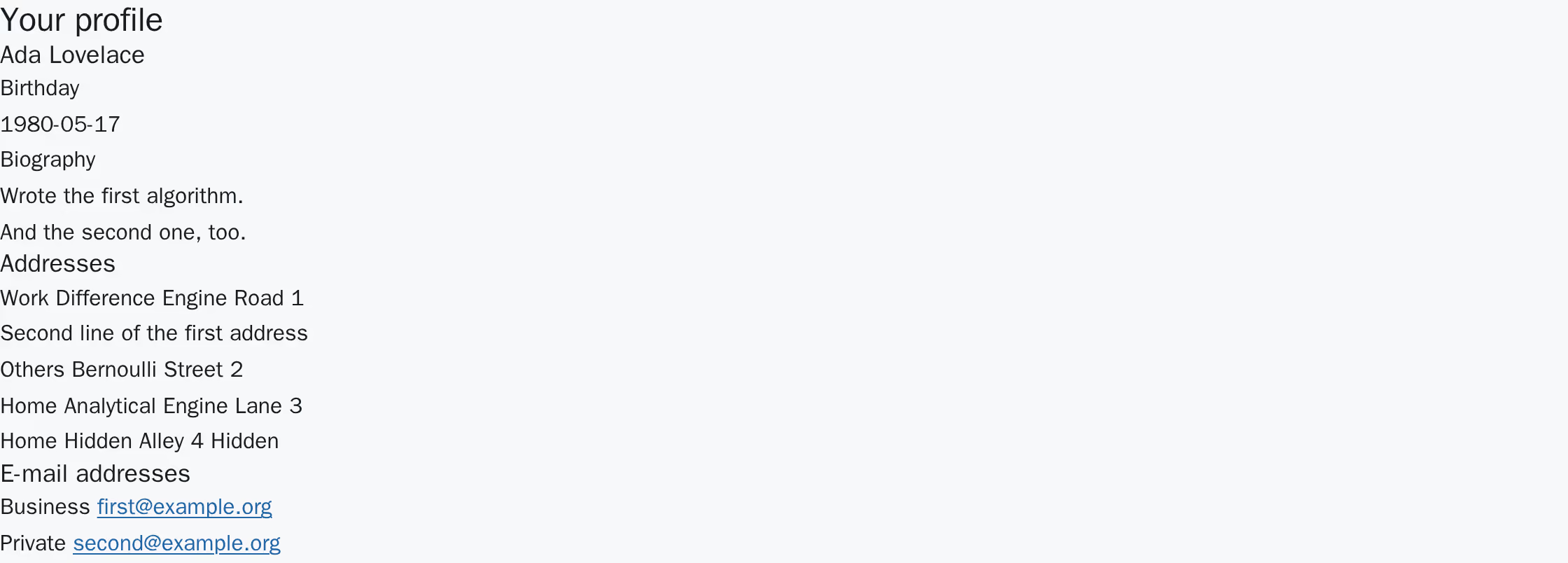
The profile of Ada Lovelace as plain HTML: the name as a heading, a birthday and a biography, a list of four addresses of which the last is marked "Hidden", and a list of two e-mail addresses rendered as links. Light scheme.
The profile of Ada Lovelace as plain HTML: the name as a heading, a birthday and a biography, a list of four addresses of which the last is marked "Hidden", and a list of two e-mail addresses rendered as links. Dark scheme.

The same profile with the editing component absent: name, birthday, biography, addresses and e-mail addresses, and not a single control. The hidden address is in the list and marked as hidden, because this view is the owner's.

What is missing in that situation is the editing, never the content, and never an error page. An editor can leave the plugin on the page in any of those cases.

The editing surface 

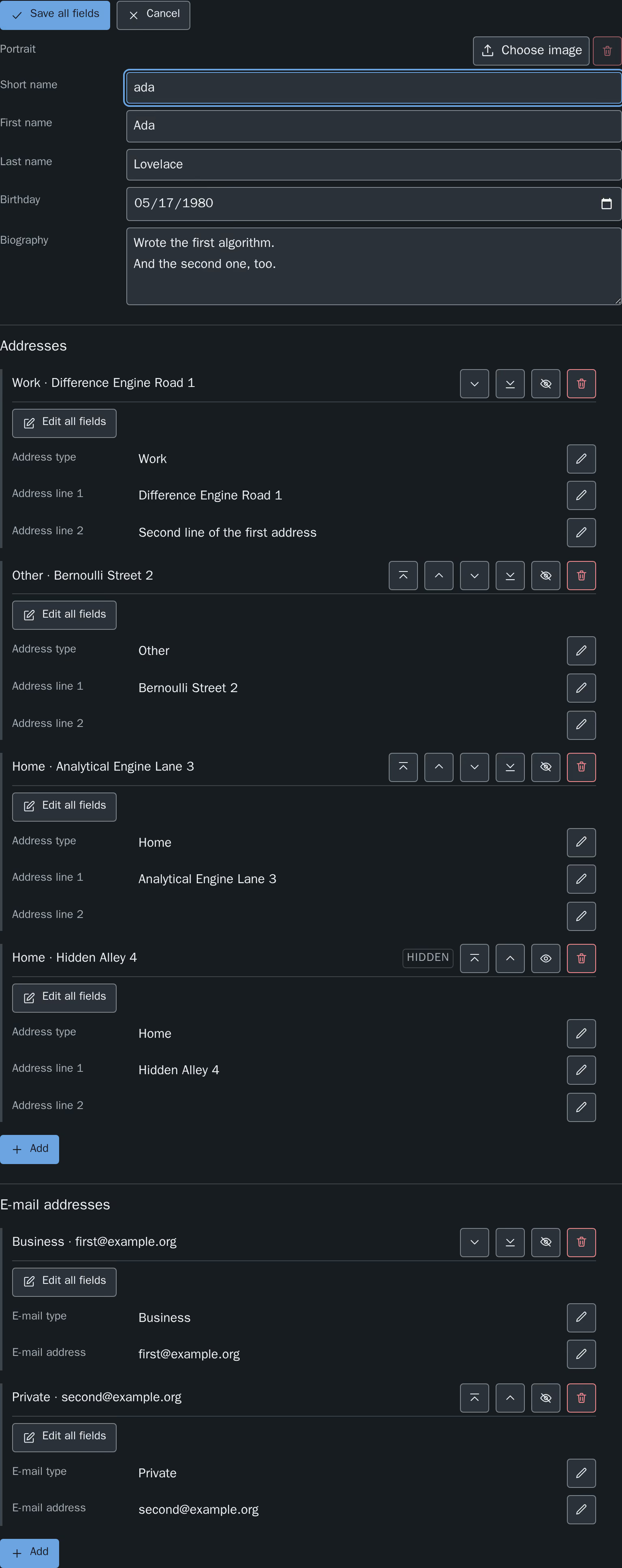
Once the component has loaded, it replaces the rendered record with its own surface. Everything the surface can change is inside it, so the page can never show a stale value next to a fresh one.

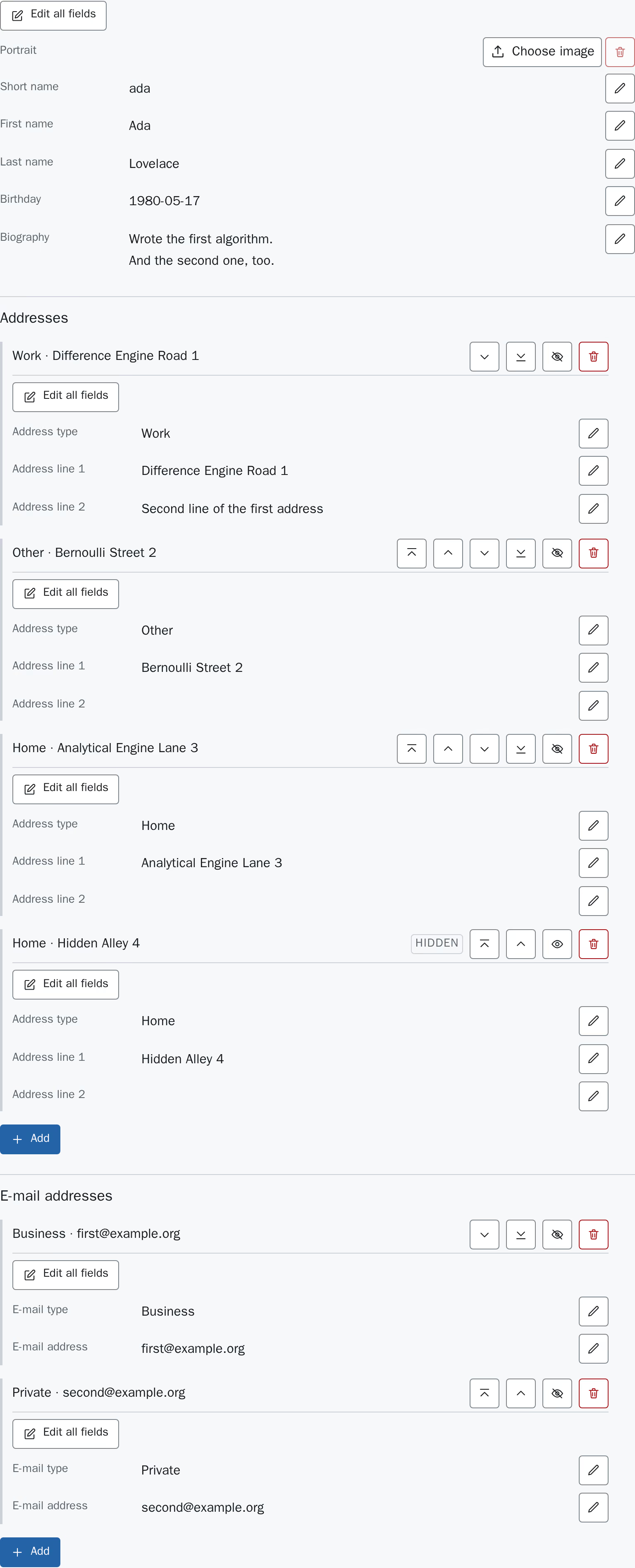
The editing surface at rest: an "Edit all fields" button, the portrait with a file control and a disabled "Remove" button, the five profile fields each with their value and an "Edit" button, then the addresses and e-mail addresses, each record with its own buttons and each section ending in an empty form with an "Add" button. Light scheme.
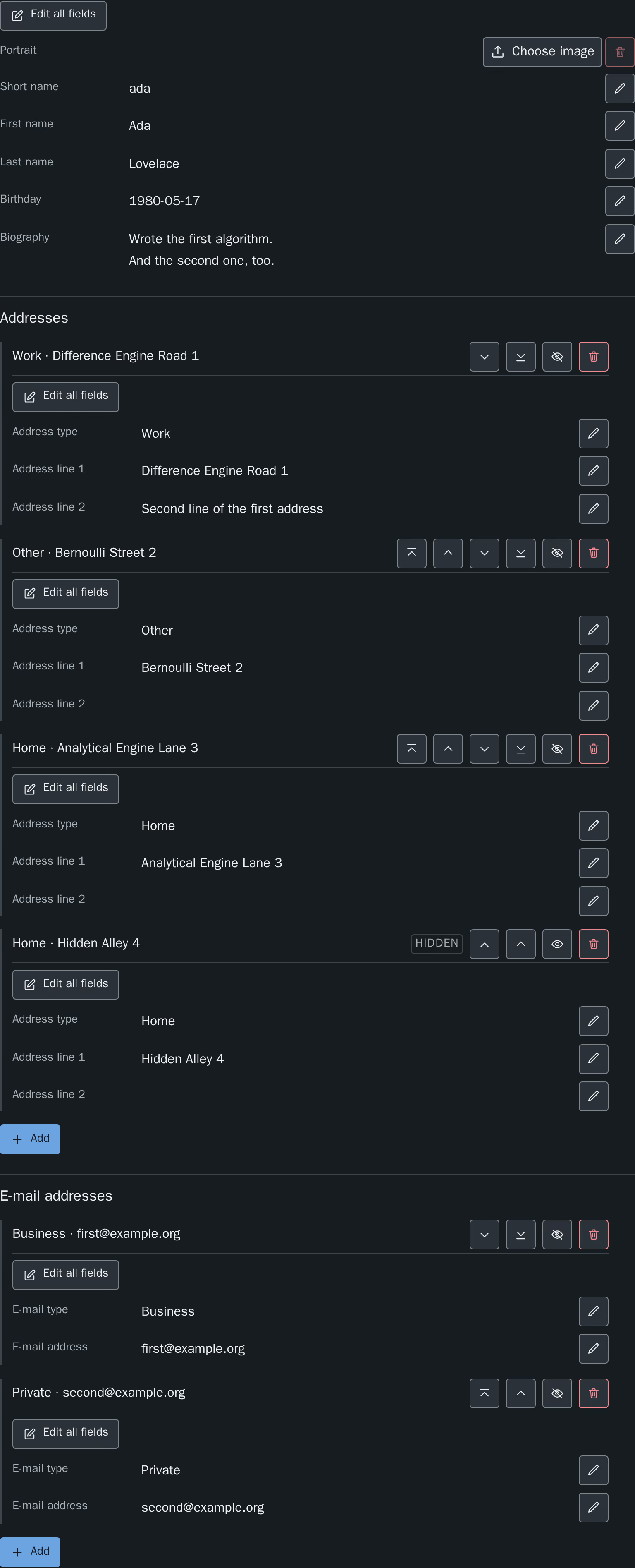
The editing surface at rest: an "Edit all fields" button, the portrait with a file control and a disabled "Remove" button, the five profile fields each with their value and an "Edit" button, then the addresses and e-mail addresses, each record with its own buttons and each section ending in an empty form with an "Add" button. Dark scheme.

The surface at rest. Every field shows its stored value with an Edit button next to it; each record carries an Edit all fields button of its own; each child record adds Move to top, Move up, Move down, Move to bottom, Hide and Remove; each collection ends in an Add button that opens a dialog; and each collection ends in an empty form for a new entry. The hidden address is marked Hidden and offers Show instead of Hide.

Every save is answered with the profile as it is stored afterwards, and that answer is what the page then shows. A value the server trims or normalises therefore becomes visible immediately, and the surface cannot drift away from what is in the database.

Editing one field 

Edit next to a value turns that value into a control and puts the cursor in it. Apply sends only that field; Cancel closes it again without sending anything.

The field "First name" switched into a text control holding "Ada", with an "Apply" and a "Cancel" button to its right. Light scheme.
The field "First name" switched into a text control holding "Ada", with an "Apply" and a "Cancel" button to its right. Dark scheme.

One field open for editing. Two buttons, and they act on this field alone.

Cancel puts the field back to the value the server last confirmed — which, after a save in the same visit, is that saved value rather than the one the page was opened with.

The keyboard works as it does in any single-line form:

Key Effect
Enter Applies the open field. Not bound in the biography, where it inserts a line break — taking that away would make a biography a single line.
Escape Cancels the open field, discarding what was typed.

Editing a whole record 

Edit all fields opens every field of one record at once and replaces itself with Save all fields and Cancel. All fields are then sent in a single request.

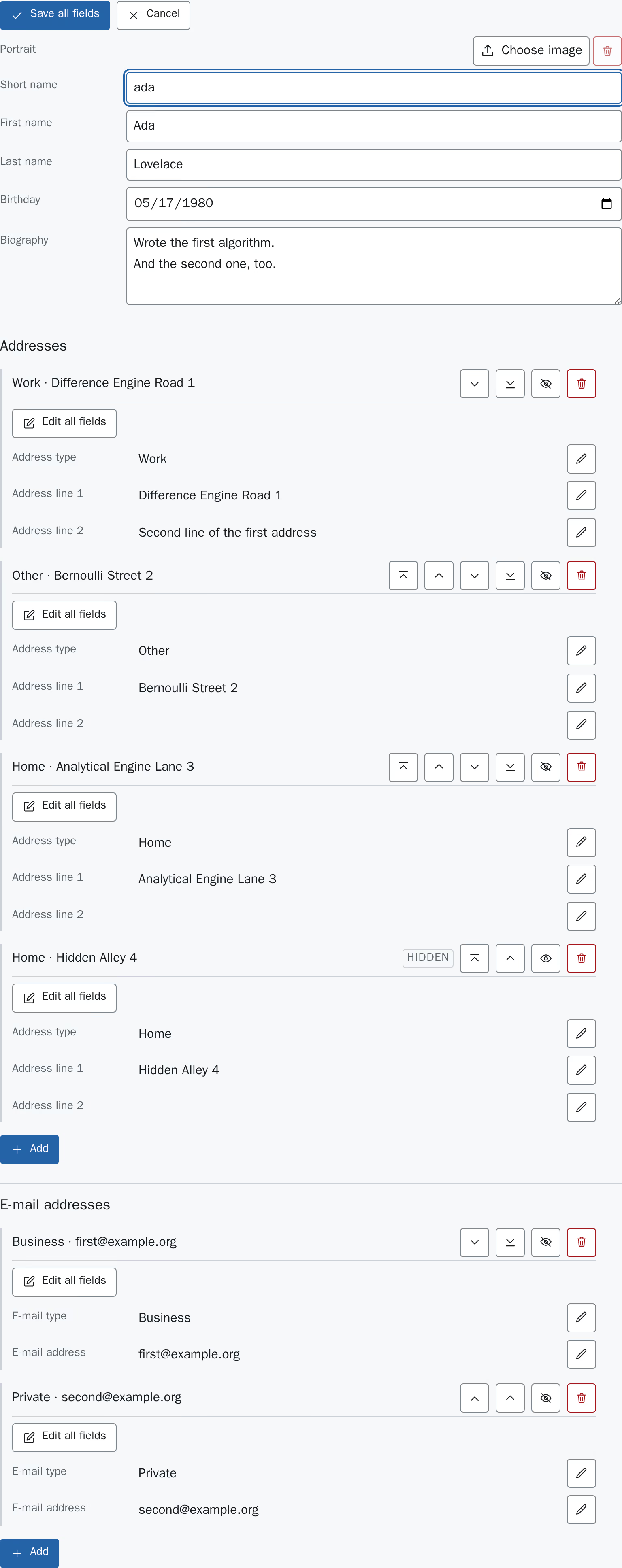
The profile record fully open: "Save all fields" and "Cancel" at the top, and the short name, first name, last name, birthday and biography all as controls, while the addresses and e-mail addresses below stay in their read view with their own Edit buttons. Light scheme.
The profile record fully open: "Save all fields" and "Cancel" at the top, and the short name, first name, last name, birthday and biography all as controls, while the addresses and e-mail addresses below stay in their read view with their own Edit buttons. Dark scheme.

The profile record open as a whole. The child records below are untouched by it — each carries its own Edit all fields.

The two modes are labelled differently on purpose: they sit next to each other on the same surface, and Apply on one field means something else than Save all fields.

The birthday is edited in the browser's own date control, and the biography in a multi-line control.

Addresses and e-mail addresses 

Each collection is a list of records, each with its own buttons, followed by an empty form for a new entry.

Every record is headed by its own content — its type and its first line, so Work · Difference Engine Road 1 — and the buttons that act on it sit on that same line. The heading is deliberately not a number: the records can be reordered, and a numbered heading would rename every entry below the one that was just moved. A record keeps its heading wherever it ends up. A record with neither a type nor a first line has no heading, and gains one as soon as something is entered.

The buttons of a record are:

Button Effect
Add Creates a record from what was typed into the empty form at the end of the collection. It is stored last, and the form starts over so that a second entry is not created from the first one's leftovers.
Remove Deletes the record. There is no confirmation step and no undo on the website.
Move up, Move down Change the order of the collection by one position, which is the order the detail page renders it in.
Move to top, Move to bottom Send the record to one end of the collection in a single step, rather than repeating Move up for a long list.
Hide, Show Take the record off the list and the detail page, or put it back. A hidden record stays in this surface and is marked Hidden, which is why the owner can find it again.

Every one of these takes effect immediately and is stored; none of them waits for a save step.

The profile image 

The image is labelled Portrait and behaves unlike every other field on the surface: choosing a file uploads it straight away, and Remove deletes it straight away. There is no Apply and nothing to cancel, because there is nothing to look at between picking a file and having uploaded it.

The control therefore says which of the two things it is about to do: Choose image while there is none, and Replace image once one is stored. Pressing it opens the file dialog of the operating system, and the file is on its way the moment one is picked.

A replaced or removed image is deleted from the file storage as well, not only from the record — unless something else on the site still references that file, in which case it is kept.

When an upload is refused, nothing was stored: the file control is emptied again and a notice says that the image was not stored and has to be chosen again. That is not a formality — the file really is gone as far as the server is concerned, and a control still showing its name would state the opposite.

When a change is refused 

A rejected save keeps what was typed and shows the reason at the field it belongs to, so nothing has to be entered again. Nothing is stored.

The field "Short name" open and empty, its control outlined in red, "Apply" and "Cancel" still beside it, and the message "Enter a short name." below it. Light scheme.
The field "Short name" open and empty, its control outlined in red, "Apply" and "Cancel" still beside it, and the message "Enter a short name." below it. Dark scheme.

A refused value. The field stays open with the typed value in it, and the reason is shown where the value is.

Failures that are not about the value itself are reported as one sentence for the whole record:

Situation What the surface says
The login has expired That the session has expired, and that the page should be reloaded and the login repeated.
A workspace became active That records cannot be edited while a workspace is active.
Anything else That the change could not be saved and should be tried again.

Reference 

The exact surface of the extension: the tables it adds and every column on them, what the image upload accepts, the validation rule of every field together with the label id of its message, and the contract of the JSON endpoints.

This chapter states what the code does. Why it does it that way is written next to the code, in the docs/ directory of the source repository, which is not part of the rendered manual.

Records and columns 

The extension adds three tables. One profile record, and two child tables whose records belong to exactly one profile and are edited inline in it.

The three tables 

Table Holds
tx_modernextbasefrontendedit_domain_model_profile One profile: names, an optional birthday, a biography, an optional image, the owning website user, and the relations to the two child tables.
tx_modernextbasefrontendedit_domain_model_address The postal addresses of one profile. Manually sorted, not shown as a table of its own in the backend.
tx_modernextbasefrontendedit_domain_model_email The e-mail addresses of one profile. Manually sorted, not shown as a table of its own in the backend.

Control columns 

All three tables are configured the same way for the columns TYPO3 manages itself:

Capability Columns
Timestamps tstamp, crdate
Soft delete deleted — deleting a record marks the row rather than removing it.
Publishing controls hidden, starttime, endtime
Language sys_language_uid, l10n_parent, l10n_source, l10n_diffsource
Workspaces versioningWS is enabled, so the t3ver_* columns exist and backend editing is workspace aware.

The two child tables additionally carry sorting as their manual sort column and are marked hideTable, so they are reached through the profile record and not through a list module view of their own.

Profile 

Column Type Notes
shortname input, trimmed, required The record label. lastname and firstname are appended to it in the backend record title.
firstname input, trimmed Optional.
lastname input, trimmed Optional. Records are listed sorted by last name, then first name.
birthday datetime with format => date and dbType => date, nullable, default null A date without a time of day. The column cannot store one.
bio text Optional free text.
image file, relationship => manyToOne, allowed => common-image-types At most one image per profile, stored as a sys_file_reference. What the frontend upload accepts is narrower than the TCA — see Image upload.
addresses inline to tx_modernextbasefrontendedit_domain_model_address foreign_field => profile, foreign_table_field => tablenames, foreign_sortby => sorting, at most 99 records, language synchronization allowed.
emails inline to tx_modernextbasefrontendedit_domain_model_email The same configuration, for the e-mail addresses.
fe_user select, renderType => selectSingle, on fe_users, maxitems => 1, default 0 The website user owning the record. A single value select is stored as a plain integer column. 0 is the item labelled as "no owner" and means the record belongs to nobody.

Ownership is read through SBUERKModernExtbaseFrontendEditSecurityProfileOwnershipResolverInterface, so an installation that keeps it somewhere other than this column replaces that one service and leaves the rest untouched.

Postal address 

Column Type Notes
profile passthrough The uid of the owning profile, written by the inline relation. Not an editable field, and not a property of the domain model.
tablenames passthrough The foreign_table_field of the relation.
type select, renderType => selectSingle, dbFieldLength => 150, default others One of home, work, others.
line1 input, trimmed The record label.
line2 input, trimmed Optional.

The three accepted values of type, with the label ids they are rendered through:

Value Backend and read plugins Editing surface
home tx_modernextbasefrontendedit_domain_model_address.type.home choice.address.type.home
work tx_modernextbasefrontendedit_domain_model_address.type.work choice.address.type.work
others tx_modernextbasefrontendedit_domain_model_address.type.others choice.address.type.others

The first column of ids lives in EXT:modern_extbase_frontend_edit/Resources/Private/Language/locallang_db.xlf, the second in locallang.xlf next to it. Both describe the same stored value, so overriding one without the other makes the read view and the editing surface disagree.

E-mail address 

Column Type Notes
profile passthrough The uid of the owning profile.
tablenames passthrough The foreign_table_field of the relation.
type select, renderType => selectSingle, dbFieldLength => 150, default others One of private, business, others.
email email, required The address itself, and the record label.
Value Backend and read plugins Editing surface
private tx_modernextbasefrontendedit_domain_model_email.type.private choice.email.type.private
business tx_modernextbasefrontendedit_domain_model_email.type.business choice.email.type.business
others tx_modernextbasefrontendedit_domain_model_email.type.others choice.email.type.others

Schema definition 

The database schema is generated from the TCA. ext_tables.sql of this extension defines exactly two columns, the type column of each child table:

type varchar(150) DEFAULT 'others' NOT NULL
Copied!

They are pinned because the definition TYPO3 generates for a type => select column differs between v13 and v14 — v13 uses an empty default, v14 the default from the TCA. Everything else, including every business column above, the inline parent pointers and the control columns, is created from the TCA and must not be repeated in ext_tables.sql.

Image upload 

A profile carries at most one image. It is written by two endpoints of its own, uploadImage and removeImage, and never by a save that carries the other fields.

The two endpoints 

Endpoint Request
uploadImage POST with a multipart/form-data body. The file travels in the field tx_modernextbasefrontendedit_ajax[profile][image], the uid of the addressed record in tx_modernextbasefrontendedit_ajax[uid].
removeImage POST with a JSON body, like every other endpoint. Removing an image that is already absent is not an error.

Both require the request token, a logged-in website user and the live workspace, and both answer with the same document every other endpoint answers with — see JSON endpoints.

Exactly one file per request. A request carrying more than one part for the image field is refused with 400 and the error code 1786496006. A request carrying none is refused with 422, keyed under the field name image.

What is accepted 

Rule Value Message id
MIME type image/jpeg, image/png, image/gif, image/webp validation.profile.image.mimeType
File name extension Has to match the detected MIME type validation.profile.image.extension
File size At most 5M validation.profile.image.tooLarge
Width At most 5000 pixels. No lower bound is configured. validation.profile.image.tooWide
Height At most 5000 pixels. No lower bound is configured. validation.profile.image.tooTall

image/svg+xml is deliberately absent from the accepted MIME types.

Two further checks are added by TYPO3 itself and cannot be switched off from here: the file name check, and the consistency check between the file name extension and the detected MIME type. Their messages come from EXT:extbase/Resources/Private/Language/locallang.xlf and are not overridden by this extension.

A rejected upload stores nothing at all — no partial file and no temporary copy. The file has to be chosen again.

Where the files are stored 

One setting decides the target folder.

Setting TypoScript constant Default
modernextbasefrontendedit.imageUploadFolder plugin.tx_modernextbasefrontendedit.settings.imageUploadFolder 1:/user_upload/profiles/

The value has to be a combined storage identifier — a storage uid, a colon and a folder path, as in 1:/user_upload/profiles/. Anything else is refused by the Extbase upload configuration with exception code 1711801071, and the endpoint then answers an exception page instead of JSON. An empty or whitespace-only value falls back to the same default, which is also what applies when no TypoScript reaches the plugin at all.

The folder itself does not have to exist; it is created on the first upload. The storage it names does have to exist.

Uploaded files keep their name and receive a random suffix, and a name that already exists in the target folder is renamed rather than overwritten.

Replacing and removing an image 

Storing a new image does not overwrite the file behind the old one — the new file is written and the reference is repointed at it. The extension then deletes the previous file, but only when nothing else in the installation still points at it. Two sources are consulted, and either one of them keeps the file:

Source Counted
sys_file_reference Every row that is not deleted and points at the file, excluding the profile's own reference. A hidden reference counts — the record it belongs to still owns the file.
sys_refindex Every entry with ref_table = 'sys_file' naming the file, excluding the entry for the profile's own reference. This is what catches usages that no sys_file_reference row covers, such as a t3://file link in rich text.

Remove follows the same path: the reference is cleared, its sys_file_reference row is soft deleted, and the file is deleted under the same condition.

Limits outside this extension 

The 5M bound applies to requests that reach TYPO3. Two limits cut in before that and produce the web server's own answer rather than a JSON body:

Limit Where
upload_max_filesize PHP configuration. A larger file never reaches $_FILES.
post_max_size PHP configuration. It bounds the whole request body, which is the file plus the other multipart fields, so it has to be the larger of the two.
Request body size limit Web server or reverse proxy, for example client_max_body_size in nginx.

Keep all three at or above 5 MB, or lower the extension's own limit to match them, so that the answer a visitor receives is the one this extension produced.

Validation rules 

Every value a website user submits is checked before it reaches a record. The rules are per record type and per field, and the same rules apply whether a whole record or a single field was submitted.

How a save is validated 

Save Checked
A whole record Every field listed below for that record type. A field the payload does not carry takes its default, which is the empty value, so a required field that is left out is reported as empty.
A single field Only that field. The rules of the other fields are not evaluated at all, so an inline save of one field never reports a different one as missing.

The list of fields below is at the same time the list of names a save may address. A name that is not in it is refused with 400 rather than ignored, so uid, pid, hidden, the image and the owning website user have no path into a record through a save.

Profile 

Field Rule Message id
shortname Required. validation.profile.shortname.empty
shortname Between 2 and 255 characters. validation.profile.shortname.length
firstname Optional, at most 255 characters. validation.profile.firstname.tooLong
lastname Optional, at most 255 characters. validation.profile.lastname.tooLong
birthday Optional. When given, a date in the format YYYY-MM-DD. validation.profile.birthday.invalid
bio Optional, at most 5000 characters. validation.profile.bio.tooLong

The 255 character bounds are the length of the varchar(255) columns the values are stored in. The 5000 character bound of the biography is not a column limit — the column is a text column — it bounds the request payload.

A birthday is a date and nothing else: a value carrying a time of day is rejected rather than truncated, and a date that does not exist, such as 2026-02-30, is rejected rather than rolled forward. An empty value means "no birthday" and passes.

Postal address 

Field Rule Message id
type One of home, work, others. An empty value is refused as well. validation.address.type.invalid
line1 Required. validation.address.line1.empty
line1 At most 255 characters. validation.address.line1.tooLong
line2 Optional, at most 255 characters. validation.address.line2.tooLong

E-mail address 

Field Rule Message id
type One of private, business, others. An empty value is refused as well. validation.email.type.invalid
email Required. validation.email.email.empty
email A valid e-mail address. validation.email.email.invalid
email At most 255 characters. validation.email.email.tooLong

Two further ids exist and are shown only by a rule that names no message of its own. No rule shipped with this extension does, so they appear once a rule set is changed:

Message id Belongs to
validation.choice.invalid The value-set check used by the two type fields.
validation.date.invalid The date check used by birthday.

The messages of a rejected image upload are listed in Image upload.

Overriding the messages 

All ids above are trans-unit ids in EXT:modern_extbase_frontend_edit/Resources/Private/Language/locallang.xlf. A translation is added the usual way, as a language file next to the English one. Changing the English wording, or the wording of an already translated language, is done with a resource override in config/system/settings.php or additional.php.

The configuration path for this differs between the supported TYPO3 versions. On TYPO3 v13:

config/system/additional.php, TYPO3 v13
$GLOBALS['TYPO3_CONF_VARS']['SYS']['locallangXMLOverride']['EXT:modern_extbase_frontend_edit/Resources/Private/Language/locallang.xlf'][]
    = 'EXT:my_sitepackage/Resources/Private/Language/Overrides/modern_extbase_frontend_edit.xlf';
Copied!

On TYPO3 v14 that path was renamed, and the old one is no longer read:

config/system/additional.php, TYPO3 v14
$GLOBALS['TYPO3_CONF_VARS']['LANG']['resourceOverrides']['EXT:modern_extbase_frontend_edit/Resources/Private/Language/locallang.xlf'][]
    = 'EXT:my_sitepackage/Resources/Private/Language/Overrides/modern_extbase_frontend_edit.xlf';
Copied!

Both accept a list, so several override files can be stacked, and both accept a locale as an additional first key to override one language only.

Messages carrying a number take it from the rule rather than from the text, through positional placeholders. %1$s and %2$s in the shortname length message are the lower and the upper bound; every other length message carries a single %1$s, which is the upper bound. Keep the placeholders and their order when rewriting a message.

JSON endpoints 

The contract of the editing endpoints, for a client other than the one this extension ships. Everything below is enforced by the server; a client that violates it receives one of the status codes in the last section.

How they are addressed 

The endpoints are a PAGE object of their own, keyed on a page type. They answer on whichever page the edit plugin sits on, so no page has to be created for them.

Setting TypoScript constant Default
modernextbasefrontendedit.ajaxPageType plugin.tx_modernextbasefrontendedit.settings.ajaxPageType 1589

The page object renders the Extbase plugin Ajax of the extension directly, with config.disableAllHeaderCode = 1 so the body is exactly what the action produced, and config.no_cache = 1. view.formatToPageTypeMapping.json is set to the same number.

The map carries eight entries: save, saveField, addChild, removeChild, reorderChildren, setChildVisibility, uploadImage and removeImage. read is deliberately not among them. When the page type is 0 the map is empty.

The endpoints 

All of them are POST. All of them except uploadImage take a JSON object as the request body.

Endpoint Body keys Writes
read uid (optional) Nothing. Returns the caller's profile.
save uid, data, and child with childUid when a child record is addressed Every writable field of one record at once.
saveField uid, field, value, and child with childUid when a child record is addressed One named field of one record.
addChild uid, child, data One new child record, appended last.
removeChild uid, child, childUid Deletes the addressed child record.
reorderChildren uid, child, order The sorting of one collection.
setChildVisibility uid, child, childUid, hidden The hidden state of one child record.
uploadImage A multipart/form-data body — see Image upload The profile image.
removeImage uid Clears the profile image.

The value types are checked strictly, and a value of the wrong type is a 400 rather than something that is cast:

Key Type
uid, childUid A JSON integer greater than 0. A numeric string is refused.
child "address" or "email". Absent or null addresses the profile itself, which save and saveField allow and the four collection endpoints do not.
data A JSON object.
field A non-empty string naming a writable field — see Validation rules.
value A string, or null.
hidden A JSON boolean.
order A JSON array of integers greater than 0. It has to be a permutation of the whole collection: a wrong length or a repeated uid is refused before anything is written.

uid is required by every endpoint except read, and it is only ever a filter: the set of records a request may reach is resolved from the session, and a uid outside that set is answered like a uid that does not exist.

The request token 

Every writing endpoint requires a TYPO3 request token in the X-TYPO3-RequestToken header. It is a hash signed JWT bound to a nonce cookie of that browser, with the scope

modern_extbase_frontend_edit/record-save
Copied!

A token that is missing, that cannot be verified, or that carries a different scope is refused identically. The token is proof that the browser loaded a page of this site; it is not authorisation, and it does not replace the login check.

The __RequestToken body parameter TYPO3 also accepts is not usable here: it is read from the parsed request body, which is empty for a request carrying a JSON body.

read requires no token and no login. It changes nothing, and answering an anonymous caller differently from a logged-in non-owner would say which profiles exist.

The guards, in order 

For a writing endpoint with a JSON body, each check runs before any value of the request body is looked at:

Order Check Failure
1 The request method is POST. 405, with an Allow: POST header.
2 The media type is application/json. 400
3 A valid request token of the scope above was received. 403
4 A website user is logged in. 403
5 The request runs in the live workspace. 409
6 The body is empty, or a JSON object. 400
7 The addressed record is in the set the session owns. 404
8 The remaining body keys have the required types. 400
9 The submitted values satisfy the validation rules. 422

read runs steps 1, 2, 6 and 7 only. uploadImage replaces step 2 with multipart/form-data and adds a check that exactly one file was sent; its order is otherwise the same.

The response envelope 

Every response carries a JSON body and the content type application/json; charset=utf-8 — successes and failures alike.

A success is 200 and one key:

{
    "data": {}
}
Copied!

data is the whole profile as it stands after the write, not an echo of the request, and it is the same document for every endpoint — including the ones that changed a single field.

A failure carries one key as well:

{
    "errors": [
        {
            "code": 1786495903,
            "message": "Request token missing or invalid."
        }
    ]
}
Copied!

code is a TYPO3 style exception code identifying the one line that refused the request. message is written for a developer, is not localized, and never repeats a value the request carried.

A 422 uses the same key with one entry per rejected value, and those entries carry a field:

{
    "errors": [
        {
            "field": "shortname",
            "code": 1221560718,
            "message": "Enter a short name."
        }
    ]
}
Copied!

field is the name of the rejected field, or null for an error that belongs to the record rather than to one of its fields. A rejected image upload is keyed under image. The message of a validation error is localized: it comes from the label file and is already translated and substituted.

The profile document 

The object under data, and the same document the edit plugin renders into its markup:

Key Value
uid The profile uid.
shortname, firstname, lastname, bio Strings.
birthday YYYY-MM-DD, or "" for "no birthday".
hidden Boolean. Readable, and writable by no endpoint.
image null, or an object with uid (the sys_file_reference uid), fileUid (the sys_file uid), publicUrl, name, extension, mimeType, size, title, alternative, width and height.
addresses A list of objects with uid, type, line1, line2 and hidden, in their stored order.
emails A list of objects with uid, type, email and hidden, in their stored order.

Both collections contain the records the owner has hidden, marked by their hidden flag. That is what lets an owner find and publish them again.

Status codes 

Status Meaning
200 The write was performed. The body carries the resulting document.
400 The request is malformed: a wrong media type, a body that is not a JSON object, a missing or wrongly typed key, an unknown child collection, an unknown field name, or more than one uploaded file.
403 The request token is missing or invalid, or no website user is logged in. Which of the two is not distinguished.
404 The addressed record does not exist, or does not belong to the calling session. The two are deliberately indistinguishable.
405 The request method is not POST. The response carries Allow: POST.
409 A workspace is active. The request is well formed and authorised, and the state of the session is what makes it unanswerable.
422 A submitted value was rejected by a validation rule. The body names the field.

Known limitations 

This extension is a proof of concept. Several of its decisions are deliberate trade-offs that would be wrong in a production extension, and they are recorded here instead of being hidden. Everything below is a property of the shipped code, not a plan.

Languages and workspaces 

Editing is refused while a workspace is active

The write path uses the Extbase persistence manager, which writes plain INSERT and UPDATE statements against the live row — it never creates a workspace version. A save issued from a workspace would therefore change the published record while the editor believes the opposite, so every write is refused with 409 instead.

The refusal is enforced twice: by the endpoints, and again by the persistence service at the boundary that performs the write. The edit plugin does not wait for it — in a workspace it renders the profile read only, loads neither the JavaScript nor the stylesheet of the editing surface, issues no request token, and says that editing is available in the live workspace only.

Backend editing is unaffected and workspace aware as usual. There is no setting to change this.

Only default language records, and no translation is created

Nothing in the write path assigns sys_language_uid or l10n_parent. A record created from the frontend therefore lands in the default language, and a translation can neither be created nor linked to its original from the frontend. Translations are made in the backend.

The payload objects carry no language field either, so a request cannot choose one.

Writing records 

The write path does not go through DataHandler

Records are written with the Extbase persistence manager. No DataHandler hook and none of the processing DataHandler performs runs for a frontend save.

In particular, no sys_history entry is written. TYPO3 v14.2 added an opt-in tracker that records Extbase persistence in sys_history, behind the feature toggle extbase.enableHistoryTracking, which is disabled by default; TYPO3 v13 has no equivalent at all.

A failed write is not rolled back
A save is not a database transaction, and the Extbase storage backend offers none. If it fails part way through, what was already written stays written and the profile can be left half updated. Every write method flushes exactly once to keep that window as small as the API allows, but the window exists. A save that reports an error should be repeated rather than assumed to have changed nothing.
A profile cannot be hidden or published from the frontend
Whether a profile is hidden is part of every response, so an interface can show the state, but no endpoint changes it. The visibility endpoint addresses an address or an e-mail address only. Use the backend.
Existing gaps in the sorting are not repaired
Reordering a collection renumbers it densely. A collection whose order is not changed is left exactly as it is, so gaps a record already had — from an earlier backend sorting operation, or from a record deleted elsewhere — remain. This is invisible in both the frontend and the backend, which read records in their stored order rather than by their sorting number.
Access group restrictions are not part of the model
None of the three tables carries an fe_group column. Visibility is hiding, start time and end time — a profile cannot be restricted to a website user group.

Concurrency and abuse 

Simultaneous edits overwrite each other
There is no optimistic locking. Nothing in a request identifies the version of the record it was based on, no response carries one, and no endpoint compares one. Two sessions editing the same profile overwrite each other's changes, the last write wins, and neither is told. Where that matters, treat a profile as edited by one person at a time.
No rate limiting
No endpoint declares a request limit. TYPO3 v14 offers an Extbase level mechanism for it and TYPO3 v13 does not, and using it on one version only would leave the two supported versions with different behaviour. Where this matters, limit the requests in front of TYPO3, in the web server or in a reverse proxy.

The profile image 

One image, no cropping, no variants
A profile has exactly one image. It is stored and delivered as it was uploaded — there is no cropping step, no focus point and no generated size variants. The Fluid partial that renders it writes a plain <img> tag and applies no image processing; an installation needing processed images replaces that one partial.
Image metadata cannot be edited from the frontend
Title, alternative text and the remaining metadata live on the file record and on the file reference. They are part of the response document, so they can be displayed, and no endpoint writes them. Editing them is a backend task.
The image is not part of a full save
Picking a file uploads it immediately; there is no apply step for it, and a save carrying the other fields neither changes nor clears the image.
A file another record uses is never deleted
When an image is replaced or removed, the previous file is deleted only if neither a live sys_file_reference row nor a sys_refindex entry outside the profile's own reference still names it. This is the safe direction, and it means an installation can accumulate files whose last reference vanished in a way the reference index did not record. Whether a deleted file frees disk space additionally depends on the storage: one with a recycler folder receives the file instead of removing it.

Display and caching 

Every plugin of this extension renders uncached
All three plugins depend on the logged-in website user, while the TYPO3 page cache identifier varies by website user groups rather than by user uid — two members of one group would otherwise share a cache entry, and for the edit plugin that entry would carry another user's profile and request token. All plugin actions are therefore registered non-cacheable, and the endpoint page type sets config.no_cache = 1. Expect the page performance of any other uncached plugin.
The birthday is edited in the technical date format
The read templates format the birthday with the installation's own date format. The editing surface shows and edits it as YYYY-MM-DD, which is what the browser's date control uses and what is stored. Reading the same date in two formats on two pages is a real inconsistency and is accepted here.
The detail plugin does not link back to the list
No setting names the page the list plugin sits on, so no back link is rendered. Use the site navigation or a link in the page content.

Changelog 

Every notable change to the Modern Extbase Frontend Edit extension is documented here, grouped by version and change type.

1.0 Changes 

Table of contents

Breaking Changes 

Features 

Deprecation 

Important 

Feature: Icons and CSS class names are configurable 

Description 

The editing surface no longer decides on its own which glyph an action draws or which CSS classes its elements carry. Both are configured by the installation:

$GLOBALS['TYPO3_CONF_VARS']['modern_extbase_frontend_edit'] = [
    'icons' => [
        'edit' => 'actions-open',
    ],
    'classes' => [
        'button' => 'button',
        'buttonPrimary' => 'button--primary',
        'control' => 'form-control',
    ],
];
Copied!

The class names are added to the ones the surface always carries, which is what lets it pick up a site's own button and form styling rather than imitating it. The icons are resolved through TYPO3's icon registry on the server, so an icon can also be replaced by re-registering its identifier from another extension. Neither needs a JavaScript build.

Impact 

Nothing has to be configured. Without any configuration the surface draws the icons the extension ships and carries only its own class names, exactly as before.

Feature: Content Security Policy rules 

Description 

The extension now declares the Content Security Policy sources its frontend editing surface needs, in Configuration/ContentSecurityPolicies.php. Nothing has to be enabled for it: TYPO3 picks the file up automatically for every installation that has frontend CSP switched on, and installations that have not are unaffected.

Frontend CSP is off by default in TYPO3 v13 and v14. A site enables it either with a feature flag:

config/system/additional.php
$GLOBALS['TYPO3_CONF_VARS']['SYS']['features']['security.frontend.enforceContentSecurityPolicy'] = true;
Copied!

or, without any feature flag, per site:

config/sites/<identifier>/csp.yaml
enforce: true
Copied!

What is declared 

Four directives, each granting only the site's own origin:

Directive Needed for
script-src 'self' The editing module, loaded through the TYPO3 import map.
style-src 'self' The stylesheet of the editing surface.
connect-src 'self' The fetch() requests to the editing endpoints.
img-src 'self' Profile images, served from the file storage.

Nothing is loaded from an external origin, and no directive that would weaken a policy is requested — in particular no 'unsafe-inline', no 'unsafe-eval', and no data: or blob: image sources.

Under the policy TYPO3 itself ships for the frontend, these four add almost nothing to the emitted header, because they permit what default-src 'self' already permits. They matter on an installation that narrows default-src, where they are what keeps the editing surface working.

Switching it off or changing it 

To keep the policy of every other extension but drop this one, name the composer package in the site's csp.yaml:

config/sites/<identifier>/csp.yaml
enforce:
  packages:
    '*': true
    sbuerk/modern-extbase-frontend-edit: false
Copied!

To disable Content Security Policy for a site entirely:

config/sites/<identifier>/csp.yaml
active: false
Copied!

The full set of options — reporting, per site mutations, and the csp.yaml format — is described in the TYPO3 documentation: Content Security Policy.

Feature: Frontend asset toolchain 

Description 

The extension now ships the JavaScript and CSS assets its frontend editing plugin will use, together with the import map entry that makes them loadable from a frontend page:

Ships As
An ES module EXT:modern_extbase_frontend_edit/Resources/Public/JavaScript/frontend-edit.js, addressable as @sbuerk/modern-extbase-frontend-edit/frontend-edit.js
A stylesheet EXT:modern_extbase_frontend_edit/Resources/Public/Css/frontend-edit.css
The import map entry Configuration/JavaScriptModules.php, mapping the prefix @sbuerk/modern-extbase-frontend-edit/ to the public JavaScript directory

Import maps are not a backend feature. TYPO3 emits them for frontend pages as well, which is why an extension asset can be an ES module with bare import specifiers rather than a bundled script tag. The module declares 'dependencies' => ['core'], so everything EXT:core publishes — notably lit — resolves inside it without a copy being shipped here.

No build step is required 

The compiled files below Resources/Public/ are part of the package. Installing the extension needs nothing beyond the usual:

composer require sbuerk/modern-extbase-frontend-edit
Copied!

Neither Composer nor an installation from the TYPO3 Extension Repository runs a JavaScript build, so shipping the compiled result is the only way the assets can be present. Node, npm and a network connection are needed to develop the extension, never to use it. The sources they are compiled from live in Build/, which is excluded from the distributed package.

Overriding the stylesheet 

The stylesheet is deliberately minimal and is driven by two custom properties, so the common case needs no override at all — redefine them anywhere in the site CSS that loads after it:

:root {
    --frontend-edit-outline-color: #b30000;
    --frontend-edit-outline-width: 2px;
}
Copied!

Every rule in the file is scoped to the frontend-edit-loaded class the module sets on <html>. That is what keeps a page unstyled when the module fails to load instead of showing editing affordances that respond to nothing — a rule that has to apply unconditionally must not be written under that class.

To replace the stylesheet entirely, override the Fluid template that loads it through plugin.tx_modernextbasefrontendedit.view.templateRootPaths and point <f:asset.css> at a file of your own.

Extending the JavaScript 

The import map maps a prefix, not a single file, so every file below Resources/Public/JavaScript/ is addressable by its own specifier. An extension of your own can therefore import from this one:

EXT:my_extension/Configuration/JavaScriptModules.php
return [
    'dependencies' => [
        'core',
        'modern_extbase_frontend_edit',
    ],
    'imports' => [
        '@vendor/my-extension/' => 'EXT:my_extension/Resources/Public/JavaScript/',
    ],
];
Copied!
EXT:my_extension/Resources/Public/JavaScript/custom.js
import { assetsLoadedClass } from '@sbuerk/modern-extbase-frontend-edit/frontend/documentState.js';
Copied!

Loading a different module in place of the shipped one is a template decision: override the Fluid template and change the identifier of <f:asset.module>. Nothing forces the shipped module to be loaded at all.

Known limitations 

No user interface yet
The shipped module is scaffolding. Until the editing component lands, adding the assets to a page changes nothing a visitor can see.
The module is not loaded by any template
The import map entry and the compiled files exist and are addressable, but the plugin templates of this release do not reference them.
Modern browsers only
Import maps are used without a polyfill, following TYPO3 core. The floor is Chrome 89, Firefox 108 and Safari 16.4; older browsers cannot resolve the module at all. This is inherited from TYPO3, not chosen by this extension.

Feature: Initial extension set up 

Description 

Initial set up of the sbuerk/modern-extbase-frontend-edit extension, providing the project foundation the actual implementation is built on:

  • TYPO3 v13 and v14 support on PHP 8.2 up to 8.5, with core version aware implementations below Core13/ and Core14/.
  • Dependency injection wiring through Configuration/Services.php, with services configured by Symfony dependency injection attributes on the classes themselves.
  • Container based tooling through Build/Scripts/runTests.sh covering linting, coding guidelines, static analysis, unit and functional tests and documentation rendering.
  • GitHub Actions workflows running these gates for TYPO3 v13 and v14 on pull requests.
  • A functional test setup ready to build on: strict PHPUnit configuration, fixture extensions loaded by their composer package name, site based tests issuing frontend sub-requests in several languages, and repository tests running in a built frontend environment.
  • Developer documentation below docs/, covering the architecture, the quality gates, both test suites and the release workflow.

Feature: Profile domain model 

Description 

The extension now ships the profile domain model the frontend editing is built on: a profile record with two manually sorted child collections, the matching backend editing forms, and repositories for reading them.

Three tables are added:

Table Contents
tx_modernextbasefrontendedit_domain_model_profile Short name, first name, last name, an optional image, an optional birthday, a biography text, the owning website user, and the relations to the two child tables.
tx_modernextbasefrontendedit_domain_model_address Postal addresses of one profile: a type (home, work or others) and two address lines.
tx_modernextbasefrontendedit_domain_model_email Email addresses of one profile: a type (private, business or others) and the address itself.

Addresses and email addresses belong to exactly one profile and are edited inline in it. Both are sorted manually, and the order an editor arranges them in is the order they are read back in.

All three tables are language aware, workspace aware and support the publishing controls hide, start time and stop time. They carry no fe_group column, so access group restrictions do not apply to a profile record. Deleting a record marks it deleted rather than removing the row.

Record ownership 

A profile carries an fe_user field naming the website user who owns it. It is optional: a profile without an owner is an ordinary editorial record, and a profile with one is a record that the owning website user will be able to edit from the frontend.

How ownership is stored is not fixed in the parts that use it. Everything above the storage layer asks SBUERKModernExtbaseFrontendEditSecurityProfileOwnershipResolverInterface which profiles a given website user owns, so an installation that keeps that information elsewhere — in a relation table, for instance, or in a group membership — replaces that one service and nothing else.

Reading profiles: visible records and editable records 

Each of the three tables has two repositories, and which one is used decides what is visible:

  • The repositories in SBUERKModernExtbaseFrontendEditDomainRepository return what any website visitor may see. Hidden records, records outside their start and stop time and records restricted to a website user group the visitor is not in are filtered out, and the configured persistence.storagePid applies. These are the repositories for displaying profiles.
  • The repositories in SBUERKModernExtbaseFrontendEditDomainRepositoryEdit additionally return records an editor has hidden, so that an owner can see a hidden entry of their own and unhide it again. Start and stop times still apply.

The split is two sets of classes rather than one repository with a switch, because a switch is shared state: whoever flips it last decides what every later caller in the same request gets to see. Only the methods that say so return hidden records; the inherited finders such as findAll() and findByUid() stay restricted to visible records in both sets.

Known limitations 

Two restrictions apply to editing these records from the frontend, and both are inherent to how Extbase writes records rather than to this extension. They are stated here because they decide whether the feature fits an installation.

Workspaces
Frontend editing is refused while a workspace is active. Extbase persistence does not create workspace versions — it writes to the live record, whatever workspace the request runs in — so a change made in a workspace would silently become a live change that no one can review or roll back. Refusing the write is the only correct behaviour available. Editing in the backend is unaffected and workspace aware as usual.
Translations
Frontend editing works on the default language only. Records created through Extbase persistence always end up in the default language and cannot be linked to an original record as its translation, so there is no way to create or edit a translation from the frontend. Translations are created in the backend, as usual. On sites configured with fallbackType: strict, an untranslated profile is not visible in the translated language until it has been translated there.

The frontend plugins that use this domain model follow in a later release. What this change adds is the data model, the backend editing forms and the read side.

Feature: Profile editing endpoints 

Description 

The extension now writes. Seven JSON endpoints let a logged-in website user change their own profile from the frontend — the profile fields, its postal addresses and its e-mail addresses, including their order and whether a single one of them is shown.

All seven are POST requests with a JSON request body, answered with a JSON response body on every path, success and failure alike. They are addressed through one page type, so no separate page has to be created for them: the endpoints answer on whichever page the edit plugin sits on.

Endpoint What it does
read Returns the caller's profile with both of its collections.
save Writes every editable field of one record at once — the profile itself, or one address or e-mail address.
saveField Writes one named field of one record, for an editor that saves while typing.
addChild Adds one address or e-mail address. It is appended, so it sorts last.
removeChild Removes one address or e-mail address and deletes the record.
reorderChildren Puts one of the two collections into the submitted order.
setChildVisibility Shows or hides a single address or e-mail address.

Every one of them answers with the whole profile as it stands after the write, not with an echo of what was sent. A client that updated its own display optimistically therefore cannot drift away from what was stored, and a client that moved or removed a record gets the resulting order back with it.

The order an address or e-mail address is dragged into is the order it is read back in, in the frontend and in the backend list alike — the frontend writes the same dense numbering the backend does, so a record arranged in one can be rearranged in the other without a repair step.

Configuration 

The endpoints need one setting, and it already exists: the page type they answer on. It is available as a site setting of the site set Profiles shipped by this extension, and as a TypoScript constant for installations that configure their sites with sys_template records.

Setting TypoScript constant Meaning
modernextbasefrontendedit.ajaxPageType plugin.tx_modernextbasefrontendedit.settings.ajaxPageType The page type (&type=) the endpoints answer on. Defaults to 1589.

Change it only if the number collides with another extension on the site. The same value is used for view.formatToPageTypeMapping.json, so both spellings of an endpoint address resolve to the same page type and a link can never point at a type nobody renders.

Nothing else has to be configured. The endpoints are not a content element, they are not offered in the content element wizard, and they cannot be placed on a page by an editor.

Security model 

A write is accepted only when all of the following hold, checked in this order and before any value of the request body is looked at: the request is a POST carrying application/json; it carries a valid TYPO3 request token in the X-TYPO3-RequestToken header, which proves the browser loaded a page of this site rather than being driven from a foreign one; a website user is logged in; and no workspace is active. The record is then resolved from the session — the ownership of the caller's login decides which profile is edited, and a record identifier in the request can only narrow that set, never widen it or seed a lookup. Child records are addressed by their own identifier together with the resolved profile, so an identifier belonging to somebody else matches nothing. A record that is not the caller's and a record that does not exist produce the identical answer, deliberately, so that the endpoints cannot be used to find out which profiles exist. Only fields that carry validation rules can be written at all: uid, pid and the owning website user are not among them and have no path into a record, so neither the storage page nor the ownership of a record can be changed by a request.

Reading is deliberately looser in one respect and no looser in any other: read requires no request token and makes no login check. A read changes nothing, and refusing an anonymous caller would make the endpoint answer differently for "not logged in" than for "logged in, but not the owner" — which is exactly the difference an attacker would use to enumerate profiles. Both cases receive the same "not found" answer, because a caller without a login owns nothing.

Known limitations 

A failed write is not rolled back
A save is not a database transaction. If it fails part way through — a connection loss, a constraint violation — what was already written stays written, and the profile can be left in a half-updated state. Each endpoint writes in a single step to keep that window as small as possible, but the window exists. A save that reports an error should be repeated rather than assumed to have changed nothing.
Existing gaps in the sort order are not repaired
Reordering a collection renumbers it without gaps. A collection whose order is not changed is left exactly as it is, so gaps that a record already had — from an earlier backend sorting operation, or from a record deleted elsewhere — stay. This is invisible in the frontend and in the backend, because both read records in their stored order rather than by their sorting number, but it means opening and saving a profile does not tidy up the numbering.
A profile cannot be hidden or published from the frontend
Whether a profile is hidden is part of every response, so an editing interface can show the state, but no endpoint changes it. setChildVisibility addresses an address or an e-mail address, as its name says. Hiding and publishing a whole profile is a different decision from hiding one of its e-mail addresses — it needs a rule about who may make a record public — and that rule is not part of this release. Use the backend.
The profile image is written by two endpoints of its own
Uploading is a different transport — a file upload, not a JSON document — with its own failure cases and its own rule for cleaning up the file behind a replaced image, so it is not one of the seven described here. The two endpoints that do it ship in the same release and are described in Feature: Profile image upload.
No rate limiting
The endpoints are not rate limited. TYPO3 v14 offers an Extbase level mechanism for it and TYPO3 v13 does not, and using it on one version only would leave the two supported versions with a different security posture. Where this matters, limit the requests in front of TYPO3, in the web server or in a reverse proxy.
Simultaneous edits overwrite each other
Two sessions editing the same profile overwrite each other's changes, the last write wins, and neither is told. There is no record version in the responses and no conflict answer.
Only the default language, and never in a workspace
Unchanged from the earlier releases and now enforced by the endpoints: a write issued while a workspace is active is refused rather than applied, because it would silently change the published record instead of creating a workspace version. Editing applies to records of the default language.
This entry describes the endpoints, not an interface
These are the addresses an editing interface talks to; on their own they change nothing a visitor sees. The plugin that uses them is described in Feature: Profile edit plugin, and ships in the same release. The endpoints are documented separately because they are a supported surface in their own right: a different interface may be built against them, and the security rules above apply to it just the same.

Feature: Profile edit plugin 

Description 

The extension now ships the editing interface the editing endpoints were built for. A third plugin, Profiles: edit, shows the logged-in website user their own profile and lets them change it without leaving the page and without a backend login.

What can be edited:

Part of the profile What the visitor can do
The profile fields Change the short name, first name, last name, birthday and biography — one field at a time, or all of them together.
Postal addresses Add, change, remove, reorder, and hide or publish a single address.
E-mail addresses The same, for e-mail addresses.

Two ways of editing sit next to each other, and they are labelled differently on purpose:

Edit and Apply
One field. Apply sends only that field, and Cancel puts the field back to the value the server last confirmed — which after a successful save is that saved value, not the one the page was opened with. Enter applies and Escape cancels; in the biography Enter inserts a line break instead, because taking it away would make a biography a single line.
Edit all fields and Save all fields
Every field of one record at once, saved in a single request.

Every save is answered with the profile as it is stored afterwards, and that answer is what the page then shows. A value the server trims, normalises or completes therefore becomes visible immediately, and the surface cannot drift away from what is in the database. A save that is rejected keeps what was typed and shows the reason at the field it belongs to, so nothing has to be entered again.

The plugin also shows the addresses and e-mail addresses the owner has hidden, marked as hidden. They are invisible to visitors on the list and the detail plugin, which is exactly why the owner needs a place to find them again and publish them.

Installation and configuration 

Place the content element Profiles: edit from the Plugins group on the page that the editPageUid setting names — the page the list and the detail plugin already link to for profiles the visitor owns.

The plugin takes no arguments and has no plugin settings of its own. It resolves the profile from the login, so it shows every visitor their own profile and nobody else's, and there is nothing to configure per placement. One content element on one page serves the whole site.

Two settings that already exist have to be right for it. Both are available as site settings of the site set Profiles and as TypoScript constants:

Setting TypoScript constant Why the edit plugin needs it
modernextbasefrontendedit.persistence.storagePid plugin.tx_modernextbasefrontendedit.persistence.storagePid The pages the profile records are stored on. A profile outside them is not found and the plugin reports that there is none. An address or e-mail address created from the frontend is written next to its profile, never onto a page a request named.
modernextbasefrontendedit.ajaxPageType plugin.tx_modernextbasefrontendedit.settings.ajaxPageType The page type the editing endpoints answer on. The plugin builds its request addresses from it, and offers no editing at all when it is 0 — see below.

All texts are translatable in the usual way, by overriding EXT:modern_extbase_frontend_edit/Resources/Private/Language/locallang.xlf.

Without JavaScript 

The plugin renders the profile as ordinary, readable HTML, and the editing surface is layered on top of it in the browser. Where that does not happen, the readable profile is what stays on the page — never a half-working form, and never an error page.

That is the deliberate answer in every one of these cases:

  • JavaScript is switched off, or the browser is older than the module mechanism this extension uses.
  • The script did not load, for instance because a caching layer in front of TYPO3 served an outdated version of the page.
  • ajaxPageType is 0, or that page type is answered by something else on the site.
  • The installation has no security token provider configured.

An editor can therefore leave the plugin on the page in any of those situations and the page still shows the profile. What is missing is the editing, not the content.

Visitors who are not logged in see a sentence asking them to log in, and visitors who are logged in but have no profile record see a different sentence saying so. Neither is an error page, because the page may be linked from anywhere.

Known limitations 

Simultaneous edits overwrite each other
Two people — or two browser tabs — editing the same profile overwrite each other's changes, and neither is told. The last save wins. There is no warning, no merge and no "this record was changed meanwhile" answer. Where that matters, treat a profile as edited by one person at a time.

The profile image is set and removed without a save step
The image is part of this surface, and it behaves unlike every other field on it: picking a file uploads it straight away, so there is no Apply and nothing to cancel. What may be uploaded, where the files are stored and what happens to a replaced one is described in Feature: Profile image upload.
The birthday is edited in the technical date format
The profile display formats the birthday according to the installation's date format setting. The editing surface shows and edits it as YYYY-MM-DD, which is what the browser's own date control uses and what is actually stored. Reading the same date in two formats on two pages is a real inconsistency and is accepted for now — inventing a second format in the editing surface would risk displaying a date that is not the one stored.
A profile cannot be hidden or published from the frontend
Unchanged from the endpoints release. Whether a profile is hidden is shown, and single addresses and e-mail addresses can be hidden and published, but the profile as a whole cannot. Use the backend.
A failed save is not rolled back
Unchanged from the endpoints release. A save that reports an error should be repeated rather than assumed to have changed nothing.
Only the default language, and never in a workspace

Unchanged from the endpoints release. A save attempted while a workspace is active is refused, with a message saying so, rather than silently changing the published record.

Feature: Profile image upload 

Description 

A website user can now set, replace and remove their own profile image from the frontend. The image is part of the editing surface of the Profile edit plugin: picking a file uploads it immediately, the stored image is shown in its place as soon as the server has accepted it, and Remove clears it again.

There is no separate save step for the image, and no cropping or preview stage in between. A file is either stored or refused, and the answer arrives without the page reloading.

Two endpoints were added for it, which brings the endpoint set of the extension to nine:

Endpoint What it does
uploadImage Stores the uploaded file as the profile image, replacing the previous one if there was one.
removeImage Removes the profile image. Removing an image that is already absent is not an error.

Both answer with the whole profile as it stands after the write, exactly like the seven endpoints of Feature: Profile editing endpoints, and both apply the same security rules: a valid request token, a logged-in website user, no active workspace, and a record resolved from the session rather than from the request.

uploadImage is the one endpoint of this extension that does not take a JSON request body. A file cannot travel in a JSON document without being re-encoded, which inflates the request and holds the file in memory twice, so the upload is an ordinary file upload request. Everything else about it is unchanged.

Without JavaScript the profile image is still rendered, and it is still readable — it simply cannot be changed, like every other field of the editing surface.

Configuration 

One setting decides where uploaded images are stored. It is available as a site setting of the site set Profiles shipped by this extension, and as a TypoScript constant for installations that configure their sites with sys_template records.

Setting TypoScript constant Meaning
modernextbasefrontendedit.imageUploadFolder plugin.tx_modernextbasefrontendedit.settings.imageUploadFolder The folder uploaded profile images are written to. Defaults to 1:/user_upload/profiles/.

The value is a combined storage identifier — a storage number, a colon and a folder path — and not a file system path. A value in any other shape is refused outright, with an error naming the setting. The folder itself is created on the first upload and does not have to exist beforehand; the storage it names does.

Point the setting at a folder of its own rather than at a shared one. Uploaded portraits arrive with an unguessable name and mixed with other editorial files they are hard to tell apart later.

Accepted files 

Every upload is checked before anything is written, and a file that fails any of these checks is refused with a message shown at the image:

Rule Value
File formats JPEG, PNG, GIF and WebP.
File size At most 5 MB.
Dimensions At most 5000 pixels on either edge. There is no minimum.

SVG is deliberately not accepted. An SVG file is a document a browser executes, and accepting one as a portrait would let a website user store code that runs for every visitor who looks at the profile.

A refused upload stores nothing: no partial file, no temporary copy, nothing to clean up. The consequence is one a visitor notices, so the surface says it — after a refusal the file has to be picked again, because nothing was kept.

The file behind a replaced image 

Replacing an image stores the new file and leaves the previous one behind; TYPO3 does not collect those by itself. This extension removes it — but only when nothing else in the installation still refers to it.

That condition is not politeness. Deleting a file record in TYPO3 also removes every reference to that file, in every table, without asking who owns them. If an editor had used the same file in a page, in a news record or in a text link, an unconditional cleanup would take the image out of those records as well, silently. The extension therefore checks both the file references and the reference index before it deletes anything, and keeps the file whenever either of them still names it.

Removing the image through Remove follows the same path.

Known limitations 

One image, no cropping, no variants
A profile has exactly one image. It is stored and delivered as it was uploaded — there is no cropping step, no focus point, and no generated size variants. An installation that needs processed images can replace the single Fluid partial that renders it.
Image metadata cannot be edited from the frontend
Alternative text, title and copyright live on the file record and on the file reference, and no endpoint writes them. What a visitor sees as the alternative text is either the text an editor entered in the backend, or a generated sentence naming the profile. Editing the metadata is a backend task.
Deleting the file does not necessarily free disk space
Whether a deleted file is really removed depends on the storage it lives in. A storage with a recycler folder receives the file instead of deleting it, which is a useful safety net and means the space is still occupied. The file record is gone in both cases, and the image no longer appears anywhere.
A file that another record uses is never deleted
The cleanup described above keeps the file whenever anything else refers to it. This is the safe direction, and it means an installation can accumulate unused files whose last reference was removed in a way the reference index did not record. They are unused, not broken, and a reference index update followed by the file list in the backend finds them.
The image is not part of a full save
Every other field can be written together with the rest of the record. The image cannot: it is written by picking a file, and a save that carries the other fields neither changes nor clears it. This is why an interrupted upload never leaves a profile half saved.
Simultaneous edits overwrite each other
Two sessions editing the same profile overwrite each other's images as they do every other field. The last upload wins, and neither session is told.

Feature: Profile list and detail plugins 

Description 

The extension now ships two frontend plugins that display the profile records:

Plugin Renders
Profiles: list All profiles of the configured storage page. Every entry shows the image and the name, links to the detail page, and — for profiles the logged-in website user owns — to the edit page.
Profiles: detail One profile with its image, birthday, biography, postal addresses and e-mail addresses. The profile is selected by the link the list plugin renders.

Both are regular content elements and are inserted from the Plugins group of the content element wizard. They only read: no record is created or changed from the frontend yet.

Only records a visitor may see are listed — hidden profiles, profiles outside their start and stop time and profiles restricted to a website user group the visitor is not in are left out.

Configuration 

Both plugins are configured through three settings. They are available as site settings of the site set Profiles shipped by this extension — site sets are available since TYPO3 v13.1 — and as TypoScript constants for installations that configure their sites with sys_template records instead. Adding the site set to a site is enough; the classic TypoScript is included in any case and carries the same defaults.

Setting TypoScript constant Meaning
modernextbasefrontendedit.persistence.storagePid plugin.tx_modernextbasefrontendedit.persistence.storagePid Comma separated list of page uids the profile records are stored on.
modernextbasefrontendedit.showPageUid plugin.tx_modernextbasefrontendedit.settings.showPageUid The page holding the Profiles: detail plugin. The list plugin links its entries to it.
modernextbasefrontendedit.editPageUid plugin.tx_modernextbasefrontendedit.settings.editPageUid The page holding the profile edit plugin. Both plugins link there for profiles the logged-in website user owns.

A request for a profile that does not exist, or that the visitor may not see, answers with the site's configured 404 page rather than with an error page.

Templates are overridden as usual, by adding plugin.tx_modernextbasefrontendedit.view.templateRootPaths, partialRootPaths and layoutRootPaths entries. The templates are deliberately small and unstyled: each concept — the profile card, the address list, the e-mail list, the image, the edit link — is a partial of its own, so a single one can be replaced without copying the rest. The image partial writes a plain <img> tag and applies no image processing, which is the one most installations will want to replace.

Known limitations 

Caching
Both plugins are rendered uncached, because the edit link depends on the logged-in website user while the TYPO3 page cache distinguishes visitors by their user groups only. Two members of one group would otherwise share a cached rendering. Expect the same page performance as for any other uncached plugin.
The edit link needs a page to point at
The link is only rendered once the edit page setting names a page, and only for a profile the logged-in website user owns. Leaving the setting empty suppresses the link entirely, which is the right state for a site that shows profiles but does not let anyone edit them. The plugin the link leads to is described in Feature: Profile edit plugin.
No "back to the list" link
The detail plugin does not link back, because no setting names the page the list plugin sits on. Use the site navigation or a link in the page content.

Feature: Profile validation and field mapping 

Description 

The extension now ships the layer that checks what a frontend edit form submits and writes the accepted values onto the profile records: payload objects for the three record types, the rules each of their fields has to satisfy, and the mapping from an accepted payload onto the domain model.

It answers two shapes of a save, both against the same set of rules:

Save What is checked
A complete form Every field of the submitted record. Fields that were not sent take their default.
A single field, edited in place Only that field. Fields that were not sent cannot produce an error, because their rules are never evaluated at all — an inline save of one field never reports a different one as missing.

Only fields that carry rules can be written. The rule set of a record is at the same time the list of field names a save may address: a name that is not in it is rejected outright rather than being ignored, so a save can never quietly write nothing. Record identity is never taken from the payload — a profile carries no uid and no pid field that a request could set, and a storage page is therefore not something a request can choose.

What is validated 

Record Fields and rules
Profile Short name is required and between 2 and 255 characters. First and last name are optional, up to 255 characters. The birthday is optional and is given as YYYY-MM-DD. The biography is optional, up to 5000 characters.
Postal address The type is one of home, work or others. The first address line is required, up to 255 characters; the second is optional, up to 255 characters.
E-mail address The type is one of private, business or others. The address is required, has to be a valid e-mail address and is at most 255 characters long.

The birthday is deliberately a date without a time of day, matching the column it is stored in. A value carrying a time is rejected rather than truncated, and a date that does not exist — 2026-02-30, for instance — is rejected as well rather than being rolled forward to the following month.

Rejected fields are reported per field, each with the message, an error code and the values the rule was configured with, so a form can mark exactly the inputs that need attention.

Changing the validation messages 

Every message this extension produces is a label in EXT:modern_extbase_frontend_edit/Resources/Private/Language/locallang.xlf with an id starting with validation.. They are addressed as follows:

Label id Shown when
validation.profile.shortname.empty No short name was entered.
validation.profile.shortname.length The short name is too short or too long.
validation.profile.firstname.tooLong, validation.profile.lastname.tooLong, validation.profile.bio.tooLong The value exceeds the length limit of that field.
validation.profile.birthday.invalid The birthday is not a valid YYYY-MM-DD date.
validation.address.type.invalid, validation.email.type.invalid The submitted type is not one of the offered ones.
validation.address.line1.empty, validation.email.email.empty A required field was left empty.
validation.address.line1.tooLong, validation.address.line2.tooLong, validation.email.email.tooLong The value exceeds the length limit of that field.
validation.email.email.invalid The e-mail address is not a valid address.
validation.choice.invalid, validation.date.invalid Fallbacks, used only by a rule that names no message of its own.

Translations are added the usual way, as a language file next to the English one. To change the English wording, or the wording of a language that is already translated, override the file in config/system/settings.php (or additional.php):

$GLOBALS['TYPO3_CONF_VARS']['SYS']['locallangXMLOverride']['EXT:modern_extbase_frontend_edit/Resources/Private/Language/locallang.xlf'][]
    = 'EXT:my_sitepackage/Resources/Private/Language/Overrides/modern_extbase_frontend_edit.xlf';
Copied!

Messages with a number in them take it from the rule rather than from the text, using positional placeholders: %1$s and %2$s are the lower and the upper bound of a length rule, so a limit that is changed in the rule cannot drift away from the number the message shows. Keep the placeholders when rewriting a message, and keep their order.

Known limitations 

This entry describes checking and mapping only
On its own this feature writes nothing: it turns a payload into a checked object and that object into an entity, and stops there. The endpoints that accept such a payload, and the persistence that follows it, are described in Feature: Profile editing endpoints and ship in the same release, so a reader looking for how a change actually reaches the database should start there.
Mapping describes a set, it does not remove from one
A save that leaves out one of a profile's addresses or e-mail addresses describes the set that should remain. Acting on that description — deleting what is no longer in it — is the write path's job, not the mapper's.
Publishing and images are not form fields
Hiding or unhiding a record is not part of a save, and neither is the profile image. Visibility is its own action, so that a save of a single field can never flip it. The image is not a payload field at all.
Only the default language, and never in a workspace
The restrictions stated for the domain model are unchanged: frontend editing applies to records of the default language, and is refused while a workspace is active.

Feature: The surface can be themed 

Description 

The editing surface is styled from a set of CSS custom properties instead of values written into the components. Every colour, distance, radius, duration and width it uses is now a property declared on the custom element, and a site overrides one by setting it on that element from its own stylesheet.

At the time this landed it was the only way the surface could be restyled at all: it was drawn inside a shadow root, which no selector reaches, and a custom property is the one thing that crosses that boundary.

modern-extbase-frontend-edit-profile {
    --frontend-edit-color-accent: #b8003c;
    --frontend-edit-measure: 60rem;
}
Copied!

The complete list is in Styling and theming.

What changed in the appearance 

The surface was previously laid out but not styled — buttons were user agent buttons at a different height than the controls beside them, and the error colour was written three times in three files.

  • Buttons and controls share one box: the same height, border, radius and focus ring.
  • The file control of the profile image is a button like every other control, reading Choose image or Replace image rather than the browser's Choose File and its permanent No file chosen — which was untrue here, because the control is emptied the moment a file is read.
  • Every address and e-mail address is headed by its own type and first line, with the buttons that act on it on the same line. The heading is not a number: the records can be reordered, and a number would rename every entry below the one that moved.
  • A field is laid out as a row — label, value, and the action belonging to it — rather than as a stack, which makes a profile roughly a third shorter and puts the Edit button beside the value it edits. On a narrow column the value wraps back under its label.
  • Every button carries an icon, drawn inline in the extension's own JavaScript — no icon font, no request, and nothing for the Content Security Policy to permit. In the toolbar of a child record the text is hidden and the icon stands alone; the label is still announced by a screen reader.
  • Buttons carry emphasis. The one that commits a pending change — Apply, Save all fields, Add — is filled in the accent colour, and Remove is labelled in the danger colour and fills only under the pointer. Everything else is the plain button.
  • The surface is capped at --frontend-edit-measure , so the Edit button of a value no longer sits at the far edge of a wide page.
  • A rejected control and its focus ring are drawn in one colour rather than two, so the field reads as wrong rather than as focused.
  • Labels, captions and the state badge are set quieter than the values they describe.
  • A dark colour scheme is provided for pages that follow the system setting.

Impact 

An installation that has not styled the surface needs to do nothing.

The typeface is unchanged and is still inherited from the page: the extension ships no font and cannot load one from another origin, because the Content Security Policy it declares permits the installation's own origin only. See Content Security Policy.

Important: Control borders have their own token 

Description 

The border of an operable control is now drawn from --frontend-edit-color-border-control instead of from --frontend-edit-color-border , which keeps the decorative borders.

The reason is a measurement rather than a preference. WCAG 2.2 success criterion 1.4.11 (Non-text Contrast, level AA) asks for 3:1 on the visual information required to identify a user interface component. On this surface the fill of a button or an input differs from the page behind it by 1.1:1 to 1.3:1, so the border is the only thing that identifies it — and one token drew both that border and the hairline between two sections, at 1.6:1 against its own fill in the light scheme and 1.4:1 in the dark one. A control at rest was, in the literal sense, not visible as a control.

Three roles, and only the middle one carries the requirement:

Property Draws Owes 3:1
--frontend-edit-color-border Separators, the child marker, the image frame, the dialog, the badge No — none of them identifies a control
--frontend-edit-color-border-control The resting edge of a button, input, select and textarea Yes
--frontend-edit-color-border-strong The same edges under the pointer, and the add form outline No, but it has to stay past the resting edge

--frontend-edit-color-border-strong changed value in both schemes as a consequence. It used to be the step above a decorative hairline; it is now the step above a control edge, and leaving it where it was would have made the hover state the weaker of the two — a control appearing to go quiet when the pointer reaches it.

Impact 

An installation that has not styled the surface needs to do nothing, and will see its buttons and inputs gain a visible edge in both colour schemes.

An installation that overrides --frontend-edit-color-border and expects it to reach the controls has to set --frontend-edit-color-border-control as well. Nothing breaks if it does not: the controls fall back to the shipped default, which meets the criterion.

An installation that configures classes.button or classes.control hands the control border to its own stylesheet. These properties then draw nothing, and the 3:1 requirement applies to whatever does — it is a property of the rendered page, not of this extension's tokens.

See A control edge carries a contrast requirement.

Important: Editing is shown as unavailable in a workspace 

Description 

The Profile edit plugin now says so before anything is typed when a workspace is active. It shows the profile — the fields, both lists and the image, including the entries the owner has hidden — under one sentence:

Your profile is shown as it appears in this workspace. Editing is only
available in the live workspace.
Copied!

No editing controls are rendered in that state, and the JavaScript and the stylesheet of the editing surface are not loaded at all.

Nothing about what the extension allows changed. Saving from a workspace was already refused, and is still refused by the server for any request that reaches it. What changed is when the person editing finds out: previously the surface looked fully editable, and the refusal arrived only after a value had been typed and Apply pressed.

Why editing is live only 

Saving a profile writes the record directly, without going through the TYPO3 data handler. That is what makes the editing surface fast and self-contained, and it is also why a workspace cannot be supported: creating a draft version of a record is precisely the work the data handler does. A save issued from a workspace would therefore not produce a draft — it would change the published record while the editor believed the opposite.

Refusing is the only correct behaviour, and showing the refusal in advance is the honest form of it.

Impact 

An integrator using workspaces should expect the plugin to be read only there. There is no setting to change this, and enabling it would not be a configuration decision but a different persistence layer.

For everyone else nothing changes: in the live workspace, which is where a website user always is, the plugin behaves exactly as before.

Important: Frontend assets ship as ES6 modules 

Description 

The frontend JavaScript is no longer compiled into a single bundled file. Every source module is emitted as its own ES6 module, imports between them survive into the emitted code, and the browser resolves them through the TYPO3 import map. Nothing is minified.

The assets also moved: JavaScript and CSS are now separated by application type, so that backend assets have a place to go that is not the frontend one.

Paths 

Before Now
Resources/Public/JavaScript/frontend-edit.js Resources/Public/JavaScript/frontend/frontend-edit.js
Resources/Public/Css/frontend-edit.css Resources/Public/Css/frontend/frontend-edit.css
@sbuerk/modern-extbase-frontend-edit/frontend-edit.js @sbuerk/modern-extbase-frontend-edit/frontend/frontend-edit.js

The import map prefix registered by this extension changed accordingly, from @sbuerk/modern-extbase-frontend-edit/ to @sbuerk/modern-extbase-frontend-edit/frontend/.

Impact 

An installation that only places the plugins needs to do nothing. Two things change for an integrator who reaches into the assets:

  • A template or TypoScript that loads the stylesheet by path has to use the new one. There is no backwards compatible alias.
  • Every module is now addressable by its own specifier rather than only the entry point. That is the deliberate cost of an unbundled build, and it means the internals are importable — they are still internals, and they change without notice.

Why the modules import each other by specifier 

The emitted modules import each other as @sbuerk/modern-extbase-frontend-edit/frontend/model/labels.js rather than relatively. TYPO3 enumerates every file below a trailing slash mapping into the import map and gives each entry a cache busting key, and only a specifier that is resolved through the map receives one: a relative specifier is resolved against the URL of the importing module and drops the query string. A deploy could then serve a fresh entry module alongside a dependency the browser still has cached. The TYPO3 core ships no relative import in any of its own modules for the same reason.

Important: The editing surface renders into the light DOM 

Description 

The editing surface used to be drawn inside a shadow root. It now renders into the page like ordinary markup.

This was done so that a site can style the surface with its own rules: no selector crosses a shadow boundary, so a theme's .button could never reach a button the surface drew, and the only styling interface was a CSS custom property. That interface still exists and is unchanged.

Impact 

A site's stylesheet now applies to the surface. This is the point of the change, and it cuts both ways: rules written for the rest of the site reach the surface whether or not that was intended. Every element the surface draws carries a class prefixed frontend-edit- , which is what a rule should be written against.

The stylesheet is no longer optional. The appearance used to ship inside the component, so a page that failed to load frontend-edit.css still rendered a coherent surface. It does not any more. The file is emitted by the plugin's own template, so this only matters for a template that renders the plugin without its assets.

Important: The focus ring follows the colour scheme 

Description 

On a dark page the focus ring was drawn in the light accent colour, which measured 2.80:1 against the page — below the 3:1 that WCAG 2.2 success criterion 1.4.11 (Non-text Contrast, level AA) asks of a focus indicator. It is now drawn in the scheme's own accent, at 6.54:1.

The defect was in the development site package rather than in the extension, but it is described here because the shape of it is worth knowing to anyone theming the surface — the same mistake in a project's own stylesheet produces the same result, and nothing reports it.

A custom property is substituted at computed value time on the element that declares it. The theme declared its focus colour once, on :root :

:root {
    --c-accent: #2563a8;
    --focus-color: var(--c-accent);   /* resolves to #2563a8 right here */
}

body[data-color-scheme='dark'] {
    --c-accent: #6ba4e0;              /* --focus-color does not follow */
}
Copied!

What inherits from :root down to <body> is the resolved colour, not the reference. Redefining --c-accent further down therefore changes everything that reads --c-accent directly, and changes nothing that read it one element higher.

Impact 

An installation that has not styled the surface needs to do nothing. The extension's own tokens were never affected: it declares --frontend-edit-focus-color and its dark override of --frontend-edit-color-accent on the same element, so the cascade picks the dark value before the substitution happens.

An installation whose theme derives one custom property from another should check that the derived one is restated in every scheme block, or declared somewhere the scheme has already been decided. The symptom is a colour that is correct in one scheme and stale in the other, and it is invisible in the stylesheet — the declaration reads exactly like one that works.

See A control edge carries a contrast requirement for the contrast requirement that applies to a control's edge, which a focus indicator shares.

Important: The surface frame is drawn from tokens the surface declares 

Description 

The dashed frame that marks an upgraded editing surface is drawn from --frontend-edit-outline-width and --frontend-edit-outline-color . Both were documented as design tokens and neither was declared: they existed only as fallback values inside the var() that read them.

Both are declared in the token block now, beside every other token, and the colour follows --frontend-edit-color-accent rather than repeating a literal.

Impact 

Overriding either continues to work exactly as before. A site that already declares one of them on modern-extbase-frontend-edit-profile needs no change.

The frame follows the accent, including in the dark scheme. The hardcoded fallback was the light accent, so a surface rendered under prefers-color-scheme: dark drew its frame in a blue that belonged to the light palette. A site that had recoloured the accent and expected the frame to follow it now gets that, which is a visible change on a page it had not been worth reporting as a defect before.

They can be found by reading the stylesheet. A token that appears only as a var() fallback is one a reader cannot discover from the block that is supposed to list every token, whatever the manual says about it.