Imaginator 

Extension key

imaginator

Package name

schliesser/imaginator

Version

main

Language

en

Author

André Buchmann

License

This document is published under the Open Publication License.

Rendered

Mon, 20 Jul 2026 15:04:11 +0000


Zero-config responsive images for TYPO3. The integrator writes no sizes and no per-image breakpoints: at render time the extension emits a real <picture> / <img> with a quantized width-ladder srcset and sizes="auto", so the browser's preload scanner fetches the correctly-sized image in a single request. Candidate URLs are HMAC-signed and served as real image bytes by a local processing endpoint. JavaScript is never required for sharpness.

For editors 

A backend aspect-ratio field per content element lets editors pick the framing once per breakpoint and get uniform, consistent images across every image of that content element, with no ragged grids from mismatched upload dimensions. Crop and focus area are honored, so the chosen subject stays in frame at every size.

For developers 

Drop one <i:image> and get sharp, perfectly-sized images on every device. No hand-tuned sizes, no breakpoint lists, no layout shift (CLS). The width ladder bounds processing to a fixed set of sizes, so you serve fewer, smaller bytes and score better Core Web Vitals (LCP/CLS) out of the box. Processing is pluggable: classic sync on first request, async via a signed middleware endpoint (default), or an external processor such as imgproxy.


Introduction 

What the extension does, how it works, where to get support and how to contribute.

Installation 

Install via Composer, activate the extension and derive the signing key.

Configuration 

Extension Configuration settings, the focus-area feature toggle, processors and Content Security Policy.

Usage 

The <i:image> Fluid ViewHelper, the aspect-ratio field and crop / focus-area handling.

Extend 

Register your own image processor by tagging a service.

Migrations 

Move an existing site from EXT:pictureino to Imaginator.
Introduction 

Imaginator renders responsive images without any per-image configuration. At page-render time it emits a real <picture> / <img> carrying a quantized width-ladder srcset plus sizes="auto", so the browser's preload scanner picks the correctly-sized candidate in one round-trip. The width and height attributes are always emitted from the largest ladder rung, so there is zero layout shift (CLS).

Requirements 

  • PHP 8.3+ (tested on 8.3 / 8.4 / 8.5)
  • TYPO3 13.4 LTS or 14.3 LTS
  • A working image processor (GraphicsMagick or ImageMagick, configured through TYPO3's standard GFX settings) for local processing; alternatively an external processor (e.g. imgproxy)
  • A non-empty encryptionKey (standard on every TYPO3 install)

What does it do? 

Imaginator renders responsive images without any per-image configuration. At page-render time it emits a real <picture> / <img> carrying a quantized width-ladder srcset plus sizes="auto", so the browser's preload scanner picks the correctly-sized candidate in one round-trip. The width and height attributes are always emitted from the largest ladder rung, so there is zero layout shift (CLS).

How it works 

The width ladder. Instead of generating a derivative for every width a layout could ever request, Imaginator works from a fixed, configurable list of rung widths. The default ladder ( 320,420,560,740,980,1300,1720,2000,2560,3200,3840) covers everything from small phones to 4K (UHD) displays out of the box. Every rung becomes one srcset candidate; its height follows from the aspect ratio. Rungs larger than the source image (or maxDimension) are capped and deduplicated, so a small source never gets upscaled. Because any requested width is quantized up to the nearest rung, at most one ladder of derivatives ever exists per image and ratio, no matter how many different layout widths the site renders it at.

The <i:image> ViewHelper optionally takes either a single aspect ratio or a per-breakpoint ratio map and turns it into the markup. A single ratio renders an <img> with the full ladder; a map renders a <picture> with one <source> per breakpoint, each its own ladder — true art direction with no hand-written media queries. Editors set that map per content element in the aspect-ratio field, and the chosen crop & focus area is honoured server-side, so the subject stays in frame at every size.

Pluggable processing. The URLs in srcset come from a processor; the render layer is identical whoever produces the pixels. You choose where the work happens:

  • Async (the default): a cold derivative is processed on first request via a signed endpoint, then served as a static file; the render itself stays cheap and processing is spread over real traffic.
  • Sync: derivatives are materialized at render time and written straight into srcset as static files (no PHP hop per image, higher cold-render cost).
  • External (e.g. imgproxy): srcset points straight at the provider, so the webserver never touches pixels. The lightest load on your TYPO3 server.

Bounded and safe. Every requested width is quantized up to a fixed ladder rung. That bounds the set of processed files, and on the signed async endpoint means only rung sizes ever verify, so an attacker cannot request arbitrary dimensions.

Why sizes="auto" is the new cool way 

A responsive <img srcset="…"> only picks the right candidate if it also knows how wide it will be laid out. Traditionally that meant hand-writing a sizes attribute — a list of media-query/width pairs that re-describes your CSS layout in the markup:

The old way — a sizes list that duplicates the layout
<img srcset="img-320.jpg 320w, img-640.jpg 640w, img-1280.jpg 1280w"
     sizes="(min-width: 1200px) 760px, (min-width: 768px) 50vw, 100vw"
     alt="…">
Copied!

That is brittle. The numbers are a guess, they have to be repeated for every image, and the moment the CSS changes — a new grid, a wider container, a sidebar that collapses — the sizes list is silently wrong and the browser downloads the wrong size (usually too big). It is exactly the kind of per-image configuration Imaginator exists to remove.

sizes="auto" flips this around. The browser already knows the final laid-out width of the image from your CSS — so it just uses it, picking the matching srcset candidate with no hand-written numbers at all:

The new way — the browser reads the real layout width
<img srcset="img-320.jpg 320w, … img-3840.jpg 3840w"
     sizes="auto" loading="lazy" width="3840" height="2160" alt="…">
Copied!

This is why it pairs perfectly with the width ladder: Imaginator emits the candidates and lets the browser — which is the only party that actually knows the rendered width — choose. No layout duplication, no drift when the design changes, correct on every viewport and container. Because the value is resolved during the browser's preload scan, the right image is fetched in the first round-trip.

Contribution 

Contributions are welcome. The full local setup, the test workflow and the conventions CI enforces live in CONTRIBUTING.md. By contributing you agree your work is licensed under the project's GPL-2.0-or-later.

Quick start 

A committed DDEV config provides a clickable sandbox. After a fresh clone:

Boot the dev environment
ddev start             # web (nginx-fpm, PHP 8.3), MariaDB, imgproxy
ddev setup             # composer install into .Build/
ddev demo              # clickable demo at https://imaginator.ddev.site/
Copied!

Backend login on every instance: admin / Password.1.

Tests & coding standards 

Run everything through DDEV before opening a pull request if possible:

Test & lint
ddev test all          # PHPUnit unit + functional
ddev lint              # PHPStan (level 8) + php-cs-fixer (dry-run)
ddev cgl-fix           # auto-fix coding-style violations
Copied!

Development follows Test Driven Development: write a failing test, verify it fails, add the implementation and verify it passes. Use Conventional Commits for messages (feat:, fix:, docs:, …), branch off main and open the pull request against main.

Installation 

Imaginator can be installed with Composer or from the TYPO3 Extension Repository (TER) via the Extension Manager.

Installation with Composer 

Install via Composer
composer require schliesser/imaginator
Copied!

Installation from TER 

In a non-Composer (legacy) installation, fetch the extension from the TYPO3 Extension Repository through Admin Tools > Extensions in the backend, then activate it there.

Signing key 

The signing secret is derived automatically from $GLOBALS['TYPO3_CONF_VARS']['SYS']['encryptionKey'], which is set on every standard TYPO3 install. No configuration is needed.

Versioning 

This project uses semantic versioning, which means that

  • bugfix updates (e.g. 1.0.0 => 1.0.1) just include small bugfixes or security-relevant stuff without breaking changes,
  • minor updates (e.g. 1.0.0 => 1.1.0) include new features and smaller tasks without breaking changes, and
  • major updates (e.g. 1.0.0 => 2.0.0) contain breaking changes, which can be refactorings, features or bugfixes.

Configuration 

Configuration is instance-wide Extension Configuration. Edit it under Settings > Extension Configuration > imaginator in the backend, or set it in config/system/settings.php:

config/system/settings.php
$GLOBALS['TYPO3_CONF_VARS']['EXTENSIONS']['imaginator'] = [
    'lqip' => 'dominant-color',
    'ladder' => '320,640,960,1280,1920',
];
Copied!

Extension Configuration 

All settings below are read from the instance-wide Extension Configuration. The external-provider keys (processor*) are shared by every offloaded processor and documented with the processors.

Settings 

processor

processor
Type
string
Default
local:async

Image processor: local:async (signed endpoint middleware), local:sync (static srcset, no middleware), imgproxy or imagor (offloaded). See Processors.

maxDimension

maxDimension
Type
integer
Default
3840

Largest image dimension in pixels. The width ladder is capped to this value.

fixedHeightDprCap

fixedHeightDprCap
Type
integer
Default
3

Highest device pixel ratio a fixed-height tier ships a min-resolution <source> for. 3 emits 1×/2×/3× tiers; 2 drops the 3× tier; 1 disables per-DPR sources (single 1× height).

ladder

ladder
Type
string
Default
320,420,560,740,980,1300,1720,2000,2560,3200,3840

Width-ladder rungs (comma-separated px). An arbitrary requested width is quantized up to the nearest rung, which bounds the number of processed files and the set of signable URLs. The default ladder covers everything from small phones up to 4K (UHD) displays.

breakpoints

breakpoints
Type
string
Default
xs:0,sm:576,md:768,lg:992,xl:1200

Design-system breakpoints (alias:min-width px) used to resolve a per-breakpoint aspect-ratio map. xs:0 is the base ratio.

format

format
Type
string
Default
avif

The output format (avif or webp) applied uniformly to the <img> and every <source>.

quality.avif

quality.avif
Type
integer
Default
50

AVIF quality. AVIF's scale sits lower than JPEG / WebP for the same perceived quality.

quality.webp

quality.webp
Type
integer
Default
72

WebP quality.

lqip

lqip
Type
string
Default
thumbhash

Low-quality image placeholder. One of thumbhash, dominant-color or none. See Content Security Policy.

excludeExtensions

excludeExtensions
Type
string
Default
svg,ai,eps,gif

File extensions served verbatim as a plain <img>, never processed (vector / animated formats that carry no meaningful width ladder).

processorBaseUrl

processorBaseUrl
Type
string
Default
(empty)

External providers only: base URL of the provider endpoint (e.g. https://imgproxy.example). See Offloaded processing with imgproxy and Offloaded processing with imagor.

processorSignKey

processorSignKey
Type
string
Default
(empty)

External providers only: HMAC key. Encoding is provider-specific — imgproxy expects a hex-encoded key, imagor the plain IMAGOR_SECRET string. Empty → unsigned URLs (insecure / unsafe, dev only).

processorSalt

processorSalt
Type
string
Default
(empty)

imgproxy only: HMAC salt (hex). imagor's scheme has no salt — leave empty there.

processorSourceBaseUrl

processorSourceBaseUrl
Type
string
Default
(empty)

External providers only: origin prefix prepended to the source path. Leave empty when the provider resolves relative paths itself (imgproxy: IMGPROXY_BASE_URL; imagor: HTTP_LOADER_BASE_URL / HTTP_LOADER_DEFAULT_SCHEME + allowed sources).

processorOptions

processorOptions
Type
array of string
Default
(empty)

Provider-specific extras passed through to the URL builder (e.g. a Cloudflare account hash). Not in the backend form — set it in config/system/settings.php under $GLOBALS['TYPO3_CONF_VARS']['EXTENSIONS']['imaginator']['processorOptions']. Builders consume what they need and ignore the rest; see Custom Processor.

This map only feeds builders registered without extensionKey. A provider shipped as its own extension declares #[AsImaginatorProcessor('my-cdn', extensionKey: 'my_cdn')] and keeps its options in its own Extension Configuration namespace instead — with its own ext_conf_template.txt and backend form.

Signing 

The signing secret is derived from the global encryptionKey. When the encryption key changes, flush the frontend caches. Re-rendered HTML then carries URLs signed with the new key.

Feature toggle 

Editor focus area 

By default imaginator activates a focus area on the default crop variant of every file reference: a movable box an editor draws to mark the part of the image that must never be cropped away. When a rendered aspect ratio differs from the source, the crop is centered on that box (falling back to the crop-area center when none is set). See Crop & Focus Area.

Core offers no focus area out of the box, and declaring a crop variant replaces core's implicit one, so imaginator re-supplies the stock variant (free crop plus the standard 16:9/3:2/4:3/1:1 ratios) and appends the focus area. An existing crop variant default configured by another extension or your site is left untouched.

Activation is a default-on feature toggle, not an Extension Configuration setting (it is read while the TCA is built). Disable it instance-wide in config/system/settings.php:

config/system/settings.php
$GLOBALS['TYPO3_CONF_VARS']['SYS']['features']['imaginator.focusArea'] = false;
Copied!

Processors 

The processor setting selects who turns the source file into the derivatives that land in srcset. Both local modes drive TYPO3's ImageService exclusively (the binary is whatever your GFX config selects — GraphicsMagick or ImageMagick); there are no direct GraphicsMagick/ImageMagick/GD calls.

local:async (default)
Processing is deferred to the first request per variant: a cold srcset candidate points at the signed /_imaginator/ endpoint and the middleware materializes the derivative, then 302-redirects to the processed file. Once a derivative exists, srcset points at the static _processed_/… file directly, so warm images skip the middleware entirely.
local:sync
Files are processed synchronously at first render time and the static _processed_/… file URL is written straight into srcset. Just like the TYPO3 core processes files on first page load if <f:image> is used. The middleware is never involved and requests are plain static-file serves.
imgproxy
Offloaded; srcset points straight at the provider (see Offloaded processing with imgproxy). imgproxy has no result cache — a fronting CDN / reverse-proxy cache is mandatory in production.
imagor
Offloaded; srcset points straight at the provider (see Offloaded processing with imagor). Enable imagor's result storage (or put a fronting cache in front) so derivatives are rendered once, not per hit.

The image endpoint & signing 

In local:async mode each candidate URL has one of these forms:

Signed candidate URLs
reference: /_imaginator/{16-hex-signature}/r{referenceUid}/{cropVariant}/{width}x{height}.{ext}
file:      /_imaginator/{16-hex-signature}/f{fileUid}/{cropVariant}/{width}x{height}.{ext}
Copied!

The uid is site-unique, so no storage segment is needed. A PSR-15 middleware verifies the signature, re-checks the width against the ladder, processes the image and 302-redirects to the processed file with Cache-Control: public, max-age=31536000, immutable.

The signing secret is derived automatically from the global encryptionKey; no configuration is needed. See Signing, and Crop & Focus Area for how the editor's crop is honoured server-side.

Offloaded processing with imgproxy 

With processor set to imgproxy, srcset URLs point straight at an imgproxy service, the webserver never touches pixels, and the signed /_imaginator/ endpoint is unused. Each candidate is built as:

{processorBaseUrl}/{signature}/rs:fill:{w}:{h}/g:sm/q:{quality}/plain/{source}@{ext}
Copied!

For a reference with a stored crop or focus area the editor's crop variant is replayed externally: the same ratio-fitted, focus-positioned rect local processing uses goes into imgproxy's crop op (c:{cw}:{ch}:nowe:{x}:{y}, replacing g:sm), so external output matches local output. Plain files and references without editor crop use smart gravity.

Offloading also sidesteps local encoder limits: e.g. AVIF at large dimensions that a thin GraphicsMagick build fails to encode.

Offloaded processing with imagor 

With processor set to imagor, srcset URLs point straight at an imagor service (thumbor-compatible URL grammar). Each candidate is built as:

{processorBaseUrl}/{signature}/{w}x{h}/smart/filters:quality({q}):format({ext})/{source}
Copied!

The signature is a URL-safe base64 HMAC of the path, keyed with processorSignKey — imagor's plain-string IMAGOR_SECRET (run imagor with IMAGOR_SIGNER_TYPE=sha256). processorSalt is unused; imagor's scheme has no salt. An empty key emits unsafe URLs, which imagor only accepts with IMAGOR_UNSAFE=1 (dev only). As with imgproxy, a reference's stored editor crop is replayed externally, the crop rect becomes imagor's manual crop segment ({x1}x{y1}:{x2}x{y2}, replacing smart); plain files and references without editor crop fall back to smart detection.

Unlike the edge-cached SaaS providers, imagor caches derivatives only when result storage is enabled (FILE_RESULT_STORAGE_BASE_DIR or the S3 equivalent). Enable it or front imagor with a CDN / reverse-proxy cache, otherwise every browser hit reprocesses the image.

Content Security Policy 

The placeholder (LQIP) 

The placeholder is not rendered as an inline style="" attribute (those cannot carry a CSP nonce). The <img> only gets a CSS class; the actual rule is registered through TYPO3's AssetCollector and emitted as a nonced <style> element. Identical placeholders are deduplicated to a single rule.

Depending on the chosen lqip option:

thumbhash (default)
The blurred preview is a data: background image, so allow img-src data: (TYPO3's default frontend CSP already does).
dominant-color
A plain background color. Needs nothing beyond the nonced/hashed <style>
none
No placeholder, no extra directive.

The sizes="auto" polyfill 

Whenever a processed image renders, Imaginator registers the sizes="auto" polyfill through the AssetCollector. It is a same-origin script file, nonce-tagged so a strict policy accepts it (TYPO3 v14 via csp, v13 via useNonce).

So a strict CSP needs to allow the nonced script under script-src, TYPO3's default frontend CSP nonces scripts automatically, so nothing extra is required. If you maintain a custom policy, make sure script-src permits same-origin nonced scripts (e.g. script-src 'self' 'nonce-…').

Pages without any <i:image> register no script at all.

Aspect Ratio Field 

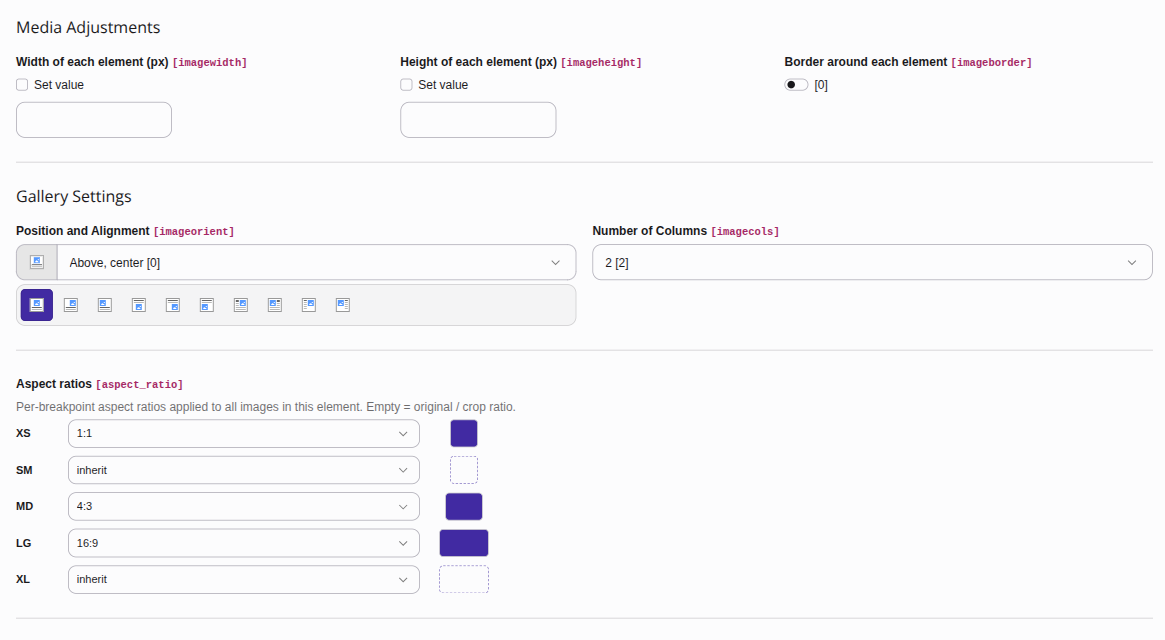
Imaginator adds an Aspect ratios field to the content element's mediaAdjustments palette. It appears only on content types that render images.

The Aspect ratios field in a content element's Media Adjustments palette

The Aspect ratios field: each design-system breakpoint picks a ratio (or inherits the next-smaller one), previewed as a swatch.

The field stores a per-breakpoint ratio map as a JSON string, for example:

Stored aspect_ratio value
{"xs": "1:1", "md": "4:3", "lg": "16:9"}
Copied!

Keys are breakpoint aliases (md, lg, …) or literal min-widths in pixels (768; 0 is the base). A breakpoint that is absent or set to auto inherits the next-smaller ratio.

A value may also be a fixed CSS height ("600px") instead of a "W:H" ratio: that tier pins the height while the width climbs the ladder. Use for e.g. a full-width hero. See Fixed-height tiers.

Binding the field 

The raw column can be passed straight into the ViewHelper; no DataProcessor is needed:

Fluid template
<i:image image="{ref}" aspectRatio="{ce.data.aspect_ratio}"
         alt="{ce.data.header}"/>
Copied!

The ViewHelper decodes the JSON map and resolves it to per-breakpoint <source> tiers using the configured breakpoints.

Content Blocks 

When EXT:content_blocks is installed, the same field is available as a field type so block authors can declare it in YAML:

ContentBlocks field definition
- identifier: aspect_ratio
  type: AspectRatio
  allowedRatios: '16:9,21:9'   # optional; defaults to the full set
Copied!

allowedRatios is a comma-separated list of the ratios offered in the editor. Omit it to expose the full default set.

Crop & Focus Area 

When an image (a FAL FileReference) is rendered, the editor's crop variant is resolved server-side: imaginator reads the reference's crop JSON and fits the requested ratio inside the crop area, centered on the focus area. The framing the editor chose is honoured and in local:async mode the URL keys only on the reference uid (r…).

The ladder is bounded by the crop area, so a tightly-cropped region is never upscaled. A src given as a path or plain file uid (f…) has no crop data and is center-cropped to the ratio.

Fluid ViewHelper 

Declare the ViewHelper namespace once per template and call <i:image>.

Fluid template
<html xmlns:i="http://typo3.org/ns/Schliesser/Imaginator/ViewHelpers"
      data-namespace-typo3-fluid="true">

    {# Simplest case: one ratio, renders an <img> with the full ladder #}
    <i:image image="{fileReference}" aspectRatio="16:9"
             alt="{fileReference.description}"/>

    {# By file UID or path #}
    <i:image src="{file.uid}" treatIdAsReference="0" aspectRatio="4:3"
             alt="A product"/>

    {# Art direction: per-breakpoint ratios render a <picture> with one
       <source> each. Keys are breakpoint aliases (xs, lg, …) or px min-widths
       (0, 992, …); each becomes a (min-width:Npx) <source>, and the min-0/xs
       entry becomes the <img> fallback. #}
    <i:image image="{hero}"
             aspectRatio="{xs: '1:1', lg: '16:9'}"
             alt="Hero"/>

    {# Full-bleed hero: a fixed CSS height instead of a ratio. Width climbs
       the ladder, the height stays pinned (the rendered image only gets
       wider/flatter from tablet to 4K, never taller). #}
    <i:image image="{hero}" aspectRatio="600px" alt="Hero"/>

    {# Mix ratio and fixed-height tiers per breakpoint: a portrait-ish ratio
       on small screens, a pinned height on large ones. #}
    <i:image image="{hero}"
             aspectRatio="{xs: '16:9', lg: '600px'}" alt="Hero"/>

    {# LCP / above-the-fold image #}
    <i:image image="{hero}" aspectRatio="16:9" alt="Hero" priority="1"/>
</html>
Copied!

Arguments 

Argument Type Default Description
image File / FileReference FAL object. Use this or src.
src string '' File UID or path (e.g. fileadmin/img/x.jpg).
treatIdAsReference bool false Treat src as a sys_file_reference UID.
aspectRatio string | map "W:H", a fixed CSS height "600px" (full-bleed hero: width climbs the ladder, height pinned), a {breakpoint: "W:H"|"Npx"} map, or the raw aspect_ratio JSON. Omitted: the crop variant (for a reference) or original image ratio. A malformed tier value raises an error; auto / empty skips the tier.
cropVariant string default FAL crop variant to use.
alt string '' Alternative text.
title string title attribute on the <img>.
class string CSS class on the <img>.
priority bool false Mark as the LCP image (see Priority / LCP images).

width and height are always emitted from the largest rung, so there is zero layout shift.

Fixed-height tiers 

A tier value of "600px" (or "600") pins the height instead of deriving it from a ratio. Width still climbs the ladder, so a full-bleed hero keeps a constant CSS height across viewports while the served crop only gets wider and flatter, but never needlessly taller, from tablet to 4K.

The px value is a CSS height. To stay sharp on high-DPR screens the tier is emitted as several <source>s gated by min-resolution: 1× serves the given height, 2× serves twice it, 3× three times up to fixedHeightDprCap (default 3). A low-DPR screen matches no min-resolution source and gets the cheap 1× height; a retina screen matches a gated source and stays crisp. Height is chosen by the device pixel ratio, width by the layout. So the served pixels match the need with no waste. Heights are never scaled beyond the source image's own height.

Pair a fixed-height image with CSS such as width:100%; height:600px; object-fit:cover; any surplus served height is re-cropped by object-fit.

Priority / LCP images 

Set priority="1" on the above-the-fold (LCP) image. Imaginator then:

  • drops loading="lazy" and adds fetchpriority="high" on the <img>;
  • renders an explicit sizes="100vw" instead of sizes="auto";
  • adds a <link rel="preload" as="image" imagesrcset="…" imagesizes="100vw" fetchpriority="high"> to the <head>, so the request is discoverable in the initial document.

This satisfies Lighthouse's LCP request is discoverable, not lazily loaded and fetchpriority should be applied audits.

Extend 

Imaginator's render layer is processor-agnostic: it only ever sees the ImageProcessorInterface, so the same <picture> / <img> is emitted regardless of who produces the pixels. Adding a new processor (a CDN, another self-hosted service) is a pure integration concern, no core change.

Custom Processor 

A processor turns an ImageVariant into the URL that goes into srcset (and, for local processors, processes the file). All built-ins (local:async, local:sync, imgproxy and imagor) implement the same interface; your own is added the same way: put #[AsImaginatorProcessor('my-key')] on your class, pick the interface that fits, set processor = my-key — no YAML.

New CDN provider: a URL builder is enough 

For an external provider (CDN / image service) you rarely need a full processor — the non-grammar work (source-URL resolution, editor-crop replay, offloaded semantics) is already written once in ExternalImageProcessor. Implement only the provider's URL grammar:

Classes/UrlBuilder/MyCdnUrlBuilder.php (in your extension)
use Schliesser\Imaginator\Attribute\AsImaginatorProcessor;
use Schliesser\Imaginator\Dto\ExternalConfig;
use Schliesser\Imaginator\Dto\ImageVariant;
use Schliesser\Imaginator\Dto\Rectangle;
use Schliesser\Imaginator\UrlBuilder\UrlBuilderInterface;

#[AsImaginatorProcessor('my-cdn')]
final readonly class MyCdnUrlBuilder implements UrlBuilderInterface
{
    public function __construct(private ExternalConfig $config) {}

    public function build(ImageVariant $variant, string $sourceUrl, ?Rectangle $crop = null): string
    {
        return sprintf(
            '%s/%dx%d/%s',
            rtrim($this->config->baseUrl, '/'),
            $variant->width,
            $variant->height,
            $sourceUrl,
        );
    }
}
Copied!

The compiler pass wraps the builder in a configured ExternalImageProcessor automatically. Convention: the builder takes ExternalConfig as its sole constructor argument — it carries the unified processorBaseUrl / processorSignKey / processorSalt settings; ignore the fields your provider has no equivalent for (imagor ignores salt). Keep the builder pure (no I/O), so it stays golden-file testable.

Provider-specific extras (e.g. a Cloudflare account hash) arrive in ExternalConfig::$options; read them in the builder via $this->config->option('accountHash') or $this->config->requireOption('accountHash') — the latter throws a descriptive exception naming the exact configuration path, so a misconfiguration fails loudly instead of emitting broken URLs.

Where the options live depends on who ships the builder. Extension Configuration is namespaced per extension, so a builder shipped in your own extension declares its extension key on the attribute and keeps the options in its own namespace — its own ext_conf_template.txt, its own backend form:

#[AsImaginatorProcessor('my-cdn', extensionKey: 'my_cdn')]
final readonly class MyCdnUrlBuilder implements UrlBuilderInterface { /* … */ }
Copied!
config/system/settings.php (or your ext_conf_template.txt backend form)
$GLOBALS['TYPO3_CONF_VARS']['EXTENSIONS']['my_cdn'] = [
    'accountHash' => 'abc123',
];
Copied!

Without extensionKey the options come from imaginator's own processorOptions map (used by the built-in providers; it has no backend UI):

$GLOBALS['TYPO3_CONF_VARS']['EXTENSIONS']['imaginator']['processorOptions'] = [
    'accountHash' => 'abc123',
];
Copied!

The full interface 

When URL grammar is not enough (local processing, exotic materialization), implement the processor interface itself — same attribute:

Classes/Imaging/ImageProcessorInterface.php
interface ImageProcessorInterface
{
    /** Render-time: URL that belongs in srcset for this variant. */
    public function buildUrl(ImageVariant $variant): string;

    /** True when pixels happen elsewhere (external CDN/service); local processing is skipped. */
    public function isOffloaded(): bool;

    /** Local processors only: produce/return the processed binary. */
    public function materialize(ImageVariant $variant): ProcessedImage;
}
Copied!
  • Return true from isOffloaded() for an external service (CDN / provider). buildUrl() then maps the variant onto the provider's URL grammar and materialize() is never called (the webserver never touches pixels).
  • Return false for a local processor; materialize() produces the derivative through TYPO3's ImageService.

Register it 

One attribute covers both shapes — the implemented interface decides:

#[AsImaginatorProcessor('my-cdn')]
final class MyProcessor implements ImageProcessorInterface { /* … */ }
Copied!
  • ImageProcessorInterface → the service itself is registered under the key.
  • UrlBuilderInterface → a configured ExternalImageProcessor wrapping the builder is registered under the key.
  • Neither or both → the container compile fails with a descriptive exception; duplicate and empty keys fail too (nothing silently last-wins).

Manual tagging remains a supported alternative — e.g. for multi-key aliasing or when your service needs its own factory. Tag it with imaginator.image_processor and a key; the registry is a lazy service locator indexed by that key:

Configuration/Services.yaml (in your extension)
Vendor\MyExt\Imaging\MyCdnProcessor:
  tags:
    - { name: 'imaginator.image_processor', key: 'my-cdn' }
Copied!

Escalation ladder: attribute on a URL builder (zero configuration code) → builder + options (extensionKey for your own namespace, or imaginator's processorOptions) → manual yaml named service with your own factory → full ImageProcessorInterface class (same attribute).

Select it with the processor setting:

config/system/settings.php
$GLOBALS['TYPO3_CONF_VARS']['EXTENSIONS']['imaginator']['processor'] = 'my-cdn';
Copied!

Pictureino 

Imaginator is built on the per-breakpoint aspect-ratio idea pioneered by EXT:pictureino (zeroseven/pictureino). The two extensions conflict by design as they register the same backend field. So they cannot run side by side:

Swap the package
composer remove zeroseven/pictureino
composer require schliesser/imaginator
Copied!

No database migration 

The aspect-ratio field is the unprefixed aspect_ratio column, the same column pictureino used, so existing editor data is preserved as-is. There is no schema change and no data migration to run.

Template changes 

Replace the pictureino ViewHelper call with <i:image>. The per-breakpoint {alias: ratio} map keys resolve to the configured breakpoints, matching pictureino's behaviour:

Fluid template
<html xmlns:i="http://typo3.org/ns/Schliesser/Imaginator/ViewHelpers"
      data-namespace-typo3-fluid="true">

    <i:image image="{data.image}"
             aspectRatio="{data.aspect_ratio}"
             alt="{data.header}"/>
</html>
Copied!

After swapping templates, review the configuration. The ladder, format and processor defaults differ from pictureino's.