Grid for Container

Version

3.1.0

Language

en

Authors

Marco Schmidt

Email

typo@schmidt-webmedia.de

License

This extension documentation is published under the CC BY-NC-SA 4.0 (Creative Commons) license

Add an easy to use grid element for Container. It's Framework independent. Prepared for Bootstrap

TYPO3

The content of this document is related to TYPO3 CMS, a GNU/GPL CMS/Framework available from typo3.org .

Community Documentation:

This documentation is community documentation for the TYPO3 extension Grid for Container

It is maintained as part of this third party extension.

If you find an error or something is missing, please: Report a Problem

Extension Manual

This documentation is for the TYPO3 extension grid_for_container.

For Contributors

You are welcome to help improve this guide. Just click on "Edit me on GitHub" on the top right to submit your change request.

For Users

If you are happy with this extension or you need a new future please let me know. E-Mail adress at the top.

Sitemap:
Sitemap

Introduction

What does it do?

This extension will add an easy to use grid with Container. It's Framework independent. It means you can config this extension with other Frameworks like Bootstrap, Foundation, ... This version is prepared for Bootstrap.

Features

As a TYPO3 you have to choose between four grid options:

  • 1 column grid
  • 2 column grid
  • 3 column grid
  • 4 column grid
  • 5 column grid
  • 6 column grid

Regarding the framework configuration you can choose for example between:

  • 50%/50%
  • 25%/75%
  • 75%/25%

layouts in a 2 column grid.

Screenshots

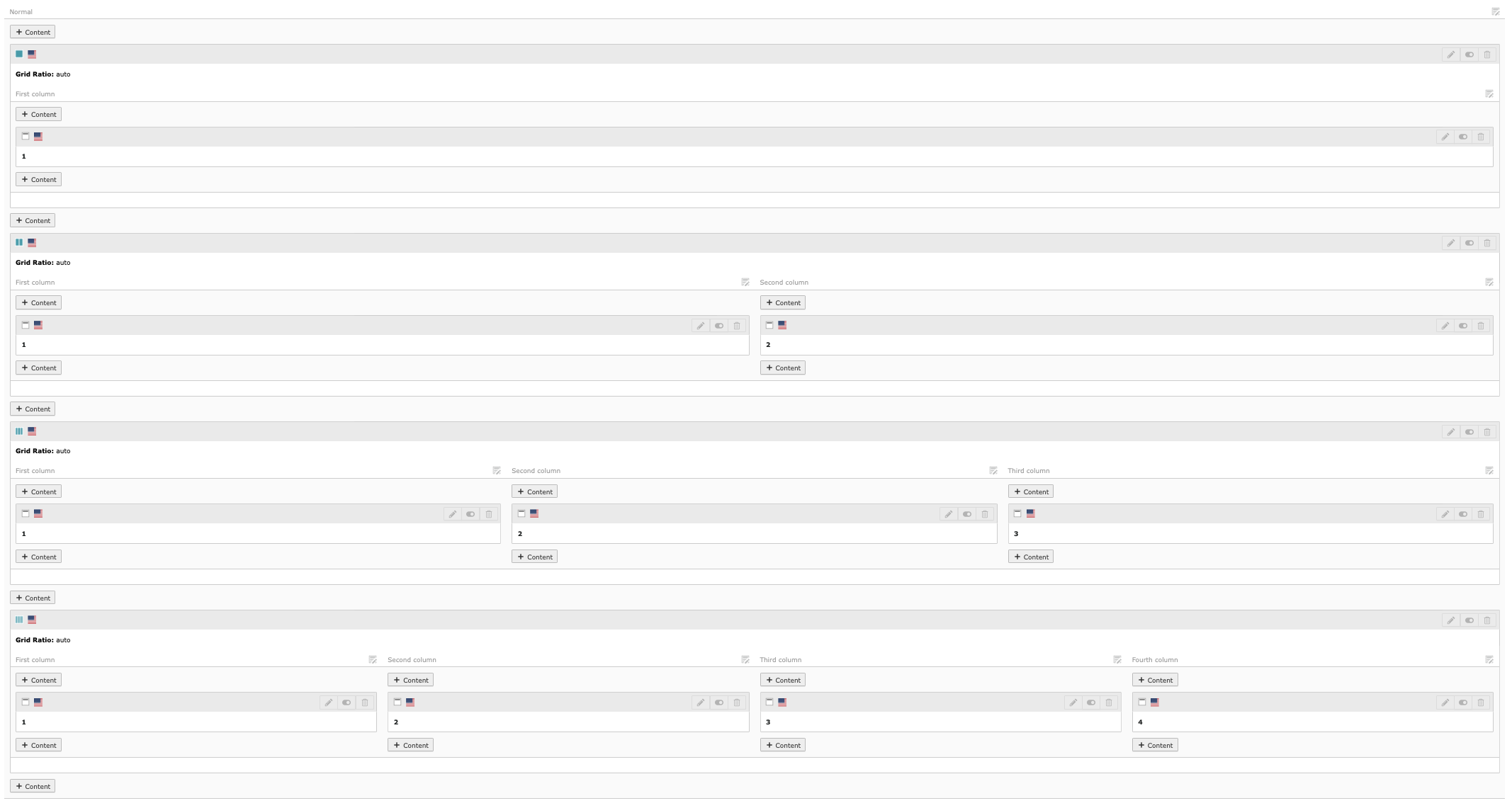
Backend view

Backend view

Frontend view

Frontend view

Basic configuration

For a basically usage with Bootstrap you don't need much configuration.

Static Template

Include following static templates:

Static template

Custom Framework configuration

If you don't use Bootstrap or you need to customize the prepared grid ratio then you have to change the grid.json file. Following steps will describe how to do it.

Copy Grid.json

Copy the Grid.json to your resources folder. The Grid.json is located in: Resources/Private/Grid/Grid.json

Make your changes

Make your changes in your own Grid.json file.

{
    "cols": [
        {
        "onecol": [
            {
            "label": "",
            "class": [
                "",
                ""
            ]
            }
        ],
        "twocol": [
            {
            "label": "",
            "class": [
                "",
                ""
            ]
            }
        ],
        "threecol": [
            {
            "label": "",
            "class": [
                "",
                "",
                ""
            ]
            }
        ],
        "fourthcol": [
            {
            "label": "",
            "class": [
                "",
                "",
                "",
                ""
            ]
            }

        ]
        }
    ],
    "row": [
        {
        "class": ""
        }
    ]
}
Copied!

Change extension settings

The next step will be change the path of Grid.json in the extension settings. This you will find in TYPO3 backend.

Extension Settings

Clear cache

Clear all cache and be happy with your customized grid

Changelog

All notable changes to this project will be documented in this file.

[Unreleased]

Added

  • Add new CType 'container'

[3.1.1] - 2025-03-10

Fixed

  • Correct path for Extension Icon set

[3.1.0] - 2025-01-05

Added

  • Choose relevant column grids in extension settings
  • Add five and six column grids

[3.0.0] - 2024-12-04

Added

  • Add TYPO3 v13 Support

Changed

  • Code improvements, thanks to @xerc

Remove

  • Remove Container ^2

[2.1.1] - 2023-04-26

Changed

  • TYPO3 v12 LTS Support

[2.1.0] - 2023-04-20

Added

  • TYPO3 v12@dev Support

Changed

  • Use Bootstrap 4 & 5 as default grid config

[2.0.0] - 2022-09-30

Breaking changes

If you are using an own Grid configuration, you have to check the Extension settings and set the Grid Theme to "customized". Please check also if the path is still correct.

Added

  • Support for Container ^1 & ^2
  • Separate between Bootstrap 3, Bootstrap 4 & 5 and customized grid configuration (Grid theme)

[1.0.2] - 2022-03-17

Changed

  • Name of extension

[1.0.1] - 2022-03-04

Fixed

  • Preview in backend

[1.0.0] - 2022-02-19

Changed

  • Dependencies

[0.9.0] - 2021-11-27

First release

Sitemap

below normal contents
