slub_events 

Classification

slub_events

Version

6.3

Language

en

Description

slub_events is an extbase/fluid based tool for event registration and experts booking. It is developped and used in production at the Saxony State and University Library (SLUB) Dresden, Germany.

Keywords

events, registration

Copyright

2013-2019

Author

Alexander Bigga (SLUB Dresden)

Email

typo3@slub-dresden.de

License

This document is published under the Open Content License available from http://www.opencontent.org/opl.shtml

Rendered

Thu, 22 Jan 2026 15:59:31 +0000

The content of this document is related to TYPO3, a GNU/GPL CMS/Framework available from www.typo3.org.

Table of Contents
What does it do? 

This extension is yet another event listing and registration solution with TYPO3 using extbase and fluid. This extension is developped and used in production at the Saxony State and University Library in Dresden, Germany (SLUB): www.slub-dresden.de

There are two use cases supported:

  1. Event listing and detail view with optional subscription
  2. Category listing with subscription for single consultation ("Knowledge Bar", "Wissensbar")

On subscription, the customer receives an email including an ics-calendar invitation. MS Outlook and Thunderbird/Lightning recognize this component as calendar event.

The contact person receives an email on end of the subscription period or if not enough subscribers where found before the subscription end. In all cases an ics-calendar invitation is appended to the mails.

The templates are not yet all localized but are easily changeable by overwriting templateRootPaths etc. as usual with extbase/fluid extensions.

Please use for your feedback the Github project website . Create issues and if possible, provide a pull request with a solution.

Credits 

Some backend icons by Yusuke Kamiyamane. Licensed under a Creative Commons Attribution 3.0 License. Compatibility with TYPO3 7.6: Manuel Selbach

Users manual 

Page Setup 

Please imagine the following page structure and put the mentioned plugins onto these pages:

Events		<-- plugin "SLUB: Events: Listing", List View
|-- Details	<-- plugin "SLUB: Events: Listing", Single View
|-- Subscribe	<-- plugin "SLUB: Events: Registration", Subscribe View
|-- Unsubscribe	<-- plugin "SLUB: Events: Registration", Unsubscribe View
`-- Eventdata	<-- Sysfolder for Eventdata
Copied!

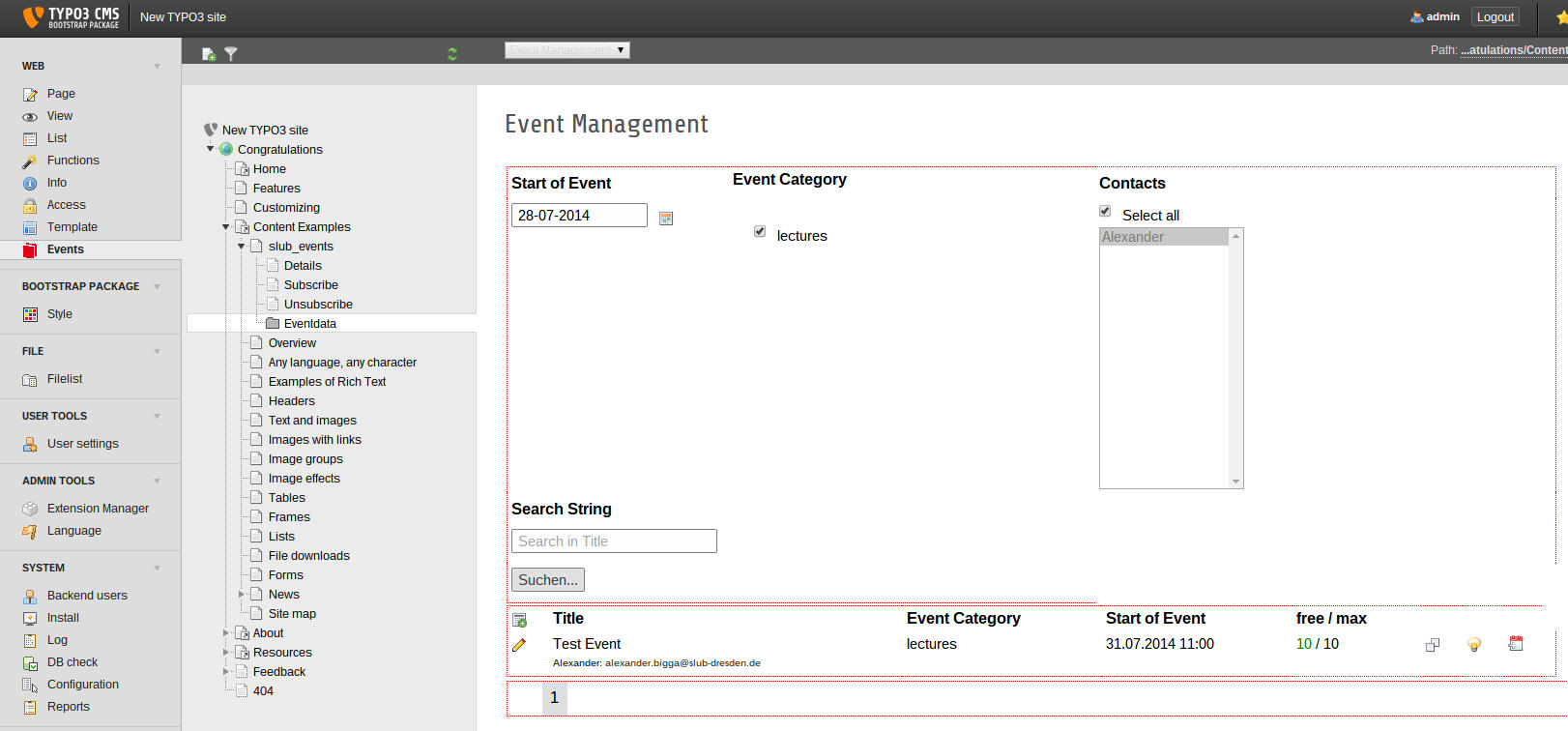
Backend Module 

On creating an event, some required datafields must be present already. Use the the TYPO3 list module to create these four datatypes on the "Eventdate" folder:

  1. Category: The categories of your events like "Tutorial", "Lesson", "Workshop", etc. You can create a category tree.
  2. Contact Details: The name and email address will be used to send the confirmation emails on subscription. The picture and the description is shown in the detail view and in the category list view of the knowledge bar.
  3. Location: Add location with title, descriptions and links. The title will be shown in the ics-invitation.
  4. Disciplines: Disciplines can be used as another filter tree for the list view.

If all this is done, you can start using the backend module on the left column, called "Events" and select the Eventdata-folder or any page below the slub_events template in the middle column.

The Backend Module

The backend module appears on the right column if a page in the pagetreeg has been selected.

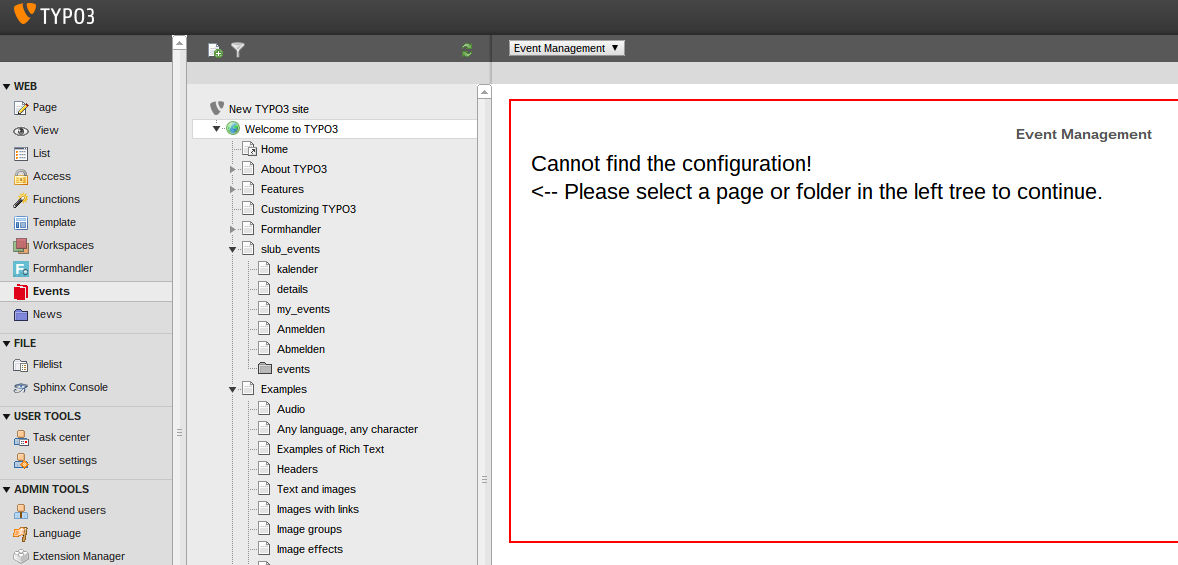
Important: You have to set the StoragePid of the Eventdata-folder on some template (see Set Storage Folder of Event Data). Otherwise you get the following error message:

Cannot find the configuration!

<-- Please select a page or folder in the left tree to continue.
Copied!
Error: cannot find the configuration

Error if no page or folder is selected with the slub_events template.

Frontend Plugins 

As mentioned in Page Setup there are several frontend plugins to list, show and register to events.

SLUB: Events: Listing 

This plugin has three functions:

  • List View: list all upcoming events in a chronological order. By default only future events (including "today") are shown. You can show event only from selected categories, disciplines or contacts. You can change the chronological ordering and you can show past events.
  • Single View: show details of a single event.
  • List Month View: this is an experimental view with fullcalendar. We are playing around with it.

SLUB: Events: Registration 

This plugin has two functions:

  • Subscribe View: This shows the registration form.
  • Unsubscribe View: This is the target plugin to unsubscribe users. Unfortunately you have to place it on a separate page.

SLUB: Events: User Panel 

This basic plugin shows all events of a customer. This is currently working only for our usecase:

  • the user is logged in
  • the "customer ID" is equal to the fe_user username

SLUB: Events: Knowledge Bar 

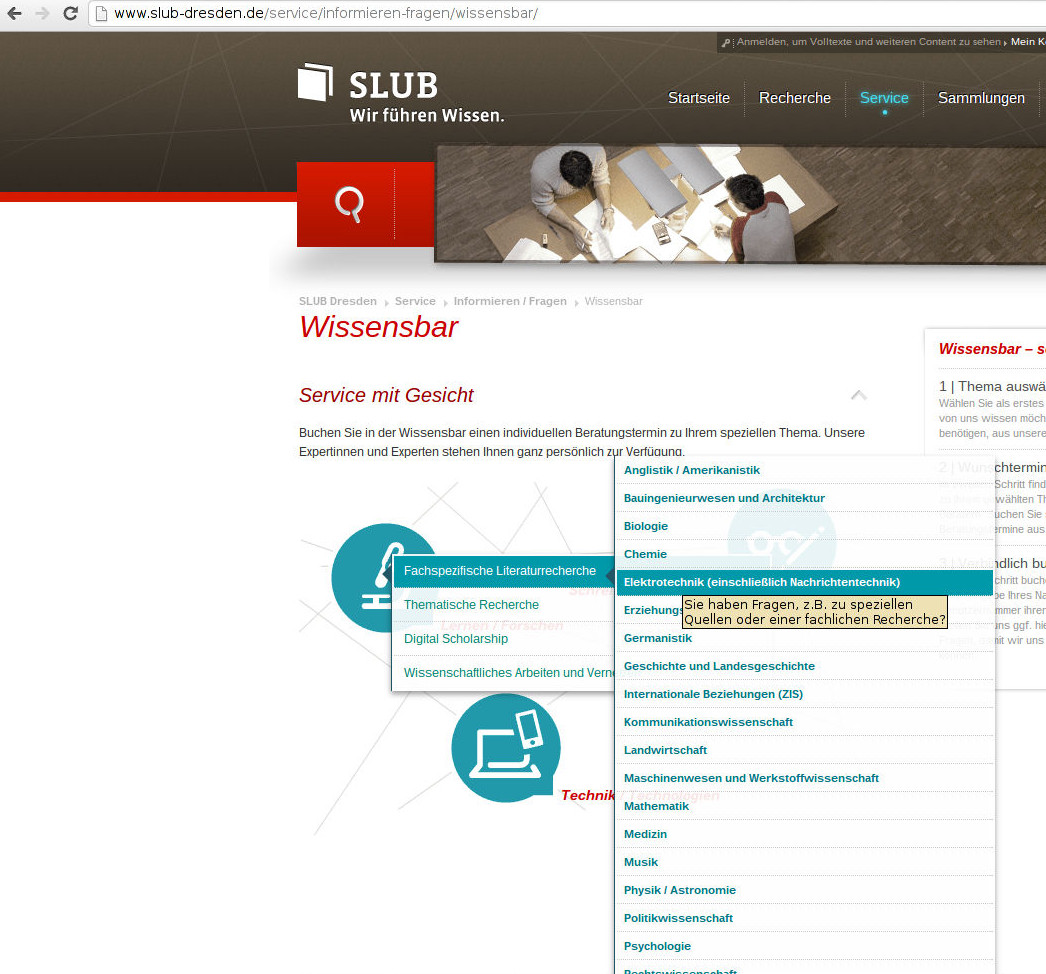
The knowledge bar is a different type of event with only one subscriber. Technically an event may have multiple categories. This plugin lists the event ordered by categories. The event itself only provides the time, subscription and contact details. The descriptions are taken from the category.

To better understand the concept, have a look at the SLUB Knowledge Bar.

Screenshots 

Some screenshots to show the functionality used at the Saxony State and University Library in Dresden, Germany (SLUB): www.slub-dresden.de

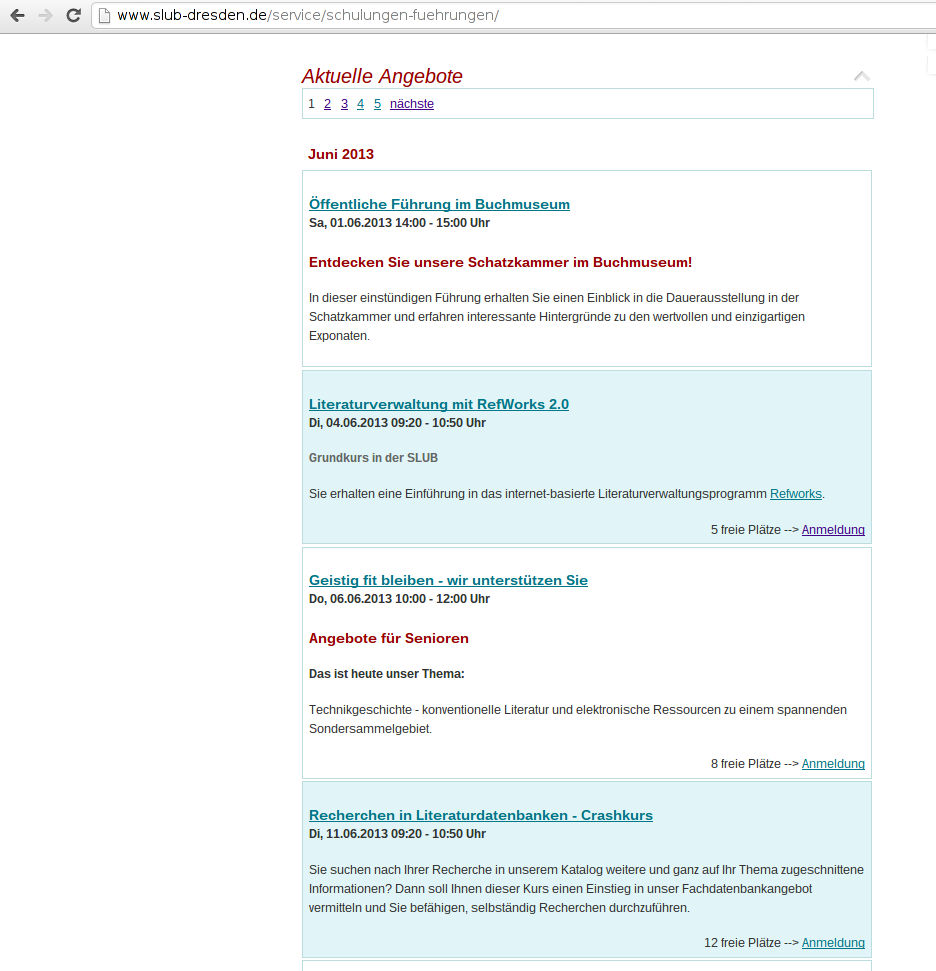
Listing View

Listing of Events

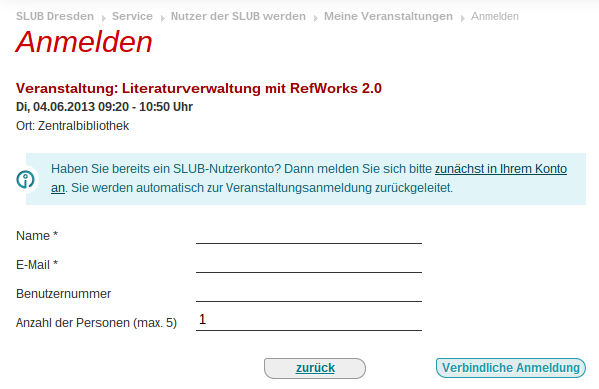
Subscription View

Subscription Form

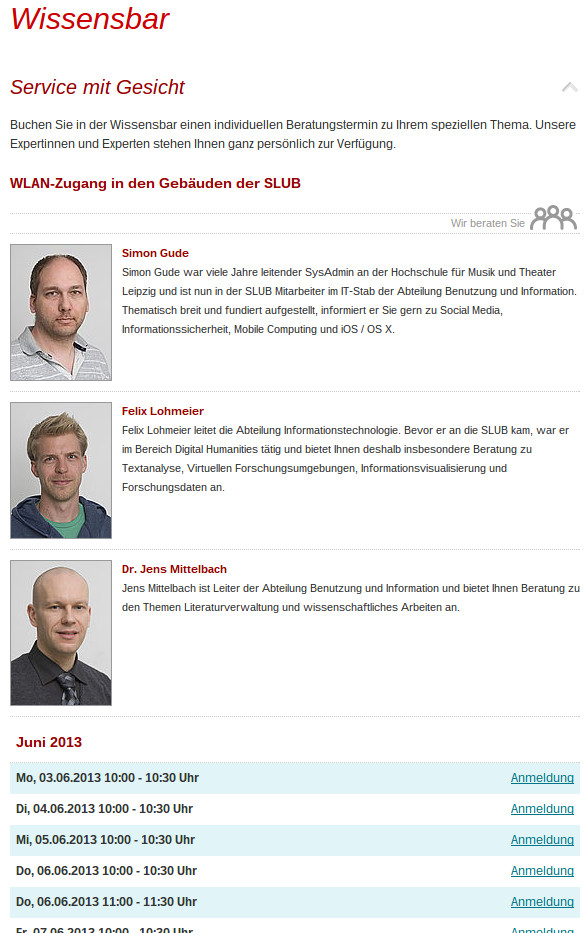
Knowledge Bar View

Knowledge Bar View

Knowledge View

Knowledge View

Plugin Reference 

Common Settings 

Page of List View 

Page which containts the list view (see SLUB: Events: Listing).

Page of Single View 

Page which contains the single view (see SLUB: Events: Listing).

Page of Subscribe Form 

Page which contains the subscription form plugi (see SLUB: Events: Registration).

SLUB: Events: Listing 

This plugin offers the main list and single event view.

Properties 

Select Function 

Select function of this plugin:

  • list view: show list of events depending on settings
  • single view: show one single event

Show Only Selected Categories 

Show only events with selected categories.

Include Child Categories 

Show also events of all sub-categories.

Show Only Selected Disciplines 

Show only events with selected disciplines.

Include Child Disciplines 

Show also events of all sub-disciplines.

Show Past Events 

Show events in the past. This may be interesting for some archive page.

The default behaviour of the listview is to show only events which start today.

Event Ordering 

Ordering of the listed events by event start date and time.

Show Only Selected Contacts 

Show only event of the selected contact(s).

SLUB: Events: Registration 

This plugin offers the form for subscribe and unsubscribe to events.

Properties 

Select Function 

  • Subscribe View: show the event subscribe form
  • Unsubscribe View: show the event unsubscribe form

Page of MyEvents View 

Page which contains the user panel plugin (see SLUB: Events: User Panel).

Page of Subscribe Form 

Page which contains this plugin with the subscribe view.

Page of Unsubscribe Form 

Page which contains this plugin with the unsubscribe view.

SLUB: Events: User Panel 

This plugin shows all future events, the logged in user subscribed to.

Past events are not shown.

Properties 

Page of Unsubscribe Form 

Page which contains this plugin with the unsubscribe view (see SLUB: Events: Registration).

API 

Authorization 

To have access to the api, an authorization is required. You can configure users via typoscript. This configuration is set global (plugin.tx_slubevents.settings.api.users) in the plugin and not for a specific plugin.

Constants Type Comment
settings.api.users.0.username String Username to authorize access
settings.api.users.0.password String Password to authorize access

Feel free to add further users. If you have one user with empty username or empty password, the authorization will fail. In default these values are empty for security. So, if you get no data, check this configuration.

Event list 

The API delivers a json formatted list with events. You can manipulate the list with additional parameter.

You have to call this API with a special page type. Just attach "?type=1452982642" to your project url and typoscript calls the extension "slubevents" and the plugin "apieventlist".

Additional parameter 

Parameter Type Comment
tx_slubevents_apieventlist[category] String|Integer Comma separated list of category ids
tx_slubevents_apieventlist[discipline] String|Integer Comma separated list of discipline ids
tx_slubevents_apieventlist[contact] String|Integer Comma separated list of contact ids
tx_slubevents_apieventlist[showPastEvents] Integer (0|1) Default is to show events beginning with today
tx_slubevents_apieventlist[showEventsFromNow] Integer (0|1) Additional setting for "showPastEvents"
tx_slubevents_apieventlist[limitByNextWeeks] Integer Set a limit for the next weeks
tx_slubevents_apieventlist[startTimestamp] Integer (Timestamp) Influence the start date, works together with stopTimestamp
tx_slubevents_apieventlist[stopTimestamp] Integer (Timestamp) Influence the stop date, works together with startTimestamp
tx_slubevents_apieventlist[sorting] String (asc|desc) Default value is ascending
tx_slubevents_apieventlist[limit] Integer Limit quantity of result data

If you use these parameter and have trouble add "tx_slubevents_apieventlist" in [FE][cacheHash][cachedParametersWhiteList] and [FE][cacheHash][excludedParameters].

Typoscript constants 

Constant Type Comment
settings.unsubscribePid Integer Set the page to unsubscribe an event. If not set, link to unsubscribe not generated

Event list user 

The API delivers a json formatted list with events subscribed by a specific user. You can manipulate the list with additional parameter.

As extra parameter you have to specify the user. This api is in general separated from event list to be more flexible. It has her own result structure. Compared with event list, a user event does not show the subscribers (it is the given user) but has an unsubscribe link.

You have to call this API with a special page type. Just attach "?type=1452982643" to your project url and typoscript calls the extension "slubevents" and the plugin "apieventlist".

Additional parameter 

You can manipulate the list with the same additional parameter like "event list". Just use different prefix "tx_slubevents_apieventlistuser" instead of "tx_slubevents_apieventlist".

Necessary parameter 

Parameter Type Comment
tx_slubevents_apieventlistuser[user] Integer Event -> subscribers -> customerid

If you use these parameter and have trouble add "tx_slubevents_apieventlistuser" in [FE][cacheHash][cachedParametersWhiteList] and [FE][cacheHash][excludedParameters].

Administrator Manual 

Set Storage Folder of Event Data 

You should set the storagePid for the frontend and for the backend module to your Eventdata folder.

For example:

Property
storagePid
Data type
integer
Description

The uid of your storage folder. In this folder all events, contacts, categories and subscribers are stored.

This setting is important for the frontend plugin (plugin.tx_slubevents.persistence) to find the data.

It's also important for the backend module (module.tx_slubevents.persistence) if your data is not stored on PID 0.

Default
empty
Property
hidePagination
Data type
boolean
Description
In list view (backend module and frontend plugin) a pagination is shown by default. If you want to suppress this pagination for some reason set this option to TRUE
Default
0: show pagination

[tsref:plugin.tx_slubevents.persistence] [tsref:module.tx_slubevents.persistence]

Configure Email Handling 

Property
senderEmailAddress
Data type
string
Description
Set the sender email address of all outgoing mails.
Default
webmaster@example.com
Property
email.keepLocalFilesForDebugging
Data type
string
Description

Keep files (.ics, .csv, .html) sent by email for debugging purpose. The files are stored in typo3temp/tx_slubevents/.

Do not use this setting on production environment!

Default
0 - Do not keep files.
Property
emailToContact.sendEmailOnMaximumReached
Data type
boolean
Description
Send email to the contact person if maximum number of subscribers is reached and the subscription is closed. The email contains the current subscriber list inline and as CSV file.
Default
1 = Always send mails.
Property
emailToContact.sendEmailOnFreeAgain
Data type
boolean
Description
In case of cancellation by a customer, an email is sent to the contact person if the minimum number of subscribers is not reached anymore. The event is not guaranteed anymore.
Default
1 = Send mails to contact person in case of cancellation by customer.
Property
emailToContact.sendEmailOnEveryBooking
Data type
boolean
Description
Send email on every subscription / booking that is made to the contact person. The email contains always the up-to-date subscriber list inline.
Default
0 = Don't send mails.
Property
baseURL
Data type
string
Description
In most sent emails the event description is included. The description field is an RTE-field and you may use images inside. The url of these images in the email are relative and won't work in the email program. That's why you may set an baseURL which gets included in the HTML content of the emails.
Default
empty Example: http://www.slub-dresden.de/

[tsref:plugin.tx_slubevents.settings]

Scheduler Tasks 

You can add different task to the backend scheduler.

Check for End of Subscription Period 

slub_events:checkevents:checkforsubscriptionend

This task checks e.g. every 20 minutes if the subscription end is already reached of future events. If this is the case, an email is sent to the contact person with the subscription list. After this the subscription is closed officially. The event gets marked in the database that this email has been sent already.

If there are not enough subcribers (min_subscriber not reached) the event is getting cancelled by setting the is_cancelled property of the event.

Argument

Example

Description

storagePid


senderEmailAddress

webmaster@example.com

Set the sender email address of outgoing emails to the contact person. Emails to the subscribers get the contact persons email as sender address.

Make Statistics Report 

slub_events:checkevents:makestatisticsreports

You may sent a statistics report to one or more given email address every month about the last months events. The report contains a list of all events and the number of subscribers inline and as CSV attachment.

Argument

Example

Description

storagePid


senderEmailAddress

webmaster@example.com

Set the sender email address of outgoing emails to the contact person. Emails to the subscribers get the contact persons email as sender address.

receiverEmailAddress

abc@example.com, dfg@example.com

Set the receiver email address of the statistics report. You may enter a comma separated list.

Add a Privacy-Checkbox to registration form 

If you need a checkbox to confirm the acceptance of a Privacy Policy, simply add these line to your registration form template (e.g. EXT:slub_events/Resources/Private/Partials/Subscriber/FormFields.html).

<f:form.checkbox value="1" property="acceptpp" id="acceptpp"/>
<label for="acceptpp">
      <f:translate key="tx_slubevents_domain_model_subscriber.acceptpp"/>
      <span class="required">*</span>
</label>
Copied!

While the property acceptpp is submitted, it's needed to be checked to submit a valid registration.

Known Problems 

Configuration 

  • In the list view, month names are written as fulltext as separators. If you encounter problems with the selected language or with the encoding, please check your locale settings. Of course, the set locale must exist on your server, because these date strings are rendered directly by an PHP function (strftime).

    Wrong locale setting

    Broken "Umlaute" because of missing or wrong locale settings.

    config.locale_all = de_DE.UTF-8

  • Not everything is localized yet. Especially some fluid templates have pure German texts. But these templates you have to customize anyway. Nevertheless, we continue our work to translate the contents step-by-step.

Limitations 

  • There is no way to add extra fields to the registration form. The fields are connected to the data model which makes it easy to use the built-in validation by Extbase.

    To add new fields, you have to change the database scheme, the data model, the subscriber controler, etc. If you have a better approach: please fill in a issue feature request on the Github project website and explain your solution.

    Thank you!

Support 

We provide this extension "as is" to inspire other developers and maybe to make some users happy with it's current functionality.

As this is not our core business, we cannot provide extensive support for this extension and we cannot offer any development service. But we will have a look on every issue and bug you provide. And of course we will apply your patches if you sent it to us.

Forge Bug- and Issuetracker 

Please use the issue tracker on the Github project website to report issues and feature requests. This helps us and others.

Email 

Of course you can mail me at typo3@slub-dresden.de. But don't expect a fast answer...

Donation 

That's quite friendly to ask for. But we take no money - only patches ;-)