Dropbox FAL Driver

Provides a Dropbox driver for TYPO3 File Abstraction Layer.

Introduction

See how EXT:dropbox looks like in action.

Installation

Explains how to install this extension in Composer-based and Classic TYPO3 installations.

Configuration

Learn how to configure this extension.

FAQ

These questions have been frequently asked.
What does it do?

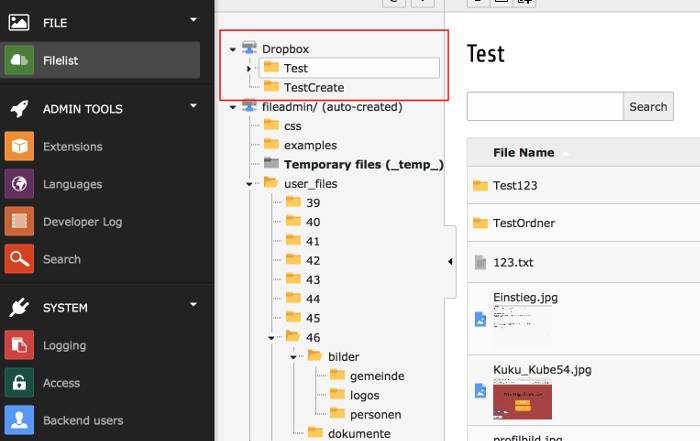
This extension adds a Dropbox FAL driver to TYPO3. With that driver you can browse, modify and delete files from your Dropbox account.

Screenshot

FAL Dropbox fileadmin

Installation

Composer

If your TYPO3 installation works in composer mode, please execute following command:

composer req stefanfroemken/dropbox
vendor/bin/typo3 extension:setup --extension=dropbox
Copied!

If you work with DDEV please execute this command:

ddev composer req stefanfroemken/dropbox
ddev exec vendor/bin/typo3 extension:setup --extension=dropbox
Copied!

ExtensionManager

On non composer based TYPO3 installations you can install dropbox still over the ExtensionManager:

  1. Login

    Login to backend of your TYPO3 installation as an administrator or system maintainer.

  2. Open ExtensionManager

    Click on Extensions from the left menu to open the ExtensionManager.

  3. Update Extensions

    Choose Get Extensions from the upper selectbox and click on the Update now button at the upper right.

  4. Install dropbox

    Use the search field to find dropbox. Choose the dropbox line from the search result and click on the cloud icon to install dropbox.

Next step

Configure dropbox.

For administrators

This chapter describes how to manage the extension from a superuser point of view.

Updating

If you update dropbox to a newer version, please read this section carefully!

Update to Version 5.0.0

Please execute the token wizard in driver record again to retrieve a fresh refresh token. With that refresh token EXT:dropbox is available to generate a new access token which is available for 4 hours. Remaining time of current access token you can see in dropbox info section of dropbos driver record.

Im future files get bigger and bigger. Downloading these files just to access the image dimension (width/height) can be very slow, costs traffic and of cause CPU time. With version 5.0.0 I use the dropbox API to retrieve this information. This is faster if you have a lot of huge files in your selected folder, but it's slower, if you have a lot of tiny small files in your folder.

Dropbox API can only retrieve image dimension (width/height) for images up to 20 MB.

Update to Version 4.3.0

The access tokens generated by/for Dropbox have now a lifetime of max. 4 hours. So, we can not store the access token anymore. THX goes to TYPO3 community which provides a pull request to migrate to refresh tokens which can be used to generate new temporary available access tokens.

Please edit your dropbox storage and execute the refresh token wizard.

The new access tokens will be stored in sys_registry. On error while working with the API EXT:dropbox will automatically try to refresh the access token and tries the same request again.

Update to Version 4.2.0

A big thank you goes to Georg Ringer, who kindly gave me the extension key "dropbox". I took the chance and renamed all paths, PHP classes, names and repos to the new extension key "dropbox".

Please execute the Rename Extension Key Upgrade wizard from install tool to rename the driver identifier in all sys_file_storage records of existing Dropbox storages.

Update to Version 4.1.0

I have added TYPO3 11 compatibility. With this change my ext dropbox is not compatible with PHP versions less than 7.4 anymore. This version is still TYPO3 10.4 compatible, but needs at least PHP 7.4.

Configuration

Create APP at dropbox.com

  1. Go to Developer area of dropbox.com

    Simply visit: https://www.dropbox.com/developers

    If this link is not valid anymore go to https://www.dropbox.com/, click the upper left menu icon with the 9 dots. Choose the App Center. In the left menu of the App Center you will find a link to Develop Apps. Now you should be in the developer corner of Dropbox.

  2. Create new Dropbox App

    Click the App Console button in the upper right corner. Now you see all your apps (if you have created some). Click the Create app button.

  3. Choose API

    With a free or simple Dropbox account you only have the possibility to choose the API with Scoped access. The TYPO3 Dropbox extension can only work with this API. Do not choose any other API.

  4. Choose App type

    For security reasons I prefer to choose App folder. But if you`re sure, you also can give your app full access to all of your Dropbox files.

  5. Give it a name

    Assign a Dropbox global unique name to your new app. Please consider, that words like dropbox are not allowed as part of the name.

    Confirm your settings with button Create App. You will be redirected to detail view of your app.

  6. Configure your new app

    Switch over to tab Permissions and activate following permissions:

    • files.metadata.read
    • files.content.write
    • files.content.read
  7. Locate App key

    For next section you will need to copy App key from tab Settings.

Create File Storage

  • Go to list module and choose PID 0 (Rootpage with TYPO3 logo in front).
  • Create a new record of type File Storage
  • On tab General choose a name like Dropbox
  • On tab Configuration you have to choose the Dropbox driver

Start Driver Wizard

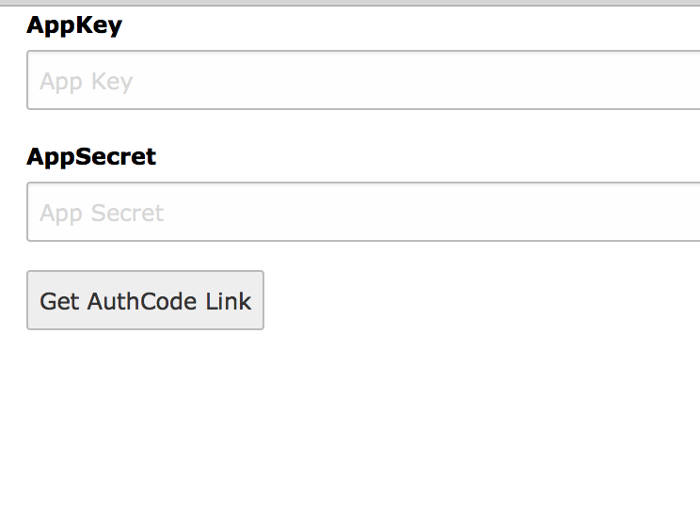
While editing the File storage click on the + icon to start the wizard. Paste in the App Key from Dropbox App explained above. Click on Get AuthCode Link

Insert app key and app secret

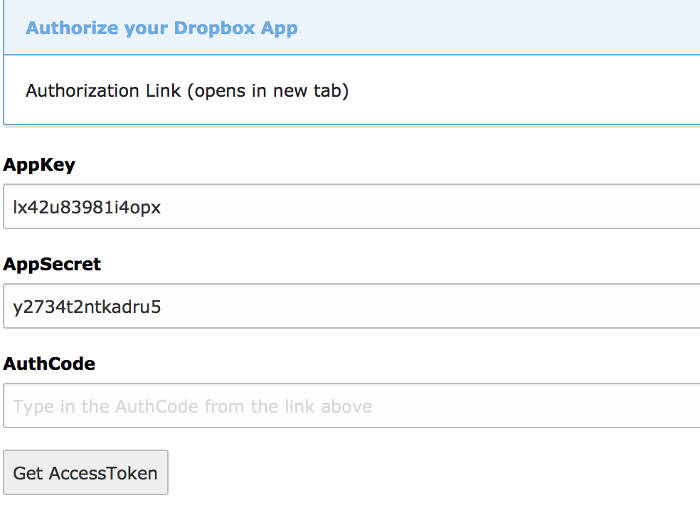
On the next page you have to click on the authorization link which will open a new tab where you have to give access to your Dropbox App.

Copy the AuthCode from Dropbox page into the AuthCode field of the Wizard.

Get Access Toekn from Dropbox

With a click on Get AccessToken a further request to dropbox.com will start in the background. On success the Refresh Token will automatically inserted in File Storage record and the wizard will close.

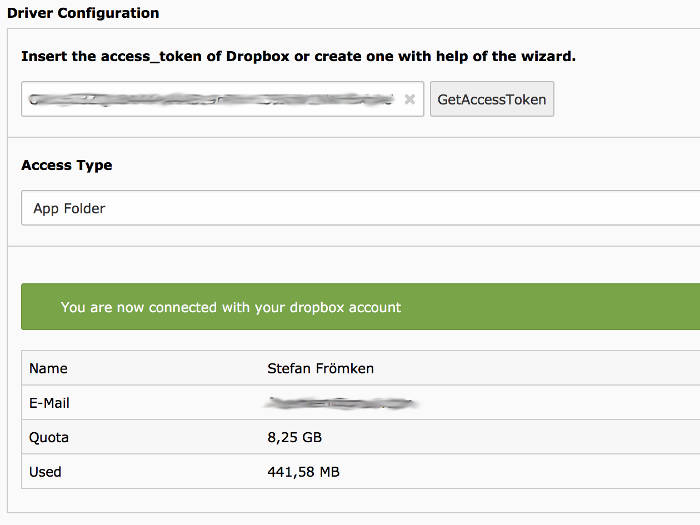
Save the record. On success it will show you some user data.

Connection successfully

Performance

Deactivate countFilesInFolder

The extension provides an extension setting named countFilesInFolder, which is enabled by default. When activated, the extension performs an individual API request to Dropbox API for each listed folder in order to determine the number of contained files.

Each API call introduces a latency of approximately 300–400 milliseconds. For example, if a parent folder contains 10 subfolders, the total time required to render the file list may reach up to 4 seconds.

Since the file count is primarily a visual indicator, this feature can be disabled to optimize performance. When countFilesInFolder is set to 0, the file list will render significantly faster, but will display "0 files" for each subfolder.

Folder for manipulated and temporary images

Within the Configuration tab, at the bottom of the settings list, you will find the option Folder for manipulated and temporary images etc..

By default, this folder is located within the Dropbox file storage. As a result, all processed or temporary images are transferred via the Dropbox API, which significantly impacts performance due to the slow transfer rates.

To improve rendering speed and overall performance, it is recommended to relocate this folder to a fast local file storage. For example, if your fileadmin storage has the storage UID 1, you can set the value to: 1:/_processed_/dropbox. This ensures that temporary files are handled locally rather than being transferred through the Dropbox API.

FAQ

Bad Request

In most cases you get that error, if your Dropbox App does not have the required permissions. PLease visit App Console at Dropbox again and make sure you have activated files.metadata.read, files.content.read and files.content.write. Save your App. After each change at the Dropbox App you have to restart the AccessToken Wizard in your Dropbox TYPO3 FAL Storage and save the record again.

Upload of file XY failed

If you get this error message while uploading a new file, this is because you have missed to activate the Dropbox Permission files.content.write in your Dropbox App. Please visit: https://www.dropbox.com/developers Choose your App, switch to tab permission and activate that option.

Uploaded file could not be moved!

If you get this error message you have to activate the files.content.write permission in Developer corner of Dropbox: https://www.dropbox.com/developers but you have missed to re-authenticate your connection to Dropbox. Please move to your Dropbox FAL storage and start the Authentication Wizard again.

Using Dropbox Storage is slow

I know, but let me explain:

Dropbox delivers an API call to retrieve all folders and files of a given folder. But this request does not contain any image metadata like image dimension (width/height) anymore since 2019. As TYPO3 needs this information to render previews and the image in crop wizard, I have to start a second request for EACH image in selected folder to retrieve the image dimensions with help of another API endpoint. And if you have activated the image preview in filelist module it needs a third dropbox call to retrieve a specific thumbnail. All that costs a lot of time.

How to solve that?

  • Disable image preview in filelist and file browser. If you have a lot of images in your folder that would speed up the listing a lot
  • Good structure in your dropbox folder. Try to keep the amount of folders and files within a folder as small as possible
  • Move the temporary folder for dropbox storage to a faster storage (local storage/SSD). I have explained it in section Configure dropbox
  • Keep your files as small as possible in dropbox storage.

Cut and Paste copies files

That happens if you have deactivated the clipboard. Please activate the clipboard. You will find a button to activate "moving" files instead of "copying". If you know paste the file, it will be moved instead.

ChangeLog

Version 6.1.0

  • Add feature to prevent counting files of sub-folders
  • Repair creating new file
  • Prevent class properties where possible (stateless)
  • Use "new" if class has state
  • Prevent additional API calls where possible

Version 6.0.0

  • Add TYPO3 compatibility
  • Remove support for older TYPO3 versions

Version 5.0.2

  • Use new doctrine query methods calls

Version 5.0.1

  • Update documentation

Version 5.0.0

  • Add TYPO3 12 compatibility
  • Remove TYPO3 10 compatibility
  • BUGFIX: Auto refresh AccessToken
  • Get image width/height by dropbox API
  • Render image preview with thumbnail provided by dropbox API
  • Show remaining time of current AccessToken in driver configuration
  • New client factory to use dropbox API nearly everywhere
  • New PathInfoFactory to create path objects for files and folders
  • New FlashMessageHelper to reduce complexity of other classes
  • Update documentation. New configuration section.

Version 4.3.0

  • Use refresh token to build access tokens
  • Remove referred link from user account
  • Add descriptions to fields in config form

Version 4.2.0

  • TASK: Rename ext key fal_dropbox to dropbox
  • Add Upgrade Wizard to rename driver identifier for existing FAL storages
  • Add a lot more documentation
  • Add new wizard to retrieve access token
  • New ext icon

Version 4.1.0

  • Add TYPO3 11 compatibility