MySQL Report 

Extension key

mysqlreport

Package name

stefanfroemken/mysqlreport

Version

5.1

Language

en

Author

Stefan Froemken

License

This document is published under the Creative Commons BY 4.0 license.

Rendered

Tue, 20 Jan 2026 23:30:49 +0000


With mysqlreport you can analyze and profile all SQL queries executed by TYPO3s ConnectionPool API in FE and/or BE context.


Table of Contents:
Introduction 

What does it do? 

With mysqlreport you can analyze your MySQL/MariaDB server. It will show you some hints about InnoDB usage, table cache, thread cache, uptime and an overall overview. Additional, you can activate profiling of each query in extension settings and show details of all queries of a TYPO3 request in BE module.

Screenshots 

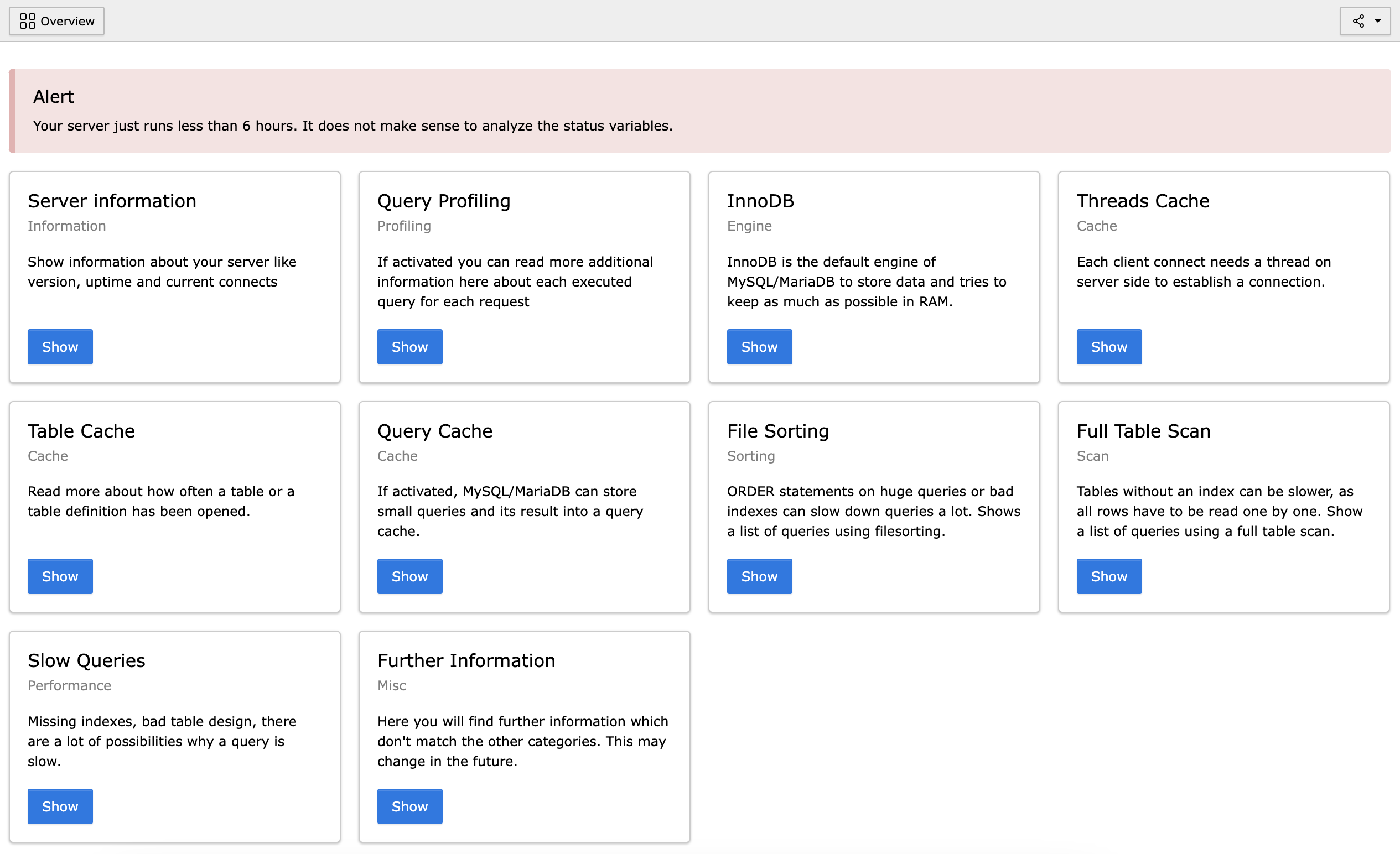
Backend Module 

First touch with the MySQL Report Backend Module

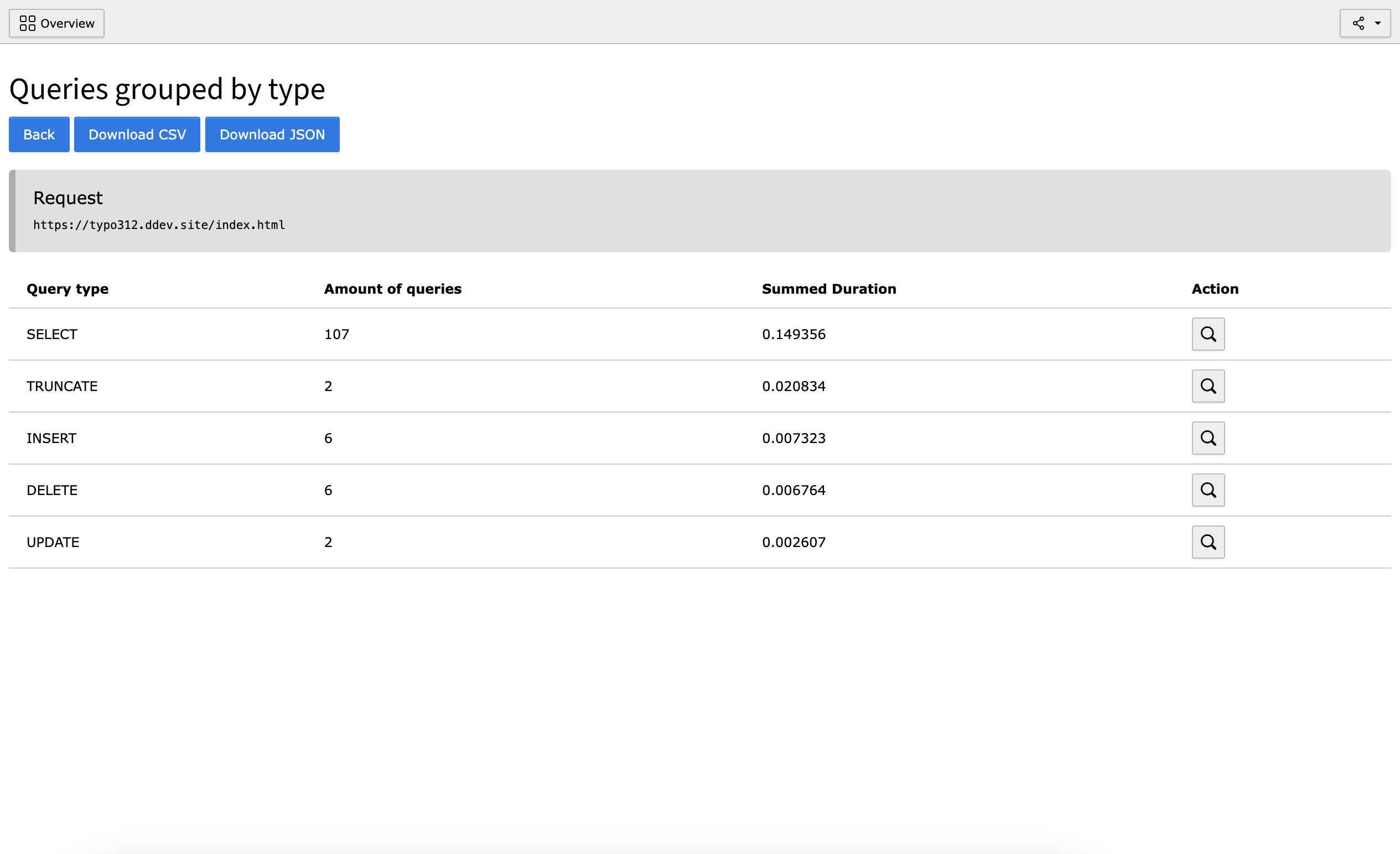
All Queries of a Request 

Shows a group list of all queries of a specific request

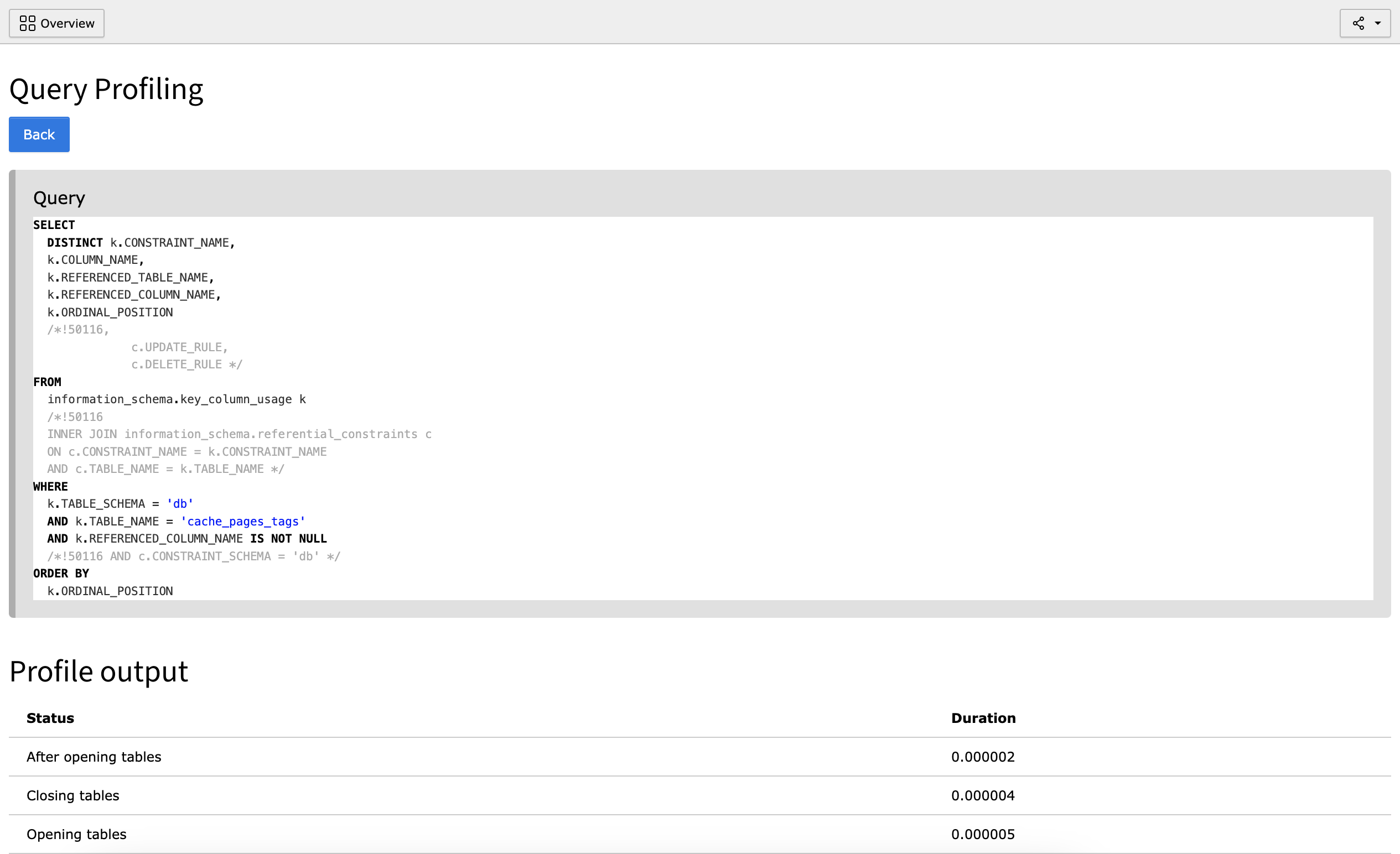
Detailed Query Analysis 

Shows a detailed analysis of one specific query

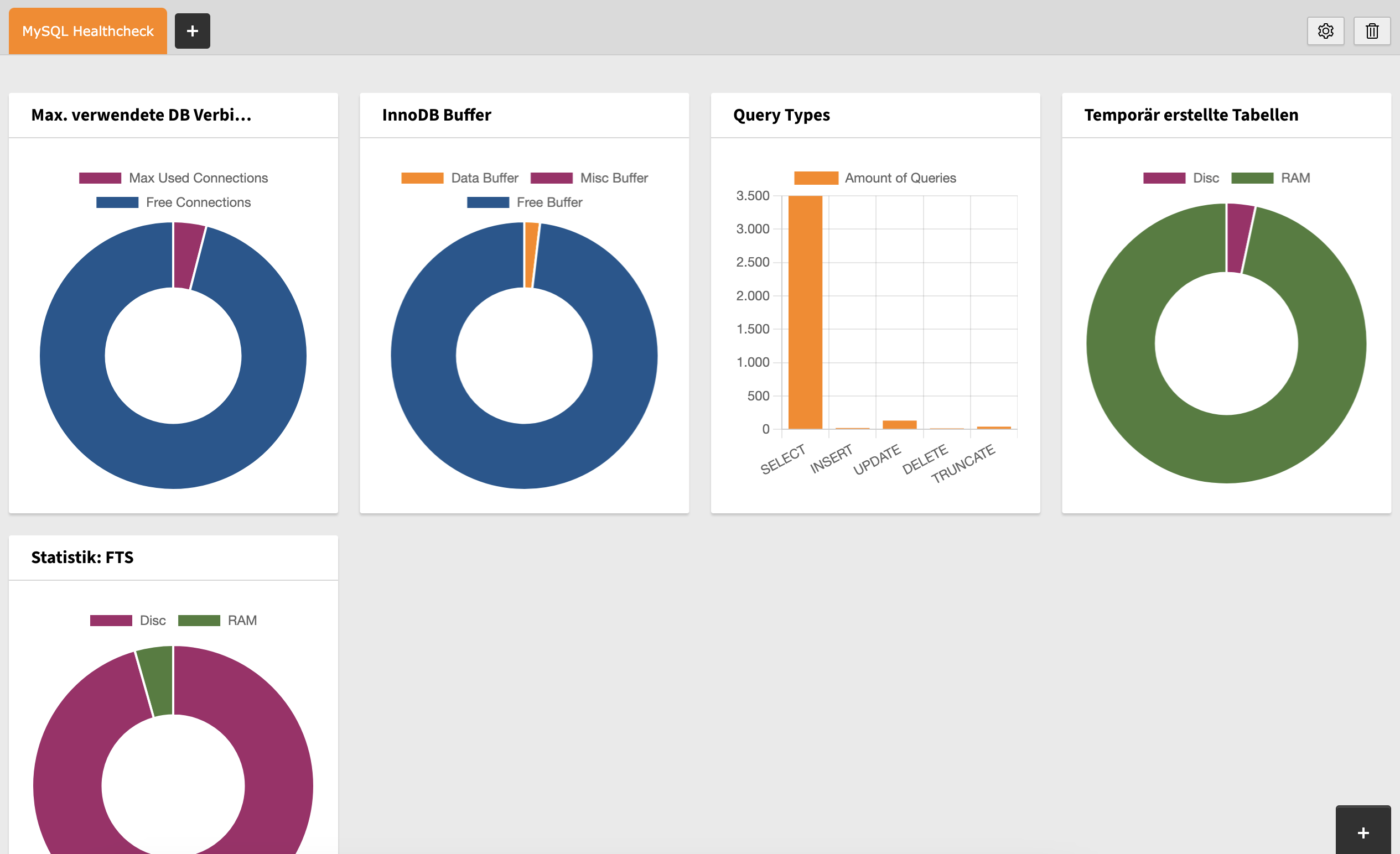
Dashboard Widgets 

Shows various dashboard widgets with current MySQL information

Installation 

Extension Manager 

Install mysqlreport in TYPO3 legacy installations with the help of Extension Manager:

  1. TYPO3 BE Login

    Login into TYPO3 backend as an administrator or system maintainer.

  2. Visit Extension Manager

    Click Extension Manager from the left side menu.

  3. Get Extension

    Choose Get Extensions from the upper selectbox.

  4. Search

    Use the search mask to search for mysqlreport.

  5. Install

    Find mysqlreport in the list and install the extension with the icon on the left.

  6. Wait

    The installation will be confirmed with a blue notification on the upper right.

Composer 

Install mysqlreport in TYPO3 Composer-based installations on the shell:

  1. Shell Login

    Login into shell of your TYPO3 installation.

  2. Change Directory

    Move into the root directory of your TYPO3 installation

  3. Install

    composer req stefanfroemken/mysqlreport
    Copied!
  4. Add mysqlreport profile table

    vendor/bin/typo3 extension:setup -e mysqlreport
    Copied!
    typo3/sysext/core/bin/typo3 extension:setup -e mysqlreport
    Copied!

Next step 

Configure mysqlreport in Extension Settings.

Configuration 

Extension Settings 

Head over to the Settings module of TYPO3 in the left menu of TYPO3 backend and choose Configure Extensions. Open the accordion for mysqlreport.

enableFrontendLogging 

Activate logging for frontend requests

mysqlreport will only collect the queries with their execution times and query type (SELECT/INSERT/UPDATE/DELETE).

enableBackendLogging 

Activate logging for backend requests

mysqlreport will only collect the queries with their execution times and query type (SELECT/INSERT/UPDATE/DELETE).

activateExplainQuery 

mysqlreport executes each query again with a prefixed EXPLAIN to retrieve detailed index and performance information. You will see these additional information in backend module of mysqlreport in section Profiling in the detail view of a selected query.

slowQueryThreshold 

mysqlreport can NOT read the original queries from Slow Query Log of your server. But, as we already have collected the duration of all queries, we can show the first 100 queries with a duration higher than the configured value here (Default: 10.0 seconds).

If you want to see queries slower than slowQueryThreshold you have to activate one of these profile checkboxes from above.

Administrator manual 

After installation of mysqlreport you will see a new backend module MySQL Report in System section of the left menu.

Choose a section from one of the topics.

Views 

Overview 

This is the first view you will see after opening the mysqlreport backend module. It contains general information about your MySQL/MariaDB server and uptime.

Query Cache 

Shows general information about the Query Cache of your server.

InnoDB 

Shows general information about the InnoDB status like InnoDB Buffer Pool Size of your server.

Threads Cache 

Shows general information about the Threads Cache of your server.

Table Cache 

Shows general information about the Table and Table Definitions Cache of your server.

Profiling 

This view is empty by default. Please visit extension settings before and activate your preferred profile method.

After visiting some pages in BE and/or FE this view will show you a grouped selection of all requests.

Click on the duration to show all queries of selected request grouped by type (SELECT/INSERT/DELETE).

Click on the duration to show all queries of given request and type ordered from lowest to fastest query.

Click again on duration of a query to show full query with its placeholders.

If you have activated addExplain in extension settings you will see further information about your query like timings about each step the server needs to collect the data for your query. Further you will see an EXPLAIN output of your query.

Queries using filesort 

Sorting a lot of hugh queries will exceed the amount of RAM usage and will start a sorting based on your hard-disk or SSD. This is always a lot slower than sorting data in RAM. It should be prevented as good as you can. Use this view to show all queries which initiated a file sort.

Queries with FTS 

If a table does not have sufficient indexes (INDEX) defined, it may happen that the server has to search full table one row after the other which costs a lot of time. Please check the list of queries here to identify queries without a defined index or, where a given index could not be used.

Slow Queries 

We have implemented this cool feature with version 1.1.0. Please activate profiling and set slowQueryTime in extension settings to your needs. After some queries where logged this view will show you the 100 slowest queries, if there is any slower than configured.

Clear Profiles 

After activating profiling in extension settings each query for each activated request will be stored in table tx_mysqlreport_query_information. As big as your TYPO3 could be, this table can grow very fast and can slow down your TYPO3 system a lot. Please keep an eye on that table. mysqlreport comes with a new entry in Clear Cache menu of TYPO3 (icon at the upper right) called Clear MySQL Profiles. A click will clear (TRUNCATE) the complete profile table.

Upgrades 

Upgrade to version 5.0.0 

Add TYPO3 14 compatibility

Removed TYPO3 13 compatibility

We add "adminpanel" as conflicting extension, because of duplicate SQL logging.

Upgrade to version 4.0.0 

Please visit Installtool and execute "DB compare":

  • Add new column using_index
  • Remove old column not_using_index
  • Remove old column profile
  • Add table tx_mysqlreport_query_information
  • Remove table tx_mysqlreport_domain_model_profile

Make sure TYPO3 "adminpanel" is not installed. This system extension interferes with our own SQL logger.

All profile or profileRecord variables are changed to queryInformationRecord.

The event ModifyProfileRecordsEvent was renamed to ModifyQueryInformationRecordsEvent.

All extension settings have new names, please visit settings and adopt settings to your needs again. There is no UpgradeWizard.

Upgrade to version 2.0.0 

I have moved the array based API to Services.yaml. This is a huge change which will break on TYPO3 systems installed as Standalone (ZIP/TAR). Please remove the old mysqlreport extension first and then install the new 2.0.0 version of mysqlreport. For composer based installations I could not reproduce this error.

If you get an error while upgrading, please remove the typo3temp/var/cache/code/di/ folder and reload your page.

Migrate array config to Services.yaml 

If you have added your own infoboxes to mysqlreport you have to migrate your infoboxes from array syntax in MySqlReportInfoBoxes.php to Services.yaml:

Old version:

return [
    'aUniqueName' => [
        'class' => \[YourVendor]\[YourExtKey]\InfoBox\Overview\AbortedConnectsInfoBox::class,
        'pageIdentifier' => 'overview'
    ]
];
Copied!

New version:

services:
  ...
  [YourVendor]\[YourExtKey]\InfoBox\Overview\AbortedConnectsInfoBox:
    tags:
      - name: 'mysqlreport.infobox.overview'
        priority: 60
Copied!

Please have a look into the Developer API to get a list of all allowed tags.

Developer manual 

mysqlreport used the first available hook/event of TYPO3 to attach its own SQL logger to the Doctrine system in TYPO3. Please keep in mind that therefore all queries before that hook could not be collected/analyzed.

With version 2.0.0 mysqlreport comes with a completely new API to add your own panels/infoboxes to backend module.

Please see API for more information.

MySQL Report API 

Since mysqlreport 2.0.0 there is a completely rewritten API to add your own panels/infoboxes to the backend module.

The infoboxes will be realized with the f:be.infobox ViewHelper of TYPO3.

Infobox Registry 

If you want to extend pages of mysqlreport with further infoboxes you have to add some lines to the Service.yaml of your extension.

Example content of the Service.yaml:

services:
  ...
  YourVendor\YourExtKey\InfoBox\Information\ConnectionInfoBox:
    tags:
      - name: 'mysqlreport.infobox.[pageIdentifier]'
        priority: 60
Copied!

As you see, each infobox in the backend module has its own PHP class. Please attach the tag name for the page you want to modify, to each of your infobox classes. With priority you can change the loading order of the infoboxes on a specific page.

Currently, following tags are available:

  • mysqlreport.infobox.status
  • mysqlreport.infobox.innodb
  • mysqlreport.infobox.misc
  • mysqlreport.infobox.query_cache
  • mysqlreport.infobox.table_cache
  • mysqlreport.infobox.thread_cache

Your own Infobox 

Create a new PHP class which extends the AbstractInfoBox class of mysqlreport:

<?php

declare(strict_types=1);

namespace StefanFroemken\Mysqlreport\InfoBox\Overview;

use StefanFroemken\Mysqlreport\InfoBox\AbstractInfoBox;
use StefanFroemken\Mysqlreport\Menu\Page;

class AbortedConnectsInfoBox extends AbstractInfoBox
{
    protected $pageIdentifier = 'overview';

    protected $title = 'Aborted Connects';

    public function renderBody(Page $page): string
    {
        if (!isset($page->getStatusValues()['Aborted_connects'])) {
            $this->shouldBeRendered = false;
            return '';
        }

        $content = [];
        $content[] = 'You have %d aborted connects.';

        return sprintf(
            implode(' ', $content),
            $page->getStatusValues()['Aborted_connects']
        );
    }
}
Copied!

You have to set the pageIdentifier to show your infobox on the right view in backend module.

Set a title. It will be used as the title in the infobox.

The content of the infobox has to be rendered in the renderBody method. Over the $page argument you have access to all the status and variable values of your MySQL/MariaDB server.

Highlight Infobox 

The AbstractInfoBox class comes with a setState method which allows values from StateEnumeration.

  • -2 or StateEnumeration::STATE_NOTICE
  • -1 or StateEnumeration::STATE_INFO
  • 0 or StateEnumeration::STATE_OK
  • 1 or StateEnumeration::STATE_WARNING
  • 2 or StateEnumeration::STATE_ERROR

Unordered List 

Sometimes it is useful to show some values of your server as list. The list will be shown at the bottom of the infobox.

// Results in <ul><li>Value is OK</li></ul>
$this->addUnorderedListEntry('Value is OK');

// Results in <ul><li><strong>Aborted connects:</strong> 25</li></ul>
$this->addUnorderedListEntry(
    $page->getStatusValues()['Aborted_connects'],
    'Aborted connects'
);
Copied!

Disable Infobox 

If a server variable is not available for a server, it may help to hide the infobox in backend module.

Use $this->shouldBeRendered = false; in renderBody of your class.

Use own Template 

By default mysqlreport uses the template from:

EXT:mysqlreport/Resources/Private/Templates/InfoBox/Default.html

Use template property to define your own template for rendering of your infobox:

protected $template = 'EXT:[your_ext_key]/Resources/Private/Templates/InfoBox/MyBetterTemplate.html'
Copied!

Known Problems 

AdminPanel 

If you have installed the TYPO3 AdminPanel mysqlreport can still be used, but collecting DB queries and profiling information will not work anymore, as AdminPanel registers its own SqlLogger and overwrites the SqlLogger of mysqlreport. Please deinstall AdminPanel, if you want or need full feature set of mysqlreport.

TYPO3 compatibility 

I have tried to add as many try-catch blocks as possible to nearly every method which was marked with @throws. This should prevent throwing exceptions or break TYPO3 while using mysqlreport. This extension is ready for LIVE systems. If there is still a problem, please create an issue at MySQL Report at GitHub

Support of further Database Systems 

Currently, mysqlreport just supports MySQL and MariaDB with driver mysqli and pdo_mysql only.

Support of further Connections 

Currently, mysqlreport just supports the DEFAULT Database Connection of TYPO3 only.

SQL Logger 

mysqlreport comes with its own SQL Logger. If you have implemented your own SQL Logger mysqlreport will overwrite SQL Logger with its own version.

Missing Queries in profiling 

mysqlreport is not a TYPO3 system extension. That's why mysqlreport has to wait until the first official hook or event to inject its own SQL Logger into the TYPO3 system. All queries before that event can therefore not be logged.

ChangeLog 

Version 5.1.0 

  • [TASK] Implement new ext and module icon specific for TYPO3 14.1
  • [TASK] Remove TYPO3 14.0 compatibility

Version 5.0.0 

  • [TASK] Add TYPO3 14 compatibility
  • [TASK] Remove TYPO3 13 compatibility

Version 4.0.2 

  • [TASK] Use specific connection for mysqlreport table

Version 4.0.1 

  • [TASK] Add logging for each try-catch

Version 4.0.0 

  • [TASK] Remove toolbar icon
  • [TASK] Replace placeholders in SQL to build read SQL for EXPLAIN
  • [TASK] Move EXPLAIN query in logger to destruct
  • [TASK] Add LoggingStatement to log bindValue und execute method
  • [TASK] Completely rework registering of logger
  • [TASK] Remove TYPO3 11 and TYPO3 12 compatibility
  • [TASK] Remove ConnectionHelper class
  • [TASK] Rename tx_mysqlreport_domain_model_profile to tx_mysqlreport_query_information

Version 3.0.4 

  • [BUGFIX] Update to correct TYPO3 version in composer.json

Version 3.0.3 

  • [BUGFIX] Allow installation of mysqlreport without installed dashboard

Version 3.0.2 

  • [DOCS] Add Screenshots

Version 3.0.1 

  • [DOCS] Reduce line length to max. 80 chars
  • [DOCS] Add a note about problems with "Add EXPLAIN" option
  • [TASK] Add status report about activated "Add EXPLAIN" option
  • [TASK] Add toolbar item to notify about activated "Add EXPLAIN" option

Version 3.0.0 

  • Remove TYPO3 10 compatibility
  • Add TYPO3 12 compatibility
  • [FEATURE] Implement a lot of dashboard widgets
  • [BUGFIX] Repair queries in ProfileRepository
  • [BUGFIX] Repair analyzing queries with FTS
  • [TASK] Apply new php-cs-fixer configuration
  • [DOCS] Set indents to 4 spaces

Version 2.1.0 

  • [FEATURE] Add Download Option for JSON and CSV
  • [BUGFIX] Further adjustments for queries with FULL GROUP
  • [TESTS] Remove PHP 7.3 tests

Version 2.0.4 

  • [BUGFIX] Incompatible queries in case of FULL GROUP

Version 2.0.3 

  • [DOCS] Use packagist package name as package name
  • [DOCS] Remove duplicate section

Version 2.0.2 

  • Use correct include in ChangeLog docs
  • Add space in admin manual to prevent broken parsing
  • Improve ChangeLog

Version 2.0.1 

  • Add upgrade section to documentation

Version 2.0.0 

  • Registration of InfoBoxes has moved from array syntax into Services.yaml
  • PageFinder has been migrated to Symfony Service Locator
  • Add new SqlViewHelper to format SQL statements (only Composer)
  • Update documentation. Explain new API.
  • Update documentation. Add a note about using AdminPanel.
  • Remove all usages of GeneralUtility::makeInstance
  • Add infobox on empty results in Slow Query Log, Queries using filesort and FTS
  • Add Event to modify profile records
  • Add EventListener to reduce precision of duration to 6

Version 1.1.5 

  • Use ->fetch() instead of ->fetchAssociative() for TYPO3 v10 standalone compatibility

Version 1.1.4 

  • Remove hard-coded version from ext_emconf.php

Version 1.1.3 

  • Prevent division by zero at several places

Version 1.1.2 

  • Prevent division by zero
  • Solve undefined array key cachecmd while storing records in BE
  • Add method to replace query questionmarks

Version 1.1.1 

  • Set default value of profile to empty array
  • Set connection configuration for SqlLoggerHelper
  • Set values to NULL for DBAL type NULL

Version 1.1.0 

  • Use ExtConf instead of ExtensionConfiguration class
  • Do not log queries to our own profile table
  • Implement ConnectionHelper to prevent logging own queries
  • Implement SqlLoggerHelper for temporary deactivating the logger
  • Implement Profile model for better type safety
  • Add infobox for max_allowed_packet
  • Add infobox for temporary tables
  • Update infobox for table cache
  • Update infobox for table definition cache
  • Add new module for slow queries
  • Add new extension setting to set duration for slow queries
  • Add button for detail view instead of clicking on duration value
  • Add query profile view for filesort, notUsingIndex and slow query lists
  • Implement ProfileFactory to reduce method calls to environment values

Version 1.0.0 

  • Remove TYPO3 v9 compatibility
  • Add TYPO3 v11 compatibility
  • This version is still TYPO3 v10 compatible
  • No new features, but completely rewritten code
  • Much better API to register new Panels/InfoBoxes for BE module

Sitemap