TYPO3 Extension friendlycaptcha_official 

Extension key

friendlycaptcha_official

Package name

studiomitte/friendlycaptcha-typo3

Version

main

Language

en

Author

Studio Mitte GmbH

License

This document is published under the Creative Commons BY 4.0 license.

Rendered

Fri, 06 Feb 2026 09:36:19 +0000


<abstract>


Table of Contents:
Introduction 

What does it do? 

This extension integrates the service of Friendly Captcha into your site by using the official API. This version only supports Friendly Captcha V2. For V1 support, please install an earlier version of the plugin.

Currently it supports the following form solutions:

  • System extension "form" (typo3/cms-form)
  • Community extension "powermail" (in2code/powermail)

Additionally the extension can be used in your own extensions.

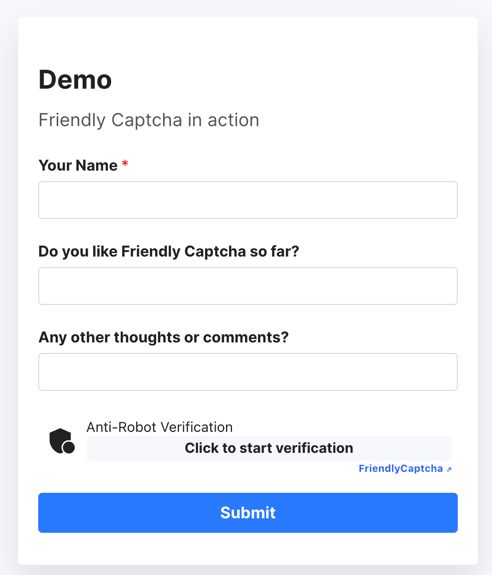
Screenshots 

This chapter should help people understand how the extension works. Remove it if it is not relevant.

Official demo of Friendly Captcha

Official demo of Friendly Captcha

Installation 

This extension can be installed as most of all other extensions of TYPO3 too.

Composer 

Use composer to install this extension by using

composer require studiomitte/friendlycaptcha
Copied!

Extension Manager 

Use the TYPO3 Extension Manager to install this extension.

Search for friendlycaptcha_official and install the extension.

General configuration 

It is required to have an account at https://friendlycaptcha.com/ before being able to use this extension!

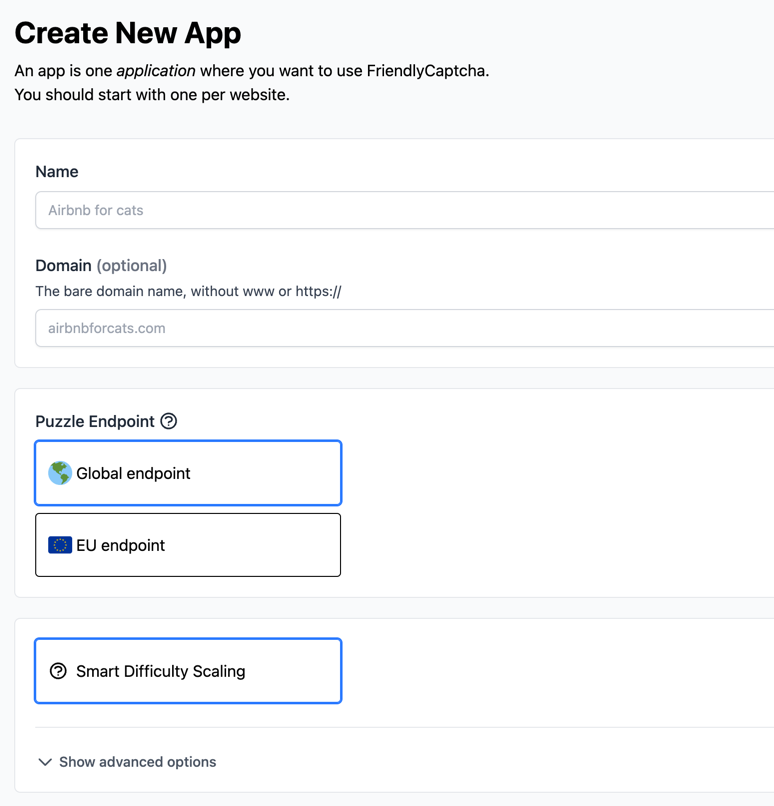
After creating the account, you need to setup a so called Application

Creation of an application

Creation of an application

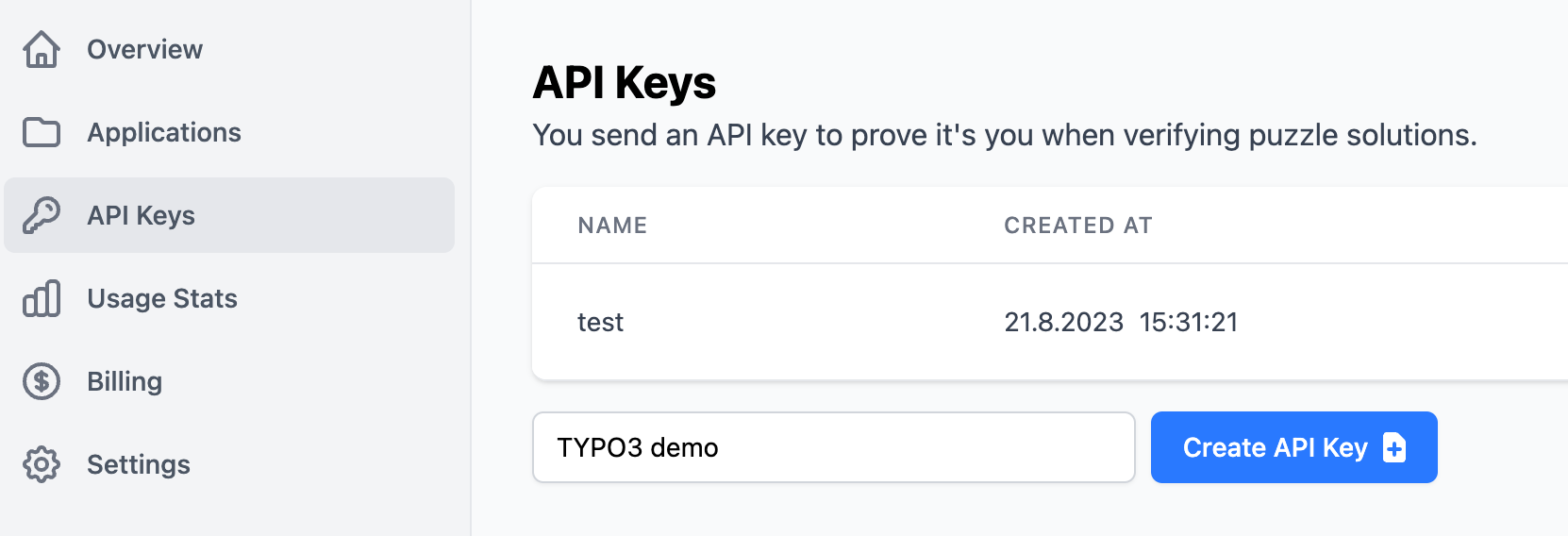
and afterwards you need to create new a new API Key. Please copy the generated key as you need it later!

Creation of an API Key

Creation of an API Key

Integration 

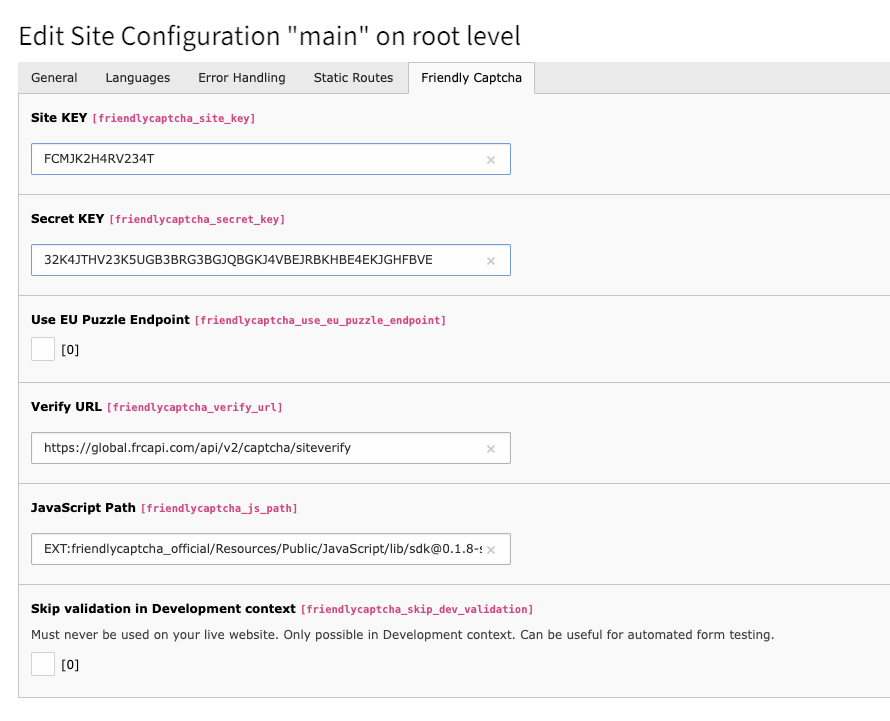
The integration is configured in the Sites module.

Switch to the module Site Management/Sites and select the site which you want to configure.

A new tab Friendly Captcha is available which includes all configuration options.

Integration in the Site module

Integration in the Site module

By default, the global endpoint https://global.frcapi.com/api/v2/captcha/siteverify is used. If you prefer to use the EU endpoint, enter https://eu.frcapi.com/api/v2/captcha/siteverify in Verify URL field and ensure that the Use EU Puzzle Endpoint option is checked.

Working with automated tests 

If you are using automated tests you might want to skip the captcha. This can be achieved by setting the folloowing ENV variable FRIENDLYCAPTCHA_SKIP_HEADER_VALIDATION to a string with minimum length of 30.

Now provide the same string with with the request header X-FriendlyCaptcha-Skip-Validation.

EXT:form 

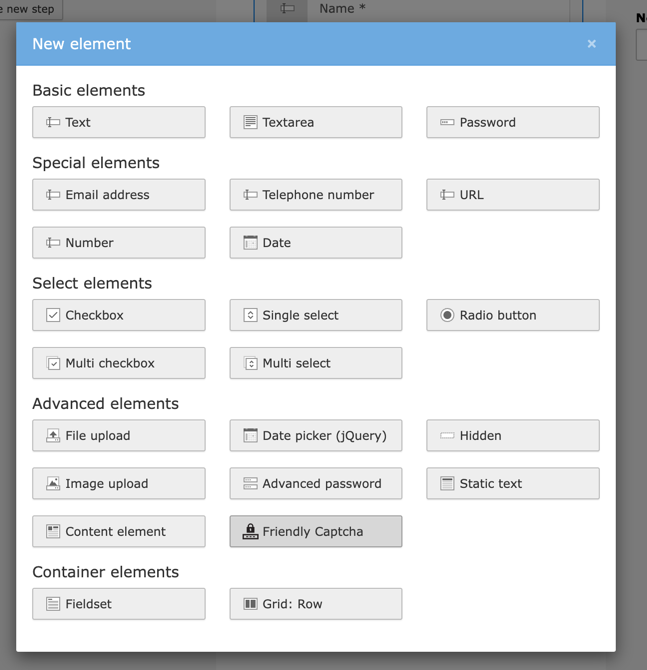
If the extension form is used, the Friendly Captcha integration is automatically available in the section Advanced Elements.

Field "Friendly Captcha"

Field "Friendly Captcha"

The automatically used template can be found at EXT:friendlycaptcha_official/Resources/Private/Form/Partials/Friendlycaptcha.html.

EXT:powermail 

Friendly Captcha can be used in EXT:powermail by following these steps:

Setup 

TypoScript and Page TsConfig need to be extended.

Add TypoScript 

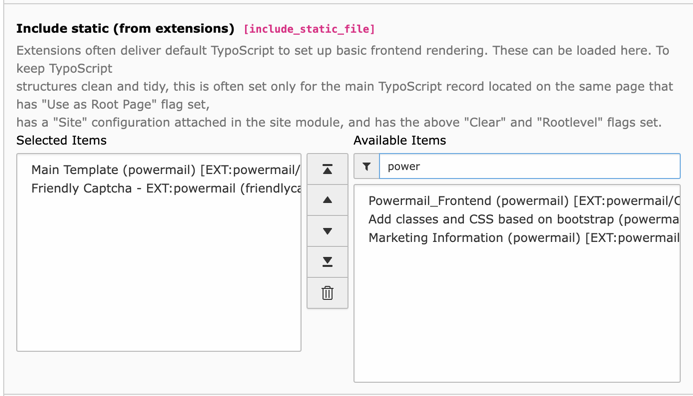
Either import the TypoScript manually in your site package or add the following line to your TypoScript template:

@import 'EXT:friendlycaptcha_official/Configuration/TypoScript/Powermail/setup.typoscript'
Copied!

or select the TypoScript in your TypoScript record

Add TypoScript

Add TypoScript

Add Page TsConfig 

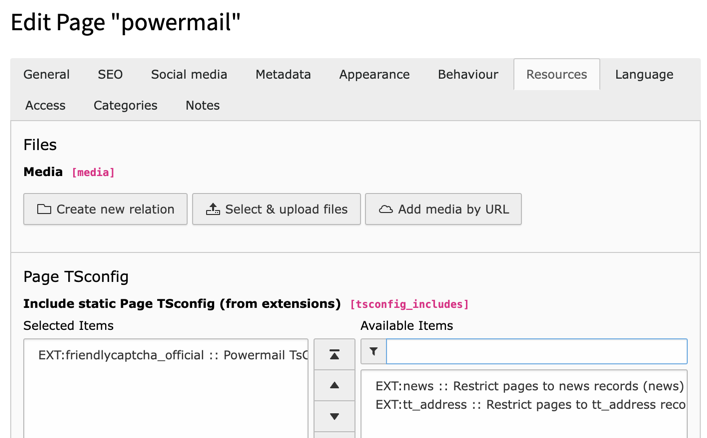
Either import the TsConfig manually in your site package or add the following line to your TsConfig files :

@import 'EXT:friendlycaptcha_official/Configuration/PageTsConfig/powermail.typoscript'
Copied!

or select the TypoScript in your TypoScript record

Add Page TsConfig

Add Page TsConfig

Usage 

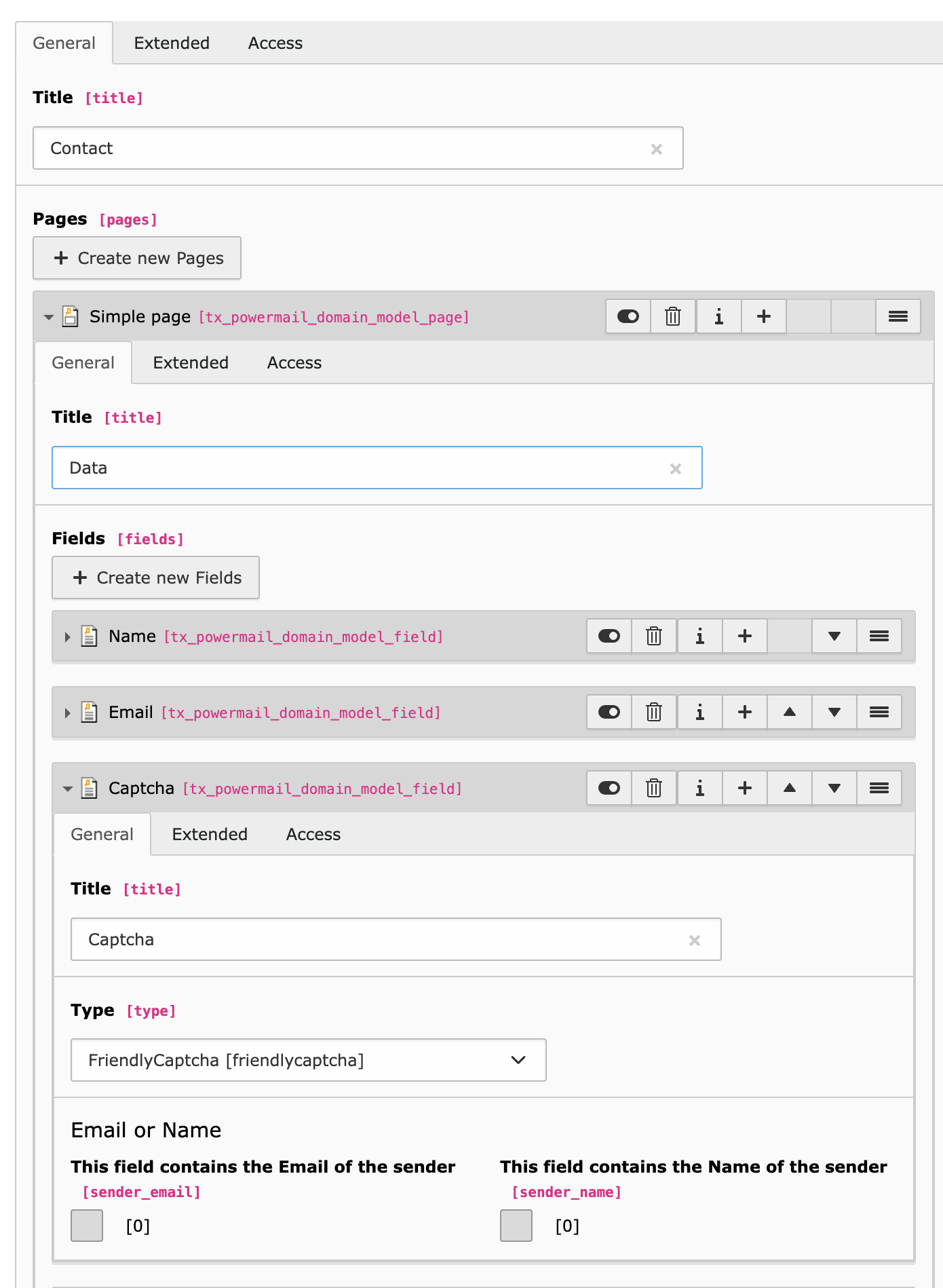
It is now possible to select Friendly Captcha as a field type in a powermail field record

Add Friendly Captcha to your form

Add Friendly Captcha to your form

Result 

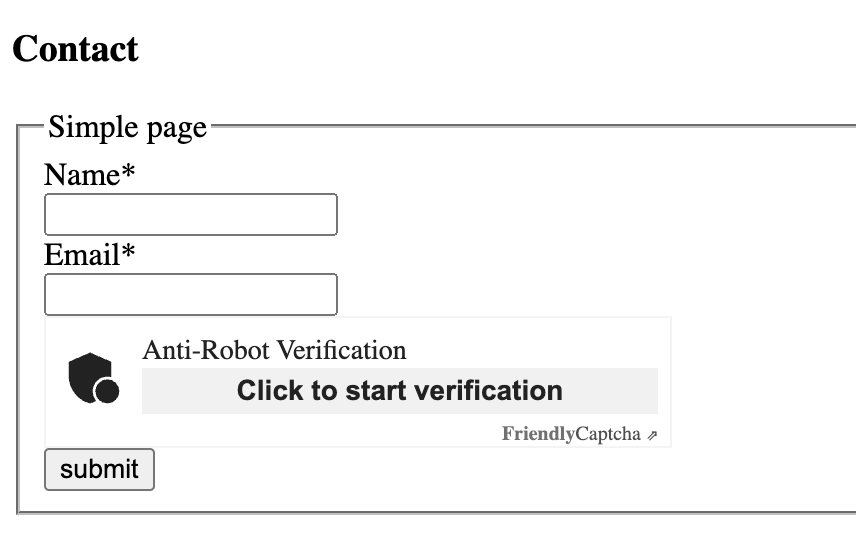
The result should look like this:

Result

Result

Custom integration 

To integrate Friendly Captcha in your own extensions, 2 steps are required:

Integrate puzzle 

The puzzle needs to be integrated into the form. This can be done like this in your templates

<html xmlns:f="http://typo3.org/ns/TYPO3/CMS/Fluid/ViewHelpers"
      xmlns:friendlycaptcha="http://typo3.org/ns/StudioMitte/FriendlyCaptcha/ViewHelpers"
      data-namespace-typo3-fluid="true">

    <f:variable name="captchaConfiguration" value="{friendlycaptcha:configuration()}" />
    <f:if condition="{captchaConfiguration.enabled}">
        <f:then>
            <f:asset.script defer="1" async="1" identifier="friendlycaptcha" src="{captchaConfiguration.jsPath}" />
            <div class="frc-captcha" data-sitekey="{captchaConfiguration.siteKey}" {f:if(condition: '{captchaConfiguration.useEuPuzzleEndpoint}', then: 'data-api-endpoint="eu"')}></div>
        </f:then>
        <f:else>
            <p>{f:translate(key:'LLL:EXT:friendlycaptcha_official/Resources/Private/Language/locallang.xlf:configuration_missing')}</p>
        </f:else>
    </f:if>

</html>
Copied!

Verify 

The verification of the puzzle is done after the form has been submitted. Either use the validator \StudioMitte\FriendlyCaptcha\FieldValidator\FormValidator or use a custom implementation with a code like this

$friendlyCaptchaService = GeneralUtility::makeInstance(Api::class);
// either pass the solution as 1st argument to verify() or let it be fetched from the request within the method
if (!$friendlyCaptchaService->verify()) {
    $this->addError(
        $this->translateErrorMessage('message.invalid', 'friendlycaptcha_official'),
        1689236324
    );
}
Copied!

Migration to FriendlyCaptcha V2 

If you’re currently using an earlier version of the plugin with Friendly Captcha V1 and want to switch to Friendly Captcha V2:

  • Enable V2 in yout Application in the Panel at https://friendlycaptcha.com/
  • Install the newest version of the plugin (min v1.0)
  • In TYPO3 backend, go to the Site Management/Sites module and switch to the FriendlyCaptcha tab. You need to change the URLs

Puzzle Endpoint - check it if you want to use the EU Endpoint Verify URL - https://global.frcapi.com/api/v2/captcha/siteverify or https://eu.frcapi.com/api/v2/captcha/siteverify if you prefer to use EU endpoint JavaScript Path - EXT:friendlycaptcha_official/Resources/Public/JavaScript/lib/sdk@0.1.26-site.compat.min.js

JavaScript Path. _v2.1.0_update:

Migration to FriendlyCaptcha v2.1.0 

If you’re currently using an earlier v2 version of the plugin and want to switch to Friendly Captcha v2.1.0:

  • After install the newest version, you need to change the JavaScript Path in TYPO3 backend - Site Management/Sites module

Change EXT:friendlycaptcha_official/Resources/Public/JavaScript/lib/sdk@0.1.8-site.compat.min.js to EXT:friendlycaptcha_official/Resources/Public/JavaScript/lib/sdk@0.1.26-site.compat.min.js

Why to switch? 

Version 2.1.0 of the plugin uses the latest 0.1.26 version of the Friendly Captcha widget library, which includes improvements to accessibility.

Sitemap