(Sudhaus7) Responsive Picture 

Extension key

responsive_picture

Version

5.0

Language

en

Description

Adding responsive images to TYPO3

Keywords

responsive, image, picture, media, query

Copyright

2020

Author

Sudhaus7, a B-Factor GmbH label

License

Open Content License available from www.opencontent.org/opl.shtml

Rendered

Wed, 13 May 2026 08:45:15 +0000

Table of Contents

Introduction 

What does it do? 

This is a TYPO3 Extension which automatically creates media alternatives for an image.

In the TYPO3 Backend an image can have alternative images and crop configurations per media query added.

For the Frontend a Fluid Partial is available as drop-in replacement for the Media/Rendering/Image Partial shipped with the fluid_styled_content extension.

An editor can select a part of an image for mobile display and a completely different image for the 4k Desktop.

New in 1.0.0 missing media sizes are now created automatically media sizes and their maxWidth and maxHeight are now configured in TypoScript Partial Media/Rendering/Image is a true drop-in replacement Documentation covers usage in the Frontend

Screenshots 

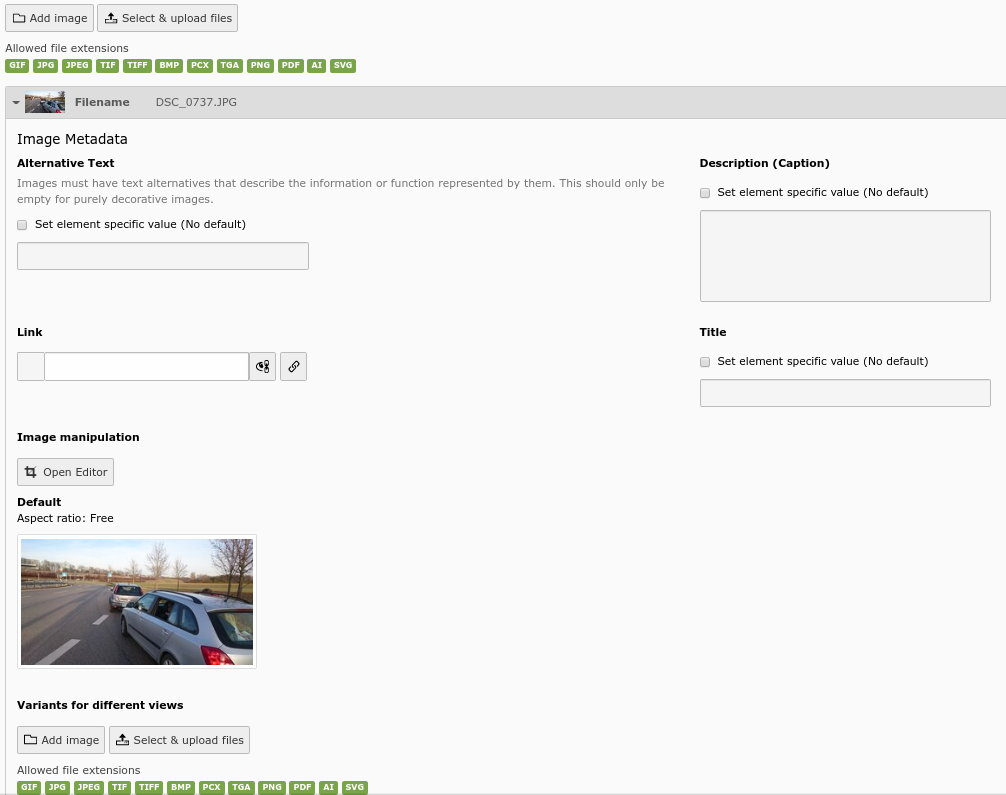
Normal view of image backend with new button

The standard view of the image backend with the new variants button

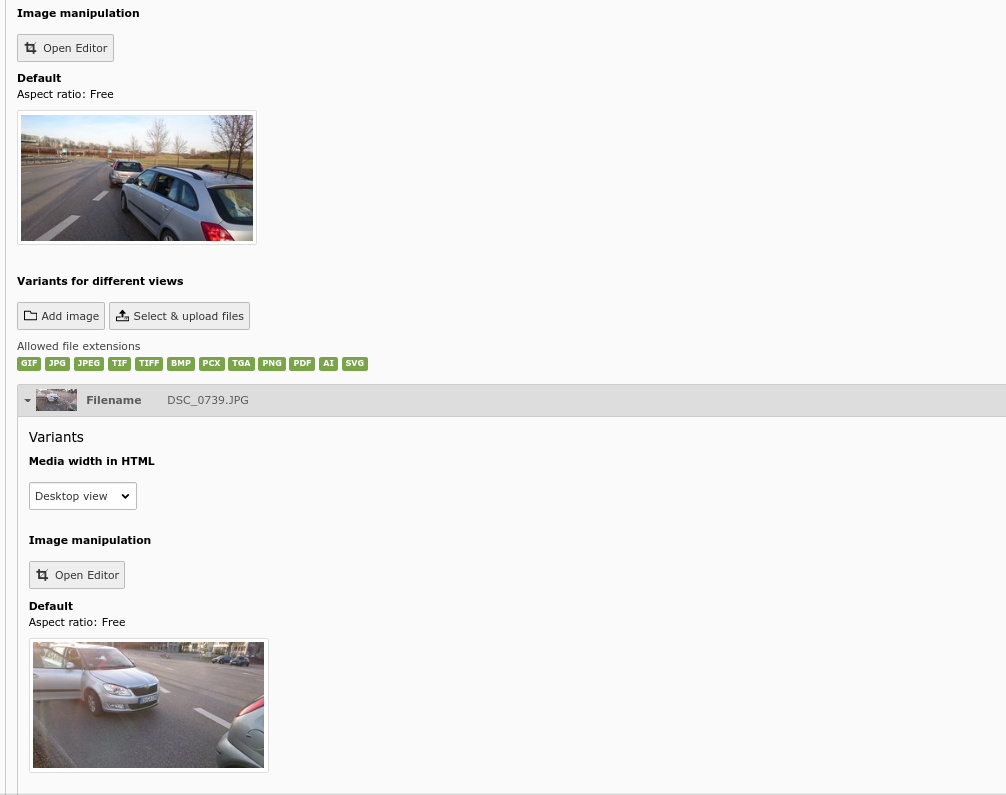
View with added picture variant

The view with an added variant image

Configuration 

In this section you will find the available configuration options for the Frontend and the Backend

Frontend 

Image sizes and media queries are managed in TypoScript in config.tx_responsivepicture

config.tx_responsivepicture {
    autocreatevariations = 1
    sizes {
        10 {
            key = (min-width: 1200px)
            mediaquery = (min-width: 1200px)
            maxW = 1600
            maxH = 1600
        }
        20 {
            key = (min-width: 768px)
            mediaquery = (min-width: 768px)
            maxW = 1024
            maxH = 1024
        }
        30 {
            key = (min-width: 300px)
            mediaquery = (min-width: 300px)
            maxW = 600
            maxH = 600
        }
    }
}
Copied!

config.tx_responsivepicture.autocreatevariations 

Property
autocreatevariations
Data type
bool
Description
Defines if missing media variations should automatically be created. Default: true

config.tx_responsivepicture.sizes 

Property
sizes
Data type
array
Description
List of media queries and the respective sizes. The order of this list is preserved and reflects the order of the variations in the file reference.

config.tx_responsivepicture.sizes.[idx].key 

Property
key
Data type
string
Description
The identifier / key of this setting. This must correspond with the key in the PageTS configuration of TCEFORM.sys_file_reference.media_width. For backwards compatibility this looks like the media query, but can be any character sequence.

config.tx_responsivepicture.sizes.[idx].mediaquery 

Property
mediaquery
Data type
string
Description
The concrete media query used later in the <source> tag inside a <picture> element

config.tx_responsivepicture.sizes.[idx].maxW 

Property
maxW
Data type
string
Description
The max width of the image variation to be generated for this media query.

config.tx_responsivepicture.sizes.[idx].maxH 

Property
maxH
Data type
string
Description
The max height of the image variation to be generated for this media query.

Backend 

New media queries can be added to the backend dropdown inside the variation through the PageTS tree by adding entries to: TCEFORM.sys_file_reference.media_width

media_width 

Property
media_width
Data type
array
Description

List of media query widths

Example:

media_width.addItems {
    (min-width: 200px): Very small device image
    (min-width: 1600px): Very large screen
}
Copied!

Model and Properties 

the following properties are now additionally available to a file_reference (\TYPO3\CMS\Core\Resource\FileReference) object in the Frontend.

New properties 

Property
variants
Method
FileReference::getVariants()
Data type
array
Description

retrives an array of file references containing the media variations (see Frontend). The data is loaded when the property is accessed the first time.

Example:

<f:for each="{image.variants}" as="variant">
    do stuff
</f:for>
Copied!
Property
variant
Method
FileReference::isVariant()
Data type
bool
Description

returns true if a file reference is a variant of another file reference

Example:

<f:for each="{image.variants}" as="variant">
    <f:if condition="{variant.variant}">
        do something conditionally
    </f:if>
</f:for>
Copied!
Property
mediaquery
Method
FileReference::getMediaquery()
Data type
string
Description

returns the media query for this variant. If the object is not a variation then it will return an empty string.

Example:

<f:for each="{image.variants}" as="variant">
    <source media="{variant.mediaquery}" .. />
</f:for>
Copied!
Property
variationmaxwidth
Method
FileReference::getVariationmaxwidth()
Data type
string
Description

returns the configured max width for this variation.

Example:

<f:for each="{image.variants}" as="variant">
    <source srcset="{f:uri.image(image: '{variant}', maxWidth: '{variant.variationmaxwidth}')}">
</f:for>
Copied!
Property
variationmaxheight
Method
FileReference::getVariationmaxheight()
Data type
string
Description

returns the configured max height for this variation.

Example:

<f:for each="{image.variants}" as="variant">
    <source srcset="{f:uri.image(image: '{variant}', maxHeight: '{variant.variationmaxheight}')}">
</f:for>
Copied!

Drop-in ready partial 

There is a drop-in preconfigured implementation of all of this available in this extension if you use fluid_styled_content. It is enabled by default, but depending of you implementation it might not be used.

Typoscript configuration 

lib.contentElement {
    partialRootPaths {
        1 = EXT:responsive_picture/Resources/Private/Partials/
    }
}
Copied!

This enables for fluid_styled_content to load the extensions own partial, which is Media/Rendering/Image.html

Partial 

<picture>
    <f:for each="{file.variants}" as="variant">
        <source media="{variant.mediaquery}"
                srcset="{f:uri.image(image: '{variant}', maxWidth: '{variant.variationmaxwidth}', maxHeight: '{variant.variationmaxheight}')}">
    </f:for>
    <f:media alt="{file.alternative}"
             class="image-embed-item"
             file="{file}"
             height="{dimensions.height}"
             loading="{settings.media.lazyLoading}"
             style="width:auto;height:auto;max-width:100%"
             title="{file.title}"
             width="{dimensions.width}" />
</picture>
Copied!

This will create a <picture> element with several <source> elements according to the configured media sizes, resized according to the max width and height and the original image as fallback. Cropping informations are applied as well in this step.

Index: Labels for Crossreferencing 

.. ref-targets-list::

Thanks 

This extension was developed and is maintained by Sudhaus7 (https://sudhaus7.de)

Thanks go as well to Georg Ringer for his excellent Documentation of EXT:news, which provided me a great stepping stone for writing this documentation.