Broken Link Fixer checks the links on your website, generates a report
and allows you to edit entries with broken links directly from the report
in the TYPO3 backend.
It can check all types of links: Links to pages, records, external URLs
and file links. This task can be executed in the TYPO3 backend via the
TYPO3 Scheduler or via the command line
and supports sending a status mail when broken links are detected.
The content of this document is related to TYPO3, a GNU/GPL CMS/Framework
available from www.typo3.org
Broken Link Fixer (brofix) is an extension which enables you to conveniently
check your website for broken links. This manual explains how to
install, configure and use the extension.
The extension was started using the core EXT:linkvalidator source code and documentation
but is now an independent project.
What does it do?
Broken Link Fixer checks the links in your website, reports
broken links and provides a way to fix these problems.
It includes the following features:
Broken Link Fixer can check all kinds of links. This includes internal
links to pages and content elements, file links to files in the local
file system and external links to files somewhere else in the web.
Broken Link Fixer checks a number of fields by default, for example
header fields and text fields of content elements.
It can be configured to check any field you like (via TSconfig).
A console command can be setup to check
automatically. This can also generate a report which is sent via email.
Broken Link Fixer is extendable. It provides hooks to check special types
of links or override how the checking of external, file and page
links works.
Difference to linkvalidator
Broken Links Fixer was forked off linkvalidator but then developed independantly,
which made it possible to make more significant changes:
improved user interface with better handling of list of broken links:
sort (by page, link type, link target, error type etc.)
paginate (if more than 100 broken links are displayed)
filter the broken link list, e.g. by URL
"clickfilter": filter by content element or URL by click
possible to recheck for a specific URL by clicking a button
"Check link again" - all broken link records with
this target will be updated if status changes
more descriptive (flash) messages to show what is going on
visible hints for "stale" broken link records (e.g. if content element
was edited after last link check)
more visibility of broken links by showing number of broken links for the
page in the page module (if EXT:page_callouts is installed)
better handling of external links
possibility to exclude links from being checked to avoid false positives
link target cache to avoid frequent rechecking of external links
crawl delay: automatically delay between checking links of one domain
link checking
the scheduler task was replaced by a console command
it is not necessary to specify the start pid, if no pid is given, the
site configuration is used
configuration from Global Configuration is used, if not explicitly
specified in link configuration (e.g. from email address)
the broken link records are not removed and created again, but updated.
In linkvalidator, the entire list (for current check criteria) is removed
at beginning of link check. This might result in duplicates and in broken
links missing during link check.
content fields are not checked if they are not editable in the BE. This
includes permission checks (which linkvalidator also handles), but also
checks via FormEnginge - for example tt_content.bodytext is not editable
in the BE for plugins. If CE types are switching in content elements, this
can be a problem with linkvalidator.
broken link records are automatically removed via DataHandler hook if a
record is deleted.
Credits
This extension is based on the TYPO3 core extension
EXT:linkvalidator. It was
forked from the source code of linkvalidator. Thus, it is based on the work
of the original authors and maintainers.
Glossary
false positives
These are URL which were falsely detected as broken. They are valid
URLs which Broken Link Fixer detects as broken.
link source
You can think of a link as a connection between 2 points, the link source
and the link target.
The link source, is where the link is defined, e.g. in the text of
a content element.
Link Source -----> Link target
Copied!
Understanding link source and link target can be helpful to understand
how Broken Link Fixer works. Some things affect the link target (the URL),
such as link target excluding.
link target
The link target is where the link points to. This is usually an URL,
such as http://example.org/example. It can also be a page or a file.
on-the-fly checking
"On-the-fly" checking means almost immediate link checking as soon as
the record is saved. This is in contrast to periodic link checking via
the console command.
stale links
These are links, where the broken link status is "stale", meaning it may be
outdated. For example the broken link is still shown in the list
while the record has already been updated and the broken link fixed.
Installation
If you are using Composer, you can install it like any other extension.
composer require sypets/brofix
Copied!
If you are not using Composer, you can install Broken Link Fixer
(brofix) using the Extension Manager.
page_callouts
It is recommended to install the extension page_callouts as well, as it
will supply the hook / event to show information about broken links
in the page module.
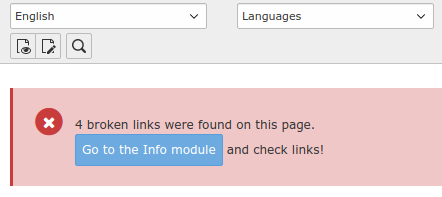
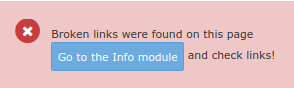
Page module with information about broken links and link to broken link list.
If an email should be sent on every link check performed via the console
command, it is a good idea to check if email sending is setup correctly
and works. (Sending a mail is optional).
# email recipients
mod.brofix.mail.recipients = recipient@example.org
# Add contact information here, such as an email address or a URL which contains an email addressmod.brofix.linktypesConfig.external.headers.User-Agent = Mozilla/5.0 (compatible; Site link checker; +https://gratesturff.com/imprint.html)# pid of a page of type folder - this is where the exclude link target# records are stored
mod.brofix.excludeLinkTarget.storagePid = 20
Copied!
Commands
If using scheduler, select TaskExecute console commands first.
brofix:checklinks
Check for broken links
This will use the settings from the TSconfig configuration.
If no start pages are supplied as arguments, all start pages
that have a site configuration are used.
Links will be checked based on the configured linktypes
and searchFields if they have supported TCA
configuration.
After completion, an email is sent (if configured, see also -e / --send-email
below) for each site or start page (see also -p option).
You can run the console command from the command line (or cron) or configure
it in the scheduler (Task:Execute console commands
| Schedulable Command:brofix:checklinks).
The following examples show the console commands in a Composer installation.
# Use -h to show all parameters:
vendor/bin/typo3 brofix:checklinks -h
Copied!
Do not execute link checking, just show what configuration is used:
vendor/bin/typo3 brofix:checklinks --dry-run
Copied!
If everything is already configured via TSconfig, you don't need any arguments:
vendor/bin/typo3 brofix:checklinks
Copied!
Execute link checking, send an email to webmaster@example.org:
Can be one or more page ids (separated by comma) to use as start pages. If none
is given, the site configuration is used to determine the start pages. Based
on the start pages and depth, the page tree is traversed to gather all pages
on which broken links will be checked (omitting hidden pages and subpages of
hidden pages with extendToSubpages).
In CLI, use several -x options if more than one, e.g -p 1 -p 2 on the command line.
In the scheduler, seperate several with comma.
# Use 1 and 123 as start pages
vendor/bin/typo3 brofix:checklinks -p 1 -p 2
Copied!
-d / --depth
default: uses TSConfig which has a default of 9999 (infinite)
When traversing the page tree, how deep to go. Overrides TSconfig depth. If this option is not given, the TSconfig configuration of the
start page Broken Link Fixer is currently checking is used.
# Check only the page given, do not traverse page tree
vendor/bin/typo3 brofix:checklinks -p 1,123 -d 0
Copied!
-t / --to
default: Use TSconfig mail.recipients.
If this is also empty (the default), global configuration is used (see
mod.brofix.mail.recipients in TSconfig).
Email address of recipient.
-e / --send-email
default: auto
Configure whether to send an email when link checking is complete.
If "auto"
is used (the default), this does not override the TSconfig setting. Using the
TSconfig setting makes it possible to configure the setting for each site
individually.
Possible values:
"never" : never send email (previously: 0)
"always": send email (previously: 1)
"any" : send email if any broken links were found
"new" : send email if new broken links were found
"auto" : do not override, TSconfig setting (or default) is used
# send email only if broken links were found
vendor/bin/typo3 brofix:checklinks -e any
Copied!
-x / --exclude-uids
default: none
Important
This will only apply to checking with scheduler / cli. If checking in the
backend, the pages will still be checked which can lead to inconsistent
results. Use with care!
Make it possible to omit specific page ids and their subpages when checking.
In CLI, use several -x options if more than one, e.g -x1 -x2 on the command line.
In the scheduler, seperate several with comma.
# Use 1 and 123 as start pages
vendor/bin/typo3 brofix:checklinks -p 1,123 -x 55 -x 60
Give your backend users / user groups permission to the "Check Links"
(web_brofix) module.
Give backend users / user groups permission to the table
tx_brofix_exclude_link_target, if they should be able to add URLs to the
list of URLs not to be checked. (This requires a certain
amount of prudence and understanding, otherwise this feature may be misused.)
In this case, you must also set TSconfig excludeLinkTarget.storagePid
to a page of type system folder. The editors must have access to this page
(to be able to save records on this page).
Global Configuration
The global configuration affects not just brofix but the behaviour of
other extensions as well.
If mod.brofix.mail.sendOnCheckLinks is 1, an email will be sent. You
can override this in the console command. If an email should be sent,
you should configure the recipient and sender address.
You can configure the following settings to set the from address globally (or
you can set it specifically for brofix via TSconfig):
Extension configuration is used for global settings which should be the same
for the entire TYPO3 installation.
It is
configured in the backend, via Settings | Extension Configuation
or using the file settings.php.
EXT:backend
EXT:backend | login.loginLogo
Logo
Login tab
default:
empty
Set the logo used in the Fluid email in the EXT:backend extension configuration:
$GLOBALS['TYPO3_CONF_VARS']['EXTENSIONS']['backend']['login.loginLogo'] = 'EXT:my_theme/Resources/Public/Images/login-logo.png or //domain.tld/login-logo.png';
Copied!
EXT:brofix
EXT:brofix | linkTargetCacheExpiresLow
External link target cache (in seconds) for checking
"regex:/^(httpStatusCode:(401|403):|libcurlErrno:60:SSL certificate problem: unable to get local issuer certificate)/"
available values:
either a regex starting with regex: or a string
If result from link target checking match this, consider the link target (URL)
as non-checkable. This is written to the database table and displayed in the
backend module. It is possible to filter by this status. By default, these
links are not displayed (since the default filter in the backend shows only
broken links).
Currently, these are the known status:
1: broken
2: ok
3: not possible to check ("non-checkable")
4: is excluded
This should also improve handling of cloudflare protected sites as these
typically return 403 HTTP status code. The link checking status is no longer
considered broken, it is now considered "not-checkable", since the actual
link check result cannot be obtained.
What kind of results from link checking, make the URL "non-checkable" can
be configured via Exension Configuration "combinedErrorNonCheckableMatch".
This can be either a regular expression (with prefix "regex:" and enclosing
delimeters (e.g. "/"). Or it can be a list of strings, separated by comma.
This is matched against a combination of the link checking result, consisting of:
Usually, you will want to apply this in any rich text fields where link tags
are used.
EXT:brofix | tcaProcessing
Perform TCA processing
Checking tab
default:
"default"
available values:
"default" | "full"
Changes how the TCA processing is done. The default setting may not work
for some configurations and especially for Flexforms. In that case, it should
be set to "full". This setting is still experimental, so it is not on by
default.
This setting results in 2 changes:
Use of the FormDataGroup
If the entire row is fetched for TCA processing. If "full" is on, the entire row is fetched.
If the value is "default", only the fields defined in "searchFields" are fetched, in addition
to some fields such as type, relevant fields for language evaluation and header.
By default, one of the following class names to use as FormDataGroup for TCA
processing will be used based on the value of tcaProcessing:
"" (empty, which means the default FormDataGroup based on tcaProcessing is used)
available values:
any valid class name which implements FormDataGroupInterface as fully qualified class name, for example MyvendorMyextensionFormEngineMyFormdatagroup
Changes how the TCA processing is done.
EXT:brofix | showEditButtons
(since TYPO3 v12)
Show button to edit entire record, only the field with a broken link or both.
Report tab
default:
"Both" (both buttons are displayed)
available values:
"Both", "Edit field", "Edit full"
EXT:brofix | showalllinks
(since TYPO3 v12)
Show all links, not just broken links.
Report tab
default:
1 (on)
available values:
1 (on) | 0 (off)
If this is on, all links can be displayed, not just the broken links. This
requires a full recheck if the setting was previously off or the feature not
yet available.
EXT:brofix | traverseMaxNumberOfPagesInBackend
Maximum number of pages to traverse in Backend ...
Report tab
default:
1000
available values:
any number, 0 turns feature off
Set the maximum number of pages traversed in the backend module.
This should be limited so that loading the broken link list in the backend
does not feel sluggish and slow. A good rule of thumb is to always keep the
time required to load a page in the Backend always under 1 second. Depending
on the performance of your site, you should use a limit such as 1000 (thousand).
Remember that even though pagination is applied, Broken Link Fixer will
always traverse through all subpages of the current page (unless the level
is restricted in the form). The traversing of the pages is not cached and
may cause considerable delays.
If not set, a default is automatically generated using the email address from Global Configuration
$GLOBALS['TYPO3_CONF_VARS']['MAIL']['defaultMailFromAddress'].
linktypes
optional
Property
mod.brofix.linktypes
Data type
string
Description
Comma separated list of hooks to load.
Possible values:
db: Check links to database records (pages, content elements).
file: Check links to files located in your local TYPO3 installation.
external: Check links to external files.
This list may be extended by other extensions providing a linktype
checker.
Default
db,file,external
searchFields.[table]
optional
Property
mod.brofix.searchFields.[table]
Data type
string
Description
Comma separated list of table fields in which to check for
broken links. Broken Link Fixer only checks fields that have
been defined in searchFields.
Broken Link Fixer ships with sensible defaults that work well
for the TYPO3 core. Not all fields which contain links are
currently checked though. You can configure additional fields
for extensions.
Warning
Currently, Broken Link Fixer can only detect links in specific types
of fields, as configured in TCA:
fields with at least one softref set
in their TCA configuration.
fields with type "link" (like tt_content.header_link)
For this reason, it is currently not possible to check for
pages.media.
Exclude specific content types from link checking. 'html' is not
checked by default, because the parsing for links does not always
work correctly and may cause a number of links to be displayed as
broken, which are in fact ok (false positives).
Default
html
doNotCheckContentOnPagesDoktypes
optional
Property
mod.brofix.check.doNotCheckContentOnPagesDoktypes
Data type
string
Description
Comma separated list of page types on which content should not be
checked. This still means the pages will get checked.
This is for example by default the cause for the page types shortcut
and external link.
Default
3,4 (Link to external URL, shortcut)
doNotCheckPagesDoktypes
optional
Property
mod.brofix.check.doNotCheckPagesDoktypes
Data type
string
Description
Comma separated list of page types which should not be checked.
This means if a page has a doktype which is listed in this list,
we do not do any link checking on the page.
Default
6,7,199,255 (Backend User section, Mount Point, Menu Separator, Recycler)
doNotTraversePagesDoktypes
optional
Property
mod.brofix.check.doNotTraversePagesDoktypes
Data type
string
Description
Comma separated list of page types which should not be traversed.
This means if a page has a doktype which is listed in this list,
we do not do any link checking on subpages of these pages (and
subpages of the subpages etc.).
Default
6,199,255 (Backend User section, Menu Separator, Recycler)
doNotCheckLinksOnWorkspace
optional
Property
mod.brofix.check.doNotCheckLinksOnWorkspace
Data type
int
Description
This option is used to enable or disable checking links that are created in Workspace, by default,
the links created on workspaces will be checked and reported.
Default
0
reportHiddenRecords
optional
Property
mod.brofix.reportHiddenRecords
Data type
int
Description
Whether links to hidden records should be treated as broken links.
Important
This used to be linkhandler.reportHiddenRecords but is now available
as configuration option for any linktype.
HTTP request header. It is recommended to leave the default value and not change this.
Default
*
timeout
optional
Property
mod.brofix.linktypesConfig.external.timeout
Data type
int
Description
Timeout for HTTP request.
Default
10
redirects
optional
Property
mod.brofix.linktypesConfig.external.redirects
Data type
int
Description
Number of redirects to follow. If more redirects are necessary to reach
the destination final URL, this is handled as broken link.
Default
5
excludeLinkTarget.storagePid
required (if "exclude URL" functionality should be available for non-admin
editors)
Property
mod.brofix.excludeLinkTarget.storagePid
Data type
int
Description
The pid of the storage folder which contains the excluded link target
records. If you want to enable editors to add URLs to list of excluded
URLs, you must change this (it must be != 0).
Create a central folder to store the excluded URLs or create one for each
site.
Important
The storage pid is stored along with the broken link records. If
you change this value, you should start a complete recheck of broken
links to get this updated.
Excluded link targets (=URLs) are treated as valid URLs. This can be
used for the rare case that an URL is detected as broken, but is
not broken. This may be the case for some sites which require login
credentials, but also for common sites where the automatic link
checking mechanism yields false results.
Default
0
excludeLinkTarget.allowed
optional
Property
mod.brofix.excludeLinkTarget.allowed
Data type
string
Description
Allowed link types which can be excluded. By default, it is only possible
to exclude external URLs. If you would like to make this available for
page links too, add additional link types, e.g.
allowed = external,db
Copied!
You can set it to empty to disable the "exclude URL" functionality:
allowed =
Copied!
Default
external
linkTargetCache.expiresLow
optional
Property
mod.brofix.linkTargetCache.expiresLow
Data type
int
Description
When the link target cache expires in seconds. Whenever an external URL
is checked or rechecked, the link target cache is used. Once the cache
expires, the URL must be checked again.
The value means that the information for external URLs is retained for
that time without having to access the external site.
2 different values are used for expiresLow and expiresHigh so that the
target will usually not expire during the on-the-fly checking which would
lead to delays.
As a rule of thumb, use the interval for full checking (e.g. 1 day for
once a day checking) and multiply that with a factor of 1 to 10 for
expiresLow. Add another interval for expiresHigh.
The interval for expiresLow will be used for full checking via the
console command.
# checking links daily, use 7 as factor:# 1 day * 7 * (seconds per day)# 1 * 7 * 24*60*60
linkTargetCache.expiresLow = 604800
# 1 * 8 * 24*60*60
linkTargetCache.expiresHigh = 691200
Copied!
Default
604800 (7 days)
linkTargetCache.expiresHigh
optional
Property
mod.brofix.linkTargetCache.expiresHigh
Data type
int
Description
See tsconfiglinktargetcacheexpires for description
Default
691200 (8 days)
crawlDelay.seconds
optional
Property
mod.brofix.crawlDelay.seconds
Data type
int
Description
The minimum number of seconds that must have passed between
checking 2 URL for the same domain.
If the required time has already passed since an URL of the same domain
was last checked, the wait is not performed.
This helps to prevent that external sites are bombarded with requests from
our site.
Note
Currently, a wait is not performed for every URL if URLs are redirected
because this is handled internally by Guzzle.
This is a pragmatic approach to make sure that a minimum delay is used
when checking URLs of the same site. As a site may have multiple domains
or several domains may be used by the same site, this will not always get
the desired result, but it is a "good enough" approach.
This will not be used for on-the-fly
checking, only for checking via the console command task.
crawlDelay.seconds = 10
Copied!
Default
5
crawlDelay.nodelay
optional
Property
mod.brofix.crawlDelay.nodelay
Data type
string
Description
Do not use the crawlDelay.seconds wait period for these domains
crawlDelay.nodelay = example.org,example.com
Copied!
Default
empty
report.docsurl
optional
Property
mod.brofix.report.docsurl
Data type
string
Description
Add a documentation URL. This will add an "i" button to the broken link
report with a link to the documentation.
Whether to show the "Check links" button. By default, the button is
available for "admin" users, but not for regular editors.
Warning
If activated, editors can start a checking of all pages and subpages
of inifinite level (if value is set to 999). This may put some load
on the system as it initiates a number of queries to the database.
It is recommended to be restrictive with this permission.
Deactivate the button for non-admin users (default):
mod.brofix.report.recheckButton = -1
Copied!
Activate button if depth=0 (current page) is selected:
mod.brofix.report.recheckButton = 0
Copied!
Enable the button in User TSconfig with depth "infinite" (for a user or group):
page.mod.brofix.report.recheckButton = 999
Copied!
If the current depth <= recheckButton, the button will be displayed.
This makes it possible to not only control whether checking is
possible, but also the depth
Default
-1 (do not show button for non-admin users)
mail.sendOnCheckLinks
optional
Property
mod.brofix.mail.sendOnCheckLinks
Data type
string
Description
Enable sending an email when the brofix:checkLinks console command
is excecuted. This can be overridden via command line arguments (-e).
Possible values:
"never" : never send email (previously: 0)
"always": send email (previously: 1)
"any" : send email if any broken links were found
"new" : send email if new broken links were found
Default
always
mail.recipients
required
Property
mod.brofix.mail.recipients
Data type
string
Description
Set the recipient email address(es) of the report mail sent by the
console command. Can be several, separated by comma.
Example
mod.brofix.mail.recipients = sender@example.org
Copied!
Default
This is empty by default.
$GLOBALS['TYPO3_CONF_VARS']['MAIL']['defaultMailFromName'] and
$GLOBALS['TYPO3_CONF_VARS']['MAIL']['defaultMailFromAddress']
is used if this is empty.
mail.fromname
required (unless set in
$GLOBALS['TYPO3_CONF_VARS']['MAIL']['defaultMailFromName'])
Property
mod.brofix.mail.from
Data type
string
Description
Set the from name of the report mail sent by the console command.
Example
mod.brofix.mail.from = Sender
Copied!
Default
This is empty by default.
$GLOBALS['TYPO3_CONF_VARS']['MAIL']['defaultMailFromName']
is used if this is empty.
mail.fromemail
required (unless set in
$GLOBALS['TYPO3_CONF_VARS']['MAIL']['defaultMailFromEmail'])
Property
mod.brofix.mail.from
Data type
string
Description
Set the from email of the report mail sent by the console command.
Example
mod.brofix.mail.from = sender@example.org
Copied!
Default
This is empty by default.
$GLOBALS['TYPO3_CONF_VARS']['MAIL']['defaultMailFromEmail']
is used if this is empty.
mail.replytoemail
optional
Property
mod.brofix.mail.replytoemail
Data type
string
Description
Set the replyto email of the report mail sent by the cron script.
Default
Empty
mail.replytoname
optional
Property
mod.brofix.mail.replytoma,e
Data type
string
Description
Set the replyto name of the report mail sent by the cron script.
Default
Empty
mail.subject
optional
If this is not set explicitly, a subject will be auto-generated.
Property
mod.brofix.mail.subject
Data type
string
Description
Set the subject of the report mail.
Default
Empty, auto-generated
mail.template
optional
Always uses the default template CheckLinksResults if not supplied.
Property
mod.brofix.mail.template
Data type
string
Description
Set the template name of the report mail. If
$GLOBALS['TYPO3_CONF_VARS']['MAIL']['format'] equals 'both',
CheckLinksResults.html and CheckLinksResults.txt must exist.
When you see the message "Broken links were found" in the page module, click
on the link that is displayed.
You will now see the list of broken links.
Alternatively, select "Check Links" in the left column.
Start editing
Click on the "Edit" action button for one of the items in
the list.
Fix the link
In the rich text editor (RTE), the broken link should stand out (with yellow
background and red border).
Double click on it and the link browser will open.
If the broken link is not in an RTE field, you may have to directly edit
the field.
In general, broken link fixing is pretty straightforward, but there are some
pitfalls which you may run into sooner or later. Look at usagepitfalls
for some tips on how to deal with these.
The report
This section covers some more details of the list of broken links.
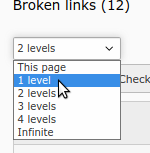
depth selector
What Broken Link Fixer will show depends on the currently selected page
(in the page tree). Additionally, you can show broken link information on
subpages. This depends on the depth, that is selected:
This page: shows only broken links on current page
1 level: shows broken links on current page and direct subpages of this page
2 levels: additionally show broken links on subpages of the subpages
etc.
This is the same behaviour as in the "Pagetree Overview", also in the Info
module.
Using a high level (e.g. "infinite") may be useful for getting an overview. But,
depending on the number of pages and broken links found, working with this may
feel sluggish and slow. It is recommended to use a low level when working with
the list (e.g. "This page").
buttons
Refresh display: This just reloads the list. It does not recheck links.
Check links (if available): This checks broken links, depending on the
selected depth. For external URLs, the Link target cache
is used.
i (if configured): This opens the documentation in another browser tab.
table
Columns in the table:
Columns 1-3
Page: The title and [page id] are shown.
Element: The record in which the broken link was found in. A language icon
may be displayed. The header of the element (if available) and the [uid]
are displayed.
Type: This shows the type of the record (e.g. "Page Content", "Page", "News")
and the field the broken link is found in (e.g. "Text", "Link").
Columns 5-8
Link target: The link target (e.g. the URL or target page). You can click
on it, to open it in another browser tab.
Error: The error that occurred, e.g. "Page not found". Hover over the
text with the mouse to see the original exception message.
Checked: The last check time of the link target or when the
element was last checked (whichever is older). Since a link target
cache is used for external URLs, the check time may be before the check
time of the element in column 2. If you loaded the URL in the browser and feel
the information displayed is not up to date, you can press the "Recheck URL"
button.
If the record was edited
after the last check, the broken link information may be outdated.
It does not mean, it will always be outdated, as the record may have been
edited without changing the links, but it is an indicator, that it might be
a good idea to recheck. In this case, you can click on the "Recheck URL" button
.
The following is displayed:
if (possibly) outdated: red background and a recheck icon.
Action: Action buttons:
Edit: Edit the field containing this broken link
Refresh URL: Rechecks the URL and removes
the broken link record if the URL is ok or the broken link is no longer
in the record. This is the only checking action which will actually check
external URLs and refresh the link target cache.
Exclude URL: Only use this for
"false positives" (if the URL is ok, but displayed as broken). Always
"Recheck URL" first. This button opens a form to create an "Exclude URL"
record. Once this is stored, all broken link records related to this URL
are removed. In all subsequents checks, the URL is treated as valid and
is not rechecked!
Exclude link targets
As described in the Glossary we differentiate between the link source
and the link target. The link target is the target of a link, it may be an
external URL or a target page in your TYPO3 site.
"Excluded link targets" (or "exclusions") are targets which have been permanently
excluded from link checking. The reason for doing this is usually that brofix
cannot correctly determine the state of the link target and falsely detects
it as broken ("false positive"). Without any action to prevent this, the "false"
broken links would always appear in the broken link list which severely impedes
working with the broken link list as editor.
A solution for this is to permanently add the link targets to the list of
excluded link targets. Links with this link target will no longer be checked
and the broken links already detected will immediately be removed from the
internal list which brofix uses to display broken links.
Excluding link targets
In the module "Check links" the action button
"Permanently exclude ..." appears for every broken link record.
This is only available for external link targets by default, but can be
configured differently.
As soon as the button is clicked, an edit dialog appears which makes it
possible to select a "reason" and add additional notes.
Once you press save, all broken link records stored in brofix for this link
target will be removed and the broken links will no longer be displayed in
the list of broken links.
Important
The link targets in the list will no longer be checked by brofix.
Manage exclusions module
The management of broken links excluded is done in the module "Manage exclusions"
which is a submodule of "Check Links".
This module allows you to list the excluded link targets using the provided
filters.
The following functionality is available:
List and filter the excluded link targets
Select exclude link targets and delete them
Export excluded link targets as CSV file
Known problems
The most relevant known problems currently concern only "external broken links".
You can turn off external link checking entirely or use one of the other
counter measures.
False positives
The main problem with external links are
false positives where the automatic link
checking will report a problem even though the URL is ok.
Link target cache
The result for external URLs is stored in the link target cache. This is an
internal storage, which saves the last result of the check. This way it is
not always necessary to recheck the external URL. The cache has an expiration
date, by default this is one week.
Because of this, the displayed information may not be up to date. Clicking
the "Recheck URL" button will always refresh the
information.
Since the status of external URLs will not change very often, the link target
cache is not a problem and considerably speeds up link checking. Also it reduces
network traffic and load on external servers.
Because of the above mentioned problem of the false positives, it is a good
idea anyway to verify the result by loading the URL in the browser.
Once you work more with Broken Link Fixer and fixing the links in your site,
you will get a better judgement when checking an external URL yourself is
necessary.
Be aware of crawling external sites. It is best practice to be "polite"
and not bombard external sites with excessive requests. You may want to
limit external checking by using one or more of the following measures:
Alternatively you can
override the ExternalLinktype class
(in your own extension) and for example check only specific URLs or exclude
specific URLs or handle only specific error types as errors.
"Manage Exclusions"
The third possibility leaves it up to the editors to exclude specific URLs
if there are problems: You can give them permission to exclude URLs or domains,
see Exclude link targets.
Via console command (or scheduler), a full link check of the entire sites or
specific pages can be performed
"on-the-fly" checking: When editing a record by pressing the blue "edit" action
button in the list of broken links, a recheck is performed
when returning to the list. This only checks the links in the edited field.
If records or pages are deleted or set to inactive (hidden=1), the
corresponding broken link records are removed immediately.
It is possible to manually start (re)checking by pressing the "Check links"
button in the list. This will check all links on
the current page and subpages (depending on the selected depth, e.g. 2 levels).
This is by default not active for editors (to avoid excessive rechecking),
but can be configured to be available.
It is possible to recheck the current link by pressing the "Recheck URL"
button. This is faster than the previous option and can
be useful, if only a few broken link records need to be rechecked.
It is recommended to configure the console command to perform a full check
regularly (e.g. once a day).
Due to normal editing activity some of the broken link information can become
outdated between the full checks, which can be handled either with the "Recheck URL"
button (for recheck for one broken link) or with the "Check links" button to
check an entire page or page and subpages.
The fifth option (Recheck URL) is the only action where the link target cache
is not used. This can be used to refresh the information about the link target.
What is checked
By default, links are not checked on hidden records or records on hidden pages.
In general, if content is not rendered in the frontend, it does not make sense
to check the content. Thus, the following are also not checked:
Content on pages with page type "Shortcut" or "Link to external URL".
Content of default language on pages with the option "Hide default language
of page" enabled
Subpages or content on subpages of a hidden page with "Extend to subpages"
enabled
Content in a hidden gridelement
Link target cache
In general, we try to avoid excessive checking, especially when it comes
to external URLs.
Checking external URLs has the following problems:
network traffic is generated
external sites may be bombarded with requests in rapid succession -
in general it is recommended to wait between requests to the same site (crawl delay).
If external sites get too many requests (in a timeframe), this may even
result in our site getting blocked.
checking an external URL may take a few seconds to complete - redirects
are followed, which may result in several requests and each single
request may take several seconds - thus, it is undeterministic. Using this
mechanism for on-the-fly checking is problematic, because we want to obtain
the results immediately.
For this reason, the following mechanisms are used:
The results of external link checking is cached. This means, if an
URL is checked more than once before the cache expires, the results
from the cache are used.
Crawl delay, see next section.
This has the drawback, that the broken link information may be outdated, because
the link target has changed its status.
However, the advantages are that link checks are faster and less external link
checking is performed.
If information about an external URL is outdated, the recheck URL
button can be used to refresh.
This will recheck the URL and also update all other broken
link records, if the link target status changed.
Crawl delay
If several URLs of one domain are checked, we wait at least this amount of
time before the next request (this is only done when checking via the console
command, not for on-the-fly checking).
Exclude link targets
It is a known problem, that the automatic checking does not always yield the
correct result, specifically the link is shown as broken, but it works (e.g.
by checking in the browser). These are known as "false positives". This is
rare but may happen for a handful of different URLs in your site.
As a workaround, it is possible to add a specific URL or specific domain to an
exclude list. In this case, the URL will be treated as if valid. It will no
longer show up in the report. As soon as the URL is excluded, all existing
broken link records are removed. Adding an URL to the exclude list can be
conveniently done by clicking on a button
in the list of broken links.
<?phpdeclare(strict_types=1);
namespaceMyvendor\MyExtension\Linktype;
useSypets\Brofix\Linktype\ErrorParams;
useSypets\Brofix\Linktype\ExternalLinktype;
classExternalUniolLinktypeextendsExternalLinktype{
publicfunctioncheckLink(string $origUrl, array $softRefEntry, int $flags = 0): bool{
// do some checking here, if $origUrl should get checked ..
$isValidUrl = parent::checkLink($origUrl, $softRefEntry, $this->flags);
if (!$isValidUrl) {
$exceptionMsg = $this->errorParams->getExceptionMsg();
// highly probably certificate chain issue, which should be treated as edge case false positive// curl(60): 'SSL certificate problem: unable to get local issuer certificate'if ($exceptionMsg === 'SSL certificate problem: unable to get local issuer certificate') {
returntrue;
}
}
return $isValidUrl;
}
}
Copied!
Changelog
Important
Since version 2.3.0 and higher, we list only the important changes here
(specifically breaking changes).
For more changes, please see the respective
release notes and
commit messages
in the GitHub repository: https://github.com/sypets/brofix
[BREAKING] Move the module from the Info module to its own module. This
requires changes in the editor configuration: Give the editors permission to
the "brofix" module.
2.3.0
Rename branch master => main
Add module for "Manage Exclusions"
Note
Older, more detailed changes.
2.2.0
Update to 2.2.0 requires updating the database.
Add support for TYPO3 v11
Add crdate to table. This will later make it possible to detect
new broken links (or broken links recently detected).
Add start and stop time to check links email report
Change order of settings in check links email report
Add additional setting mod.brofix.mail.language to set the
language of the email report.
Do not check records of default language if l18n_cfg is 1 or 3
("Hide default language of page")
Also consider if records should be checked on page if rechecking
URL or fields.
Optimize external link checking: Do not use extra headers
Accept-Language and Accept-Encoding by default. This causes problems with
some websites.
Optimize pagination: Do not show pagination controls if there is
only one page
2.1.1
Fix setting of depth=0 via CLI command brofix:checklinks
(issue:69)
Fix fatal error: Exception was thrown on CLI command checklinks if
replytoemail was set (due to call to not existing function).
(issue:66)
Fix version constraints (in ext_emconf.php)
2.1.0
!!! Change in SQL: It is required to do database compare and recheck links.
UI optimization: use card layout instead of table for small screens
Add editable restrictions: Show only broken links the editor has
access to.
2.0.2
"Check links" button is always available for admins, but deactivated for
editors by default
Change styling for "Last check" field if information is considered "fresh".
2.0.1
add "freshness" / "stale" information in "Last check" column in broken
link report
add "Last check" time for the URL as well. Because of the "link target"
cache, the "last check" information for the field and the URL may differ.
Add "Check links" button to report
2.0.0
Support for TYPO3 9 was dropped
bugfix: Do not use FlashMessages in DataHandler hook
several improvements in broken link list
It is now possible to recheck URLs from the GUI via a button.
This is configurable (report.recheckButton).
It is checked if record was edited after last check. In that case the
broken link information may be "stale" (outdated). This is shown in the
list along with the time of the last check.
The last check time of the URLs are shown as well. Since the check status
is cached, this may differ from the time when the record was last checked.
While this may be confusing (to show different values), it makes the behaviour
more transparent.
1.0.4
Add --send-email and --dry-run option to command controller
Add more output to command controller
Fix formatting of floats in email
> 1.0.0
bug fixing
1.0.0
Supports TYPO3 9 and 10
Initial version, change extension key to "brofix" (Broken Link Fixer)
GUI: page module
Shows message in page module, if broken links on page (depends on ext:page_callouts to add hook)
GUI: RTE
Links to hidden or deleted CE are also marked as broken as RTE (as they are also reported as
broken by brofix)
GUI: broken link report
List was decluttered:
Only page title is displayed (not full page path)
short localized error messages are used.
Show a short date format for "last checked" (only hours and minutes, not the date if timestamp is today)
Sorting: It is now possible to sort by page / element, content type, URL or error type
"Check links" tab was removed
All links types are always displayed, no need to check checkboxes
In the report, the broken links of the just edited record are displayed in a different color. This makes
it easier to keep track if jumping back and forth from the edit form to the list of broken links.
Show an informational message if no page is selected in the page tree.
Reload list immediately, if form was changed. Since there is currently only a select list, it
does not make sense to have to click a button additionally to changing the value in the select field.
Link checking
Use console command instead of scheduler task
Previously, all records in the broken links table (of currently to be checked pages) were
removed at the beginning of the check. This resulted in inconsistent results, especially
during checks which took longer than just a few minutes. Now, the records are not removed,
but the existing records are updated (if they already exist) or are inserted (if new). This
way, the link check results are mostly up-to-date.
Crawl delay: A minimum wait time between 2 checks of URLs of the same domain. The crawl delay
is not used in on-the-fly checking.
Link target "cache": External URLs are now stored in a persistent "cache" table. The duration
(expiration time) is configurable: Thus, on-the-fly checking is faster because the cache is used.
Exclude link targets: For the still existing problem of false positives, it is possible to exclude
URLs (or domains) from link checking. Excluded URLs are treated as valid URLs. URLs can be excluded
by clicking a button in the link list and then editing the record. Permissions for editors are
restricted and must explicitly be granted.
A timestamp of the last check is added to the broken links table and obsolete records (e.g. belonging
to a removed page) are removed at the end of the link checking.
Links in fields, which are not editable, are no longer checked. Previously, the fields which were configured to
be checked were always checked, independently of the content type (CType) or page type (doktype).
However, for some types, content is not relevant such as bodytext for plugins or the URL for normal
page types. Furthermore, it is not possible to edit these as editor and the editor would get an
error message. These broken links stayed in the list of broken links and there was no way to remove
them. Now, only editable fields are checked.
Do not check records if in hidden gridelement.
Email report
Shows additional statistics, such as number of pages checked, number of links checked, percentage of
broken links to number of checked links. Especially the percentage of broken links to total number of
links can be used as an indicator for the "site health".
The number of broken links is added to the subject of the email. This way, it is not necessary to click
on each email to see the most relevant numbers.
Development
Setup unit and functional tests (see Build directory)
Added .editorconfig
Feature - Resolve Certificate Chain
since verion 8.0.0
Link to Issue 486 <https://github.com/sypets/brofix/issues/494>
This introduces a new class StayAliveCertificateChainResolver to resolve
certificate chains. This is relevant only for external links with HTTPS.
This class requires the package stayallive/certificate-chain-resolver (which is
now required in composer.json).
Objective: this class will fetch the entire certificate chain (and store it in
var/transient) for a domain based on the given URL. The underlying problem is
that some servers do not provide the entire certificate chain. Qualys SSL Labs
(https://www.ssllabs.com/ssltest/analyze.html) shows this as "incomplete
certificate chain" or something similar. However, the browsers will usually
resolve this by fetching and caching intermediate certificates. However the curl
library (which is usually used by Guzzle in TYPO3) will not and will fail with
curl error core 60 "Unable to resolve local issuer certificate".
By default, this class will be used in ExternalLinktype.
Configuration is in Extension Configuration (see ext_conf_template.txt)
resolveCertChains. By default it is set to "intelligent": the cert chain is
only fetched on typical errors (libcurl errno=60). It can also be set
to "always" or "never"
Impact
Possibly fixes problems with external links with incomple certificate chain.
URLs which had this problem and previously showed an error in brofix
(false positives) should now be displayed with status "ok".
Migration
Do a rechecking on affected URLs. This is not strictly necessary, it is also
possible to wait until the cache expires for these URLs.
Feature - Make link checking more robust
since verion 7.0.1
Link to Issue 486 <https://github.com/sypets/brofix/issues/486>
Make link checking more robust and make it configurable how to handle exceptions
Link checking may abort because an exception is thrown. For some severe errors,
this makes sense, but there are some scenarios with minor errors where the
checking should continue.
For example, if a record is deleted between fetching several records
in a database query and TCA parsing, this may result in an exception in
LinkParser.
Brofix always tries to perform robust checking so that small errors are just
logged via the logging framework, but it is possible to change this behavior
with the option behaviourOnCheckError in Extension Configuration:
(default) intelligent : mode where brofix decides on a case by case basis
continue : continue checking even in case of exceptions due to errors like these (which might obscure errors)
abort : always throw exception
Impact
Possibly fixes problems with brofix aborting while checking links due to an
exception.
Migration
It is not necesary to change anything unless the default behaviour is not to
be used. In this case change the option behaviourOnCheckError in Extension
Configuration.
Feature - Add field for page id in DB table for broken links
since verion 7.0.0
Important
When updating to version 7.0.0, should perform DB schema updates and execute
upgrade wizard!
A field record_pageid is added to the database table
tx_brofix_broken_links. This will always contain the uid of the related
page, either of the page itself if the broken link is in the pages table, or
the pid if any other record.
Impact
performance improvements (depending on number of pages)
For users of brofix, it is not necessary to read this. It provides further
details for developers of this extension.
Adding the field record_pageid to the database table tx_brofix_broken_links
makes it possible to simplify a number of database queries and improve the
sorting of elements.
Previously, it was always necessary to query if
tx_brofix_broken_links.table_name containes 'pages' or not and then use
either record_uid or record_pid as field to obtain the page
id. The previous behavior doubled the number of parameters in prepared statement.
This used to not be a big problem in previous versions because a workaround was
introduced chunking the array of page ids if they reached a certain limit so the
query did not reach the number of parameters in prepared statement limit.
Reducing the limit to 50% might result in performance improvement in cases with
large number of pages.
Additionally, the array chunking made it impossible to properly paginate fetching
only the items for the current page, which also has a performance impact.
So, due to this change, further performance improvements are possible in the
future.
Feature - Add index url_hash for performance
since verion 6.2.0
An index is added to the database table tx_brofix_broken_links for the
fields link_type, url_hash and check_status. A new field url_hash is
introduced which generates a hash for the URL.
This results may result in significant performance improvements when opening
records with RTE fields and many links in the backend. When the RTE is opened,
pre-processing is performed in order to mark the broken links as broken. For
this, a db query is performed for each link.
Breaking - Use LinkTargetResponse (Add check_status)
A database field "check_status" was added to the tx_brofix_broken_links
and tx_brofix_link_target_cache tables.
It is now possible to save all links, not just the broken links to
tx_brofix_broken_links (configurable by extension configuration).
For some status codes for external links (e.g. HTTP status code 401 and 403),
the link targets are considered uncheckable - we cannot really know if they
are broken or not. This is stored as separate status and it is possible to
filter by this status in the broken link module.
Currently, these are the known status:
1: broken
2: ok
3: not possible to check
4: is excluded
This should also improve handling of cloudflare protected sites as these
typically return 403 HTTP status code. The link checking status is no longer
considered broken, it is now considered "not checkable", since the actual
link check result cannot be obtained.
What kind of results from link checking, make the URL "uncheckable" can
be configured via Exension Configuration "combinedErrorNonCheckableMatch".
This can be either a regular expression (with prefix "regex:" and enclosing
delimeters (e.g. "/"). Or it can be a list of strings, separated by comma.
This is matched against a combination of the link checking result, consisting of:
regex:/^(httpStatusCode:(401|403):|libcurlErrno:60:SSL certificate problem: unable to get local issuer certificate)/
Copied!
Impact
There were some changes to the database and the LinktypeInterface.
See "Migration" for necessary actions.
Also, there was a change to the backend module: A new filter "Check status:"
was added to filter broken links by status. By default, only broken links
are shown (as before this change).
Migration
Update any custom classes implementing LinktypeInterface to address changes
to the interface. In particular, the checkLinks() method will now return
LinkTargetResult instead of int.
Also, a database update must be performed to address the changed schema.
The tables tx_brofix_broken_links and tx_brofix_link_target_cache should be
emptied. This can be done by performing the Upgrade wizard "Truncate tables
tx_brofix_broken_links and tx_brofix_link_target_cache".
Some language labels have been added, it is advised to join Crowdin and
contribute translations.
Also, a new select field "Check status" was added to the Broken Link list module:
It is recommended to advise editors about this, but it should not be a problem.
Editors can just use the default selection (only show broken links).
Feature - Add button to jump to page layout
since verion 6.0.2
By default, a close button is now displayed in the list of broken links.
The button is only displayed, if
the extension page_callouts is loaded
showPageLayoutButton is set in the brofix extension configuration
You should use the latest version of page_callouts
so that the close button will displayed in the page layout to jump back to
the list of broken links.
If this button should not be displayed, it is possible to deactivate it in
the extension configuration.
Migration
No migration necessary.
Feature - More configuration options for sending emails
There is an option "send-email" in the command / scheduler task which determined
if an email should be sent when the link checking is complete. There are now
more options which also make it possible to send an email only when broken
links were found and also only when new broken links were found.
The old values (0, 1, -1) are still supported and are mapped to the new values.
If EXT:page_callouts
is installed, information is displayed in the page module, if broken links exists.
Since this has a small performance impact, is not really necessary if broken
links are fixed regularly.
This is now configurable via:
extension configuration: "Show message in page module if broken links exist
on page" [showPageCalloutBrokenLinksExist] (default: "depends on user settings")
user settings: "Show message in page module if broken links exist on page"
[tx_brofix_showPageCalloutBrokenLinksExist] in tab "Broken links" (default: on),
only available if extension configuration showPageCalloutBrokenLinksExist is
set to "depends on user settings".
The information is only displayed if extension configuration is set to "Always"
or "depends on user settings" and the user settings is active.
Additionally, page_callouts mubst be installed.
Migration
No migration necessary. It might make sense to inform the BE users about this.
Feature - Support checking in Flexforms
This feature can be used and has been tested, but should be considered
experimental until further notice!
For Flexform checking to fully work, you must set
:ref:`tcaProcessing <extensionConfiguation_tcaProcessing>` to "full"
in the extension configuration for brofix.
Since Flexforms consist of nested fields, checking these kind of fields needed
modified functionality. It is now possible to also check Flexforms for
broken links.
Implementation
Which Flexform fields are visible is determined by the fields defined in the
Flexform XML schema, just as is the case for other fields. When the values
are written to the database field (e.g. tt_content.pi_flexform), this may
include older fields which will no longer be displayed. However, if we get
the schema from the processed TCA, we process only the fields which would be
displayed in the Backend.
How do we determine which fields should be checked and how?
We use the type (and other TCA configuration in the Flexform schema) and only
parse fields which have a type which might include links, e.g.
if the "softref" field is set, we get the list of softref parsers from this
field
if "enableRichtext" is set (but softref not), we use the "typolink_tag" parser
key
type "link" and type "input" with "renderType" "inputLink" use the "typolink"
softref parser key
more field types (such as "file") will be supported in the future
Using this new feature
Add your Flexform fields to the search fields, for example:
In the extension configuration for brofix, set tcaProcessing to "full"
Check your fields in your Flexform configuration, to make sure, you are
using field configuration which will be checked by brofix (see the
"Implementation" section), such as type "link-t3tca-columns-link-since-typo3-v12-and-set-the-correct-refsoftref <t3tca:tca_property_softref>".
Check your links
Caveats
This new feature comes with some caveats:
It is not possible to edit the field with the broken link directly: When
clicking the edit button in the broken link list, an edit dialog is opened
for all fields in the flexform while for non-Flexform fields, the edit dialog
will show only the affected field. The advantage of showing only the affected
field is that it is easier to find the broken link, especially in non-RTE
fields where the broken link is not highlighted. (The reason for this caveat
is that it is not possible currently with core functionality using the
record_edit route.)
It is not possible to specify directly which fields in the Flexform will
be checked. The fields which are checked is derived directly form the field
configuration (type, renderType, enableRichtext and softref).
In order for the Flexform processing to work the full record is fetched from
the database. This makes the process possibly slightly slower and less
efficient, but should not have a big impact.
Some of these caveats may be addressed in future releases.
Combination with extensions
dce
This new feature was tested with EXT:dce, but a problem is found. If patch
from the PR is applied, it should work:
Previously, a form showing only the field with the broken link is opened, if
clicking the "pencil" button in the Broken Link Fixer report.
This is not ideal in some cases because relevant context is missing, for example
when editing redirect records.
For this reason, it is now possible to also edit the full record, but this is
configurable (see Extension Configuration).
Impact
A new button is now displayed in the broken link list BE module, in addition to the
already existing button. The buttons have the following functionality:
button to edit only the field (same as before)
button to edit the entire record (which contains an additional icon)
If this makes sense depends on which records / fields are checked and if it is
helpful to have more context. If not, this can be deactivated in the Extension
Configuration.
Sitemap
Link targets
Hint
This page is only relevant for documentation contributors!
This page contains an automatically generated list of all
link targets
in this manual. It can be used for cross-referencing within this manual
and from other manuals using :ref:.
.. ref-targets-list::
Reference to the headline
Copy and freely share the link
This link target has no permanent anchor assigned.The link below can be used, but is prone to change if the page gets moved.

 for one of the items in
the list.
for one of the items in
the list.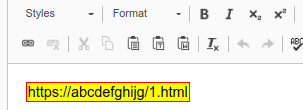



 button.
 Exclude URL: Only use this for
"false positives" (if the URL is ok, but displayed as broken). Always
"Recheck URL" first. This button opens a form to create an "Exclude URL"
record. Once this is stored, all broken link records related to this URL
are removed. In all subsequents checks, the URL is treated as valid and
is not rechecked!
Exclude URL: Only use this for
"false positives" (if the URL is ok, but displayed as broken). Always
"Recheck URL" first. This button opens a form to create an "Exclude URL"
record. Once this is stored, all broken link records related to this URL
are removed. In all subsequents checks, the URL is treated as valid and
is not rechecked! in the list. This will check all links on
the current page and subpages (depending on the selected depth, e.g. 2 levels).
This is by default not active for editors (to avoid excessive rechecking),
but can be configured to be available.
in the list. This will check all links on
the current page and subpages (depending on the selected depth, e.g. 2 levels).
This is by default not active for editors (to avoid excessive rechecking),
but can be configured to be available.