
Toolbar & Presets
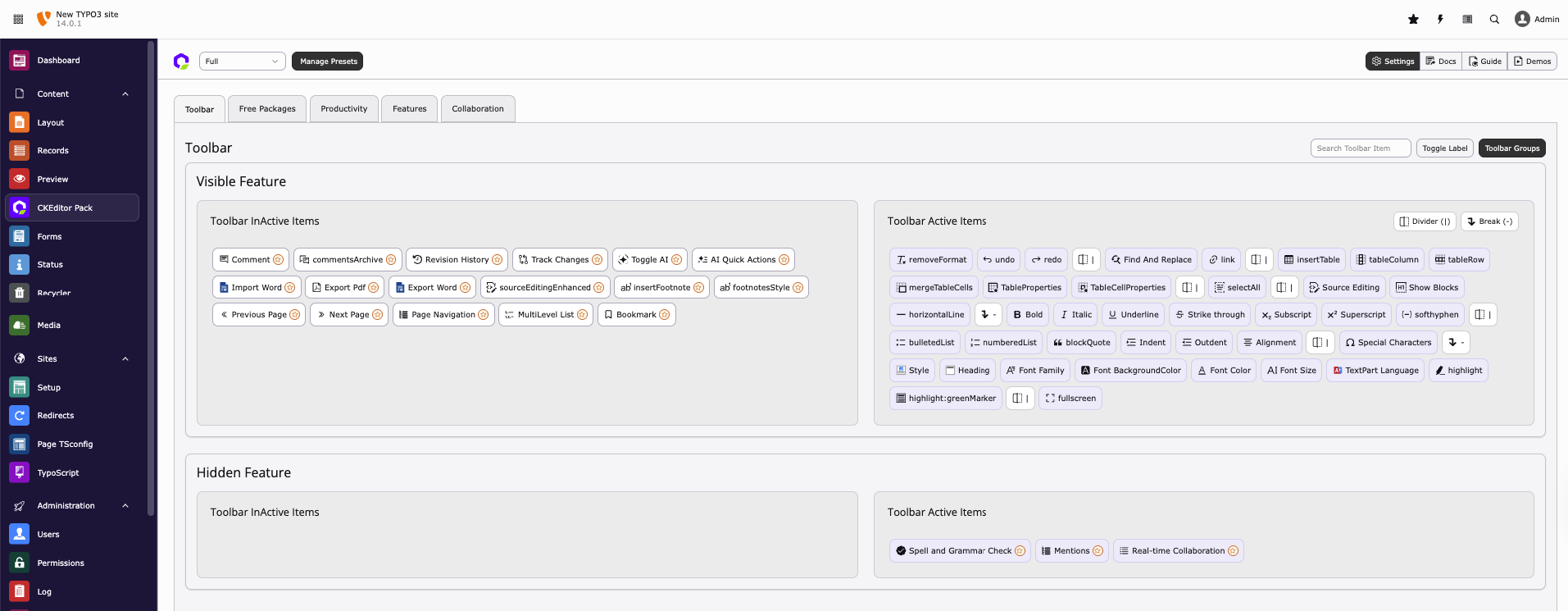
You can easily create your own RTE presets or edit your preset using the drag-and-drop UI toolbar management. Take a look at the interactive demo below:
Advanced Features for Managing RTE Presets
We have added new preset management features in CKEditor to support both editors and developers, making configuration handling faster, safer, and more consistent.
1. Load from YAML
The Load from YAML feature retrieves the default RTE configuration directly from the TYPO3 core YAML file. It allows integrators to access or restore the original settings quickly, without manually navigating system directories.
2. Reset
The Reset feature restores all modified configuration settings to their default state. This provides a clean baseline and helps prevent issues caused by incorrect or experimental changes.
3. Sync
The Sync feature aligns configuration values between the default TYPO3 RTE YAML file and the extension’s custom YAML file. It ensures both remain consistent, reduces conflicts, and keeps behavior uniform across environments.
4. Import / Export Presets
The Import / Export Presets feature allows you to easily manage and share CKEditor presets between different TYPO3 environments. It helps you keep the same editor configuration across local, staging, and live systems without manual setup.
Import Presets
The Import Presets option lets you add CKEditor presets from a YAML file into your TYPO3 system. This is useful when you receive a preset from another environment or project and want to reuse the same editor setup.
Simply upload the YAML file, and the preset will be created automatically with all toolbar buttons, groups, and settings.
Export Presets
The Export Presets option allows you to download existing or custom CKEditor presets as a YAML file. This makes it easy to share presets with other TYPO3 systems or team members.
You can select a preset and export it, then import the same file into another TYPO3 installation to get the exact same configuration.
Note
When exporting presets, the following features are not included in the generated YAML file:
- Document Outline
- Paste Office Enhanced
- Editoria11y
- Markdown