
Visual Editor
CKEditor Pack works seamlessly with TYPO3's Visual Editor module. Editors can use the same CKEditor presets, toolbar configuration, and premium features directly inside the page-based Visual Editor workflow — not only in classic FormEngine record editing.
Overview
When the visual_editor system extension is active, CKEditor Pack renders rich-text
fields inside the Visual Editor preview iframe (editMode=1). The extension reuses the
same database-backed presets from the CKEditor Pack module, so toolbar items, enabled
features, and processing rules stay consistent between:
- classic backend FormEngine RTE fields, and
- Visual Editor inline editing (
ve-editable-rich-text).
No separate Visual Editor preset is required.
Requirements
- TYPO3: v13.0 or newer
- Extension:
visual_editorsystem extension installed and enabled - CKEditor Pack: configured preset (for example
camino_defaultor a custom preset)
Opening the Visual Editor
- Log in to the TYPO3 backend.
- Open Web → Visual Editor.
- Select the page you want to edit.
- Click an editable rich-text content element.
- CKEditor loads inside the nested preview iframe with the configured preset toolbar.
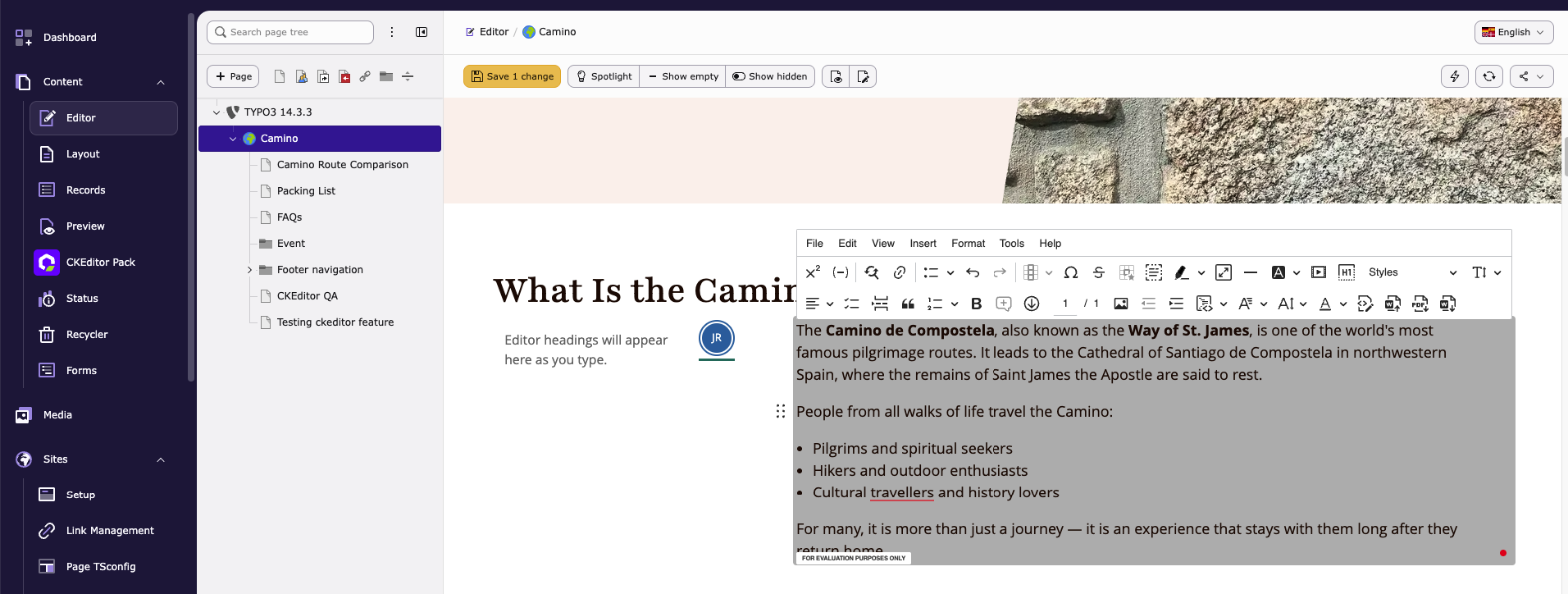
CKEditor Pack in TYPO3 Visual Editor
Collaboration
CKEditor Pack also brings collaboration features into Visual Editor, including:
- Real-time collaboration
- Comments
- Track changes
- Revision history
Collaboration uses the same preset configuration and channel setup as classic backend editing, so teams can work on content directly from the Visual Editor page view.