Semantic Suggestion 

Extension key

semantic_suggestion

Package name

talan-hdf/semantic-suggestion

Version

main

Language

en

Author

Wolfangel Cyril

License

This document is published under the Open Publication License.

Rendered

Wed, 29 Jul 2026 09:55:38 +0000


Semantic Suggestion suggests related pages by comparing the text of the pages themselves, instead of relying on categories or hand-made links. A scheduler task analyses a page tree, stores a similarity score for every relevant page pair, and a frontend plugin renders the best matches for the page being displayed.


Introduction 

What the extension does, what it does not do, and how it performs.

Installation 

Requirements, Composer and TER installation, first analysis run.

Configuration 

The scheduler task, every TypoScript setting, and the settings that are ignored.

Integration 

Rendering the suggestions: content element, Fluid, Bootstrap Package, templates and CSS.

Backend module 

Reading the stored analyses and the access rules that apply to editors.

Multi-site and multilingual 

One task per site, one run per language, and what stays instance-wide.

How it works 

The analysis pipeline, the scoring formula, language handling and caching.

Troubleshooting 

Diagnosing an empty suggestion list, debug mode, useful SQL.

Upgrade 

Migrating from 3.x / 4.0.0, and the behaviour changes of 4.1.
Introduction 

What does it do? 

Semantic Suggestion builds a "related pages" list from the text of the pages themselves. No category has to be maintained and no link has to be created by hand.

  • A scheduler task walks a page tree, turns every page into a TF-IDF vector and compares the vectors pairwise.
  • Every pair scoring above a configurable threshold is written to the table tx_semanticsuggestion_similarities.
  • A frontend plugin reads that table for the page being rendered and displays the best matches with their title, media and a text excerpt.
  • A backend module (Web > Semantic Suggestion) shows what was stored.

Because the frontend only reads pre-computed rows, displaying suggestions costs a single indexed query — all the work happens in the scheduler task.

The suggestion list rendered in the frontend

The plugin output with the shipped template.

What it does not do 

  • It does not index anything on the fly. A page that was created after the last task run has no suggestions until the task runs again.
  • It does not compare pages across sites, nor across languages. Both boundaries are enforced (see Multi-site and multilingual).
  • It does not need Solr. A separate extension, semantic_suggestion_solr, can write into the same table from a Solr index; the two producers coexist without erasing each other's rows.

Performance 

Where Cost
Scheduler task The dominant cost, quadratic in the number of pages of the scope. Expect seconds on a small tree, minutes from a few hundred pages, and schedule it off-peak.
Frontend One indexed SELECT on (page_id, root_page_id, sys_language_uid), plus one page record and one media lookup per displayed suggestion.
Backend module Reads every row of the selected site to compute its statistics.

The measured task duration depends far more on the average amount of text per page than on the page count alone. Use the backend module to see how many pairs a given quality level actually produces before lowering it.

Credits 

The text processing — language detection, stop words, stemming and TF-IDF vectorisation — is provided by the nlp_tools extension, which in turn uses wamania/php-stemmer (Snowball).

Installation 

Requirements 

Requirement Version
TYPO3 12.4 → 14.x
PHP 8.1 or higher
typo3/cms-scheduler same as core, required
cywolf/nlp-tools (nlp_tools) ^2.0, required

Installation with Composer 

composer require talan-hdf/semantic-suggestion
vendor/bin/typo3 extension:setup --extension=semantic_suggestion
vendor/bin/typo3 cache:flush
Copied!

extension:setup creates the table tx_semanticsuggestion_similarities. You can also apply the schema from Admin Tools > Maintenance > Analyze Database Structure.

Installation from the TER 

  1. Install and activate nlp_tools first — see the warning above.
  2. Install semantic_suggestion from Admin Tools > Extensions, or upload the archive to typo3conf/ext/.
  3. Activate the extension, then update the database schema.

Upgrading an existing installation 

Coming from 3.x or 4.0.0, two upgrade wizards must run. Skipping the first one makes suggestions disappear for every analysis whose task started on a subtree instead of a site root:

vendor/bin/typo3 upgrade:run semanticSuggestionMigrateRootPageId
vendor/bin/typo3 upgrade:run semanticSuggestionLabelAnalysisRows
Copied!

They are also listed in Admin Tools > Upgrade > Upgrade Wizard. See Upgrade for what they change and how to verify the result.

First analysis run 

Nothing is displayed until the scheduler task has run once.

  1. Create a Semantic Suggestion: Generate Similarities task in the Scheduler module and set its start page to a site root — see Scheduler task.
  2. Run it with Execute now, or from the CLI:

    vendor/bin/typo3 scheduler:run --task=<uid>
    Copied!
  3. Open Web > Semantic Suggestion to confirm that pairs were stored.
  4. Add the plugin to your templates — see Integration.

If the module reports no analysis, run vendor/bin/typo3 semantic:diagnostic and read Troubleshooting.

Configuration 

The extension is configured in two places, and they do different jobs:

Where Decides
Scheduler task Which pages are analysed, and which pairs are stored.
TypoScript How the stored pairs are displayed, and how the backend module renders.

A third place, the extension configuration in Admin Tools > Settings > Extension Configuration, only acts as a fallback — see Extension configuration.

Scheduler task 

Create a Semantic Suggestion: Generate Similarities task in the Scheduler module. Its fields:

startPageId

startPageId
Type
integer
Default
1

Page the analysis starts from. It may be a site root or any page below it; the subtree is walked to full depth. The site the page belongs to is resolved automatically and stored separately — see Database columns.

qualityLevel

qualityLevel
Type
float
Default
0.3

Storage threshold, between 0.1 and 1.0. A pair scoring below it is not written to the database, so it can never be displayed either.

The threshold applied is exactly this value, floored at 0.05. No offset is applied. Lowering it later requires a full re-run to produce the missing pairs.

excludePages

excludePages
Type
string
Default
(empty)

Comma-separated page UIDs that are not analysed at all, for example 42,56,78.

recursiveExclusion

recursiveExclusion
Type
boolean
Default
1

When enabled, an excluded page takes its whole subtree with it.

When disabled, only the excluded page itself is skipped and its children are still analysed. Note that those children are then collected without the exclusion list, so an excluded page nested under another excluded page is analysed in that mode.

languageId

languageId
Type
integer
Default
-1

-1 analyses every language configured on the site in a single run, which is what a multilingual site normally wants. Set an explicit language ID only when you need a different quality level per language, and create one task per language — see A multilingual site.

Scheduling: daily or weekly, off-peak. Each run deletes and rewrites only its own rows, identified by root_page_id + scope_page_id + sys_language_uid, so several tasks can coexist — one per site, or one per subtree of a site.

TypoScript 

All settings live under plugin.tx_semanticsuggestion_suggestions.settings and are exposed to the Constant Editor under the category semantic_suggestion. The extension loads its own TypoScript instance-wide, so overrides belong in a site's root template.

Display 

qualityLevel

qualityLevel
Type
float
Default
0.3
Path
plugin.tx_semanticsuggestion_suggestions.settings

Display filter. Stored pairs scoring below this value are not shown.

It is independent from the task's quality level. Setting it lower than the task's simply shows everything that was stored; setting it higher shows fewer, better matches. It can never reveal a pair that was never stored.

maxSuggestions

maxSuggestions
Type
integer
Default
3
Path
plugin.tx_semanticsuggestion_suggestions.settings

Number of suggestions rendered, after exclusions and the language check.

excludePages

excludePages
Type
string
Default
(empty)
Path
plugin.tx_semanticsuggestion_suggestions.settings

Page UIDs that are never shown as a suggestion. This does not stop those pages from displaying suggestions of their own, and it does not save any processing — the pairs were still computed and stored. To skip a page entirely, exclude it in the scheduler task instead.

excerptLength

excerptLength
Type
integer
Default
100
Path
plugin.tx_semanticsuggestion_suggestions.settings

Maximum number of characters of the excerpt; longer text is cut and suffixed with an ellipsis.

excerptSources

excerptSources
Type
string
Default
bodytext,description,abstract
Path
plugin.tx_semanticsuggestion_suggestions.settings

Ordered list of sources for the excerpt; the first non-empty one wins. bodytext means the rendered content of the page. Not exposed in the Constant Editor.

debugMode

debugMode
Type
boolean
Default
0
Path
plugin.tx_semanticsuggestion_suggestions.settings

Writes verbose entries to typo3temp/logs/semantic_suggestion.log and appends a debug block to the rendered plugin output. Never enable it in production.

Analysis 

analyzedFields

analyzedFields
Type
array of float
Default
title 1.5, description 1.0, keywords 2.0, abstract 1.2, content 1.0
Path
plugin.tx_semanticsuggestion_suggestions.settings

Page fields fed to the analysis, and their weight. content falls back to the bodytext of the page's content elements when the page field is empty.

recencyWeight

recencyWeight
Type
float
Default
0.2
Path
plugin.tx_semanticsuggestion_suggestions.settings

Share of the final score taken from the recency comparison:

score = semanticSimilarity * (1 - recencyWeight) + recencyBoost * recencyWeight
Copied!

enableStemming

enableStemming
Type
boolean
Default
1
Path
plugin.tx_semanticsuggestion_suggestions.settings

Reduces words to their stem before vectorising. Only affects languages for which nlp_tools ships a stemmer — see Language handling.

defaultLanguage

defaultLanguage
Type
string
Default
en
Path
plugin.tx_semanticsuggestion_suggestions.settings

Last-resort language code, used only when neither the site configuration nor content analysis nor languageMapping could determine one.

languageMapping

languageMapping
Type
array of string
Default
(unset)
Path
plugin.tx_semanticsuggestion_suggestions.settings

Legacy mapping of language UID to language code, for example languageMapping.1 = de. Only consulted after the site configuration and content analysis have both failed, which does not happen on a site with a proper locale. Keep it unset unless you know you need it.

Backend module 

Six booleans toggle the sections of the module, all enabled by default: showStatistics, showPerformanceMetrics, showLanguageStatistics, showTopSimilarPairs, showDistributionScores, showTopSimilarPages.

Template integration 

overrideBootstrapTemplates

overrideBootstrapTemplates
Type
boolean
Default
0
Path
plugin.tx_semanticsuggestion_suggestions.settings

Registers the shipped Bootstrap Package page templates so suggestions appear automatically after the main content. Opt-in, and to be enabled in the constants of the Bootstrap Package site only — see Bootstrap Package.

Settings that are accepted but ignored 

These appear in older documentation and in configurations carried over from previous versions. No code reads them, so they can be dropped:

Setting Status
minTextLength Never read. There is no minimum text length enforced by this extension; a page with no text simply produces no vector and therefore no pair. No longer present in the shipped TypoScript.
confidenceThreshold Never read. The language-detection confidence check lives inside nlp_tools and is not configurable from here. No longer present in the shipped TypoScript.
proximityThreshold Legacy name of the display threshold. It is only consulted when qualityLevel is absent, and the shipped setup always sets qualityLevel — so editing it has no effect. Use qualityLevel.
persistence.storagePid The plugin stores no records.

Extension configuration 

Admin Tools > Settings > Extension Configuration > semantic_suggestion offers parentPageId, proximityThreshold, maxSuggestions and excerptLength. They are a fallback only:

  • the backend module uses them when the corresponding TypoScript setting is missing,
  • the analysis uses this section when TypoScript is unreachable (the CLI case described above),
  • the frontend plugin never reads them,
  • parentPageId is read by no code at all.

Database columns 

tx_semanticsuggestion_similarities holds two different page references, and mixing them up is the usual cause of "my suggestions disappeared":

Column Meaning
page_id The page the suggestions belong to.
similar_page_id A page suggested for it.
similarity_score Score of the pair, 0.0 to 1.0.
root_page_id The site: UID of the site root page, resolved automatically. The frontend filters on it, which is what keeps suggestions inside a site.
scope_page_id The task: the startPageId that produced the row. Several values may share one root_page_id when different tasks cover different subtrees of one site.
sys_language_uid Language the pair was computed in.
source Producer of the row: analysis for this extension, solr for semantic_suggestion_solr. Each deletes only its own rows.

Integration 

Three ways to get the suggestion list onto a page. All of them read the same stored rows and honour the same TypoScript settings.

As a content element 

Add the Semantic Suggestions element (plugin semanticsuggestion_suggestions) wherever an editor should place the list. No TypoScript needed.

In a Fluid template 

The extension registers a reusable TypoScript object. Call it from any Fluid template:

<div class="section section-semantic-suggestion">
    <f:cObject typoscriptObjectPath="lib.semantic_suggestion" />
</div>
Copied!

Or from TypoScript directly:

page.100 =< lib.semantic_suggestion
Copied!

lib.semantic_suggestion references — rather than copies — the plugin's view, persistence and settings, so a template override applies to both integration paths at once.

Bootstrap Package 

The extension ships page templates for every Bootstrap Package layout, each placing the suggestions after the main content (colPos 0) and before the bottom content (colPos 9), inside <div class="section section-semantic-suggestion">.

Enable them in the Constant Editor, category semantic_suggestion > Template Integration, or in TypoScript constants:

plugin.tx_semanticsuggestion_suggestions.settings.overrideBootstrapTemplates = 1
Copied!

Then flush the cache.

Covered layouts: Default, Simple, None, 2Columns, 2Columns2575, 2Columns5050, 2ColumnsOffsetRight, 3Columns, SpecialFeature, SpecialStart, SubnavigationLeft, SubnavigationRight, SubnavigationLeft2Columns, SubnavigationRight2Columns.

Overriding the template 

The plugin renders Templates/Suggestions/List.html. Point TypoScript at your own copy, using index 10 or above — 0 and 1 are taken by the extension:

plugin.tx_semanticsuggestion_suggestions.view {
    templateRootPaths.10 = EXT:my_sitepackage/Resources/Private/Templates/
    partialRootPaths.10  = EXT:my_sitepackage/Resources/Private/Partials/
    layoutRootPaths.10   = EXT:my_sitepackage/Resources/Private/Layouts/
}
Copied!

Variables available in List.html:

Variable Content
suggestions Array keyed by page UID. Each entry has similarity (float), excerpt (string) and data (the page record, plus data.media, the first media file of the page, or null).
currentPageTitle Title of the page being rendered.
pagination currentPage, numberOfPages, hasNextPage, hasPreviousPage, startRecord, endRecord, totalItems. The plugin paginates at 10 items per page, which is above maxSuggestions by default, so a single page of results is the norm.
debugLogs Only filled when debugMode is on, and rendered as a visible block.

Styling 

The shipped template reuses Bootstrap card markup, so it inherits the site's styles when Bootstrap is present. The classes it emits:

/* wrapper, only present when you add it yourself or use the shipped page templates */
.section-semantic-suggestion { }

/* emitted by the plugin template */
.card-menu { }              /* the list */
.card-menu-item { }         /* one suggestion, carries proximity="<score>" */
.card-menu-item .card-title { }
.card-menu-item .card-text { }   /* excerpt */
.card-menu-item .card-info { }   /* last modified, score */
Copied!

Disabling suggestions on some pages 

Either remove the object for those pages:

[page["uid"] == 42]
    lib.semantic_suggestion >
[END]
Copied!

or keep them out of the suggestion lists of other pages with excludePages. The two are not the same thing: the first hides the list on page 42, the second stops page 42 from being suggested.

Backend module 

Web > Semantic Suggestion shows what the scheduler task stored. It never computes anything itself, so opening it is safe on a production site.

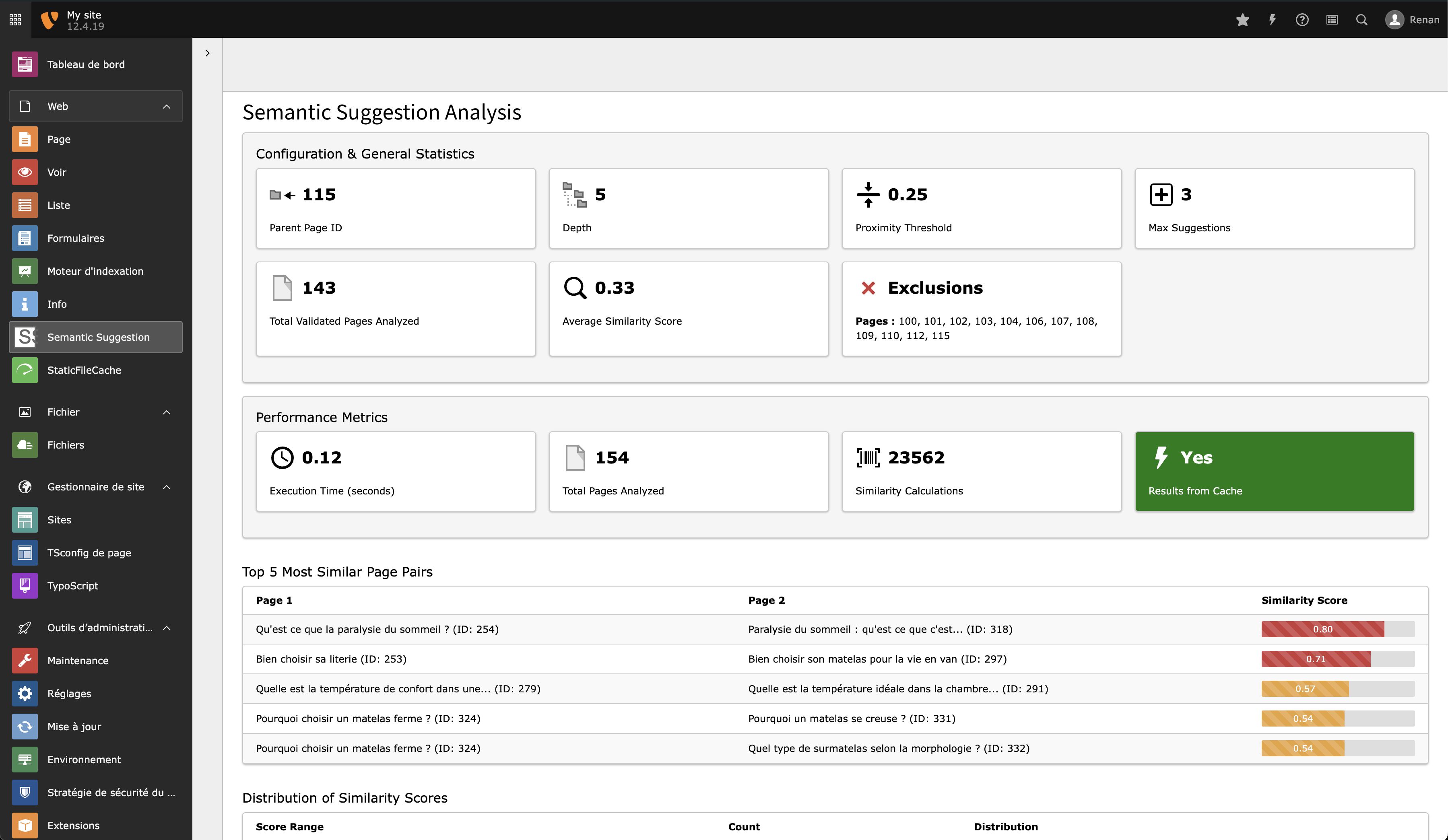
The Semantic Suggestion backend module

Analysis selector, configuration reminder and statistics.

The page tree is hidden on purpose: the module works on one analysis at a time, picked from a dropdown.

What it shows 

Section Content
Analysis selector One entry per site, grouped by root_page_id, with the number of pages and of stored pairs. Every task of a site appears as a single analysis, whichever subtree each one started from.
Configuration reminder The display settings in effect: quality level, maxSuggestions, excludePages, excerptLength.
Statistics The five most similar pairs, the five pages with the most links, the score distribution, and the totals — all computed with the display filters applied, so they reflect what visitors actually see.
Language statistics Distribution of the analysed pages over the site's languages.
Performance metrics Module execution time and the number of stored pairs above the display threshold.

Each section can be switched off in TypoScript — see TypoScript.

Performance metrics section

Access control 

  • Administrators see every analysis of the instance.
  • Other backend users see only the analyses of sites they hold a webmount on. A webmount on a subpage resolves to that page's site, so an editor mounted on one section still sees their whole site's analysis — and nothing from other sites.
  • The rootPageId URL argument is validated against that same list, so it cannot be used to reach another site's data.

A user with no webmount inside any configured site sees an empty module.

Multi-site and multilingual 

Several sites in one instance 

Create one task per site, with startPageId on that site's root page:

Task "Similarities – Main site"      startPageId: 1    languageId: -1
Task "Similarities – Campaign site"  startPageId: 85   languageId: -1
Copied!

The task resolves the site from startPageId and only ever walks that site's page tree, so tasks cannot contaminate each other. Extra tasks on subtrees of a site are allowed too — for instance a daily task on a fast-moving news section and a weekly one on the rest. Each rewrites only its own scope_page_id.

What is scoped per site automatically:

  • Frontend display. The lookup filters on the current page's site, so a page of one site can never be suggested on another. No configuration needed.
  • Cache invalidation. Analysis cache entries are tagged site_<rootPageId>, so editing content on one site does not invalidate another's analysis.
  • Backend module. Permission-scoped per site — see Access control.

What is not scoped, and needs your attention:

  • TypoScript. The extension's constants and setup are loaded instance-wide by ext_localconf.php, so every setting is shared until a site's root template overrides it. This is why the Bootstrap Package integration (Bootstrap Package) must be enabled per site and never globally.
  • Extension configuration and the log file, which are instance-wide by nature.

A multilingual site 

Language handling is driven by the site configuration. Each language's locale gives the language code used for stop words, stemming and vectorisation:

# config/sites/main/config.yaml
languages:
  -
    languageId: 0
    title: 'English'
    locale: 'en_US.UTF-8'      # → analysed as "en"
  -
    languageId: 1
    title: 'Deutsch'
    locale: 'de_DE.UTF-8'      # → analysed as "de"
Copied!

One task is enough. A multilingual site has a single root page and several languages entries; with the default languageId = -1 the task iterates over all of them in one run:

Task "Similarities – Main site"
  startPageId:  1     # the site root — one per SITE, not per language
  languageId:   -1    # all languages of this site
  qualityLevel: 0.3
Copied!

Do not create one task per language pointing at different page UIDs: that pattern belongs to multi-site setups, where each site has its own root page.

Split by language only when a language needs a different quality level. Both tasks then target the same root page with an explicit language ID:

Task 1  startPageId: 1   languageId: 0   qualityLevel: 0.3
Task 2  startPageId: 1   languageId: 1   qualityLevel: 0.25
Copied!

Rows are keyed by sys_language_uid on top of the site and the scope, so the two tasks never collide.

Languages never mix 

The language boundary is enforced three times over, so mixed-language suggestions are not something you have to configure away:

  1. Pages are collected per language by the task.
  2. Two pages whose detected language codes differ score 0.0 and are not stored.
  3. The frontend query filters on sys_language_uid and re-checks the language of each candidate page record.

If suggestions really do cross a language, the cause is almost always a missing or malformed locale in the site configuration — see Troubleshooting.

Per-site templates 

Override the plugin template in the site's root template, using index 10 or above:

plugin.tx_semanticsuggestion_suggestions.view {
    templateRootPaths.10 = EXT:my_sitepackage/Resources/Private/Templates/
}
Copied!

See Overriding the template.

How it works 

The analysis pipeline 

Everything below happens inside the scheduler task.

  1. Scope. The site is resolved from startPageId, and the languages to process are taken from its site configuration (all of them, or the one given by languageId).
  2. Page collection. The subtree below startPageId is walked to full depth, per language. Deleted and hidden pages are skipped, as are the pages listed in excludePages.
  3. Text preparation. For every page, its language is resolved from the site configuration (see Language handling), then each field of analyzedFields is read. content falls back to the bodytext of the page's content elements in that language when the page field itself is empty. Stop words of that language are removed, then — if enableStemming is on — the text is stemmed with that language's stemmer.
  4. Vectorisation. Pages are grouped by that same language code and each group is vectorised together, so all pages of one language share a single vocabulary and IDF corpus. Every page is vectorised exactly once, not once per comparison.
  5. Comparison. Every page is compared with every other page of the same language using cosine similarity on those vectors, then combined with the recency term:

    score = cosine(vector1, vector2) * (1 - recencyWeight)
          + recencyBoost              * recencyWeight
    Copied!

    Pairs of different languages score 0.0 and are dropped.

  6. Storage. Pairs scoring at or above the task's quality level are written to tx_semanticsuggestion_similarities, in one transaction, in batches of 100. The rows of the previous run of this task — same site, same scope, same language — are deleted first, so a run never disturbs another task's results.

The frontend does none of this: it reads the stored rows for the current page, filters them by the display quality level, excludePages and the language, and renders at most maxSuggestions of them.

Reading the scores 

The score is a cosine similarity between TF-IDF vectors, mixed with the recency term. Two consequences worth keeping in mind:

  • Scores are lower than a naive word-count similarity would give. Real values on a normal site cluster well below 0.5; 0.3 is a reasonable threshold and 0.8 will match nothing. If you are migrating from a 2.x configuration, lower your thresholds.
  • The recency term can carry a pair on its own. recencyBoost is the absolute difference between the two pages' normalised ages over a 30-day window, so with the default recencyWeight = 0.2 a pair with no textual similarity at all can still score 0.2. Set the weight to 0 for a purely textual score.

The relevance labels shown in the backend module are thresholds on that score: High above 0.8, Medium above 0.6, Low below.

Language handling 

The language is resolved per page, once, and the same value is then used for stop word removal, stemming and vectorisation. The order is:

  1. The site configuration. The locale of the page's language, reduced to its two-letter code (de_DE.UTF-8de). This is the normal case and it always wins for a page belonging to a configured site.
  2. Content analysis, by nlp_tools, only when the step above found nothing — a page outside any configured site.
  3. defaultLanguage, when there is not even any text to analyse.

Stop words, stemming and detection profiles come from nlp_tools, which supports six languages:

Language Code Stop words Stemmer (Snowball)
German de yes yes
English en yes yes
Spanish es yes yes
French fr yes yes
Italian it yes yes
Portuguese pt yes yes
any other English list used as fallback none, words are only tokenised

Any other language still gets TF-IDF vectorisation, which is what does most of the work; it just loses stemming and gets an unhelpful stop word list. Note also that content-based detection can only ever return one of the six codes above.

German is the language this extension was tuned on: the Snowball stemmer is what makes Automobilindustrie and Automobil share a stem, and umlauts are handled. A lower quality level than for English (0.25 instead of 0.3) is a reasonable starting point on a German site.

Known limitations 

  • Field weights are coarse, being implemented as text repetition — see analyzedFields.
  • The comparison is quadratic in the number of pages of a scope. Split a very large site into several tasks on subtrees rather than raising the quality level to compensate.

Caching 

The extension registers a cache named semantic_suggestion (file backend, 24 h, member of the pages group). It holds analysis results and the intermediate nlp_tools results, and entries are tagged site_<rootPageId>.

Invalidation happens on two occasions:

  • the scheduler task flushes its site's tag after saving,
  • a DataHandler hook flushes the tag of the affected site when a page or a content element is changed, moved or deleted. Records being created carry a NEW… placeholder instead of a UID and cannot be resolved to a site at that point; they are picked up by the next analysis run anyway.
# flush everything, including this cache
vendor/bin/typo3 cache:flush
Copied!

Troubleshooting 

The three tools 

1. The diagnostic command

Checks that the nlp_tools stack is reachable and working, on German samples:

vendor/bin/typo3 semantic:diagnostic
Copied!

If it cannot instantiate the services, nothing else will work — reinstall nlp_tools before looking any further.

2. The stored rows

Everything the frontend can possibly show is in one table. This is the fastest way to tell a storage problem from a display problem:

SELECT root_page_id, scope_page_id, sys_language_uid, source,
       COUNT(*) AS pairs, MIN(similarity_score), MAX(similarity_score)
FROM tx_semanticsuggestion_similarities
GROUP BY root_page_id, scope_page_id, sys_language_uid, source;
Copied!

Several scope_page_id values under one root_page_id is normal — it means several tasks cover different subtrees of the same site.

3. Debug mode
plugin.tx_semanticsuggestion_suggestions.settings.debugMode = 1
Copied!

Writes to typo3temp/logs/semantic_suggestion.log and appends a debug block to the plugin output. Turn it off again afterwards — it is visible to visitors.

No suggestions anywhere 

Work down this list; each step rules out the ones above it.

Check How If it fails
The task ran Its last execution in the Scheduler module, or the log line Starting similarity generation task Run it once with Execute now
Rows exist The query above See The task runs but stores nothing
Rows exist for this page SELECT * FROM tx_semanticsuggestion_similarities WHERE page_id = <uid> The page was outside the task's scope, or excluded, or has too little text
root_page_id is the site root Compare it with the site's root page UID The 4.1 migration wizard has not run — see Upgrade
The display threshold is not above every score Compare qualityLevel with the MAX() above Lower the display value
The plugin is actually rendered Look for the wrapper markup in the page source See Integration

The task runs but stores nothing 

Cause Sign Fix
nlp_tools missing or broken semantic:diagnostic fails, or the log shows Failed to create TF-IDF vectors Install nlp_tools; without it every score is 0.0
Quality level too high Log line Using threshold for filtering with a high value Set the task's quality level to 0.250.3 and re-run
Pages have no text Log warnings One or both pages have no text content Nothing to do: image-only pages produce no vector
startPageId outside any site The task fails with an exception in the log Point it at a page belonging to a configured site
Everything excluded No pages found for language in the log Review excludePages and recursiveExclusion

Suggestions are irrelevant 

  • Raise the display quality level first: it costs nothing and needs no re-run. Only raise the task's level once you know which value you want, since lowering it again requires a full re-analysis.
  • Set recencyWeight to 0 if you see unrelated pages being suggested. The recency term is a difference of ages, not a freshness bonus, and it can carry a pair with no textual overlap.
  • Check the language of the affected pages: an unsupported language loses stemming and gets the English stop word list, which makes scores noisier — see Language handling.
  • Do not expect much from field weights. They are applied as text repetition, so only differences of half a point or more change anything.

Suggestions from another language 

The language boundary is enforced in three places, so this practically only happens when the site configuration is incomplete. Check that every language of the site has a full locale:

languages:
  -
    languageId: 1
    locale: 'de_DE.UTF-8'   # not just 'de'
Copied!

Then re-run the task, since the stored rows were computed with the old configuration.

Suggestions from another site 

Not possible since 4.1.0 — unless the rows predate it and the migration wizard has not run. Verify:

-- must return 0
SELECT COUNT(*) FROM tx_semanticsuggestion_similarities WHERE scope_page_id = 0;
Copied!

See Upgrade.

The task times out 

The comparison is quadratic in the number of pages of one scope, so the answer is to reduce the scope rather than to raise the threshold:

  • split the site into several tasks on subtrees, each with its own frequency,
  • or run it from the CLI, where max_execution_time is usually unlimited:

    vendor/bin/typo3 scheduler:run --task=<uid>
    Copied!

The backend module is empty or unreachable 

  • "No module access" on TYPO3 14 with versions before 4.1.2: known bug, upgrade.
  • An empty analysis list for an editor: they have no webmount inside a site that has an analysis — see Access control. Administrators always see everything.
  • "No similarity analysis found" for an administrator: the table is empty, go back to The task runs but stores nothing.

A page renders empty after enabling the Bootstrap Package integration 

overrideBootstrapTemplates was enabled globally instead of in the Bootstrap Package site's own constants, and the shipped Default.html replaced another site's page template. Set the constant in the right root template only — see Bootstrap Package.

Upgrade 

To 4.1 from 3.x or 4.0.0 

Version 4.1 changes the meaning of the root_page_id column and adds scope_page_id (see Database columns). Existing rows must be migrated, otherwise the frontend — which now filters on the site root — finds nothing for any analysis whose task started on a subtree.

1. Update the database schema
vendor/bin/typo3 extension:setup --extension=semantic_suggestion
Copied!
2. Run the upgrade wizards
vendor/bin/typo3 upgrade:run semanticSuggestionMigrateRootPageId
vendor/bin/typo3 upgrade:run semanticSuggestionLabelAnalysisRows
Copied!

Both are also listed in Admin Tools > Upgrade > Upgrade Wizard, as "Semantic Suggestion: split root_page_id into site root and analysis scope" and "Semantic Suggestion: label existing analysis rows with their source".

Wizard What it does
semanticSuggestionMigrateRootPageId Moves the old value into scope_page_id and fills root_page_id with the real site root of that page. Idempotent, deletes nothing. Rows whose start page no longer belongs to any configured site — or whose old value was 0 — cannot be resolved and are left untouched.
semanticSuggestionLabelAnalysisRows Sets source = 'analysis' on rows that inherited the column's former 'solr' default, which is what made semantic_suggestion_solr delete rows it did not own. It deliberately does nothing when that extension is installed, because the two producers' old rows are then indistinguishable — in that case re-run the Generate Similarities task and the Solr indexer once instead, and each rewrites its own rows.
3. Verify
-- must return 0
SELECT COUNT(*) FROM tx_semanticsuggestion_similarities WHERE scope_page_id = 0;
Copied!

Any remaining row is one the wizard could not resolve. Re-run the corresponding scheduler task to regenerate it, or delete it if that task is gone.

4. Review your thresholds

The storage threshold is now exactly the quality level you set on the task, with no hidden offset. Earlier versions silently stored from qualityLevel - 0.1, so a task configured at 0.3 was really storing from 0.2.

Nothing breaks, but each task now stores slightly fewer pairs. Those extra pairs were below the display threshold and therefore never shown — unless you had deliberately lowered the TypoScript value below the task's to exploit the buffer. If you did, lower the task's quality level to match and re-run it.

5. Review your template integration

overrideBootstrapTemplates now defaults to 0. If you relied on the automatic Bootstrap Package integration, enable it explicitly in the constants of the site that uses Bootstrap Package — and read the warning in Bootstrap Package first if the instance hosts more than one site.

TYPO3 14 

Upgrade to at least 4.1.2 before moving an instance to TYPO3 14: on earlier versions the backend module could not be opened at all — every user, administrators included, was redirected with "No module access".

From 2.x 

2.x scored pages with a plain word-count cosine similarity, whose values are much higher than the TF-IDF scores used since 3.0. A configuration carried over unchanged will usually display nothing.

  1. Make sure nlp_tools is installed (Composer does it for you).
  2. Lower your thresholds: 0.250.35 instead of the 0.50.8 that made sense in 2.x.
  3. Re-run the scheduler task — all scores are recomputed.
  4. Drop proximityThreshold from your TypoScript in favour of qualityLevel, and stop setting minimumSimilarity on the task; it is now derived from the quality level and ignored as input.

Changelog 

The full, per-release changelog lives in the repository, in CHANGELOG.md, and follows Keep a Changelog and Semantic Versioning.

Release highlights 

Version Highlights
4.1.x Multi-site correctness: suggestions are scoped to the current site, the backend module is permission-scoped, cache invalidation is per site, and the Bootstrap Package integration became opt-in. TYPO3 14 support. Requires the migration wizards — see Upgrade.
4.0.0 TYPO3 13 support.
3.1 Unified qualityLevel setting, replacing the split minimumSimilarity / proximityThreshold configuration.
3.0.0 TF-IDF scoring, stemming and stop word handling through nlp_tools, language detection from the site configuration.
2.0.0 Scores moved from the cache to a dedicated database table, computed by a scheduler task.

Upgrading between any of these is covered in Upgrade.

Sitemap