Addressmgmt 

Version

6.1

Language

en

Authors

undkonsorten - TYPO3 Agentur Berlin: Eike Starkmann, Thomas Alboth, Felix Althaus

Email

eike.starkmann@undkonsorten.com

License

This extension documentation is published under the CC BY-NC-SA 4.0 (Creative Commons) license

TYPO3

The content of this document is related to TYPO3 CMS, a GNU/GPL CMS/Framework available from typo3.org .

Extension Manual

This documentation is for the TYPO3 extension addressmgmt. The TYPO3-Extension Address Management (EXT: addressmgmt) was created to replace tt_address. It is used to display persons, organisations or locations als lists or as a map.

For Contributors

You are welcome to help improve this guide. Just click on "Edit me on GitHub" on the top right to submit your change request.
Introduction 

What does it do? 

The TYPO3-Extension Address Management (EXT: addressmgmt) was created to replace tt_address.

It is used to display persons, organisations or locations as lists or on a map. It provides also a connection to FE User in order to add/edit address records in the frontend. You can visit the demo website here.

Features of TYPO3 Address Management

  • address database and backend masks for
    • Persons (E.g.: John Doe)
    • Organisations (E.g: TYPO3 Association)
    • Locations (E.g.: Deutscher Bundestag or an are like a National Park)
  • list view (by SysFolder and/or SysSategories) and template switcher
  • map view (based on Leaflet.js, OpenStreetMap and Mapbox)
  • TYPO3 FE users frontend edit/create Addresses (with geoPosition connector)
  • customizable filters based on SysCategories
  • detail view

It's build with love and

  • it's based on extbase & fluid
  • it's easy to use and understand
  • working with TYPO3 core elements (like sys categories and fe users)
  • it's tested and improved on multiple live websites
  • has a documentation

Demo 

Visit our demo website with backend and frontend login.

Maintainer 

This TYPO3 extension is created and maintained by undkonsorten - Die Berliner Internet-Agentur.

Screenshots 

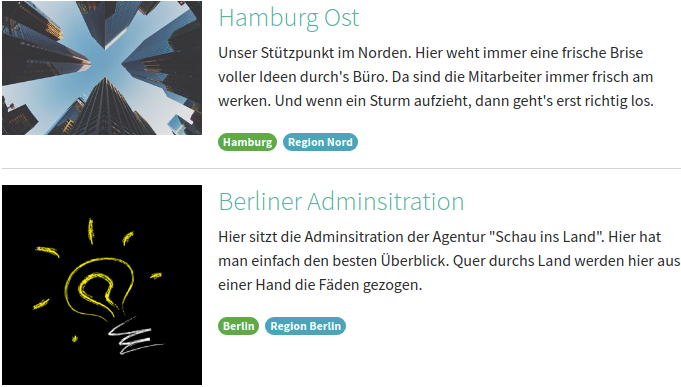
List view with images of locations 

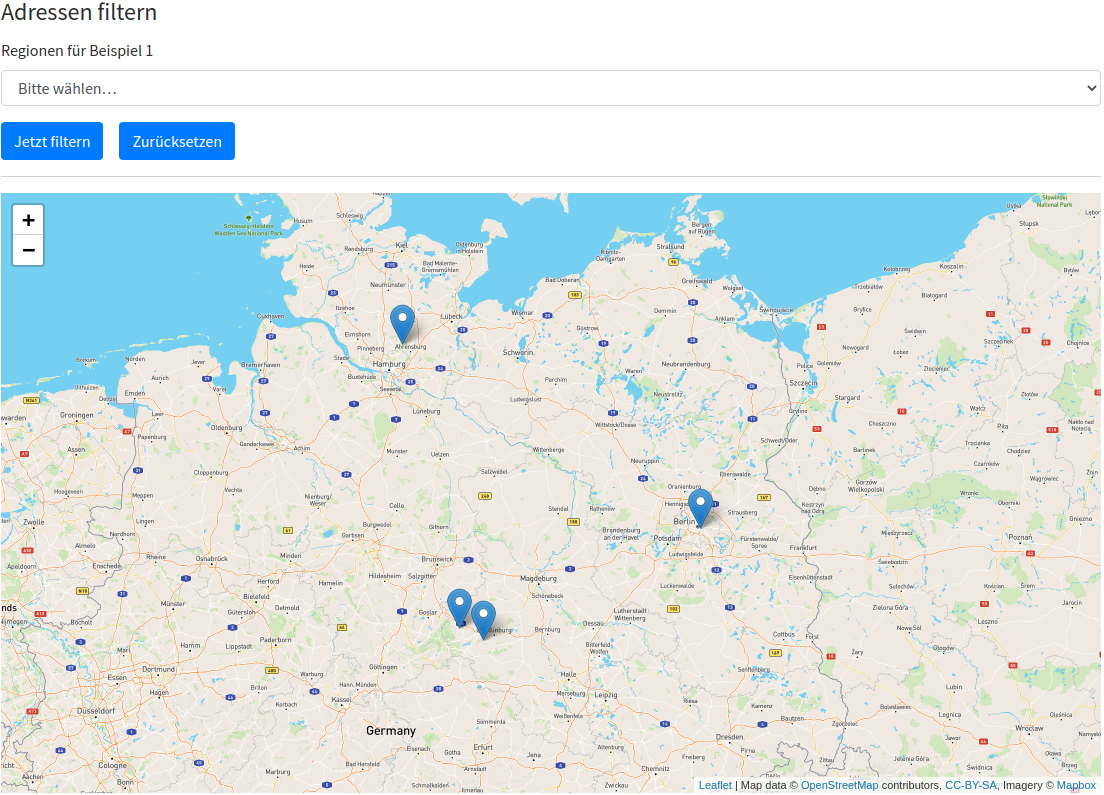
Map view with filters 

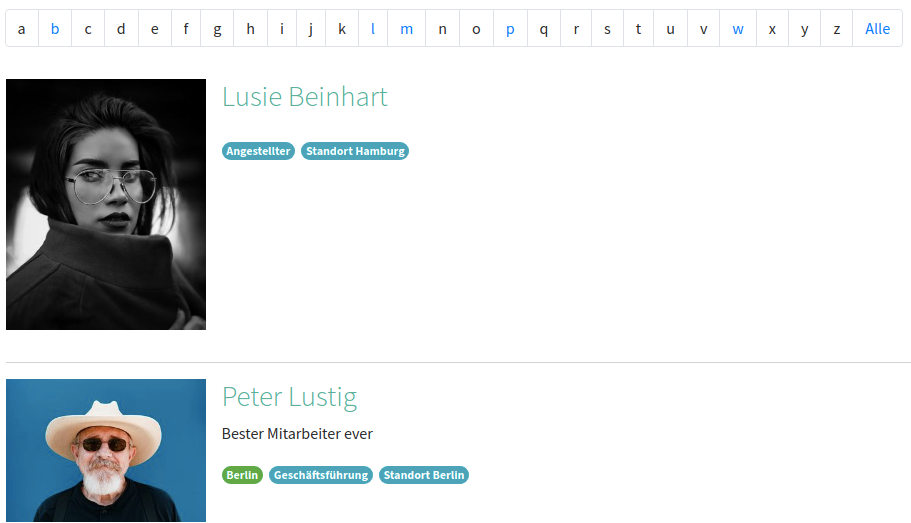
List view with images of persons 

A-Z list view with images of persons 

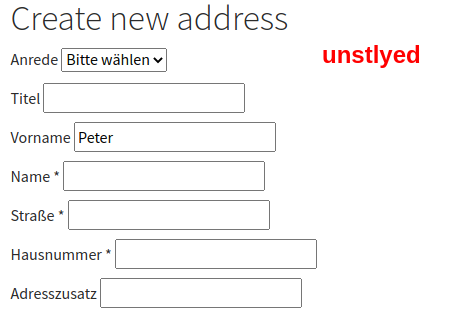
Edit profile for TYPO3 frontend users 

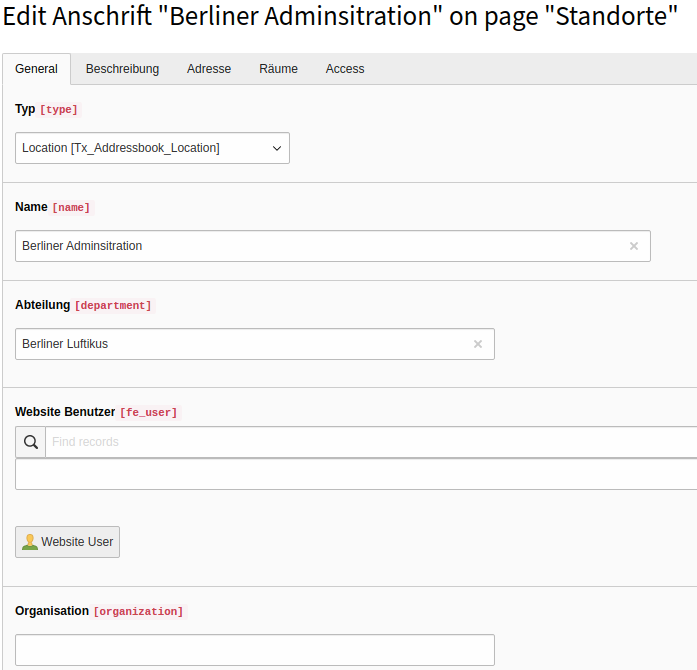
Edit location in TYPO3 backend 

Installation 

Composer 

Install the extension via Composer

composer require undkonsorten/addressmgmt
Copied!

TYPO3 extension repository 

Download the extensions addressmgmt from the TYPO3 extension repository or install it via the TYPO3 Backend

Latest version from git 

You can get the lastest version of TYPO3 Address Management (Ext: addressmgmt) from GitHub.com/undkonsorten/addressmgmt with the bash command

git clone https://github.com/undkonsorten/addressmgmt.git
Copied!

Add/clone the repository into your typo3conf/ext folder and activate it in the TYPO3 Extension Manager.

Configuration 

TypoScript 

This page is divided into the following sections which are all configurable by using TypoScript:


Include static TypoScript 

The extension ships some TypoScript code which needs to be included.

  1. Switch to the root page of your site.
  2. Switch to the Template module and select Info/Modify.
  3. Press the link Edit the whole template record and switch to the tab Includes.
  4. Select Address Management (addressmgmt) at the field Include static (from extensions):

Include TypoScript in site_package 

Another way is to include the addressmgmt TypoScript in a TYPO3 site_package. They are several kind of ways to include the TypoScript from extensions. Use your preferred way.


Constants 

Address Management provides many settings through the TYPO3 Constant Editor.

The Constant Editor provides the following constants:

Persistence 

storagePid 

Property
storagePid
Data type
int
Default
(none)
Description
The default pid of the page/folder that contains the address entries
Example
plugin.tx_addressmgmt.persistence.storagePid = 123
Copied!

recursive 

Property
recursive
Data type
int
Default
(none)
Description
Recursive levels of child pages to fetch records from the storagePid
Example
plugin.tx_addressmgmt.persistence.recursive = 2
Copied!

newRecordStoragePid 

Property
newRecordStoragePid
Data type
int
Default
(none)
Description
Pid of folder / page where frontend created addresses are stored
Example
plugin.tx_addressmgmt.persistence.newRecordStoragePid = 130
Copied!

orderBy 

Property
Order by
Data type
string
Default
(none)
Description
Defines the field whicht should be used for sorting the list view. If nothing is set the uid will be used. Possible values are for example: name, first_name, crdate
Example
plugin.tx_addressmgmt.settings.orderBy = title
Copied!

orderDirection 

Property
Order direction
Data type
string
Default
(none)
Description
Define sorting of the list view (ASC,DESC)
Example
plugin.tx_addressmgmt.settings.orderDirection = ASC
Copied!

showA-zFilter 

Property
showA-zFilter
Data type
boolean
Default
0
Description
Activates the A-Z Filter (with grouped items by first letter A - B ... - Z)
Example
plugin.tx_addressmgmt.settings.showA-zFilter =  1
Copied!

pidsA-z 

Property
pidsA-z
Data type
int
Default
(none)
Description
Pid A-Z: Page id for a-z list view
Example
plugin.tx_addressmgmt.settings.pidsA-z = 124
Copied!

detailPid 

Property
detailPid
Data type
int
Default
(none)
Description
Default page id for detail/single view
Example
plugin.tx_addressmgmt.settings.detailPid = 125
Copied!

pidsLogin 

Property
pidsLogin
Data type
int
Default
(none)
Description
PidsLogin: Login Page-Id for for redirect if FE User is not logged in
Example
plugin.tx_addressmgmt.settings.pidsLogin = 129
Copied!

target.default 

Property
target.default
Data type
string
Default
1:default
Description
Defines the storage where files, uploaded by a frontend user will be stored. 1 stands for storage with the uid 1 - which is usually the folder `/fileadmin/
Example
plugin.tx_addressmgmt.settings.target.default = 1:default
Copied!

target.images 

Property
target.images
Data type
string
Default
1:image
Description
Defines the storage where images, uploaded by a frontend user will be stored. 1 stands for storage with the uid 1 - which is usually the folder `/fileadmin/
Example
plugin.tx_addressmgmt.settings.target.images = 1:default
Copied!

createDefaultAddressType 

Property
createDefaultAddressType
Data type
sting
Default
(none)
Description
Create default address type. Possible values are Tx_Addressbook_Location, Tx_Addressbook_Organisation, Tx_Addressbook_Person. If no parameter is set here, the frontend user can choose, which which kind of record should be created
Example
plugin.tx_addressmgmt.settings.createDefaultAddressType = Tx_Addressbook_Organisation
Copied!

Map Display 

latitude 

Property
latitude
Data type
string
Default
(none)
Description
Defines the latitude center of your map (if no pins are shown)
Example
plugin.tx_addressmgmt.settings.mapConfiguration.latitude = 14.000
Copied!

longitude 

Property
longitude
Data type
string
Default
(none)
Description
Defines the longitude center of your map (if no pins are shown)
Example
plugin.tx_addressmgmt.settings.mapConfiguration.longitude = 30.000
Copied!

fitBounds 

Property
fitBounds
Data type
boolean
Default
(none)
Description
Set the map boundaries to existing pins / locations shown
Example
plugin.tx_addressmgmt.settings.mapConfiguration.fitBounds = 1
Copied!

clusterMarker 

Property
clusterMarker
Data type
boolean
Default
(none)
Description
Cluster results on the map. More infomation about Leaflet Marker Cluster.
Example
plugin.tx_addressmgmt.settings.mapConfiguration.clusterMarker = 1
Copied!

tileLayerConfiguration.options.accessToken 

Property
tileLayerConfiguration.options.accessToken
Data type
string
Default
(none)
Description
You need to add your Mapbox access token, if you want to use the map feature. More Information on Mapbox access token
Example
plugin.tx_addressmgmt.settings.tileLayerConfiguration.options.accessToken = x3dma0ena4fdsajsapf
Copied!

tileLayerConfiguration.options.id 

Property
tileLayerConfiguration.options.id
Data type
string
Default
mapbox/streets-v11
Description
Id of the mapbox style (here street). This can change the visual presentation of your map.
Example
plugin.tx_addressmgmt.settings.tileLayerConfiguration.options.id = mapbox/outdoors-v11
Copied!

tileLayerConfiguration.urlTemplate 

Property
tileLayerConfiguration.urlTemplate
Data type
string
Default
https://api.mapbox.com/styles/v1/{id}/tiles/{z}/{x}/{y}?access_token={accessToken}
Description
Normally you don not have to change this URL, als long as you want to use Mapbox and the Mapbox-API-Url-Schema does not change (which unfortunately happended in the past).
Example
plugin.tx_addressmgmt.settings.tileLayerConfiguration.urlTemplate = ...
Copied!

tileLayerConfiguration.options.maxZoom 

Property
tileLayerConfiguration.options.maxZoom
Data type
string
Default
(none)
Description
Maximum zoom level for mapbox tile server. More Information on Mapbox zoom level
Example
plugin.tx_addressmgmt.settings.tileLayerConfiguration.options.maxZoom = 10
Copied!

tileLayerConfiguration.options.attribution 

Property
tileLayerConfiguration.options.attribution
Data type
string
Default
© <a href='https://www.mapbox.com/about/maps/' target='_blank'>Mapbox</a> © <a href='http://www.openstreetmap.org/copyright' target='_blank'>OpenStreetMap</a> <strong><a href='https://www.mapbox.com/map-feedback/' target='_blank'>Improve this map</a></strong>
Description
Attribution text for the Open Street Map. More Information on Mapbox attribution
Example
plugin.tx_addressmgmt.settings.tileLayerConfiguration.options.maxZoom = ...
Copied!

Setup 

There are more settings avialable in the setup.txt. We explain here items that are not already defined by the constants above or those that might be not easy to understand.

editableCategoryConfiguration 

Property
editableCategoryConfiguration
Data type
boolean
Default
(none)
Description
Here you can define the available SysCategories for frontend editing (for TYPO3 frontend users) by their root / parent category
Example
plugin.tx_addressmgmt.settings.editableCategoryConfiguration.default {
Copied!

rootCategory = 1 orderBy = title sorting = ASC

}

filterConfiguration 

Property
filterConfiguration
Data type
boolean
Default
(none)
Description
Here you can define the available SysCategories for the frontend filter by their root / parent category. Feel free to add as many filters as you want. they will show up in the frontend automatically.
Example
    plugin.tx_addressmgmt.settings.filterConfiguration {
       filter1 {
          rootCategory = 1
          orderBy = title
          sorting = DESC
       }
       filter2 {
          rootCategory = 3
          orderBy = sorting
          sorting = ASC
       }
}
Copied!

list.media.width 

Property
list.media.width
Data type
int/string
Default
320
Description
Width of image in the list view
Example
plugin.tx_addressmgmt.settings.list.media.width = 400
Copied!

TsConfig 

Via TsConfig (Configuration/TsConfig/TemplateLayouts.ts) Address Management provides 3 different layouts for the Address List View:

  1. Map only
  2. Map with list
  3. List only
tx_addressmgmt.templateLayouts {
   map = LLL:EXT:addressmgmt/Resources/Private/Language/locallang_db.xlf:tx_addressmgmt.templateLayout.map
   map-list = LLL:EXT:addressmgmt/Resources/Private/Language/locallang_db.xlf:tx_addressmgmt.templateLayout.map-list
   list = LLL:EXT:addressmgmt/Resources/Private/Language/locallang_db.xlf:tx_addressmgmt.templateLayout.list
}
Copied!

The template be chosen in the Plugin in the dropdown Template layout @settings.templateLayout@.

Extension Manager 

Some general settings of TYPO3 Address Management can be only configured in the Extension Manager / Extension Configuration.

Settings 

Root category for addresses 

Property
basic.feUserRelation
Data type
boolean
Default
(none)
Description
Enables the connection between addresses and Frontend Users. This is useful, if frontend users need to be able to edit their own profile in th frontend

Root category for addresses 

Property
basic.rootCategory
Data type
int
Default
(none)
Description
If you add the uid of a TYPO3 SysCategory here, this category will be shown as the only available root category for the Address records. This helps to limit the available options (aka. sysCategores) for the editors and might imporove the backend usability

Templates 

Some Text Here

Map 

Features 

TYPO3 Addressmanagement can display addresses on a map. Therefore it provides fields for

  • Latitute and Lontitude for Pins/Markers and
  • GeoJson for Shapes/Polygones

on the map.

OpenStreetMap 

We decided to use for our map OpenStreetMap . The map is created with Leaflet.js. As a tile server we are using Mapbox.

Using Mapbox 

In Order to use Mapbox you need to create an Mapbox account and add the credentials via TypoScript settings.

For Editors 

Feel free to help us with more documentation here concerning the following topics:

Records 

  • New Record (Organization, Location, Persons)
  • SysCategories (Topics and Regions)
  • Rooms
  • Social Identifier & Links (e.g. Twitter, Insta etc.)

Plugins 

  • Views and Settings available in the plugins

Known Problems 

Use this section for informing about any type of of problem.

Changelog 

Changelog on Github 

The complete changelog can be found on the Github release page of Address Management

Version Compatibility 

TYPO3 10.4 LTS: The version 5 is compatible with TYPO3 10.4 LTS.

TYPO3 9.5 LTS: The version 4.1.0 is compatible with TYPO3 9.5 LTS.

TYPO3 8.7 LTS: The branch develop-8.7 (Version 3.1.1.) is compatible with TYPO3 8.7 LTS.

TYPO3 7.6 LTS: The branch master-7.6 (Version 2.1.0.) is compatible with TYPO3 7.6 LTS.

TYPO3 6.2 LTS: The branch typo3-6.2 (Version 1.0.0) is compatible with TYPO3 6.2 LTS.

Sitemap