Taskqueue

Version

9.3

Language

en

Authors

Eike Starkmann, Felix Althaus

Email

starkmann@undkonsorten.com, althaus@undkonsorten.com

License

This extension documentation is published under the CC BY-NC-SA 4.0 (Creative Commons) license

This extension provides a taskqueue for asynchronous tasks. For example sending many emails with or rendering PDFs. This task spooling helps to avoid server load peaks and can improve user experience.

Extension Manual

This documentation is for the TYPO3 extension Taskqueue.

TYPO3

The content of this document is related to TYPO3 CMS, a GNU/GPL CMS/Framework available from typo3.org .

Introduction

What does it do?

There are lost's of task that can be done asynchronous in an extension.

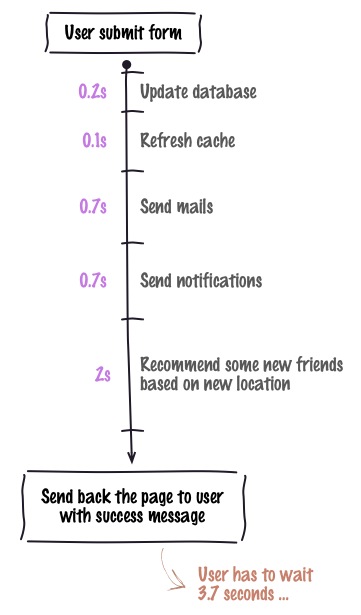
For example: You have a user registration that sends an confirmation email and maybe renders a pdf which is attached to the email. The normal way would be that the user has to wait till the pdf was build and the email was send and then his registration is finished and he gets redirected or whatever. But so what's is done is that the we are using the users time to run a certain task. This results in high page loading times.

TaskQueue

Default way of handling (big) tasks

|

A nice way of doing this would be that a task is created and stored in a queue which can later be executed (e.g. cron).

This is what this extension does. It provides a task queue for other extension where task can be created and stored so that the page load speeds up. Also you have a nice overview of tasks that are in the queue which also can be manipulated.

Of course there are lots of other systems that provides such a solution, like PHPredis or PHP-Resque, but these solutions require extra databases or software packages. This extension does not need anything and is a small and fast solution.

Screenshots

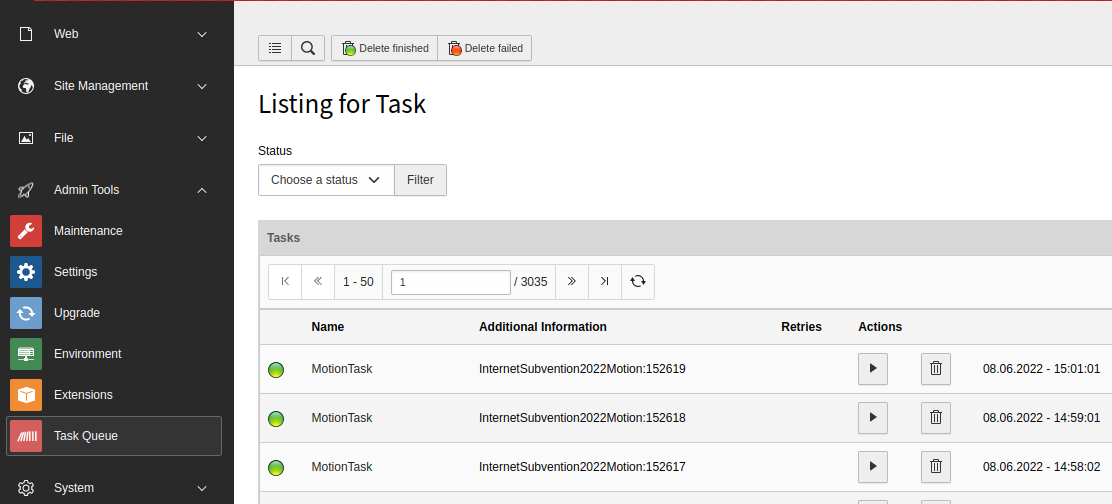
TaskQueue Backend

|

task administration

|

And this is the taskqueue backend module.

For Editors

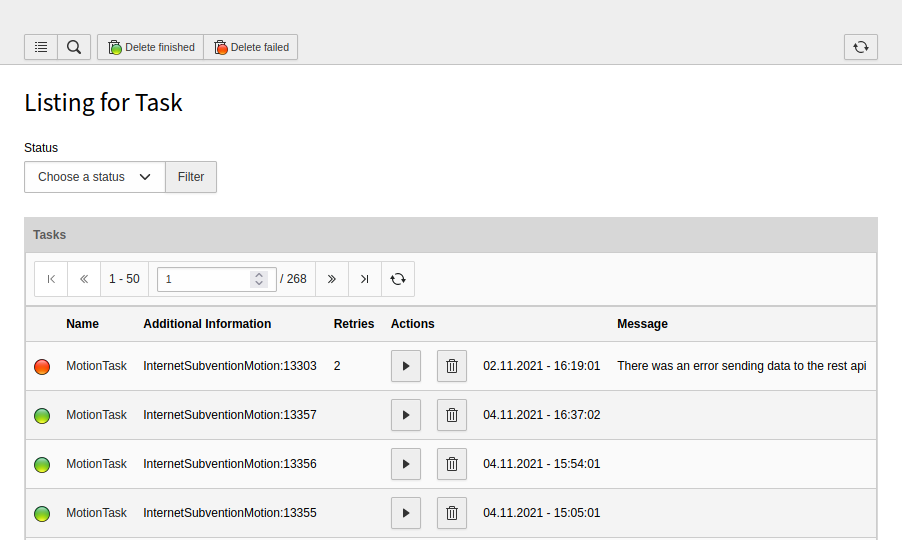
After installation you should see a menu called Task Queue. Here all tasks are shown.

TaskQueue Backend

|

Tasks can have four different statuses:

  • Red: Task failed.
  • Yellow: Task is running.
  • Blue: Task is waiting.
  • Green: Task is finished.

A Task can be started and deleted manually.

Each task has a start date, which defines the date the task can be started. This is not respected when starting a task manually.

Message of tasks can contain log message but also exception.

Every task can have a priority.

You can not create tasks manually, because this would not make sense. A task can only be created by another extension, because you have to implement the run() method. More about that see dev-manual.

Commands

./vendor/bin/typo3cms taskqueue:run-tasks limit whitelist blacklist
Copied!

Limit defines how many tasks should be executed.

Whitelist should be a comma seperated list of names. Every task name that is included in this list is executed.

Blacklist is analog the opposite.

These options exist for filtering task execution.

./vendor/bin/typo3cms taskqueue:delete-tasks dateInterval
Copied!

DateInterval defines the intervall after witch the tasks should be deleted. The following syntax is supported: https://www.php.net/manual/en/dateinterval.construct.php

Cronjob

Task can also be started via cronjob.

./vendor/bin/typo3cms taskqueue:run-tasks 15 "MailTask,ApiTask"
Copied!

This will start 15 tasks named "MailTask" or "ApiTask"

./vendor/bin/typo3cms taskqueue:delete-tasks P3M
Copied!

This will delete tasks older than 3 month.

Scheduler

It is possible to add this cronjob to the scheduler.

  • Simply click on the add icon and choose Execute Console Commands.

Installation

  • Install the extension via extension manager or composer
  • Include the static template.

After installation you should see a menu called Task Queue.

TypoScript reference

The only setting is the storage pid.

Constants

Configure page ids

storagePid

storagePid
type

int

Default

The id of the page storing the tasks

Example:

 module.tx_taskqueue.persistence {
   storagePid = 42
}
Copied!

Developer corner

Use this section to provide examples of code or detail any information that would be deemed relevant to a developer.

Extending a task

First create an extension that extends the task model. Lets call our new model MailTask.

class Task
Fully qualified name
\Undkonsorten\Taskqueue\Domain\Task

Has to be extended.

Examples

MailTask:

class MailTask extends \Undkonsorten\Taskqueue\Domain\Model\Task{
...
}
Copied!

Configure the subclass.

Classes:

\Undkonsorten\Wall\Domain\Model\Task\MailTask::class => [
        'tableName' => 'tx_taskqueue_domain_model_task',
        'recordType' => 'tx_wall_domain_model_task'
    ],
    \Undkonsorten\Taskqueue\Domain\Model\Task::class => [
        'subclasses' => [
            'tx_wall_domain_model_task' => \Undkonsorten\Wall\Domain\Model\MailTask::class
        ]
    ],
Copied!

You can also add your own setter and getter here. But to make the date accessible for the taskqueue extension all data needs to be stored in the data array via the set/getProperty.

We add an user, a post, a comment and a mail to the task:

MailTask:

/**
   *
   * @param integer $user
   */
  public function setUser($user) {
     $this->setProperty('user', $user);
  }

  /**
   *
   * @return integer
   */
  public function getUser() {
     return $this->getProperty('user');
  }

  /**
   *
   * @return integer
   */
  public function getPost() {
     return $this->getProperty('post');
  }
  /**
   *
   * @param integer $post
   */
  public function setPost($post) {
     $this->setProperty('post', $post);
  }
  /**
   *
   * @return integer
   */
  public function getComment() {
     return $this->getProperty('comment');
  }

  /**
   *
   * @param integer $comment
   */
  public function setComment($comment) {
     $this->setProperty('comment', $comment);
  }

  /**
   *
   * @param array $mail
   */
  public function setMail($mail) {
     $this->setProperty('mail', $mail);
  }

  /**
   *
   * @return array
   */
  public function getMail() {
     return $this->getProperty('mail');
  }
Copied!

As you see we don't use protected variables here.

Now you have your own task that you can add to the task queue. But before you have to implement the run() method.

Implementing run()

Every task has its own run method(). In this method you have to define the actual work that needs to be done. The taskqueue extension does not know anything about what the task is doing, it just calls the run() method on every task.

MailTask:

 public function run(){

$mailVariables = array();
$mailVariables['user'] = $this->userRepository->findByUid($this->getUser());
if(!$mailVariables['user']){
	throw new Exception('Something') //The task will be marked as failed automatically
}
$mailVariables['post'] = $this->postRepository->findByUid($this->getPost());
$mailVariables['comment'] = $this->commentRepository->findByUid($this->getComment());
$mailVariables['link'] = $this->getLink();
$mailVariables['editLink'] = $this->getEditLink();

//Update the mail
$mail = $this->getMail();
if($mailVariables['user']->getFirstName() && $mailVariables['user']->getLastName()){
		$mail['receiverName'] = $mailVariables['user']->getFirstName()." ".$mailVariables['user']->getLastName();
	}else{
		$mail['receiverName'] = $mailVariables['user']->getUsername();
	}

$mail['receiverEmail'] = $mailVariables['user']->getEmail();
$this->setMail($mail);

$this->mailManager->sendTemplateEmail($this->getMail(), $mailVariables);
$this->setMessage(LocalizationUtility::translate(
          'tx_wall_task.notification.send',
          'wall',
          array('1' =>$mailVariables['user']->getUsername())
      ));
 }
Copied!

Here the run method makes use of the data stored in the task. With this data a mail is generated and then send.

Adding a task to the taskqueue

After you have a ready implemented task you need to add it to the queue so that it can be executed.

MailController:

/**
 * task repository
 * @var \Undkonsorten\Taskqueue\Domain\Repository\TaskRepository
 *
 */
protected $taskRepository;

...

/*@var $task Undkonsorten\Wall\Domain\Model\MailTask */
$task = $this->objectManager->get('Undkonsorten\Wall\Domain\Model\MailTask');

$task->setPost($newPost->getUid());
$task->setCommend($newComment->getUid());
$task->setMail($mail);
$task->setUser($user->getUid());
$task->setStartDate(time());
$this->taskRepository->add($task);
....

Copied!
  • First you need to inject the task repository.
  • Then you get an task object via the object manager (keep in mind to get you own task object, the one from taskqueue is abstract)
  • Then you set the needed data.

What is important here is, that it would be good to store only uids in the task object, because these data get serialized and stored in the database. When you store complete objects the performance will go down.

Keep in mind that when you create new objects, for example a post, these objects don't have an uid until they get stored in the database. To it might me useful to run a peristAll before add an uid to the task.

MailTask:

...
// we need to persist the new object because otherwise it would not have an uid
// and we want only uids to be saved in task
$this->persitenceManager->persistAll();
$task->setPost($newPost->getUid());
...
Copied!

Concrete Example

All the code examples are taken from the extension wall. This extension allows feusers to write posts and comment on a wall, a little bit like facebook. It uses taskqueue to notify users on new posts and comments. The extension is available here: http://typo3.org/extensions/repository/view/wall

It might help you to have a look at the code.

Stop all task of certain name

Sometimes it is necessary to skip all tasks if a specific error has happened. For example if you run 15 tasks in one run and they are working on an api, if the first task gets an timeout if might be usefull to skip the other tasks.

To achieve this you need to throw a StopRunException, which ships with the extension.

StopRunException:

namespace Undkonsorten\Taskqueue\Exception;

class StopRunException extends Exception
{
    /**
     * @var string
     */
    protected $taskname;

    public function __construct($message = "", $code = 0, Throwable $previous = null, string $taskname)
    {
        $this->taskname = $taskname;
        parent::__construct($message, $code, $previous);
    }

    /**
     * @return string
     */
    public function getTaskname(): string
    {
        return $this->taskname;
    }

    /**
     * @param string $taskname
     */
    public function setTaskname(string $taskname): void
    {
        $this->taskname = $taskname;
    }

}
Copied!

If you can use the task name to only skip certain tasks.

Example:

class MotionTask
{
   public function run(): void
   {
   ...
    try {
         //Something bad happens here
     }catch(ConnectException $exception){
         throw new StopRunException("Consolidate API was not reachable.", "1637171378", $exception , MotionTask::class);
     }
   ...
   }
Copied!

Sitemap

Index

Note: This index page has just entered the scene. I will develop gradually.

Linktargets

Labels for Cross-Referencing

.. ref-targets-list::