
Feature: Readability score in RTE overlay
Description
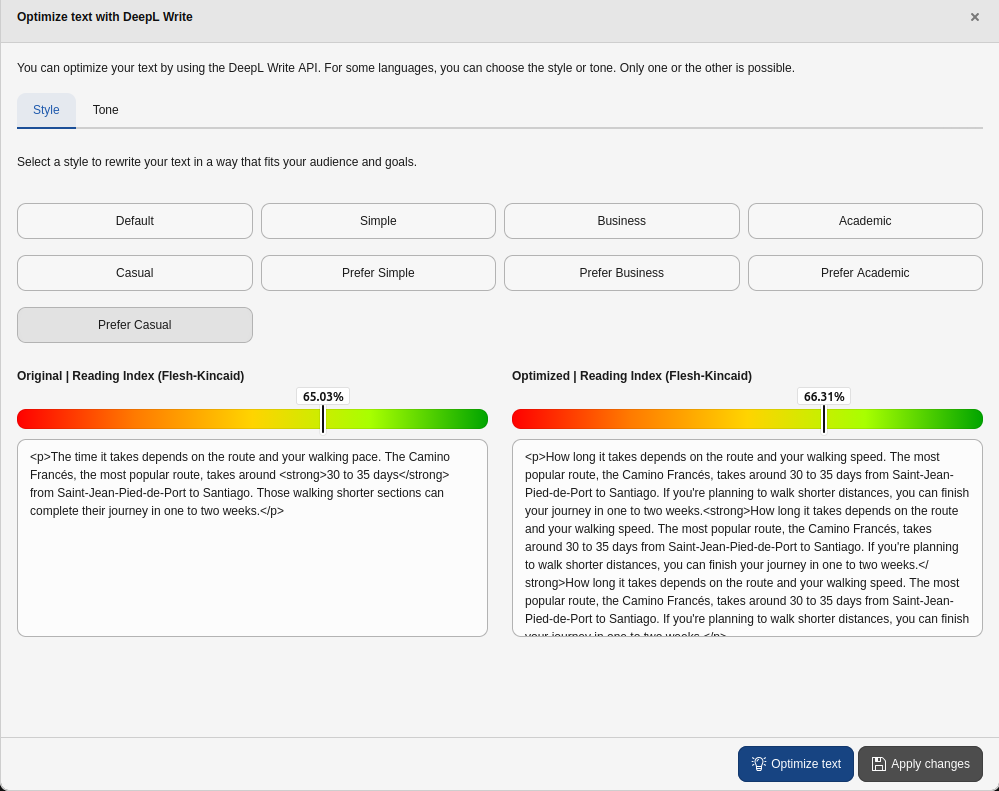
The DeepL Write RTE overlay now displays a Flesch reading-ease score for both the original and the optimized text, giving editors immediate feedback on how readable a text is before and after rephrasing.
The score is shown as a coloured marker bar above each text area and is updated for the optimized text once the rephrasing result is returned.
Readability is calculated per content language using a language specific
Flesch reading-ease formula. German, English, French, Italian and Portuguese
are supported out of the box, and regional variants such as en-US or
pt-BR are matched by their primary language subtag. For unsupported
languages or empty texts no score is reported and the overlay keeps working
without interruption.
Impact
Editors using the DeepL Write overlay in the rich text editor get an at-a-glance readability indication for the text they are working on, helping to judge whether a rephrasing actually improves readability.
Developer
See also
This how-to is also available as dedicated documentation under Developer › Readability calculators.
The readability score is computed by small, language specific calculators. Each
calculator implements ReadabilityCalculatorInterface (usually by extending
AbstractReadabilityCalculator) and is registered through the
deepl.readability service tag. At runtime ReadabilityCalculatorRegistry
selects the calculator whose language matches the primary subtag of the editor
content language.
Out of the box the following languages are provided, each using a documented
Flesch reading-ease adaptation, where ASL is the average sentence length
(words / sentences) and ASW the average number of syllables per word
(syllables / words):
- English (
en) — Flesch:206.835 - 1.015 * ASL - 84.6 * ASW - German (
de) — Amstad:180 - ASL - 58.5 * ASW - French (
fr) — Kandel & Moles:207 - 1.015 * ASL - 73.6 * ASW - Italian (
it) — Franchina & Vacca:206 - ASL - 65 * ASW - Portuguese (
pt) — Martins et al.:248.835 - 1.015 * ASL - 84.6 * ASW
Adding a language
To support an additional language, add a class that extends
AbstractReadabilityCalculator, declare the language it serves and the
hyphenation locale used for syllable counting, and implement the language
specific formula. Tag it with #[AutoconfigureTag('deepl.readability')] so it
is registered automatically:
<?php

declare(strict_types=1);

namespace Vendor\MyExtension\Readability\Calculator;

use Symfony\Component\DependencyInjection\Attribute\AutoconfigureTag;
use WebVision\DeeplWrite\Readability\Calculator\AbstractReadabilityCalculator;

#[AutoconfigureTag('deepl.readability')]
final class FleschReadingEaseSpanish extends AbstractReadabilityCalculator
{
    // Primary language subtag matched against the editor content language.
    protected const LANGUAGE = 'es';

    // Locale of the org_heigl/hyphenator dictionary used for syllables.
    protected const HYPHENATION_LOCALE = 'es';

    protected function calculateScore(
        float $averageSentenceLength,
        float $averageSyllablesPerWord,
    ): float {
        // Return the language specific Flesch reading-ease score; the base
        // class guards empty input and caps the result at the maximum of 100.
        return 206.84 - 1.02 * $averageSentenceLength - 60.0 * $averageSyllablesPerWord;
    }
}The base class handles word, sentence and syllable counting (the latter via
org_heigl/hyphenator, which ships dictionaries for de, en, es,
fr, it and pt), guards against empty input and caps the score at
100, so a calculator only has to provide the formula.
Note
Spanish (es) is supported by DeepL Write but is intentionally not shipped
with a calculator yet: the commonly cited Fernández-Huerta formula is based
on "sentences per 100 words" and carries a historically mis-transcribed
coefficient, so a reliable, well-sourced variant should be selected before
adding it. The snippet above illustrates the API only and is not an endorsed
formula.