DeepL Translate (CORE) 

Extension key

deepltranslate_core

Package name

web-vision/deepltranslate-core

Version

main

Language

en

Copyright

2018

Author

web-vision GmbH & Contributors

Rendered

Mon, 27 Apr 2026 11:29:57 +0000

License

This document is published under the Open Publication License.


This extension provides translation of pages, content and records in TYPO3 for languages supported by DeepL.

Select `Translate with DeepL` localization handler

Quick start 

A quick introduction in how to install, configure and use this extension.

Introduction 

Introduction to the extension, general information.

Editors manual 

Learn how to translate pages and content using DeepL translation.

Administration 

Install or upgrade deepltranslate_core, learn how to configure the extension.

Frequential asked questions 

Learn about answers to frequential asked questions.

Known Issues 

Known issues and information about them.

Reference 

In-depth reference about certain aspects of this extension:

  • Extension configuration
  • Table Configuration (TCA)

Addons 

Various extensions improve deepltranslate_core with additional features.

Changelog 

Learn about what have changed and what actions are required to process.

What does it do? 

This extension provides automatic translation for pages, content and TCA record fields using DeepL supported languages.

Contribution 

Contributions are essential to the success of open source projects, but they are by no means limited to contributing code. Much more can be done, for example by improving the documentation or answering questions on stackoverflow.com.

Contribution workflow 

  1. Please always create an issue on Github before starting a change. This is very helpful to understand what kind of problem the pull request solves, and whether your change will be accepted.
  2. Bug fixes: Please describe the nature of the bug you wish to report and provide how to reproduce the problem. We will only accept bug fixes if we can can reproduce the problem.
  3. Features: Not every feature is relevant to the majority of users. In addition: We do not want to complicate the usability of this extension for a marginal feature. It helps to have a discussion about a new feature before before opening a pull request.
  4. Please always create a pull request based on the updated release branch. This ensures that the necessary quality checks and tests are performed as a quality can be performed.

Contribution information 

Commit message 

  • This repository uses similar subject prefixes like convential commits, but follows the known prefixes used in the TYPO3 Community:

    • [FEATURE] instead of feat: for changes introducing new features. Requires a Feature-*.rst changelog file.
    • [BUGFIX] instead of fix:
    • [TASK] instead of chore: for any task.
    • [DOCS] instead of docs: for documentation or markdown file related changes.
    • [!!!] before the other prefixes instead of ! or BREAKING to hint breaking changes. Requires a Breaking-*.rst changelog file.

    with special [!!!] before task or feature indicating breaking changes.

Documentation and Changelog 

  • Breaking changes indicated with prefix [!!!] requires a Breaking-*.rst changelog file.
  • Features indicated with prefix [FEATURE] requires a Feature-*.rst changelog file.
  • Tasks deprecation methods, classes or functionality needs to be documented adding Deprecation-*.rst changelog files.
  • In case important information needs to be documented Important-*.rst changelog files could be provided.

Documentation is rendered locally using:

Build/Scripts/runTests.sh -s renderDocumentation
Copied!

and can ge viewed in the browser opening Documentation-GENERATED-temp/Index.html for example on linux with:

xdg-open Documentation-GENERATED-temp/Index.html
Copied!

Executing toolchain 

All related development tools are executed using the Build/Scripts/runTests.sh command dispatcher.

Available general options:

  • -b <docker|podman> allows to set the container system to use in case both are available, otherwise it is determined. podman is used over docker if not enforced using this option.
  • -s <suite> selectes the suite (command) to execute, see -h for full description of available options and suites.
  • -p <8.2|8.2|8.3|8.4|8.5> defines the PHP version to use for PHP related suites and commands, for example phpunit, phpstan or composer operations.
  • -x enforces xdebug profile=debug for php script executions, use-ful to debug unit- or functional tests.
  • -d <sqlite|mysql|mariadb|postgres> selects the database to use for functional tests and starts/stops/cleans the selected container.
  • -i <version> allows to select the database server version for MariaDB, MySQL or PostgreSQL. See -h for the list of available options. Used for functional tests.

Examples 

functional tests for TYPO3 v13.4 with PHP 8.2
Build/Scripts/runTests.sh -t 13 -p 8.2 -s composerUpdate && \
Build/Scripts/runTests.sh -t 13 -p 8.2 -s functional -d sqlite && \
Build/Scripts/runTests.sh -t 13 -p 8.2 -s functional -d mariadb -i 10.7
Copied!
functional test for TYPO3 v14.3 with PHP 8.5
Build/Scripts/runTests.sh -t 14 -p 8.5 -s composerUpdate && \
Build/Scripts/runTests.sh -t 14 -p 8.5 -s functional -d sqlite && \
Build/Scripts/runTests.sh -t 14 -p 8.5 -s functional -d mariadb -i 10.7
Copied!
unit tests for TYPO3 v13.4 with PHP 8.5
Build/Scripts/runTests.sh -t 13 -p 8.5 -s composerUpdate && \
Build/Scripts/runTests.sh -t 13 -p 8.5 -s unit && \
Build/Scripts/runTests.sh -t 13 -p 8.5 -s unitRandom
Copied!
unit tests for TYPO3 v14.3 with PHP 8.2
Build/Scripts/runTests.sh -t 14 -p 8.2 -s composerUpdate && \
Build/Scripts/runTests.sh -t 14 -p 8.2 -s unit && \
Build/Scripts/runTests.sh -t 14 -p 8.2 -s unitRandom
Copied!
Code style fixer
Build/Scripts/runTests.sh -t 13 -p 8.2 -s composerUpdate && \
Build/Scripts/runTests.sh -t 13 -p 8.2 -s cgl
Copied!
Static code analyzer - analyze
Build/Scripts/runTests.sh -t 13 -p 8.2 -s composerUpdate && \
Build/Scripts/runTests.sh -t 13 -p 8.2 -s phpstan && \
Build/Scripts/runTests.sh -t 14 -p 8.2 -s composerUpdate && \
Build/Scripts/runTests.sh -t 14 -p 8.2 -s phpstan
Copied!
Static code analyzer - regenerate PHPStan baseline
Build/Scripts/runTests.sh -t 13 -p 8.2 -s composerUpdate && \
Build/Scripts/runTests.sh -t 13 -p 8.2 -s phpstanGenerateBaseline && \
Build/Scripts/runTests.sh -t 14 -p 8.2 -s composerUpdate && \
Build/Scripts/runTests.sh -t 14 -p 8.2 -s phpstanGenerateBaseline
Copied!

Sponsors 

We very much appreciate the sponsorship of the development and features of the DeepL Translate Extension for TYPO3.

DeepL "Add automatic translation flag and hint" sponsored by 

Quick start 

  1. Install this extension:

    composer require -W 'web-vision/deepltranslate-core':'~6.0.0@dev'
    Copied!
  2. Configuration:

    • Set DeepL API key in extension configuration
    • Configure DeepL options in site language
    • Configure editor access rights to use DeepL translation

Quick installation 

Composer mode 

only the extension itself
composer require -W \
   'web-vision/deepltranslate-core':'~6.0.0@dev'
Copied!
requiring depending TYPO3 extensions along the way
composer require \
    'web-vision/deeplcom-deepl-php':'~1.18.0@dev' \
    'web-vision/deepl-base':'~2.0.0@dev' \
    'web-vision/deepltranslate-core':'~6.0.0@dev'
Copied!

Classic mode 

Quick configuration 

Extension Configuration - API Key 

This extension uses the DeepL under the hood to provide the translations, which requires a API key regarding the plan and connected limits. Get your key here and enter it to the extension configuration for deepltranslate_core.

:guilabel:`Extension Configuration > Settings > DeepL API Key`

Further reading 

Basic Usage TYPO3 v14 

Once the extension is installed and the API key provided, we are ready to start translating pages, content elements and/or records.

Translate Page with or without contents elements 

deepltranslate-core respects the new translation workflow and shares the same wizard provided by TYPO3 v14, which means that translating a page and optional directly the contents are started using the generic translation dropdown.

  1. Generic translation dropdown to create translation

    Generic translation dropdown to create translation
  2. Select content elements to translate

    Select content elements to translate
  3. Select Translate localization mode

    Select `Translate` localization mode
  4. Select Translate with DeepL localization handler

    Select `Translate with DeepL` localization handler
  5. Review and confirm selected localization options

    Review and confirm selected localization options
  6. Localization is in progress

    Localization is in progress
  7. Localization completed successfully

    Localization completed successfully

Translate Content Elements 

Once the extension is installed and the API key provided, we are ready to start translating content elements. When translating a content element, there are four additional options besides the normal translate and copy.

  • DeepL Translate (auto detect).
  • DeepL Translate.
  1. Start translate of missing records for language

    Start translate of missing records for language
  2. Select source language

    Select source language

    In case content element translation for current page already exists TYPO3 allows to select the source language to translate content elements from.

  3. Select content elements to translate

    Select content elements to translate
  4. Select Translate localization mode

    Select Translate localization mode
  5. Select Translate with DeepL localization handler

    Select `Translate with DeepL` localization handler
  6. Review and confirm selected localization options

    Review and confirm selected localization options
  7. Localization is in progress

    Localization is in progress
  8. Localization completed successfully

    Localization completed successfully

Translate Record 

In list view, you are able to translate single elements by clicking the DeepL translate button for the language you want.

  1. Start localization for a record with Localize to in the Records Module

    Start localization for a record with `Localize to` in the `Records Module`

Basic Usage TYPO3 v13 

Translating a page 

deepltranslate-core adds a separate dropdown for DeepL translation of a page to the list and web module. The dropdown is filtered to not translated pages and against DeepL API possible translation languages.

Dropdown for DeepL translation

Translating content elements 

Once the extension is installed and the API key provided, we are ready to start translating content elements. When translating a content element, there are four additional options besides the normal translate and copy.

  • DeepL Translate.
DeepL Options

DeepL translate options

Translating a single element 

In list view, you are able to translate single elements by clicking the DeepL translate button for the language you want.

Translation buttons in list view

Languages that are not available will have no DeepL button. In this case, use normal translation.

Translation button for tx_news, one language not available in DeepL

Auto-translate-prefix 

To enable tagging of automatically translated pages and content, the page turned on of translated pages has been extended to implement a control.

Page Property DeepL Translate

Each time content is translated, the fields are updated.


The field information "Last translation date" and "DeepL Translated content has not been checked" are always transferred to the page object and can be queried in Fluid.

In this way, information and notes can be controlled in the Fluid template if required. This must be added to the template by a TYPO3 administrator or developer.

Page Frontend prefix

When an editor is previewing a hidden page translated by DeepL, a DeepL badge is displayed in addition to the "Preview" badge in the upper right corner.

Page frontend preview

Installation 

The extension has to be installed like any other TYPO3 CMS extension. You can download the extension using one of the following methods:

only the extension itself
composer require -W \
   'web-vision/deepltranslate-core':'~6.0.0@dev'
Copied!
requiring depending TYPO3 extensions along the way
composer require \
    'web-vision/deeplcom-deepl-php':'~1.18.0@dev' \
    'web-vision/deepl-base':'~2.0.0@dev' \
    'web-vision/deepltranslate-core':'~6.0.0@dev'
Copied!
  1. Switch to the module System > Extensions.
  2. Switch to Get Extensions
  3. Search for the extension key deepltranslate_core
  4. Import the extension from the repository.
  1. Get current version from TER by downloading the zip version. Alternatively, get the zip from the Github Releases page.
  2. Switch to the module System > Extensions.
  3. Enable upload Upload Extension
  4. Select or drag extension ZIP archive and upload the file

Compatibility 

DeepL Translate (CORE) supports:

DeepL Translate version TYPO3 Version PHP version Supported Composer TER
6.x 14.3.x 8.2, 8.3, 8.4, 8.5 yes web-vision/deepltranslate-core deepltranslate_core
6.x 13.4.x 8.2, 8.3, 8.4, 8.5 yes web-vision/deepltranslate-core deepltranslate_core
5.x 13.4.x 8.2, 8.3, 8.4, 8.5 yes web-vision/deepltranslate-core deepltranslate_core
5.x 12.5.x 8.1, 8.2, 8.3, 8.4 yes web-vision/deepltranslate-core deepltranslate_core
4.x 11, 12 7.4, 8.0, 8.1, 8.2, 8.3, (8.4) no web-vision/wv_deepltranslate wv_deepltranslate
3.x 9, 10, 11 >=7.4 no web-vision/wv_deepltranslate wv_deepltranslate
2.x 9, 10, 11 >=7.4 no web-vision/wv_deepltranslate wv_deepltranslate

Configuration 

Set up API 

  1. Go to the extension configuration in System > Settings > Extension Configuration.

  2. Open the settings for deepltranslate_core > Settings and add your API key.

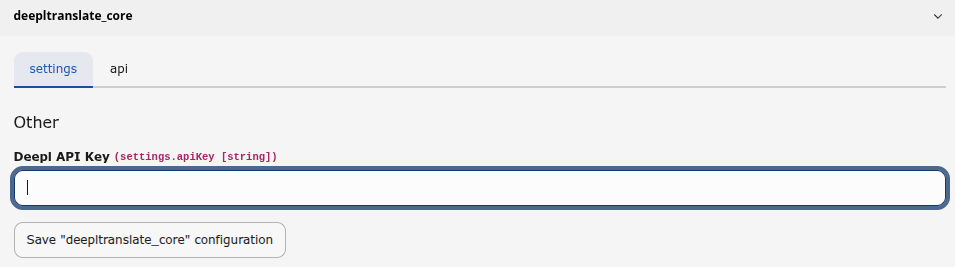
    The Extension configuration settings showing the input field for DeepL API key

    The correct DeepL API endpoint for free or pro plans is auto-detected the given API key format.

Further Readings

Set up translation language 

  1. Go to Site Management > Sites and edit your site configuration
  2. Switch to tab Languages and open your target

    Site settings for a TYPO3 language showing empty DeepL Target Language dropdown
  3. Go to DeepL Settings and set up your Target Language (ISO Code)

    Selected target now set to German

Choice a Formality 

The formality configuration has been moved from the extension configuration to the SiteConfig languages. The Formality Select field is only displayed if the selected Target-Translate of DeepL is supported.

The same option is available in the Select field as DeepL API Supported.

deeplFormality

deeplFormality
type

string

Sets whether the translated text should lean towards formal or informal language. Possible options:

default
The default setting. If formal or informal depends on the language
less
Less formal language. Will fail, if no formality support for language
more
More formal language. Will fail, if no formality support for language
prefer_less
Use less formal language, if possible, otherwise fallback to default
prefer_more
Use more formal language, if possible, otherwise fallback to default

Configure tables 

If not set by default, you need to define the l10n_mode for the fields you want to have translatable by deepltranslate_core.

See the tableConfiguration for details.

Detecting target language 

The following chain tries to detect the language to translate into:

  1. Set up DeepL Translation language in SiteConfiguration * Target languages detected from DeepL will only appear
  2. Check hreflang against DeepL supported languages * Needed for detecting EN-GB, EN-US, PT-PT or PT-BR
  3. Fallback to Language ISO code

For currently allowed languages see the DeepL conform language key. As this extension retrieves available languages from the API, translations are restricted to the languages listed in the official DeepL API documentation.

If none of these match against DeepL API, translation for this language is disabled for usage within DeepL. Translation buttons and dropdowns respect this setting.

Access Configuration 

Access to the automatic translation functions with Deepl-Translate in the TYPO3 backend can be defined via the following options in the user group settings.

Backend Gruppen Access Right - Custom module options

Allowed Translate

Allowed Translate

This setting controls the visibility of the general translation function in the translation modal of the page module, in the translation options of data records in the list module and in the translation selection in the page header of the page and list module.

Allowed Glossary Sync

Allowed Glossary Sync

This setting allows backend users of a backend user group with corresponding authorisation to synchronise glossary entries of a glossary SysFolder (SysFolder with activated glossary module) towards Deepl.

Auto-translate-prefix 

To enable the tagging of automatically translated pages and content, the page activation of translated pages has been extended to provide a means of control.

This information is passed to the Page Context Fluid template, where it can be used to create a page-specific look.

Page Frontend

To make this easier, you can also use the extension partial.

<f:if condition="{page.tx_wvdeepltranslate_content_not_checked}" >
    <div style="background: #006494; border: #0000cc 1px solid; color: #fff; padding: 10px; text-align: center">
        <f:translate key="LLL:EXT:deepltranslate_core/Resources/Private/Language/locallang.xlf:preview.flag" />
        <f:if condition="{page.tx_wvdeepltranslate_translated_time} > 0" >
            <f:format.date format="{dateFormat}">{page.tx_wvdeepltranslate_translated_time}</f:format.date>
        </f:if>
    </div>
</f:if>
Copied!

Upgrade 5.x to 6.x 

From an API perspective there are no relevant changes or any migrations required (yet), which means you can simply update the extension.

See changelog-v6 for details on included changes.

composer-mode 

composer config minimum-stability "dev" \
&& composer config "prefer-stable" true \
composer require -W \
   "web-vision/deepltranslate-core":"6.0.*@dev"
Copied!

classic-mode 

  1. Get it from the Extension Manager: Switch to the module System > Extensions. Switch to Get Extensions and search for the extension key deepltranslate_core and import the extension from the repository.
  2. Get it from typo3.org: You can always get current version from TER by downloading the zip version. Upload the file afterwards in the Extension Manager.
  3. Get it from GitHub release: TER upload archives are added to the corresponding GitHub release page, in case you need to download or update the extension and GITHUB_RELEASES is down or not reachable.

Upgrade 4.x to 5.x 

Starting with 5.x the composer package name and extension key has been renamed!

You need to migrate the extension settings from ['TYPO3_CONF_VARS']['EXTENSIONS']['wv_deepltranslate'] to ['TYPO3_CONF_VARS']['EXTENSIONS']['deepltranslate_core'].

Then you will need to replace the previous package by uninstalling it first.

composer-mode 

composer remove "web-vision/wv_deepltranslate"
composer require "web-vision/deepltranslate-core":"^5"
Copied!

classic-mode 

  1. Uninstall "wv_deepltranslate" using the Extension Manager. Switch to the module Admin Tools > Extensions and filter for wv_deepltranslate and remove (uninstall) the extension.
  2. Ensure to remove the folder completely. Run

    rm -rf typo3conf/ext/wv_deepltranslate
    Copied!
  3. Get it from the Extension Manager: Switch to the module Admin Tools > Extensions. Switch to Get Extensions and search for the extension key deepltranslate_core and import the extension from the repository.
  4. Get it from typo3.org: You can always get current version from TER by downloading the zip version. Upload the file afterwards in the Extension Manager.

FAQ 

My dropdown in the site configuration is empty 

This happens if TYPO3 cached the request from the DeepL API for allowed languages, but no API key was provided. In this case, empty your system cache in TYPO3. Normally no cache files should be created when no API key is provided.

If this step does not work, delete the cached files manually. The location is as follows:

var/cache/data/deepltranslate_core

typo3temp/var/cache/data/deepltranslate_core

After deleting the files in this directory and going to Site Configuration, the extension will reload the cache and the dropdown should have all the translatable language keys.

What will be the cost for DeepL API subscription? 

You can find all the details regarding the usage of the DeepL API here:

Known issues 

Translation options not shown 

When API key is not set, deepltranslate_core disables all functions. Go to Settings and fix it. Clear cache after this.

Extension Configuration 

Some general settings can be configured in the Extension Configuration.

  1. Go to System > Settings > Extension Configuration
  2. Choose deepltranslate_core

The settings are divided into several tabs and described here in detail:

Properties

Settings 

Tab Settings provides basic extension settings required for minimal operational state.

Screenshot of :guilabel:`Extension Configuration > deepltranslate_core > Settings`
Name Type Default
string

apiKey

apiKey
Type
string
Required

true

Add your DeepL API Key here, either DeepL Free API or DeepL Pro.

API 

Tab API provides the ability to set default settings used for DeepL API. requests.

Screenshot of :guilabel:`Extension Configuration > deepltranslate_core > API`
Name Type Default
string prefer_quality_optimized: Prefer quality optimized (with fallback)
string on: Split at punctuation and newlines
bool false
string
string
string
bool true

modelType

modelType
Type
string
Default
prefer_quality_optimized: Prefer quality optimized (with fallback)

DeepL model, available options:

  • latency_optimized: Latency optimized
  • quality_optimized: Quality optimized
  • prefer_quality_optimized Prefer quality optimized (with fallback)

splitSentences

splitSentences
Type
string
Default
on: Split at punctuation and newlines

Enable Text splitting, available options:

  • off: No splitting
  • on: Split at punctuation and newlines
  • nonewlines: Split only at new lines

preserveFormatting

preserveFormatting
Type
bool
Default
false

Keep existing formatting

ignoreTags

ignoreTags
Type
string

Exclude content from being translated in between these tags; Comma separated, useful for available options:

  • placeholders
  • shortcodes
  • pre

For example: shortcodes,pre

nonSplittingTags

nonSplittingTags
Type
string

Only for tag_handling XML! Prevent splitting inside these tags. Comma separated, allows the API keeping the text unsplitted.

splittingTags

splittingTags
Type
string

Split inside these tags. Comma separated list, defines tags that should be splitted, for example: p,div

outlineDetection

outlineDetection
Type
bool
Default
true

Enable automatic detection of document structure in XML/HTML

Table Configuration 

deepltranslate_core supports the translation of specific fields of TCA records. It only understands fields to be translated only if their l10n_mode is set to prefixLangTitle.

deepltranslate_core uses a DataHandler hook to detect translatable fields.

The following setup is required to make deepltranslate_core work on your table:

<extension_key>/Configuration/TCA/Overrides/<table_name>.php
<?php

$GLOBALS['TCA']['<table_name>']['columns']['<field_name>']['l10n_mode']
    = 'prefixLangTitle';
$GLOBALS['TCA']['<table_name>']['columns']['<another_field_name>']['l10n_mode']
    = 'prefixLangTitle';
Copied!

Addons 

Official Addons 

Following official addons are available:

PUBLIC EXT:deepltranslate_glossary 

Provides TYPO3 based Glossary management for DeepL Glossaries to use for page and content translations.

PRIVATE EXT:deepltranslate_assets 

Extend the ability to translate file meta data (FAL) directly as long as site-configurations are not ambiguous.

PRIVATE EXT:deepltranslate_auto_renew 

Providing auto and renew translation.

PRIVATE EXT:deepltranslate_mass 

Provides bulk translation of pages and content.

ChangeLog 

Every change to the web-vision/deepltranslate-core extension is documented here.

Breaking: Removed Autotranslate Mode 

Description 

The autotranslate mode has been removed now because it literally was only a duplicate of the normal translate mode and was not handled differently.

Not having a use-case and a real difference possible at the moment the mode is removed before re-implementing it for TYPO3 v14 again having no value.

In case a valid use-case and different handling purpose may raise up in the future it will be (re-)added as a feature again.

Impact 

Except not having it selectable anymore there is no impact because it was the same process as the casual deepl based translate mode.

Affected installations 

Instances upgrading from deepltranslate-core 5.x or earlier will notice that the mode has been dropped. It's simple not selectable anymore.

Migration 

There is no migration path. Developers can use the events to introduce a custom mode again and handle it on their own if they really want or have a change not provided upstream to make use of this mode.

Otherwise simple use the remaining deepl base translate mode and having the same outcome.

Breaking: Removed DeeplTranslateViewHelper 

Description 

The DeeplTranslateViewHelper has been marked as deprecated in 5.x and is no longer used within the deepltranslate extension ecosystem and is now removed without any replacement.

Following class is removed:

  • \WebVision\Deepltranslate\Core\ViewHelpers\DeeplTranslateViewHelper

Impact 

Error is thrown that ViewHelper cannot be found when used in custom extension or project fluid templates.

Affected installations 

Instances using the ViewHelper in project or extension fluid templates.

Migration 

There is no direct replacement for the ViewHelper and extension or project needs to implement their own implementation, for example by cloning the removed ViewHelper into a local path extension.

Own usage has been replaced for TYPO3 v13 the depending EXT:deepl_base overrides the templates and using a ViewHelper which dispatches the PSR-14 \WebVision\Deepl\Base\Event\ViewHelpers\ModifyInjectVariablesViewHelperEvent, which is not needed in TYPO3 v14 because of the completely overhaul of the translation (localization) behaviour.

Breaking: Removed TYPO3 v12 support 

Description 

Support for TYPO3 v12 has been removed for 6.x based on our dual TYPO3 core version support per major version as casual support matrix.

This includes removing code paths and configurations only required for TYPO3 v12.

Impact 

TYPO3 v12 or older instances cannot update to the 6.x version and are required to upgrade TYPO3 to be able to install the next version of the EXT:deepltranslate_core and related extensions/addons based on this version.

Extension cannot be installed in that version but does not break otherwise.

Affected installations 

TYPO3 v12 or older instances with web-vision/deepltranslate-core version 5.x.

Migration 

Upgrade TYPO3 to supported version for 6.x beforehand or in the same step.

Feature: Added TYPO3 v14 Support 

Description 

TYPO3 v14.3.* has been added coming with following changes:

Handling and visual difference between TYPO3 v13 and v14 

For TYPO3 v14 the streamlined and revamped overall localization handling is adopted and making use of the new Localization Handler feature. That means, that the look and feel is different based on the used TYPO3 version even with the same extension version. Some examples:

  • TYPO3 v14 localization handler selection:

    Select `Translate with DeepL` localization handler in TYPO3 v14
  • TYPO3 v13 localization mode selection in PageLayout module:

    Select `Translate with DeepL` localization mode in TYPo3 v13

Impact 

web-vision/deepltranslate-core can now be installed and used in TYPO3 v14.3 instances.

Supported features are completely available for TYPO3 v13 and v14, except that generic TYPO3 handling is used provided by these versions.

Feature: Automatic registration of AccessItemInterface 

Description 

EXT:deepltranslate_core provides the \AccessItemInterface to define access subtypes to use as Custom Permission Options grouped as deepltranslate.

These items are now automatically registered through the Symfony Dependency Injection container by simply providing autoconfigured classes implementing \AccessItemInterface.

No manual registration required anymore.

Example 

Implement custom access class:

EXT:my_ext/Classes/Access/CustomAccess.php
<?php

namespace MyVendor\MyExt\Access;

use WebVision\Deepltranslate\Core\Access\AccessItemInterface;

final class CustomAccess implements AccessItemInterface
{
    public function getIdentifier(): string
    {
        return 'customAccess';
    }

    public function getTitle(): string
    {
        return sprintf(
            '%s:%s',
            'LLL:EXT:my_ext/Resources/Private/Language/locallang.xlf',
            'be_groups.deepltranslate_access.items.customAccess.title',
        );
    }

    public function getDescription(): string
    {
        return sprintf(
            '%s:%s',
            'LLL:EXT:my_ext/Resources/Private/Language/locallang.xlf',
            'be_groups.deepltranslate_access.items.customAccess.description',
        );
    }

    public function getIconIdentifier(): string
    {
        return 'custom-access-logo';
    }
}
Copied!

Impact 

Classes implementing \AccessItemInterface defined in extensions are now automatically registered and possible provide any access items which have not been registered manually before.

This can be mitigated by using #[Exclude] attribute on the class or exclude it from the autoconfigure load configuration in Configuration/Services.yaml.

Deprecation: AccessRegistry methods 

Description 

Following \WebVision\Deepltranslate\Core\Access\AccessRegistry methods has been deprecated:

  • addAccess() because access items are gathered based on the \AccessItemInterface and added through the constructor by the DI container. Calling this method does not add anything and emits now a E_USER_DEPRECATED error.
  • getAllAccess() is now deprecated and triggers a E_USER_DEPRECATED error. Use getItems() instead.
  • getAccess() is now deprecated and triggers a E_USER_DEPRECATED error. Use get() instead.
  • hasAccess() is now deprecated and triggers a E_USER_DEPRECATED error. Use has() instead.

Impact 

Calling deprecated \WebVision\Deepltranslate\Core\Access\AccessRegistry methods triggers a E_USER_DEPRECATED error.

Affected installations 

All installations that call one of the deprecated \WebVision\Deepltranslate\Core\Access\AccessRegistry methods triggers a E_USER_DEPRECATED error. Use the above mentioned replacements or remove the addAccess() calls in ext_localconf.php.

Migration 

addAccess() 

To register additional \AccessItemInterface the approach have been to provide following code in EXT:my_ext/ext_localconf.php:

EXT:my_ext/ext_localconf.php
<?php

use TYPO3\CMS\Core\Utility\GeneralUtility;
use WebVision\Deepltranslate\Core\Access\AccessRegistry;

$accessRegistry = GeneralUtility::makeInstance(AccessRegistry::class);
$accessRegistry->addAccess(new CustomAccessItem());
Copied!

This is no longer required and does not do anything except triggering an E_USER_DEPRECATED error and can be simply removed.

In case dual extension version support is required encapsulate it into a condition, for example:

EXT:my_ext/ext_localconf.php
<?php

use TYPO3\CMS\Core\Utility\GeneralUtility;
use WebVision\Deepltranslate\Core\Access\AccessRegistry;
use WebVision\Deepltranslate\Core\TranslatorInterface;

// @todo web-vision/deepltranslate-core:>=6.0.0 Remove complete condition
//       block once lowest supported deepltranslate-core extension version
//       has been raised to 6.0.0 or higher.
if (class_exists(TranslatorInterface::class) === false) {
    $accessRegistry = GeneralUtility::makeInstance(AccessRegistry::class);
    $accessRegistry->addAccess(new CustomAccessItem());
}
Copied!

getAllAccess() 

getAllAccess() can be replaced simply using the new get() method:

EXT:my_ext/Classes/SomeClass.php
 <?php

 namespace MyVendor\MyExt;

 final class SomeClass {
     public function __construct(
         private AccessRegistry $accessRegistry,
     ) {}

     public function someMethod(): void
     {
-       $allRegisteredAccessItems = $this->accessRegistry->getAllAccess();
+       // `getItems()` returns now the identifiers as keys and `array_values()`
+       // ensures to deal only with the items like with previous `getAllAccess()`.
+       $allRegisteredAccessItems = array_values($this->accessRegistry->getItems());

         foreach($allRegisteredAccessItems as $accessItem) {
             // ... do something with the access item
         }
     }
 }
Copied!

hasAccess(), getAccess() 

Deprecated hasAccess() and getAccess() can be simply replaced by their new counter methods based on the now used \Psr\Container\ContainerInterface :

EXT:my_ext/Classes/SomeClass.php
 <?php

 namespace MyVendor\MyExt;

 final class SomeClass {
     public function __construct(
         private AccessRegistry $accessRegistry,
     ) {}

     public function hasAccess(): bool
     {
        $accessIdentifier = '';
-       if (!$this->accessRegistry->hasAccess($accessIdentifier)) {
+       if (!$this->accessRegistry->has($accessIdentifier)) {
          // access does not exists, take this as allowed.
          return true;
        }

-       $accessItem = $this->accessRegistry->getAccess($accessIdentifier);
+       $accessItem = $this->accessRegistry->get($accessIdentifier);
        return $this->getBackendUserAuthentication()->check(
            'custom_options',
            sprintf('deepltranslate:%s', $accessItem->getIdentifier()),
        );
     }

     private function getBackendUserAuthentication(): BackendUserAuthentication
     {
         return $GLOBALS['BE_USER'];
     }
 }
Copied!

6.x Changes by type 

This lists all changes to the web-vision/deepltranslate-core extension of minor versions grouped by their type.

Table of contents

Breaking Changes 

Features 

Deprecations 

Important notes 

Sitemap