DeepL Translate (Glossary) 

Extension key

deepltranslate_glossary

Package name

web-vision/deepltranslate-glossary

Version

6.0

Language

en

Copyright

2024

Author

web-vision GmbH

Rendered

Mon, 27 Apr 2026 11:47:25 +0000

License

This document is published under the Open Publication License.


This extension is a PUBLIC EXT:deepltranslate_core addon providing the ability to manage DeepL API glossaries used to translate pages, content and records in TYPO3 for languages supported by DeepL.

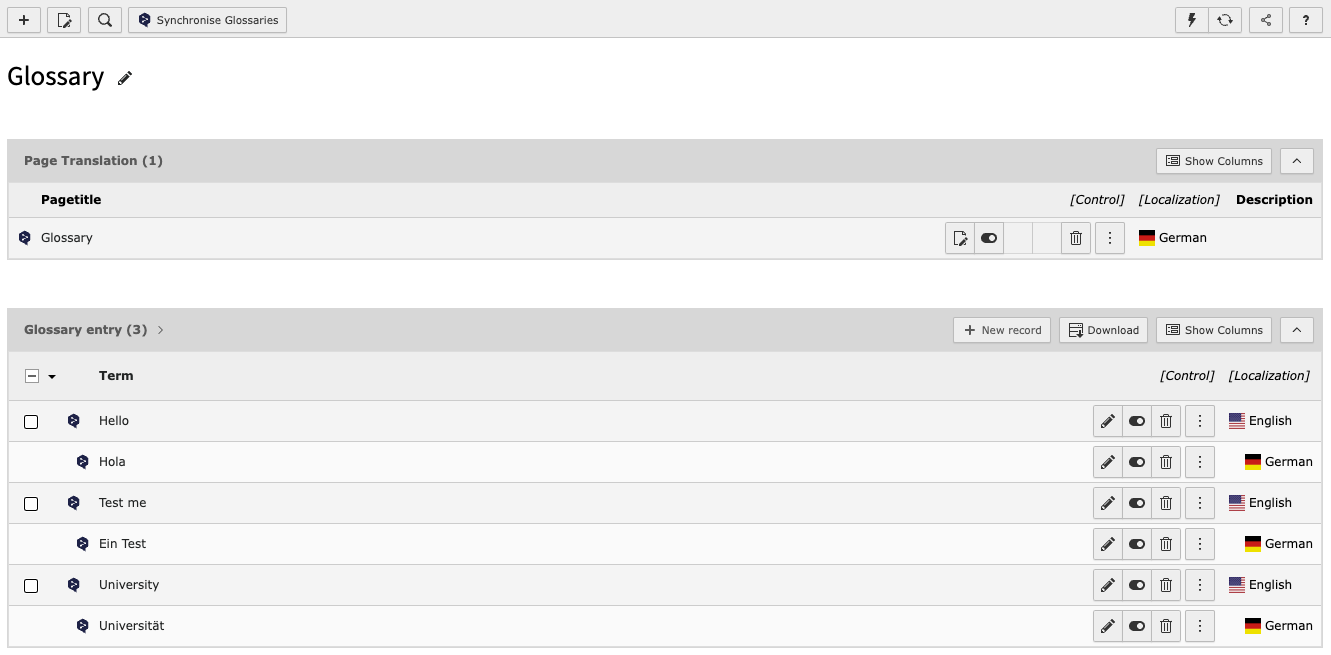
List view of glossary items

Introduction 

Introduction to the extension, general information.

Editors manual 

Learn how to manage glossaries.

Administration 

Install or upgrade deepltranslate_glossary, learn how to configure the extension.

Housekeeping 

Learn more about cli commands for housekeeping tasks.

Known Issues 

Known issues and information about them.

Changelog 

Learn about what have changed and what actions are required to process.

Contribution 

Contributions are essential to the success of open source projects, but they are by no means limited to contributing code. Much more can be done, for example by improving the documentation or answering questions on stackoverflow.com.

Contribution workflow 

  1. Please always create an issue on Github before starting a change. This is very helpful to understand what kind of problem the pull request solves, and whether your change will be accepted.
  2. Bug fixes: Please describe the nature of the bug you wish to report and provide how to reproduce the problem. We will only accept bug fixes if we can can reproduce the problem.
  3. Features: Not every feature is relevant to the majority of users. In addition: We do not want to complicate the usability of this extension for a marginal feature. It helps to have a discussion about a new feature before before opening a pull request.
  4. Please always create a pull request based on the updated release branch. This ensures that the necessary quality checks and tests are performed as a quality can be performed.

Contribution information 

Commit message 

  • This repository uses similar subject prefixes like conventional commits, but follows the known prefixes used in the TYPO3 Community:

    • [FEATURE] instead of feat: for changes introducing new features. Requires a Feature-*.rst changelog file.
    • [BUGFIX] instead of fix:
    • [TASK] instead of chore: for any task.
    • [DOCS] instead of docs: for documentation or markdown file related changes.
    • [!!!] before the other prefixes instead of ! or BREAKING to hint breaking changes. Requires a Breaking-*.rst changelog file.

    with special [!!!] before task or feature indicating breaking changes.

Documentation and Changelog 

  • Breaking changes indicated with prefix [!!!] requires a Breaking-*.rst changelog file.
  • Features indicated with prefix [FEATURE] requires a Feature-*.rst changelog file.
  • Tasks deprecation methods, classes or functionality needs to be documented adding Deprecation-*.rst changelog files.
  • In case important information needs to be documented Important-*.rst changelog files could be provided.

Documentation is rendered locally using:

Build/Scripts/runTests.sh -s renderDocumentation
Copied!

and can ge viewed in the browser opening Documentation-GENERATED-temp/Index.html for example on linux with:

xdg-open Documentation-GENERATED-temp/Index.html
Copied!

Executing toolchain 

All related development tools are executed using the Build/Scripts/runTests.sh command dispatcher.

Available general options:

  • -b <docker|podman> allows to set the container system to use in case both are available, otherwise it is determined. podman is used over docker if not enforced using this option.
  • -s <suite> selectes the suite (command) to execute, see -h for full description of available options and suites.
  • -p <8.2|8.2|8.3|8.4|8.5> defines the PHP version to use for PHP related suites and commands, for example phpunit, phpstan or composer operations.
  • -x enforces xdebug profile=debug for php script executions, use-ful to debug unit- or functional tests.
  • -d <sqlite|mysql|mariadb|postgres> selects the database to use for functional tests and starts/stops/cleans the selected container.
  • -i <version> allows to select the database server version for MariaDB, MySQL or PostgreSQL. See -h for the list of available options. Used for functional tests.

Examples 

functional tests for TYPO3 v13.4 with PHP 8.2
Build/Scripts/runTests.sh -t 13 -p 8.2 -s composerUpdate && \
Build/Scripts/runTests.sh -t 13 -p 8.2 -s functional -d sqlite && \
Build/Scripts/runTests.sh -t 13 -p 8.2 -s functional -d mariadb -i 10.7
Copied!
functional test for TYPO3 v14.3 with PHP 8.5
Build/Scripts/runTests.sh -t 14 -p 8.5 -s composerUpdate && \
Build/Scripts/runTests.sh -t 14 -p 8.5 -s functional -d sqlite && \
Build/Scripts/runTests.sh -t 14 -p 8.5 -s functional -d mariadb -i 10.7
Copied!
unit tests for TYPO3 v13.4 with PHP 8.5
Build/Scripts/runTests.sh -t 13 -p 8.5 -s composerUpdate && \
Build/Scripts/runTests.sh -t 13 -p 8.5 -s unit && \
Build/Scripts/runTests.sh -t 13 -p 8.5 -s unitRandom
Copied!
unit tests for TYPO3 v14.3 with PHP 8.2
Build/Scripts/runTests.sh -t 14 -p 8.2 -s composerUpdate && \
Build/Scripts/runTests.sh -t 14 -p 8.2 -s unit && \
Build/Scripts/runTests.sh -t 14 -p 8.2 -s unitRandom
Copied!
Code style fixer
Build/Scripts/runTests.sh -t 13 -p 8.2 -s composerUpdate && \
Build/Scripts/runTests.sh -t 13 -p 8.2 -s cgl
Copied!
Static code analyzer - analyze
Build/Scripts/runTests.sh -t 13 -p 8.2 -s composerUpdate && \
Build/Scripts/runTests.sh -t 13 -p 8.2 -s phpstan && \
Build/Scripts/runTests.sh -t 14 -p 8.2 -s composerUpdate && \
Build/Scripts/runTests.sh -t 14 -p 8.2 -s phpstan
Copied!
Static code analyzer - regenerate PHPStan baseline
Build/Scripts/runTests.sh -t 13 -p 8.2 -s composerUpdate && \
Build/Scripts/runTests.sh -t 13 -p 8.2 -s phpstanGenerateBaseline && \
Build/Scripts/runTests.sh -t 14 -p 8.2 -s composerUpdate && \
Build/Scripts/runTests.sh -t 14 -p 8.2 -s phpstanGenerateBaseline
Copied!

Glossaries 

You can define glossaries for your translations. Each glossary has a name, a source language and a target language. The name is made up of the page title and the target and source languages.

List view of glossary items

On pages with Doktype 254 (Folder) and "Use Container" set to "DeepL Glossary", a synchronise button appears for easy synchronisation of the glossary terms listed in this page.

Possible glossary combinations in multiple language translation modes are built on the fly, so your glossary can be used from any target to source, except the default system language.

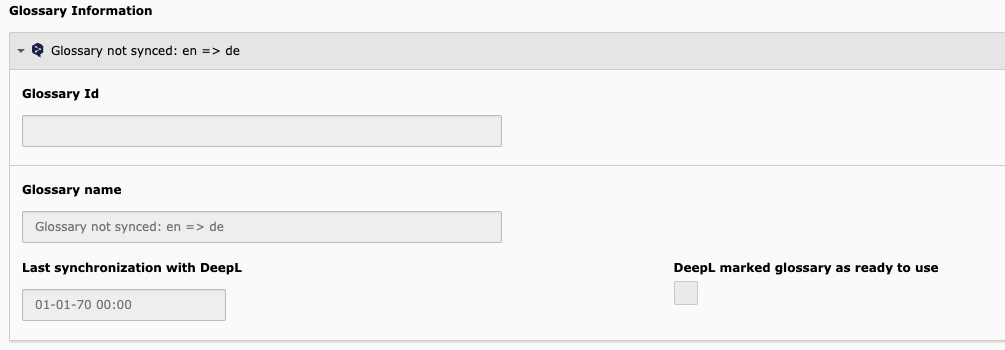
Each glossary shows you the current sync status to the DeepL API in the page settings.

Page settings tab *DeepL Translate* with not synced glossary

Adding terms is done through the list module.

Add entry via add record

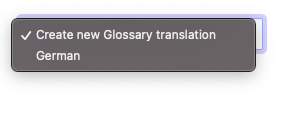
To generate a glossary translation, simply translate the page into the required glossary language using the TYPO3 translation dropdown. A custom translation dropdown will be displayed, which will only accept languages in which glossary entries can be created.

Custom translation dropdown in list view
Possible translations based on source language EN

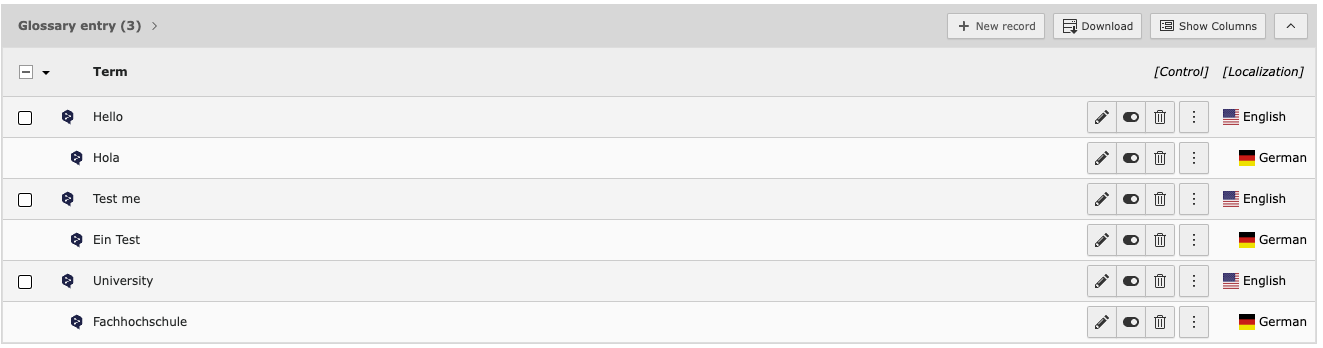
After that you can make translations with the Translate to button. As the glossary entries are made for not using DeepL standard wording, the ability of translating entries by DeepL is disabled.

Backend list view of glossary entries, original language english, translated to German

You can retrieve the current sync information of this glossary to the API in the page settings, tab DeepL Translate.

In each glossary directory, a button is enabled to synchronise that glossary.

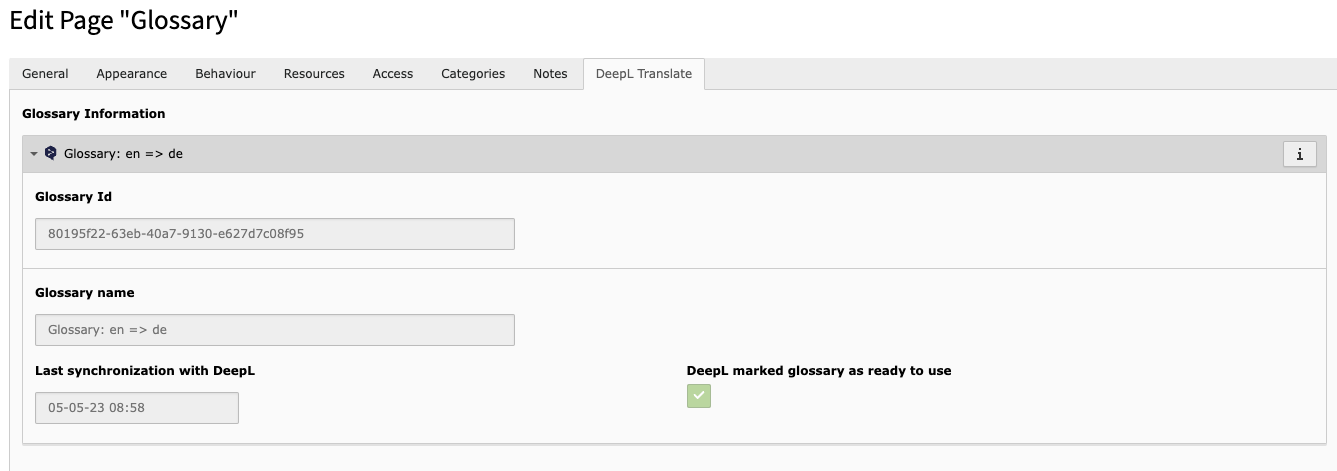
After sync the tab DeepL Translate should look like this:

Tab "DeepL Translate" with set ID, time of last sync and ready status

Housekeeping 

Three CLI commands are available for Cleanup, Sync and Overview.

Overview 

To get an overview of how many glossaries are registered with DeepL, you can use the following:

vendor/bin/typo3 deepl:glossary:list
Copied!

This will give you an overview of the API connected glossaries, number of entries, creation date and Glossary DeepL ID.

Cleanup 

Due to sync failures, it is useful to delete all DeepL glossaries.

vendor/bin/typo3 deepl:glossary:cleanup --all
Copied!
vendor/bin/typo3 deepl:glossary:cleanup --glossaryId 123-123
Copied!

This command retrieves information about all glossaries or one glossary registered in the DeepL API and deletes them from the API. In addition, each glossary ID is checked against the database and if found, the database record is updated.

The command then checks the local database to see if any glossaries still have sync information, and cleans them up too.

At the end you will get a table with all deleted glossary IDs and the information if the database has been updated with this glossary.

This command does not delete your glossaries in TYPO3.

After this, you are able to sync your glossaries with DeepL again.

Synchronisation 

Synchronisation is performed by CLI command or as a scheduled task (as configured CLI command).

vendor/bin/typo3 deepl:glossary:sync
Copied!

Accepts pageId as option. If not given, syncs all available glossaries.

Installation 

The extension has to be installed like any other TYPO3 CMS extension. You can download the extension using one of the following methods:

only the extension itself
composer require -W \
   'web-vision/deepltranslate-glossary':'~6.0.0@dev' \
Copied!
requiring depending TYPO3 extensions along the way
composer require \
    'web-vision/deeplcom-deepl-php':'~1.18.0@dev' \
    'web-vision/deepl-base':'~2.0.0@dev' \
    'web-vision/deepltranslate-core':'~6.0.0@dev' \
    'web-vision/deepltranslate-glossary':'~6.0.0@dev'
Copied!
  1. Switch to the module System > Extensions.
  2. Switch to Get Extensions
  3. Search for the extension key deepltranslate_glossary
  4. Import the extension from the repository.
  1. Get current version from TER by downloading the zip version. Alternatively, get the zip from the Github Releases page.
  2. Switch to the module System > Extensions.
  3. Enable upload Upload Extension
  4. Select or drag extension ZIP archive and upload the file

Compatibility 

DeepL Translate (GLOSSARY) supports:

DeepL Translate version TYPO3 Version PHP version Supported Composer TER
6.x 14.3.x 8.2, 8.3, 8.4, 8.5 yes web-vision/deepltranslate-glossary deepltranslate_glossary
6.x 13.4.x 8.2, 8.3, 8.4, 8.5 yes web-vision/deepltranslate-glossary deepltranslate_glossary
5.x 13.4.x 8.2, 8.3, 8.4, 8.5 yes web-vision/deepltranslate-glossary deepltranslate_glossary
5.x 12.5.x 8.1, 8.2, 8.3, 8.4 yes web-vision/deepltranslate-glossary deepltranslate_glossary

Upgrade 5.x to 6.x 

Despite supported TYPO3 version functionality has been stayed the same and no greater actions are needed.

composer-mode 

composer require -W \
   "web-vision/deepltranslate-core":"6.0.*@dev" \
   "web-vision/deepltranslate-glossary":"6.0.*@dev"
Copied!

classic-mode 

  1. Get it from the Extension Manager: Switch to the module System > Extensions. Switch to Get Extensions and search for the extension key deepltranslate_core and import the extension from the repository.
  2. Get it from typo3.org: You can always get current version from TER by downloading the zip version. Upload the file afterwards in the Extension Manager.
  3. Get it from GitHub release: TER upload archives are added to the corresponding GitHub release page, in case you need to download or update the extension and GITHUB_RELEASES is down or not reachable.

Upgrade 4.x to 5.x 

There is no version 4.x. Before 5.x the glossary functionality was part of EXT:wv_deepltranslate.

The main extension has been renamed to EXT:deepltranslate_core with 5.x and glossary implementation extracted into this dedicated EXT:deepltranslate_glossary extension.

composer-mode 

composer remove "web-vision/wv_deepltranslate"
composer require \
    "web-vision/deepltranslate-core":"^5" \
    "web-vision/deepltranslate-glossary":"^5"
Copied!

classic-mode 

  1. Uninstall "wv_deepltranslate" using the Extension Manager. Switch to the module Admin Tools > Extensions and filter for wv_deepltranslate and remove (uninstall) the extension.
  2. Ensure to remove the folder completely. Run

    rm -rf typo3conf/ext/wv_deepltranslate
    Copied!
  3. Get it from the Extension Manager: Switch to the module Admin Tools > Extensions. Switch to Get Extensions and search for the extension key deepltranslate_core and import the extension from the repository.
  4. Get it from typo3.org: You can always get current version from TER by downloading the zip version. Upload the file afterwards in the Extension Manager.

Known Issues 

None so far. If you find an issue, feel free to contribute.

ChangeLog 

Every change to the web-vision/deepltranslate-glossary extension is documented here.

Breaking: Raised lowest supported EXT:deepltranslate_core version 

Description 

Lowest supported EXT:deepltranslate_core version is raised to 6.0.0 providing a matching TYPO3 v13 & v14 support.

Impact 

No real impact because lowest supported TYPO3 version already requires PHP 8.2 as lowest supported PHP version.

Migration 

Upgrade EXT:deepltranslate_core version along with EXT:deepltranslate_glossary:

composer require -W \
  'web-vision/deepltranslate-core':'~6.0.0@dev' \
  'web-vision/deepltranslate-glossary':'~6.0.0@dev'
Copied!

Breaking: Raised lowest supported php version 

Description 

Support for PHP 8.1 has been removed and PHP 8.2 required as lowest supported PHP version.

That matches supported TYPO3 versions and therefore not breaking on their own as the lowest TYPO3 version requires PHP 8.2+ already.

Impact 

No real impact because lowest supported TYPO3 version already requires PHP 8.2 as lowest supported PHP version.

Migration 

Upgrade PHP version for the web-server and also when using composer and php commands, for example the bin/typo3 command line tool.

Breaking: Removed TYPO3 v12 support 

Description 

Support for TYPO3 v12 has been removed for 6.x based on our dual TYPO3 core version support per major version as casual support matrix.

This includes removing code paths and configurations only required for TYPO3 v12.

Impact 

TYPO3 v12 or older instances cannot update to the 6.x version and are required to upgrade TYPO3 to be able to install the next version of the EXT:deepltranslate_glossary together with EXT:deepltranslate_core (6.x) and related private addons when released in a compatible version.

Extension cannot be installed in that version but does not break otherwise.

Affected installations 

TYPO3 v12 or older instances with EXT:deepltranslate_core version 5.x and EXT:deepltranslate_glossary version 5.x.

Migration 

Upgrade TYPO3 to supported version for 6.x beforehand or in the same step with upgrading/installing EXT:deepltranslate_glossary.

Feature: Added TYPO3 v14 Support 

Description 

TYPO3 v14.3.* has been added coming with following changes:

Impact 

web-vision/deepltranslate-glossary can now be installed and used in TYPO3 v14.3 instances.

Sitemap