Introduction 

What does it do? 

The goal of the core extension seo is to make sure basic technical Search Engine Optimization (SEO) is done right out of the box. Specific fields for SEO purposes are added, as well as the rendering of HTML meta tags in the frontend.

There are several things you can do to optimize your site for search engines. Some tasks are only solvable with good human writers, others are technical tasks, which need to be implemented.

The goal of the extension seo is to help you with the following parts of your SEO journey.

  • Give editors all the fields needed to set the necessary meta tags
  • Provide the rendering of meta tags in the frontend for SEO related information, to avoid reimplementing it again and again
  • Provide stable APIs for developers to give them the chance to change the behaviour when needed in edge cases

This manual will not cover all the developer information, as these are covered in the TYPO3 API documentation.

Screenshots 

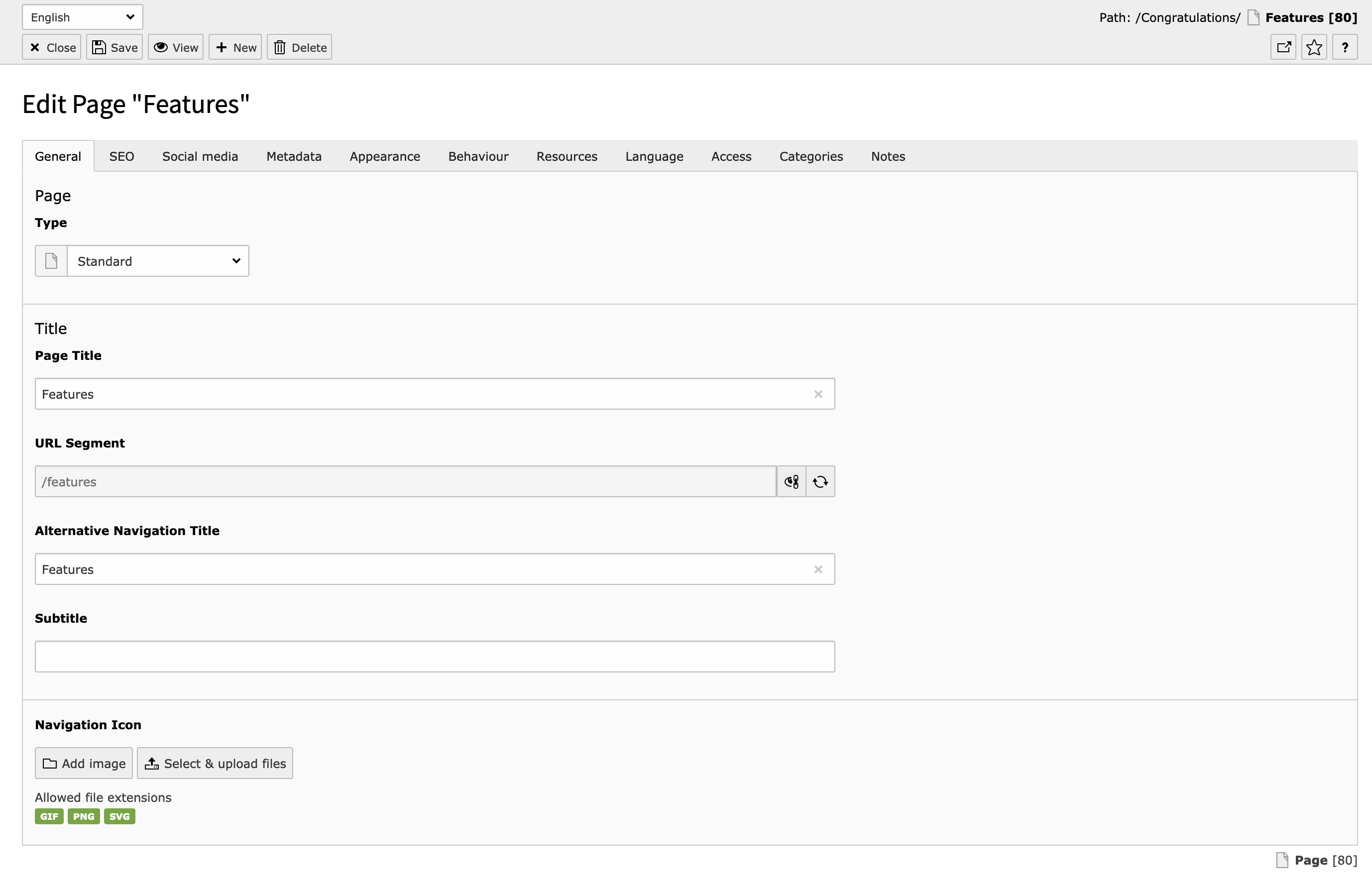
General Tab in the TYPO3 Backend

General Tab in the TYPO3 Backend

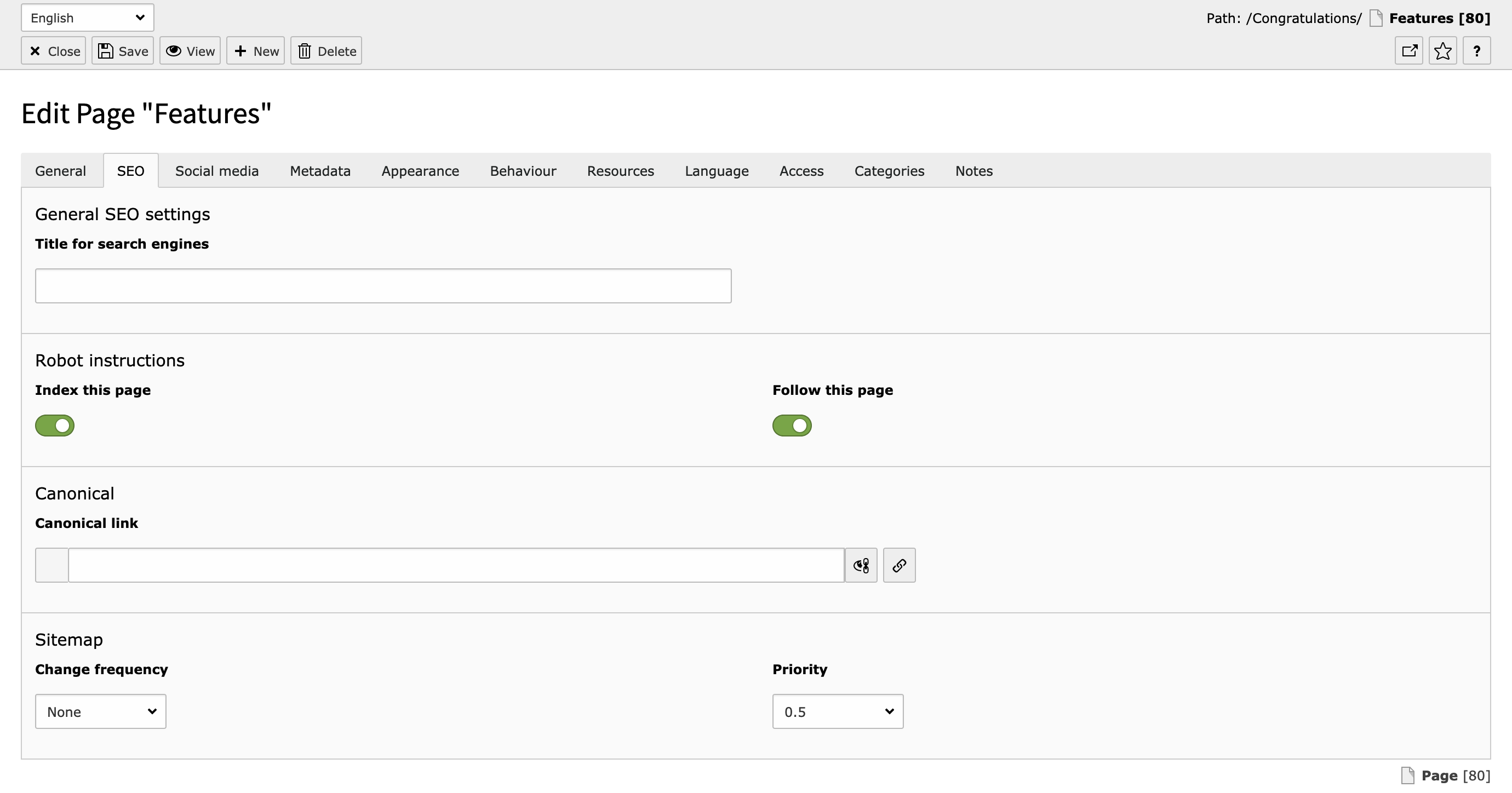
SEO Tab in the TYPO3 Backend

SEO Tab in the TYPO3 Backend

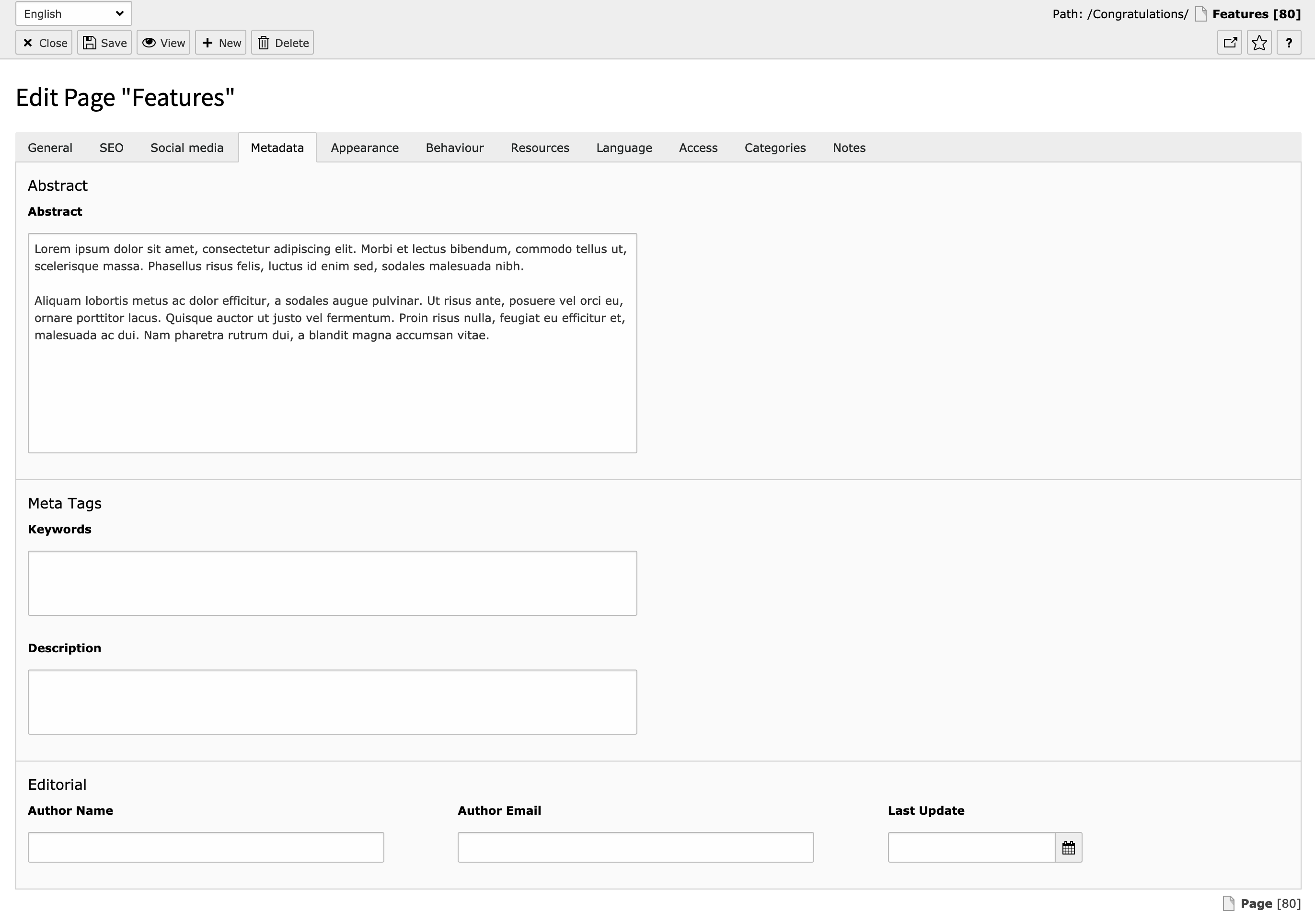
Metadata Tab in the TYPO3 Backend

Metadata Tab in the TYPO3 Backend

Hreflang Tags 

hreflang link-tags are added automatically for multi-language websites based on the one-tree principle. The links are based on the Site configuration and depend on translations of a page.

hreflang="x-default" indicates the link of the current page in the default language.

The value of hreflang is set for each language in Site Management > Sites (see Adding Languages)

Canonical Tags 

TYPO3 provides built-in support for the canonical tag ( <link rel="canonical" href="https://example.com/subpage">).

If the core extension seo is installed, it will automatically add the canonical link to the website output.

The canonical link is basically the same absolute link as the link to the current hreflang base, and is meant to indicate where the original source of the content is. It is a tool to prevent duplicate content penalties.

In the page properties (Page > (any Page) > SEO > Canonical link), the canonical link can be overwritten per language, by editing the page of the specific language. The link wizard offers all possibilities including external links and link handler configurations.

If no manual canonical link is entered, TYPO3 will generate a canonicalized URL to the current page in the current language.

XML Sitemap 

See XML sitemap for the documentation how to configure your XML sitemaps.

For Editors 

Target group: Editors

Welcome to our small SEO introduction. We will explain the basic fields the TYPO3 core provides and introduce the SEO tools this way.

All the following fields are part of the page record.

You can reach it by:

  • Open the Web > Page module
  • Use the pen (Edit page properties) in the top bar icon to edit the page record

An alternative way is to use the context menu.

  • Open Web > Page module
  • Right click the page you want to edit in the page tree
  • Select the Edit action

General tab 

General Tab in the TYPO3 Backend

General Tab in the TYPO3 Backend

Page Title 

The page title field is used for several purposes. From a SEO perspective it is mainly used to define the default URL segment and as a fallback title, if you don't set a specific SEO title. More information about the usage of the title fields can be found at Title for search engines.

URL Segment (slug) 

The URL segment is the part of the URL the user enters to access your page. Depending on your use case URLs have to fulfill certain criteria.

By default the URL segment is based on the page tree and page title, but you can override this and set it yourself.

If you want to optimize your page for search engines, it is recommended to have at least the keyword you want to be found on in your URL segment. Please make sure to check other best practices with your SEO specialist.

SEO Tab 

SEO Tab in the TYPO3 Backend

SEO Tab in the TYPO3 Backend

Title for search engines 

The Title for search engines field is used for the <title>...</title> tag of your web page. This title is used in the search results of search engines. There are some best practices for the value of this field.

  • Use a speaking title, which targets your audience
  • If possible, use the keywords you want to be found on in the title
  • Please make sure your title fits in a Google Snippet. You can use 3rd party extensions to help you with this.

When no value for the Title for search engines field is defined, it will have a fallback to the field Page title. It will show the page title in the search results in that case.

The title can have the name of the site as a prefix or suffix. The behaviour of this can be defined by an integrator. By default the title will have the name of the site as a suffix, separated by a dash.

Google result preview

Google result preview

Description 

The description field is important for SEO purposes. This field is used to instruct search engines to use this text to show as a teaser of your page in the search result snippets. With this description, you can give the user a clear overview of the topic of this page.

Google result preview

Google result preview

Index this page 

Defines whether the page should be indexed by a search engine or not. Disabling indexing also removes the page from the XML sitemap.

Follow this page 

Defines whether search engines should follow the links on this page.

Change frequency 

This field is used in the XML sitemap and will give search engines a hint how often the content of your page is likely to change. For example: News in an archive are “never” updated, while your home page might get “weekly” updates.

Priority 

The priority is also used in the XML sitemap. Priority allows you to define how important the page is compared to other pages on your site. The priority is stated in a value from 0 to 1. Your most important pages can get an higher priority as other pages. This value does not affect how important your pages are compared to pages of other websites. All pages and records get a priority of 0.5 by default.

Social media 

Social Media Tab in the TYPO3 Backend

Social media Tab in the TYPO3 Backend

The social media tab contains information which is used to enrich the snippet that is shown when visitors share your URLs in social networks, modern browsers etc.

TYPO3 offers to have different content for OpenGraph (used for example by Facebook and LinkedIn) and X (formerly Twitter) Cards. Both implementations allow you to set a title, a description and to provide an image. When this information is not set manually, the social network will decide itself what to show. Most probably it will use the information from Title for search engines and Description.

Facebook preview without image

Facebook preview without image

Title 

This title can be specified to be shown as the title of the snippet preview when your page is shared on the social network. You only have to fill this field when you want a different title as in the search results.

Description 

Used to adjust the description of the preview snippet when your page is shared at a social network. You only have to fill this field when you want a different description as the description in the search results.

Image 

You can specify the image that should be shown when your page is shared on a social network. Please be aware that the different social networks need specific dimensions for an image. TYPO3 ships with the most used dimension. If you want to have more dimensions, please let your integrator add more dimensions.

Facebook preview with image

Facebook preview with image

Metadata Tab 

Metadata Tab in the TYPO3 Backend

Metadata tab in the TYPO3 Backend

The Metadata tab contains a list of elements like Abstract, Keywords and editorial information.

Some extensions may utilize this for embedding within your frontend, but EXT:seo by default does not make use of them.

Dashboard widgets for SEO 

"Missing Meta Description" widget 

New in version 12.2

The widget "Missing Meta Description" was added.

To make it more convenient for TYPO3 editors to optimize their website for search engines, typo3/cms-seo offers a dashboard widget that shows pages without a meta description.

The description field is important for SEO purposes. This field is used to instruct search engines to use this text to show as a teaser of your page in the search result snippets. With this description, you can give the user a clear overview of the topic of this page:

Google result preview

Adding the "Missing Meta Description" widget to your personal Dashboard 

If you have the access rights to the Dashboard module and are granted access to the "Missing Meta Description" widget you can add it yourself to your Dashboard:

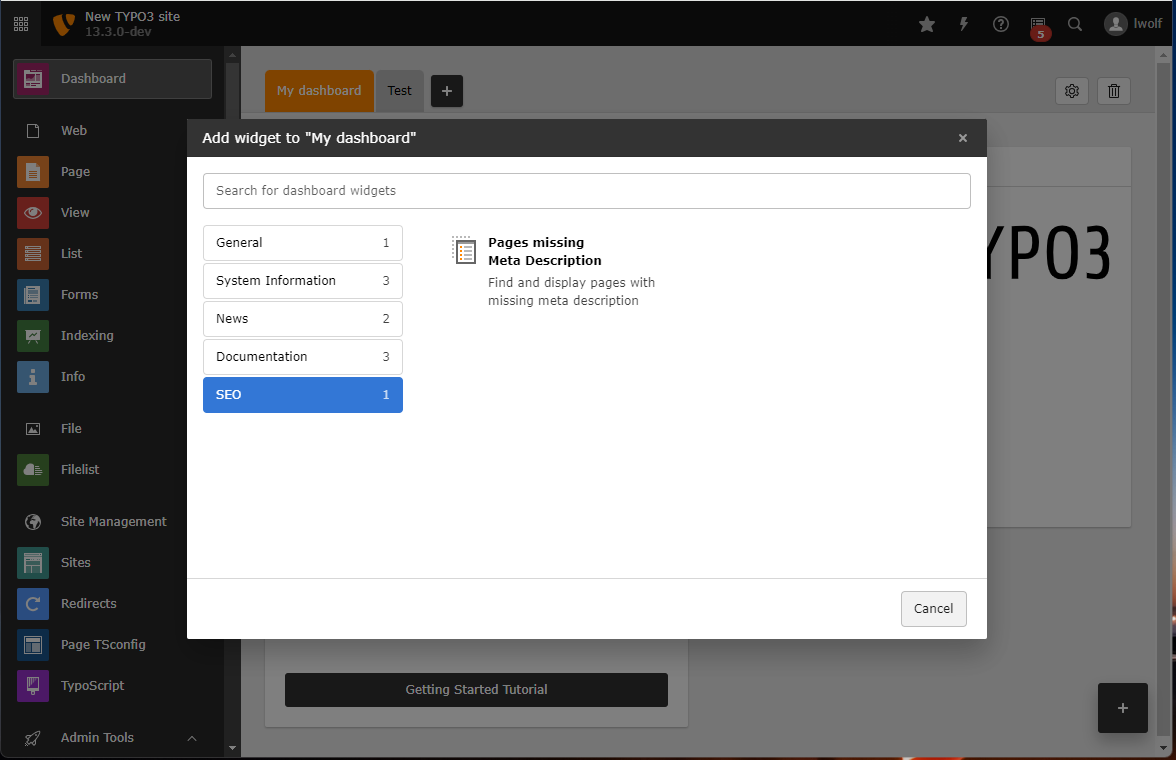
Screenshot of the backend, showing the widget "Pages missing Meta Description" in category "SEO"

Adding the widget "Pages missing Meta Description"

  1. Open the Dashboard module
  2. Click on the plus button to add a widget
  3. Go to category "SEO"
  4. Choose widget "Pages missing Meta Description"

Using the "Missing Meta Description" widget to improve SEO results 

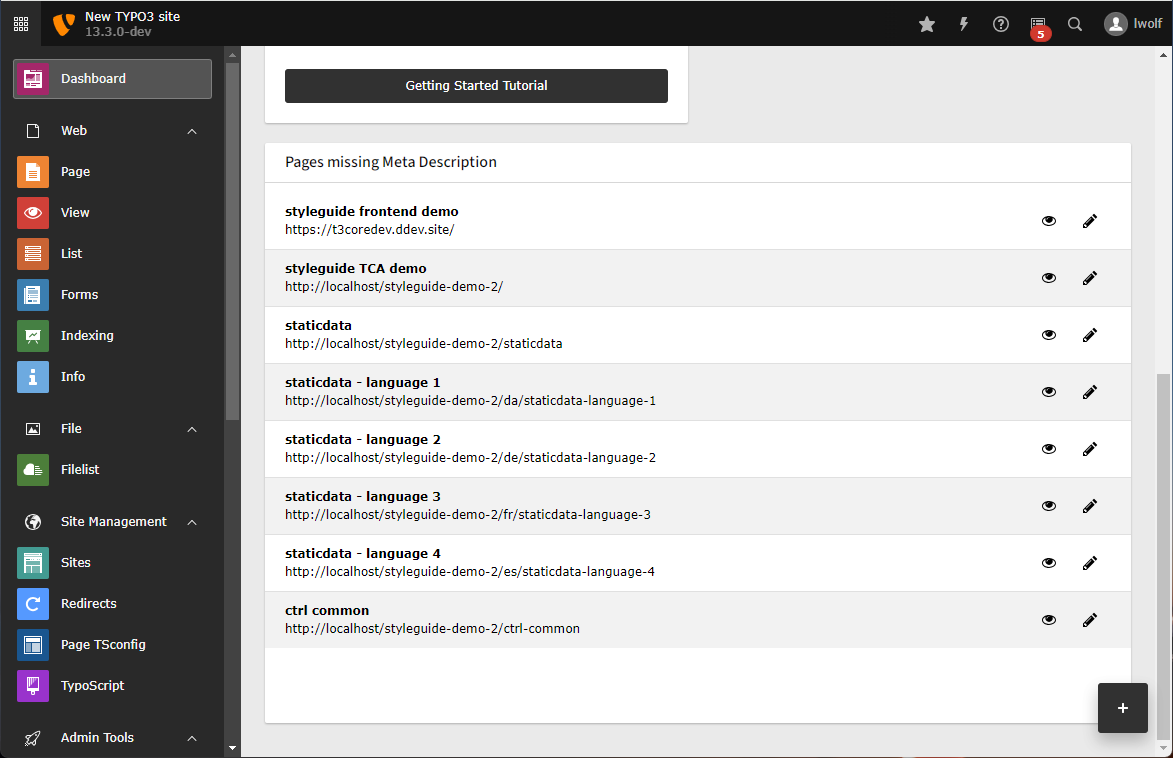
Therefore this widget lists pages without a description in their meta data:

Screenshot a widget listing pages without description

Pages without description listed in the Dashboard

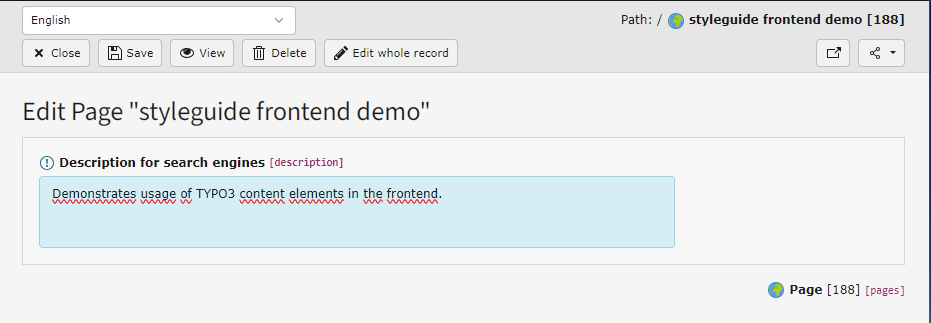
You can now click on the pencil icon to add a description to the page:

Screenshot of an edit form showing just the description field

Add a description to the page

Installation 

Target group: Administrators

This extension is part of the TYPO3 Core.

Table of contents

Installation with Composer 

Check whether you are already using the extension with:

composer show | grep seo
Copied!

This should either give you no result or something similar to:

typo3/cms-seo       v12.4.11
Copied!

If it is not installed yet, use the composer require command to install the extension:

composer require typo3/cms-seo
Copied!

The given version depends on the version of the TYPO3 Core you are using.

Installation without Composer 

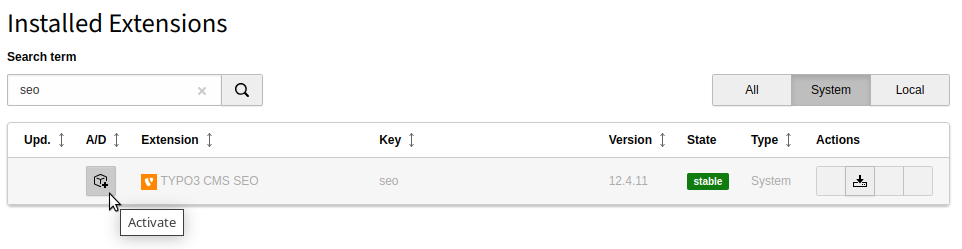
In an installation without Composer, the extension is already shipped but might not be activated yet. Activate it as follows:

  1. In the backend, navigate to the Admin Tools > Extensions module.
  2. Click the Activate icon for the SEO extension.
Extension manager showing SEO extension

Extension manager showing SEO extension

Configuration 

Target group: Developers, Integrators

TypoScript Settings 

There are a couple of TypoScript settings that can influence the output regarding SEO.

Site configuration 

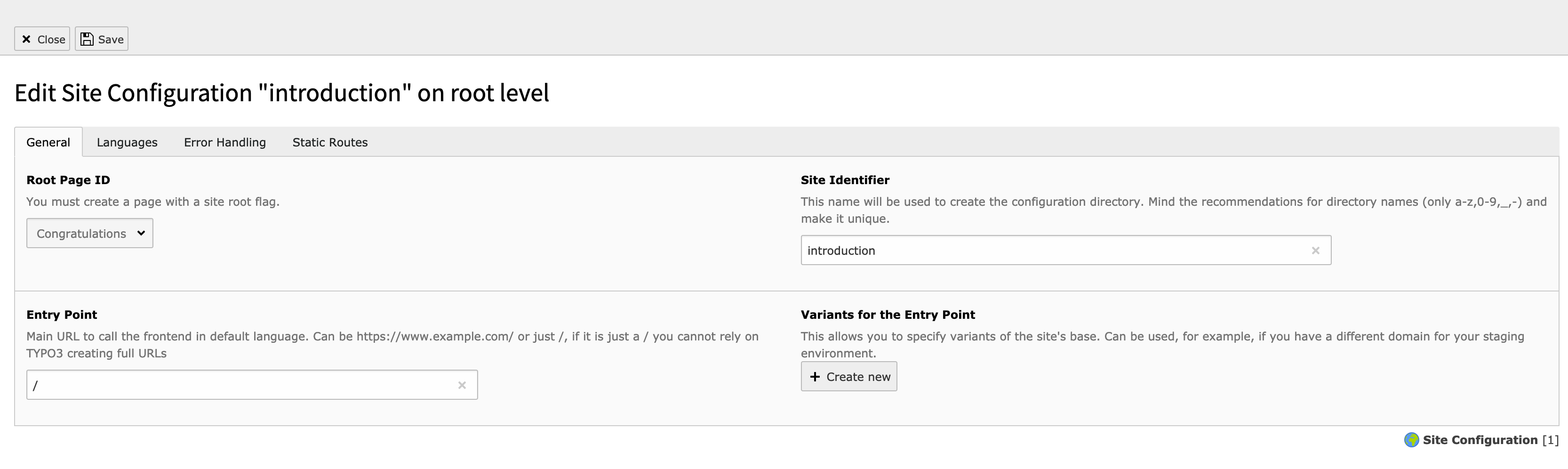
The configuration of sites is done with the Site Management > Sites module. As the settings for your websites are important for SEO purposes as well, please make sure you check the following fields.

example site

Example site

To get more in depth information about the site handling please refer to the Site handling docs.

Entry Point 

Please ensure, that you have configured your sites so that they all have an entry point. This is used for properly generating the canonical tags, for example.

Languages 

Ensure, that you setup the site languages correctly. All languages should have the right information in the Locale and other language-dependant input fields. When set correctly, TYPO3 will automatically connect your page in the different languages so that search engines understand their relations. This it to ensure that the search engine knows which page to show when someone is searching in a specific language.

See Adding Languages for more details.

Error Handling 

Although TYPO3 will respond with a HTTP status code 404 (Not found) when a page is not found, it is best practice to have a proper content telling the user that the page they requested is not available. This can guide them to another page or for example to a search function of your website.

See Error handling for more details.

robots.txt 

The robots.txt file is a powerful feature and should be used with care. It will deny or allow search engines to access your pages. By blocking access to your pages, search engines won't crawl these pages. You should make sure that this will not prevent the search engines from finding important pages.

It is best practice to keep your robots.txt as clean as possible. An example of a minimal version of your robots.txt:

# This space intentionally left blank. Only add entries when you know how powerful the robots.txt is.
User-agent: *
Copied!

On Static routes you can find more details on how to create a static route that will show this information when visiting https://www.example.com/robots.txt.

When you want to disallow specific URLs, you can use the Index this page option in the backend or set the robot HTTP header X-Robots-tag manually.

Static Routes and redirects 

Having correct redirects and choosing the appropriate status code is a very important part of SEO.

It is possible to manage redirects via the TYPO3 redirects extension, but it is not the only option and from a performance perspective it may not be the best solution. Please also see Performance in the EXT:redirects documentation.

Tags 

Canonical Tag 

Just like the hreflang link-tags, the <link rel="canonical" href="" /> link-tag is also generated automatically. If you have a specific edge case, and you don't want TYPO3 to render the tag, you can disable rendering completely. You can put this line in the ext_localconf.php of an extension and also make sure your extension is loaded after EXT:seo:

unset($GLOBALS['TYPO3_CONF_VARS']['SC_OPTIONS']['TYPO3\CMS\Frontend\Page\PageGenerator']['generateMetaTags']['canonical']);
Copied!

TypoScript examples 

This section will provide you with examples on how to configure several behaviours in the frontend.

Setting missing OpenGraph meta tags 

Most of the OpenGraph meta tags are rendered automatically when EXT:seo is installed. If you want to add meta tags properties such as og:title, og:description and og:image, you can use TypoScript code like this:

page {
  meta {
    og:site_name = YOUR_SITE_NAME
    og:site_name.attribute = property

    og:locale = en_US
    og:locale.attribute = property
    og:locale:alternate {
      attribute = property
      value {
         1 = de_DE
      }
    }
  }
}
Copied!

Setting fallbacks for meta tags 

As you can see on TypoScript and PHP the tags are first set by PHP and after that the TypoScript config is handled. As EXT:seo is only adding the meta tags for the SEO and Social media fields (if they are filled in the page properties), you have some possibilities to add fallbacks.

Because EXT:seo is handling the tags in PHP-scope, you are able to add those fallbacks using TypoScript. You can add those tags with TypoScript and those will only be rendered when EXT:seo has not rendered them.

An example to set a fallback description and og:description:

page {
  meta {
    description = Your fallback description tag
    og:description = Your fallback OG:description tag
  }
}
Copied!

Setting fallbacks for og:image and twitter:image 

If you want to have a fallback og:image or twitter:image, you can use this little snippet.

page {
  meta {
    og:image.stdWrap.cObject = TEXT
    og:image.stdWrap.cObject {
      if.isFalse.field = og_image
      stdWrap.typolink {
        parameter.stdWrap.cObject = IMG_RESOURCE
        parameter.stdWrap.cObject.file = EXT:your_extension/Resources/Public/Backend/OgImage.svg
        returnLast = url
        forceAbsoluteUrl = 1
      }
    }
    twitter:image.stdWrap.cObject = TEXT
    twitter:image.stdWrap.cObject {
      if.isFalse.field = twitter_image
      stdWrap.typolink {
        parameter.stdWrap.cObject = IMG_RESOURCE
        parameter.stdWrap.cObject.file = EXT:your_extension/Resources/Public/Backend/TwitterCardImage.svg
        returnLast = url
        forceAbsoluteUrl = 1
      }
    }
  }
}
Copied!

More information about the Meta Tag API can be found on:

Setting defaults for the author on meta tags 

This example shows how to set a default author based on the TypoScript constant {$my.default.author}:

page {
  meta {
    author = {$my.default.author}
  }
}
Copied!

Developer Corner 

When you work with a pages-only approach you most likely don't need to use the meta tag APIs. If you have a special edge-case or have a detail view to show a record, you need the APIs to render the corresponding meta information for your page. You can refer to the documentation of the following APIs:

  • The MetaTagApi (see MetaTag API) to define what metatags should be rendered on your page
  • The PageTitleAPI (see Page title API) will give you the possibility to set the title of the page

General Recommendations 

Recommendations for additional SEO extensions 

The TYPO3 core ships the whole API and the needed fields to fulfill all necessary technical requirements of implementing SEO.

Besides that, there are lots of tools you can use to optimize your rankings.

If you install additional SEO extensions in TYPO3, make sure you check the following recommendations:

  • The extension should stick to the core fields where possible
  • The extension should stick to the core behaviour where possible
  • The extension could extend TCA with additional helpers for your editors, like:

    • Readability checks
    • Keyword and content checks
    • Previews
    • Page speed insights
    • Large-Language-Model (LLM)-enabled text creation

Some of these tools might need external services, others can work completely on-premise.

Recommendations for the description field 

  • Duplicate meta descriptions should only be used under specific circumstances
  • Duplicate meta descriptions should only be used on a few pages
  • Leave the description empty if you do not can provide one
  • Provide an engaging explanation of your page, to ensure people will be motivated to visit your site
  • If SEO is not your thing, professional services are available to support you

Sitemap