Sentry Cron Monitor 

Detect failed TYPO3 Scheduler tasks before they go unnoticed.

Sentry Cron Monitor reports every production Scheduler task to Sentry and creates a Microsoft Teams alert for failures. It adds monitoring centrally, so you do not have to modify each task.

Decide if it fits 

Understand the problem the extension solves, its audience, and its scope.

Install and configure 

Meet the requirements, install the package, and configure its runtime values.

Verify the setup 

Run one harmless task and confirm its monitor, check-in, and alert in Sentry.

Clean up muted monitors 

Preview and delete muted cron monitors manually or with an automatic TYPO3 Scheduler task.

Feedback and issues 

The documentation is maintained with the extension. Report unclear or outdated content, problems, and feature requests in the GitHub issue tracker.
Introduction 

Why this extension exists 

Scheduler tasks often run without a person watching them. A failed import, export, synchronization, or cleanup task can remain unnoticed until its missing result causes another problem.

The primary goal of Sentry Cron Monitor is to make these failures visible in the monitoring tools a team already uses. The extension connects TYPO3 Scheduler to Sentry Cron Monitoring and routes failure alerts to Microsoft Teams.

Is this extension right for you? 

Use this extension when all of the following statements apply:

  • your project runs recurring tasks with TYPO3 Scheduler;
  • your team uses Sentry for production monitoring;
  • your team uses Microsoft Teams for operational notifications; and
  • you want one central integration instead of adding Sentry code to every task.

Scope 

The extension monitors Scheduler tasks with cron or interval schedules. It does not create Scheduler tasks, initialize the Sentry PHP SDK, or provide a test task. Your project must provide those parts.

Continue with How it works to understand the monitoring behavior.

How it works 

The extension connects TYPO3 Scheduler tasks with Sentry Cron Monitoring. It reports when a task starts, succeeds, or fails. The Scheduler remains responsible for running the task.

For each monitored task execution, the extension:

  1. Creates or updates the matching Sentry cron monitor.
  2. Sends an in_progress check-in.
  3. Creates the required alert rule when it does not exist.
  4. Lets TYPO3 run the task.
  5. Sends an ok or error check-in.

This monitoring runs only in a TYPO3 Production context and only when the configured Sentry host is reachable. In every other case, TYPO3 still runs the Scheduler task without Sentry monitoring.

Choose a topic 

What happens during execution? 

Follow automatic and manual task executions and their check-ins.

How are monitors created? 

Understand monitor identity, schedules, alerts, and cleanup.

Task execution 

The extension monitors both automatic and manually triggered TYPO3 Scheduler executions.

Automatic execution 

The server cron job starts all due Scheduler tasks:

vendor/bin/typo3 scheduler:run
Copied!

Command-line execution 

A developer or operator can run one configured Scheduler task by UID:

vendor/bin/typo3 scheduler:execute --task=<task-uid>
Copied!

Check-in results 

in_progress
TYPO3 is about to run the task.
ok
The task finished and returned true.
error
The task returned false or threw an exception.

Sentry uses these check-ins and the configured schedule to detect failed or missed executions.

See Sentry monitors for the monitor name and schedule.

Sentry monitors 

The extension creates a Sentry cron monitor for each TYPO3 Scheduler task. Existing and newly added tasks require no task-specific Sentry code.

Monitor identity 

For Scheduler tasks that execute console commands, the extension combines and normalizes the command identifier and task UID before sending a check-in to Sentry:

<normalized-command-identifier>-uid-<task UID>
Copied!

For example:

aus-projectcenter-sync-absences-to-outlook-uid-26
Copied!

Failures for this monitor appear in Sentry as:

Cron failure: aus-projectcenter-sync-absences-to-outlook-uid-26
Copied!

Other Scheduler task types use their normalized task title instead of a command identifier. The UID distinguishes otherwise identical tasks. Renaming a task or command changes the slug and can leave the previous monitor in Sentry.

Schedule mapping 

Cron schedule
The extension passes a Scheduler cron expression to Sentry unchanged.
Interval schedule
The extension converts the interval from seconds to whole minutes and rounds up. For example, 90 seconds becomes a two-minute Sentry schedule.

The configured Configuration reference tells Sentry how to interpret the monitor schedule.

Alerts 

Before each monitored run, the extension checks whether the matching Sentry issue alert rule exists. It creates the rule when necessary. The rule sends matching production failures to the configured Microsoft Teams channel.

Muted monitors 

Use the Production-only Delete muted cron monitors to preview or delete muted cron monitors in the configured Sentry project. You can also run the cleanup automatically as a TYPO3 Scheduler console-command task.

Requirements 

Meet every requirement on this page before installing the extension.

System requirements 

  • TYPO3 13.4 LTS or 14.3
  • PHP 8.3, 8.4, or 8.5
  • TYPO3 Scheduler system extension
  • PHP allow_url_fopen support for the Sentry reachability check

Sentry requirements 

  • A Sentry project for the TYPO3 application
  • An initialized Sentry PHP SDK with a valid DSN
  • The organization slug and project represented by that DSN
  • A Sentry user authentication token with alerts:read and alerts:write permissions to manage issue alert rules and cron monitors
  • Outbound HTTPS access from TYPO3 to the Sentry host

Microsoft Teams requirements 

  1. Add and configure the Microsoft Teams integration in Sentry.
  2. Add the Sentry app to the Microsoft Teams channel that should receive alerts.
  3. Record the integration ID and exact channel name for the extension configuration.
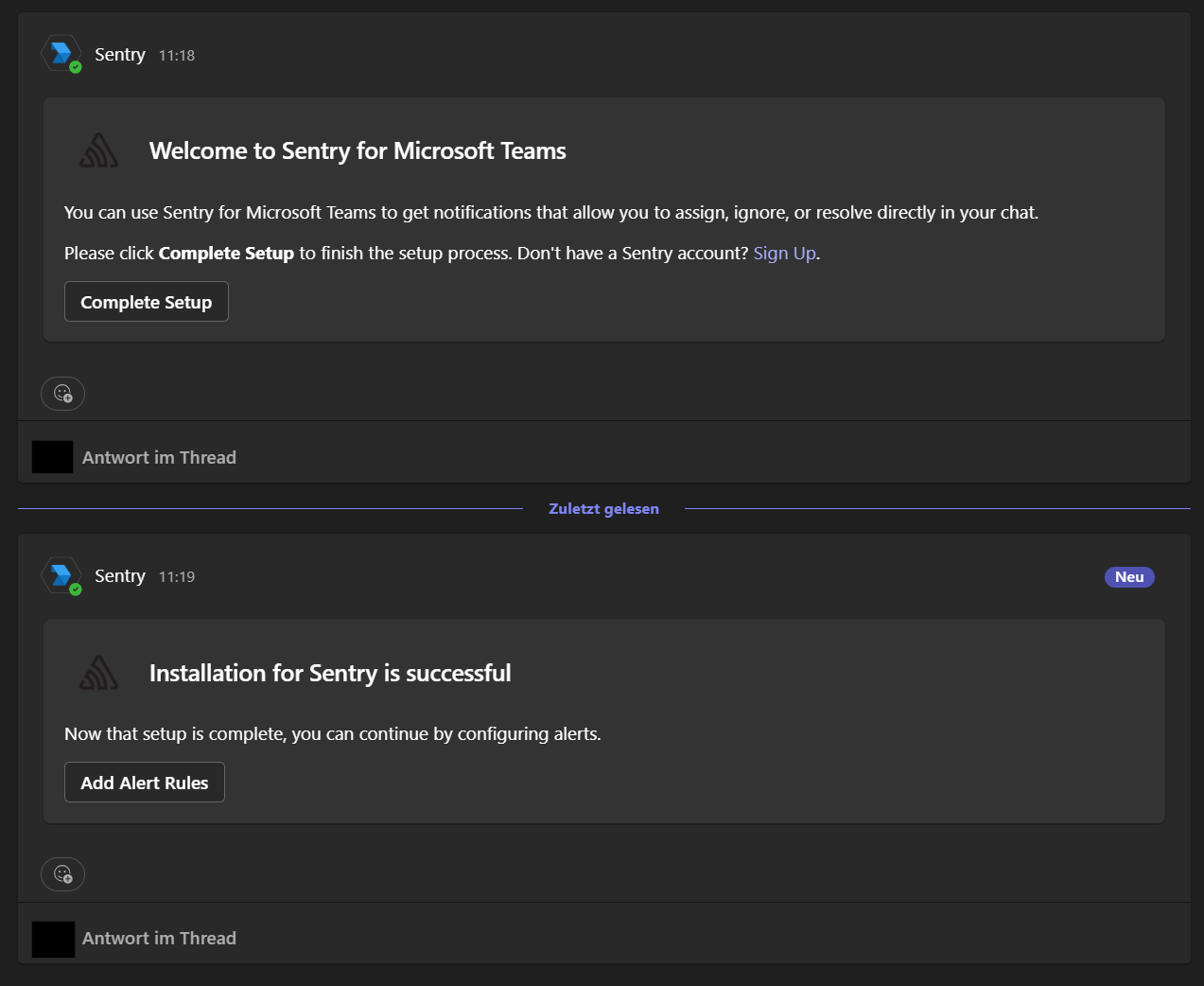
Microsoft Teams messages for completing and confirming the Sentry integration

A successful Microsoft Teams integration first offers Complete Setup and then confirms that the Sentry installation succeeded.

When these requirements are met, continue with the Installation.

Installation 

Install the package 

Run this command in the TYPO3 project root:

composer require andersundsehr/sentry_cron_monitor
Copied!

Composer installs the extension and its Sentry SDK dependency. The extension registers its Scheduler integration when TYPO3 loads the package.

Clear caches 

Clear the TYPO3 caches after installing the package:

vendor/bin/typo3 cache:flush
Copied!

The extension has no database schema and adds no Scheduler task of its own.

Next step 

Add the project-specific values described in Configuration.

Configuration 

Configure the extension in config/system/additional.php. This file is not rewritten by TYPO3 backend configuration tools and can read values supplied by each deployment environment.

1. Provide environment variables 

Define these variables in the deployment platform or secret manager:

SENTRY_MS_TEAMS_INTEGRATION_ID=123456
SENTRY_ORGANIZATION=my-organization
SENTRY_MS_TEAMS_CHANNEL=Operations
SENTRY_AUTH_TOKEN=replace-with-a-secret
SENTRY_CRON_TIMEZONE=Europe/Berlin
Copied!

Ensure that the variables are available in $_ENV before TYPO3 loads config/system/additional.php. The exact setup depends on the project and hosting platform.

2. Map the variables to TYPO3 

Add this configuration:

config/system/additional.php
<?php

$GLOBALS['TYPO3_CONF_VARS']['EXTENSIONS']['sentry_cron_monitor'] = [
    'integrationIdMsTeams' => (int) ($_ENV['SENTRY_MS_TEAMS_INTEGRATION_ID'] ?? 0),
    'orgName' => $_ENV['SENTRY_ORGANIZATION'] ?? '',
    'teamsChannelName' => $_ENV['SENTRY_MS_TEAMS_CHANNEL'] ?? '',
    'authToken' => $_ENV['SENTRY_AUTH_TOKEN'] ?? '',
    'timezone' => $_ENV['SENTRY_CRON_TIMEZONE'] ?? 'Europe/Berlin',
];
Copied!

3. Clear the cache 

Apply the new system configuration:

vendor/bin/typo3 cache:flush
Copied!

Configuration reference 

integrationIdMsTeams

Environment variable: SENTRY_MS_TEAMS_INTEGRATION_ID

Numeric integration ID from the target URL of the Configure link in the Sentry Microsoft Teams integration.

orgName

Environment variable: SENTRY_ORGANIZATION

Sentry organization slug, not its display name. The extension combines this slug with the project ID from the configured DSN to build the alert-rule API URL.

teamsChannelName

Environment variable: SENTRY_MS_TEAMS_CHANNEL

Exact name of the Microsoft Teams channel that receives notifications.

authToken

Environment variable: SENTRY_AUTH_TOKEN

Sentry user authentication token with alerts:read and alerts:write permissions. The extension uses it to manage issue alert rules and to list and delete cron monitors.

timezone

Environment variable: SENTRY_CRON_TIMEZONE

IANA timezone used for Sentry monitor schedules, for example Europe/Berlin.

The extension requires no task-specific configuration. Continue with Verify the setup to confirm the integration.

Verify the setup 

Run one harmless Scheduler task and confirm that Sentry receives its check-in. This proves that TYPO3, Sentry, the alert API, and the extension configuration work together.

Before you start 

  • Use an integration, staging, or production system whose TYPO3 application context starts with Production.
  • Choose a task that is safe to execute on demand.
  • Complete the Configuration first.

1. Find a task UID 

List the configured Scheduler tasks:

vendor/bin/typo3 scheduler:list
Copied!

Record the UID of a harmless task.

2. Run the task 

Replace <task-uid> with that UID:

vendor/bin/typo3 scheduler:execute --task=<task-uid>
Copied!

The command must run with the same Production context and environment variables as the regular Scheduler cron job.

For a local Docker installation whose regular context is Development/docker, enable monitoring for this single command while retaining the Docker database configuration:

TYPO3_CONTEXT=Production/docker vendor/bin/typo3 scheduler:execute --task=<task-uid>
Copied!

The context must start with Production. Keep the /docker suffix locally; Production/Integration selects integration infrastructure such as its database host and usually cannot run in a local Docker network.

Run the configured task through scheduler:execute. Starting its Symfony command directly bypasses the Scheduler integration and does not create a Sentry monitor.

3. Check Sentry 

Open the Sentry project and verify these results:

Location Expected result
Crons A monitor named <normalized task title>-uid-<task UID> exists.
Monitor details The latest check-in has the ok status for a successful task.
Alerts An issue alert named `Monitor Alert for <normalized task title>-uid-<task UID>` exists.

The first execution creates the monitor and issue alert. Later executions reuse the matching alert rule.

4. Test a failure safely 

To verify Microsoft Teams delivery, use a dedicated test task that returns false or throws an exception. Run it only in a controlled environment. The expected result is an error check-in followed by a Teams notification from the generated Sentry alert rule.

The extension does not ship a failing test task. Remove or disable your test task after verification.

If an expected result is missing, use Troubleshooting.

Maintenance commands 

Delete muted cron monitors 

Use sentry-cron-monitor:delete-muted to remove cron monitors that are muted in Sentry. The command only processes monitors from the project identified by the configured Sentry DSN.

The command considers a monitor muted when the Sentry API returns isMuted=true for the monitor itself. It does not delete active monitors or a monitor with only one muted environment.

Preview monitors 

Run the command without options first:

Preview muted monitors
vendor/bin/typo3 sentry-cron-monitor:delete-muted
Copied!

The command lists the ID, slug, and name of every matching monitor but deletes nothing.

Delete the listed monitors 

Review the preview, then add --force:

Delete muted monitors
vendor/bin/typo3 sentry-cron-monitor:delete-muted --force
Copied!

The command retrieves every cursor page from Sentry and sends one DELETE request for each muted monitor. It exits immediately when one API request fails.

Run cleanup automatically 

To run cleanup on a schedule:

  1. Create a TYPO3 Scheduler task of type Execute console commands.
  2. Select sentry-cron-monitor:delete-muted.
  3. Add the --force option.
  4. Choose a conservative schedule, for example once per day.
  5. Run the task manually once and check its Scheduler and Sentry results.

Troubleshooting 

Start with the symptom that matches your result from Verify the setup.

The task runs but no monitor appears 

Check these conditions in order:

  1. TYPO3 runs in an application context beginning with Production.
  2. The Sentry PHP SDK is initialized before the Scheduler runs.
  3. The configured DSN is valid.
  4. PHP can open the Sentry host through HTTPS and allow_url_fopen is enabled.
  5. The Scheduler CLI process receives the same environment variables as the web process.

The exception Sentry is not initialized 

The extension could not read a DSN from the current Sentry SDK hub. Initialize the Sentry PHP SDK for CLI requests and verify that the Scheduler command loads that initialization.

The monitor exists but the alert does not 

  • Verify SENTRY_ORGANIZATION contains the organization slug, not its display name.
  • Verify the DSN belongs to the expected Sentry project.
  • Verify SENTRY_AUTH_TOKEN can list and create issue alert rules.
  • Inspect the TYPO3 and Sentry logs for HTTP authentication or permission errors.

The alert exists but Teams receives nothing 

  • Verify the Sentry Microsoft Teams integration is active.
  • Compare the configured integration ID and channel name with Sentry.
  • Confirm the first channel in the Microsoft Teams team is named General.
  • Confirm the event and alert rule use the Production environment.
  • Trigger failure only with a controlled test task and inspect the alert history in Sentry.

The monitor schedule is inaccurate 

  • Verify SENTRY_CRON_TIMEZONE contains the intended IANA timezone.
  • Compare cron expressions with the Scheduler task configuration.
  • Remember that interval schedules are rounded up to whole minutes. An interval of 90 seconds becomes two minutes in Sentry.

Renaming a task creates another monitor 

The monitor identity contains the task title and UID. Renaming the task changes that identity. Remove the obsolete monitor and alert rule manually in Sentry after confirming that the new monitor works.

Too many missed-check-in alerts 

Increase the monitor's failure tolerance in Sentry. Also confirm that the Scheduler cron job runs frequently enough to start all due tasks.

Still unresolved 

Collect the TYPO3 version, PHP version, application context, task schedule, and relevant log message. Do not include DSNs or authentication tokens. Then open an issue in the GitHub issue tracker.

Architecture 

The extension adds monitoring at the central TYPO3 Scheduler execution point. This design covers every task without requiring changes to individual task classes.

Component overview 

ext_localconf.php
Registers \AUS\SentryCronMonitor\Xclass\Scheduler as an XCLASS for \TYPO3\CMS\Scheduler\Scheduler .
Scheduler XCLASS
Controls the execution flow, converts the schedule, sends Sentry check-ins, and delegates the original execution to TYPO3.
DsnService
Reads the DSN from the initialized Sentry SDK. It derives the Sentry host and project alert-rule API URL.
AlertService
Searches the project issue alert rules for the monitor slug and creates the Microsoft Teams rule when no match exists.
MutedMonitorService
Lists all cron monitor pages for the DSN project, filters monitors with isMuted=true, and deletes selected monitor IDs.
DeleteMutedMonitorsCommand
Enforces the Production context, displays a cleanup preview, and delegates deletion to MutedMonitorService only when --force is present.

Execution diagram 

TYPO3 Scheduler command
         |
         v
Scheduler XCLASS
         |
         +-- context is not Production ------> TYPO3 task execution
         |
         +-- Sentry host is unreachable -----> TYPO3 task execution
         |
         v
Build monitor schedule and send in_progress check-in
         |
         v
AlertService ----> Sentry issue alert API ----> Microsoft Teams rule
         |
         v
TYPO3 task execution
         |
         +-- returns true --------------------> ok check-in
         |
         +-- returns false or throws ---------> error check-in
Copied!

Design rationale 

Central Scheduler interception
A central integration minimizes setup and automatically includes new tasks. The tradeoff is a dependency on TYPO3 Scheduler internals.
Production-only monitoring
Development executions do not create production monitors or notifications. Integration and staging systems that should send check-ins must use a TYPO3 context beginning with Production.
Reachability fallback
A temporarily unreachable Sentry host must not prevent the business task from running. The extension therefore skips monitoring and delegates to the original Scheduler when the host check fails.
Automatic alert provisioning
Keeping alert creation in the execution path removes a manual Sentry setup step. It also means that each monitored execution lists the project issue alert rules before running the task.

Generated alert rule 

The generated Sentry issue alert rule:

  • uses the Production environment;
  • matches the task's monitor.slug tag;
  • reacts to first-seen and regression conditions; and
  • sends the notification through the configured Microsoft Teams integration.

Architectural constraints 

TYPO3 supports only one XCLASS per base class. Another extension that replaces \TYPO3\CMS\Scheduler\Scheduler can conflict with this extension. Core changes to the Scheduler class can also require an update after a TYPO3 upgrade.

References 

Glossary 

Check-in
A status message sent for one execution of a Sentry cron monitor. This extension uses in_progress, ok, and error.
Cron monitor
A Sentry object that records expected task schedules and executions. It can detect failures and missed executions.
DSN
Data Source Name. It identifies the Sentry host and project used by the initialized Sentry SDK.
Issue alert rule
A Sentry rule that matches events and executes an action. This extension creates a rule that sends matching monitor failures to Microsoft Teams.
Monitor slug
Machine-readable monitor identifier used by the generated alert filter.
Scheduler task
A TYPO3 task configured for one-time or recurring execution by the Scheduler system extension.
XCLASS
TYPO3 mechanism that replaces an instantiated class with a subclass. This extension uses it to wrap central Scheduler execution.

Behavior reference 

Condition Behavior
Context is not Production Run the task without Sentry monitoring.
Sentry host is unreachable Run the task without Sentry monitoring.
Task returns true Send an ok check-in.
Task returns false Send an error check-in.
Task throws an exception Send an error check-in and preserve the exception.
Matching alert rule exists Reuse it.
Matching alert rule does not exist Create a Microsoft Teams issue alert rule.

External documentation