Structured data for TYPO3 (schema.org) 

Extension key

schema

Package name

brotkrueml/schema

Version

4.1

Language

en

Author

Chris Müller

License

This document is published under the Creative Commons BY 4.0 license.

Rendered

Tue, 02 Dec 2025 17:56:32 +0000


Structured data is essential for search engine optimisation nowadays. This extension allows the easy integration of structured data based on the schema.org vocabulary on a TYPO3 website. A good introduction to the topic is provided by Google: Understand how structured data works.


Table of Contents

For Editors

Introduction 

Table of Contents

What does it do? 

Structured data is essential for search engine optimisation nowadays. This extension allows the easy integration of structured data based on the schema.org vocabulary on a TYPO3 website. A good introduction to the topic is provided by Google: Understand how structured data works.

The defined structured data is embedded on a web page in JSON-LD markup and can be checked with the Schema Markup Validator and Google's Rich Results Test. The JSON-LD generated by this extension can also be reviewed in the Admin Panel.

The schema.org vocabulary 

Schema.org is a set of extensible schemas that enables webmasters to embed structured data on their web pages for use by search engines and other applications. The vocabulary is divided into different sections:

  • The core section provides all default types and properties, like Person or Organization.
  • The pending section is a staging area for work-in-progress terms which have yet to be accepted into the core vocabulary. Pending terms are subject to change and should be used with caution. On the schema.org website they are displayed in a blue colour.
  • The auto section provides additional terms related to auto.
  • The bib section provides additional terms related to bibliography.
  • The health-lifesci section provides additional terms related to health and lifesciences.

The schema.org vocabulary is evolving, several times a year a new version is released. The TYPO3 extensions are updated when relevant changes are made to the according vocabulary. The classes for the type models and view helpers are generated by the schema-generator library.

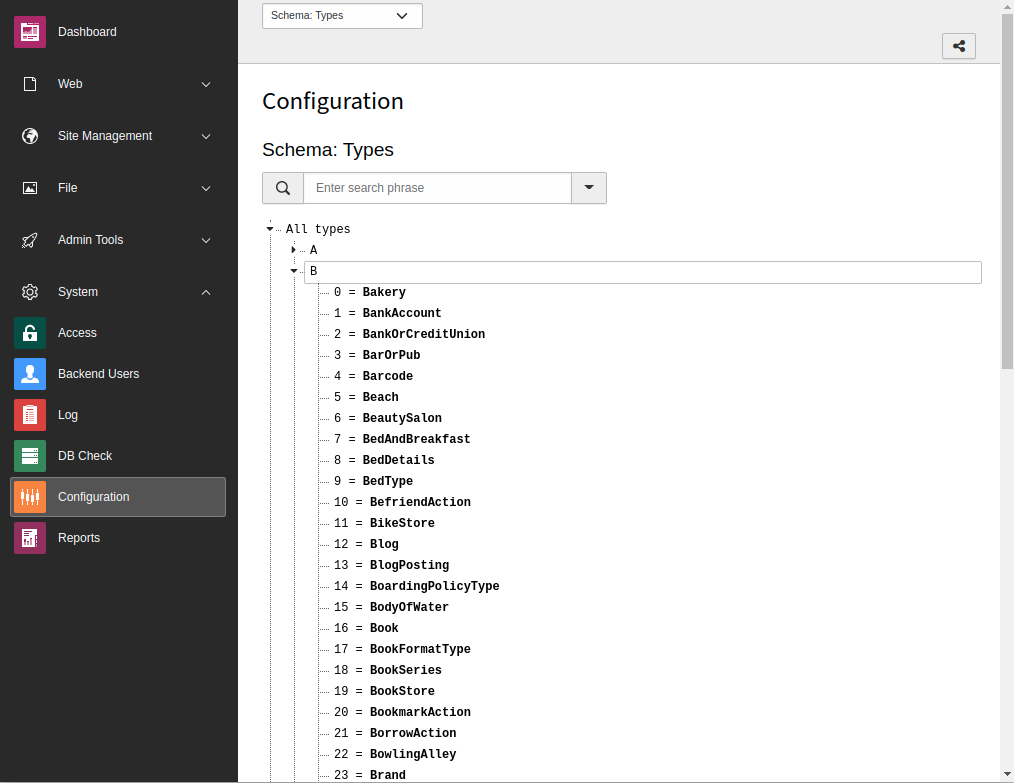
You can browse through a list of types available in a TYPO3 installation.

Release management 

This extension uses semantic versioning which basically means for you, that

  • Bugfix updates (for example, 1.0.0 => 1.0.1) just includes small bug fixes or security relevant stuff without breaking changes.
  • Minor updates (for example, 1.0.0 => 1.1.0) includes new features and smaller tasks without breaking changes.
  • Major updates (for example, 1.0.0 => 2.0.0) breaking changes which can be refactorings, features or bug fixes.

The changes between the different versions can be found in the changelog.

Web page types 

Target group: Editors

Table of Contents

Adjustment of the web page type 

As an editor you have the possibility to adjust the type of every single web page for the schema markup. The default value is the most generic one: WebPage.

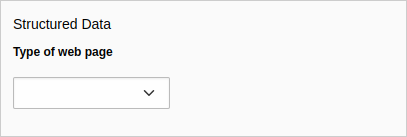
You'll find the field in the page properties under the SEO tab (with installed seo system extension) or under the Metadata tab (if the seo system extension is not installed):

Field in the page properties

Field Type of web page in the page properties

If no value is selected, WebPage is assumed.

Available web page types 

WebPage is the most common web page type, the other types are more specific:

Type Description
WebPage This is the most generic type for a web page
  AboutPage Page about the site, the organization, the person behind the site, etc.
  CheckoutPage Checkout page in a web shop
  CollectionPage Page about multiple things, like a paginated page listing blog posts, a product category, etc.
    MediaGallery A mixed-media page that can contains media such as images, videos, and other multimedia
      ImageGallery Page with an image gallery as the most valuable content
      VideoGallery Page with a video gallery
  ContactPage Page with contact information
  FAQPage Page with frequently asked questions
  ImageGallery Page with an image gallery as the most valuable content
  ItemPage Page about a single item, for example, a blog posting, a photograph, a product
  MedicalWebPage Page that provides medical information (with installed extension "schema_health")
  ProfilePage Page for user profiles
  QAPage A page with a question and one or more answers to this question
  RealEstateListing Page listing that describes one or more real-estate offers (with installed extension "schema_pending")
  SearchResultsPage Page for the result pages of the search function

Installation 

Target group: Administrators

The recommended way to install this extension is by using Composer. In your Composer-based TYPO3 project root, just type:

composer req brotkrueml/schema
Copied!

and the recent stable version will be installed.

In a legacy installation, you can also install the extension from the TYPO3 Extension Repository (TER).

The extension configuration offers some basic configuration which is explained in the Configuration chapter.

Configuration 

Target group: Developers, Integrators

Table of Contents

Extension configuration 

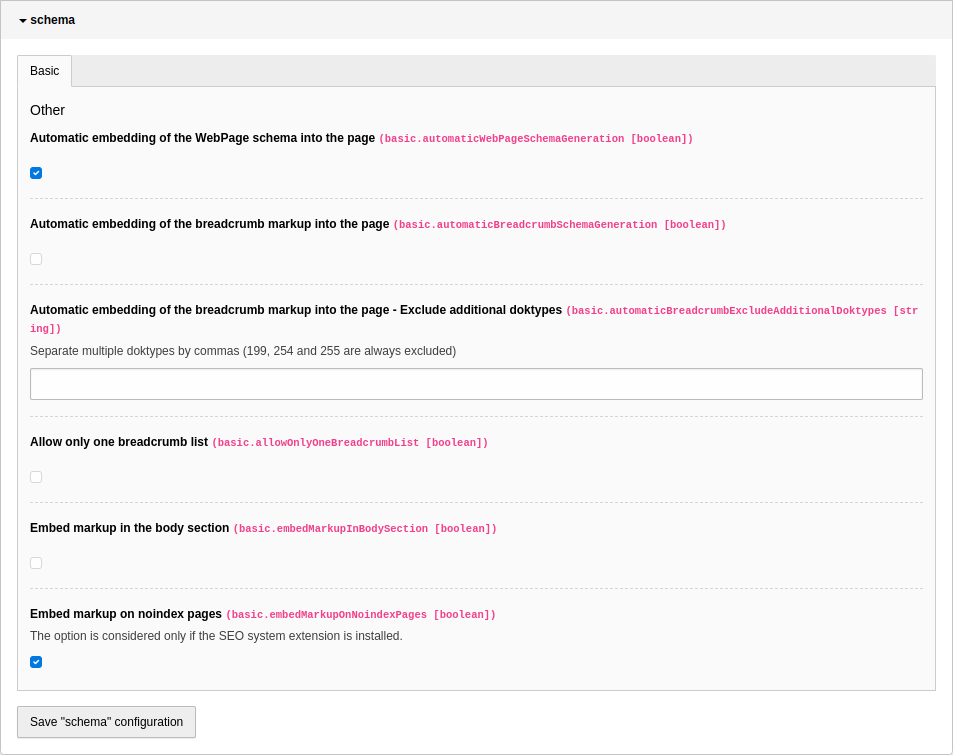
To configure the extension, go to Admin Tools > Settings > Extension Configuration and click on the Configure extensions button. Open the schema configuration:

Options in the extension configuration

Options in the extension configuration

Automatic embedding of the WebPage schema into the page 

If this option is enabled, the WebPage type schema is automatically embedded into the page. The web page type can be defined in the field Specific type of web page of the page properties and defaults to WebPage.

Default value
enabled

Automatic embedding of the breadcrumb markup into the page 

If this option is enabled, the breadcrumb is automatically generated from the rootline of the current page.

Default value
disabled

Automatic embedding of the breadcrumb markup into the page - Exclude additional doktypes 

If the option Automatic embedding of the breadcrumb markup into the page is enabled, you can define additional doktypes, which will be excluded from the breadcrumb. Separate multiple doktypes with commas.

The doktypes 199 (spacer), 254 (folder) and 255 (recycler) are always excluded.

Default value
(empty)

Allow only one breadcrumb list 

With enabled option only one breadcrumb list will be rendered. This may be helpful, if the option Automatic embedding of the breadcrumb markup into the page is enabled and you want to overwrite the generated breadcrumb list on a dedicated page with a custom one.

Embed markup on "noindex" pages 

If this option is enabled, the schema markup is embedded also on "noindex" pages.

Default value
enabled

TypoScript 

Target group: Integrators

Content Object (cObject) SCHEMA 

The extension provides the cObject SCHEMA. The cObject itself will not display anything. Instead it will add configured types to the global schema output.

A small example:

EXT:my_extension/Configuration/TypoScript/setup.typoscript
page = PAGE
page.10 = SCHEMA
page.10 {
   type = WebSite
   properties {
      name.field = seo_title // title
      description.field = description
   }
}
Copied!

That will add an element of type WebSite to schema. It will consist of the property name as well as description. The name property will be filled from the seo_title field, falling back to the title field.

Top-level properties 

The cObject SCHEMA provides the following top-level properties:

type

type
Data type
string / stdWrap

Defines the schema type to use, see: List of available types.

Example:

EXT:my_extension/Configuration/TypoScript/setup.typoscript
page.10 = SCHEMA
page.10.type = WebSite
Copied!

id

id
Data type
string / stdWrap

The ID added as @id to the type, if defined.

Example:

EXT:my_extension/Configuration/TypoScript/setup.typoscript
page.10 = SCHEMA
page.10.type = WebSite
page.10.id {
   typolink {
      parameter = t3://page?uid={site : rootPageId}
      parameter.insertData = 1
      forceAbsoluteUrl = 1
      returnLast = url
   }
}
Copied!

properties

properties
Data type
array

The key will be used as property name. The value can be a static text, an array, a content object, a stdWrap property or an if condition.

Example:

EXT:my_extension/Configuration/TypoScript/setup.typoscript
page.10 = SCHEMA
page.10.type = WebSite
page.10.properties {
   name.field = seo_title // title
   description.field = description
}
Copied!

A property can be a SCHEMA again, which will result in nested structures.

Example:

EXT:my_extension/Configuration/TypoScript/setup.typoscript
page.10 = SCHEMA
page.10.type = WebSite
page.10.properties {
   publisher = SCHEMA
   publisher {
      id {
         typolink {
            parameter = t3://page?uid={site : rootPageId}#organization
            parameter.insertData = 1
            forceAbsoluteUrl = 1
            returnLast = url
         }
      }
   }
}
Copied!

Multiple values can also be assigned to one property using numeric keys.

Example:

EXT:my_extension/Configuration/TypoScript/setup.typoscript
page.10 = SCHEMA
page.10 {
   type = Organization
   properties {
      name = My Company
      sameAs {
         10 = https://example.org/
         20.typolink {
            parameter = t3://page?uid=42
            forceAbsoluteUrl = 1
            returnLast = url
         }
      }
   }
}
Copied!

if

if
Data type
if

Prevents processing of the whole cObject if it evaluates to false.

Example:

EXT:my_extension/Configuration/TypoScript/setup.typoscript
page.10 = SCHEMA
page.10 {
   if {
      equals.data = site : rootPageId
      value.field = uid
   }
   type = WebSite
}
Copied!

View helpers 

Target group: Developers, Integrators

Introduction 

With the help of <schema:type> view helpers you can define schema markup in Fluid templates. This can be helpful if you can't use the API, for example, in third-party extensions.

Each type in the schema.org vocabulary is mapped into an according view helper. The properties of a type are available as view helper arguments. As you will see in the example, you can also nest view helpers into each other.

There are currently over 600 view helpers available.

<schema:type> view helpers 

Let's start with a simple example. It's the same markup about John Smith as in the API reference, so you can compare the differences.

Imagine you describe a person on a plugin's detail page that you want to enrich with structured markup:

<schema:type.person
   -id="https://example.org/#person-42"
   givenName="John"
   familyName="Smith"
   gender="https://schema.org/Male"
>
   <schema:type.event
      -as="performerIn"
      name="Fancy Event"
      image="https://example.org/event.png"
      url="https://example.org/"
      isAccessibleForFree="true"
   >
      <schema:property -as="sameAs" value="https://mastodon.social/@fancy-event"/>
      <schema:property -as="sameAs" value="https://pixelfed.social/@fancy-event"/>
   </schema:type.event>
</schema:type.person>
Copied!

Every type view helper starts with <schema:type.xxx> where xxx is the lower camel case variant of the schema.org type name.

Changed in version 3.0

If the type name starts with a number (for example, 3DModel) then the first number of the view helper is written out ( <schema:type.threeDModel).

The according properties (like givenName and familyName) are attributes. You can find a list of all available properties for a specific type on the schema.org page, for example, for the person.

In the example, there are two attributes that begin with a -. They are explained in detail in the chapter Special attributes.

As you can see, the value true (and false accordingly) can be used. They are mapped later to the schema types https://schema.org/True and https://schema.org/False.

Please also recognise the <schema:property> view helper. With this view helper you can pass more than one string value to the according type.

You can also use the default Fluid view helpers:

<schema:type.blogPosting
   -isMainEntityOfWebPage="1"
   headline="{data.title}"
   description="{data.description}"
   datePublished="{f:format.date(format:'Y-m-d', date: data.publishDate)}"
>
   <f:if condition="{data.lastUpdated}">
       <schema:property -as="dateModified" value="{f:format.date(format:'Y-m-d', date: data.lastUpdated)}"/>
   </f:if>
</schema:type.blogPosting>
Copied!

Special attributes 

Special attributes start with a dash ( -) to separate them from the common properties of the schema.org specification and to avoid collisions. Let's have a deeper look on them.

-id

-id

This attribute sets a unique id for the type and is mapped in JSON-LD to the @id property. The LD in JSON-LD means "linked data". With an @id you can define a type on one page (for example, Event):

{
   "@context": "https://schema.org/",
   "@type": "Event",
   "@id": "https://example.org/#event-1",
   "name": "Fancy Event",
   "image": "https://example.org/event.png",
   "url": "https://example.org",
   "isAccessibleForFree": "https://schema.org/True",
   "sameAs": ["https://mastodon.social/@fancy-event", "https://pixelfed.social/@fancy-event"]
}
Copied!

and reference it on the same or another page (for example, Person):

{
   "@context": "https://schema.org/",
   "@type": "Person",
   "@id": "https://example.org/#person-42",
   "givenName": "John",
   "familyName": "Smith",
   "gender": "https://schema.org/Male",
   "performerIn": {
      "@type": "Event",
      "@id": "https://example.org/#event-1",
      "name": "Fancy Event"
   }
}
Copied!

-as

-as

This attribute is used to connect a type to its parent. In the above example, you can see that the event type view helper uses -as to connect to the performerIn property of the person type view helper.

-specificType

-specificType

Sometimes it can may be helpful to set a specific type. Imagine you have records of places in the backend where you can select which type of specific place a record has: for example, Museum, Airport, Park or Zoo. In a Fluid template you can loop over these records when they are on the same page. But it is not very convenient to use a <f:switch> or <f:if> view helper to choose the correct type. For this scenario you can benefit from this argument:

<f:for each="{places}" as="place">
   <schema:type.place
      name="{place.name}"
      -specificType="{place.type}"
   />
</f:for>
Copied!

-isMainEntityOfWebPage

-isMainEntityOfWebPage

This argument defines the type as a main entity of a web page:

<schema:type.person
   -id="https://example.org/#person-42"
   -isMainEntityOfWebPage="1"
   givenName="John"
   familyName="Smith"
   gender="https://schema.org/Male"
/>
Copied!

which results in the output:

{
   "@context": "https://schema.org/",
   "@type": "WebPage",
   "mainEntity": {
      "@type": "Person",
      "@id": "https://example.org/#person-42",
      "givenName": "John",
      "familyName": "Smith",
      "gender": "https://schema.org/Male"
   }
}
Copied!

Main entities can be prioritised, please have a look into the Prioritisation section.

<schema:multipleType> view helper 

You can also add a multiple type node:

<schema:multipleType
   -id="https://example.org/#my-product-and-service"
   types="Product,Service"
   properties="{
      name: 'My product and service',
      manufacturer: 'Acme Ltd.',
      provider: 'Acme Ltd.'
   }"
/>
Copied!

In the types argument the types are delimited by commas. Add in the properties argument the name/value pairs of the according properties. Here you can mix the properties from the defined types. The special properties -as, -id and -isMainEntityOfWebPage can also be used as described above.

The example results in the following JSON-LD:

{
   "@context": "https://schema.org/",
   "@type": ["Product", "Service"],
   "@id": "https://example.org/#my-product-and-service",
   "manufacturer": "Acme Ltd.",
   "name": "My product and service",
   "provider": "Acme Ltd."
}
Copied!

You can also use the PropertyViewHelper to add properties to a multiple type instead the properties argument:

<schema:multipleType
   -id="https://example.org/#my-product-and-service"
   types="Product,Service"
>
   <schema:property -as="name" value="My product and service"/>
   <schema:property -as="manufacturer" value="Acme Ltd."/>
   <schema:property -as="provider" value="Acme Ltd."/>
</schema:multipleType>
Copied!

<schema:nodeIdentifier> view helper 

Sometimes it is useful to reference a node with just the ID. For this case the <schema:nodeIdentifier> view helper is available:

<f:variable name="identifier1" value="{schema:nodeIdentifier(id: 'https://example.org/#john-smith')}"/>
<f:variable name="identifier2" value="{schema:nodeIdentifier(id: 'https://example.org/#sarah-jane-smith')}"/>
<schema:type.person name="John Smith" -id="{identifier1}" knows="{identifier2}"/>
<schema:type.person name="Sarah Jane Smith" -id="{identifier2}" knows="{identifier1}"/>
Copied!

This generates the following JSON-LD:

{
   "@context": "https://schema.org/",
   "@graph": [
      {
         "@type": "Person",
         "@id": "https://example.org/#john-smith",
         "name": "John Smith",
         "knows": {
            "@id": "https://example.org/#sarah-jane-smith"
         }
      },
      {
         "@type": "Person",
         "@id": "https://example.org/#sarah-jane-smith",
         "name": "Sarah Jane Smith",
         "knows": {
            "@id": "https://example.org/#john-smith"
         }
      }
   ]
}
Copied!

The view helper has only one attribute which is required:

id

id

This attribute defines the id and is mapped in JSON-LD to the @id property.

<schema:blankNodeIdentifier> view helper 

Sometimes it is not necessary (or possible) to define a globally unique ID with an IRI. For these cases you can use a blank node identifier:

<f:variable name="blankIdentifier1" value="{schema:blankNodeIdentifier()}"/>
<f:variable name="blankIdentifier2" value="{schema:blankNodeIdentifier()}"/>
<schema:type.person name="John Smith" -id="{blankIdentifier1}" knows="{blankIdentifier2}"/>
<schema:type.person name="Sarah Jane Smith" -id="{blankIdentifier2}" knows="{blankIdentifier1}"/>
Copied!

This generates the following JSON-LD:

{
   "@context": "https://schema.org/",
   "@graph": [
      {
         "@type": "Person",
         "@id": "_:b0",
         "name": "John Smith",
         "knows": {
            "@id": "_:b1"
         }
      },
      {
         "@type": "Person",
         "@id": "_:b1",
         "name": "Sarah Jane Smith",
         "knows": {
            "@id": "_:b0"
         }
      }
   ]
}
Copied!

The view helper has no arguments.

You can find more information in the Blank node identifier API section.

<schema:property> view helper 

You can only set one string value in the argument of a type view helper, but sometimes it is necessary to add more than one value to it. There comes the property view helper into the game:

<schema:type.corporation
   name="Acme Ltd."
   image="https://example.org/logo.png"
   url="https://example.org/"
>
   <schema:property -as="sameAs" value="https://mastodon.social/@acme"/>
   <schema:property -as="sameAs" value="https://pixelfed.social/@acme"/>
</schema:type.corporation>
Copied!

You can use as much property view helpers as you like for the same property. If you prefer, you can combine the view helpers as follows:

<schema:type.corporation>
   <schema:property -as="name" value="Acme Ltd."/>
   <schema:property -as="image" value="https://example.org/logo.png"/>
   <schema:property -as="url" value="https://example.org/"/>
   <schema:property -as="sameAs" value="https://mastodon.social/@acme"/>
   <schema:property -as="sameAs" value="https://pixelfed.social/@acme"/>
</schema:type.corporation>
Copied!

The <schema:property> view helper accepts two argument, both are required.

-as

-as

You know already the -as attribute from the type view helpers. Its purpose is the same, it references the property in the parent <schema:type> view helper.

value

value

The value argument sets the value of the property, as you guessed already.

<schema:breadcrumb> View Helper 

This view helper is described in-depth in the chapter View helper <schema:breadcrumb>.

Using the XML schema (XSD) in your code editor 

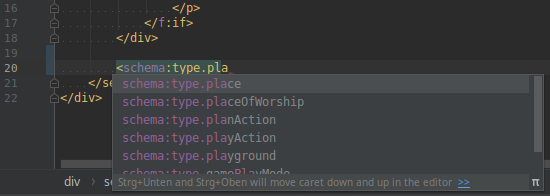
It is possible to assist your code editor on suggesting the tag name and the possible attributes:

Auto completion in PhpStorm with configured XSD schema

Auto completion in PhpStorm with configured XSD schema

Just add the schema namespace to the root element of your Fluid template:

<html
    xmlns:f="http://typo3.org/ns/TYPO3/CMS/Fluid/ViewHelpers"
    xmlns:schema="http://typo3.org/ns/Brotkrueml/Schema/ViewHelpers"
    schema:schemaLocation="https://brot.krue.ml/schemas/schema-1.9.0.xsd"
    data-namespace-typo3-fluid="true"
>
Copied!

The relevant parts are the namespace declaration ( xmlns:schema="http://typo3.org/ns/Brotkrueml/Schema/ViewHelpers") and the schema:schemaLocation attribute which points to the recent XSD definition.

You can also import the XSD file into your favorite IDE after downloading it from the following URL: https://brot.krue.ml/schemas/schema-1.9.0.xsd.

Admin Panel 

Target group: Integrators, Developers

With an activated Admin Panel, you can display the structured data on a page generated by this extension for reviewing:

Types information in the Admin Panel

Types information in the Admin Panel

There are links available: The type to the according Schema.org documentation and - if available - to the Google and Yandex references for the specific type, other URLs to their destination.

Additionally, you can copy the markup on the specific page to the clipboard, for example, to check it against the Schema Markup Validator, or call Google's Rich Result Test to validate the structured data.

Configuration 

To allow non-admin users to access the schema information in the Admin Panel, you have to configure it in the corresponding user TSconfig:

admPanel {
   enable {
      ext-schema = 1
   }
}
Copied!

Translation 

Target group: Developers, Integrators

All strings are translatable. Translations are managed on Crowdin. Click on the link or the button below to help translating!

Crowdin localization status

Override translations 

You can override translations in the usual way. Have a look into the according TYPO3 documentation: Custom translations.

However, if you feel that a translation provided by the translation server could be improved, please suggest an alternative on Crowdin.

Known problems 

Have a look at the issue tracker to see which features and bugs are already opened. If you encounter any problems, you can open an issue and preferably file a pull request.

Introduction for developers 

Target group: Developers, Integrators

Table of Contents

Introduction 

The structured markup can be generated in two ways:

Each type in the schema.org vocabulary corresponds to a PHP model that provides the available properties. There is also a view helper for each type that makes it easy to integrate the data into your website via a Fluid template.

Attention should be paid to the following points:

  • A web page can be characterised by different schema.org types as outlined in this chapter. The WebPage type is set automatically if the corresponding configuration option is set. But it can always overridden manually with the desired type and properties. The chapter The WebPage type is dedicated to this topic.
  • A breadcrumb does not only help the user to recognise the location of a particular page on the website. It is also helpful for search engines to understand the structure of your website. Google honors the website operator for using the breadcrumb schema markup on a page: It will be shown in the search result snippet.
  • The main entity of a web page indicates the primary entity. It can be set separately from a WebPage.

Quick dive-in 

The schema.org vocabulary consists of many types, like Person, Organization, Product, and so on. They are written with an upper letter at the beginning of the term.

Each type has several properties which characterise the specific type, like givenName or lastName for a Person. The properties start with a lower letter at the beginning in the vocabulary.

The most generic type is Thing. Each other type inherits the properties from one or more other types, e.g: Corporation is a specific type for Organization and defines a new property. Organization itself is a specific type of Thing and inherits the properties of Thing and defines many more properties characterising this type.

You can retrieve the information about a type or property from the URL https://schema.org/ followed by the term name. (for example, https://schema.org/Person) or the name of the property (for example, https://schema.org/givenName).

Models 

This extension provides model classes for each type under the PHP namespace \Brotkrueml\Schema\Model\Type. For example, the type Thing is mapped to the model \Brotkrueml\Schema\Model\Type\Thing, which knows about the according schema.org properties. A property value can be set with an according method:

EXT:my_extension/Classes/Controller/MyController.php
<?php

declare(strict_types=1);

namespace MyVendor\MyExtension\Controller;

use Brotkrueml\Schema\Type\TypeFactory;

final class MyController
{
    public function __construct(
        private readonly TypeFactory $typeFactory,
    ) {}

    public function doSomething(): void
    {
        // ...

        $thing = $this->typeFactory->create('Thing');
        $thing->setProperty('name', 'A thing');

        // ...
    }
}
Copied!

The schema manager connects the type models to the page:

EXT:my_extension/Classes/Controller/MyController.php
<?php

declare(strict_types=1);

namespace MyVendor\MyExtension\Controller;

use Brotkrueml\Schema\Manager\SchemaManager;
use Brotkrueml\Schema\Type\TypeFactory;

final class MyController
{
    public function __construct(
        private readonly SchemaManager $schemaManager,
        private readonly TypeFactory $typeFactory,
    ) {}

    public function doSomething(): void
    {
        // ...

        $thing = $this->typeFactory->create('Thing');
        $thing->setProperty('name', 'A thing');

        $this->schemaManager->addType($thing);

        // ...
    }
}
Copied!

The chapter Using The API describes in-depth how to use the models and the schema manager.

View helpers 

For usage in Fluid templates, each type is mapped to a view helper in the schema:type namespace. You assign the type properties as view helper arguments, for example:

<schema:type.thing name="A thing"/>
Copied!

The view helpers can be nested into each other.

The chapter View helpers explains the usage of the view helpers in detail.

Using The API 

Target group: Developers

Introduction 

With the extension's API you can define the structured markup with PHP. For example, create a class which gets an Extbase model as input and defines the markup. Then instantiate the class in an action of your controller.

Each type model class in the PHP namespace \Brotkrueml\Schema\Model\Type inherits from the abstract class \Brotkrueml\Schema\Core\Model\AbstractType which defines methods to set and get the properties of a model.

There are currently over 600 models available.

Starting with examples 

Types 

Let's start with a simple example. Imagine you describe a person on a plugin's detail page that you want to enrich with structured markup. First you have to create the schema model:

EXT:my_extension/Classes/Controller/MyController.php
<?php

declare(strict_types=1);

namespace MyVendor\MyExtension\Controller;

use Brotkrueml\Schema\Type\TypeFactory;

final class MyController
{
    public function __construct(
        private readonly TypeFactory $typeFactory,
    ) {}

    public function doSomething(): void
    {
        // ...

        $person = $this->typeFactory->create('Person');

        // ...
    }
}
Copied!

The schema type Person maps to the model \Brotkrueml\Schema\Model\Type\Person. You can use every accepted type from the core section of schema.org. Also have a look into the Classes\Model\Type folder of this extension to get a general idea of the available types.

If the type is not available a \Brotkrueml\Schema\Type\ModelClassNotFoundException is thrown.

Every type implements the \Brotkrueml\Schema\Core\Model\TypeInterface. You will find a list of the available methods in the section Available type model methods.

Surely you will need to add some properties:

EXT:my_extension/Classes/Controller/MyController.php
<?php

declare(strict_types=1);

namespace MyVendor\MyExtension\Controller;

use Brotkrueml\Schema\Model\Enumeration\GenderType;
use Brotkrueml\Schema\Type\TypeFactory;

final class MyController
{
    public function __construct(
        private readonly TypeFactory $typeFactory,
    ) {}

    public function doSomething(): void
    {
        // ...

        $person = $this->typeFactory->create('Person');
        $person
            ->setId('https://example.org/#person-42')
            ->setProperty('givenName', 'John')
            ->setProperty('familyName', 'Smith')
            ->setProperty('gender', GenderType::Male);

        // ...
    }
}
Copied!

That was easy ...

Let's go on and define an event the person attends:

EXT:my_extension/Classes/Controller/MyController.php
<?php

declare(strict_types=1);

namespace MyVendor\MyExtension\Controller;

use Brotkrueml\Schema\Type\TypeFactory;

final class MyController
{
    public function __construct(
        private readonly TypeFactory $typeFactory,
    ) {}

    public function doSomething(): void
    {
        // ...

        $event = $this->typeFactory->create('Event')
            ->setProperty('name', 'Fancy Event')
            ->setProperty('image', 'https:/example.org/event.png')
            ->setProperty('url', 'https://example.org/')
            ->setProperty('isAccessibleForFree', true)
            ->setProperty('sameAs', 'https://mastodon.social/@fancy-event')
            ->addProperty('sameAs', 'https://pixelfed.social/@fancy-event')
        ;

        // ...
    }
}
Copied!

Now we have to connect the two types together:

EXT:my_extension/Classes/Controller/MyController.php
<?php

declare(strict_types=1);

namespace MyVendor\MyExtension\Controller;

use Brotkrueml\Schema\Type\TypeFactory;

final class MyController
{
    public function __construct(
        private readonly TypeFactory $typeFactory,
    ) {}

    public function doSomething(): void
    {
        // ...

        $person = $this->typeFactory->create('Person');
        $event = $this->typeFactory->create('Event');

        // ...

        $person->setProperty('performerIn', $event);

        // ...
    }
}
Copied!

The defined models are ready to embed on the web page. The schema manager does that for you:

EXT:my_extension/Classes/Controller/MyController.php
<?php

declare(strict_types=1);

namespace MyVendor\MyExtension\Controller;

use Brotkrueml\Schema\Manager\SchemaManager;
use Brotkrueml\Schema\Type\TypeFactory;

final class MyController
{
    public function __construct(
        private readonly SchemaManager $schemaManager,
        private readonly TypeFactory $typeFactory,
    ) {}

    public function doSomething(): void
    {
        // ...

        $person = $this->typeFactory->create('Person');

        // ...

        $this->schemaManager->addType($person);

        // ...
    }
}
Copied!

That's it ... if you call the according page the structured markup is embedded automatically into the head section:

{
   "@context": "https://schema.org/",
   "@type": "Person",
   "@id": "https://example.org/#person-42",
   "givenName": "John",
   "familyName": "Smith",
   "gender": "https://schema.org/Male",
   "performerIn": {
      "@type": "Event",
      "name": "Fancy Event",
      "image": "https://example.org/event.png",
      "url": "https://example.org",
      "isAccessibleForFree": "https://schema.org/True",
      "sameAs": ["https://mastodon.social/@fancy-event", "https://pixelfed.social/@fancy-event"]
   }
}
Copied!

Multiple types 

JSON-LD allows multiple types for a node. The rendered @type property is then an array, the properties of the single types are merged. This way, a node can be, for example, a Product and a Service at the same time - which can be useful in some cases.

The technical difference to a single type is only that you call \Brotkrueml\Schema\Type\TypeFactory->create() with more than one argument:

EXT:my_extension/Classes/Controller/MyController.php
<?php

declare(strict_types=1);

namespace MyVendor\MyExtension\Controller;

use Brotkrueml\Schema\Manager\SchemaManager;
use Brotkrueml\Schema\Type\TypeFactory;

final class MyController
{
    public function __construct(
        private readonly SchemaManager $schemaManager,
        private readonly TypeFactory $typeFactory,
    ) {}

    public function doSomething(): void
    {
        // ...

        $productAndService = $this->typeFactory->create('Product', 'Service');
        $productAndService
            ->setId('https://example.org/#my-product-and-service')
            ->setProperty('name', 'My product and service')
            ->setProperty('manufacturer', 'Acme Ltd.') // from Product
            ->setProperty('provider', 'Acme Ltd.') // from Service
        ;
        $this->schemaManager->addType($productAndService);

        // ...
    }
}
Copied!

The factory method returns an instance of the \Brotkrueml\Schema\Core\Model\MultipleType class which provides the same API as a single type.

This results in the following JSON-LD:

{
   "@context": "https://schema.org/",
   "@type": ["Product", "Service"],
   "@id": "https://example.org/#my-product-and-service",
   "manufacturer": "Acme Ltd.",
   "name": "My product and service",
   "provider": "Acme Ltd."
}
Copied!

Node identifiers 

JSON-LD supports the usage of @id as reference without giving a type. This is useful when using circular references, for example:

{
   "@context": "https://schema.org/",
   "@type": "Person",
   "@id": "https://example.org/#john-smith",
   "name": "John Smith",
   "knows": {
      "@type": "Person",
      "name": "Sarah Jane Smith",
      "knows": { "@id": "https://example.org/#john-smith" }
   }
}
Copied!

You can accomplish this with the help of the \Brotkrueml\Schema\Core\Model\NodeIdentifier class:

EXT:my_extension/Classes/Controller/MyController.php
<?php

declare(strict_types=1);

namespace MyVendor\MyExtension\Controller;

use Brotkrueml\Schema\Core\Model\NodeIdentifier;
use Brotkrueml\Schema\Manager\SchemaManager;
use Brotkrueml\Schema\Type\TypeFactory;

final class MyController
{
    public function __construct(
        private readonly SchemaManager $schemaManager,
        private readonly TypeFactory $typeFactory,
    ) {}

    public function doSomething(): void
    {
        // ...

        $johnSmithId = new NodeIdentifier('https://example.org/#john-smith');

        $person1 = $this->typeFactory->create('Person');
        $person1->setId($johnSmithId);
        $person1->setProperty('name', 'John Smith');

        $person2 = $this->typeFactory->create('Person');
        $person2->setProperty('name', 'Sarah Jane Smith');
        $person2->setProperty('knows', $johnSmithId);

        $person1->setProperty('knows', $person2);

        $this->schemaManager->addType($person1, $person2);

        // ...
    }
}
Copied!

As you can see in the example, you can also use a node identifier as an argument for ->setId() instead of a string.

Blank node identifiers 

Sometimes it is not necessary (or possible) to define a globally unique ID with an IRI. For these cases you can use a blank node identifier.

The above example can also be used with a blank node identifier:

EXT:my_extension/Classes/Controller/MyController.php
<?php

declare(strict_types=1);

namespace MyVendor\MyExtension\Controller;

use Brotkrueml\Schema\Core\Model\BlankNodeIdentifier;
use Brotkrueml\Schema\Manager\SchemaManager;
use Brotkrueml\Schema\Type\TypeFactory;

final class MyController
{
    public function __construct(
        private readonly SchemaManager $schemaManager,
        private readonly TypeFactory $typeFactory,
    ) {}

    public function doSomething(): void
    {
        // ...

        $johnSmithId = new BlankNodeIdentifier();

        $person1 = $this->typeFactory->create('Person');
        $person1->setId($johnSmithId);
        $person1->setProperty('name', 'John Smith');

        $person2 = $this->typeFactory->create('Person');
        $person2->setProperty('name', 'Sarah Jane Smith');
        $person2->setProperty('knows', $johnSmithId);

        $person1->setProperty('knows', $person2);

        $this->schemaManager->addType($person1, $person2);

        // ...
    }
}
Copied!

To use a blank node identifier instantiate the class \Brotkrueml\Schema\Core\Model\BlankNodeIdentifier. The identifier is generated automatically on instantiation, so you do not have to worry about the ID itself. A blank node identifier in JSON-LD always starts with _:.

This results in the following JSON-LD output:

{
   "@context": "https://schema.org/",
   "@type": "Person",
   "@id": "_:b0",
   "name": "John Smith",
   "knows": {
      "@type": "Person",
      "name": "Sarah Jane Smith",
      "knows": { "@id": "_:b0" }
   }
}
Copied!

The model in-depth 

Each type model, like Thing, Person or Event, must implement the interfaces \Brotkrueml\Schema\Core\Model\NodeIdentifierInterface and \Brotkrueml\Schema\Core\Model\TypeInterface. For convenience, a type model can also extend the abstract class \Brotkrueml\Schema\Core\Model\AbstractType which implements every required method.

Each enumeration type, like GenderType, ItemAvailability or OrderStatus, implement the interface \Brotkrueml\Schema\Core\Model\EnumerationInterface.

One interface is available to "mark" a type model class as a "special type". It does not require the implementation of additional methods:

  • \Brotkrueml\Schema\Core\Model\WebPageTypeInterface for a web page type.

These interfaces can be useful when you want to extend the vocabulary.

ThingEventOtherTypesWebPageEnumerationAbstractTypeNodeIdentifierInterfaceTypeInterfaceWebPageTypeInterfaceEnumerationInterface
Inheritance of the type models (namespaces are omitted for better readability)

Each type model delivered with this extension extends the AbstractType class.

Available type model methods 

The type models which implement \Brotkrueml\Schema\Core\Model\TypeInterface or extend \Brotkrueml\Schema\Core\Model\AbstractType expose the following methods:

setId($id): static

setId($id): static

The method sets the unique ID of the model. With the ID, you can cross-reference types on the same page or between different pages (and even between different web sites) without repeating all the properties.

It is common to use an IRI as ID like in the above example. Please keep in mind that the ID should be consistent between changes of the properties, for example, if a person marries and the name is changed. The person is still the same, so the IRI should be.

The IRI is no URL, so it is acceptable to give a "404 Not Found" back if you call it in a browser.

Parameter
NodeIdentifierInterface|string|null $id: The unique ID to set.
Return value
Reference to the model itself.

getId(): string|null

getId(): string|null

Gets the ID of the type model.

Parameter
none
Return value
A previously set ID or null (if not defined).

setProperty($propertyName, $propertyValue): static

setProperty($propertyName, $propertyValue): static

Call this method to set a property or overwrite a previously one.

Parameters
string $propertyName
The property name to set. If the property does not exist in the model, an exception is thrown.
string|array|bool|TypeInterface|NodeIdentifierInterface|null $propertyValue
The value of the property to set. This can be a string, a boolean, another model, a node identifier or an array of strings, booleans or models. Also null is possible to clear the property value.
Return value
Reference to the model itself.

addProperty($propertyName, $propertyValue): static

addProperty($propertyName, $propertyValue): static

Call this method if you want to add a value to an existing one. In the example above, you can see that addProperty() is used to add a second value to the sameAs property.

Calling the addProperty() method on a property that has no value assigned has the same effect as calling setProperty(). So you can safely use it, for example, in a loop, to set some values on a property.

Parameters
string $propertyName
The property name to set. If the property does not exist in the model, an exception is thrown.
string|array|bool|TypeInterface|NodeIdentifierInterface|null $propertyValue
The value of the property to set. This can be a string, a boolean, another model, a node identifier or an array of strings, booleans or models. Also null is possible to clear the property value.
Return value
Reference to the model itself.

setProperties($properties): static

setProperties($properties): static

Set multiple properties at once.

Parameter
array $properties
The properties to set. The key of the array is the property name, the value is the property value. Allowed as values are the same as with the method ->setProperty().
Return value
Reference to the model itself.

getProperty($propertyName): mixed

getProperty($propertyName): mixed

Get the value of a property.

Parameter
string $propertyName
The property name to get the value from. If the property name does not exist in the model, an exception is thrown.
Return value
The value of the property (string, bool, model, node identifier, array of strings, array of models, null).

hasProperty($propertyName): bool

hasProperty($propertyName): bool

Check whether the property name exists in a particular model.

Parameter
string $propertyName
The property name to check.
Return value
true, if the property exists and false, otherwise.

clearProperty($propertyName): static

clearProperty($propertyName): static

Resets the value of the property (set it to null).

Parameter
string $propertyName
The property name to set. If the property does not exist in the model, an exception is thrown.
Return value
Reference to the model itself.

getPropertyNames(): array

getPropertyNames(): array

Get the names of all properties of the model.

Return value
Array of all property names of the model.

getType(): string|string[]

getType(): string|string[]

Get the type of the model.

Return value
A string (if it is a single type) or an array of strings (if it is a multiple type).

EnumerationInterface method 

An enumeration type requires to implement the interface \Brotkrueml\Schema\Core\Model\EnumerationInterface.

canonical(): string

canonical(): string

Returns the canonical value of an enum case. This value is used for JSON-LD rendering.

Return value
The canonical value.

Schema manager 

The schema manager (class \Brotkrueml\Schema\Manager\SchemaManager) collects the concrete type model objects and prepares them for embedding into the web page.

The class exposes the following methods:

addType(...$type): self

addType(...$type): self

Adds the given type models to the Schema Manager for inclusion on the web page.

Parameter
TypeInterface ...$type
The type model classes with the set properties. These can be also "special" types, like a WebPage or a BreadcrumbList.
Return value
Reference to itself.

hasWebPage(); bool

hasWebPage(); bool

Checks, if a web page type is already available.

Parameter
none
Return value
true, if a web page type is available, otherwise false.

addMainEntityOfWebPage($mainEntity, $isPrioritised = false): self

addMainEntityOfWebPage($mainEntity, $isPrioritised = false): self

Adds a main entity to the web page.

Parameters
TypeInterface $mainEntity
The type model to be added.
bool $isPrioritised
Set to true to prioritise a main entity.
Return value
Reference to itself.

Node identifier 

A node identifier (class \Brotkrueml\Schema\Core\Model\NodeIdentifier) holds the ID for a type or a reference.

On instantiation of a NodeIdentifier the ID is given as a string argument into the constructor.

The class exposes the following method:

getId(): string

getId(): string

Returns the ID.

Parameter
none
Return value
The ID as a string.

Blank node identifier 

A blank node identifier (class \Brotkrueml\Schema\Core\Model\BlankNodeIdentifier) holds the ID for a type or a reference.

On instantiation of a BlankNodeIdentifier the ID is auto-generated and unique within a request.

The class exposes the following method:

getId(): string

getId(): string

Returns the ID.

Parameter
none
Return value
The ID as a string.

Other useful APIs 

Boolean data type 

Boolean property values are mapped to the according schema terms https://schema.org/True or https://schema.org/False. You can also use the \Brotkrueml\Schema\Model\DataType\Boolean class yourself. It exposes two public constants:

FALSE

FALSE

Provides the value https://schema.org/False.

TRUE

TRUE

Provides the value https://schema.org/True.

and one static method:

convertToTerm(bool $value): string

convertToTerm(bool $value): string

This method returns the according schema term.

Enumerations 

Target group: Integrators, Developers

Introduction 

The schema.org vocabulary provides enumerations types. An enumeration has one or more members, for example, the GenderType used for the gender property has the members Male and Female.

These enumerations can be used in your code instead of plain strings. This has the advantage of avoiding typos because you can use your IDE's capabilities. Also these members are part of a common vocabulary.

You can find the enums provided by the TYPO3 schema extensions in the Classes/Model/Enumeration/ folder.

Usage in PHP 

Usage in PHP is straightforward, in this example we are using the \Brotkrueml\Schema\Model\Enumeration\GenderType enum in the gender property:

EXT:my_extension/Classes/Controller/MyController.php
<?php

declare(strict_types=1);

namespace MyVendor\MyExtension\Controller;

use Brotkrueml\Schema\Model\Enumeration\GenderType;
use Brotkrueml\Schema\Type\TypeFactory;

final class MyController
{
    public function __construct(
        private readonly TypeFactory $typeFactory,
    ) {}

    public function doSomething(): void
    {
        // ...

        $person = $this->typeFactory->create('Person');
        $person
            ->setId('https://example.org/#person-42')
            ->setProperty('givenName', 'John')
            ->setProperty('familyName', 'Smith')
            ->setProperty('gender', GenderType::Male);

        // ...
    }
}
Copied!

This results in the following output:

{
   "@context": "https://schema.org/",
   "@type": "Person",
   "@id": "https://example.org/#person-42",
   "givenName": "John",
   "familyName": "Smith",
   "gender": "https://schema.org/Male",
}
Copied!

Usage in Fluid templates 

The example in the PHP section above can also be adapted for a Fluid template. We make use of the constant view helper (which is available since Fluid v2.12):

<schema:type.person
   -id="https://example.org/#person-42"
   givenName="John"
   familyName="Smith"
   gender="{f:constant(name: '\Brotkrueml\Schema\Model\Enumeration\GenderType::Male')}"
/>
Copied!

This results in the following output:

{
   "@context": "https://schema.org/",
   "@type": "Person",
   "@id": "https://example.org/#person-42",
   "givenName": "John",
   "familyName": "Smith",
   "gender": "https://schema.org/Male",
}
Copied!

Create your own enumeration type 

Not all enumerations defined by schema.org are provided by this extension (or by the section extensions), but only those who have at least one member defined by schema.org. You may find a schema.org enumeration type which references members from the GoodRelations or from other vocabularies. If you need them, you can create a custom enum.

Have a look into Add a new enumeration.

The WebPage type 

Target group: Developers

Table of Contents

Introduction 

There are several web page types available to characterise the content of a web page. A list of the types can be found in the section Available Web Page Types.

The WebPage type and its descendants (like AboutPage or ImageGallery) can only appear once on a web page – as opposed to the other types.

This extension defines a new field Type of web page in the page properties. Choose the appropriate type for the page and the schema markup is added automatically to the page (if the corresponding configuration setting is activated). If the configuration option is set and the according page has an expiration date set, the according property expires will be set in the markup.

But you have various options to set the web page type on your own. This can be the case, if you want to define the mainEntity property for a blog article or a product.

But now let's look at code.

Using the API 

As you saw in a previous chapter you can use the API to define the schema for a page. The WebPage type is no exception to that. Define a WebPage type for a page via API:

EXT:my_extension/Classes/Controller/MyController.php
<?php

declare(strict_types=1);

namespace MyVendor\MyExtension\Controller;

use Brotkrueml\Schema\Manager\SchemaManager;
use Brotkrueml\Schema\Type\TypeFactory;

final class MyController
{
    public function __construct(
        private readonly SchemaManager $schemaManager,
        private readonly TypeFactory $typeFactory,
    ) {}

    public function doSomething(): void
    {
        // ...

        $itemPage = $this->typeFactory->create('ItemPage');
        $this->schemaManager->addType($itemPage);

        // ...
    }
}
Copied!

That is it. But you can add one or more properties to it - let's define a page with a product as primary content:

EXT:my_extension/Classes/Controller/MyController.php
<?php

declare(strict_types=1);

namespace MyVendor\MyExtension\Controller;

use Brotkrueml\Schema\Manager\SchemaManager;
use Brotkrueml\Schema\Type\TypeFactory;

final class MyController
{
    public function __construct(
        private readonly SchemaManager $schemaManager,
        private readonly TypeFactory $typeFactory,
    ) {}

    public function doSomething(): void
    {
        // ...

        $aggregateRating = $this->typeFactory->create('AggregateRating')
            ->setProperty('ratingValue', '4')
            ->setProperty('reviewCount', '126')
        ;

        $product = $this->typeFactory->create('Product')
            ->setProperties([
                'name' => 'Some fancy product',
                'color' => 'blue',
                'material' => 'wood',
                'image' => 'https://example.org/some-fancy-product.jpg',
                'aggregateRating' => $aggregateRating,
            ])
        ;

        $itemPage = $this->typeFactory->create('ItemPage')
            ->setProperty('mainEntity', $product)
        ;

        $this->schemaManager->addType($itemPage);

        // ...
    }
}
Copied!

The example is rendered as JSON-LD:

{
   "@context": "https://schema.org/",
   "@type": "ItemPage",
   "mainEntity": {
      "@type": "Product",
      "aggregateRating": {
         "@type": "AggregateRating",
         "ratingValue": "4",
         "reviewCount": "126"
      },
      "color": "blue",
      "image": "https://example.org/some-fancy-product.jpg",
      "material": "wood",
      "name": "Some fancy product"
   }
}
Copied!

If you define a web page on your own, this overrules the page field value of the specific type of web page.

Using the view helpers 

But imagine you don't have the possibility to add PHP code to an extension (for example, it is a third-party extension). So the view helpers come into the game. Let's implement the same example as above with view helpers:

<schema:type.itemPage>
   <schema:type.product
      -as="mainEntity"
      name="Some fancy product"
      color="blue"
      material="wood"
      image="https://example.org/some-fancy-product.jpg"
   >
      <schema:type.aggregateRating
         -as="aggregateRating"
         ratingValue="4"
         reviewCount="126"
      />
   </schema:type.product>
</schema:type.itemPage>
Copied!

Remark 

As mentioned above, only one web page type can exist on a page. But what happens if you set more than one web page type? Well, the last call wins the race. So you can define it in your Extbase action and set it in a Fluid template – the template wins.

The breadcrumb markup 

Target group: Developers

Introduction 

A breadcrumb is an essential part of a web page. It gives the user an idea of where he is on the web site. He can also navigate to parent pages. But for search engines a breadcrumb is also essential to understand the structure of a web site. Last but not least, the breadcrumb is shown in the search result snippet if structured markup for the breadcrumb is available.

There can also be more than one breadcrumb on a page, Google gives an example in his guidelines for a breadcrumb.

Using the API 

You can define a breadcrumb with the API as you may already guessed. For example, you have defined a breadcrumb somewhere:

$breadcrumb = [
   'Some product category' => 'https://example.org/some-product-category/',
   'Some product subcategory' => 'https://example.org/some-product-subcategory/',
   'Some fancy product' => 'https://example.org/some-fancy-product/',
];
Copied!

Now you can iterate over the pages:

EXT:my_extension/Classes/Controller/MyController.php
<?php

declare(strict_types=1);

namespace MyVendor\MyExtension\Controller;

use Brotkrueml\Schema\Manager\SchemaManager;
use Brotkrueml\Schema\Type\TypeFactory;

final class MyController
{
    public function __construct(
        private readonly SchemaManager $schemaManager,
        private readonly TypeFactory $typeFactory,
    ) {}

    public function createBreadcrumb(array $breadcrumb): void
    {
        // ...

        $breadcrumbList = $this->typeFactory->create('BreadcrumbList');
        $counter = 0;
        foreach ($breadcrumb as $name => $url) {
            $counter++;

            $breadcrumbList->addProperty(
                'itemListElement',
                $this->typeFactory->create('ListItem')
                    ->setProperties([
                        'name' => $name,
                        'item' => $url,
                        'position' => $counter,
                    ]),
            );
        }
        $this->schemaManager->addType($breadcrumbList);

        // ...
    }
}
Copied!

This results in the following schema markup:

{
   "@context": "https://schema.org/",
   "@type": "WebPage",
   "breadcrumb": {
      "@type": "BreadcrumbList",
      "itemListElement": [
         {
            "@type": "ListItem",
            "item": "https://example.org/some-product-category/",
            "name": "Some product category",
            "position": "1"
         },
         {
            "@type": "ListItem",
            "item": "https://example.org/some-product-subcategory/",
            "name": "Some product subcategory",
            "position": "2"
         },
         {
            "@type": "ListItem",
            "item": "https://example.org/some-fancy-product/",
            "name": "Some fancy product",
            "position": "3"
         }
      ]
   }
}
Copied!

As you can see, the breadcrumb is embedded in a WebPage automatically.

Using the view helpers 

View helper <schema:type.breadcrumbList> 

The schema markup can also be achieved by a view helper in a Fluid template:

<schema:type.breadcrumbList>
   <f:for each="{breadcrumb}" as="item" iteration="iterator">
      <schema:type.listItem
         -as="itemListElement"
         name="{item.title}"
         item="{item.link}"
         position="{iterator.cycle}"
      />
   </f:for>
</schema:type.breadcrumbList>
Copied!

It is also possible to use it in combination with one of the WebPage types:

<schema:type.itemPage>
   <schema:type.breadcrumbList -as="breadcrumb">
      <f:for each="{breadcrumb}" as="item" iteration="iterator">
         <schema:type.listItem
            -as="itemListElement"
            name="{item.title}"
            item="{item.link}"
            position="{iterator.cycle}"
         />
      </f:for>
   </schema:type.breadcrumbList>
</schema:type.itemPage>
Copied!

View helper <schema:breadcrumb> 

But mostly you will have the breadcrumb structure in a Fluid variable created by a MenuProcessor in TypoScript:

EXT:my_extension/Configuration/TypoScript/setup.typoscript
page = PAGE
page {
   # ... some other configuration ...

   10 = FLUIDTEMPLATE
   10 {
      # ... some other configuration ...
      dataProcessing {
         10 = TYPO3\CMS\Frontend\DataProcessing\MenuProcessor
         10 {
             special = rootline
             as = breadcrumb
         }
      }
   }
}
Copied!

Wouldn't it be cool to use this variable as input for the schema markup without iterating over the structure? So, let's use the breadcrumb view helper for that:

<schema:breadcrumb breadcrumb="{breadcrumb}"/>
Copied!

That is it.

The best place to use this view helper is in the template where you generate the visual representation of the breadcrumb for your users.

Normally the home page is part of the generated breadcrumb, but this is not necessary for the schema markup - so the home page is omitted. But if you really want to have it in the markup (or you have a breadcrumb generated on your own without the home page), you can use the attribute renderFirstItem and set it to 1:

<schema:breadcrumb breadcrumb="{breadcrumb}" renderFirstItem="1"/>
Copied!

You can build your own breadcrumb array and assign it to the template. It should have the following structure:

$breadcrumb = [
   [
      'title' => 'Home page',
      'link' => '/',
      'data' => [
         'tx_schema_webpagetype' => 'WebPage',
      ],
   ],
   [
      'title' => 'Some product category',
      'link' => '/some-product-category/',
      'data' => [
         'tx_schema_webpagetype' => 'CollectionPage',
      ],
   ],
   [
      'title' => 'Some product subcategory',
      'link' => '/some-product-subcategory/',
      'data' => [
         'tx_schema_webpagetype' => 'CollectionPage',
      ],
   ],
   [
      'title' => 'Some fancy product',
      'link' => '/some-fancy-product/',
      'data' => [
         'tx_schema_webpagetype' => 'ItemPage',
      ],
   ],
];
Copied!

If the key tx_schema_webpagetype is omitted, it defaults to WebPage.

Remarks 

  • The home page should not be included into the markup.
  • Please keep in mind that according to the Google Structured Data Testing Tool, only the type BreadcrumbList is allowed for the breadcrumb property - either the schema.org definition allows strings. Other types than the BreadcrumbList are ignored by the schema manager.
  • It is intended that the breadcrumb is not automatically rendered out of the page structure of your TYPO3 installation, because it is possible to extend the breadcrumb with own MenuProcessors like in the news extension.

Main entity of a web page 

Target group: Developers

Table of Contents

Introduction 

A WebPage type provides a property mainEntity, which indicates the primary content of a page. Every type is allowed - although some types does not make sense (for example, a breadcrumb cannot be the primary content).

Using the API 

The main entity of a web page can be defined with the API. Let's start with an example that specifies a product as the primary content:

EXT:my_extension/Classes/Controller/MyController.php
<?php

declare(strict_types=1);

namespace MyVendor\MyExtension\Controller;

use Brotkrueml\Schema\Manager\SchemaManager;
use Brotkrueml\Schema\Type\TypeFactory;

final class MyController
{
    public function __construct(
        private readonly SchemaManager $schemaManager,
        private readonly TypeFactory $typeFactory,
    ) {}

    public function addMainEntity(): void
    {
        // ...

        $aggregateRating = $this->typeFactory->create('AggregateRating')
            ->setProperty('ratingValue', '4')
            ->setProperty('reviewCount', '126');

        $product = $this->typeFactory->create('Product')
            ->setProperties([
                'name' => 'Some fancy product',
                'color' => 'blue',
                'material' => 'wood',
                'image' => 'https://example.org/some-fancy-product.jpg',
                'aggregateRating' => $aggregateRating,
            ]);

        $this->schemaManager->addMainEntityOfWebPage($product);

        // ...
    }
}
Copied!

The above example is rendered as JSON-LD. Let's assume the WebPage type is set to ItemPage - either in the page properties or via the API or a view helper.

{
   "@context": "https://schema.org/",
   "@type": "ItemPage",
   "mainEntity": {
      "@type": "Product",
      "aggregateRating": {
         "@type": "AggregateRating",
         "ratingValue": "4",
         "reviewCount": "126"
      },
      "color": "blue",
      "image": "https://example.org/some-fancy-product.jpg",
      "material": "wood",
      "name": "Some fancy product"
   }
}
Copied!

Using the view helpers 

You can define the main entity also in a view helper:

<schema:type.product
   -as="mainEntity"
   -isMainEntityOfWebPage="1"
   name="Some fancy product"
   color="blue"
   material="wood"
   image="https://example.org/some-fancy-product.jpg"
>
   <schema:type.aggregateRating
      -as="aggregateRating"
      ratingValue="4"
      reviewCount="126"
   />
</schema:type.product>
Copied!

Remark 

You can set the view helper argument -isMainEntityOfWebPage only in the main type view helper, not in a child type view helper.

Prioritisation 

Main entities can be prioritised. This is sometimes necessary when different main entities are defined in different places (for example in a controller, a Fluid page template or in a content element).

Let's look at an example: In a page template for a blog post, the main entity is defined as type BlogPosting. There are content elements on the page that display questions and answers for a FAQ. The content element sets the web page type to 'FAQPage' and also defines the questions as the main entities (to display as rich snippets on the search results page). However, Google Search Console shows an error because BlogPosting is not allowed as the main entity of a FAQPage.

With the API 

The main entity of the API example above can be prioritised by setting the second argument to true:

$schemaManager->addMainEntityOfWebPage($product, true);
Copied!

With view helpers 

Let's look at the example described in the introduction. In a page template, a BlogPosting type is defined as the main entity of the page:

<!-- This is defined in a page template -->
<schema:type.blogPosting
   -isMainEntityOfWebPage="1"
   name="A blog post"
/>
Copied!

And the FAQ is rendered in the template of a content element. To prioritise these types, -isMainEntityOfWebPage is set to 2:

<!-- This is defined in a content element template -->
<schema:type.fAQPage/>
<f:for each="{questions}" as="question">
   <schema:type.question
      -isMainEntityOfWebPage="2"
      name="{question.title}"
   />
</f:for>
Copied!

This results in the following output:

{
   "@context": "https://schema.org/",
   "@graph": [{
      "@type": "FAQPage",
      "mainEntity":[{
         "@type": "Question",
         "name": "Question #1"
      }, {
         "@type": "Question",
         "name": "Question #2"
      }]
   }, {
      "@type": "BlogPosting",
      "name": "A blog post"
   }]
}
Copied!

PSR-14 events 

Target group: Developers

Table of Contents

Introduction 

You can enhance the functionality in the schema extension with PSR-14 event listeners. An event listener receives an event that provides methods for retrieving and setting dedicated properties.

Render additional types 

The event allows to add markup in cases where no controller is available, for example, if you want to enrich a page with structured data depending on the doktype of a page.

The event \Brotkrueml\Schema\Event\RenderAdditionalTypesEvent provides the following methods:

getRequest(): \Psr\Http\Message\ServerRequestInterface

Returns the PSR-7 request object.

addType(TypeInterface ...$type): void

Add one or more type models.

addMainEntityOfWebPage(TypeInterface $mainEntity): void

Add a main entity.

Example 

In the following example we add structured data markup depending on the doktype of the page:

EXT:my_extension/Classes/EventListener/AddMarkupToArticlePages.php
<?php

declare(strict_types=1);

namespace MyVendor\MyExtension\EventListener;

use Brotkrueml\Schema\Event\RenderAdditionalTypesEvent;
use Brotkrueml\Schema\Type\TypeFactory;
use TYPO3\CMS\Core\Attribute\AsEventListener;
use TYPO3\CMS\Frontend\Page\PageInformation;

#[AsEventListener(
    identifier: 'my-extension/add-markup-to-article-pages',
)]
final readonly class AddMarkupToArticlePages
{
    public function __construct(
        private TypeFactory $typeFactory,
    ) {}

    public function __invoke(RenderAdditionalTypesEvent $event): void
    {
        // The "frontend.page.information" attribute is available since TYPO3 v13.
        // Use the "frontend.controller" attribute (TSFE) in older TYPO3 versions
        // to retrieve the page record.
        /** @var PageInformation $pageInformation */
        $pageInformation = $event->getRequest()->getAttribute('frontend.page.information');
        $page = $pageInformation->getPageRecord();
        if ($page['doktype'] !== 12345) {
            return;
        }

        // Only for doktype 12345
        $article = $this->typeFactory->create('Article');
        $article->setProperty('name', $page['title']);
        // ... and set some other properties

        $event->addType($article);
    }
}
Copied!

The method __invoke() implements the logic for rendering additional types. It receives the RenderAdditionalTypesEvent. You can add as many types as you like.

Extending the vocabulary 

Target group: Developers

Introduction 

The TYPO3 schema extension ships type models and view helpers with their properties from the core section of the schema.org definitions. However, there are several extensions, like Health and lifesciences or Autos. There are also pending types and properties available that enable schema.org to introduce terms on an experimental basis.

The embedding of these vocabulary extensions goes beyond the scope of this TYPO3 extension, as it will considerably increase the number of terms – while most of them are not used by the majority of users.

For your convenience there are separate extensions to extend the vocabulary available with the terms of the different sections. But if you only want to add only a few terms you are encouraged to add them on your own, especially pending terms.

Pending terms are experimental, after a certain time a term will be incorporated into the core section or dropped. This depends on the usage, adoption and discussions. To maintain backward-compatibility and to not break any pages, pending types are also not supplied by this extension.

But the vocabulary delivered with this extension can be extended according to your needs. This chapter describes the necessary steps to register additional properties to existing types or to introduce new types on your website.

Register additional properties 

Sometimes it may be necessary to use properties that are not standardised or pending, or to add property annotations. Therefore the schema extension provides a way to extend types.

These additional properties are not only available in the API but also as arguments in the view helpers.

To add one or more properties to a type, create a new class, for example in EXT:my_extension/Classes/Schema/AdditionalProperties/ and implement the \Brotkrueml\Schema\Core\AdditionalPropertiesInterface. The interface requires two methods:

getType(): string

getType(): string

Returns the type name.

getAdditionalProperties(): array

getAdditionalProperties(): array

Return a list of additional properties as string.

Here is an example for such an implementation:

EXT:my_extension/Classes/Schema/AdditionalProperties/Car.php
<?php

declare(strict_types=1);

namespace MyVendor\MyExtension\Schema\AdditionalProperties;

use Brotkrueml\Schema\Core\AdditionalPropertiesInterface;

final class Car implements AdditionalPropertiesInterface
{
    public function getType(): string
    {
        return 'Car';
    }

    public function getAdditionalProperties(): array
    {
        return [
            'accelerationTime',
            'emissionsCO2',
            'fuelCapacity',
            'seatingCapacity',
            'speed',
        ];
    }
}
Copied!

For each type create a new PHP class.

Adding types 

Changed in version 3.0.0

You can add additional types for use in the API or as a WebPage type. As an example, in March 2020, schema.org introduces a new VirtualLocation type related to the corona crisis, which was quickly adopted by Google. The type can be used as location in the Event type. So let's start with this example.

  1. Create the type model class

    The model class for a type defines the available properties. The model class for the VirtualLocation type may look like the following:

    EXT:my_extension/Classes/Schema/Type/VirtualLocation.php
    <?php
    
    declare(strict_types=1);
    
    namespace MyVendor\MyExtension\Schema\Type;
    
    use Brotkrueml\Schema\Attributes\Type;
    use Brotkrueml\Schema\Core\Model\AbstractType;
    
    #[Type('VirtualLocation')]
    final class VirtualLocation extends AbstractType
    {
        protected static array $propertyNames = [
            'additionalType',
            'alternateName',
            'description',
            'disambiguatingDescription',
            'identifier',
            'image',
            'mainEntityOfPage',
            'name',
            'potentialAction',
            'sameAs',
            'subjectOf',
            'url',
        ];
    }
    
    Copied!

    In the example, the class is stored in Classes/Schema/Type of your extension, but you can choose any namespace. It has to extend from \Brotkrueml\Schema\Core\Model\AbstractType. The class must have the \Brotkrueml\Schema\Attributes\Type attribute assigned. It has one mandatory parameter: the type name. The protected static property $propertyNames contains the available schema.org properties.

    Now you can use the VirtualLocation in your PHP code:

    EXT:my_extension/Classes/Controller/MyController.php
    <?php
    
    declare(strict_types=1);
    
    namespace MyVendor\MyExtension\Controller;
    
    use Brotkrueml\Schema\Manager\SchemaManager;
    use Brotkrueml\Schema\Type\TypeFactory;
    
    final class MyController
    {
        public function __construct(
            private readonly SchemaManager $schemaManager,
            private readonly TypeFactory $typeFactory,
        ) {}
    
        public function createVirtualLocation(): void
        {
            // ...
    
            $location = $this->typeFactory->create('VirtualLocation');
            $location->setProperty('url', 'https://example.com/my-webinar-12345/register');
            $this->schemaManager->addType($location);
    
            // ...
        }
    }
    
    Copied!
  2. Create the view helper (optional)

    If you have the need for a view helper with that type, you can create one:

    EXT:my_extension/Classes/ViewHelpers/Schema/Type/VirtualLocationViewHelper.php
    <?php
    
    declare(strict_types=1);
    
    namespace MyVendor\MyExtension\ViewHelpers\Schema\Type;
    
    use Brotkrueml\Schema\Core\ViewHelpers\AbstractTypeViewHelper;
    
    final class VirtualLocationViewHelper extends AbstractTypeViewHelper
    {
        protected string $type = 'VirtualLocation';
    }
    
    Copied!

    Changed in version 3.0

    The name of the type must be defined with the $type property.

    To use the schema namespace in Fluid templates also with your custom view helpers add the following snippet to the ext_localconf.php file of your extension:

    EXT:my_extension/ext_localconf.php
    $GLOBALS['TYPO3_CONF_VARS']['SYS']['fluid']['namespaces']['schema'][]
       = 'MyVendor\\MyExtension\\ViewHelpers\\Schema';
    Copied!

    This way you don't have to think about which namespace to use. And if the pending type is moved to the core section you have no need to touch your Fluid templates. Of course, feel free to use another namespace.

Add a new WebPage type 

Changed in version 3.0.0

If you are responsible for a medical website, the chances are high that you need the MedicalWebPage web page type, which is part of the Health schema.org extension.

Register this web page type so that it is available in the web page type list in the page properties. Simply follow the steps in the Adding types section.

Mark your class as a WebPage type with the interface \Brotkrueml\Schema\Core\Model\WebPageTypeInterface:

EXT:my_extension/Classes/Schema/Type/MedicalWebPage.php
<?php

declare(strict_types=1);

namespace MyVendor\MyExtension\Schema\Type;

use Brotkrueml\Schema\Attributes\Type;
use Brotkrueml\Schema\Core\Model\AbstractType;
use Brotkrueml\Schema\Core\Model\WebPageTypeInterface;

#[Type('MedicalWebPage')]
final class MedicalWebPage extends AbstractType implements WebPageTypeInterface
{
    protected static array $propertyNames = [
        // ... the properties ...
    ];
}
Copied!

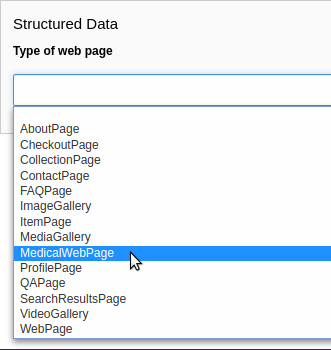
The new web page type can now be selected in the page properties:

MedicalWebPage in the list of available web page types

MedicalWebPage in the list of available web page types

Add a new enumeration 

schema.org provides the ability to use enumerations as values for certain properties. The TYPO3 schema extensions provide the enumerations defined by schema.org. However, there are some enumerations where schema.org refers to other vocabularies. These enumerations are not provided by the TYPO3 schema extensions. An example is BusinessEntityType, which suggests using the GoodRelations terms. If you want to use them, you can define and use your own enumeration to provide a defined set of of possible values satisfiying your needs (instead of plain strings):

EXT:my_extension/Classes/Schema/Enumeration/BusinessEntityType.php
<?php

declare(strict_types=1);

namespace MyVendor\MyExtension\Schema\Enumeration;

use Brotkrueml\Schema\Core\Model\EnumerationInterface;

enum BusinessEntityType implements EnumerationInterface
{
    case Business;
    case Enduser;
    case PublicInstitution;
    case Reseller;

    public function canonical(): string
    {
        return 'http://purl.org/goodrelations/v1#' . $this->name;
    }
}
Copied!

All enumeration types must implement the interface Brotkrueml\Schema\Core\Model\EnumerationInterface, which requires a canonical() method. Depending on the case, it returns the string to use in the JSON-LD output.

Now you can make use of this enum in PHP, for example:

// use MyVendor\MyExtension\Schema\Enumeration\BusinessEntityType;

$demand = $this->typeFactory->create('Demand');
$demand->setProperty('eligibleCustomerType', BusinessEntityType::Enduser);
Copied!

or in Fluid:

<schema:type.demand
   eligibleCustomerType="{f:constant(
      name: \MyVendor\MyExtension\Schema\Enumeration\BusinessEntityType::Enduser
   )}"
/>
Copied!

which results in:

{
   "@type": "Demand",
   "eligibleCustomerType": "http://purl.org/goodrelations/v1#Enduser"
}
Copied!

Another use case might be to create your own extended GenderType enum instead using the enum from this extension:

EXT:my_extension/Classes/Schema/Enumeration/GenderType.php
<?php

declare(strict_types=1);

namespace MyVendor\MyExtension\Schema\Enumeration;

use Brotkrueml\Schema\Core\Model\EnumerationInterface;

enum GenderType implements EnumerationInterface
{
    case Androgyne;
    case Bigender;
    case Binary;
    case Cis;
    case DemiBoy;
    case DemiGirl;
    case Eunuch;
    case Female;
    case Genderless;
    case Intersex;
    case Male;
    case Multigender;
    case Neither;
    case Polygender;
    case Queer;
    case Transgender;

    public function canonical(): string
    {
        return match ($this) {
            self::DemiBoy => 'Demi-boy',
            self::DemiGirl => 'Demi-girl',
            self::Female, self::Male => 'https://schema.org/' . $this->name,
            default => $this->name,
        };
    }
}
Copied!

List of available types 

Target group: Developers, Integrators

Introduction 

The available schema.org types (like Person, Organization or BlogPosting) are extended with ongoing versions of the schema.org standard. The vocabulary can also be extended independently or by installing additional vocabulary sections.

An overview of the available types can be found in the System > Configuration module.

Types overview 

To open the types overview, navigate to the System > Configuration module. In the upper menu bar, select Schema: Types.

Available types in the Configuration module

Available types in the Configuration module

There are two groups available:

  • All types: The available types are listed alphabetically.
  • Web page types: The available web page types used in the page properties.

You can quickly look up the available types using the search box.

Deprecations 

Introduced in version 3 

Direct instantiation of a type model

Direct instantiation of a type model
Deprecated since version
3.11.0
Removed in version
4.0.0
Alternative
Get an instance of a type model via the TypeFactory, see Types for details. A deprecation log entry is written with information about the calling class and line number.

PSR-14 event RegisterAdditionalTypePropertiesEvent

PSR-14 event RegisterAdditionalTypePropertiesEvent
Deprecated since version
3.10.0
Removed in version
4.0.0
Alternative
Create a class implementing AdditionalPropertiesInterface, see Register additional properties for details.

Enumeration type model / view helper classes

Enumeration type model / view helper classes
Deprecated since version
3.9.0
Removed in version
4.0.0
Alternative
Use the specific enums and the <f:constant> view helper instead, see enumerations for details.

\Brotkrueml\Schema\Type\TypeFactory::createType()

\Brotkrueml\Schema\Type\TypeFactory::createType()
Deprecated since version
3.0.0
Removed in version
4.0.0
Alternative
Inject the TypeFactory into the constructor and use the create() method. Have a look at the migration section.

Introduced in version 1 

\Brotkrueml\Schema\Core\Model\AbstractType->isEmpty()

\Brotkrueml\Schema\Core\Model\AbstractType->isEmpty()
Deprecated since version
1.7.0
Removed in version
2.0.0
Alternative
None. If you need it use \Brotkrueml\Schema\Core\Model\AbstractType->getPropertyNames() and loop over the property names with \Brotkrueml\Schema\Core\Model\AbstractType->getProperty().

\Brotkrueml\Schema\Manager\SchemaManager->setMainEntityOfWebPage()

\Brotkrueml\Schema\Manager\SchemaManager->setMainEntityOfWebPage()
Deprecated since version
1.4.1
Removed in version
2.0.0
Alternative
Use \Brotkrueml\Schema\Manager\SchemaManager->addMainEntityOfWebPage() instead. See the API.

\Brotkrueml\Schema\Provider\TypesProvider

\Brotkrueml\Schema\Provider\TypesProvider
Deprecated since version
1.7.0
Removed in version
2.0.0
Alternative

Use \Brotkrueml\Schema\Type\TypeRegistry which is a singleton and can be instantiated with GeneralUtility::makeInstance() or injected with dependency injection.

Since version 3.0 there is no alternative available.

Changelog 

All notable changes to this project will be documented in this file.

The format is based on Keep a Changelog, and this project adheres to Semantic Versioning.

Unreleased 

[4.1.1] - 2025-12-02 

Fixed 

  • Match composer description with TYPO3 v14 title handling (#147)
  • Version constraint for TYPO3 v14 in composer.json file

4.1.0 - 2025-11-25 

Added 

  • Compatibility with TYPO3 v14

4.0.1 - 2025-09-10 

Fixed 

  • automaticBreadcrumbSchemaGeneration outputs breadcrumbs in wrong order (#146)
  • Double masking of special chars of types in admin panel

4.0.0 - 2025-09-09 

Changed 

  • Type declarations added to TypeInterface (#129)
  • schema.org enumerations marked as stable

Fixed 

  • Admin panel shows no markup when loading a page with Shift+Reload (#132)

Removed 

  • Compatibility with TYPO3 v11 (#100)
  • Compatibility with TYPO3 v12 (#119)
  • Deprecated method TypeFactory::createType() (#116)
  • Types and view helpers representing enumerations (#126)
  • Properties moved from core vocabulary to pending (#120)
  • Deprecated PSR-14 event RegisterAdditionalTypePropertiesEvent (#130)
  • Manual instantiation of type model classes
  • Extension setting "Embed markup in the body section", the markup is now always embedded into the body section

3.14.2 - 2025-09-10 

Fixed 

  • Double masking of special chars of types in admin panel

3.14.1 - 2025-09-06 

Fixed 

  • Undeclared argument title passed to IconViewHelper in TYPO3 v11 (#145)

3.14.0 - 2025-08-30 

Added 

  • Button to copy markup to clipboard in Admin Panel

Removed 

  • Validation via Schema Markup Validator in Admin Panel (#144)

3.13.2 - 2025-07-22 

Fixed 

  • Type attribute with named argument throws warning (#141)

3.13.1 - 2025-07-18 

Fixed 

  • Passing multiple types to SchemaManager->addType() not all types are considered under circumstances (#140)

3.13.0 - 2025-05-17 

Updated 

  • schema.org definition to version 29.2

3.12.2 - 2025-05-03 

Fixed 

  • Example in the docs for adding a type

3.12.1 - 2025-04-25 

Fixed 

  • Exception with activated admin panel on TYPO3 v11 (#139)

3.12.0 - 2025-04-14 

Added 

  • Multiple documentation links for same publisher for a type in admin panel

3.11.1 - 2025-04-10 

Fixed 

  • Absolute URL is prefixed with site URL in a reverse proxy environment (#136)

3.11.0 - 2025-04-01 

Added 

  • Link to new Google manuals for product-related types in Admin Panel

Updated 

  • schema.org definition to version 29.0

Changed 

  • RenderAdditionalTypesEvent is part of the API now (#135)

Deprecated 

  • Manual instantiation of a type model classes - use the TypeFactory instead. A deprecation log entry is written with more information

Fixed 

  • Missing pending properties for some types (#133)

3.10.1 - 2025-03-16 

Fixed 

  • Markup was cached on non-cached pages (#131)

3.10.0 - 2025-03-12 

Added 

  • Registration of additional properties by implementing AdditionalPropertiesInterface

Deprecated 

  • PSR-14 event RegisterAdditionalTypePropertiesEvent

Fixed 

  • Additional properties cache is not cleared when flushing the cache

3.9.1 - 2025-01-28 

Fixed 

  • Error on legacy v13 installation with deactivated admin panel (#127)

3.9.0 - 2025-01-13 

Added 

  • Experimental support for schema.org enumerations
  • SchemaManager->addType() is now variadic

Deprecated 

  • Types and view helpers representing enumerations

3.8.0 - 2024-11-22 

Updated 

  • schema.org definition to version 28.1

3.7.1 - 2024-10-22 

Fixed 

  • Parse error with Fluid 4 and TYPO3 v13 (#124)

3.7.0 - 2024-09-19 

Updated 

  • schema.org definition to version 28.0

3.6.1 - 2024-08-18 

Fixed 

  • FAQ page type in automatic breadcrumb raises error in Rich Snippet Tool (#121)

3.6.0 - 2024-07-23 

Updated 

  • schema.org definition to version 27.02

3.5.0 - 2024-05-20 

Updated 

  • schema.org definition to version 27.0

3.4.1 - 2024-05-03 

Fixed 

  • Undefined array key "addRootLineFields" in TYPO3 v13.2

3.4.0 - 2024-02-16 

Updated 

  • schema.org definition to version 26.0

3.3.0 - 2024-02-04 

Updated 

  • schema.org definition to version 25.0

3.2.0 - 2024-01-30 

Added 

  • Compatibility with TYPO3 v13

3.1.0 - 2024-01-10 

Added 

  • Picture formats avif and webp are recognized as image in Admin Panel
  • Link to new Google manuals for various types in Admin Panel

Updated 

  • schema.org definition to version 24.0

3.0.0 - 2023-10-23 

Added 

  • Method TypeFactory->create() which should be used instead of TypeFactory::createType()

Changed 

  • Type model classes need to be marked with the "Type" attribute (#107)
  • Type view helpers need to specify a $type property

Updated 

  • Links to Google manuals

Deprecated 

  • TypeFactory::createType(), instead inject TypeFactory via DI and call create() method (#83)

Removed 

  • Compatibility with TYPO3 v10 (#73)
  • Compatibility with PHP 7.4 and PHP 8.0
  • Interface WebPageElementTypeInterface for marking web page element types

2.11.0 - 2023-10-19 

Updated 

  • schema.org definition to version 23.0

2.10.0 - 2023-07-21 

Updated 

  • schema.org definition to version 22.0

2.9.1 - 2023-06-06 

Fixed 

  • Custom page cache tags for schema page cache not considered (#115)

2.9.0 - 2023-06-02 

Updated 

  • schema.org definition to version 21.0

Fixed 

  • Hidden pages were referenced in automatic generated breadcrumb (#114)
  • Disabled pages in menu were referenced in automatic generated breadcrumb

2.8.0 - 2023-05-22 

Updated 

  • schema.org definition to version 19.0

2.7.2 - 2023-04-26 

Fixed 

  • Deprecation notice for items configuration in TCA select field in TYPO3 v12

2.7.1 - 2023-02-24 

Fixed 

  • Avoid error when SchemaManager is called via view helpers in backend context (#108)

2.7.0 - 2023-02-14 

Added 

  • Configuration option to allow only one breadcrumb list (#104)

2.6.4 - 2023-01-05 

Fixed 

  • Avoid deprecation in admin panel for PHP 8.2

2.6.3 - 2022-12-09 

Fixed 

  • "Cannot call constructor" error in admin panel with TYPO3 v12.1 (#103)

2.6.2 - 2022-11-15 

Fixed 

  • "CacheManager can not be injected" error in custom functional tests when using typo3/testing-framework (#102)

2.6.1 - 2022-10-28 

Fixed 

  • Rich Snippet Tool interprets FAQPage in breadcrumb wrong (#101)

2.6.0 - 2022-10-04 

Added 

  • Compatibility with TYPO3 v12 (#99)

2.5.2 - 2022-09-02 

Fixed 

  • Property with only @id as value not displayed in AdminPanel (#98)

2.5.1 - 2022-06-13 

Security 

  • Properly escape content

2.5.0 - 2022-05-18 

Added 

  • Assign multiple values to one property via TypoScript

Fixed 

  • Usage of stdWrap in combination with a string property value in TypoScript configuration

2.4.0 - 2022-03-28 

Updated 

  • schema.org definition to version 14.0

2.3.0 - 2022-02-28 

Added 

  • Configuration option to exclude custom doktypes when automatically generating the breadcrumb (#84)
  • Content Object (cObject) SCHEMA to add types via TypoScript (#88) Thanks to Daniel Siepmann

2.2.2 - 2022-01-02 

Fixed 

  • Empty property values in Admin Panel for multiple types

2.2.1 - 2021-11-20 

Fixed 

  • Error in Admin Panel when a property has a URL as value without path

2.2.0 - 2021-11-17 

Added 

  • Prioritisation of main entities (#77)

2.1.0 - 2021-10-19 

Added 

  • List of available schema.org types in Configuration module (only TYPO3 v11+) (#74)

Fixed 

  • Type error in PaddingViewHelper with activated Admin Panel (#76)

2.0.2 - 2021-09-15 

Fixed 

  • Display field "Type of web page" in page properties for noindex pages

2.0.1 - 2021-08-09 

Fixed 

  • Avoid error in Rich Result Test when validating JSON-LD via Admin Panel

2.0.0 - 2021-08-01 

Added 

  • Node identifier and blank node identifier (#65, #67)
  • Multiple types for a node (#64, #68)

Changed 

Fixed 

  • Custom doktypes greater than 199 are rendered in breadcrumb list

Removed 

  • Compatibility with TYPO3 v9 LTS (#41)
  • Compatibility with PHP 7.2 and PHP 7.3 (#42)
  • The PSR-14 event and signal for (de)activating the embedding of markup are removed (#60)
  • Signal/slots in favour of PSR-14 events (#43)
  • Deprecated methods AbstractType->isEmpty() and SchemaManager->setMainEntityOfWebPage() (#44)
  • Deprecated class TypesProvider (#44)

1.13.2 - 2022-10-28 

Fixed 

  • Rich Snippet Tool interprets FAQPage in breadcrumb wrong (#101)

1.13.1 - 2022-06-13 

Security 

  • Properly escape content

1.13.0 - 2022-03-28 

Updated 

  • schema.org definition to version 14.0

1.12.1 - 2021-08-09 

Fixed 

  • Avoid error in Rich Result Test when validating JSON-LD via Admin Panel

1.12.0 - 2021-07-07 

Updated 

  • schema.org definition to version 13.0

Changed 

  • Move from Structured Data Testing Tool to Schema Markup Validator in Admin Panel (#66)

Fixed 

  • PHP 8.0 issues
  • Link images with extension in uppercase in Admin Panel (#69)
  • Ignore an empty array for a property value when rendering JSON-LD

1.11.1 - 2021-04-06 

Fixed 

  • Add missing properties for types Pharmacy and Physician
  • Allow value "0" in PropertyViewHelper

1.11.0 - 2021-03-10 

Updated 

  • schema.org definition to version 12.0 (#3)

1.10.0 - 2020-12-28 

Added 

  • Compatibility with TYPO3 v11

Updated 

  • schema.org definition to version 11.01 (#3)

Changed 

  • Raise minimum required version to TYPO3 9.5.16

1.9.0 - 2020-09-08 

Added 

  • Button in Admin Panel to verify structured data in Rich Result Test

Updated 

  • schema.org definition to version 10.0 (#3)

1.8.0 - 2020-07-08 

Added 

  • Display schema markup of a page in the Admin Panel (#49)

1.7.2 - 2020-06-14 

Fixed 

  • Remove usage of PHP 8.0 functions, as polyfill is not available in classic installation

1.7.1 - 2020-05-26 

Fixed 

  • Generate types in view helpers inside "for" loop correctly (#52)

1.7.0 - 2020-04-22 

Added 

  • Possibility to register additional schema types (#38)
  • Introduce a TypeInterface for type models implementations
  • Introduce a TypeFactory for creating type models (#48)

Updated 

  • schema.org definition to version 7.04 (#3)

Changed 

  • Decouple rendering of JSON-LD from AbstractType and SchemaManager
  • Move decision about embedding markup into event listener
  • Support only TYPO3 LTS versions

Deprecated 

  • TypesProvider in favour of TypeRegistry (which now is a singleton)
  • AbstractType->isEmpty()

1.6.0 - 2020-03-09 

Added 

Changed 

  • Adapt properties management in type models

1.5.2 - 2020-02-09 

Fixed 

  • Correct sorting of rootline during automatic breadcrumb generation (#32)

1.5.1 - 2020-01-30 

Fixed 

  • Remove doubled base URL in id of list item in BreadcrumbViewHelper (#31)

1.5.0 - 2020-01-22 

Added 

  • Add Signal/PSR-14 event to decide about embedding of markup (#29)

Updated 

  • schema.org definition to version 6.0 (#3)

1.4.2 - 2019-12-13 

Changed 

  • Remove middlewares in favour of aspects

Fixed 

  • Markup is not lost anymore when non-cached plugin on page (#27)
  • Don't show special doktypes in BreadcrumbList (#28)

1.4.1 - 2019-12-01 

Fixed 

  • Handle multiple items in mainEntity as array defined in WebPage correctly (#25)

Deprecated 

  • SchemaManager->setMainEntityOfWebPage() in favour of SchemaManager->addMainEntityOfWebPage() (#25)

1.4.0 - 2019-11-23 

Changed 

  • Multiple items in mainEntity of a WebPage (#25)

Updated 

  • schema.org definition to version 5.0 (#3)

1.3.1 - 2019-11-04 

Changed 

  • Use Dependency Injection for TYPO3 v10 with fallback for v9

Fixed 

  • Type value of 0.00 is not rendered when used in view helper (#23)

1.3.0 - 2019-09-28 

Added 

  • Configuration option for automatic embedding of a breadcrumb in pages (#20)
  • Choice where to place markup: head or body section (#21)
  • API for retrieving lists of types (#19)

1.2.0 - 2019-09-03 

Added 

  • Don't embed schema markup when page should not be indexed by search engines (#18)
  • Use @graph when multiple types on root level (#17)

Changed 

  • Use interface to identify a WebPage type model

1.1.0 - 2019-07-27 

Added 

  • Support for TYPO3 10.0

Changed 

  • Set classes as final (where appropriate), adjust visibility of properties

1.0.0 - 2019-07-11 

First stable release

Added 

  • Hint in documentation to XSD schema of view helpers

0.9.0 - 2019-07-10 

Changed 

  • Rename method getProperties() to getPropertyNames() in AbstractType class

Fixed 

  • Allow null as property value (this is also the default value after instantiation of a type model)
  • Do not render a property with an empty string

0.8.1 - 2019-07-09 

Fixed 

  • Check, if given breadcrumb item is an array in BreadcrumbViewHelper

0.8.0 - 2019-07-09 

Changed 

  • Add possibility to overwrite web page type in another language

0.7.0 - 2019-07-08 

Added 

  • The mainEntity property can be set via the SchemaManager or the type view helpers (#14)

Changed 

  • Add conflict with extension brotkrueml/sdbreadcrumb

Fixed 

  • Type with only empty properties should be rendered (#15)

0.6.0 - 2019-07-04 

Added 

  • Allow all numeric values as property value
  • Initial documentation in reST format (#9)

0.5.0 - 2019-07-03 

Added 

  • Add method for setting different properties at once for a type (#12)

Changed 

  • Check if at least one property of a type is filled (#13)
  • Mark some methods as internal

0.4.0 - 2019-06-30 

Added 

  • BreadcrumbLists can be handled by SchemaManager (#2)
  • Possibility to assign the same property multiple times in a view helper (#8)

0.3.0 - 2019-06-29 

Fixed 

  • Assigning multiple sub types in Fluid throwed error (#7)

0.2.0 - 2019-06-28 

Added 

  • Specific type of WebPage can be selected in page properties (#1)

0.1.0 - 2019-06-25 

Initial release

Added 

  • API for adding schema.org vocabulary to a website
  • View helpers for usage in Fluid templates

Migration 

From version 3.x to version 4.0 

In version 4.0, the compatibility with TYPO3 v11 LTS and TYPO3 v12 LTS has been removed.

PSR-14 event RegisterAdditionalTypePropertiesEvent 

The deprecated PSR-14 event RegisterAdditionalTypePropertiesEvent has been removed. As an alternative create a class implementing AdditionalPropertiesInterface (which is available since version 3.10.0), see Register additional properties for details.

Manual instantiation of a type model class 

Instantiating a type model class manually with "new" is not supported anymore. The \Brotkrueml\Schema\Type\TypeFactory->create() method should be used instead (which is available since version 3.0.0):

  use Brotkrueml\Schema\Model\Type\Event;
+ use Brotkrueml\Schema\Type\TypeFactory;

  final class MyController
  {
+     public function __construct(
+         private readonly TypeFactory $typeFactory,
+     ) {}

      public function doSomething(): void
      {
          // ...

-         $event = new Event();
+         $event = $this->typeFactory->create('Event');

          // ...
      }
  }
Copied!

Types and view helpers representing enumerations 

Types and view helpers representing enumerations were removed. It is unlikely that they were used as they had no real purpose. Use real enumerations instead which are available since version 3.9.0.

Properties moved from core to pending 

Over the time some properties moved from the core vocabulary to pending with newer version of the Schema.org definition (for whatever reason). To avoid breaking, these properties were reapplied to the corresponding type models. Those properties have now been removed. If you need some of them, register them yourself like explained in Register additional properties or install the schema_pending extension.

Type declarations added to TypeInterface 

Missing return type declarations and type declarations for the argument of the setId() method have been added. If you do not implement custom type models directly from the \Brotkrueml\Schema\Core\Model\TypeInterface, you are not affected by this change. Otherwise you have to adjust the methods of your type model classes.

However, implementing a type model directly from the interface is discouraged and might not work in the future, extend from \Brotkrueml\Schema\Core\Model\AbstractType instead.

From version 2.x to version 3.0 

In version 3.0, the compatibility with TYPO3 v10 LTS was removed. Also PHP 8.1 or higher is necessary.

Type model classes 

The type models classes were previously registered via a Configuration/TxSchema/TypeModels.php file. This file is not recognised anymore, you have to mark a type model class with the attribute \Brotkrueml\Schema\Attributes\Type now. See the Adding types section for more information.

Additionally, the static property $propertyNames of a type model class is now type-hinted as an array.

+ use Brotkrueml\Schema\Attributes\Type;

+ #[Type('MyCustomType')]
  final class MyCustomType extends AbstractType
  {
-     protected static $propertyNames = [
+     protected static array $propertyNames = [
         // ... the properties ...
      ]
  }
Copied!

View helpers 

Custom view helpers need to specify a property which holds the name of the type:

  final class MyCustomTypeViewHelper extends AbstractTypeViewHelper
  {
+     protected string $type = 'MyCustomType';
  }
Copied!

Type factory 

The call of the static method \Brotkrueml\Schema\Type\TypeFactory::createType() has been deprecated. Instead, inject the TypeFactory into the constructor and use the new create() method:

 <?php

 declare(strict_types=1);

 namespace MyVendor\MyExtension\Controller;

 use Brotkrueml\Schema\Type\TypeFactory;

 final class MyController
 {
+    public function __construct(
+        private readonly TypeFactory $typeFactory,
+    ) {}

     public function doSomething(): void
     {
         // ...

-        $person = TypeFactory::createType('Person');
+        $person = $this->typeFactory->create('Person');

         // ...
     }
 }
Copied!

From version 1.x to version 2.0 

In version 2.0, the compatibility with TYPO3 v9 LTS was removed. Also PHP 7.4 or higher is necessary.

Signal/Slots 

The signal/slots were removed:

  • registerAdditionalTypeProperties
  • shouldEmbedMarkup

You can migrate the slots easily to the PSR-14 event listeners:

Previous slot (in ext_localconf.php):

EXT:my_extension/ext_localconf.php
$signalSlotDispatcher = \TYPO3\CMS\Core\Utility\GeneralUtility::makeInstance(
   TYPO3\CMS\Extbase\SignalSlot\Dispatcher::class
);
$signalSlotDispatcher->connect(
   \Brotkrueml\Schema\Core\Model\AbstractType::class,
   'registerAdditionalTypeProperties',
   \MyVendor\MyExtension\EventListener\AdditionalPropertiesForPerson::class,
   '__invoke'
);
Copied!

PSR-14 event listener (in Configuration/Services.yaml):

services:
   # Place here the default dependency injection configuration

   MyVendor\MyExtension\EventListener\AdditionalPropertiesForPerson:
      tags:
         - name: event.listener
           identifier: 'myAdditionalPropertiesForPerson'
Copied!

You can find more information about the PSR-14 event listeners in the chapter PSR-14 events.

Removed Deprecations 

The following deprecated methods and classes were removed:

  • \Brotkrueml\Schema\Core\Model\AbstractType->isEmpty()
  • \Brotkrueml\Schema\Manager\SchemaManager->setMainEntityOfWebPage()
  • \Brotkrueml\Schema\Provider\TypesProvider

For the migration follow the instructions on the deprecations chapter.

Markup is embedded by default on "noindex" pages 

In schema version 1.x the markup was not embedded on "noindex" pages (with installed SEO system extension). In version 2 the markup is embedded by default also on these pages. You can deactivate this behaviour in the extension configuration.

Also in version 1.x a PSR-14 event \Brotkrueml\Schema\Event\ShouldEmbedMarkupEvent was available to change the default behaviour of not embedding the markup on "noindex" pages. With the new configuration option this is not necessary anymore and event listeners for this event must be removed.

Sitemap