Introduction 

What does it do? 

The extension provides a form finisher for the TYPO3 Form Framework for rate limiting when sending a form. This way a submission can be restricted to, for example:

  • one IP address over all forms using this finisher
  • a combination of IP address and specific form
  • a combination of a specific form and an email address

If the limit is exceeded, a customizable error is displayed.

Release management 

This extension uses semantic versioning which basically means for you, that

  • Bugfix updates (for example, 1.0.0 => 1.0.1) just includes small bug fixes or security relevant stuff without breaking changes.
  • Minor updates (for example, 1.0.0 => 1.1.0) includes new features and smaller tasks without breaking changes.
  • Major updates (for example, 1.0.0 => 2.0.0) breaking changes which can be refactorings, features or bug fixes.

Installation 

Target group: Administrators

The recommended way to install this extension is by using Composer. In your Composer-based TYPO3 project root, just type:

composer req brotkrueml/typo3-form-rate-limit
Copied!

and the recent stable version will be installed.

In classic mode, you can also install the extension from the TYPO3 Extension Repository (TER).

Then continue with the configuration.

Configuration 

Target group: Developers, Integrators

Site sets 

This extension provides support for site sets.

Add brotkrueml/form-rate-limit as dependency to the configuration of your site package:

EXT:your_sitepackage/Configuration/Sets/<your-set>/config.yaml
name: your-vendor/your-sitepackage
label: Sitepackage

dependencies:
  # ... some other dependencies

  - brotkrueml/form-rate-limit
Copied!

Include TypoScript sets 

The extension ships some TypoScript code which needs to be included.

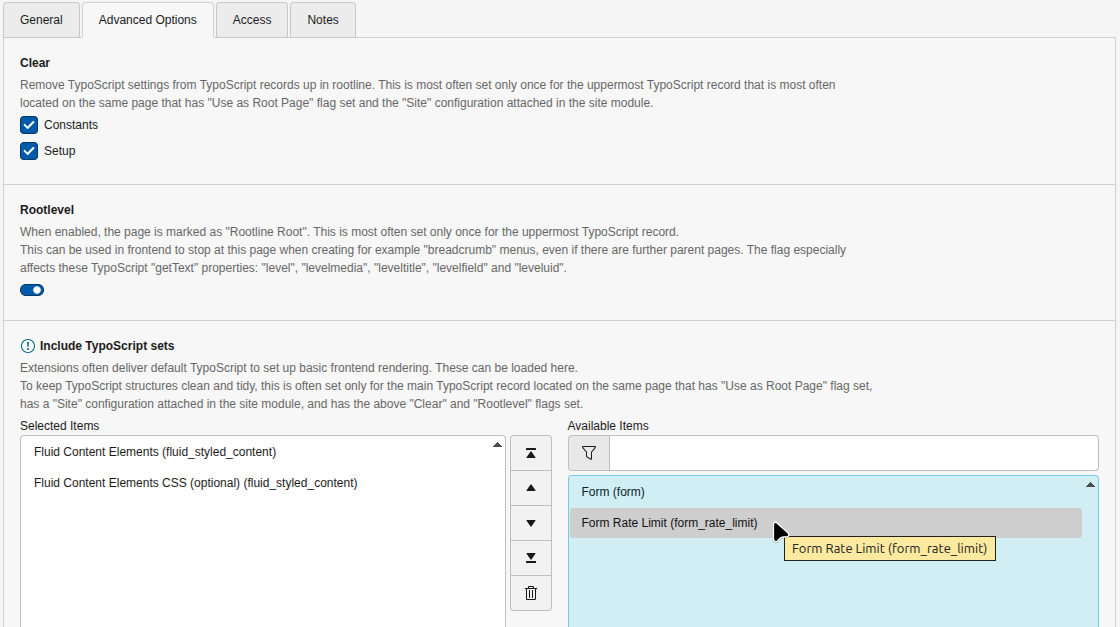
  1. Switch to the root page of your site.
  2. Switch to the Site Management > TypoScript module and select Edit TypoScript record.
  3. Press the link Edit the whole TypoScript record and switch to the tab Advanced Options.
  4. Select Form Rate Limit (form_rate_limit) from the available items at the field Include TypoScript sets:
Include TypoScript sets

Include TypoScript sets

Finisher 

Target group: Integrators

Under the hood, the symfony/rate-limiter is used. This is the same rate limiter that TYPO3 Core uses to limit the number of incorrect backend logins.

Example 

Let's start with an example:

finishers:
  - identifier: RateLimit
    options:
      policy: 'sliding_window'
      interval: '1 hour'
      limit: 2
      restrictions:
        - '__ipAddress'
        - '__formIdentifier'
        - '{email}'
      template: 'EXT:my_extension/Resources/Private/Templates/Form/RateLimitExceeded.html'

  # other finishers follow
Copied!

The example uses the "sliding window" policy. This form can be submitted successfully twice within one hour from the same IP address with the same provided email address. Additionally, a custom template for the error message is assigned.

Options 

The form finisher ships with default options. If they are suitable for your needs, you can omit them in your form definition. The default values can be found in the following list.

interval

interval
Type

string

Default

1 hour

The interval for the policy used. Since the interval is later passed to the DateInterval object, any possible value understood by that object is possible, for example:

  • 2 hours
  • 10 minutes
  • 1 day
  • 1 hour 30 minutes
  • 90 minutes
  • PT3600S (3600 seconds)

limit

limit
Type

int

Default

1

The limit to which the form can be submitted with the provided restrictions within the specified interval.

policy

policy
Type

string

Default

sliding_window

Two policies are currently available:

fixed_window

This is the simplest technique and it is based on setting a limit for a given interval of time (for instance, 5 submits per hour).

See Fixed Window Rate Limiter for details.

sliding_window

This is similar to the fixed window rate limiter, but then using a 1 hour window that slides over the timeline.

See: Sliding Window Rate Limiter for details.

The "token_bucket" policy is currently not supported.

restrictions

restrictions
Type

array

Default

['__ipAddress', '__formIdentifier']

The restrictions for limiting the submission of a form. The default value combines the IP address and the form identifier.

The possible values can be combined at will:

__ipAddress
The IP address is taken into account for limiting the submission of a form.
__formIdentifier

The form identifier is taken into account. This is a combination of the identifier in the form definition and the content element ID.

In connection mode the content element ID is the same for each language. In free mode the content element ID is different for each language.

{someFormField}

Every form field can be used to add an additional restriction. The field identifier must be surrounded by curly brackets.

For example, if you want to limit the submission to the given email address, this field can be added to the restriction list as {email} if the identifier of the email address field is named email.

someCustomValue
You can set a custom value that will be used unchanged as part of the restrictions.

Examples:

  • Limit by the form and an email address (available as "email" field):

    restrictions:
       - '__formIdentifier'
       - '{email}'
    Copied!
  • Limit by a custom value and some of the defined fields. This may be helpful when you have the form multiple times on the website:

    restrictions:
       - 'our-weekend-raffle'
       - '{name}'
       - '{address}'
       - '{zip}'
       - '{city}'
    Copied!

template

template
Type

string

Default

EXT:form_rate_limit/Resources/Private/Templates/RateLimitExceeded.html

The extension provides a Fluid template that is used when the rate limit is exceeded. You can (and usually want) to customise it to your needs. The template option gives you the possibility to assign a custom template to a finisher. Some variables in the template are available:

formIdentifier
The form identifier can be used to insert an anchor into the template. The browser will then jump to this anchor in case the rate limit is reached.
interval
The configured interval option.
limit
The value of the specified limit.
policy
The defined policy.

PSR-14 event 

Target group: Developers

Have a look into the event dispatcher documentation, if you are not familiar with PSR-14 events.

RateLimitExceededEvent 

This event is dispatched when the rate limit for a form has been exceeded. This way you can create an event listener which notifies you about the exceeded limit: add a log entry, send an email, inform a third-party system, etc.

The event \Brotkrueml\FormRateLimit\Event\RateLimitExceededEvent provides the following methods:

->getFormIdentifier(): string
Returns the form identifier.
->getInterval(): string
Returns the configured interval.
->getLimit(): int
Returns the configured limit.
->getPolicy(): string
Returns the configured policy.
->getRequest(): \Psr\Http\Message\ServerRequestInterface
Returns the PSR-7 request object.

Example 

This example adds an entry to the TYPO3 log:

EXT:your_extension/Classes/EventListener/FormRateLimitExceededLogger.php
<?php

declare(strict_types=1);

/*
 * This file is part of the "form_rate_limit" extension for TYPO3 CMS.
 *
 * For the full copyright and license information, please read the
 * LICENSE.txt file that was distributed with this source code.
 */

namespace YourVendor\YourExtension\EventListener;

use Brotkrueml\FormRateLimit\Event\RateLimitExceededEvent;
use Psr\Log\LoggerInterface;
use TYPO3\CMS\Core\Attribute\AsEventListener;

#[AsEventListener(
    identifier: 'your-extension/form-rate-limit-exceeded-logger',
)]
final readonly class FormRateLimitExceededLogger
{
    public function __construct(
        private LoggerInterface $logger,
    ) {}

    public function __invoke(RateLimitExceededEvent $event): void
    {
        $this->logger->warning(
            'The form with identifier "{formIdentifier}" was sent more than {limit} times within {interval}',
            [
                'formIdentifier' => $event->getFormIdentifier(),
                'limit' => $event->getLimit(),
                'interval' => $event->getInterval(),
            ],
        );
    }
}
Copied!

Command 

Target group: Administrators

The states of the rate limiter is stored in the var/form_rate_limit/ folder. To clean up this folder with expired states, a command is available. You can call it on the console with:

vendor/bin/typo3 formratelimit:cleanupexpiredstorageentries
Copied!
typo3/sysext/core/bin/typo3 formratelimit:cleanupexpiredstorageentries
Copied!

To run the command regularly you can add a cron job or run it from the TYPO3 scheduler.

Troubleshooting 

  • The finisher preset identified by "RateLimit" could not be found, or the implementationClassName was not specified.:

    Please include the TypoScript configuration shipped with this extension.

  • Tried resolving a template file for controller action "Standard->index" in format ".html", but none of the paths contained the expected template file (...). No paths configured.

    The assigned template to the finisher is not available. Please check the path and filename.

Changelog 

All notable changes to this project will be documented in this file.

The format is based on Keep a Changelog, and this project adheres to Semantic Versioning.

Unreleased 

2.1.2 - 2026-04-21 

Fixed 

  • Avoid configuring symfony/rate-limiter in extra.typo3/cms.Package.providesPackages for TYPO3 v14

2.1.1 - 2026-03-31 

Fixed 

  • Add missing TYPO3 v14 compatibility to ext_emconf.php

2.1.0 - 2026-03-31 

Added 

  • Compatibility with TYPO3 v14

2.0.0 - 2025-09-22 

Removed 

  • Compatibility with TYPO3 v11
  • Compatibility with TYPO3 v12

1.7.1 - 2024-11-14 

Fixed 

  • Form finisher not visible in TYPO3 v13 using site sets

1.7.0 - 2024-11-11 

Added 

  • Allow cleanup command in scheduler (#11), thanks to @RKlingler

1.6.1 - 2024-05-17 

Fixed 

  • Wrong site set label (#8), thanks to @ErHaWeb

1.6.0 - 2024-05-13 

Added 

  • Support for site sets in TYPO3 v13

1.5.0 - 2024-02-04 

Added 

  • Compatibility with TYPO3 v13

1.4.0 - 2024-01-16 

Added 

  • Compatibility with Symfony 7

1.3.1 - 2023-12-21 

Fixed 

  • Cannot use interval > 27263 seconds (#5)

1.3.0 - 2023-08-13 

Added 

  • PSR-7 request object is available in PSR-14 event (#2)

1.2.0 - 2023-08-07 

Added 

  • PSR-14 event is dispatched when rate limit is exceeded (#1)

1.1.0 - 2023-04-01 

Added 

  • Prevent download of language packs for TYPO3 v12

1.0.0 - 2023-01-13 

Initial release

Sitemap