Introduction 

What does it do? 

The extension integrates Matomo Analytics easily into TYPO3. The extension supports Matomo 5.

The extension takes the Content Security Policy (CSP) into account: a nonce attribute is added to the script tag, if the feature is enabled for frontend.

When to use this extension 

This extension is useful if you want to add further Matomo method calls dependent on certain conditions — such as custom dimensions or setting the user id. Another option is to enable the Matomo tag manager and add data layer variables. PSR-14 events are available for these purposes. Also have a look at the use cases.

When not to use this extension 

If you only use Matomo's default tracking code or have only static values for additional Matomo method calls, insert the JavaScript snippet directly via TypoScript or the Fluid template.

Limitation 

This extension can only embed one tracking code for one Matomo instance. If you have to add multiple tracking codes for one or more Matomo instances you cannot use this extension and have to do it on your own.

Screenshots 

Integration of Matomo in the site configuration

Integration of Matomo in the site configuration

Release management 

This extension uses semantic versioning which basically means for you, that

  • Bugfix updates (for example, 1.0.0 => 1.0.1) just includes small bug fixes or security-relevant stuff without breaking changes.
  • Minor updates (for example, 1.0.0 => 1.1.0) includes new features and smaller tasks without breaking changes.
  • Major updates (for example, 1.0.0 => 2.0.0) breaking changes which can be refactorings, features or bug fixes.

The changes between the different versions can be found in the changelog.

Installation 

Target group: Administrators

The recommended method for installing this extension is to use Composer. In your Composer-based TYPO3 project root, simply enter:

composer req brotkrueml/typo3-matomo-integration
Copied!

and the recent version will be installed.

In a legacy installation you can also install the extension from the TYPO3 Extension Repository (TER).

The extension offers some configuration options, which are explained in the chapter Configuration.

Configuration 

Target group: Developers, Integrators

Site configuration 

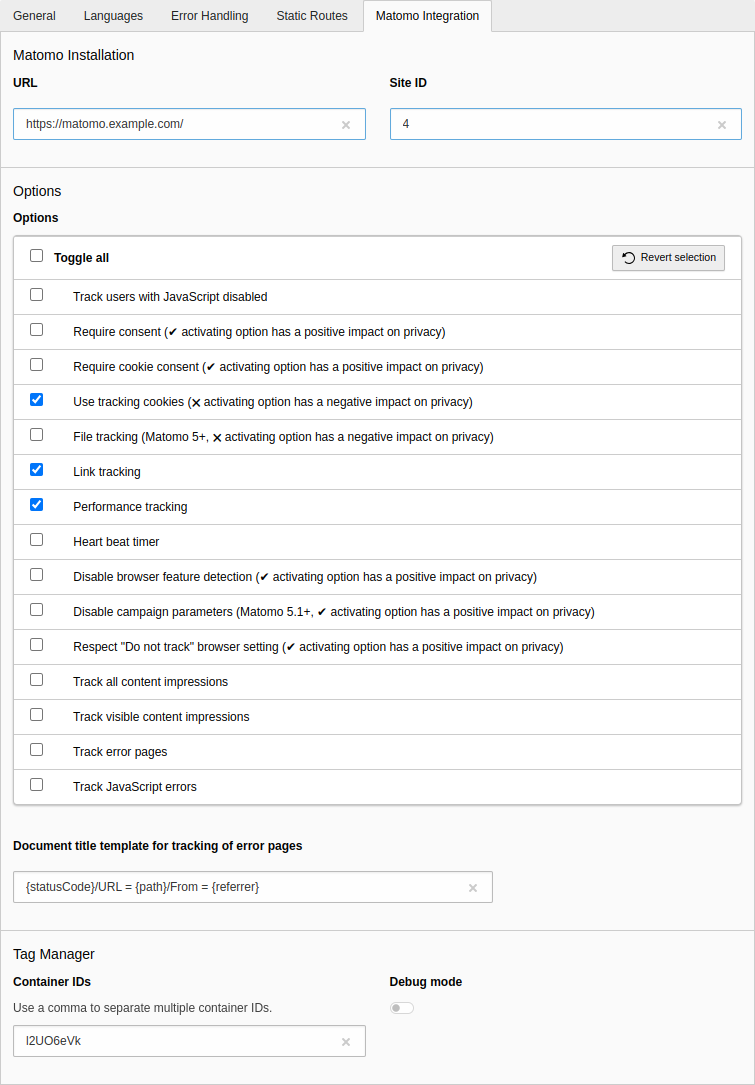
To configure the extension, go to Site Management > Sites and select the appropriate site configuration. Click on the Matomo Integration tab:

Options in the site configuration

Options in the site configuration

Installation 

URL
Enter the URL of your Matomo instance (without matomo.php at the end). Relative URLs can be used, like //matomo.example.com/.
Site ID
Enter the site ID for the website.

Options 

Track users with JavaScript disabled

If this option is enabled, users with JavaScript disabled will be tracked. Technically, a <noscript> tag is embedded in the web page.

Default: disabled

Require consent

Activating this option has a positive impact on privacy.

Enable this option when a consent manager is used which sets up consent tracking: no tracking request will be sent to Matomo and no cookies will be set. For more information have a look into Implementing tracking or cookie consent with the Matomo JavaScript Tracking Client.

Default: disabled

Require cookie consent

Activating this option has a positive impact on privacy.

Enable this option when a consent manager is used which sets up consent tracking: tracking requests will still be sent but no cookies will be set. For more information have a look into Implementing tracking or cookie consent with the Matomo JavaScript Tracking Client.

Default: disabled

Use tracking cookies

Activating this option has a negative impact on privacy.

Activating this option enables cookies tracking.

See also When cookies are disabled by a visitor (cookieless tracking), how does it impact Matomo reports accuracy?

Default: enabled

File tracking

Activating this option has a negative impact on privacy.

This option has been introduced with Matomo 5 and enables the file:// protocol tracking.

Default: disabled

Link tracking

This option enables the download and outlink tracking.

Default: enabled

Performance tracking

This option enables the tracking of performance data.

Default: enabled

Heart beat timer

Enable this option when you want to accurately measure the time spent in the visit.

Default: disabled

Disable browser feature detection

Activating this option has a positive impact on privacy.

This option disables the browser feature detection.

Default: disabled (browser features are detected)

Disable campaign parameters

Activating this option has a positive impact on privacy.

By default, Matomo will send campaign parameters (mtm, utm, etc.) to the tracker and record that information. Some privacy regulations may not allow for this information to be collected. If this applies to you, activate this method to prevent campaign parameters from being sent to the tracker.

Default: disabled (campaign parameters are sent)

Respect "Do not track" browser setting

This option prevents requests and cookies when people don't want to be tracked.

Default: disabled

Track all content impressions

If you use content tracking you can enable this option when you want to track all content impressions on a page.

Default: disabled

Track visible content impressions

If you use content tracking you can enable this option when you want to track visible content impressions on a page.

Default: disabled

Track error pages

If you have configured the error handling and enable this option, the document title will be set as described in the Matomo FAQ: How to track error pages. You can customise the document title in the field "Document title template for tracking of error pages"

Default: disabled

Track JavaScript errors

With this option enabled JavaScript errors are tracked.

Default: disabled

Document title template for tracking of error pages

Adapt the template for the document title to your needs with the option "Track error pages" enabled. You can use the following variables:

{statusCode}
The status code of the error (for example, 404, 500).
{path}
The path of the URL where the error occurred.
{referrer}
The referrer.

Default: {statusCode}/URL = {path} /From = {referrer}

Tag Manager 

Container IDs

If you use the Matomo Tag Manager, enter the container IDs in this field. If no value is given, the tag manager code will not be embedded in the web page.

Default: empty string

Examples for possible values:

  • Live: l2UO6eVk
  • Dev: l2UO6eVk_dev_600e4be39a8bfd98bf71f295
  • Staging: l2UO6eVk_staging_6584c7e4727fcb9180530d6d

Multiple container IDs can be configured, separated by a comma, for example: l2UO6eVk,gu8CuJ6Q.

Debug Mode

When debug mode is enabled, various debug messages are logged on the developer console.

Default: disabled

Developer corner 

Target group: Developers

Objects 

A data object is available for use in the PSR-14 events:

JavaScriptCode 

The \Brotkrueml\MatomoIntegration\Code\JavaScriptCode object holds a piece of arbitrary JavaScript code used in the BeforeTrackPageViewEvent, AfterTrackPageViewEvent and AddToDataLayerEvent events. This object is necessary to distinguish between a "normal" string and JavaScript code for later embedding.

Example:

$javaScriptCode = new \Brotkrueml\MatomoIntegration\Code\JavaScriptCode(
   '/* some JavaScript code */'
);
Copied!

The object provides the following method:

__toString(): string

__toString(): string

Returns the JavaScript code.

PSR-14 events 

To enrich Matomo's JavaScript tracking code with additional calls, PSR-14 events are available. You can draw inspiration from the Use cases chapter.

ModifySiteConfigurationEvent 

This event allows to modify some settings from the site configuration on runtime.

The event provides the following methods:

getRequest(): \Psr\Http\Message\ServerRequestInterface

getRequest(): \Psr\Http\Message\ServerRequestInterface

Get the current PSR-7 request object.

getSiteIdentifier(): string

getSiteIdentifier(): string

Get the site identifier.

getUrl(): string

getUrl(): string

Get the URL.

setUrl(string $url): void

setUrl(string $url): void

Set a URL.

getSiteId(): int

getSiteId(): int

Get the site ID.

setSiteId(int $siteId): void

setSiteId(int $siteId): void

Set a site ID.

getTagManagerContainerIds(): array

getTagManagerContainerIds(): array

Get the list of container IDs for the Matomo Tag Manager.

setTagManagerContainerIds(array $containerIds): void

setTagManagerContainerIds(array $containerIds): void

Set a list of container IDs for the Matomo Tag Manager.

Example 

The example below adjusts the site ID depending on the current language:

EXT:your_extension/Classes/Matomo/ModifyMatomoSiteId.php
<?php

declare(strict_types=1);

namespace YourVender\YourExtension\Matomo;

use Brotkrueml\MatomoIntegration\Event\ModifySiteConfigurationEvent;
use TYPO3\CMS\Core\Attribute\AsEventListener;

#[AsEventListener(
    identifier: 'your-vendor/your-extension/modify-matomo-site-id',
)]
final readonly class ModifyMatomoSiteId
{
    public function __invoke(ModifySiteConfigurationEvent $event): void
    {
        if ($event->getRequest()->getAttribute('language')->getLanguageId() === 1) {
            // Override the site ID when in another language
            $event->setSiteId(42);
        }
    }
}
Copied!

EnrichScriptTagEvent 

With this event you can add attributes to the surrounding <script> tag. For a concrete usage have a look into the use cases.

The event provides the following methods:

getRequest(): \Psr\Http\Message\ServerRequestInterface

getRequest(): \Psr\Http\Message\ServerRequestInterface

Get the current PSR-7 request object.

setId(string $id): void

setId(string $id): void

Set the id.

setType(string $type): void

setType(string $type): void

Set the type.

addDataAttribute(string $name, string $value = ''): void

addDataAttribute(string $name, string $value = ''): void

Add a data attribute with the $name without the data- prefix. The value is optional, if it is not given or an empty string only the name is rendered.

Example 

The example below results in the following script snippet:

<script id="some-id" data-foo="bar" data-qux>/* the tracking code */</script>
Copied!

The event listener class:

EXT:your_extension/Classes/Matomo/AddAttributesToMatomoScriptTag.php
<?php

declare(strict_types=1);

namespace YourVender\YourExtension\Matomo;

use Brotkrueml\MatomoIntegration\Event\EnrichScriptTagEvent;
use TYPO3\CMS\Core\Attribute\AsEventListener;

#[AsEventListener(
    identifier: 'your-vendor/your-extension/add-attributes-to-matomo-script-tag',
)]
final readonly class AddAttributesToMatomoScriptTag
{
    public function __invoke(EnrichScriptTagEvent $event): void
    {
        // Set the id
        $event->setId('some-id');

        // Add data attributes
        $event->addDataAttribute('foo', 'bar');
        $event->addDataAttribute('qux');
    }
}
Copied!

BeforeTrackPageViewEvent 

This event can be used to add calls before the embedding of the trackPageView code.

This can be helpful when you want to adjust the document title or to add custom dimensions.

The event provides the following methods:

getRequest(): \Psr\Http\Message\ServerRequestInterface

getRequest(): \Psr\Http\Message\ServerRequestInterface

Get the current PSR-7 request object.

addJavaScriptCode(string $code): void

addJavaScriptCode(string $code): void

Adds a JavaScript code snippet.

addMatomoMethodCall(string $method, ...$parameters): void

addMatomoMethodCall(string $method, ...$parameters): void

Adds a Matomo method call for the given method and optional parameters. The value can be of type: array, bool, int, float, string or \Brotkrueml\MatomoIntegration\Code\JavaScriptCode.

Example 

The example below results in the following code:

// ...
_paq.push(["setDocumentTitle", "Some Document Title"]);
_paq.push(["trackPageView"]);
// ...
Copied!

or (for illustration of the usage of the \Brotkrueml\MatomoIntegration\Code\JavaScriptCode object):

// ...
function getDocumentTitle { return "Some Document Title"; }
_paq.push(["setDocumentTitle", getDocumentTitle()]);
_paq.push(["trackPageView"]);
// ...
Copied!

The event listener class:

EXT:your_extension/Classes/Matomo/SetDocumentTitleExample.php
<?php

declare(strict_types=1);

namespace YourVender\YourExtension\Matomo;

use Brotkrueml\MatomoIntegration\Code\JavaScriptCode;
use Brotkrueml\MatomoIntegration\Event\BeforeTrackPageViewEvent;
use TYPO3\CMS\Core\Attribute\AsEventListener;

#[AsEventListener(
    identifier: 'your-vendor/your-extension/set-document-title-example',
)]
final readonly class SetDocumentTitleExample
{
    public function __invoke(BeforeTrackPageViewEvent $event): void
    {
        // Set the document title
        $event->addMatomoMethodCall('setDocumentTitle', 'Some Document Title');

        // OR:
        // Add some JavaScript code
        $event->addJavaScriptCode('function getDocumentTitle { return "Some Document Title"; }');
        // Set the document title
        $event->addMatomoMethodCall('setDocumentTitle', new JavaScriptCode('getDocumentTitle()'));
    }
}
Copied!

TrackSiteSearchEvent 

The event is useful for tracking site search metrics, such as the keyword or the number of results. Especially the number of results can be interesting, since Matomo displays a list of keywords without results.

Further information can be found on the Matomo website:

The event provides the following methods:

getRequest(): \Psr\Http\Message\ServerRequestInterface

getRequest(): \Psr\Http\Message\ServerRequestInterface

Get the current PSR-7 request object.

setKeyword(string $keyword): void

setKeyword(string $keyword): void

Sets the keyword.

setCategory(string|false $category): void

setCategory(string|false $category): void

Sets an optional category.

setSearchCount(int|false $searchCount): void

setSearchCount(int|false $searchCount): void

Sets an optional search count.

addCustomDimension(int $id, string $value): void

addCustomDimension(int $id, string $value): void

Adds a custom dimension with the given ID and value.

Example 

The example below results in the following code:

// ...
_paq.push(["trackSiteSearch", "some search keyword", false, 42, {"dimension3": "Some custom dimension value"}]);
// ...
Copied!

The event listener class:

EXT:your_extension/Classes/Matomo/SomeTrackSiteSearchExample.php
<?php

declare(strict_types=1);

namespace YourVender\YourExtension\Matomo;

use Brotkrueml\MatomoIntegration\Event\TrackSiteSearchEvent;
use TYPO3\CMS\Core\Attribute\AsEventListener;

#[AsEventListener(
    identifier: 'your-vendor/your-extension/some-track-site-search-example',
)]
final readonly class SomeTrackSiteSearchExample
{
    public function __invoke(TrackSiteSearchEvent $event): void
    {
        $event->setKeyword('some search keyword');
        $event->setSearchCount(42);
        $event->addCustomDimension(3, 'some custom dimension value');
    }
}
Copied!

EnrichTrackPageViewEvent 

This event can be used to enrich the trackPageView call with a page title and/or a custom dimension only for the page view.

The event provides the following methods:

getRequest(): \Psr\Http\Message\ServerRequestInterface

getRequest(): \Psr\Http\Message\ServerRequestInterface

Get the current PSR-7 request object.

setPageTitle(string $pageTitle): void

setPageTitle(string $pageTitle): void

Sets the page title.

addCustomDimension(int $id, string $value): void

addCustomDimension(int $id, string $value): void

Adds a custom dimension with the given ID and value.

Example 

The example below results in the following code:

// ...
_paq.push(["trackPageView", "Some Page Title", {"dimension3": "Some Custom Dimension Value"}]);
// ...
Copied!

The event listener class:

EXT:your_extension/Classes/Matomo/SomeEnrichTrackPageViewExample.php
<?php

declare(strict_types=1);

namespace YourVender\YourExtension\Matomo;

use Brotkrueml\MatomoIntegration\Event\EnrichTrackPageViewEvent;
use TYPO3\CMS\Core\Attribute\AsEventListener;

#[AsEventListener(
    identifier: 'your-vendor/your-extension/some-enrich-track-page-view-example',
)]
final readonly class SomeEnrichTrackPageViewExample
{
    public function __invoke(EnrichTrackPageViewEvent $event): void
    {
        // You can set another page title
        $event->setPageTitle('Some Page Title');
        // And/or you can set a custom dimension only for the track page view call
        $event->addCustomDimension(3, 'Some Custom Dimension Value');
    }
}
Copied!

AfterTrackPageViewEvent 

This event can be used to add calls after the embedding of the trackPageView code.

The event provides the following methods:

getRequest(): \Psr\Http\Message\ServerRequestInterface

getRequest(): \Psr\Http\Message\ServerRequestInterface

Get the current PSR-7 request object.

addJavaScriptCode(string $code): void

addJavaScriptCode(string $code): void

Adds a JavaScript code snippet.

addMatomoMethodCall(string $method, ...$parameters): void

addMatomoMethodCall(string $method, ...$parameters): void

Adds a Matomo method call for the given method and optional parameters. The value can be of type: array, bool, int, float, string or \Brotkrueml\MatomoIntegration\Code\JavaScriptCode.

Example 

The example below results in the following code:

// ...
_paq.push(["trackPageView"]);
_paq.push(["enableHeartBeatTimer", 30]);
// ...
Copied!

The event listener class:

EXT:your_extension/Classes/Matomo/EnableHeartBeatTimerWithActiveSecondsExample.php
<?php

declare(strict_types=1);

namespace YourVender\YourExtension\Matomo;

use Brotkrueml\MatomoIntegration\Event\AfterTrackPageViewEvent;
use TYPO3\CMS\Core\Attribute\AsEventListener;

#[AsEventListener(
    identifier: 'your-vendor/your-extension/enable-heartbeat-timer-with-active-seconds-example',
)]
final readonly class EnableHeartBeatTimerWithActiveSecondsExample
{
    public function __invoke(AfterTrackPageViewEvent $event): void
    {
        $event->addMatomoMethodCall('enableHeartBeatTimer', 30);
    }
}
Copied!

AddToDataLayerEvent 

With this event you can add variables to the Matomo tag manager data layer.

The event provides the following method:

getRequest(): \Psr\Http\Message\ServerRequestInterface

getRequest(): \Psr\Http\Message\ServerRequestInterface

Get the current PSR-7 request object.

addVariable(string $name, $value): void

addVariable(string $name, $value): void

Adds a variable with a name and value. The value can be of type: string, int, float or \Brotkrueml\MatomoIntegration\Code\JavaScriptCode.

Example 

The example below results in the following code:

var _mtm=window._mtm||[];
_mtm.push({"mtm.startTime": (new Date().getTime()), "event": "mtm.Start", "orderTotal": 4545.45, "orderCurrency": "EUR"});
// ...
Copied!

The mtm.startTime and event variables are added always by default.

The event listener class:

EXT:your_extension/Classes/Matomo/AddOrderDetailsToDataLayerExample.php
<?php

declare(strict_types=1);

namespace YourVender\YourExtension\Matomo;

use Brotkrueml\MatomoIntegration\Event\AddToDataLayerEvent;
use TYPO3\CMS\Core\Attribute\AsEventListener;

#[AsEventListener(
    identifier: 'your-vendor/your-extension/add-order-details-to-datalayer-example',
)]
final readonly class AddOrderDetailsToDataLayerExample
{
    public function __invoke(AddToDataLayerEvent $event): void
    {
        $event->addVariable('orderTotal', 4545.45);
        $event->addVariable('orderCurrency', 'EUR');
    }
}
Copied!

Use cases 

Target group: Developers

Page types as custom dimension 

Depending on the URL structure, it is not easy to accumulate page views for one or more sections on a website. However, you can use an "action" custom dimension to measure these sections (such as "Blog", "Jobs", "Videos").

In this use case, a page type is set for a specific page when a configured section is available in the root line. The page type should only be available for the trackPageView call, so we implement an event listener based on the EnrichTrackPageViewEvent event.

The given use case results in the following code when the current page id or a parent page id is 167:

// ...
_paq.push(["trackPageView", "", {"dimension2": "Blog"}]);
// ...
Copied!
  1. The event listener

    To separate the configuration from the implementation, the ID of the custom dimension and the configuration of the page types are also injected.

    The $pageTypes argument is a simple associative array with the page ID of the parent page of a section as the key and the value of the custom dimension as the value of the array.

    EXT:your_extension/Classes/EventListener/AddPageTypeToMatomoTracking.php
    <?php
    declare(strict_types=1);
    
    namespace YourVender\YourExtension\EventListener;
    
    use Brotkrueml\MatomoIntegration\Event\EnrichTrackPageViewEvent;
    use TYPO3\CMS\Frontend\Controller\TypoScriptFrontendController;
    
    final class AddPageTypeToMatomoTracking
    {
       private int $customDimensionId;
       private array $pageTypes;
    
       public function __construct(
          int $customDimensionId,
          array $pageTypes
       ) {
          $this->customDimensionId = $customDimensionId;
          $this->pageTypes = $pageTypes;
       }
    
       public function __invoke(EnrichTrackPageViewEvent $event): void
       {
          $rootLine = $event->getRequest()->getAttribute('frontend.controller')->rootLine;
          $pageIds = array_keys($this->pageTypes);
          $hits = array_filter(
             $rootLine,
             static fn (array $page): bool => in_array($page['uid'], $pageIds)
          );
          if ($hits === []) {
             return;
          }
    
          $pageType = $this->pageTypes[current($hits)['uid']];
          $event->addCustomDimension($this->customDimensionId, $pageType);
       }
    }
    Copied!
  2. Registration of the event listener

    We need to inject the custom dimension ID and the page types configuration into the event listener:

    EXT:your_extension/Configuration/Services.yaml
    YourVender\YourExtension\EventListener\AddPageTypeToMatomoTracking:
       arguments:
          $customDimensionId: 2
          $pageTypes:
             # key: parent page ID, value: value to set for the custom dimension
             167: Blog
             218: Jobs
             112: Videos
             # ... and possibly some more types
       tags:
          - name: event.listener
            identifier: 'your-ext/addPageTypeToMatomoTracking'
    Copied!

Some more ideas how to determine the page type:

  • Set the Matomo page type dependent on the TYPO3 page type.
  • Use a separate field in the page properties to select the Matomo page type.

Colour scheme as custom dimension 

If you provide your page with a light and a dark colour scheme, it might be interesting to see how many visitors prefer which colour scheme. This can be analysed in Matomo with a "visit" custom dimension.

In contrast to the use case above, where the custom dimension should only be used for tracking a page view, this custom dimension can be defined "globally" so we can use the BeforeTrackPageViewEvent event.

The given use case results in the following code:

// ...
_paq.push(["setCustomDimension", 1, window.matchMedia&&window.matchMedia("(prefers-color-scheme:dark)").matches?"dark":"light"]);
_paq.push(["trackPageView"]);
// ...
Copied!
  1. The event listener

    The event provides an addMatomoMethodCall() method. With this method you can insert any JavaScript code, so be careful what you do. In this example, we use the window.matchMedia() function to get the colour scheme currently in use

    As in the use case above, the ID of the custom dimension is injected via dependency injection.

    EXT:your_extension/Classes/EventListener/AddColourSchemeToMatomoTracking.php
    <?php
    declare(strict_types=1);
    
    namespace YourVendor\YourExtension\EventListener;
    
    use Brotkrueml\MatomoIntegration\Code\JavaScriptCode;
    use Brotkrueml\MatomoIntegration\Event\BeforeTrackPageViewEvent;
    
    final class AddColourSchemeToMatomoTracking
    {
       private int $customDimensionId;
    
       public function __construct(int $customDimensionId)
       {
          $this->customDimensionId = $customDimensionId;
       }
    
       public function __invoke(BeforeTrackPageViewEvent $event): void
       {
          $event->addMatomoMethodCall(
             'setCustomDimension',
             $this->customDimensionId,
             new JavaScriptCode('window.matchMedia&&window.matchMedia("(prefers-color-scheme:dark)").matches?"dark":"light"')
          );
       }
    }
    Copied!
  2. Registration of the event listener

    EXT:your_extension/Configuration/Services.yaml
    YourVendor\YourExtension\EventListener\AddColourSchemeToMatomoTracking:
       arguments:
          $customDimensionId: 1
       tags:
          - name: event.listener
            identifier: 'your-ext/addColourSchemeToMatomoTracking'
    Copied!

Extending the script tag 

Using tracking tools like Matomo within the European Union need special treatments in order to let the customer consent and agree with the tracking. Although Matomo respects the browser's "Do not track" setting, not everyone is aware of it.

Some GDPR tools like klaro.js require special attribute settings within the script tag in order to work.

  1. The event listener

    Before the script tag is rendered the event EnrichScriptTagEvent dispatched from the injector. This events allow to register an id, a type and add additional data attributes.

    EXT:your_extension/Classes/EventListener/PrepareScriptTagForKlaroJs.php
    <?php
    declare(strict_types=1);
    
    namespace YourVendor\YourExtension\EventListener;
    
    use Brotkrueml\MatomoIntegration\Event\EnrichScriptTagEvent;
    
    final class PrepareScriptTagForKlaroJs
    {
       public function __invoke(EnrichScriptTagEvent $event)
       {
          $event->setType('text/plain');
          $event->addDataAttribute('type', 'application/javascript');
          $event->addDataAttribute('name', 'matomo');
       }
    }
    Copied!
  2. Registration of the event listener

    EXT:your_extension/Configuration/Services.yaml
    YourVendor\YourExtension\EventListener\PrepareScriptTagForKlaroJs:
       tags:
          - name: event.listener
            identifier: 'your-ext/prepare-script-for-klaro-js'
    Copied!

Add site search metrics 

When offering a site search, the main thing you want to know is what users are searching for. Also worth knowing are, for example, the search terms without results or the query time for a search phrase. The blog post Display search metrics from TYPO3 extension ke_search in Matomo illustrates how to achieve this within the extension ke_search. The article can also serve as a blueprint for other search extensions.

Changelog 

All notable changes to this project will be documented in this file.

The format is based on Keep a Changelog, and this project adheres to Semantic Versioning.

Unreleased 

3.0.2 - 2026-01-28 

Fixed 

  • Method ConsumableNonce->consumeInline() does not exist in TYPO3 < 13.4.20

3.0.1 - 2026-01-28 

Fixed 

  • Nonce attribute is missing in script tag for TYPO3 v13.4.20+ with activated CSP (#34)

3.0.0 - 2025-11-26 

Added 

  • Compatibility with TYPO3 v14

Changed 

  • Default template for error pages for new installations

Removed 

  • Compatibility with TYPO3 v11 (#16)
  • Compatibility with TYPO3 v12 (#28)
  • Support of Matomo v4

2.4.1 - 2026-01-28 

Fixed 

  • Nonce attribute is missing in script tag for TYPO3 v13.4.20+ with activated CSP (#34)

2.4.0 - 2025-09-17 

Documentation improvements

2.3.0 - 2024-11-25 

Added 

  • Allow URLs with relative protocol (#32)

2.2.0 - 2024-06-11 

Added 

  • Option for disabling campaign parameters in Matomo 5.1+ (#31)

2.1.1 - 2024-05-22 

Fixed 

  • Float values not allowed for addMatomoMethodCall (#30)

2.1.0 - 2024-04-19 

Added 

  • PSR-14 event for modifying site configuration on runtime (#29)

2.0.0 - 2024-02-09 

Added 

  • Compatibility with TYPO3 v13

Changed 

  • Site configuration setting matomoIntegrationTagManagerContainerId to matomoIntegrationTagManagerContainerIds (#19)

Removed 

  • Compatibility with TYPO3 v10 (#17)
  • Compatibility with PHP 7.4 and 8.0 (#18)

1.8.0 - 2023-11-19 

Added 

  • Option for file tracking in Matomo 5+ (#25)

1.7.0 - 2023-07-31 

Added 

  • Option for requiring consent (#23)

1.6.0 - 2023-05-21 

Added 

  • Multiple tag manager container IDs can be used (#14)
  • Option for requiring cookie consent (#20)
  • CSP nonce attribute to script tag in TYPO3 v12+, if available (#7)

1.5.1 - 2023-04-01 

Fixed 

  • Error when opening a site configuration in TYPO3 v12.3 (#15)

1.5.0 - 2022-11-06 

Added 

  • PSR-7 request object is available in PSR-14 events via getRequest() method (#11)

Changed 

  • Initialisation of JavaScript variable _paq is now more robust (#13)

1.4.0 - 2022-10-05 

Added 

  • Compatibility with TYPO3 v12 (#9)

1.3.2 - 2022-06-13 

Security 

  • Properly escape content from PSR-14 events

1.3.1 - 2022-04-07 

Fixed 

  • Site ID cannot be configured through an environment variable (#8)

1.3.0 - 2022-02-15 

Added 

  • PSR-14 event for site search tracking (#4)
  • PSR-14 event for adding attributes to the script tag (#5)

1.2.0 - 2022-02-02 

Added 

  • Option to disable browser feature detection (#3)

1.1.0 - 2021-10-13 

Added 

  • Option to track error pages (#1)
  • Option to track JavaScript errors (#2)

1.0.1 - 2021-09-28 

Fixed 

  • Remove suggests to avoid dependency issue with EXT:matomo_widgets v1.1.2

1.0.0 - 2021-08-30 

Initial release

Upgrade 

From version 1.x to version 2.0 

The setting matomoIntegrationTagManagerContainerId in the site configuration has been changed to matomoIntegrationTagManagerContainerIds to reflect that it can hold multiple container IDs since version 1.6.0.

Migration: Search the YAML files of your site configuration(s) for this string and adjust it accordingly.

Sitemap