
Installation
Feed Display supports TYPO3 v13 and v14. Composer installation is recommended. See Compatibility for the exact TYPO3/PHP version range and for renamed TYPO3 v14 backend module paths.
Install the extension with Composer
-
In your command line interface, change to the root directory of your project and enter the following command:
composer req erhaweb/feed-displayCopied! -
Apply database changes
This extension uses the caching framework to cache feed data and plugin configuration. For this, the tables
cache_andfeeddisplay cache_must be created.feeddisplay_ tags These tables can be created in the Maintenance module under Analyze Database Structure → Apply selected changes.
- TYPO3 v13: Admin Tools → Maintenance
- TYPO3 v14: System → Maintenance
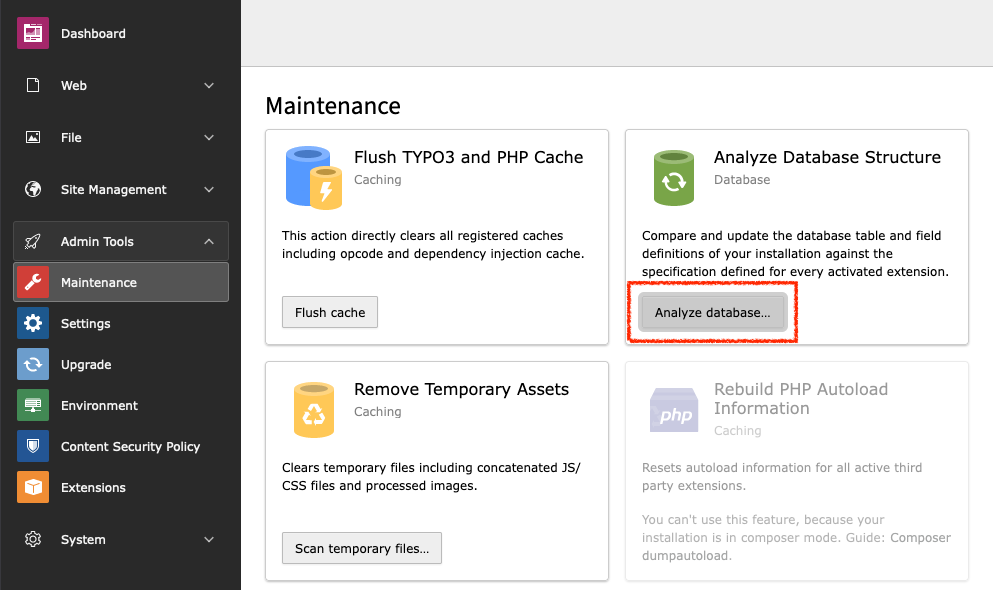
Maintenance: Analyze Database Structure
Install the extension with Composer in a DDEV environment
-
In your command line interface, change to the root directory of your project and enter the following command:
ddev composer req erhaweb/feed-displayCopied! -
Apply database changes
This extension uses the caching framework to cache feed data and plugin configuration. For this, the tables
cache_andfeeddisplay cache_must be created.feeddisplay_ tags These tables can be created in the Maintenance module under Analyze Database Structure → Apply selected changes.
- TYPO3 v13: Admin Tools → Maintenance
- TYPO3 v14: System → Maintenance
Maintenance: Analyze Database Structure
Install the extension in the classic way
- Open the TYPO3 backend.
-
Go to the Extension Manager.
- TYPO3 v13: Admin Tools → Extensions
- TYPO3 v14: System → Extensions
- Select
Get Extensionsin the module header. - Enter the extension key
feed_in the search field.display
In the result list click the Import & Install button under Actions
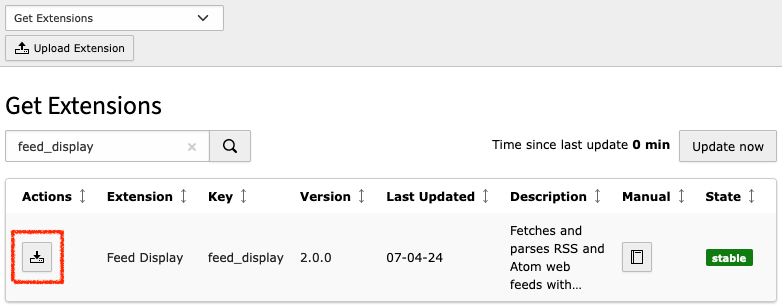
The "Get Extensions" dialog