
Protection Configuration
Status of Folders
To view the protection status of a folder, select it in the page tree on the left.
You will see an overview of the folder where you can create a new access rule or edit an existing one. Existing rules can also be deleted here.
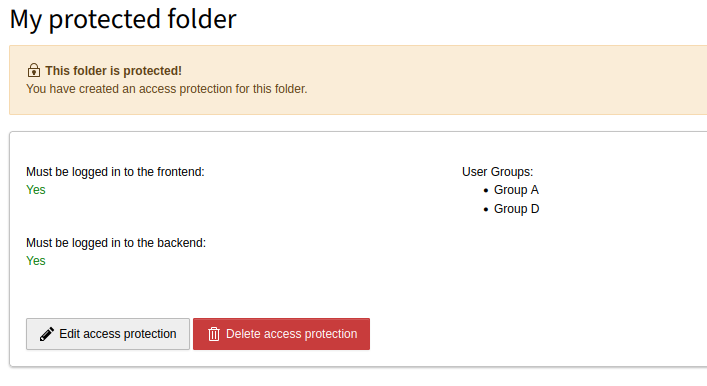
Current status of a single folder. In this case users must be members of the frontend usergroups "Group A" or "Group D" OR might be logged into the Backend.
- Click Create access protection to add a protection rule (only available if no rule exists yet)
- Click Edit access protection to edit an existing protection rule
- Click Delete access protection to delete an existing protection rule
Access rules are inherited by subfolders — unless those folders have their own access rules. Access rules of subfolders do not supplement the existing rules but replace them completely.
Creating or Editing a Protection Rule
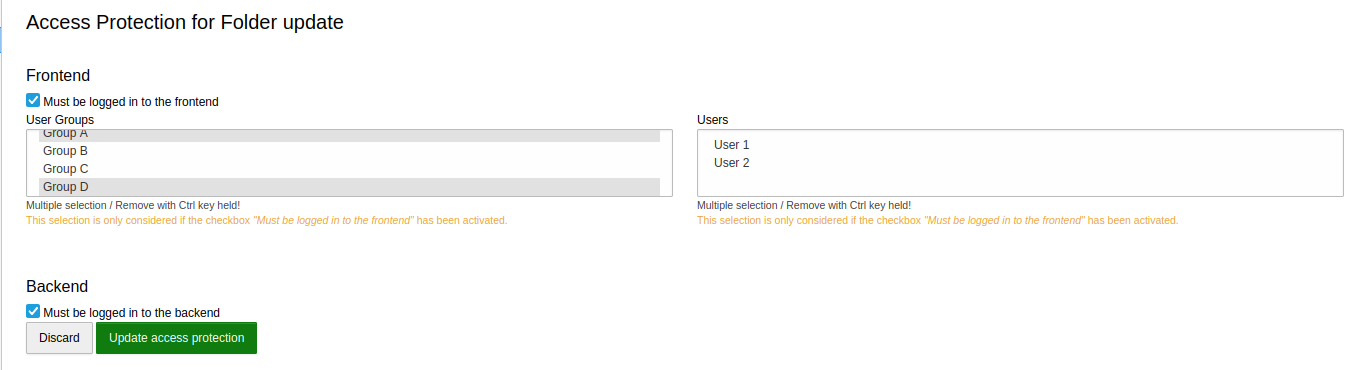
Settings to protect the folder
Select who is allowed to access the contents of the respective folder (including subfolders).
Note
All conditions are combined with an OR conjunction: a visitor is granted access as soon as any one of them is satisfied.
The available conditions are provided by the access types. See there for a detailed explanation of each condition and how it is evaluated.