
Themes
Themes can be built by creating an own extension in which update constants, TSConfig, and partials and add our own assets.
The structure of the folders and files of an extension (for example mydastheme) with its own Bootstrap and css files and assets will look something like this:
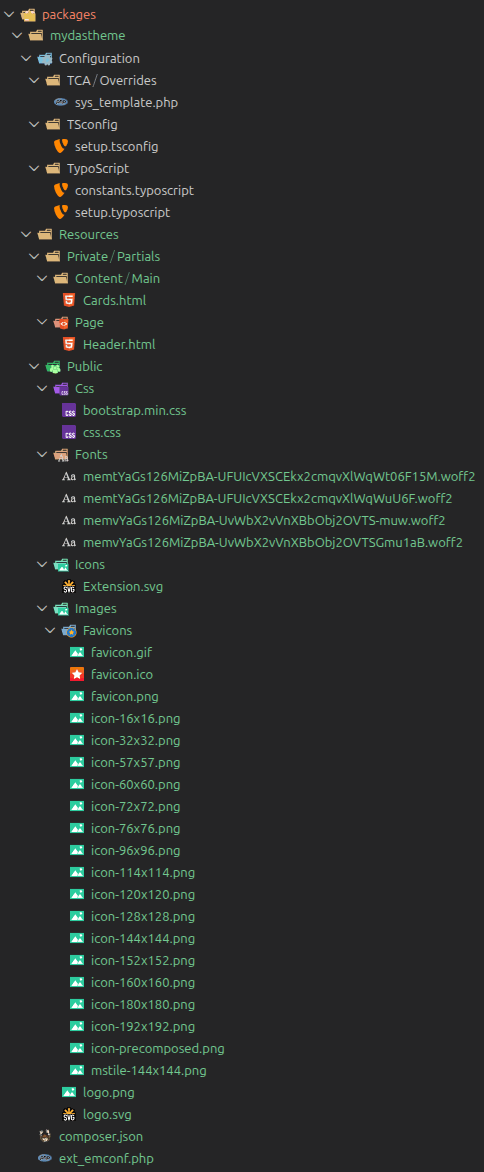
In the example, the partials Content/Main/Cards.html and Page/Header.html overwrite the ones from the extension Das, so it's possible to have a different frontend output for the Cards content element and the page header with the navigation bar.
In order to overwrite assets and the path to the partial folders, the files mydastheme/Configuration/TypoScript/constants.typoscript and mydastheme/Configuration/TypoScript/setup.typoscript should contain something like:
mydastheme/Configuration/TypoScript/constants.typoscript
seo.siteTitle = myDasTheme
plugin.tx_das {
    settings {
        theme = mydastheme
        cssFile20 = EXT:mydastheme/Resources/Public/Css/bootstrap.min.css
        cssFile95 = EXT:mydastheme/Resources/Public/Css/css.css
    }
    view {
        templates {
            partialRootPath = EXT:mydastheme/Resoources/Private/Partials/Page/
        }
        partialRootPath = EXT:mydastheme/Resoources/Private/Partials/
    }
}
page {
    fluidtemplate {
        partialRootPath = EXT:mydastheme/Resoources/Private/Partials/
    }
}mydastheme/Configuration/TypoScript/setup.typoscript
page.includeCSS.file95 = {$plugin.tx_das.settings.cssFile95}