
Site Sets
Starting with TYPO3 v13, TYPO3 introduced Site Sets as the modern
replacement for the classic "Include static (from extensions)" mechanism.
video_ ships its own Site Set which bundles the TypoScript,
TSconfig and settings the extension needs at runtime. Registering this
Site Set with your site configuration is the recommended way to enable
video_ on TYPO3 v13 and later.
Note
The Site Set key for this extension is jweiland/video-shariff.
It is defined in EXT:.
Why the Site Set must be added
Adding the Site Set is mandatory for video_ to work correctly
on TYPO3 v13+ sites. Without it, none of the extension's TypoScript is
loaded, which has the following consequences:
- The Shariff-wrapped video output (two-click privacy layer) is not
rendered - videos from YouTube and Vimeo would be embedded directly,
defeating the entire purpose of
video_.shariff - The preview image rendering (thumbnail + overlay text) is not
initialized, so the
VideoPublicUrlViewHelperandVideoPreviewImageViewHelperhave no configuration to fall back to. - Constants such as
lib.video_shariff.defaultThumbnailand the language overrides for the preview text are not available. - The plugin's frontend assets (JavaScript, CSS) are not included.
In short: if the Site Set is not added, the extension is installed but silently inactive on the frontend. Adding the Site Set is therefore a required step, not an optional one.
Adding the Site Set via the backend
-
Open Site Management
In the TYPO3 backend, navigate to the Site Management module on the left and choose Sites.
-
Edit the site configuration
Select the site for which
video_should be activated and open it for editing.shariff -
Switch to the "Sets for this Site" tab
Within the site configuration, switch to the tab Sets for this Site (in some installations labelled Site Sets).
-
Select Video Shariff
From the list of available Site Sets, activate Video Shariff (internal key
jweiland/video-shariff). The label is defined by the extension inConfiguration/.Sets/ video- shariff/ config. yaml 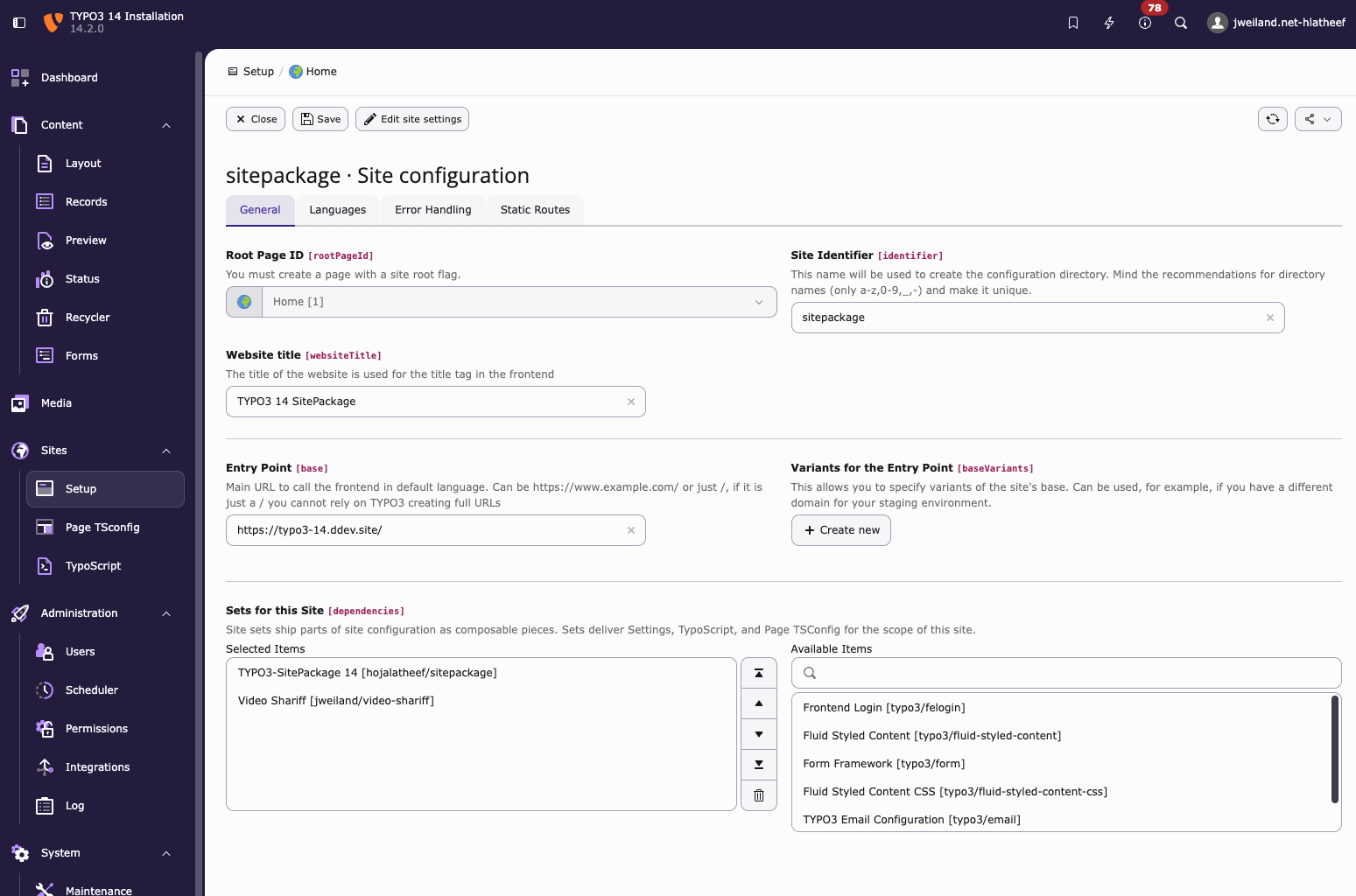
Enabling the Video Shariff Site Set for a site in the TYPO3 Site Management module.
-
Save
Save the site configuration. TYPO3 will flush the relevant caches so the Site Set takes effect immediately on the next frontend request.
Adding the Site Set via YAML
If you manage your site configuration in version control, you can add
video_ as a dependency directly in the site's
config.:
dependencies:
- jweiland/video-shariffThis is equivalent to selecting the Site Set in the backend and is the preferred approach for site packages that are deployed via Composer.
Available settings
The Site Set exposes its configuration through
Configuration/. The
settings are grouped under the videoShariff category and can be
edited from the TYPO3 backend via Site Management →
Settings, or overridden per-site in the site's
config. / settings..
videoShariff.defaultThumbnail
-
- type
-
string
- Default
-
EXT:video_shariff/Resources/Public/Images/DefaultThumbnail.png
Fallback thumbnail that is rendered in the Shariff preview overlay whenever no video-specific thumbnail can be fetched from the provider (for example when YouTube or Vimeo does not return a preview image, or when the upstream request fails). The value is an t3coreapi:typoscript-syntax-file-includes resolved at render time by
Videovia itsPreview Image View Helper fallbackThumbnailFileargument.The setting is consumed by the TypoScript constant
lib.contentElement.settings.video_shariff.defaultThumbnailforfluid_styled_contentand byplugin.tx_news.settings.video_shariff.defaultThumbnailfor thenewspartial, both wired up inConfiguration/.Typo Script/ setup. typoscript Overriding it
Either adjust the value in the backend Settings editor, or set it in your site package's
config.:yaml settings: videoShariff: defaultThumbnail: 'EXT:my_sitepackage/Resources/Public/Images/VideoFallback.jpg'Copied!
Relationship to the legacy TypoScript include
On TYPO3 v12 and earlier, video_ was activated by adding the
static template Video shariff (video_shariff) to a TypoScript template
record - see TypoScript. On TYPO3 v13+ the Site Set replaces that
include; you should not add both, as the Site Set already imports
the same TypoScript via:
@import 'EXT:video_shariff/Configuration/TypoScript/setup.typoscript'Verifying the Site Set is active
After saving the site configuration you can verify that the Site Set is active by:
- Opening the Template module, selecting a page within the
site and checking that
lib.video_shariffconstants appear in the Constant Editor. - Rendering a page that contains a YouTube or Vimeo video - the video must now be wrapped by the Shariff preview image instead of being embedded directly.