
Introduction
What does it do?
The Image Optimization for TYPO3 extension (nr_image_optimize)
compresses images in TYPO3 on three independent layers:
- On upload
- A PSR-14 event listener runs lossless optimization whenever a
file is added to or replaced in a FAL storage
(
AfterFileAddedEvent/AfterFileReplacedEvent). The listener delegates to the installedoptipng/gifsicle/jpegoptimbinaries. - On demand in the frontend
- A PSR-15 middleware intercepts every request that starts with
/processed/and delegates to the \Netresearch\NrImageOptimize\Processor. The processor parses the URL, loads the original via Intervention Image, produces a resized/recropped variant, optionally writes a matching WebP and AVIF sidecar, and streams the best result back to the client. Variants are cached on disk and served with long-lived HTTP caching headers. - In bulk from the CLI
- Two Symfony Console commands iterate the FAL index: nr:image:optimize compresses every eligible file, nr:image:analyze reports optimization potential as a fast heuristic without touching any file.
All three layers share a common \Netresearch\NrImageOptimize\Service\ImageOptimizer service for tool resolution and process orchestration.
Performance model
Every image on a page costs the server twice: once when the page is
rendered, and once when a browser fetches the image. What sets this
extension apart from TYPO3 core's f:image / ImageService
pipeline is when the expensive part -- decoding, resizing,
encoding -- happens.
TYPO3 core processes every referenced image while the page renders, inside the request that produces the HTML. On a cold page cache the visitor waits for all of it before the first byte of HTML arrives, images below the fold and in hidden sliders included, and one PHP process does the work for all of them, one after another.
This extension only builds a /processed/... URL string while
the page renders. Nothing is decoded or written at that point. The
work happens later, in a separate request per image, when -- and
only if -- the browser asks for that image. Those requests are
spread across all PHP-FPM workers, and once a variant exists the web
server serves it as a static file without touching TYPO3 at all.
What that is worth
The numbers below come from the benchmark that ships with this
extension (make benchmark, see Reproduce it).
Both pipelines render the same 24 photos (3000×2000 JPEG) as 800×600
crops on otherwise identical pages; every scenario is a state a real
site is in at some point. Medians of three visits, TYPO3 14.3.6,
PHP 8.4, ImageMagick 7, Apache + PHP-FPM in Docker on a developer
laptop -- absolute values will differ on your hardware, the ratios
will not.
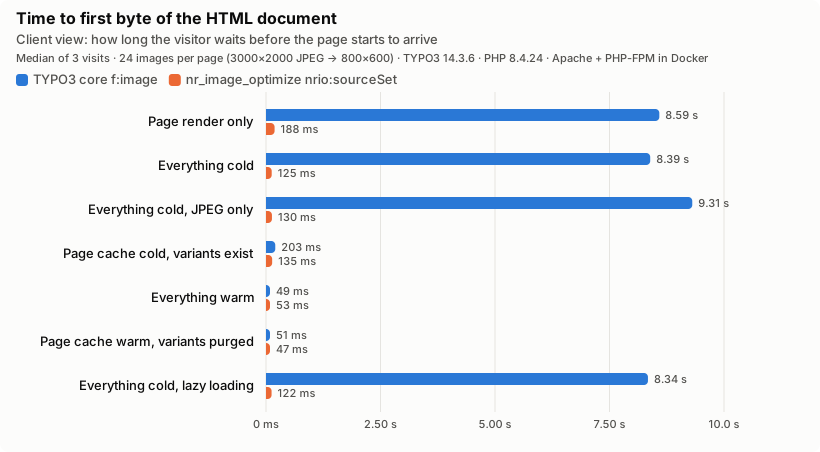
Client view -- the first byte of HTML. With a cold cache the visitor waits 8.4 s for core, 0.12 s for the extension.
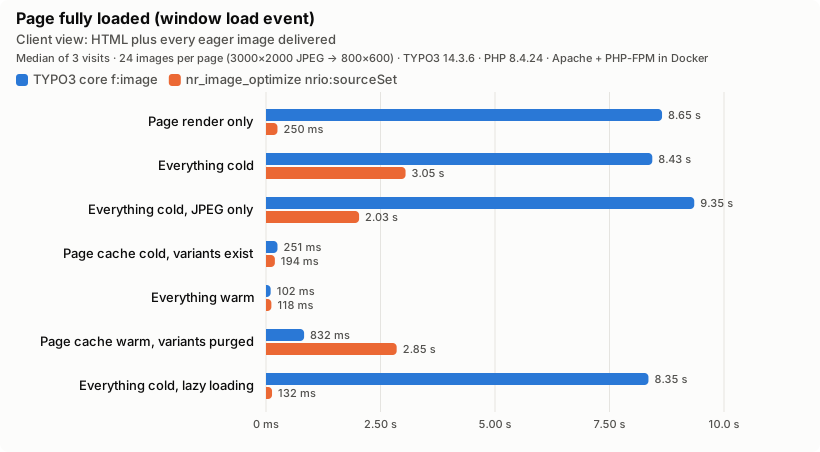
Client view -- the complete page. The 24 variant requests run in parallel across PHP-FPM workers instead of serially inside one render: 8.4 s become 3.0 s, and the largest contentful paint moves from 8.4 s to 0.7 s. The "variants purged" row looks like a regression at first glance (2.9 s for the extension against 0.8 s for core) -- it is not: that page is rendered eager, so all 24 images are requested again regardless, and core's number is fast because it serves 404s instead of doing the work (see below).
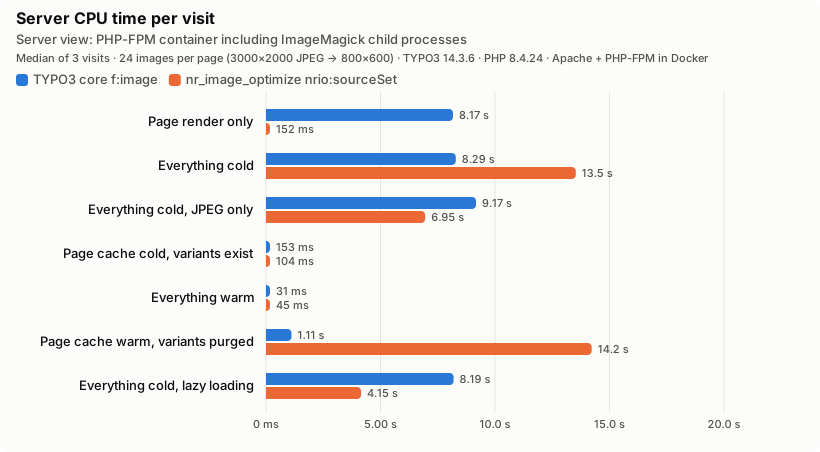
Server view -- CPU time of the PHP-FPM container, ImageMagick
included. Read this one carefully: on a fully viewed cold page
the extension spends more CPU (13.5 s vs 8.3 s), because the
first request for a variant writes three files -- JPEG, WebP and
AVIF -- and AVIF encoding is expensive. The "JPEG only" row
isolates that: with skipWebP=1&skipAvif=1 the same 24 images
cost 6.9 s against core's 9.2 s, so the pipeline itself is the
cheaper one and the extra formats are what the surplus buys. That
work is off the visitor's critical path, and it only happens for
images that are requested (lazy loading: 4.1 s vs 8.2 s for the
seven images the viewport needed). The same logic explains
"variants purged": that page is eager, so all 24 images are
requested again, and the extension pays close to the full
cold-cache cost a second time (14.2 s) -- core's 1.1 s is not a
faster regeneration, it is 24 cheap 404s instead of one.
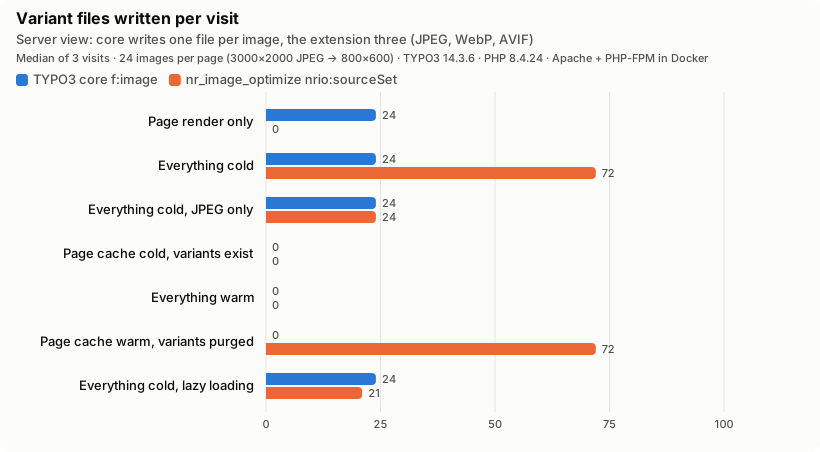
Server view -- files written. Rendering alone writes 24 files with core and none with the extension. With lazy loading the extension writes 21 files -- three formats (JPEG, WebP, AVIF) for each of the 7 images the browser actually fetched -- while core still writes 24, one per referenced image, regardless of what the viewport needs.
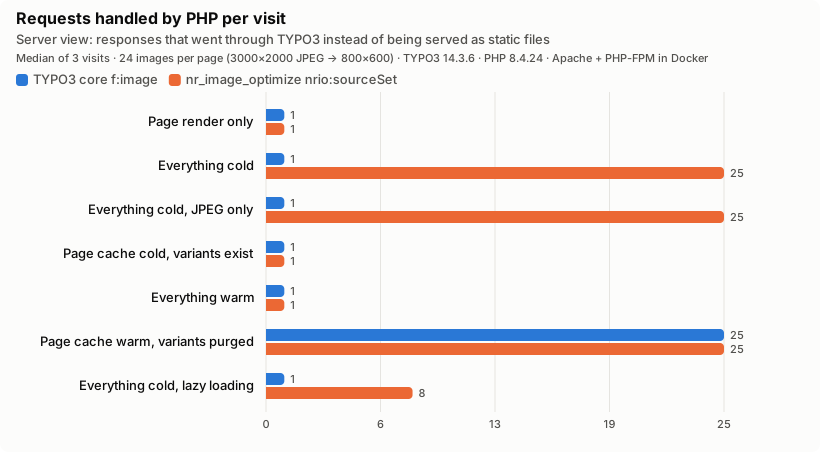
Server view -- requests that reached TYPO3. Steady state is one PHP request for either pipeline; everything else is static files. Note the "variants purged" row: when variant files are deleted under a warm page cache, core's HTML points at files nothing regenerates -- 24 broken images, each a PHP request for an error page -- while the middleware simply regenerates them.
In short:
- First visitor after a deployment or cache flush: HTML in 0.12 s instead of 8.4 s; complete page in 3.0 s instead of 8.4 s.
- Lazy loading and hidden content actually save work: only images the browser fetches are ever processed.
- Render time is independent of image count and size. A page
with 200 images renders as fast as one with two; image-heavy
pages no longer risk
max_execution_timeduring render. - Purged or lost variants are not an outage. They are regenerated on the next request instead of serving 404s until someone flushes the page cache.
- Steady state is identical: a page-cache hit plus static files in both cases.
- Per image, the extension does more work by default -- three formats, 13.5 s against 8.3 s of CPU for 24 images -- and less for the same single format (6.9 s against 9.2 s); it delivers fewer bytes where the browser accepts AVIF or WebP.
Reproduce it
The benchmark is part of the test suite, so the claims above are re-measured rather than remembered:
make benchmarkprovisions TYPO3, the extension, Apache and PHP-FPM in Docker, drives Chromium through the seven scenarios with both pipelines and rewrites the charts inDocumentation/together with the rawImages/ Benchmark/ results.json(every iteration, not just the medians). Only Docker is required; seeTests/.E2E/ README. md - The suite asserts the architectural claims -- zero variants written during render, lower cold-cache TTFB, no broken images after a purge, fewer images processed under lazy loading -- and fails when they stop holding. Absolute timings are reported, never asserted.
Tests/guards the core claim (render writes nothing; core'sFunctional/ Benchmark/ Render Cost Test. php ImageServiceprocesses everything) in every CI run, without a browser.
Features
- Automatic optimization on upload. In-place lossless compression without re-encoding. Unsupported extensions, offline storages, and missing binaries are handled transparently -- the listener never raises.
- Bulk CLI commands. Streaming iteration over
sys_filekeeps memory usage flat on large installations. Progress bar with cumulative savings. - No image processing during page render. Rendering only
emits
/processed/URLs; each variant is produced in its own request, when a browser first asks for it, and served as a static file from then on (see Performance model). - Next-gen format support. Automatic WebP and AVIF sidecar
generation with Accept-header-driven content negotiation and
skipWebP/skipAvifopt-outs. - Responsive images.
\Netresearch\NrImageOptimize\ViewHelpers\SourceSetViewHelper
emits
<img>tags with density-based or width-basedsrcset+sizes. - Render modes. Choose between
coverandfitresize strategies per URL. - Fetch priority. Native
fetchpriorityattribute support for Core Web Vitals (LCP) tuning. - PSR-14 extension points. \Netresearch\NrImageOptimize\Event\ImageProcessedEvent and \Netresearch\NrImageOptimize\Event\VariantServedEvent let integrators observe the pipeline.
- Driver abstraction. Imagick is preferred when the
extension is loaded; GD is used as a fallback. The
ImageReaderInterfaceadapter (see ImageManager abstraction) hides the Intervention Image v3/v4 API difference. - Backend maintenance module. View statistics about processed images, check prerequisites, and clear the cache from the TYPO3 backend.
- Security. Path traversal is blocked at URL parsing time,
quality and dimension values are clamped to safe ranges,
PSR-7 responses replace direct
header()/exitcalls.
Requirements
- PHP 8.2, 8.3, 8.4, or 8.5.
- TYPO3 13.4 or 14.
- Imagick or GD PHP extension.
- Intervention Image 3.11+ (installed automatically via Composer).
Optional optimizer binaries
The on-upload listener and the CLI commands only compress files
when a matching binary is available in $PATH:
optipng- Lossless PNG compression.
gifsicle- Lossless GIF compression.
jpegoptim- Lossless (default) or lossy JPEG compression.
Paths can be pinned per binary via the OPTIPNG_BIN,
GIFSICLE_BIN, and JPEGOPTIM_BIN environment variables. A
set-but-invalid override is treated as authoritative: the tool
is reported unavailable rather than silently falling back to
$PATH. $PATH lookups also verify is_executable().
See Optional: install optimizer binaries for package-manager snippets.
Recommended extensions
- imageoptimizer
- Alternative TYPO3 image optimization extension that integrates a broader set of external binaries with the core image processing pipeline.