
Running tools
Tools are small, admin-curated PHP functions the model may call mid-generation. Where a normal completion answers in one shot, a tool run is a bounded agent loop: the model may ask to call a tool, nr-llm executes it, feeds the result back, and re-asks — until the model answers or an iteration cap is reached. The v1 consumer is the interactive Tool Playground.
The Tool Playground — the only
tool-running surface in this release — is admin-only. The runtime itself
applies a two-tier gate: each tool declares requiresAdmin(), and
Tool drops admin-only tools when the acting backend user is
not an administrator. Most built-in tools require admin because a tool runs
with full TYPO3 privileges, has no per-record authorization, and its return
value egresses both to the configured LLM provider and to the rendered
backend output; only a few read-only, scope-limited tools are offered to
non-admin users.
Note
The runtime design and its security and cost rationale are recorded in ADR-038. Skill ingest and injection — which can steer which tools a run may use and what arguments the model chooses — are ADR-035 / ADR-036 and the Managing skills guide.
The built-in tools
nr-llm ships eleven read-only introspection tools. Each is a reference
implementation of the security contract: model-chosen arguments are
validated and scoped, volumes are capped, and secret-bearing output is either
redacted or gated behind a separate _raw variant. Eight ship enabled;
the three unredacted _raw variants (get_env_raw, get_php_info_raw
and list_be_users_raw) ship disabled and must be enabled deliberately.
Most require admin; only get_pagetree, get_tca and
read_fal_asset_meta are offered to non-admin backend users.
The two tools below are the fullest illustrations of the contract:
fetch_logs- Returns the most recent
sys_logentries, newest first, with an optional PSRlevelfilter and alimit(default 20, hard-capped at 50). Personally-identifying fields — the client IP, the backend user id and the serialized payload — are redacted by omission, because the result egresses to the external provider. read_fal_asset_meta- Returns read-only metadata (file name, MIME type, size, title, alternative
text) for a single managed file (
sys_file) by itsuid. The uid is model-chosen and therefore injection-steerable, so the lookup is storage-scoped (default: the default storage). A uid in a non-permitted storage returns the same neutral "not found or not permitted" string as a missing uid — the model cannot enumerate arbitrary files.
The remaining tools follow the same pattern:
get_env/get_env_raw- Process environment variables.
get_envredacts secret-looking values (password, token, key, secret, salt, DSN, …);get_env_rawreturns them unredacted (database password, encryption key) and ships disabled. get_php_info/get_php_info_raw- PHP runtime configuration.
get_php_infois redacted;get_php_info_rawreturns the full, secret-bearingphpinfodetail and ships disabled. get_pagetree- The backend page tree (uid, title, doktype) as a depth-indented outline; deleted and hidden pages are excluded — structure only, no content.
get_tca- The TYPO3 TCA schema: with no argument it lists the configured table names;
with a
tableargument it returns that table's field definitions. list_be_groups- The backend user groups (uid, title).
list_be_users/list_be_users_raw- Backend users.
list_be_usersomits credentials (password hashes and MFA secrets are never included);list_be_users_rawreturns the full non-credential profile columns and ships disabled.
Registering a tool
A tool is a PHP class that implements
Netresearch\:
getSpec(): ToolSpec- Returns the declaration the model receives — a name, a description, and a
JSON-Schema
parametersblock. Build it withToolSpec::function($name, $description, $parameters). execute(array $arguments): string- Runs the tool with the model-provided arguments and returns a plain string that is fed back into the conversation as a tool turn.
The interface carries #[AutoconfigureTag('nr_llm.tool')], so a class is
auto-registered simply by implementing it — no central registration file
to edit. Tool collects every tagged tool through a DI iterator
and indexes it by spec name; two tools with the same name is a
developer error and fails fast at container build.
When you write a tool, honour the security contract: treat $arguments as
attacker-influenced (the model is steerable by injected skill prose),
validate and scope every input (cap volumes, scope identifier lookups),
and never return secrets — the result leaves the instance.
Managing tools
The Admin Tools > LLM > Tools module lists every registered tool
with its global enable state and lets an admin toggle it. A disabled tool
is refused on every run, everywhere — the runtime gate is fail-closed, so a
disabled tool can never be offered to the model regardless of a skill's
allowed-tools or the per-run selection in the playground. Some built-in
tools (for example get_env_raw and get_php_info_raw) ship disabled
by default because they return unredacted, secret-bearing output; enable
them only deliberately.
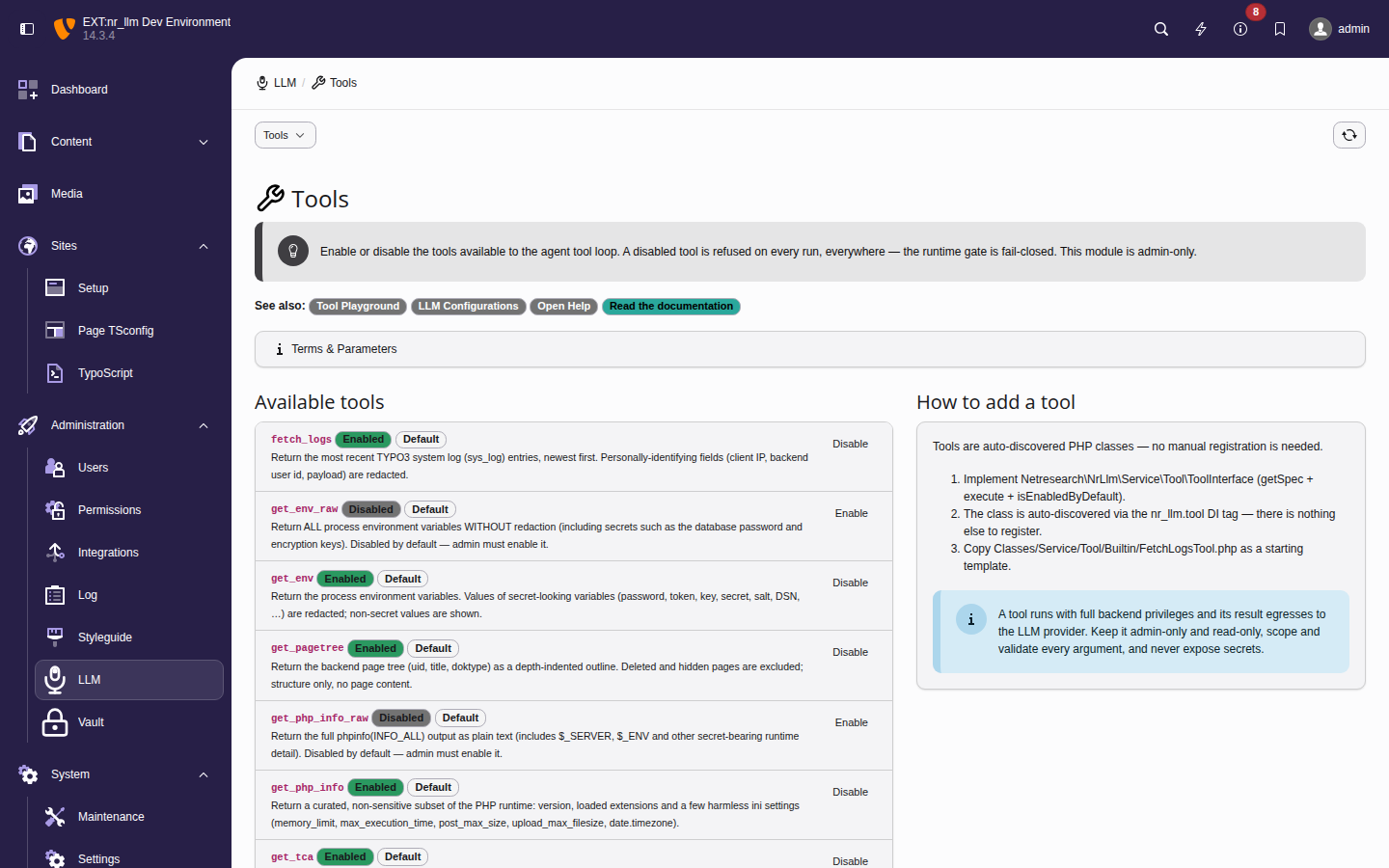
The Tools module — each registered tool with its global enable state and a
toggle. The _raw variants show as Disabled, the redacted
tools as Enabled; the Default badge marks a tool
sitting at its shipped state.
Using the Tool Playground
The playground lives in Admin Tools > LLM > Playground and is admin-only. It is a sibling of the Tools management module: the playground runs the loop, while the Tools module governs which tools exist and are enabled.
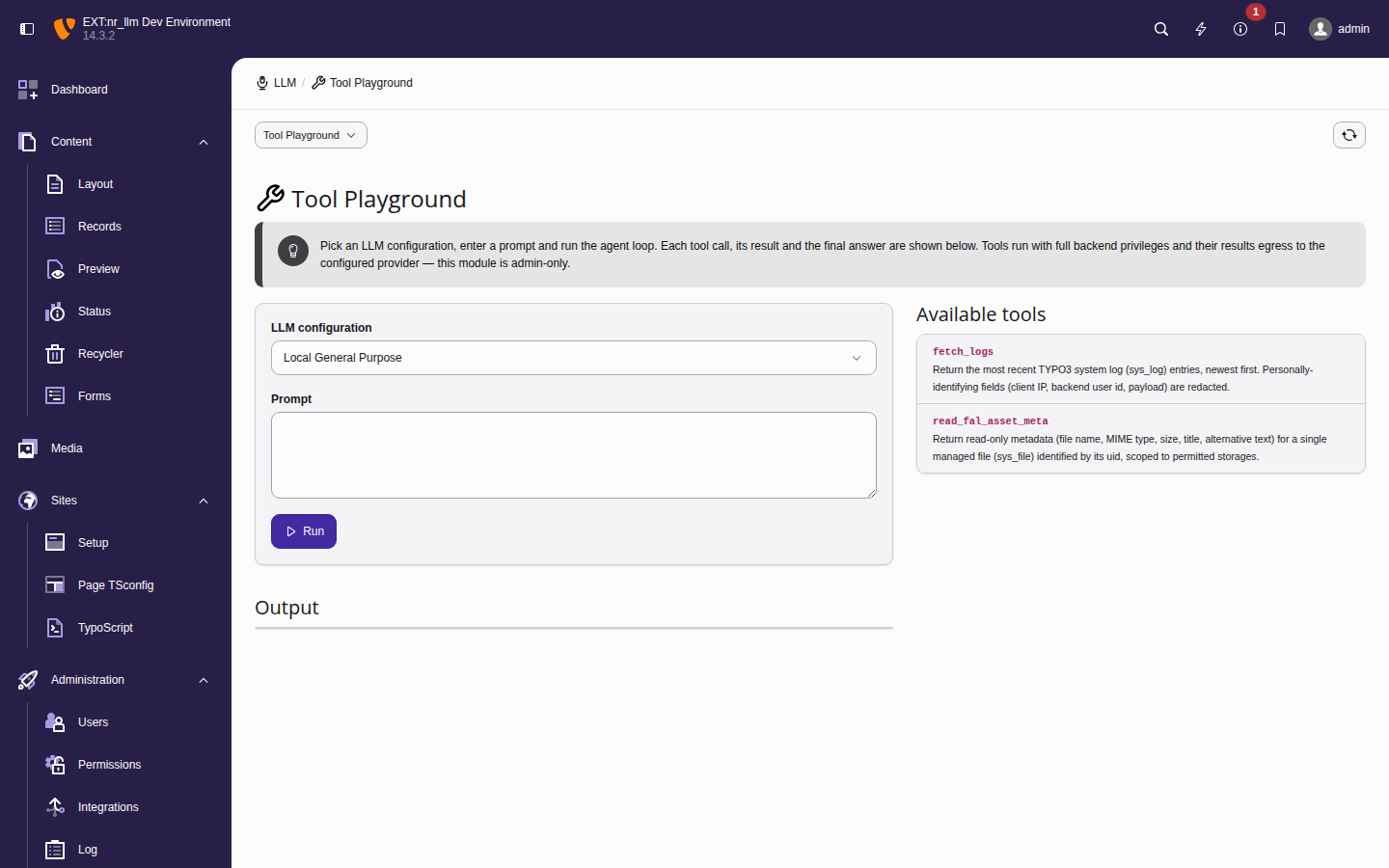
The playground shell — the configuration picker, prompt box and the
Tools available to this run panel, which lists every
registered tool with the default-enabled ones pre-checked and the
disabled _raw variants unchecked.
- Pick an LLM configuration from the dropdown. Its vault-stored API key, model, temperature and system prompt are what the loop actually runs on — the playground never falls back to a default model.
- Type a prompt and click Run.
- Read the trace. Each tool the model called is shown in order with its name, the arguments the model chose, and the tool's result (errors are badged). The model's final answer follows the trace.
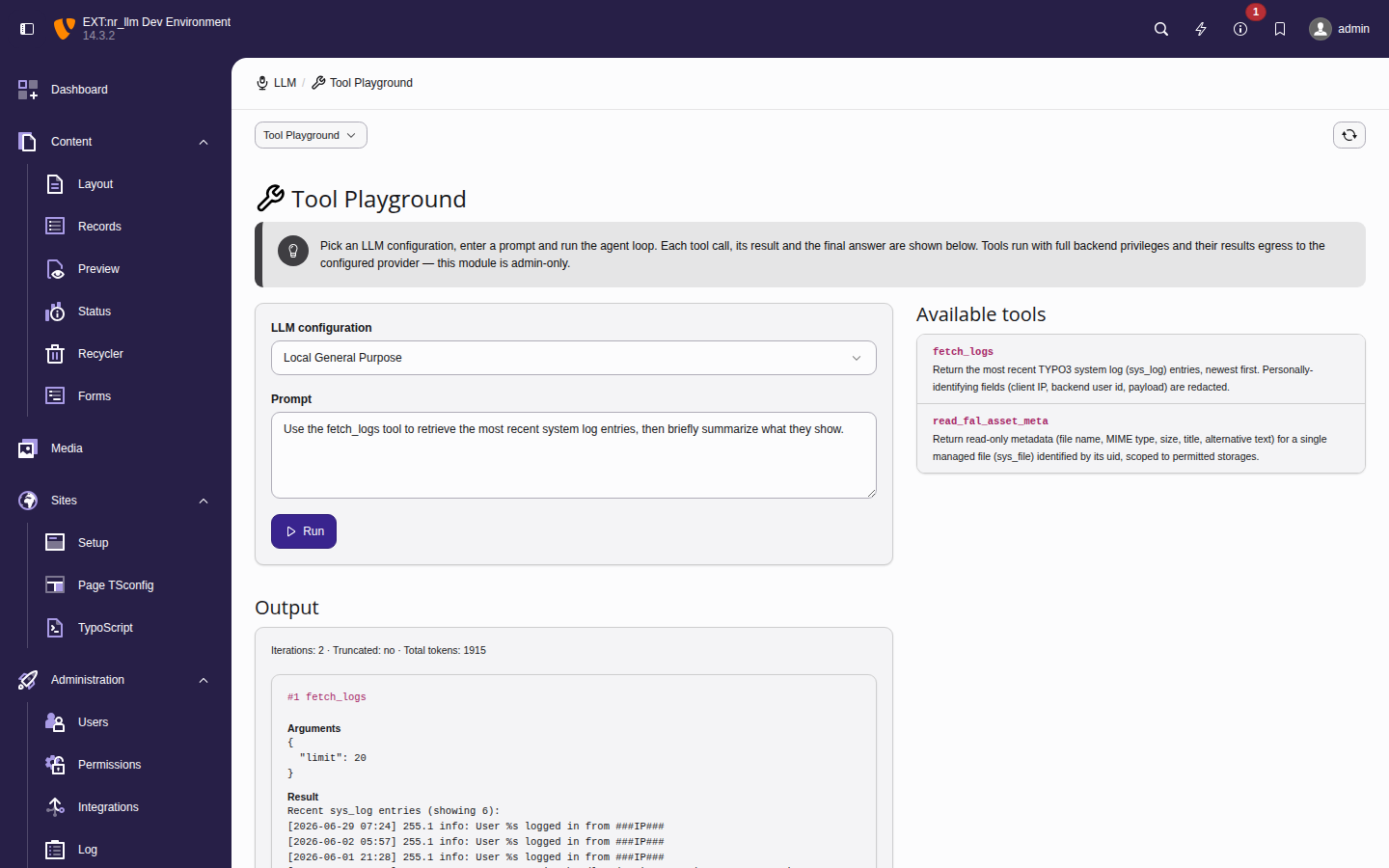
A completed run — a two-iteration loop in which the model called
fetch_logs (arguments {"limit": 3}); the redacted sys_log
result is fed back and the model's final answer closes the trace.
The Tools available to this run list lets you narrow a single run
to a subset of the globally-enabled tools (the full list and the global
enable/disable controls live in the Tools module). Every displayed string — tool
arguments, tool results (which may include sys_log content), and the
final answer — is rendered escaped; HTML is only ever shown inside a
sandboxed preview, never injected into the page.
Each run is bounded by the iteration cap (default 5) and, when the configuration's backend user has a budget, by the per-iteration budget pre-flight. If the cap is hit with tools still pending, a final tool-free completion synthesises a closing answer and the run is marked truncated. The aggregated token usage is reported; the monetary cost is recorded in the usage table by the middleware pipeline.
Ollama model-capability dependency
Tool calling depends on the model, not just the provider. For Ollama,
only function-calling-capable models — for example llama3.1,
mistral, qwen2.5 — return tool calls. A model without function-calling
support simply answers the prompt directly and never calls a tool; the
loop ends gracefully on the first plain answer. If a configured Ollama model
never seems to use the available tools, verify it is one of the
function-calling models for your Ollama version.
Gating tools with allowed-tools in a skill
A skill's SKILL.md front-matter may carry an allowed-tools key that
gates which tools the skills attached to a configuration (or task) grant for a
run. The resolution is fail-closed on declaration, computed over the
configuration's effective skills (enabled, non-orphaned — exactly the set
that is injected into the prompt):
- Absent (no skill declares
allowed-tools) — no opinion; all registered tools are offered. - Declared list — the union of the declared lists across the effective skills; only those tools are offered (intersected with what is actually registered, so an unknown name is dropped).
- Declared empty (
allowed-tools: []) — declares zero tools; if no other effective skill widens the set, the run gets no tools and is a single plain completion.
A disabled or orphaned skill never grants tools. The allow-list is enforced both when the tools are offered to the model and again when a tool call is executed, so a prompt injection cannot reach a tool the skills did not grant.
See ADR-038 for the runtime design and security rationale.