
Running tools
Tools are small, admin-curated PHP functions the model may call mid-generation. Where a normal completion answers in one shot, a tool run is a bounded agent loop: the model may ask to call a tool, nr-llm executes it, feeds the result back, and re-asks — until the model answers or an iteration cap is reached. The v1 consumer is the interactive Tool Playground.
The Tool Playground — the only
tool-running surface in this release — is admin-only. The runtime itself
applies a two-tier gate: each tool declares requiresAdmin(), and
Tool drops admin-only tools when the acting backend user is
not an administrator. Most built-in tools require admin because a tool runs
with full TYPO3 privileges, has no per-record authorization, and its return
value egresses both to the configured LLM provider and to the rendered
backend output; only a few read-only, scope-limited tools are offered to
non-admin users.
Note
The runtime design and its security and cost rationale are recorded in ADR-038. Skill ingest and injection — which can steer which tools a run may use and what arguments the model chooses — are ADR-035 / ADR-036 and the Managing skills guide.
The built-in tools
nr-llm ships forty-one read-only tools. Each is a reference
implementation of the security contract: model-chosen arguments are
validated and scoped, volumes are capped, and secret-bearing output is either
redacted or gated behind a separate _raw variant. Thirty-eight ship
enabled; the three unredacted _raw variants (get_env_raw,
get_php_info_raw and list_be_users_raw) ship disabled and must be
enabled deliberately. Many require admin; the read-only structure, content
and file tools (get_pagetree, get_tca, get_full_tca,
get_table_schema, get_flexform_schema, fluid_resolve,
search_records, get_page_content, read_records,
get_record_history, resolve_url, validate_tca,
list_fal_storages, browse_fal_folder, search_fal_files,
get_fal_references, find_missing_files) are offered to
non-admin backend users — those self-enforce the acting user's TYPO3
permissions (page-show rights, tables_select) inside the tool, so a
non-admin only ever sees what the backend already grants them (see
ADR-042).
The two tools below are the fullest illustrations of the contract:
fetch_logs- Returns the most recent
sys_logentries, newest first, with an optional PSRlevelfilter and alimit(default 20, hard-capped at 50). Personally-identifying fields — the client IP, the backend user id and the serialized payload — are redacted by omission, because the result egresses to the external provider. read_fal_asset_meta- Returns read-only metadata (file name, MIME type, size, title, alternative
text) for a single managed file (
sys_file) by itsuid. The uid is model-chosen and therefore injection-steerable, so the lookup is storage-scoped (default: the default storage). A uid in a non-permitted storage returns the same neutral "not found or not permitted" string as a missing uid — the model cannot enumerate arbitrary files.
The remaining tools follow the same pattern:
list_fal_storages- The file storages this run may touch (uid, name, driver, status flags). The effective set is the configured allow-list, intersected for non-admins with their file mounts; the server-side base path is never part of the output.
browse_fal_folder- One FAL folder: subfolders (with file count), then files with size and MIME type. Storage-relative identifiers only; anything unresolvable collapses into one neutral denial. Capped at 100 entries.
search_fal_files- Substring search over file name and metadata title/alternative within
the accessible storages.
%/_in the query match literally; missing files are excluded. get_fal_references- Where a file is used:
sys_file_referencerows as `table:`, hidden references marked. Soft references (RTE links, plain URLs) are not tracked — stated in the output so "no references" is never read as "safe to delete". Non-admins only see references from tables they may read.uid (field) find_missing_filessys_filerecords whose physical file is gone (missing = 1) — the "broken image" diagnosis. The total count is always reported next to the capped listing.get_env/get_env_raw- Process environment variables.
get_envredacts secret-looking values (password, token, key, secret, salt, DSN, …);get_env_rawreturns them unredacted (database password, encryption key) and ships disabled. get_php_info/get_php_info_raw- PHP runtime configuration.
get_php_infois redacted;get_php_info_rawreturns the full, secret-bearingphpinfodetail and ships disabled. get_pagetree- The backend page tree (uid, title, doktype) as a depth-indented outline; deleted and hidden pages are excluded — structure only, no content.
get_tca- The TYPO3 TCA schema: with no argument it lists the configured table names;
with a
tableargument it returns that table's field definitions. list_be_groups- The backend user groups (uid, title).
list_be_users/list_be_users_raw- Backend users.
list_be_usersomits credentials (password hashes and MFA secrets are never included);list_be_users_rawreturns the full non-credential profile columns and ships disabled. search_records- Full-text search across the tables that define TCA
searchFields. Returns compacttable:uidhits with a short excerpt around the match. Credential and nr-llm configuration tables are never searched; non-admins are limited to theirtables_selecttables and to hits on pages they may show. get_page_content- One page's header data plus its content elements in column/sorting order
(uid, colPos, CType, header, a short bodytext excerpt). Non-admins need
page-show permission; only admins see hidden elements (marked
[hidden]). read_records- Generic equality-filtered read of one TCA table — never raw SQL. Fields
are validated against the TCA and credential-like columns are silently
dropped; the same table gates as
search_recordsapply. get_record_history- One record's change history from
sys_history, newest first: when, which backend user, which action, and per modification the changed fields as old → new values. Values of credential-like fields are never rendered — only the fact that they changed. Same table gates asread_records, and non-admins additionally need page-show access on the record's page. resolve_url- Map a URL (or path) of this instance to the page that serves it: site, language, page uid/title/slug and route arguments. Routing only — no request is sent; foreign hosts cannot match by construction. Non-admins need page-show permission on the resolved page.
get_typoscript- The resolved frontend TypoScript (setup or constants) effective on a page,
with a dotted
pathdrill-down and capped output. Admin-only — constants routinely carry API keys — and credential-like values render as[redacted]on top of that. get_tsconfig- The rootline-merged Page TSconfig effective on a page, with the same
pathdrill-down, output cap and redaction asget_typoscript. Admin-only. get_last_exception- The newest exception/error from the TYPO3 file logs with its parsed
stack trace and the surrounding source lines of the project frames
inlined.
indexsteps back through older errors,searchfilters by message, class or component. Admin-only. read_source- A line-numbered range of one project source file. Paths must resolve
inside the project root; dotfiles,
var/*(exceptvar/log),config/system,settings.php/additional.php, key material and credential paths are structurally unreadable. Admin-only. search_code- Literal-substring (or opt-in regex) search across the project's source
files, returning
path:linehits. Vendor,varand dot directories are never searched; matched credential lines are value-redacted. Admin-only. probe_url- One GET against a URL of this instance: status, key headers, timing and a short body excerpt — and on a 5xx the matching exception from the TYPO3 logs is appended automatically. Foreign hosts and non-http(s) schemes are denied; redirects are reported, not followed. Admin-only.
get_full_tca- The TCA index: the names and titles of all accessible tables, each with a
pointer to
get_table_schema. A navigation aid so the model can traverse the schema without the whole (multi-megabyte) TCA being sent at once. The same table gates asget_table_schemaapply. Optionalfilterandextensionnarrow the list. get_table_schema- One table's schema in a readable form: control settings plus, per field,
its type and — for relational fields — the foreign table and relation kind
(the value over
get_tca). Sensitive tables are denied for every user; credential-like columns show name and type only. get_flexform_schema- The data structure of a TCA FlexForm field, rendered as sheets and fields.
When the field selects one of several structures by a pointer, the
available keys are listed so a follow-up call can pass
ds_pointer. Same table gates asget_table_schema. fluid_resolve- Which physical Fluid file backs a template, partial or layout name in an
extension: the candidate paths in override order with an exists flag and
the winning path — to debug a wrong or missing template. Paths only.
(Resolves an extension's own
Resources/Privatepaths; TypoScript override root paths need a live rendering context and are not reflected.) validate_tca- Structural TCA checks:
ctrl.label/ctrl.typenaming undefined columns,foreign_tablereferences to unknown tables,showitementries referencing undefined columns or palettes. One table or all accessible tables; findings name schema keys, never record data. check_typoscript- Scans the TypoScript effective on a page (constants and setup) for
syntax errors — invalid lines, unbalanced braces,
@importmatching no file — using the same core scanner as the backend's TypoScript module. Reports source and line number only, never the offending line's content (a constants line may carry an API key). Admin-only. list_extensions- The installed (active) extensions: key, version, composer name and title — no package paths. Admin-only.
get_site_config- Without arguments the configured sites (identifier, base, root page);
with
identifierthat site's configuration flattened to dottedkey: valuelines. Credential-like keys (camelCase included, e.g.apiKey) render as[redacted]. Admin-only. list_scheduler_tasks- The scheduler tasks with next execution, disabled flag and a last-run-failed marker. The serialized task object is never unserialized; degrades gracefully when EXT:scheduler is absent. Admin-only.
get_system_status- One compact block: TYPO3/PHP/database versions, application context, composer mode, OS family, timezone — no paths, no hostnames. Admin-only.
list_deprecations- The newest distinct messages from the deprecation log, deduplicated with a ×count suffix and project paths relativized — the upgrade work list. Admin-only.
list_middlewares- A PSR-15 middleware stack (frontend or backend) in execution order with identifiers and classes. Admin-only.
site_rag_query- Curated evidence about the website's own public content for a question: source id, title, URL and match excerpt per source, retrieved from the best available search index — EXT:solr, ke_search, indexed_search or a database fallback — and labelled with the answering backend (ADR-049). Index-level filtering is always public-only (what the anonymous visitor could read).
site_fetch_source- The full indexed text behind a
site_rag_querysource id, capped at 8000 characters — for reading a promising source beyond its excerpt.
Registering a tool
A tool is a PHP class that implements
Netresearch\:
getSpec(): ToolSpec- Returns the declaration the model receives — a name, a description, and a
JSON-Schema
parametersblock. Build it withToolSpec::function($name, $description, $parameters). execute(array $arguments): string- Runs the tool with the model-provided arguments and returns a plain string that is fed back into the conversation as a tool turn.
getGroup(): string- The tool's group — a short, stable identifier used to enable or disable
whole families of tools at once. Built-ins use
content,structure,system,accountsandconfiguration; third-party tools declare their own group (recommended: the providing extension's key). See Tool groups.
The interface carries #[AutoconfigureTag('nr_llm.tool')], so a class is
auto-registered simply by implementing it — no central registration file
to edit. Tool collects every tagged tool through a DI iterator
and indexes it by spec name; two tools with the same name is a
developer error and fails fast at container build.
When you write a tool, honour the security contract: treat $arguments as
attacker-influenced (the model is steerable by injected skill prose),
validate and scope every input (cap volumes, scope identifier lookups),
and never return secrets — the result leaves the instance.
Managing tools
The Admin Tools > LLM > Tools module lists every registered tool
with its global enable state and lets an admin toggle it. A disabled tool
is refused on every run, everywhere — the runtime gate is fail-closed, so a
disabled tool can never be offered to the model regardless of a skill's
allowed-tools or the per-run selection in the playground. Some built-in
tools (for example get_env_raw and get_php_info_raw) ship disabled
by default because they return unredacted, secret-bearing output; enable
them only deliberately.
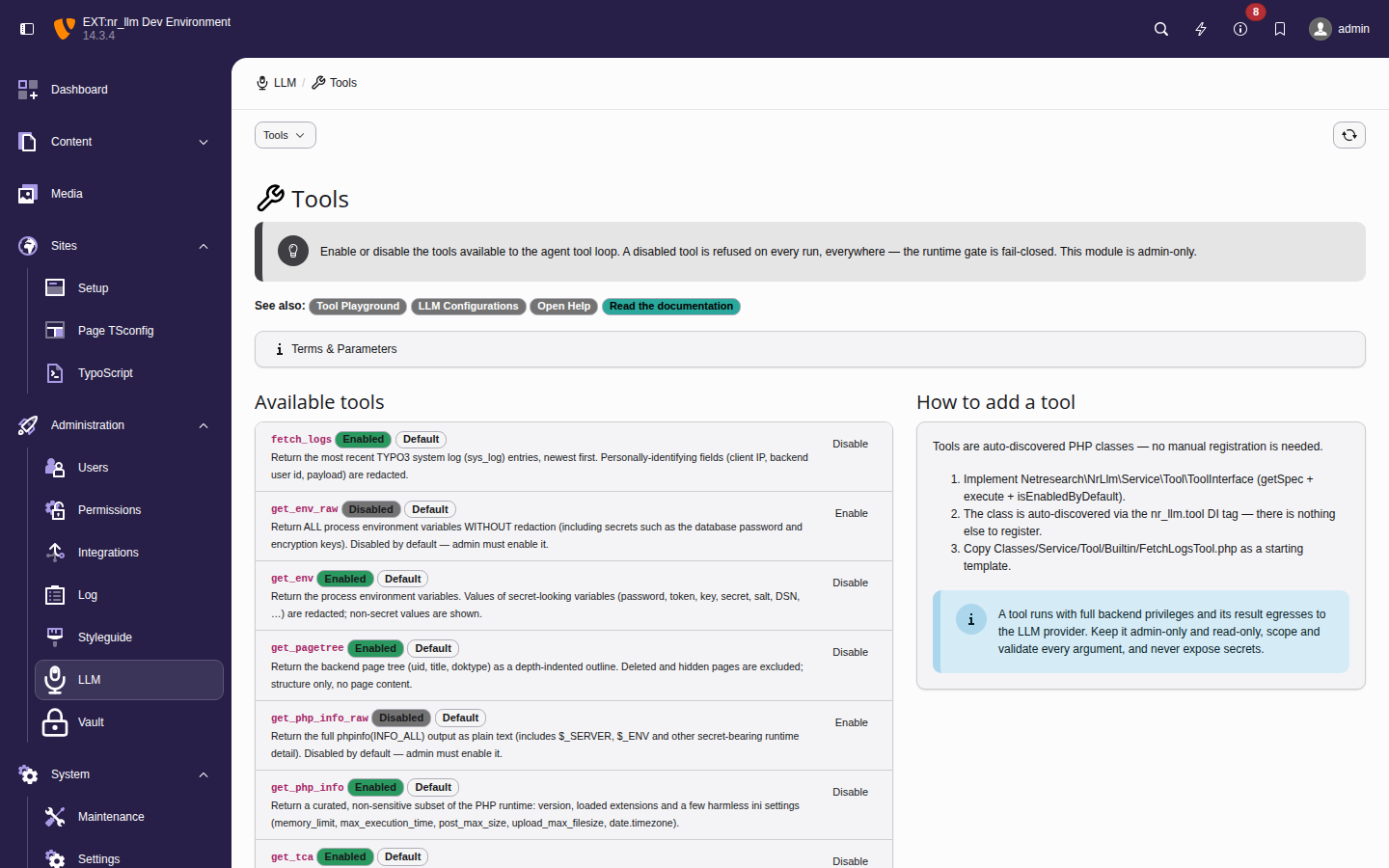
The Tools module — each registered tool with its global enable state and a
toggle. The _raw variants show as Disabled, the redacted
tools as Enabled; the Default badge marks a tool
sitting at its shipped state.
Tool groups
Every tool belongs to a group (its getGroup() value). The built-in
taxonomy:
| Group | Tools |
|---|---|
content | search_records, get_page_content, read_records,
get_record_history |
structure | get_pagetree, get_tca, read_fal_asset_meta,
get_full_tca, get_table_schema, get_flexform_schema,
resolve_url, validate_tca |
system | get_env (+ raw), get_php_info (+ raw),
fetch_logs, probe_url, list_extensions,
list_scheduler_tasks, get_system_status,
list_deprecations, list_middlewares |
accounts | list_be_users (+ raw), list_be_groups |
| ``configuration | get_typoscript, get_tsconfig, fluid_resolve,
check_typoscript, get_site_config |
code | get_last_exception, read_source, search_code |
files | list_fal_storages, browse_fal_folder,
search_fal_files, get_fal_references,
find_missing_files |
rag | site_rag_query, site_fetch_source |
Groups can be switched on three levels, and the result cascades fail-closed — a tool is offered only when every level permits it:
- Centrally in the Tools module: each group header carries an Enable/Disable group toggle. A disabled group refuses all of its tools — including same-group tools installed later — and a per-tool override can not re-enable a tool inside a disabled group (predictable, fail-closed). Per-tool toggles keep working but take effect only once the group is enabled again.
- Per configuration: the Allowed tool groups field on an
LLM configuration restricts agent runs with that configuration to tools of
the selected groups (empty = all groups). This intersects with a skill's
allowed-toolsdeclaration. - Per run in the playground: the tool checkboxes are grouped, and each group checkbox (de)selects its children.
Third-party extensions declare their own group per tool; the recommended value is the extension key, so an admin can disable an extension's whole tool family with one toggle. The design is recorded in ADR-043.
Using the Tool Playground
The playground lives in Admin Tools > LLM > Playground and is admin-only. It is a sibling of the Tools management module: the playground runs the loop, while the Tools module governs which tools exist and are enabled.
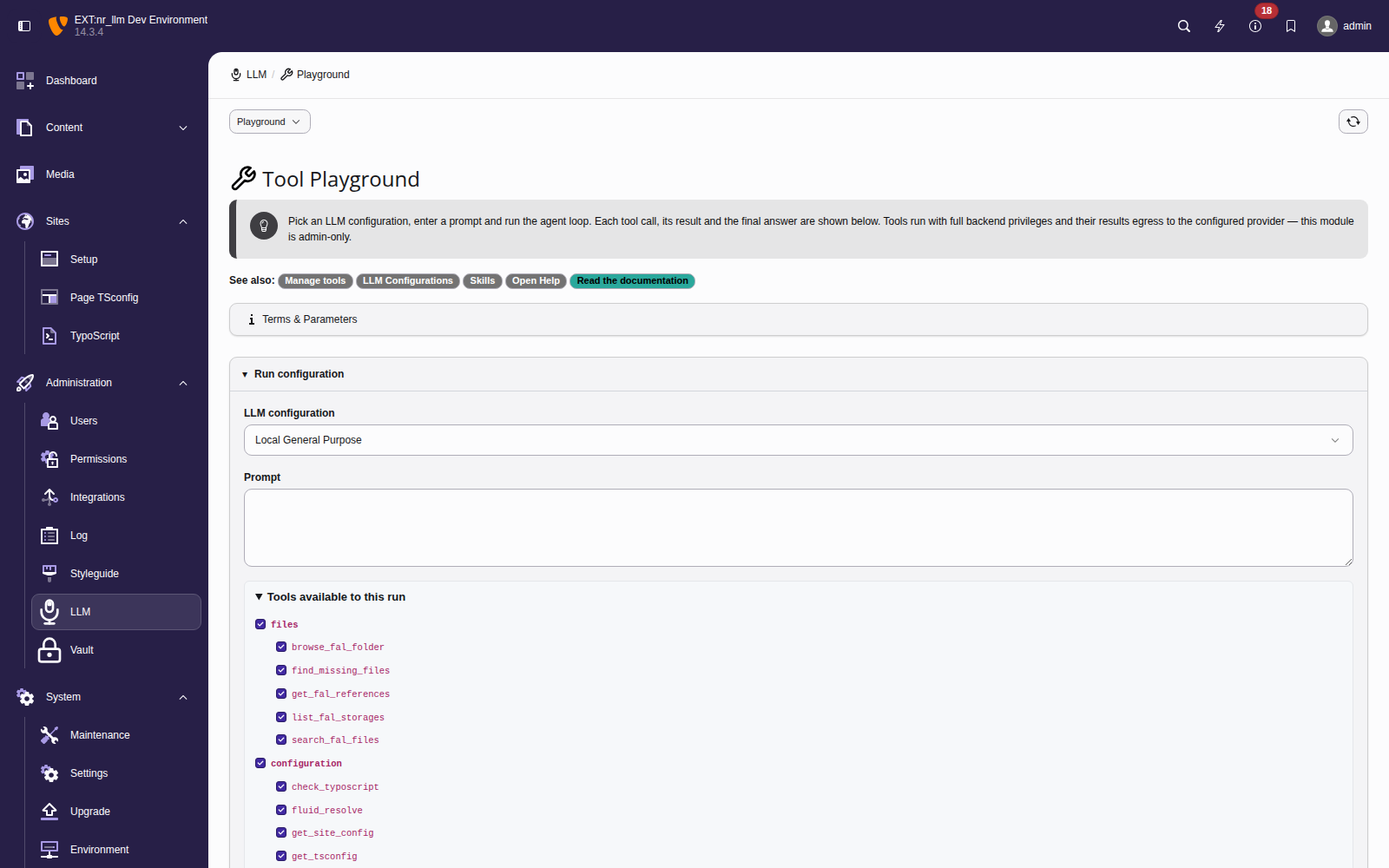
The playground shell — the configuration picker, prompt box and the
Tools available to this run panel, which lists every
registered tool with the default-enabled ones pre-checked and the
disabled _raw variants unchecked.
Tip
Small local models work best with a narrow tool set. With every
group enabled, the model is offered every enabled tool declaration at
once (several dozen). Small models such as the seeded qwen3:4b
often fail to pick the right tool from a set that large, or reason
past the token budget without calling any. Untick the groups that are
irrelevant to the question — restricted to one or two groups, the same
model picks the right tool. Larger hosted models cope with the full
set.
- Pick an LLM configuration from the dropdown. Its vault-stored API key, model, temperature and system prompt are what the loop actually runs on — the playground never falls back to a default model.
- Type a prompt. Optionally open the override panels to force-inject skills (added on top of the configuration's own), force-add snippets (inserted as leading system messages), override the system prompt, cap the max rounds, or tick capture raw provider response.
- Click Run — or Dry run to assemble the prompt and inspect exactly what would be sent without calling the model.
- Read the inspector — live from the moment you click Run. A summary strip reports rounds, tool calls, the prompt/completion token split, estimated cost, wall time and status. The step list is the nr_llm ↔ LLM dialog in order: each round's outbound request (the messages sent and the tools offered) appears the instant it goes out, a waiting indicator shows while the model works, then the response and each tool execution stream in. Select a step to open its detail — requests carry Messages sent and Tools offered; responses carry Structured, Raw JSON and Thinking. The model's final answer closes the run.
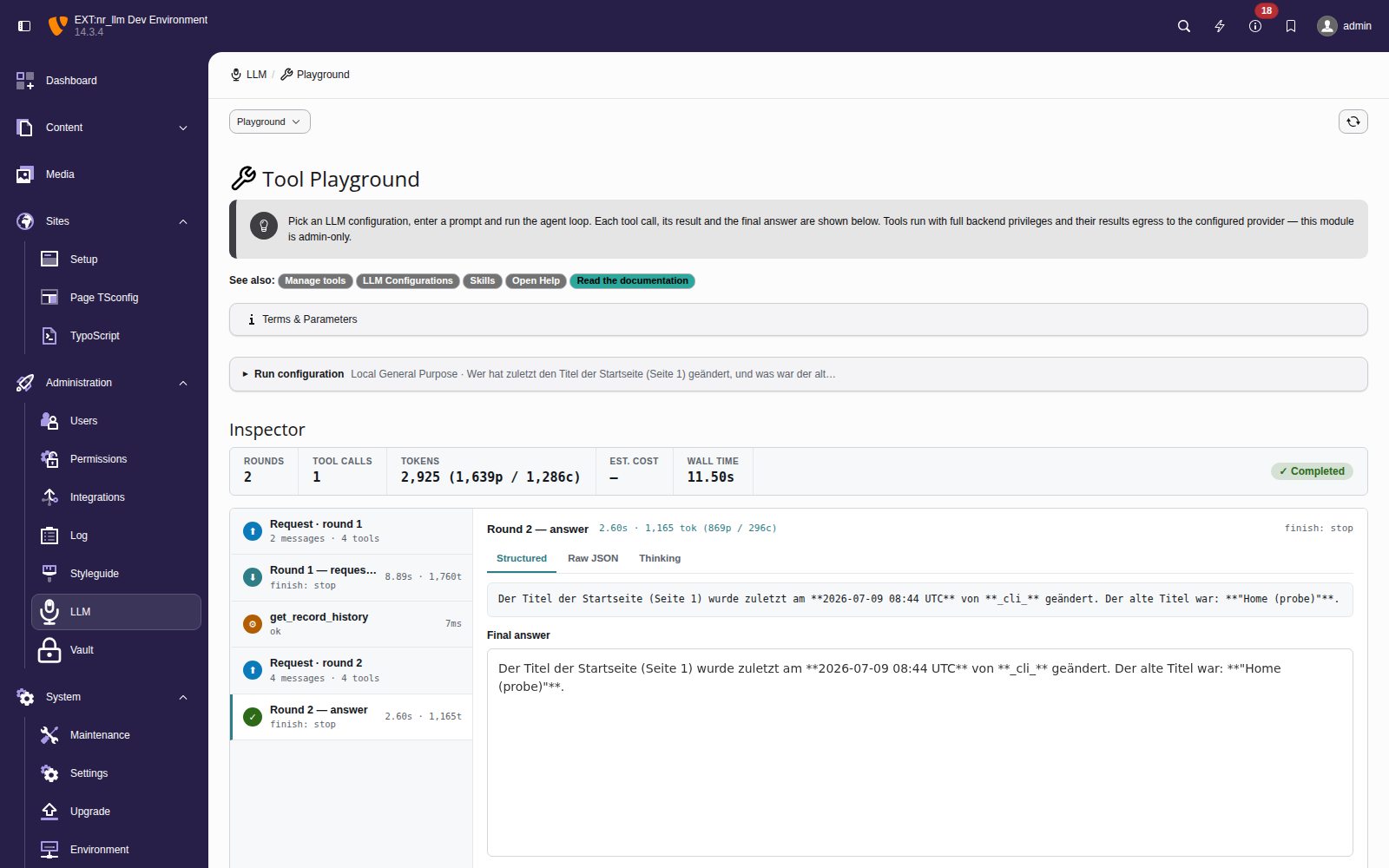
A completed run — the summary strip (rounds, tool calls, token split, wall
time, status), the ordered step list of the nr_llm ↔ LLM dialog, and the
selected step's detail: here round 1 requested the list_be_users tool,
whose result is fed back so round 2 can answer.
The Tools available to this run list lets you narrow a single run
to a subset of the globally-enabled tools (the full list and the global
enable/disable controls live in the Tools module). Raw-response capture is off unless you
tick it, so ordinary runs never retain the provider's raw payload. Every
displayed string — tool arguments, tool results (which may include
sys_log content), and the final answer — is rendered escaped; HTML is
only ever shown inside a sandboxed preview, never injected into the page.
Each run is bounded by the iteration cap (default 5) and, when the configuration's backend user has a budget, by the per-iteration budget pre-flight. If the cap is hit with tools still pending, a final tool-free completion synthesises a closing answer and the run is marked truncated. The aggregated token usage is reported; the monetary cost is recorded in the usage table by the middleware pipeline.
Ollama model-capability dependency
Tool calling depends on the model, not just the provider. For Ollama,
only function-calling-capable models — for example llama3.1,
mistral, qwen2.5 — return tool calls. A model without function-calling
support simply answers the prompt directly and never calls a tool; the
loop ends gracefully on the first plain answer. If a configured Ollama model
never seems to use the available tools, verify it is one of the
function-calling models for your Ollama version.
Gating tools with allowed-tools in a skill
A skill's SKILL.md front-matter may carry an allowed-tools key that
gates which tools the skills attached to a configuration (or task) grant for a
run. The resolution is fail-closed on declaration, computed over the
configuration's effective skills (enabled, non-orphaned — exactly the set
that is injected into the prompt):
- Absent (no skill declares
allowed-tools) — no opinion; all registered tools are offered. - Declared list — the union of the declared lists across the effective skills; only those tools are offered (intersected with what is actually registered, so an unknown name is dropped).
- Declared empty (
allowed-tools: []) — declares zero tools; if no other effective skill widens the set, the run gets no tools and is a single plain completion.
A disabled or orphaned skill never grants tools. The allow-list is enforced both when the tools are offered to the model and again when a tool call is executed, so a prompt injection cannot reach a tool the skills did not grant.
See ADR-038 for the runtime design and security rationale.