TYPO3 LLM extension 

1
Extension key

nr_llm

Package name

netresearch/nr-llm

Version

0.7

Language

en

Author

Netresearch DTT GmbH

License

This document is published under the CC BY 4.0 license.

Rendered

Wed, 22 Apr 2026 13:39:10 +0000


Shared AI foundation for TYPO3. Configure LLM providers once — every AI extension uses them. Supports OpenAI, Anthropic Claude, Google Gemini, Ollama, and more.

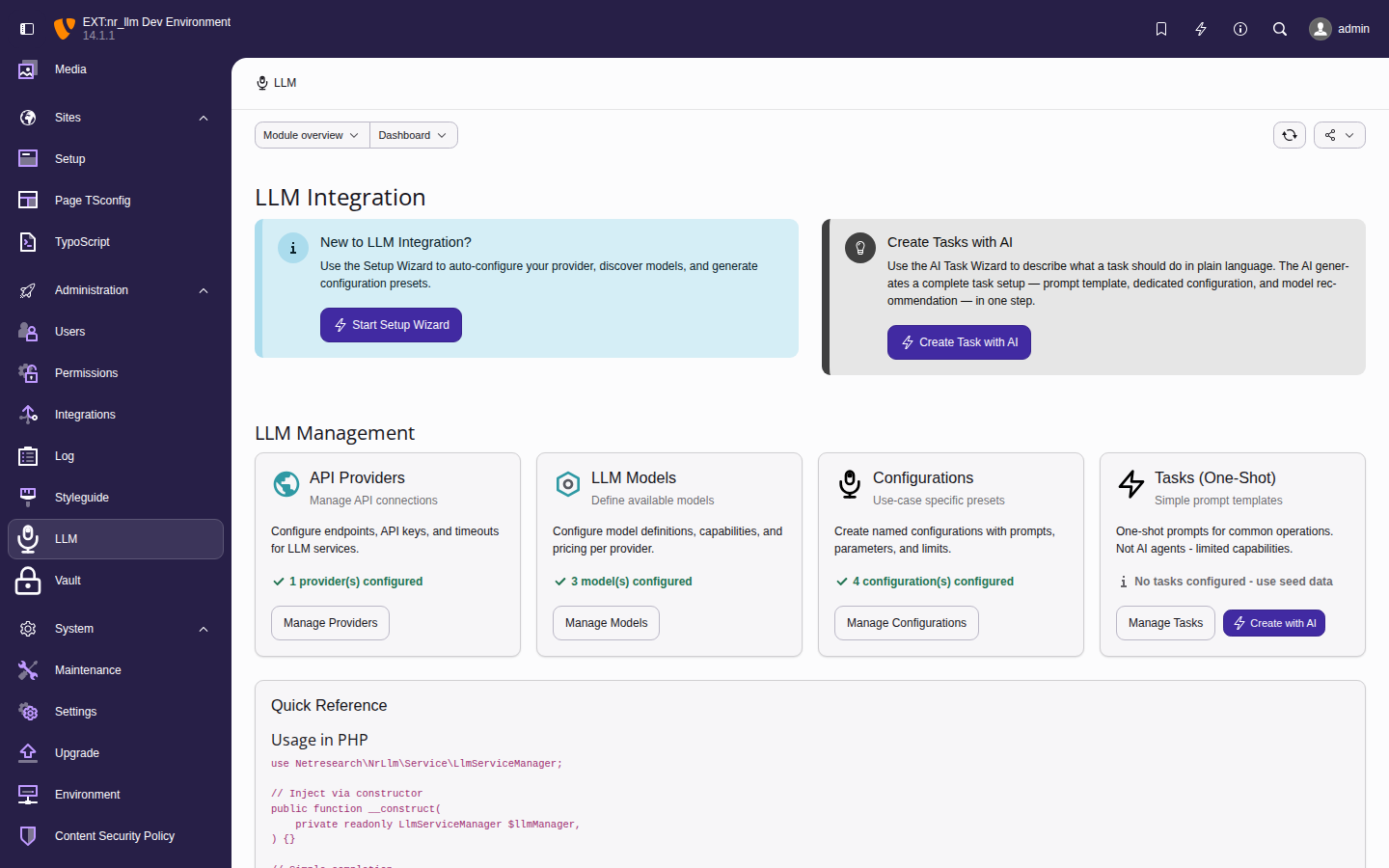
LLM backend module dashboard showing provider and model management, AI wizard buttons, and quick-reference code snippets

The Admin Tools > LLM backend module.


Getting started 

📘 Introduction 

Learn what nr-llm is, which providers are supported, and what problems it solves.

📦 Installation 

Install nr-llm via Composer and activate it.


For administrators 

Set up and manage AI providers, models, and configurations through the TYPO3 backend module.

🛠️ Administration guide 

Step-by-step: add providers, fetch models, create configurations and tasks. Includes screenshots of every screen.

✨ AI-powered wizards 

Setup wizard, configuration wizard, and task wizard — let AI generate your config from a plain-language description.

📋 Configuration reference 

Complete field reference for providers, models, configurations, TypoScript settings, security, and caching.


For developers 

Build your TYPO3 extension on nr-llm — three lines of dependency injection, no API key handling.

🚀 Integration guide 

Step-by-step tutorial: add AI capabilities to your extension in five minutes.

💻 Developer guide 

LlmServiceManager API, streaming, tool calling, and custom providers.

⚙️ Feature services 

Translation, vision, embeddings, and completion — ready to inject and use.

📚 API reference 

Complete class and method reference for all public services and response objects.

🏗️ Architecture 

Three-tier configuration hierarchy, provider abstraction, and design decisions.

✅ Testing 

Test infrastructure, mocking LLM services, and CI configuration.


[n] A Netresearch extension 

1

Professional TYPO3 development, AI integration, and enterprise consulting since 2002.


Table of contents

Introduction 

What does it do? 

nr-llm is the shared AI foundation for TYPO3. It lets administrators configure LLM providers once in the backend — and every AI-powered extension on the site uses them automatically.

For extension developers, it eliminates the need to build provider integrations, manage API keys, or implement caching and streaming. Add AI capabilities to your extension with three lines of dependency injection.

For administrators, it provides a single backend module to manage all AI connections, encrypted API keys, and provider configurations. Switch from OpenAI to Anthropic without touching any extension code.

For agencies, it means consistent AI architecture across client projects, no vendor lock-in, and a local-first option via Ollama for data-sensitive environments.

The extension enables developers to:

  • Access multiple AI providers through a single, consistent API.
  • Switch providers transparently without code changes.
  • Leverage specialized services for common AI tasks (translation, vision, embeddings).
  • Cache responses to reduce API costs and improve performance.
  • Stream responses for real-time user experiences.
  • Store API keys securely with sodium encryption or nr-vault envelope encryption.

Supported providers 

Provider Models Capabilities
OpenAI GPT-5.x series, o-series reasoning models Chat, completions, embeddings, vision, streaming, tools.
Anthropic Claude Claude Opus 4.5, Claude Sonnet 4.5, Claude Haiku 4.5 Chat, completions, vision, streaming, tools.
Google Gemini Gemini 3 Pro, Gemini 3 Flash, Gemini 2.5 series Chat, completions, embeddings, vision, streaming, tools.
Ollama Local models (Llama, Mistral, etc.) Chat, embeddings, streaming (local).
OpenRouter Multi-provider access Chat, embeddings, vision, streaming, tools.
Mistral Mistral models Chat, embeddings, streaming.
Groq Fast inference models Chat, streaming (fast inference).
Azure OpenAI Same as OpenAI Same as OpenAI.
Custom OpenAI-compatible endpoints Varies by endpoint.

Key features 

AI-powered wizards 

Built-in wizards reduce manual setup to a minimum:

  • Setup wizard guides first-time configuration in five steps (provider, connection test, model fetch, configuration, test prompt).
  • Configuration wizard generates a complete LLM configuration from a plain-language description of your use case.
  • Task wizard creates reusable one-shot prompt templates the same way.
  • Model discovery fetches available models directly from the provider API.

See AI-powered wizards for details and screenshots.

Unified provider API 

All providers implement a common interface, allowing you to:

  • Switch between providers with a single configuration change.
  • Test with different models without modifying application code.
  • Implement provider fallbacks for increased reliability.
Example: Using the provider abstraction layer
// Use database configurations for consistent settings
$config = $configRepository->findByIdentifier('blog-summarizer');
$adapter = $adapterRegistry->createAdapterFromModel($config->getModel());
$response = $adapter->chatCompletion($messages, $config->toOptions());

// Or use inline provider selection
$response = $llmManager->chat($messages, ['provider' => 'openai']);
$response = $llmManager->chat($messages, ['provider' => 'claude']);
Copied!

Specialized feature services 

High-level services for common AI tasks:

CompletionService
Text generation with format control (JSON, Markdown) and creativity presets.
EmbeddingService
Text-to-vector conversion with caching and similarity calculations.
VisionService
Image analysis with specialized prompts for alt-text, titles, descriptions.
TranslationService
Language translation with formality control, domain-specific terminology, and glossaries.
PromptTemplateService
Centralized prompt management with variable substitution and versioning.

Streaming support 

Real-time response streaming for better user experience:

Example: Streaming chat responses
foreach ($llmManager->streamChat($messages) as $chunk) {
    echo $chunk;
    flush();
}
Copied!

Tool/function calling 

Execute custom functions based on AI decisions:

Example: Tool/function calling
$response = $llmManager->chatWithTools($messages, $tools);
if ($response->hasToolCalls()) {
    // Process tool calls
}
Copied!

Intelligent caching 

  • Automatic response caching using TYPO3's caching framework.
  • Deterministic embedding caching (24-hour default TTL).
  • Configurable cache lifetimes per operation type.

Use cases 

Content generation 

  • Generate product descriptions.
  • Create meta descriptions and SEO content.
  • Draft blog posts and articles.
  • Summarize long-form content.

Translation 

  • Translate website content.
  • Maintain consistent terminology with glossaries.
  • Preserve formatting in technical documents.

Image processing 

  • Generate accessibility-compliant alt-text.
  • Create SEO-optimized image titles.
  • Analyze and categorize image content.

Search and discovery 

  • Semantic search using embeddings.
  • Content similarity detection.
  • Recommendation systems.

Chatbots and assistants 

  • Customer support chatbots.
  • FAQ answering systems.
  • Guided navigation assistants.

Requirements 

  • PHP: 8.2 or higher.
  • TYPO3: v13.4 or higher.
  • HTTP client: PSR-18 compatible (e.g., guzzlehttp/guzzle ).

Provider requirements 

To use specific providers, you need:

Credits 

This extension is developed and maintained by:

Netresearch DTT GmbH
https://www.netresearch.de

Built with the assistance of modern AI development tools and following TYPO3 coding standards and best practices.

Installation 

Quick start 

The recommended way to install this extension is via Composer:

Install via Composer
composer require netresearch/nr-llm
Copied!

After installation:

  1. Activate the extension in Admin Tools > Extension Manager.
  2. Configure providers and API keys in Admin Tools > LLM > Providers.
  3. Define available models in Admin Tools > LLM > Models.
  4. Create configurations in Admin Tools > LLM > Configurations.
  5. Clear caches.

Composer installation 

Requirements 

Ensure your system meets these requirements:

  • PHP 8.2 or higher.
  • TYPO3 v13.4 or higher.
  • Composer 2.x.
  • netresearch/nr-vault ^0.4.0 (required for API key encryption; installed automatically via Composer).

Installation steps 

  1. Add the package

    Install via Composer
    composer require netresearch/nr-llm
    Copied!
  2. Activate the extension

    Navigate to Admin Tools > Extension Manager and activate EXT:nr_llm.

  3. Configure API keys

    Use the setup wizard at Admin Tools > LLM > Setup Wizard to auto-detect your provider and discover models.

    LLM setup wizard

    The setup wizard guides you through provider connection, model discovery, and configuration.

    See Configuration reference for detailed setup instructions.

  4. Clear caches

    Flush all caches
    vendor/bin/typo3 cache:flush
    Copied!

Manual installation 

If you cannot use Composer:

  1. Download the extension from the TYPO3 Extension Repository (TER).
  2. Extract to typo3conf/ext/nr_llm.
  3. Activate in Admin Tools > Extension Manager.
  4. Configure API keys and settings.

Database setup 

The extension creates the following database tables automatically:

Table Purpose
tx_nrllm_provider Stores API provider connections with encrypted credentials.
tx_nrllm_model Stores available LLM models with capabilities and pricing.
tx_nrllm_configuration Stores use-case-specific configurations with prompts and parameters.
tx_nrllm_task Stores one-shot prompt tasks for common operations.
tx_nrllm_prompttemplate Stores reusable prompt templates with versioning and performance tracking.
tx_nrllm_service_usage Tracks specialized service usage (translation, speech, image).

Run the database compare tool after installation:

Set up extension database tables
vendor/bin/typo3 extension:setup nr_llm
Copied!

Cache configuration 

The extension uses TYPO3's caching framework. Cache configuration is set up automatically — no backend is hardcoded. TYPO3 uses your instance's default cache backend, so Redis, Valkey, or Memcached work transparently if configured.

To override the cache backend specifically for nr-llm:

config/system/additional.php
use TYPO3\CMS\Core\Cache\Backend\RedisBackend;

$GLOBALS['TYPO3_CONF_VARS']['SYS']['caching']
    ['cacheConfigurations']['nrllm_responses']
    ['backend'] = RedisBackend::class;
Copied!

Upgrading 

From previous versions 

  1. Backup your database before upgrading.
  2. Run Composer update:

    Update the extension
    composer update netresearch/nr-llm
    Copied!
  3. Run database migrations:

    Update database schema
    vendor/bin/typo3 database:updateschema
    Copied!
  4. Clear all caches:

    Flush all caches
    vendor/bin/typo3 cache:flush
    Copied!

Breaking changes 

Check the Changelog for breaking changes between versions.

Uninstallation 

To remove the extension:

  1. Deactivate in Admin Tools > Extension Manager.
  2. Remove via Composer:

    Remove the extension
    composer remove netresearch/nr-llm
    Copied!
  3. Clean up database tables if desired:

    Drop extension database tables
    DROP TABLE IF EXISTS tx_nrllm_provider;
    DROP TABLE IF EXISTS tx_nrllm_model;
    DROP TABLE IF EXISTS tx_nrllm_configuration;
    DROP TABLE IF EXISTS tx_nrllm_configuration_begroups_mm;
    DROP TABLE IF EXISTS tx_nrllm_task;
    DROP TABLE IF EXISTS tx_nrllm_prompttemplate;
    DROP TABLE IF EXISTS tx_nrllm_service_usage;
    Copied!
  4. Remove any TypoScript includes referencing the extension.

Administration 

This guide walks you through managing AI providers, models, configurations, and tasks in the TYPO3 backend. It also covers the AI-powered wizards that automate most of the setup.

The LLM backend module 

All AI management happens in Admin Tools > LLM. The dashboard shows your current setup status, quick links to each section, and AI wizard buttons.

LLM backend module dashboard showing provider count, model count, configuration count, and AI wizard buttons

The LLM dashboard with setup progress, wizard buttons, and quick-reference PHP snippets.

The module has five sections accessible from the left-hand navigation:

  • Dashboard — overview and wizards
  • Providers — API connections
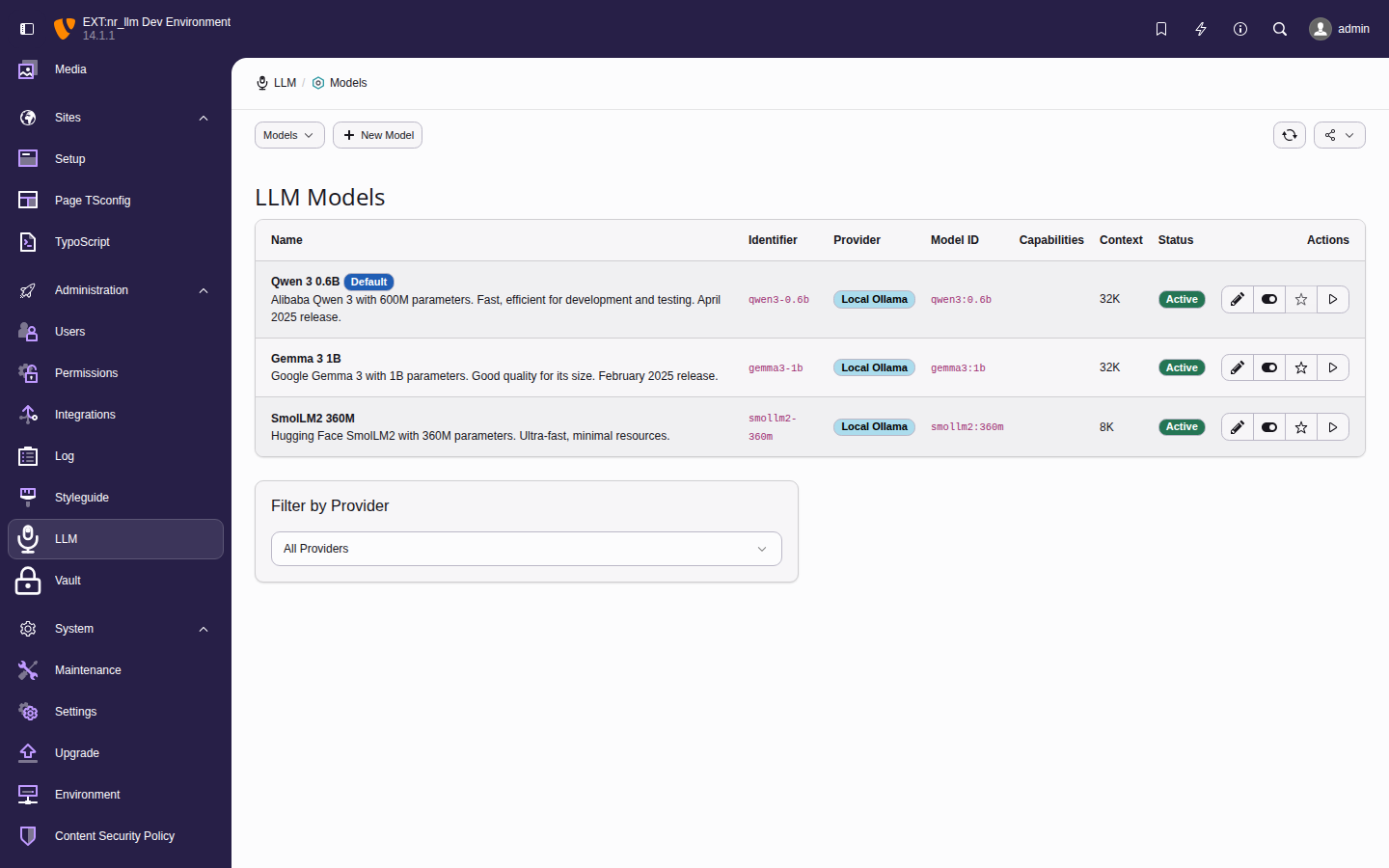
  • Models — available LLM models
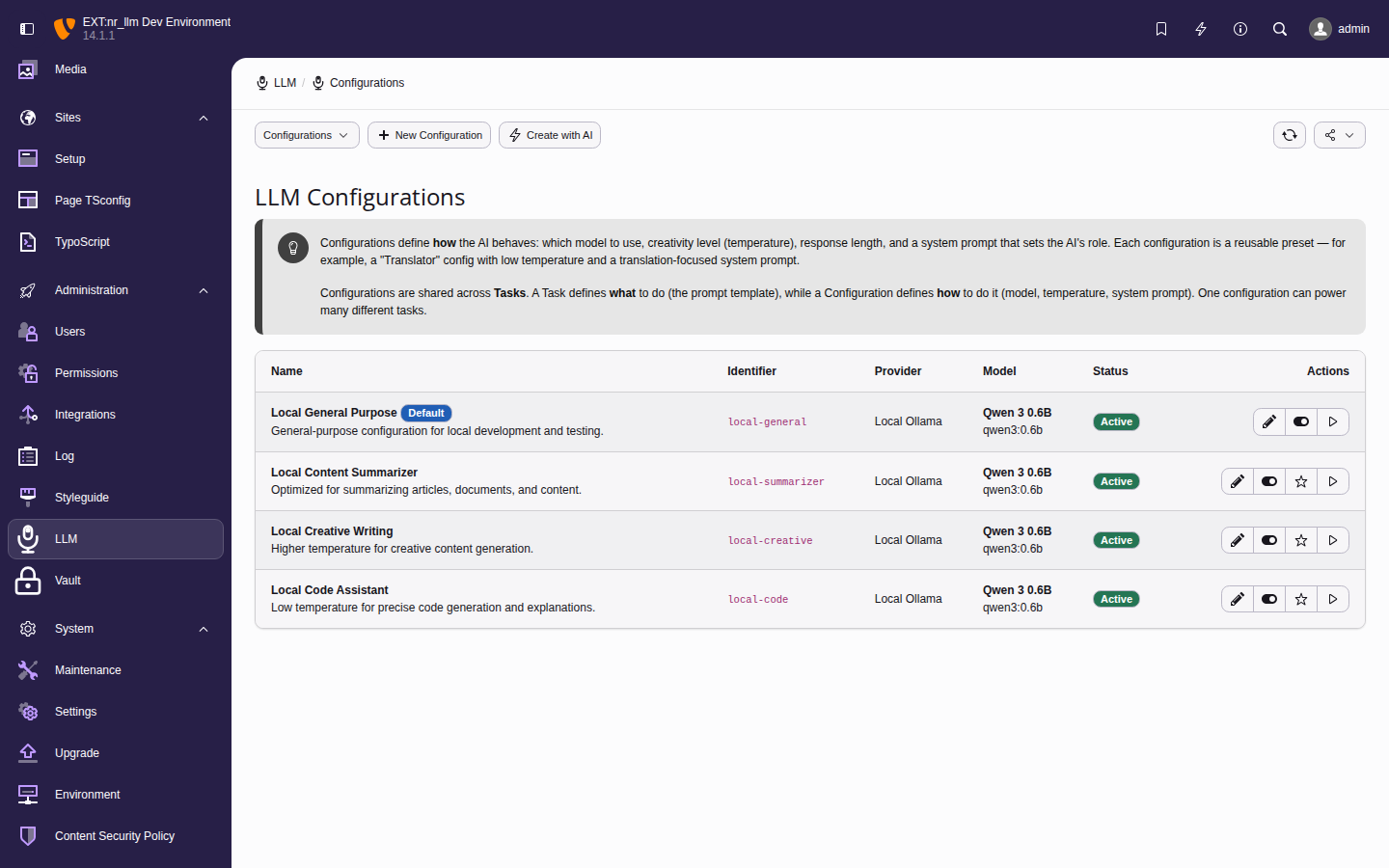
  • Configurations — use-case presets
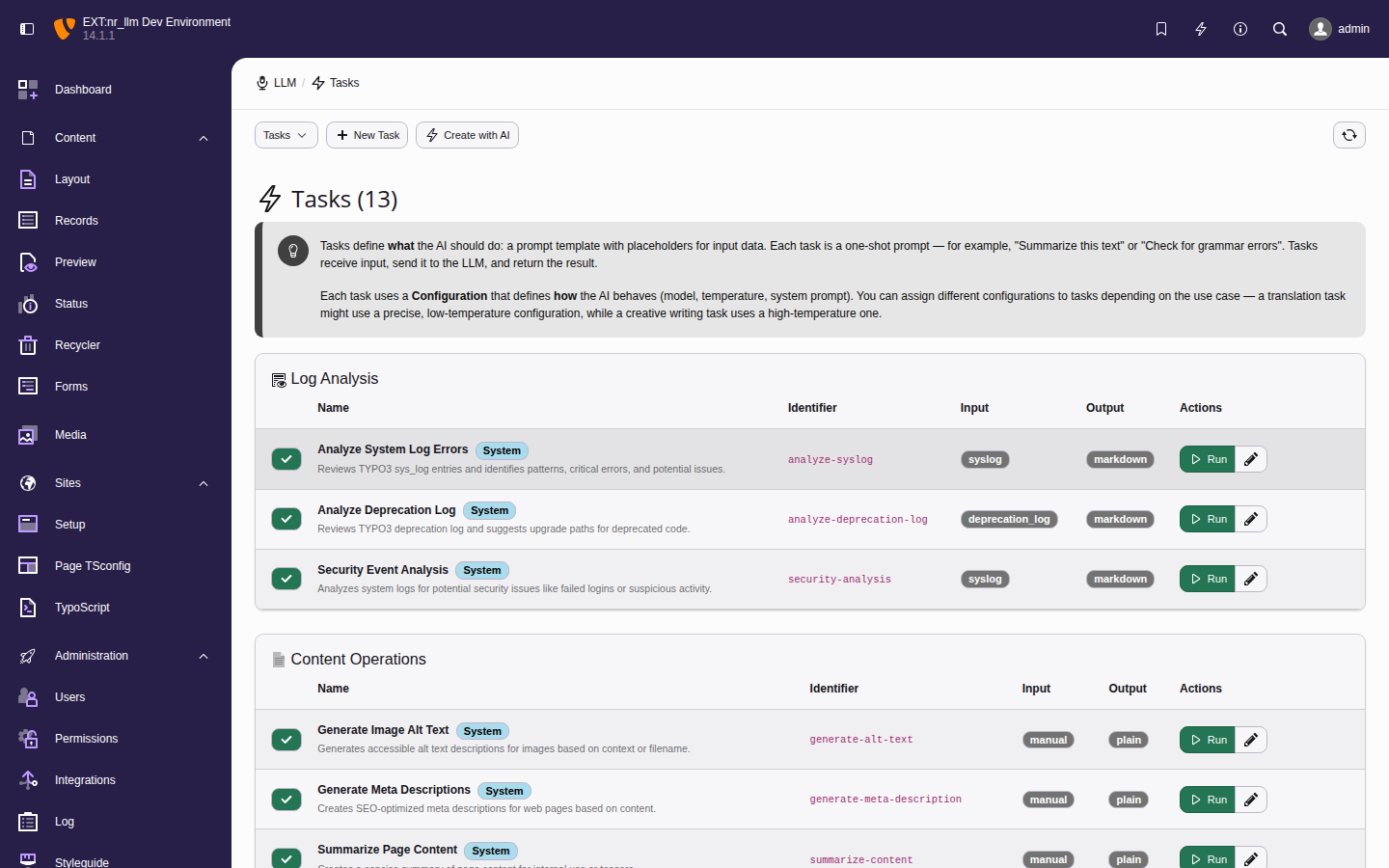
  • Tasks — one-shot prompt templates

Managing providers 

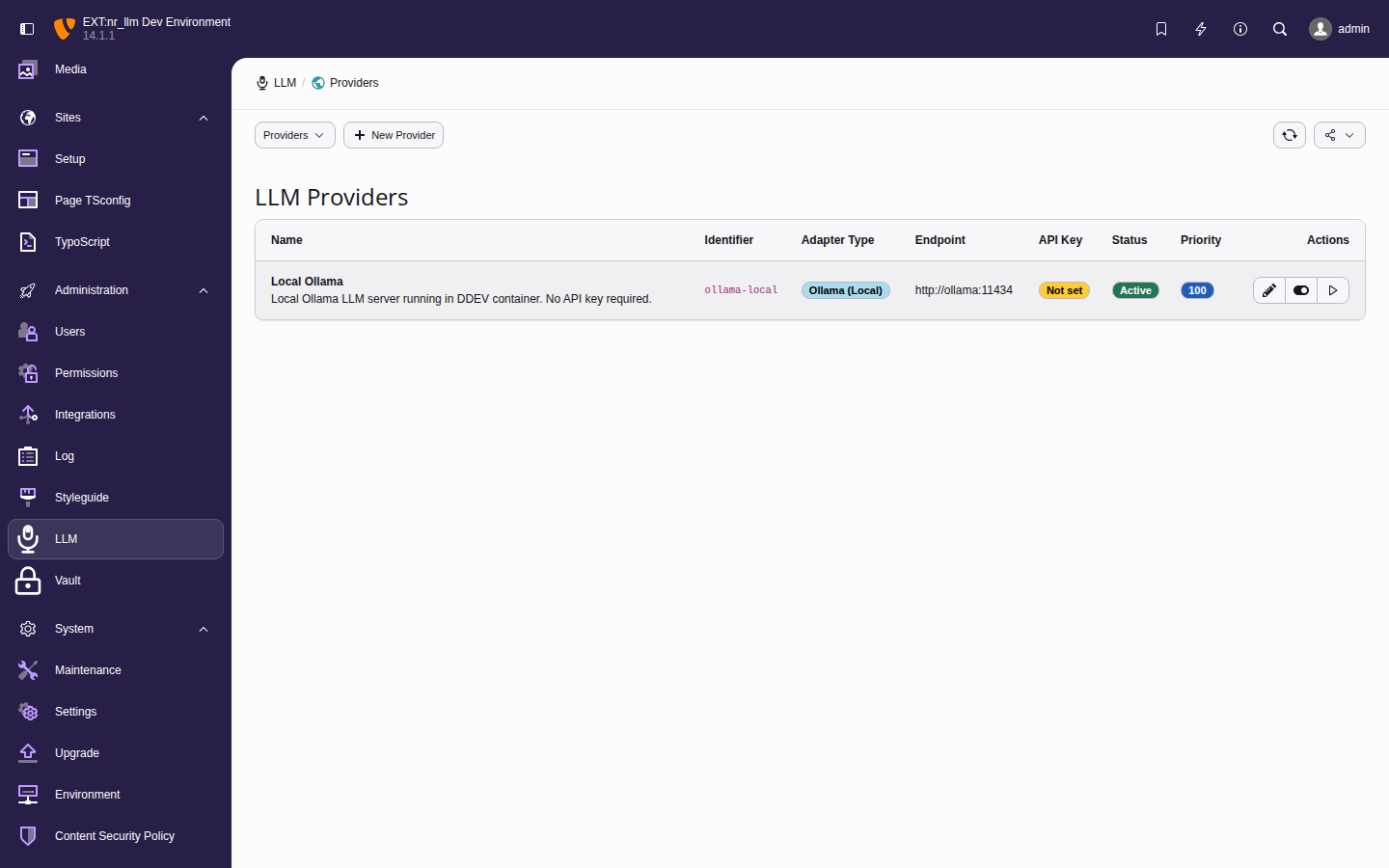
Providers represent connections to AI services. Each provider stores an API endpoint, encrypted credentials, and adapter-specific settings.

Provider list showing adapter type, endpoint URL, API key status, and actions

The provider list with connection status indicators and action buttons.

Adding a provider 

  1. Navigate to Admin Tools > LLM > Providers.
  2. Click Add Provider.
  3. Fill in the required fields:

    Identifier
    A unique slug for programmatic access (e.g., openai-prod, ollama-local).
    Name
    A display name for the backend (e.g., OpenAI Production).
    Adapter Type
    Select the provider protocol. Available adapters: openai, anthropic, gemini, ollama, openrouter, mistral, groq, azure_openai, custom.
    API Key
    Your API key. Stored securely via nr-vault envelope encryption. Leave empty for local providers like Ollama.
  4. Optionally set the endpoint URL, organization ID, timeout, and retry count.
  5. Click Save.

Testing a connection 

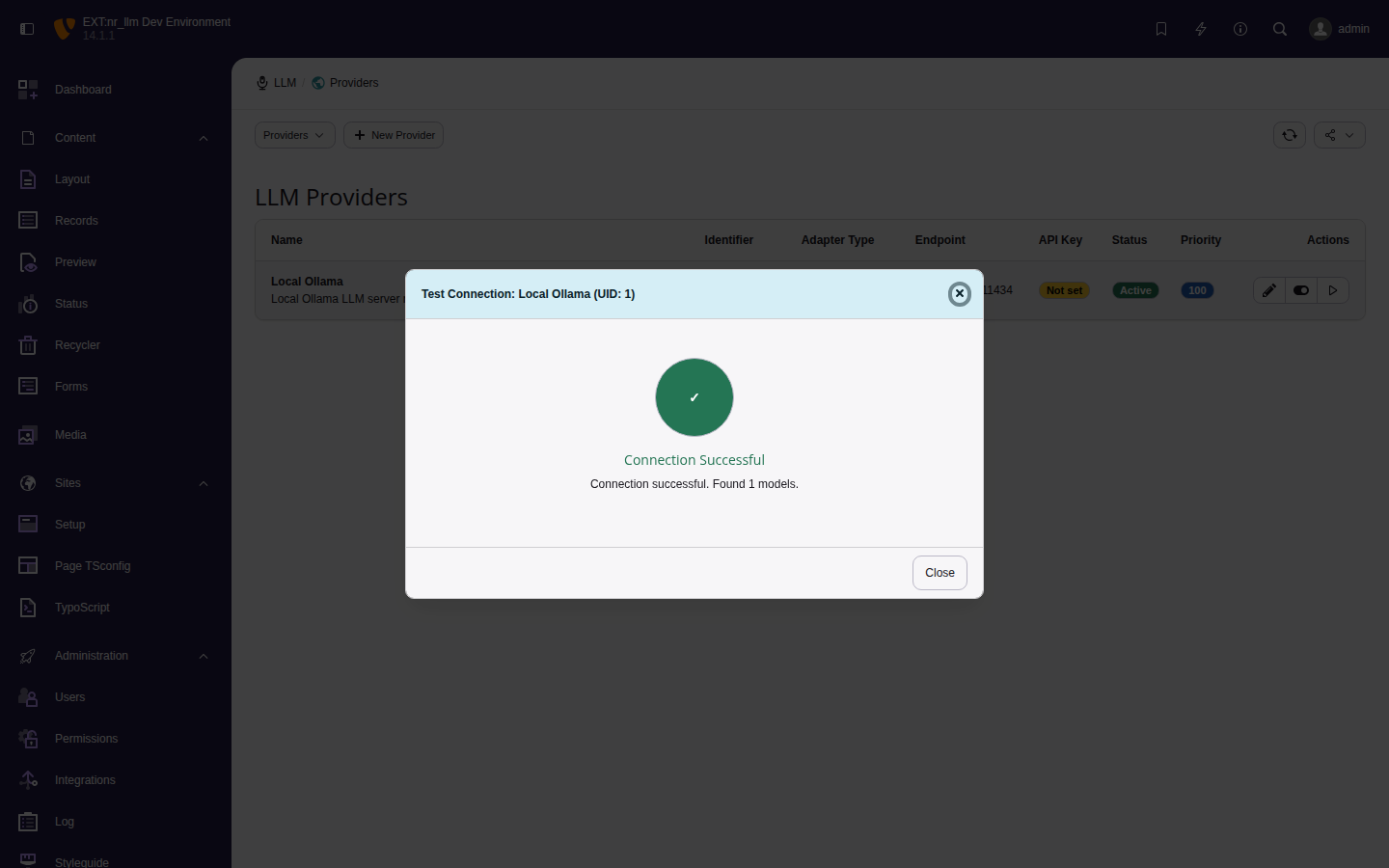
After saving a provider, click Test Connection to verify the setup. The test makes an HTTP request to the provider API and reports:

  • Connection status (success or failure).
  • Available models (if the provider supports listing).
  • Error details on failure.
Provider test modal showing successful connection to Local Ollama

Successful connection test for the Local Ollama provider.

Editing and deleting providers 

  • Click a provider row to edit its settings.
  • Use the Delete action to remove a provider. Models linked to a deleted provider become inactive.

Managing models 

Models represent specific LLM models available through a provider (e.g., gpt-5, claude-sonnet-4-6, llama-3).

Model list showing capabilities, context length, pricing, and default status

The model list with capability badges, context length, and cost-per-token columns.

Adding a model manually 

  1. Navigate to Admin Tools > LLM > Models.
  2. Click Add Model.
  3. Fill in the required fields:

    Identifier
    Unique slug (e.g., gpt-5, claude-sonnet).
    Name
    Display name (e.g., GPT-5 (128K)).
    Provider
    Select the parent provider.
    Model ID
    The API model identifier as the provider expects it (e.g., gpt-5.3-instant, claude-sonnet-4-6).
  4. Optionally set capabilities (chat, completion, embeddings, vision, streaming, tools), context length, max output tokens, and pricing.
  5. Click Save.

Fetching models from a provider 

Instead of adding models manually, use the Fetch Models action to query the provider API and auto-populate the model list:

  1. Ensure the provider is saved and the connection test passes.
  2. On the model list or model edit form, click Fetch Models.
  3. The extension queries the provider API and creates model records with capabilities and metadata pre-filled.

This is the recommended approach — it ensures model IDs match the provider exactly and keeps your catalogue current as providers release new models.

Managing configurations 

Configurations define use-case-specific presets that combine a model with a system prompt and generation parameters. Extension developers reference configurations by identifier in their code.

Configuration list with model assignment, use-case type, and parameter summary

The configuration list showing each entry's linked model, use-case type, and key parameters.

Adding a configuration manually 

  1. Navigate to Admin Tools > LLM > Configurations.
  2. Click Add Configuration.
  3. Fill in the required fields:

    Identifier
    Unique slug for programmatic access (e.g., blog-summarizer).
    Name
    Display name (e.g., Blog Post Summarizer).
    Model
    Select the model to use.
    System Prompt
    The system message that sets the AI's behavior and context.
  4. Optionally adjust temperature (0.0-2.0), top_p, frequency/presence penalty, max tokens, and use-case type (chat, completion, embedding, translation).
  5. Click Save.

Testing a configuration 

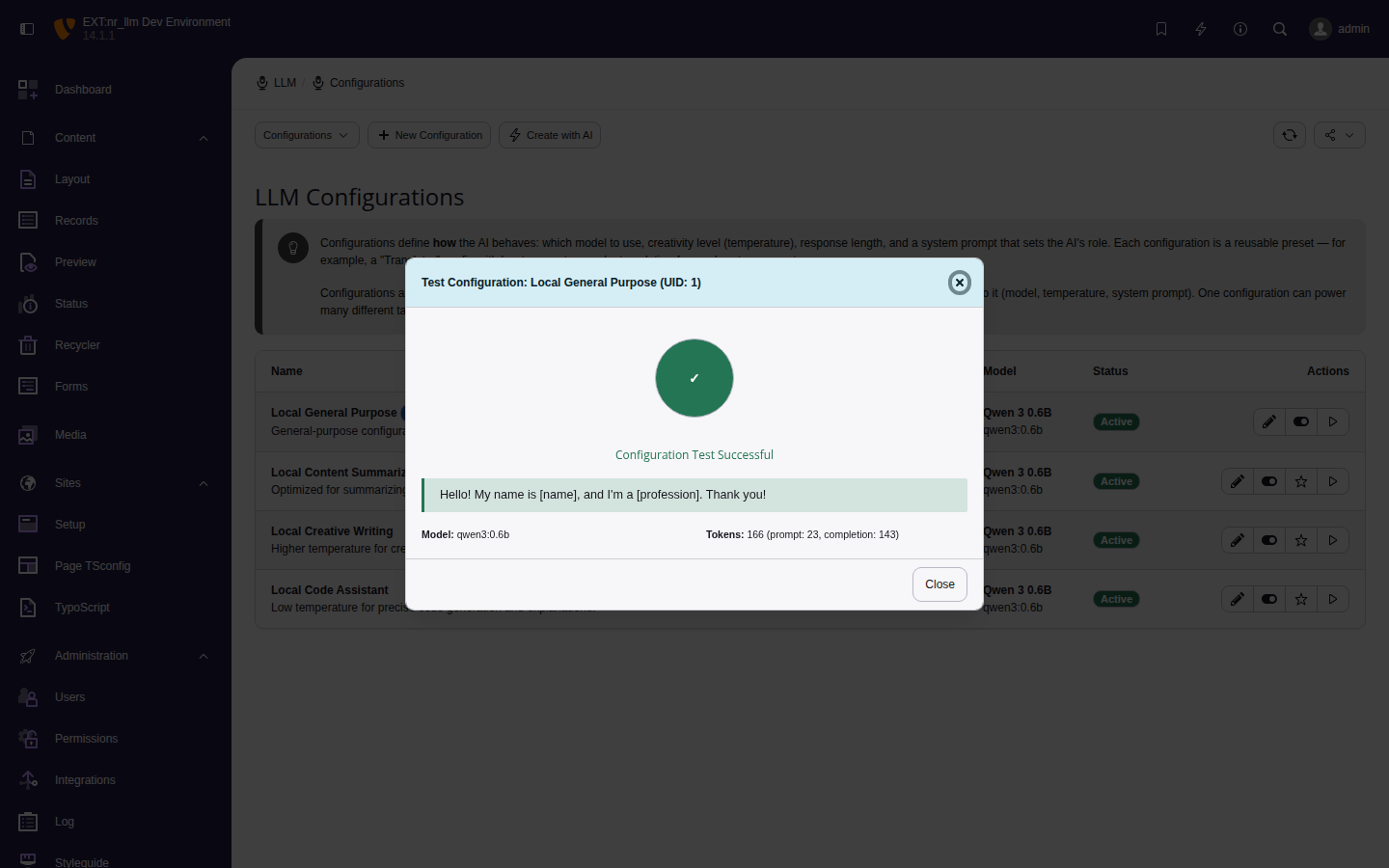
Click Test Configuration on any row. The test sends a short prompt to the model and shows the response, model ID, and token usage.

Configuration test modal showing successful response from Qwen 3 via Ollama

Successful configuration test with token count.

Editing configurations 

Click a configuration row to edit. Changes take effect immediately for any extension code that references this configuration's identifier — no code deployment needed.

Managing tasks 

Tasks are one-shot prompt templates that combine a configuration with a specific user prompt. They provide reusable AI operations that editors or extensions can execute with a single call.

Task list showing task name, linked configuration, description, and actions

The task list with each task's assigned configuration and action buttons.

Adding a task manually 

  1. Navigate to Admin Tools > LLM > Tasks.
  2. Click Add Task.
  3. Fill in the required fields:

    Name
    Display name (e.g., Summarize Article).
    Configuration
    Select the LLM configuration to use.
    User Prompt
    The prompt template. Use {placeholders} for dynamic values.
  4. Add a description so other admins understand what the task does.
  5. Click Save.

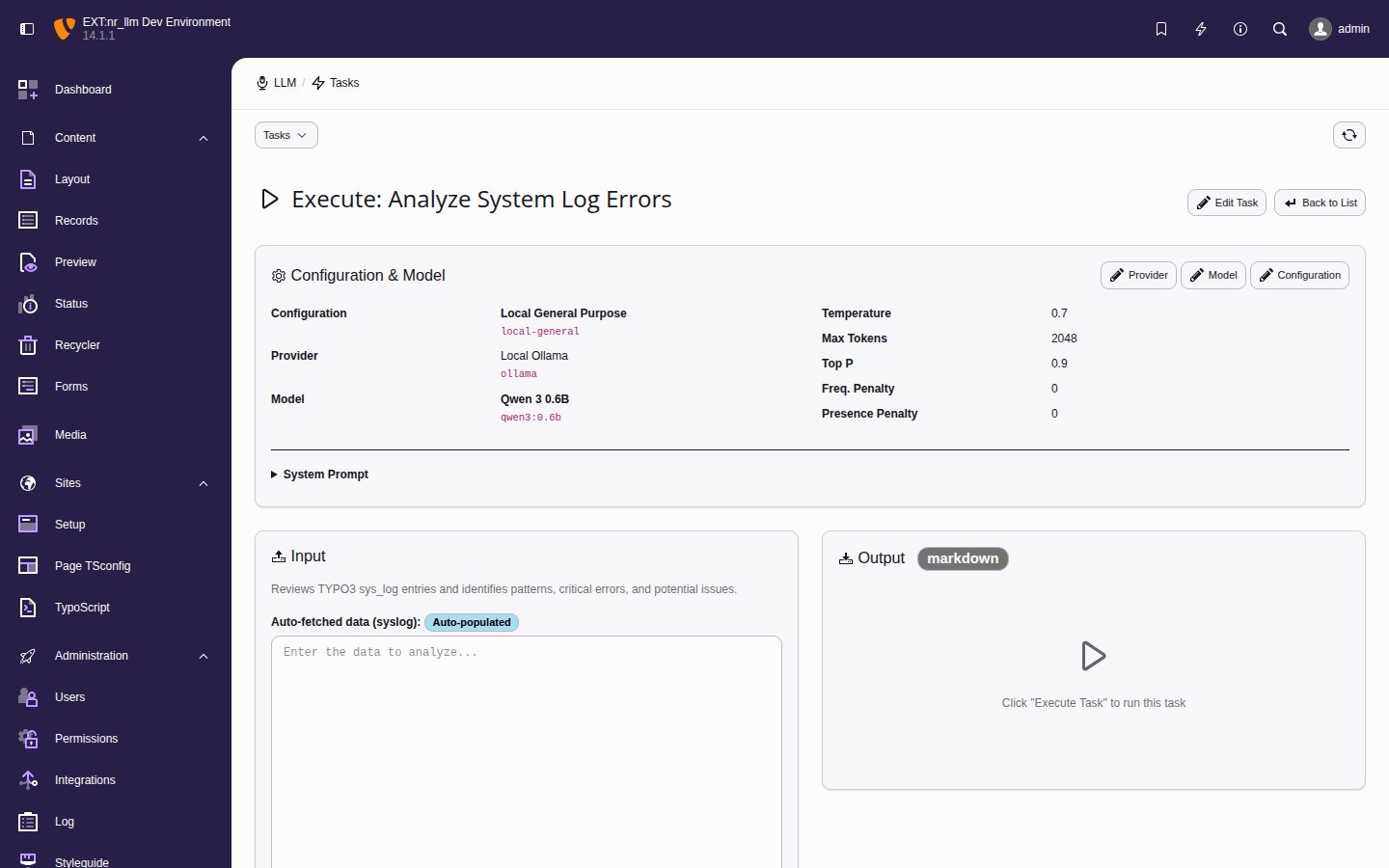
Executing a task 

Click Run on any task to open the execution form. It shows the configuration, model, parameters, input field, and prompt template.

Task execution form showing configuration details, input field, and prompt template

The task execution form for "Analyze System Log Errors" with the Ollama provider and Qwen 3 model.

Example tasks:

  • Summarize content — condense long articles.
  • Generate meta descriptions — SEO optimization.
  • Translate text — one-click translation.
  • Extract keywords — pull key terms from content.

AI-powered wizards 

The extension includes AI-powered wizards that use your existing LLM providers to generate configurations and tasks automatically. This reduces manual setup to a minimum.

Setup wizard 

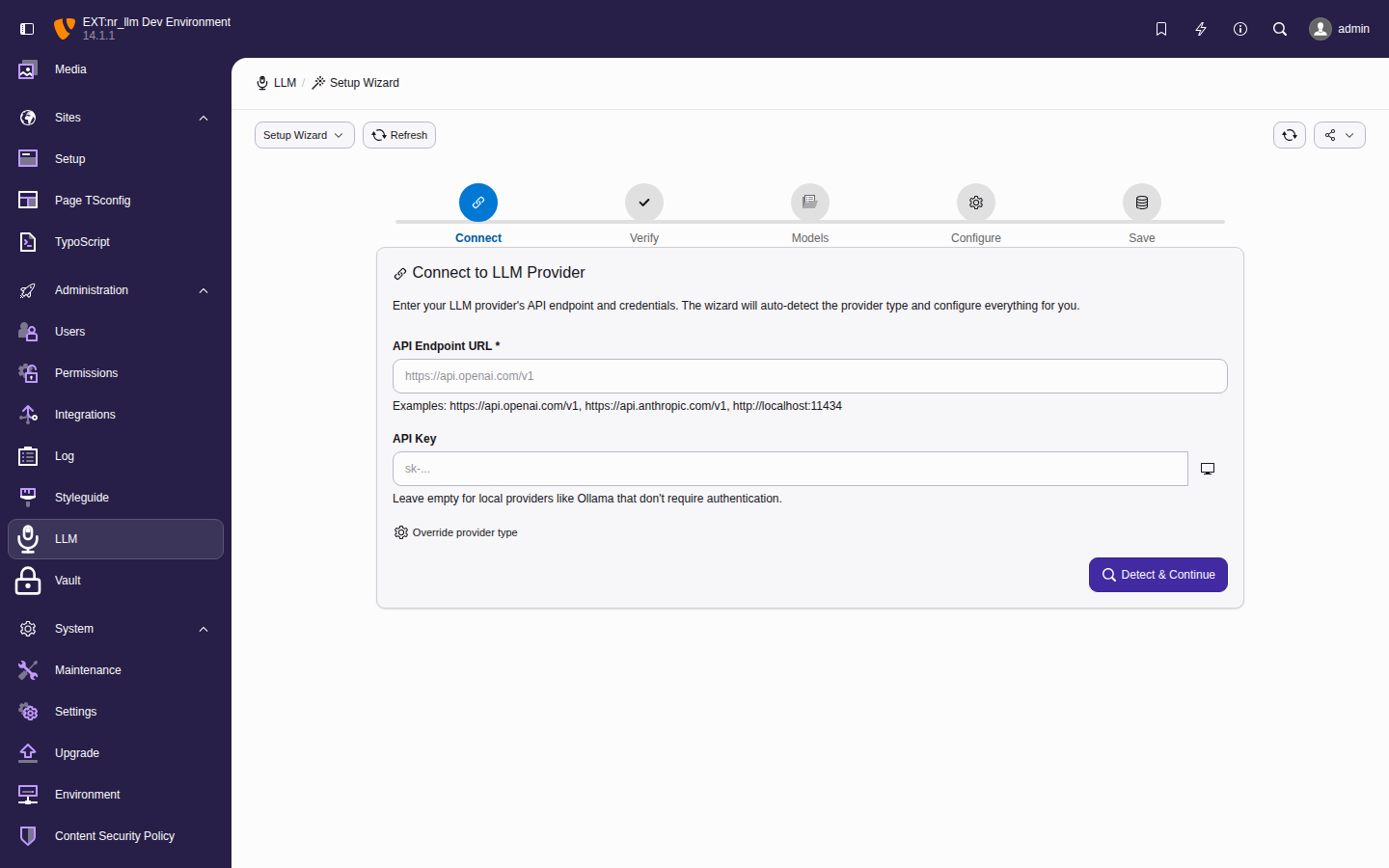
The setup wizard guides first-time configuration in five steps:

  1. Connect — enter your provider endpoint and API key.
  2. Verify — test the connection.
  3. Models — fetch available models from the provider API.
  4. Configure — create an initial configuration with system prompt and parameters.
  5. Save — run a test prompt to confirm everything works.
Five-step setup wizard with progress indicator showing Connect, Verify, Models, Configure, and Save steps

The setup wizard walks through provider creation, connection testing, model fetching, configuration, and a test prompt in five steps.

Access it from the Dashboard when no providers are configured, or via the setup wizard link at any time.

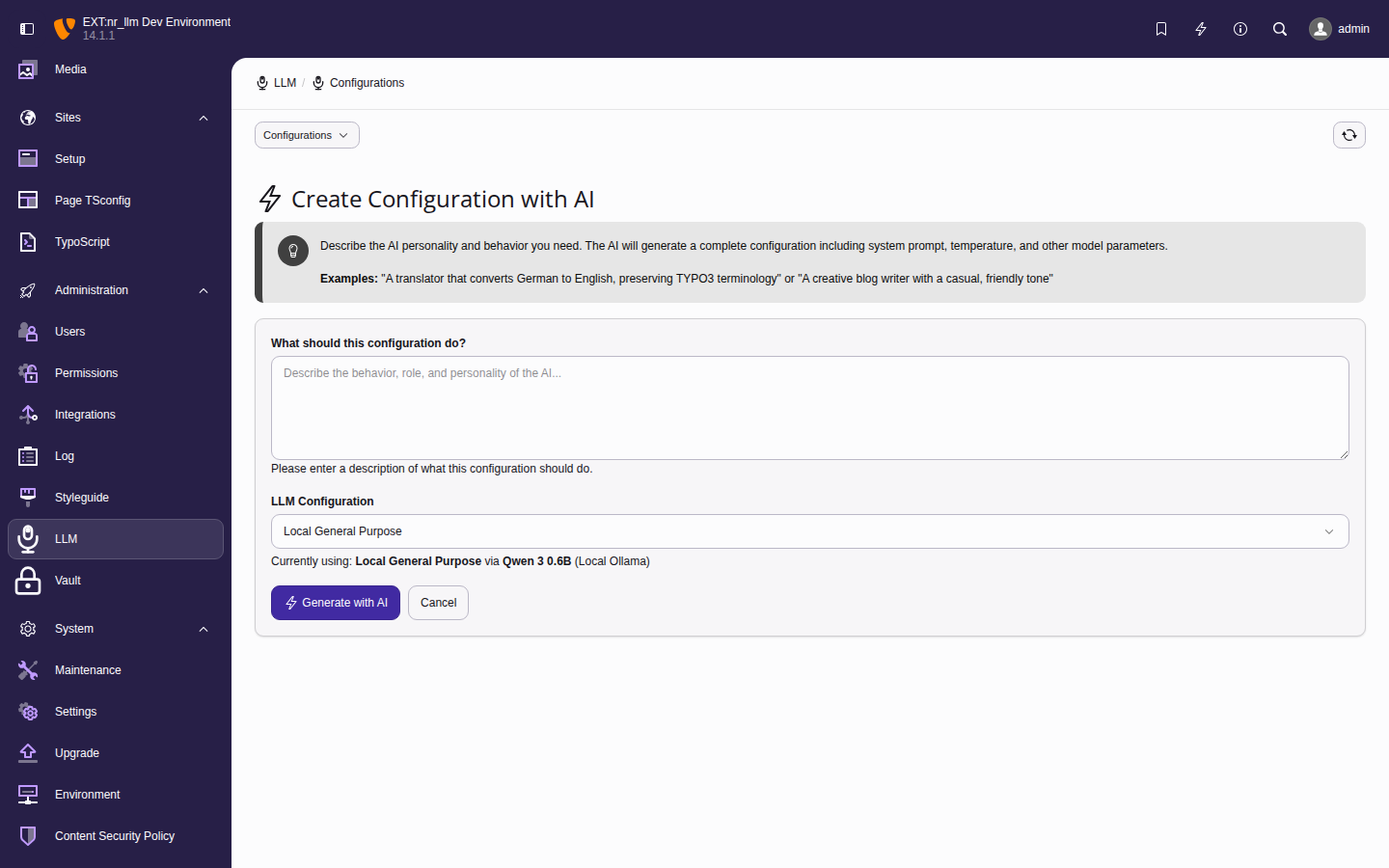
Configuration wizard 

The configuration wizard generates a complete LLM configuration using AI. Instead of filling in each field manually, describe your use case in plain language and the wizard generates everything.

  1. Navigate to Admin Tools > LLM > Configurations.
  2. Click Create with AI.
  3. Describe your use case (e.g., "summarize blog posts in three sentences").
  4. The wizard generates: identifier, name, system prompt, temperature, and all other parameters.
  5. Review and click Save.
Configuration wizard form with a plain-language description field and generated configuration preview

The configuration wizard generates all fields from a natural-language description.

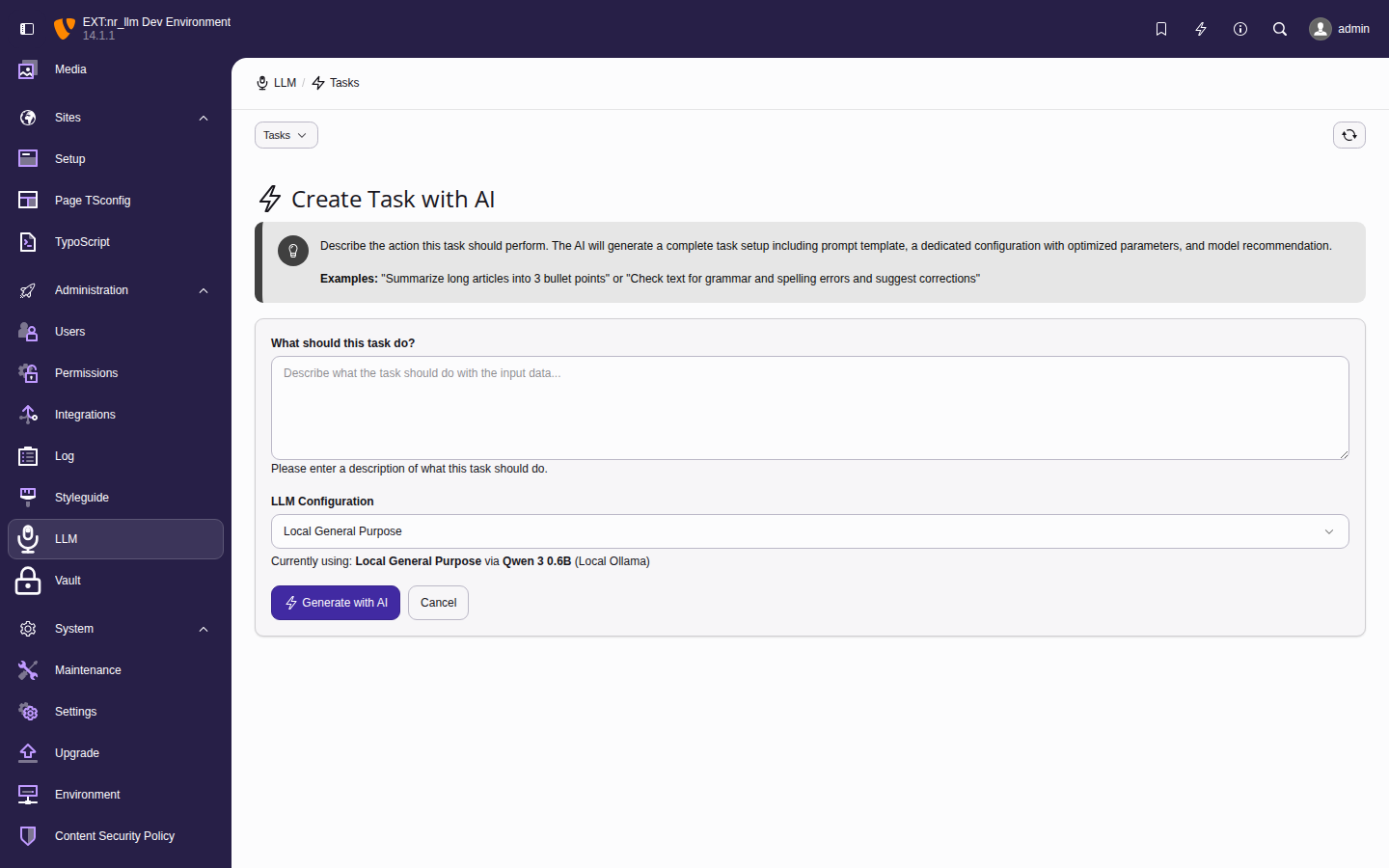
Task wizard 

The task wizard creates a complete task setup — a task and a dedicated configuration — in one step.

  1. Navigate to Admin Tools > LLM > Tasks.
  2. Click Create with AI.
  3. Describe the task (e.g., "extract the five most important keywords from an article").
  4. The wizard generates: a task with prompt template, a configuration with system prompt and parameters, and a model recommendation.
  5. Review and click Save.
Task wizard form with description field and generated task preview

The task wizard generates a complete task and configuration from a description.

Model discovery 

On the model edit form, use the Fetch Models button to query the provider API. This auto-populates available models with their capabilities, context length, and pricing metadata.

Per-user AI budgets 

The tx_nrllm_user_budget table caps per-backend-user AI spend independently of the per-configuration daily limits on tx_nrllm_configuration. A user request must clear BOTH layers: any limit on the preset they chose AND any limit on their personal budget record.

What a budget caps 

Each row in tx_nrllm_user_budget binds to exactly one be_user and defines six independent ceilings. 0 on any axis means "unlimited on this axis".

Field Unit Reset cadence
Max Requests/Day count Every day at 00:00 server-local time.
Max Tokens/Day count Every day at 00:00 server-local time.
Max Cost/Day ($) USD Every day at 00:00 server-local time.
Max Requests/Month count First of the month, 00:00 server-local time.
Max Tokens/Month count First of the month, 00:00 server-local time.
Max Cost/Month ($) USD First of the month, 00:00 server-local time.

Usage is aggregated on demand from tx_nrllm_service_usage — the same table the UsageTracker already writes to per request — so there is no second write per request and no way for a separate counter to drift away from the source of truth.

Creating a budget 

Budget records have rootLevel = -1, so admins can create them at the TYPO3 root (pid = 0) or on any regular page. Keeping them at the root is the convention because budgets are site-wide admin concerns, not page-scoped content; the recipe below follows that convention.

  1. Open Web > List in the root (page UID 0) — or on the page where you keep other cross-site configuration records.
  2. Click Create new record.
  3. Choose LLM User Budget.
  4. Pick the backend user, set the ceilings, toggle Enforce this budget on.
  5. Save.

How the check runs 

Before dispatching a request the consuming extension calls NetresearchNrLlmServiceBudgetService::check(). The service:

  1. Returns allowed when the user has no budget record, when Enforce this budget is off, or when every ceiling is 0.
  2. Aggregates today's usage and this month's usage in a single database roundtrip.
  3. Evaluates the daily window first; the monthly window only if the daily window passes.
  4. Adds +1 request and +plannedCost to the usage figures before comparing, so a user at exactly the limit is still allowed one more call.

The returned BudgetCheckResult names which bucket was tripped (exceededLimit as a stable machine key, plus a human-friendly reason string suitable for log output or caller-side wrapping).

Budgets vs. configuration limits 

Both layers persist but cap different things:

Axis Configuration daily limits Per-user budgets
Bound to a preset (tx_nrllm_configuration) a backend user (tx_nrllm_user_budget)
Question answered "Can ANY editor keep using this preset today?" "Can THIS editor keep spending this month?"
Windows daily daily AND monthly
Dimensions requests, tokens, cost requests, tokens, cost
Both must pass yes yes

See ADR-025: Per-User AI Budgets for the full design rationale, including the alternatives (counter table, group-level budgets, auto-throttling) we considered and why they were rejected.

Provider fields 

Providers represent API connections with credentials.

LLM providers list with connection status

Provider list showing adapter type, endpoint, API key status, and action buttons.

Required 

identifier

identifier
Type
string
Required

true

Unique slug for programmatic access (e.g., openai-prod, ollama-local).

name

name
Type
string
Required

true

Display name shown in the backend.

adapter_type

adapter_type
Type
string
Required

true

The protocol to use:

  • openai — OpenAI API
  • anthropic — Anthropic Claude API
  • gemini — Google Gemini API
  • ollama — Local Ollama instance
  • openrouter — OpenRouter multi-model API
  • mistral — Mistral AI API
  • groq — Groq inference API
  • azure_openai — Azure OpenAI Service
  • custom — OpenAI-compatible endpoint

api_key

api_key
Type
string

API key for authentication. Stored as a nr-vault UUID identifier (envelope encryption). nr-llm never stores raw API keys in the database. Required for cloud providers (OpenAI, Claude, Gemini, etc.); not required for local providers like Ollama.

Optional 

endpoint_url

endpoint_url
Type
string
Default
(adapter default)

Custom API endpoint URL.

organization_id

organization_id
Type
string
Default
(empty)

Organization ID (OpenAI, Azure).

timeout

timeout
Type
integer
Default
30

Request timeout in seconds.

max_retries

max_retries
Type
integer
Default
3

Number of retry attempts on failure.

options

options
Type
JSON
Default
{}

Additional adapter-specific options.

Model fields 

Models represent specific LLM models available through a provider.

Model list showing capabilities and pricing

Model list with capability badges, context length, and cost columns.

Required 

identifier (model)

identifier (model)
Type
string
Required

true

Unique slug (e.g., gpt-5, claude-sonnet).

name (model)

name (model)
Type
string
Required

true

Display name (e.g., GPT-5 (128K)).

provider

provider
Type
reference
Required

true

Reference to the parent provider.

model_id

model_id
Type
string
Required

true

The API model identifier as the provider expects it (e.g., gpt-5.3-instant, claude-sonnet-4-6, gemini-3-flash).

Optional 

context_length

context_length
Type
integer
Default
(provider default)

Maximum context window in tokens.

max_output_tokens

max_output_tokens
Type
integer
Default
(model default)

Maximum output tokens.

capabilities

capabilities
Type
string (CSV)
Default
chat

Comma-separated capabilities: chat, completion, embeddings, vision, streaming, tools.

cost_input

cost_input
Type
integer
Default
0

Cost per 1M input tokens in cents.

cost_output

cost_output
Type
integer
Default
0

Cost per 1M output tokens in cents.

is_default

is_default
Type
boolean
Default
false

Mark as default model for this provider.

Configuration field reference 

Configurations define use-case presets with model selection and parameters.

Configuration list with model assignments

Configuration list showing linked model, use-case type, and parameters.

Required 

identifier (config)

identifier (config)
Type
string
Required

true

Unique slug (e.g., blog-summarizer).

name (config)

name (config)
Type
string
Required

true

Display name (e.g., Blog Post Summarizer).

model

model
Type
reference
Required

true

Reference to the model to use.

system_prompt

system_prompt
Type
text
Required

true

System message that sets the AI's behavior.

Optional 

temperature

temperature
Type
float
Default
0.7

Creativity (0.0 = deterministic, 2.0 = creative).

max_tokens (config)

max_tokens (config)
Type
integer
Default
(model default)

Maximum response length in tokens.

top_p

top_p
Type
float
Default
1.0

Nucleus sampling (0.0-1.0).

frequency_penalty

frequency_penalty
Type
float
Default
0.0

Reduces word repetition (-2.0 to 2.0).

presence_penalty

presence_penalty
Type
float
Default
0.0

Encourages topic diversity (-2.0 to 2.0).

use_case_type

use_case_type
Type
string
Default
chat

Task type: chat, completion, embedding, translation.

fallback_chain

fallback_chain
Type
JSON (text column)
Default
(empty)

JSON object with a single key, configurationIdentifiers, whose value is the ordered list of other configuration identifiers to retry against when the primary fails with a retryable error (connection error, HTTP 5xx, or HTTP 429 rate-limit). Non-retryable errors bubble up unchanged. Streaming requests do not trigger fallback — chunks cannot be replayed against a different provider.

Example payload:

{"configurationIdentifiers": ["claude-sonnet", "ollama-local"]}
Copied!

Identifiers are matched case-insensitively; leave empty to disable fallback. See Fallback chain.

Task fields 

Tasks combine a configuration with a user prompt template for one-shot AI operations.

Task list page

Task list with assigned configurations.

Each task references an LLM configuration and adds a user prompt template. The same configuration can power multiple tasks with different prompts.

Settings 

TypoScript settings 

Runtime settings via TypoScript constants:

Configuration/TypoScript/constants.typoscript
plugin.tx_nrllm {
    settings {
        # Default provider (openai, claude, gemini)
        defaultProvider = openai
        # Enable response caching
        enableCaching = 1
        # Cache lifetime in seconds
        cacheLifetime = 3600

        providers {
            openai {
                enabled = 1
                defaultModel = gpt-4o
                temperature = 0.7
                maxTokens = 4096
            }
            claude {
                enabled = 1
                defaultModel = claude-sonnet-4-20250514
                temperature = 0.7
                maxTokens = 4096
            }
            gemini {
                enabled = 1
                defaultModel = gemini-2.0-flash
                temperature = 0.7
                maxTokens = 4096
            }
        }
    }
}
Copied!

Environment variables 

.env
# TYPO3 encryption key (used for API key encryption)
TYPO3_CONF_VARS__SYS__encryptionKey=your-key

# Optional: Override default timeout
TYPO3_NR_LLM_DEFAULT_TIMEOUT=60
Copied!

Security 

API key protection 

  1. Encrypted storage — API keys are stored as vault identifiers (UUIDs) via the nr-vault extension, which uses envelope encryption. nr-llm never stores raw API keys.
  2. Database security — the database only contains vault UUIDs, not secrets. Ensure backups are encrypted regardless.
  3. Backend access — restrict the LLM module to authorized administrators.
  4. Key rotation — re-encrypt via nr-vault's key rotation mechanism.

Input sanitization 

Sanitize user input before sending to providers:

Example: Sanitizing user input
use TYPO3\CMS\Core\Utility\GeneralUtility;

$sanitizedInput = GeneralUtility::removeXSS(
    $userInput
);

$response = $adapter->chatCompletion([
    ['role' => 'user', 'content' => $sanitizedInput],
]);
Copied!

Output handling 

Treat LLM responses as untrusted content:

Example: Escaping output
$response = $adapter->chatCompletion([
    ['role' => 'user', 'content' => $prompt],
]);

$safeOutput = htmlspecialchars(
    $response->content, ENT_QUOTES, 'UTF-8'
);
Copied!

Logging 

config/system/additional.php
use Psr\Log\LogLevel;
use TYPO3\CMS\Core\Log\Writer\FileWriter;

$GLOBALS['TYPO3_CONF_VARS']['LOG']
    ['Netresearch']['NrLlm'] = [
    'writerConfiguration' => [
        LogLevel::DEBUG => [
            FileWriter::class => [
                'logFileInfix' => 'nr_llm',
            ],
        ],
    ],
];
Copied!

Log files: var/log/typo3_nr_llm_*.log

Caching 

The extension uses TYPO3's caching framework with cache identifier nrllm_responses.

No cache backend is specified — TYPO3 automatically uses the instance's default cache backend. If your instance has Redis, Valkey, or Memcached configured, nr-llm uses it transparently with zero configuration.

  • Cache identifier: nrllm_responses
  • Cache group: nrllm
  • Default TTL: 3600 seconds (1 hour)
  • Embeddings TTL: 86400 seconds (24 hours)

To override the backend for this cache specifically:

config/system/additional.php
use TYPO3\CMS\Core\Cache\Backend\RedisBackend;

$GLOBALS['TYPO3_CONF_VARS']['SYS']['caching']
    ['cacheConfigurations']['nrllm_responses']
    ['backend'] = RedisBackend::class;
Copied!

Clear cache:

vendor/bin/typo3 cache:flush --group=nrllm
Copied!

Developer guide 

This guide covers technical details for developers integrating the LLM extension into their TYPO3 projects.

Core concepts 

Architecture overview 

The extension follows a layered architecture:

  1. Providers - Handle direct API communication.
  2. LlmServiceManager - Orchestrates providers and provides unified API.
  3. Feature services - High-level services for specific tasks.
  4. Domain models - Response objects and value types.
Architecture overview
┌─────────────────────────────────────────┐
│         Your Application Code           │
└────────────────┬────────────────────────┘
                 │
┌────────────────▼────────────────────────┐
│         Feature Services                │
│  (Completion, Embedding, Vision, etc.)  │
└────────────────┬────────────────────────┘
                 │
┌────────────────▼────────────────────────┐
│         LlmServiceManager               │
│    (Provider selection & routing)       │
└────────────────┬────────────────────────┘
                 │
┌────────────────▼────────────────────────┐
│           Providers                     │
│    (OpenAI, Claude, Gemini, etc.)       │
└─────────────────────────────────────────┘
Copied!

Dependency injection 

All services are available via dependency injection:

Example: Injecting LLM services
use Netresearch\NrLlm\Service\LlmServiceManager;
use Netresearch\NrLlm\Service\Feature\CompletionService;
use Netresearch\NrLlm\Service\Feature\EmbeddingService;
use Netresearch\NrLlm\Service\Feature\VisionService;
use Netresearch\NrLlm\Service\Feature\TranslationService;

class MyController
{
    public function __construct(
        private readonly LlmServiceManager $llmManager,
        private readonly CompletionService $completionService,
        private readonly EmbeddingService $embeddingService,
        private readonly VisionService $visionService,
        private readonly TranslationService $translationService,
    ) {}
}
Copied!

Using LlmServiceManager 

Basic chat 

Example: Basic chat request
$messages = [
    ['role' => 'system', 'content' => 'You are a helpful assistant.'],
    ['role' => 'user', 'content' => 'What is TYPO3?'],
];

$response = $this->llmManager->chat($messages);

// Response properties
$content = $response->content;           // string
$model = $response->model;               // string
$finishReason = $response->finishReason; // string
$usage = $response->usage;               // UsageStatistics
Copied!

Chat with options 

Example: Chat with configuration options
use Netresearch\NrLlm\Service\Option\ChatOptions;

// Using ChatOptions object
$options = ChatOptions::creative()
    ->withMaxTokens(2000)
    ->withSystemPrompt('You are a creative writer.');

$response = $this->llmManager->chat($messages, $options);

// Or using array
$response = $this->llmManager->chat($messages, [
    'provider' => 'claude',
    'model' => 'claude-sonnet-4-6',
    'temperature' => 1.2,
    'max_tokens' => 2000,
]);
Copied!

Simple completion 

Example: Quick completion from a prompt
$response = $this->llmManager->complete('Explain recursion in programming');
Copied!

Embeddings 

Example: Generating embeddings
// Single text
$response = $this->llmManager->embed('Hello, world!');
$vector = $response->getVector(); // array<float>

// Multiple texts
$response = $this->llmManager->embed(['Text 1', 'Text 2', 'Text 3']);
$vectors = $response->embeddings; // array<array<float>>
Copied!

Response objects 

See the API reference for the complete response object documentation. Key classes:

  • CompletionResponse — content, model, usage, finishReason, toolCalls
  • EmbeddingResponse — embeddings, model, usage
  • UsageStatistics — promptTokens, completionTokens, totalTokens

Error handling 

The extension throws specific exceptions:

Example: Error handling
use Netresearch\NrLlm\Provider\Exception\ProviderException;
use Netresearch\NrLlm\Provider\Exception\ProviderConfigurationException;
use Netresearch\NrLlm\Provider\Exception\ProviderConnectionException;
use Netresearch\NrLlm\Provider\Exception\ProviderResponseException;
use Netresearch\NrLlm\Provider\Exception\UnsupportedFeatureException;
use Netresearch\NrLlm\Exception\InvalidArgumentException;

try {
    $response = $this->llmManager->chat($messages);
} catch (ProviderConfigurationException $e) {
    // Invalid or missing provider configuration
} catch (ProviderConnectionException $e) {
    // Connection to provider failed
} catch (ProviderResponseException $e) {
    // Provider returned an error response
} catch (UnsupportedFeatureException $e) {
    // Requested feature not supported by provider
} catch (ProviderException $e) {
    // General provider error
} catch (InvalidArgumentException $e) {
    // Invalid parameters
}
Copied!

Events 

Best practices 

  1. Use feature services for common tasks instead of raw LlmServiceManager.
  2. Enable caching for deterministic operations like embeddings.
  3. Handle errors gracefully with proper try-catch blocks.
  4. Sanitize input before sending to LLM providers.
  5. Validate output and treat LLM responses as untrusted.
  6. Use streaming for long responses to improve UX.
  7. Set reasonable timeouts based on expected response times.
  8. Monitor usage to control costs and prevent abuse.

Streaming support 

Streaming allows you to receive LLM responses incrementally as they are generated, rather than waiting for the complete response. This improves perceived performance for long responses.

Usage 

Example: Streaming chat responses
$stream = $this->llmManager->streamChat($messages);

foreach ($stream as $chunk) {
    echo $chunk;
    ob_flush();
    flush();
}
Copied!

The streamChat method returns a Generator that yields string chunks as the provider generates them. Each chunk contains a portion of the response text.

Providers that implement streamingcapableinterface support streaming. Check provider capabilities before using:

Example: Checking streaming support
$provider = $this->llmManager->getProvider('openai');
if ($provider instanceof StreamingCapableInterface) {
    // Provider supports streaming
}
Copied!

Tool/function calling 

Tool calling (also known as function calling) allows the LLM to request execution of functions you define. The model decides when to call a tool based on the conversation context.

Defining tools 

Example: Tool/function calling
$tools = [
    [
        'type' => 'function',
        'function' => [
            'name' => 'get_weather',
            'description' => 'Get current weather for a location',
            'parameters' => [
                'type' => 'object',
                'properties' => [
                    'location' => [
                        'type' => 'string',
                        'description' => 'City name',
                    ],
                    'unit' => [
                        'type' => 'string',
                        'enum' => ['celsius', 'fahrenheit'],
                    ],
                ],
                'required' => ['location'],
            ],
        ],
    ],
];
Copied!

Executing tool calls 

Example: Handling tool call responses
$response = $this->llmManager->chatWithTools($messages, $tools);

if ($response->hasToolCalls()) {
    foreach ($response->toolCalls as $toolCall) {
        $functionName = $toolCall['function']['name'];
        $arguments = json_decode($toolCall['function']['arguments'], true);

        // Execute your function
        $result = match ($functionName) {
            'get_weather' => $this->getWeather($arguments['location']),
            default => throw new \RuntimeException("Unknown function: {$functionName}"),
        };

        // Continue conversation with result
        $messages[] = [
            'role' => 'assistant',
            'content' => null,
            'tool_calls' => [$toolCall],
        ];
        $messages[] = [
            'role' => 'tool',
            'tool_call_id' => $toolCall['id'],
            'content' => json_encode($result),
        ];

        $response = $this->llmManager->chat($messages);
    }
}
Copied!

Providers that implement toolcapableinterface support tool calling.

Creating custom providers 

Implement a custom provider by extending AbstractProvider:

Example: Custom provider implementation
<?php

namespace MyVendor\MyExtension\Provider;

use Netresearch\NrLlm\Provider\AbstractProvider;
use Netresearch\NrLlm\Provider\Contract\ProviderInterface;

class MyCustomProvider extends AbstractProvider implements ProviderInterface
{
    protected string $baseUrl = 'https://api.example.com/v1';

    public function getName(): string
    {
        return 'My Custom Provider';
    }

    public function getIdentifier(): string
    {
        return 'custom';
    }

    public function isConfigured(): bool
    {
        return !empty($this->apiKey);
    }

    public function chatCompletion(array $messages, array $options = []): CompletionResponse
    {
        $payload = $this->buildChatPayload($messages, $options);
        $response = $this->sendRequest('chat', $payload);

        return new CompletionResponse(
            content: $response['choices'][0]['message']['content'],
            model: $response['model'],
            usage: $this->parseUsage($response['usage']),
            finishReason: $response['choices'][0]['finish_reason'],
            provider: $this->getIdentifier(),
        );
    }

    // Implement other required methods...
}
Copied!

Registering your provider 

Register your provider in Services.yaml:

Configuration/Services.yaml
MyVendor\MyExtension\Provider\MyCustomProvider:
  arguments:
    $httpClient: '@Psr\Http\Client\ClientInterface'
    $requestFactory: '@Psr\Http\Message\RequestFactoryInterface'
    $streamFactory: '@Psr\Http\Message\StreamFactoryInterface'
    $logger: '@Psr\Log\LoggerInterface'
  tags:
    - name: nr_llm.provider
      priority: 50
Copied!

Registering a provider 

Two mechanisms pick up your provider class. Use the attribute when you can.

Preferred: the #[AsLlmProvider] attribute 

Add the attribute to any provider class that lives under the Netresearch\NrLlm\ namespace. The compiler pass auto-tags the service, sets it public (so backend diagnostics can resolve it by class name), and registers it with LlmServiceManager in priority order:

Classes/Provider/MyProvider.php
use Netresearch\NrLlm\Attribute\AsLlmProvider;
use Netresearch\NrLlm\Provider\AbstractProvider;

#[AsLlmProvider(priority: 85)]
final class MyProvider extends AbstractProvider
{
    public function getIdentifier(): string
    {
        return 'my-provider';
    }

    public function getName(): string
    {
        return 'My LLM Service';
    }

    // ... chatCompletion(), embeddings(), supportsFeature()
}
Copied!

Priority is an ordering hint only. Providers are still resolved by their getIdentifier() at runtime. Higher priority wins when two providers otherwise tie.

Third-party fallback: yaml tagging 

Extensions that sit outside the Netresearch\NrLlm\ namespace still work via the original mechanism — declare a service with the nr_llm.provider tag:

EXT:my_ext/Configuration/Services.yaml
services:
  Acme\MyExt\Provider\AcmeProvider:
    public: true
    tags:
      - name: nr_llm.provider
        priority: 85
Copied!

When both yaml tagging AND the attribute are present on the same service, the yaml wins (the attribute pass skips already-tagged services). Treat this as an override hook rather than an additive mechanism.

Capability interfaces 

Priority governs registration order only; it says nothing about what a provider can do. Capabilities are advertised by implementing the relevant interface from NetresearchNrLlmProviderContract:

  • VisionCapableInterface — image analysis
  • StreamingCapableInterface — SSE streaming
  • ToolCapableInterface — function / tool calling
  • DocumentCapableInterface — PDF / structured document input

LlmServiceManager dispatches to a provider only when the caller's requested operation matches a capability the provider actually advertises. A provider that doesn't implement VisionCapableInterface can never be asked to describe an image, regardless of priority. See ADR-022: Attribute-Based Provider Registration for the attribute-discovery design decision and the Symfony registerAttributeForAutoconfiguration alternative we evaluated.

Fallback chain 

A LlmConfiguration can carry an ordered list of other configuration identifiers to fall back to on retryable provider failures. The lookup happens transparently inside NetresearchNrLlmServiceLlmServiceManager::chatWithConfiguration() and completeWithConfiguration(). Callers see a regular completion response or a typed exception; they never need to reach into retry mechanics.

Configuring a chain 

The tx_nrllm_configuration.fallback_chain column stores a JSON object with a single key, configurationIdentifiers, whose value is the ordered array of target configuration identifiers:

Example payload stored in fallback_chain
{"configurationIdentifiers": ["claude-sonnet", "ollama-local"]}
Copied!

Editors paste that JSON into the Fallback Chain tab in the backend form. The order is the retry order. Identifiers are matched case-insensitively against tx_nrllm_configuration.identifier. Using an object (rather than a bare top-level array) leaves room for future sibling fields — e.g. per-link retry policy — without a schema break.

Retryable vs. non-retryable errors 

Fallback only triggers for errors the next provider might actually recover from:

Exception Retryable?
ProviderConnectionException (network, timeout, HTTP 5xx, retries exhausted) Yes
ProviderResponseException with code 429 (rate-limited by this provider) Yes
ProviderResponseException with any other 4xx (authentication, bad request, not found, …) No. Bubbles up. A different provider with the same input would fail the same way.
ProviderConfigurationException No. Misconfiguration is a human problem.
UnsupportedFeatureException No. Fallback won't make a text-only provider handle images.

When every configuration in the chain trips a retryable error, NetresearchNrLlmProviderExceptionFallbackChainExhaustedException is thrown. It carries the per-attempt errors so consumers can surface the full failure sequence.

Scope limits 

v1 is deliberately narrow:

  • No streaming. streamChatWithConfiguration() does not wrap the call. Once the first chunk has been yielded to the caller, mid-stream provider-switching would be detectable and surprising.
  • No recursion. A fallback configuration's own chain is ignored. This avoids cycles (a -> b -> a) and unbounded attempt trees.
  • Single primary-only chain is a no-op. If the configured chain contains only the primary's own identifier, the primary's original exception is rethrown verbatim rather than wrapped in FallbackChainExhaustedException.

Using the DTO directly 

For programmatic construction — e.g. a wizard that generates a configuration and also sets up fallback — use the NetresearchNrLlmDomainDTOFallbackChain value object:

EXT:my_ext/Classes/Service/Setup.php
use Netresearch\NrLlm\Domain\DTO\FallbackChain;

$chain = (new FallbackChain())
    ->withLink('claude-sonnet')
    ->withLink('ollama-local');

$configuration->setFallbackChainDTO($chain);
Copied!

The DTO trims and lowercases identifiers on entry, deduplicates them, and silently rejects empty strings and non-string entries read from malformed JSON. See ADR-021: Provider Fallback Chain for the full design rationale and the alternatives we ruled out.

BE group permission checks 

Every ModelCapability enum value is registered as a native TYPO3 customPermOptions entry under the nrllm namespace. Administrators see a checkbox per capability (chat, completion, embeddings, vision, streaming, tools, json_mode, audio) on the Backend Users > Access Options tab when editing a BE group. Consumer code asks the NetresearchNrLlmServiceCapabilityPermissionService whether the capability is allowed for the current user.

Running a check 

Inject the service and call isAllowed() before dispatching. The method accepts an optional BackendUserAuthentication for tests; when omitted it reads $GLOBALS['BE_USER']:

EXT:my_ext/Classes/Service/Caption.php
use Netresearch\NrLlm\Domain\Enum\ModelCapability;
use Netresearch\NrLlm\Exception\AccessDeniedException;
use Netresearch\NrLlm\Service\CapabilityPermissionService;

final class Caption
{
    public function __construct(
        private readonly CapabilityPermissionService $permissions,
    ) {}

    public function describe(string $imageUrl): string
    {
        if (!$this->permissions->isAllowed(ModelCapability::VISION)) {
            throw new AccessDeniedException(
                'Vision capability not permitted for this user',
                1745712100,
            );
        }
        // ... dispatch to VisionService ...
    }
}
Copied!

Resolution order 

The check resolves in this order:

  1. No BE user in context (CLI, scheduler, frontend) → allowed. Capability gating is a backend-editor concern; background jobs and frontend rendering are not subject to it.
  2. User is admin → allowed. Admins bypass the native TYPO3 permission machinery by convention.
  3. Delegates to $backendUser->check('custom_options', 'nrllm:capability_X') — the native TYPO3 permission check. Returns what it returns.

Complementary to configuration ACL 

The allowed_groups MM relation on tx_nrllm_configuration gates access to a specific preset (API keys, system prompt, etc.). Capability permissions gate which operations a user may invoke against any preset they can already reach. The two are orthogonal and both checks must pass.

  • Configuration ACL: "Can this editor use the 'creative-writing' configuration at all?"
  • Capability permission: "Can this editor invoke vision against any configuration?"

Stable keys 

CapabilityPermissionService::permissionString() returns the TYPO3 permission string (e.g. nrllm:capability_vision) for any enum case. Use it when you need to check directly without going through the service, for example in a Fluid ViewHelper or a TCA display condition:

Permission-string lookup
use Netresearch\NrLlm\Domain\Enum\ModelCapability;
use Netresearch\NrLlm\Service\CapabilityPermissionService;

$permString = CapabilityPermissionService::permissionString(
    ModelCapability::TOOLS,
);
// => "nrllm:capability_tools"
Copied!

See ADR-023: Native Backend Capability Permissions for the full design rationale and the alternatives (per-configuration flags, bespoke MM table, inline enforcement) we ruled out.

Build your extension on nr-llm 

This guide walks you through adding AI capabilities to a TYPO3 extension using nr-llm as a dependency. By the end, your extension will have working AI features without any provider-specific code.

Why build on nr-llm? 

When your extension calls an LLM API directly, it takes on responsibility for:

  • HTTP client setup, authentication, and error handling per provider
  • Secure API key storage (not in ext_conf_template.txt or $GLOBALS)
  • Response caching to control costs
  • Streaming implementation for real-time UX
  • A configuration UI for administrators

nr-llm handles all of this. Your extension focuses on what to ask the AI, not how to reach it.

Step 1: Add the dependency 

Install nr-llm
composer require netresearch/nr-llm
Copied!

Add the dependency to your ext_emconf.php:

ext_emconf.php
'constraints' => [
    'depends' => [
        'typo3' => '13.4.0-14.99.99',
        'nr_llm' => '0.4.0-0.99.99',
    ],
],
Copied!

Step 2: Inject the service 

All nr-llm services are available via TYPO3's dependency injection. Pick the service that matches your use case:

Classes/Service/MyAiService.php
<?php

declare(strict_types=1);

namespace MyVendor\MyExtension\Service;

use Netresearch\NrLlm\Service\LlmServiceManagerInterface;

final readonly class MyAiService
{
    public function __construct(
        private LlmServiceManagerInterface $llm,
    ) {}

    public function summarize(string $text): string
    {
        $response = $this->llm->complete(
            "Summarize the following text in 2-3 sentences:\n\n" . $text,
        );

        return $response->content;
    }
}
Copied!

No Services.yaml configuration needed — TYPO3's autowiring handles it.

Step 3: Use feature services for specialized tasks 

For common AI tasks, use the specialized feature services instead of raw chat:

Translation example
use Netresearch\NrLlm\Service\Feature\TranslationService;

final readonly class ContentTranslator
{
    public function __construct(
        private TranslationService $translator,
    ) {}

    public function translateToGerman(string $text): string
    {
        $result = $this->translator->translate($text, 'de');
        return $result->translation;
    }
}
Copied!
Image analysis example
use Netresearch\NrLlm\Service\Feature\VisionService;

final readonly class ImageMetadataGenerator
{
    public function __construct(
        private VisionService $vision,
    ) {}

    public function generateAltText(string $imageUrl): string
    {
        return $this->vision->generateAltText($imageUrl);
    }
}
Copied!
Embedding / similarity example
use Netresearch\NrLlm\Service\Feature\EmbeddingService;

final readonly class ContentRecommender
{
    public function __construct(
        private EmbeddingService $embeddings,
    ) {}

    /**
     * @param list<array{id: int, text: string, vector: list<float>}> $candidates
     * @return list<int> Top 5 most similar content IDs
     */
    public function findSimilar(string $query, array $candidates): array
    {
        $queryVector = $this->embeddings->embed($query);
        $results = $this->embeddings->findMostSimilar(
            $queryVector,
            array_column($candidates, 'vector'),
            topK: 5,
        );

        return array_map(
            fn(int $index) => $candidates[$index]['id'],
            array_keys($results),
        );
    }
}
Copied!

Step 4: Handle errors gracefully 

nr-llm throws typed exceptions so you can provide meaningful feedback:

Error handling with typed exceptions
use Netresearch\NrLlm\Provider\Exception\ProviderConfigurationException;
use Netresearch\NrLlm\Provider\Exception\ProviderConnectionException;
use Netresearch\NrLlm\Provider\Exception\ProviderResponseException;

try {
    $response = $this->llm->complete($prompt);
} catch (ProviderConfigurationException) {
    // No provider configured — guide the admin
    return 'AI features require LLM configuration. '
         . 'An administrator can set this up in Admin Tools > LLM.';
} catch (ProviderConnectionException) {
    // Network issue — suggest retry
    return 'Could not reach the AI provider. Please try again.';
} catch (ProviderResponseException $e) {
    // Provider returned an error (rate limit, invalid input, etc.)
    $this->logger->warning('LLM provider error', ['exception' => $e]);
    return 'The AI service returned an error. Please try again later.';
}
Copied!

Step 5: Use database configurations (optional) 

For advanced use cases, reference named configurations that admins create in the backend module:

Using named database configurations
use Netresearch\NrLlm\Domain\Repository\LlmConfigurationRepository;
use Netresearch\NrLlm\Service\LlmServiceManagerInterface;

final readonly class BlogSummarizer
{
    public function __construct(
        private LlmConfigurationRepository $configRepo,
        private LlmServiceManagerInterface $llm,
    ) {}

    public function summarize(string $article): string
    {
        // Uses the "blog-summarizer" configuration created by the admin
        // (specific model, temperature, system prompt, etc.)
        $config = $this->configRepo->findByIdentifier('blog-summarizer');

        $response = $this->llm->chat(
            [['role' => 'user', 'content' => "Summarize:\n\n" . $article]],
            $config->toChatOptions(),
        );

        return $response->content;
    }
}
Copied!

Testing your integration 

Mock the nr-llm interfaces in your unit tests:

Tests/Unit/Service/MyAiServiceTest.php
use Netresearch\NrLlm\Domain\Model\CompletionResponse;
use Netresearch\NrLlm\Domain\Model\UsageStatistics;
use Netresearch\NrLlm\Service\LlmServiceManagerInterface;
use PHPUnit\Framework\TestCase;

final class MyAiServiceTest extends TestCase
{
    public function testSummarizeReturnsCompletionContent(): void
    {
        $llm = $this->createStub(LlmServiceManagerInterface::class);
        $llm->method('complete')->willReturn(
            new CompletionResponse(
                content: 'A short summary.',
                model: 'gpt-5.3-instant',
                usage: new UsageStatistics(50, 20, 70),
                finishReason: 'stop',
                provider: 'openai',
            ),
        );

        $service = new MyAiService($llm);
        self::assertSame('A short summary.', $service->summarize('Long text...'));
    }
}
Copied!

Integration checklist 

  1. composer.json — Added netresearch/nr-llm to require
  2. ext_emconf.php — Added nr_llm to depends constraints
  3. Services — Inject LlmServiceManagerInterface or feature services via DI
  4. Error handling — Catch typed exceptions and show user-friendly messages
  5. Testing — Mock LlmServiceManagerInterface in unit tests
  6. Documentation — Tell your users they need to configure a provider in Admin Tools > LLM

Feature services 

High-level AI services for TYPO3 with prompt engineering and response parsing.

Overview 

The feature services layer provides domain-specific AI capabilities for TYPO3 extensions. Each service wraps the core LlmServiceManager with specialized prompts, response parsing, and configuration optimized for specific use cases.

Architecture 

Feature services architecture
┌─────────────────────────────────────────────────────────┐
│            Consuming Extensions                          │
│  (rte-ckeditor-image, textdb, contexts)                 │
└──────────────────────┬──────────────────────────────────┘
                       │ Dependency Injection
┌──────────────────────▼──────────────────────────────────┐
│              Feature Services                            │
│  - CompletionService                                     │
│  - VisionService                                         │
│  - EmbeddingService                                      │
│  - TranslationService                                    │
│  - PromptTemplateService                                 │
└──────────────────────┬──────────────────────────────────┘
                       │ LLM abstraction
┌──────────────────────▼──────────────────────────────────┐
│              LlmServiceManager                           │
│  (Provider routing, caching, rate limiting)             │
└──────────────────────┬──────────────────────────────────┘
                       │ Provider calls
┌──────────────────────▼──────────────────────────────────┐
│            Provider Implementations                      │
│  (OpenAI, Anthropic, Gemini, etc.)                      │
└─────────────────────────────────────────────────────────┘
Copied!

CompletionService 

Purpose: Text generation and completion.

Use cases 

  • Content generation.
  • Rule generation (contexts extension).
  • Content summarization.
  • SEO meta generation.

Key features 

  • JSON response formatting.
  • Markdown generation.
  • Factual mode (low creativity).
  • Creative mode (high creativity).
  • System prompt support.

Example 

Example: Using CompletionService
use Netresearch\NrLlm\Service\Feature\CompletionService;

$completion = $completionService->complete(
    prompt: 'Explain TYPO3 in simple terms',
    options: [
        'temperature' => 0.3,
        'max_tokens' => 200,
        'response_format' => 'markdown',
    ]
);

echo $completion->text;
Copied!

Methods 

CompletionService methods
// Standard completion
$response = $completionService->complete($prompt);

// JSON output
$data = $completionService->completeJson('List 5 colors as a JSON array');

// Markdown output
$markdown = $completionService->completeMarkdown('Write docs for this API');

// Factual (low creativity, high consistency)
$response = $completionService->completeFactual('What is the capital of France?');

// Creative (high creativity)
$response = $completionService->completeCreative('Write a haiku about coding');
Copied!

VisionService 

Purpose: Image analysis and metadata generation.

Use cases 

  • Alt text generation (rte-ckeditor-image).
  • SEO title generation.
  • Detailed descriptions.
  • Custom image analysis.

Key features 

  • WCAG 2.1 compliant alt text.
  • SEO-optimized titles.
  • Batch processing.
  • Base64 and URL support.

Example 

Example: Using VisionService
use Netresearch\NrLlm\Service\Feature\VisionService;

// Single image
$altText = $visionService->generateAltText(
    'https://example.com/image.jpg'
);

// Batch processing
$altTexts = $visionService->generateAltText([
    'https://example.com/img1.jpg',
    'https://example.com/img2.jpg',
]);
Copied!

Methods 

VisionService methods
// Generate WCAG-compliant alt text
$altText = $visionService->generateAltText('https://example.com/image.jpg');

// Generate SEO-optimized title
$title = $visionService->generateTitle('/path/to/local/image.png');

// Generate detailed description
$description = $visionService->generateDescription($imageUrl);

// Custom analysis
$analysis = $visionService->analyzeImage(
    $imageUrl,
    'What colors are prominent in this image?'
);
Copied!

EmbeddingService 

Purpose: Text-to-vector conversion and similarity search.

Use cases 

  • Semantic translation memory (textdb).
  • Content similarity.
  • Duplicate detection.
  • Semantic search.

Key features 

  • Aggressive caching (deterministic).
  • Batch processing.
  • Cosine similarity calculations.
  • Top-K similarity search.

Example 

Example: Using EmbeddingService
use Netresearch\NrLlm\Service\Feature\EmbeddingService;

// Generate embedding
$vector = $embeddingService->embed('Search query text');

// Find similar
$similar = $embeddingService->findMostSimilar(
    queryVector: $vector,
    candidateVectors: $allVectors,
    topK: 5
);
Copied!

Methods 

EmbeddingService methods
// Generate embedding (cached automatically)
$vector = $embeddingService->embed('Some text');

// Full response with metadata
$response = $embeddingService->embedFull('Some text');

// Batch embedding
$vectors = $embeddingService->embedBatch(['Text 1', 'Text 2']);

// Calculate cosine similarity
$similarity = $embeddingService->cosineSimilarity($vectorA, $vectorB);

// Find most similar vectors
$results = $embeddingService->findMostSimilar(
    $queryVector,
    $candidateVectors,
    topK: 5
);

// Normalize a vector
$normalized = $embeddingService->normalize($vector);
Copied!

TranslationService 

Purpose: Language translation with quality control.

Use cases 

  • Translation suggestions (textdb).
  • Content localization.
  • Glossary-aware translation.

Key features 

  • Language detection.
  • Glossary support.
  • Formality levels.
  • Domain specialization.
  • Quality scoring.

Example 

Example: Using TranslationService
use Netresearch\NrLlm\Service\Feature\TranslationService;

$result = $translationService->translate(
    text: 'The TYPO3 extension is great',
    targetLanguage: 'de',
    options: [
        'glossary' => ['TYPO3' => 'TYPO3'],
        'formality' => 'formal',
        'domain' => 'technical',
    ]
);

echo $result->translation;
echo $result->confidence;
Copied!

Methods 

TranslationService methods
// Basic translation
$result = $translationService->translate('Hello, world!', 'de');

// With options
$result = $translationService->translate(
    $text,
    targetLanguage: 'de',
    sourceLanguage: 'en',
    options: [
        'formality' => 'formal',
        'domain' => 'technical',
        'glossary' => [
            'TYPO3' => 'TYPO3',
            'extension' => 'Erweiterung',
        ],
        'preserve_formatting' => true,
    ]
);

// TranslationResult properties
$translation = $result->translation;
$sourceLanguage = $result->sourceLanguage;
$confidence = $result->confidence;

// Batch translation
$results = $translationService->translateBatch($texts, 'de');

// Language detection
$language = $translationService->detectLanguage($text);

// Quality scoring
$score = $translationService->scoreTranslationQuality($source, $translation, 'de');
Copied!

PromptTemplateService 

Purpose: Centralized prompt management.

Key features 

  • Database-driven templates.
  • Variable substitution.
  • Conditional rendering.
  • Version control.
  • A/B testing.
  • Performance tracking.

Example 

Example: Using PromptTemplateService
use Netresearch\NrLlm\Service\PromptTemplateService;

$prompt = $promptService->render(
    identifier: 'vision.alt_text',
    variables: ['image_url' => 'https://example.com/img.jpg']
);

// Use with completion service
$response = $completionService->complete(
    prompt: $prompt->getUserPrompt(),
    options: [
        'system_prompt' => $prompt->getSystemPrompt(),
        'temperature' => $prompt->getTemperature(),
    ]
);
Copied!

Installation 

Dependency injection 

Add to your extension's Configuration/Services.yaml:

Configuration/Services.yaml
services:
  Your\Extension\Service\YourService:
    public: true
    arguments:
      $visionService: '@Netresearch\NrLlm\Service\Feature\VisionService'
      $translationService: '@Netresearch\NrLlm\Service\Feature\TranslationService'
      $completionService: '@Netresearch\NrLlm\Service\Feature\CompletionService'
      $embeddingService: '@Netresearch\NrLlm\Service\Feature\EmbeddingService'
Copied!

Usage in your extension 

Example: Using feature services in your extension
<?php

namespace Your\Extension\Service;

use Netresearch\NrLlm\Service\Feature\VisionService;

class YourService
{
    public function __construct(
        private readonly VisionService $visionService
    ) {}

    public function enhanceImage(string $imageUrl): array
    {
        return [
            'alt' => $this->visionService->generateAltText($imageUrl),
            'title' => $this->visionService->generateTitle($imageUrl),
            'description' => $this->visionService->generateDescription($imageUrl),
        ];
    }
}
Copied!

Default prompts 

The extension includes 10 default prompts optimized for common use cases:

Vision 

  • vision.alt_text - WCAG 2.1 compliant alt text.
  • vision.seo_title - SEO-optimized titles.
  • vision.description - Detailed descriptions.

Translation 

  • translation.general - General purpose translation.
  • translation.technical - Technical documentation.
  • translation.marketing - Marketing copy.

Completion 

  • completion.rule_generation - TYPO3 contexts rules.
  • completion.content_summary - Content summarization.
  • completion.seo_meta - SEO meta descriptions.

Embedding 

  • embedding.semantic_search - Semantic search configuration.

Testing 

Unit tests 

Run feature service tests
# Run all unit tests
Build/Scripts/runTests.sh -s unit

# Alternative: Via Composer script
composer ci:test:php:unit
Copied!

Mocking services 

Example: Mocking feature services in tests
use Netresearch\NrLlm\Service\Feature\VisionService;
use PHPUnit\Framework\TestCase;

class YourServiceTest extends TestCase
{
    public function testImageEnhancement(): void
    {
        $visionMock = $this->createMock(VisionService::class);
        $visionMock->method('generateAltText')
            ->willReturn('Test alt text');

        $service = new YourService($visionMock);
        $result = $service->enhanceImage('test.jpg');

        $this->assertEquals('Test alt text', $result['alt']);
    }
}
Copied!

Performance 

Caching 

  • Embeddings: 24h cache (deterministic).
  • Vision: Short cache (subjective).
  • Translation: Medium cache (context-dependent).
  • Completion: Case-by-case basis.

Batch processing 

Use batch methods for better performance:

Batch processing example
// Good: Single request for multiple images
$altTexts = $visionService->generateAltText($imageUrls);

// Bad: Multiple individual requests
foreach ($imageUrls as $url) {
    $altText = $visionService->generateAltText($url);
}
Copied!

Configuration 

Custom prompts 

Override default prompts via database or configuration:

Custom prompt template in database
INSERT INTO tx_nrllm_prompts (
    identifier,
    title,
    feature,
    system_prompt,
    user_prompt_template,
    temperature,
    max_tokens,
    is_active
) VALUES (
    'custom.vision.alt_text',
    'Custom Alt Text',
    'vision',
    'Custom system prompt...',
    'Custom user prompt with {{image_url}}',
    0.5,
    100,
    1
);
Copied!

Service options 

All services accept configuration options:

Service options example
$result = $completionService->complete(
    prompt: 'Generate text',
    options: [
        'temperature' => 0.7,
        'max_tokens' => 1000,
        'top_p' => 0.9,
        'frequency_penalty' => 0.0,
        'presence_penalty' => 0.0,
        'response_format' => 'json',
        'system_prompt' => 'Custom instructions',
        'stop_sequences' => ['\n\n', 'END'],
    ]
);
Copied!

Extension integration examples 

rte-ckeditor-image 

Example: CKEditor image integration
use Netresearch\NrLlm\Service\Feature\VisionService;

class ImageAiService
{
    public function __construct(
        private readonly VisionService $visionService
    ) {}

    public function enhanceImage(FileReference $file): array
    {
        $url = $file->getPublicUrl();
        return [
            'alt' => $this->visionService->generateAltText($url),
            'title' => $this->visionService->generateTitle($url),
        ];
    }
}
Copied!

textdb 

Example: textdb translation integration
use Netresearch\NrLlm\Service\Feature\TranslationService;
use Netresearch\NrLlm\Service\Feature\EmbeddingService;

class AiTranslationService
{
    public function __construct(
        private readonly TranslationService $translationService,
        private readonly EmbeddingService $embeddingService
    ) {}

    public function suggestTranslation(string $text, string $lang): array
    {
        return [
            'translation' => $this->translationService->translate($text, $lang),
            'similar' => $this->findSimilar($text),
        ];
    }
}
Copied!

contexts 

Example: Contexts rule generation
use Netresearch\NrLlm\Service\Feature\CompletionService;

class RuleGeneratorService
{
    public function __construct(
        private readonly CompletionService $completionService
    ) {}

    public function generateRule(string $description): ?array
    {
        return $this->completionService->completeJson(
            "Generate TYPO3 context rule: $description",
            ['temperature' => 0.2]
        );
    }
}
Copied!

File structure 

Feature services file structure
nr-llm/
├── Classes/
│   ├── Domain/
│   │   └── Model/
│   │       ├── CompletionResponse.php
│   │       ├── VisionResponse.php
│   │       ├── TranslationResult.php
│   │       ├── EmbeddingResponse.php
│   │       ├── UsageStatistics.php
│   │       ├── PromptTemplate.php
│   │       └── RenderedPrompt.php
│   ├── Service/
│   │   ├── Feature/
│   │   │   ├── CompletionService.php
│   │   │   ├── VisionService.php
│   │   │   ├── EmbeddingService.php
│   │   │   └── TranslationService.php
│   │   └── PromptTemplateService.php
│   └── Exception/
│       ├── InvalidArgumentException.php
│       └── PromptTemplateNotFoundException.php
├── Configuration/
│   └── Services.yaml
├── Resources/
│   └── Private/
│       └── Data/
│           └── DefaultPrompts.php
└── Tests/
    └── Unit/
        └── Service/
            └── Feature/
                ├── CompletionServiceTest.php
                ├── VisionServiceTest.php
                └── EmbeddingServiceTest.php
Copied!

Requirements 

  • TYPO3 v13.4+.
  • PHP 8.2+.
  • nr-llm core extension (LlmServiceManager).

LlmServiceManager 

The central service for all LLM operations.

class LlmServiceManager
Fully qualified name
\Netresearch\NrLlm\Service\LlmServiceManager

Orchestrates LLM providers and provides unified API access.

chat ( array $messages, ?ChatOptions $options = null) : CompletionResponse

Execute a chat completion request.

param array $messages

Array of message objects with 'role' and 'content' keys

param ChatOptions|null $options

Optional config

Message Format:

Chat message format
$messages = [
    ['role' => 'system', 'content' => '...'],
    ['role' => 'user', 'content' => 'Hello!'],
    ['role' => 'assistant', 'content' => 'Hi!'],
    ['role' => 'user', 'content' => 'How are you?'],
];
Copied!
Returns

CompletionResponse

complete ( string $prompt, ?ChatOptions $options = null) : CompletionResponse

Simple completion from a single prompt.

param string $prompt

The prompt text

param ChatOptions|null $options

Optional config

Returns

CompletionResponse

embed ( string|array $input, ?EmbeddingOptions $options = null) : EmbeddingResponse

Generate embeddings for text.

param string|array $input

Single text or array of texts

param EmbeddingOptions|null $options

Optional configuration

Returns

EmbeddingResponse

vision ( array $content, ?VisionOptions $options = null) : VisionResponse

Analyze an image with vision capabilities.

param array $content

Array of content parts (text and image_url entries)

param VisionOptions|null $options

Optional configuration

Returns

VisionResponse

streamChat ( array $messages, ?ChatOptions $options = null) : Generator

Stream a chat completion response.

param array $messages

Array of message objects

param ChatOptions|null $options

Optional config

Returns

Generator yielding string chunks

chatWithTools ( array $messages, array $tools, ?ToolOptions $options = null) : CompletionResponse

Chat with tool/function calling capability.

param array $messages

Array of message objects

param array $tools

Array of tool definitions

param ToolOptions|null $options

Optional config

Returns

CompletionResponse with tool calls

getProvider ( ?string $identifier = null) : ProviderInterface

Get a specific provider by identifier.

param string|null $identifier

Provider identifier (openai, claude, gemini); null for default

throws

ProviderException

Returns

ProviderInterface

getAvailableProviders ( ) : array

Get all configured and available providers.

Returns

array<string, ProviderInterface>

CompletionService 

class CompletionService
Fully qualified name
\Netresearch\NrLlm\Service\Feature\CompletionService

High-level text completion with format control.

complete ( string $prompt, ?ChatOptions $options = null) : CompletionResponse

Standard text completion.

param string $prompt

The prompt text

param ?ChatOptions $options

Optional configuration

Returns

CompletionResponse

completeJson ( string $prompt, ?ChatOptions $options = null) : array

Completion with JSON output parsing.

param string $prompt

The prompt text

param ?ChatOptions $options

Optional configuration

Returns

array Parsed JSON data

completeMarkdown ( string $prompt, ?ChatOptions $options = null) : string

Completion with markdown formatting.

param string $prompt

The prompt text

param ?ChatOptions $options

Optional configuration

Returns

string Markdown formatted text

completeFactual ( string $prompt, ?ChatOptions $options = null) : CompletionResponse

Low-creativity completion for factual responses.

param string $prompt

The prompt text

param ?ChatOptions $options

Optional configuration (temperature defaults to 0.1)

Returns

CompletionResponse

completeCreative ( string $prompt, ?ChatOptions $options = null) : CompletionResponse

High-creativity completion for creative content.

param string $prompt

The prompt text

param ?ChatOptions $options

Optional configuration (temperature defaults to 1.2)

Returns

CompletionResponse

EmbeddingService 

class EmbeddingService
Fully qualified name
\Netresearch\NrLlm\Service\Feature\EmbeddingService

Text-to-vector conversion with caching and similarity operations.

embed ( string $text, ?EmbeddingOptions $options = null) : array

Generate embedding vector for text (cached).

param string $text

The text to embed

param ?EmbeddingOptions $options

Optional config

Returns

array<float> Vector representation

embedFull ( string $text, ?EmbeddingOptions $options = null) : EmbeddingResponse

Generate embedding with full response metadata.

param string $text

The text to embed

param ?EmbeddingOptions $options

Optional config

Returns

EmbeddingResponse

embedBatch ( array $texts, ?EmbeddingOptions $options = null) : array

Generate embeddings for multiple texts.

param array $texts

Array of texts

param ?EmbeddingOptions $options

Optional config

Returns

array<array<float>> Array of vectors

cosineSimilarity ( array $a, array $b) : float

Calculate cosine similarity between two vectors.

param array $a

First vector

param array $b

Second vector

Returns

float Similarity score (-1 to 1)

findMostSimilar ( array $queryVector, array $candidates, int $topK = 5) : array

Find most similar vectors from candidates.

param array $queryVector

The query vector

param array $candidates

Array of candidate vectors

param int $topK

Number of results to return

Returns

array Sorted by similarity (highest first)

pairwiseSimilarities ( array $vectors) : array

Calculate pairwise similarities between all vectors.

Returns a 2D matrix where each cell [i][j] contains the cosine similarity between vectors i and j. Diagonal values are always 1.0.

param array $vectors

Array of embedding vectors

Returns

array 2D array of similarity scores

normalize ( array $vector) : array

Normalize a vector to unit length.

param array $vector

The vector to normalize

Returns

array Normalized vector

VisionService 

class VisionService
Fully qualified name
\Netresearch\NrLlm\Service\Feature\VisionService

Image analysis with specialized prompts.

generateAltText(string|array $imageUrl, ?VisionOptions $options = null): string|array ( )

Generate WCAG-compliant alt text.

Optimized for screen readers and WCAG 2.1 Level AA compliance. Output is concise (under 125 characters) and focuses on essential information.

param string|array $imageUrl

URL, local path, or array of URLs for batch processing

param VisionOptions|null $options

Vision options (defaults: maxTokens=100, temperature=0.5)

Returns

string|array Alt text or array of alt texts for batch input

generateTitle(string|array $imageUrl, ?VisionOptions $options = null): string|array ( )

Generate SEO-optimized image title.

Creates compelling, keyword-rich titles under 60 characters for improved search rankings.

param string|array $imageUrl

URL, local path, or array of URLs for batch processing

param VisionOptions|null $options

Vision options (defaults: maxTokens=50, temperature=0.7)

Returns

string|array Title or array of titles for batch input

generateDescription(string|array $imageUrl, ?VisionOptions $options = null): string|array ( )

Generate detailed image description.

Provides comprehensive analysis including subjects, setting, colors, mood, composition, and notable details.

param string|array $imageUrl

URL, local path, or array of URLs for batch processing

param VisionOptions|null $options

Vision options (defaults: maxTokens=500, temperature=0.7)

Returns

string|array Description or array of descriptions for batch input

analyzeImage(string|array $imageUrl, string $customPrompt, ?VisionOptions $options = null): string|array ( )

Custom image analysis with specific prompt.

param string|array $imageUrl

URL, local path, or array of URLs for batch processing

param string $customPrompt

Custom analysis prompt

param VisionOptions|null $options

Vision options

Returns

string|array Analysis result or array of results for batch input

analyzeImageFull ( string $imageUrl, string $prompt, ?VisionOptions $options = null) : VisionResponse

Full image analysis returning complete response with usage statistics.

Returns a VisionResponse with metadata and usage data, unlike the other methods which return plain text.

param string $imageUrl

Image URL or base64 data URI

param string $prompt

Analysis prompt

param VisionOptions|null $options

Vision options

throws

InvalidArgumentException If image URL is invalid

Returns

VisionResponse Complete response with usage data

TranslationService 

class TranslationService
Fully qualified name
\Netresearch\NrLlm\Service\Feature\TranslationService

Language translation with quality control.

translate ( string $text, string $targetLanguage, ?string $sourceLanguage = null, ?TranslationOptions $options = null) : TranslationResult

Translate text to target language.

param string $text

Text to translate

param string $targetLanguage

Target language code (e.g., 'de', 'fr')

param string|null $sourceLanguage

Source language code (auto-detected if null)

param TranslationOptions|null $options

Translation options

TranslationOptions fields:

  • formality: 'formal', 'informal', 'default'
  • domain: 'technical', 'legal', 'medical', 'marketing', 'general'
  • glossary: array of term translations
  • preserve_formatting: bool
Returns

TranslationResult

translateBatch ( array $texts, string $targetLanguage, ?string $sourceLanguage = null, ?TranslationOptions $options = null) : array

Translate multiple texts.

param array $texts

Array of texts

param string $targetLanguage

Target language code

param string|null $sourceLanguage

Source language code (auto-detected if null)

param TranslationOptions|null $options

Translation options

Returns

array<TranslationResult>

detectLanguage ( string $text, ?TranslationOptions $options = null) : string

Detect the language of text.

param string $text

Text to analyze

param TranslationOptions|null $options

Translation options

Returns

string Language code (ISO 639-1)

scoreTranslationQuality ( string $sourceText, string $translatedText, string $targetLanguage, ?TranslationOptions $options = null) : float

Score translation quality.

param string $sourceText

Original text

param string $translatedText

Translated text

param string $targetLanguage

Target language code

param TranslationOptions|null $options

Translation options

Returns

float Quality score (0.0 to 1.0)

Response objects 

CompletionResponse 

class CompletionResponse
Fully qualified name
\Netresearch\NrLlm\Domain\Model\CompletionResponse

Response from chat/completion operations.

string content

The generated text content.

string model

The model used for generation.

UsageStatistics usage

Token usage statistics.

string finishReason

Why generation stopped: 'stop', 'length', 'content_filter', 'tool_calls'

string provider

The provider identifier.

array|null toolCalls

Tool calls if any were made.

array|null metadata

Provider-specific metadata. Structure varies by provider.

string|null thinking

Thinking/reasoning content from models that support extended thinking (e.g., Claude with thinking enabled).

isComplete ( ) : bool

Check if response finished normally.

wasTruncated ( ) : bool

Check if response hit max_tokens limit.

wasFiltered ( ) : bool

Check if content was filtered.

hasToolCalls ( ) : bool

Check if response contains tool calls.

hasThinking ( ) : bool

Check if response contains thinking/reasoning content.

getText ( ) : string

Alias for content property.

VisionResponse 

class VisionResponse
Fully qualified name
\Netresearch\NrLlm\Domain\Model\VisionResponse

Response from vision/image analysis operations.

string description

The generated image analysis text.

string model

The model used for analysis.

UsageStatistics usage

Token usage statistics.

string provider

The provider identifier.

float|null confidence

Confidence score for the analysis (if available).

array|null detectedObjects

Detected objects in the image (if available).

array|null metadata

Provider-specific metadata.

getText ( ) : string

Get the analysis text. Alias for description property.

getDescription ( ) : string

Alias for description property.

meetsConfidence ( float $threshold) : bool

Check if confidence score meets or exceeds a threshold.

param float $threshold

Minimum confidence value

Returns

bool True if confidence is not null and meets threshold

EmbeddingResponse 

class EmbeddingResponse
Fully qualified name
\Netresearch\NrLlm\Domain\Model\EmbeddingResponse

Response from embedding operations.

array embeddings

Array of embedding vectors.

string model

The model used for embedding.

UsageStatistics usage

Token usage statistics.

string provider

The provider identifier.

getVector ( ) : array

Get the first embedding vector.

static cosineSimilarity ( array $a, array $b)

Calculate cosine similarity between vectors.

returns

float

TranslationResult 

class TranslationResult
Fully qualified name
\Netresearch\NrLlm\Domain\Model\TranslationResult

Response from translation operations.

string translation

The translated text.

string sourceLanguage

Detected or provided source language.

string targetLanguage

The target language.

float confidence

Confidence score (0.0 to 1.0).

UsageStatistics 

class UsageStatistics
Fully qualified name
\Netresearch\NrLlm\Domain\Model\UsageStatistics

Token usage and cost tracking.

int promptTokens

Tokens in the prompt/input.

int completionTokens

Tokens in the completion/output.

int totalTokens

Total tokens used.

float|null estimatedCost

Estimated cost in USD (if available).

Option classes 

ChatOptions 

class ChatOptions
Fully qualified name
\Netresearch\NrLlm\Service\Option\ChatOptions

Typed options for chat operations.

static factual ( )

Create options optimized for factual responses (temperature: 0.1).

returns

ChatOptions

static creative ( )

Create options for creative content (temperature: 1.2).

returns

ChatOptions

static balanced ( )

Create balanced options (temperature: 0.7).

returns

ChatOptions

static json ( )

Create options for JSON output format.

returns

ChatOptions

static code ( )

Create options optimized for code generation.

returns

ChatOptions

withTemperature ( float $temperature) : self

Set temperature (0.0 - 2.0).

withMaxTokens ( int $maxTokens) : self

Set maximum output tokens.

withTopP ( float $topP) : self

Set nucleus sampling parameter.

withFrequencyPenalty ( float $penalty) : self

Set frequency penalty (-2.0 to 2.0).

withPresencePenalty ( float $penalty) : self

Set presence penalty (-2.0 to 2.0).

withSystemPrompt ( string $prompt) : self

Set system prompt.

withProvider ( string $provider) : self

Set provider (openai, claude, gemini).

withModel ( string $model) : self

Set specific model.

toArray ( ) : array

Convert to array format.

Provider interface 

interface ProviderInterface
Fully qualified name
\Netresearch\NrLlm\Provider\Contract\ProviderInterface

Contract for LLM providers.

getName ( ) : string

Get human-readable provider name.

getIdentifier ( ) : string

Get provider identifier for configuration.

configure ( array $config) : void

Configure the provider with API key and settings.

param array $config

Configuration key-value pairs

isAvailable ( ) : bool

Check if provider is available and configured.

supportsFeature ( string|ModelCapability $feature) : bool

Check if provider supports a specific feature.

chatCompletion ( array $messages, array $options = []) : CompletionResponse

Execute chat completion.

param array $messages

Messages with role and content. Content can be a string (plain text) or an array of content blocks for multimodal input (text, image_url, document).

complete ( string $prompt, array $options = []) : CompletionResponse

Execute simple completion from a prompt.

embeddings ( string|array $input, array $options = []) : EmbeddingResponse

Generate embeddings for text.

getAvailableModels ( ) : array

Get list of available models.

getDefaultModel ( ) : string

Get the default model identifier.

testConnection ( ) : array

Test the connection to the provider.

throws

ProviderConnectionException

Returns

array{success, message, models?}

interface VisionCapableInterface
Fully qualified name
\Netresearch\NrLlm\Provider\Contract\VisionCapableInterface

Contract for providers supporting vision/image analysis.

analyzeImage ( array $content, array $options = []) : VisionResponse

Analyze an image.

param array $content

Array of content parts (text and image_url entries)

param array $options

Optional configuration

Returns

VisionResponse

supportsVision ( ) : bool

Check if vision is supported.

getSupportedImageFormats ( ) : array

Get supported image formats.

getMaxImageSize ( ) : int

Get maximum image size in bytes.

interface StreamingCapableInterface
Fully qualified name
\Netresearch\NrLlm\Provider\Contract\StreamingCapableInterface

Contract for providers supporting streaming.

streamChatCompletion ( array $messages, array $options = []) : Generator

Stream chat completion.

supportsStreaming ( ) : bool

Check if streaming is supported.

interface ToolCapableInterface
Fully qualified name
\Netresearch\NrLlm\Provider\Contract\ToolCapableInterface

Contract for providers supporting tool/function calling.

chatCompletionWithTools ( array $messages, array $tools, array $options = []) : CompletionResponse

Chat with tool calling. Messages support multimodal content (string or array of content blocks).

supportsTools ( ) : bool

Check if tool calling is supported.

Exceptions 

class ProviderException
Fully qualified name
\Netresearch\NrLlm\Provider\Exception\ProviderException

Base exception for provider errors.

getProvider ( ) : string

Get the provider that threw the exception.

class ProviderConfigurationException
Fully qualified name
\Netresearch\NrLlm\Provider\Exception\ProviderConfigurationException

Thrown when a provider is incorrectly configured.

Extends \Netresearch\NrLlm\Provider\Exception\ProviderException

class ProviderConnectionException
Fully qualified name
\Netresearch\NrLlm\Provider\Exception\ProviderConnectionException

Thrown when a connection to the provider fails.

Extends \Netresearch\NrLlm\Provider\Exception\ProviderException

class ProviderResponseException
Fully qualified name
\Netresearch\NrLlm\Provider\Exception\ProviderResponseException

Thrown when the provider returns an unexpected or error response.

Extends \Netresearch\NrLlm\Provider\Exception\ProviderException

class UnsupportedFeatureException
Fully qualified name
\Netresearch\NrLlm\Provider\Exception\UnsupportedFeatureException

Thrown when a requested feature is not supported by the provider.

Extends \Netresearch\NrLlm\Provider\Exception\ProviderException

class InvalidArgumentException
Fully qualified name
\Netresearch\NrLlm\Exception\InvalidArgumentException

Thrown for invalid method arguments.

class ConfigurationNotFoundException
Fully qualified name
\Netresearch\NrLlm\Exception\ConfigurationNotFoundException

Thrown when a named configuration is not found.

Events 

Architecture 

This section describes the architectural design of the TYPO3 LLM extension.

Three-tier configuration architecture 

The extension uses a three-level hierarchical architecture separating concerns:

┌─────────────────────────────────────────────────────────────────────────┐
│ CONFIGURATION (Use-Case Specific)                                        │
│ "blog-summarizer", "product-description", "support-translator"          │
│                                                                          │
│ Fields: system_prompt, temperature, max_tokens, use_case_type           │
│ References: model_uid → Model                                            │
└──────────────────────────────────┬──────────────────────────────────────┘
                                   │ N:1
┌──────────────────────────────────▼──────────────────────────────────────┐
│ MODEL (Available Models)                                                 │
│ "gpt-5", "claude-sonnet-4-5", "llama-70b", "text-embedding-3-large"     │
│                                                                          │
│ Fields: model_id, context_length, capabilities, pricing                 │
│ References: provider_uid → Provider                                      │
└──────────────────────────────────┬──────────────────────────────────────┘
                                   │ N:1
┌──────────────────────────────────▼──────────────────────────────────────┐
│ PROVIDER (API Connections)                                               │
│ "openai-prod", "openai-dev", "local-ollama", "azure-openai-eu"          │
│                                                                          │
│ Fields: endpoint_url, api_key (encrypted), adapter_type, timeout        │
└─────────────────────────────────────────────────────────────────────────┘
Copied!

The same architecture expressed as PlantUML (for rendering with external tools):

Three-tier configuration architecture (PlantUML)
@startuml
skinparam rectangle {
    BackgroundColor<<config>> #E8F5E9
    BackgroundColor<<model>>  #E3F2FD
    BackgroundColor<<provider>> #FFF3E0
}

rectangle "**CONFIGURATION**\n(Use-Case Specific)" <<config>> as C {
    note right
        blog-summarizer
        product-description
        support-translator
    end note
}

rectangle "**MODEL**\n(Available Models)" <<model>> as M {
    note right
        gpt-5, claude-sonnet-4-5
        llama-70b
        text-embedding-3-large
    end note
}

rectangle "**PROVIDER**\n(API Connections)" <<provider>> as P {
    note right
        openai-prod, openai-dev
        local-ollama
        azure-openai-eu
    end note
}

C -down-> M : "N:1\nmodel_uid"
M -down-> P : "N:1\nprovider_uid"
@enduml
Copied!

Benefits 

  • Multiple API keys per provider type: Separate production and development accounts.
  • Custom endpoints: Azure OpenAI, Ollama, vLLM, local models.
  • Reusable model definitions: Centralized capabilities and pricing.
  • Clear separation of concerns: Connection vs capability vs use-case.

Provider layer 

Represents a specific API connection with credentials.

Database table: tx_nrllm_provider

Field Type Description
identifier string Unique slug (e.g., openai-prod, ollama-local)
name string Display name (e.g., OpenAI Production)
adapter_type string Protocol: openai, anthropic, gemini, ollama, etc.
endpoint_url string Custom endpoint (empty = default)
api_key string Encrypted API key (using sodium_crypto_secretbox)
organization_id string Optional organization ID (OpenAI)
timeout int Request timeout in seconds
max_retries int Retry count on failure
options JSON Additional adapter-specific options

Key design points:

  • One provider = one API key = one billing relationship.
  • Same adapter type can have multiple providers (prod/dev accounts).
  • Adapter type determines the protocol/client class used.
  • API keys are encrypted at rest using sodium.

Model layer 

Represents a specific model available through a provider.

Database table: tx_nrllm_model

Field Type Description
identifier string Unique slug (e.g., gpt-5.3-instant, claude-sonnet-4-6)
name string Display name (e.g., GPT-5.3 Instant (128K))
provider_uid int Foreign key to Provider
model_id string API model identifier (e.g., gpt-5.3-instant, claude-sonnet-4-6)
context_length int Token limit (e.g., 128000)
max_output_tokens int Output limit (e.g., 16384)
capabilities CSV Supported features: chat,vision,streaming,tools
cost_input int Cents per 1M input tokens
cost_output int Cents per 1M output tokens
is_default bool Default model for this provider

Key design points:

  • Models belong to exactly one provider.
  • Capabilities define what the model can do.
  • Pricing stored as integers (cents/1M tokens) to avoid float issues.
  • Same logical model can exist multiple times (different providers).

Configuration layer 

Represents a specific use case with model and prompt settings.

Database table: tx_nrllm_configuration

Field Type Description
identifier string Unique slug (e.g., blog-summarizer)
name string Display name (e.g., Blog Post Summarizer)
model_uid int Foreign key to Model
system_prompt text System message for the model
temperature float Creativity: 0.0 - 2.0
max_tokens int Response length limit
top_p float Nucleus sampling
presence_penalty float Topic diversity
frequency_penalty float Word repetition penalty
use_case_type string chat, completion, embedding, translation

Key design points:

  • Configurations reference models, not providers directly.
  • All LLM parameters are tunable per use case.
  • Same model can be used by multiple configurations.

Service layer 

The extension follows a layered service architecture:

┌─────────────────────────────────────────┐
│         Your Application Code           │
└────────────────┬────────────────────────┘
                 │
┌────────────────▼────────────────────────┐
│         Feature Services                │
│  (Completion, Embedding, Vision, etc.)  │
└────────────────┬────────────────────────┘
                 │
┌────────────────▼────────────────────────┐
│         LlmServiceManager               │
│    (Provider selection & routing)       │
└────────────────┬────────────────────────┘
                 │
┌────────────────▼────────────────────────┐
│       ProviderAdapterRegistry           │
│    (Maps adapters to database providers)│
└────────────────┬────────────────────────┘
                 │
┌────────────────▼────────────────────────┐
│       Provider Adapters                 │
│  (OpenAI, Claude, Gemini, Ollama, etc.) │
└─────────────────────────────────────────┘
Copied!

Feature services 

High-level services for common AI tasks:

  • CompletionService: Text generation with format control (JSON, Markdown).
  • EmbeddingService: Text-to-vector conversion with caching.
  • VisionService: Image analysis for alt-text, titles, descriptions.
  • TranslationService: Language translation with glossaries.

Provider adapters 

The extension includes adapters for multiple LLM providers:

  • OpenAI (OpenAiProvider): GPT-5.x series, o-series reasoning models.
  • Anthropic (ClaudeProvider): Claude Opus 4.5, Claude Sonnet 4.5, Claude Haiku 4.5.
  • Google (GeminiProvider): Gemini 3 Pro, Gemini 3 Flash, Gemini 2.5 series.
  • Ollama (OllamaProvider): Local model deployment.
  • OpenRouter (OpenRouterProvider): Multi-model routing.
  • Mistral (MistralProvider): Mistral models.
  • Groq (GroqProvider): Fast inference.

Security 

API key encryption 

API keys are encrypted at rest in the database using sodium_crypto_secretbox (XSalsa20-Poly1305).

  • Keys are derived from TYPO3's encryptionKey with domain separation.
  • Nonce is randomly generated per encryption (24 bytes).
  • Encrypted values are prefixed with enc: for detection.
  • Legacy plaintext values are automatically encrypted on first access.

For details, see ADR-012: API key encryption at application level.

Supported adapter types 

Adapter Type PHP Class Default Endpoint
openai OpenAiProvider https://api.openai.com/v1
anthropic ClaudeProvider https://api.anthropic.com/v1
gemini GeminiProvider https://generativelanguage.googleapis.com/v1beta
ollama OllamaProvider http://localhost:11434
openrouter OpenRouterProvider https://openrouter.ai/api/v1
mistral MistralProvider https://api.mistral.ai/v1
groq GroqProvider https://api.groq.com/openai/v1
azure_openai OpenAiProvider (custom Azure endpoint)
custom OpenAiProvider (custom endpoint)

Testing guide 

Comprehensive testing guide for the TYPO3 LLM extension.

Overview 

The extension includes a comprehensive test suite:

Test Type Count Purpose
Unit tests 2735 Individual class and method testing.
Integration tests 39 Service interaction and provider testing.
E2E tests 127 Full workflow testing with real APIs.
Functional tests 285 TYPO3 framework integration.
Fuzzy tests 79 Fuzzy/property-based testing.

Unit testing 

Running tests 

Prerequisites 

Install development dependencies
# Install dependencies (dev deps included by default)
composer install
Copied!

Unit tests 

Run unit tests
# Recommended: Use runTests.sh (Docker-based, consistent environment)
Build/Scripts/runTests.sh -s unit

# With specific PHP version
Build/Scripts/runTests.sh -s unit -p 8.3

# Alternative: Via Composer script
composer ci:test:php:unit
Copied!

Integration tests 

Run integration tests
# Run integration tests (requires API keys)
OPENAI_API_KEY=your-api-key-here \
    Build/Scripts/runTests.sh -s functional
Copied!

All tests 

Run complete test suite
# Run all test suites via runTests.sh
Build/Scripts/runTests.sh -s unit
Build/Scripts/runTests.sh -s functional

# Run code quality checks
Build/Scripts/runTests.sh -s cgl
Build/Scripts/runTests.sh -s phpstan
Copied!

Test structure 

Test directory structure
Tests/
├── Unit/
│   ├── Domain/
│   │   └── Model/
│   │       ├── CompletionResponseTest.php
│   │       ├── EmbeddingResponseTest.php
│   │       └── UsageStatisticsTest.php
│   ├── Provider/
│   │   ├── OpenAiProviderTest.php
│   │   ├── ClaudeProviderTest.php
│   │   ├── GeminiProviderTest.php
│   │   └── AbstractProviderTest.php
│   └── Service/
│       ├── LlmServiceManagerTest.php
│       └── Feature/
│           ├── CompletionServiceTest.php
│           ├── EmbeddingServiceTest.php
│           ├── VisionServiceTest.php
│           └── TranslationServiceTest.php
├── Integration/
│   ├── Provider/
│   │   └── ProviderIntegrationTest.php
│   └── Service/
│       └── ServiceIntegrationTest.php
├── Functional/
│   ├── Controller/
│   │   └── BackendControllerTest.php
│   └── Repository/
│       └── PromptTemplateRepositoryTest.php
└── E2E/
    └── WorkflowTest.php
Copied!

Writing tests 

Unit test example 

Example: Unit test
namespace Netresearch\NrLlm\Tests\Unit\Service;

use Netresearch\NrLlm\Domain\Model\CompletionResponse;
use Netresearch\NrLlm\Domain\Model\UsageStatistics;
use Netresearch\NrLlm\Provider\Contract\ProviderInterface;
use Netresearch\NrLlm\Service\LlmServiceManager;
use PHPUnit\Framework\TestCase;

class LlmServiceManagerTest extends TestCase
{
    private LlmServiceManager $subject;

    protected function setUp(): void
    {
        parent::setUp();

        $mockProvider = $this->createMock(ProviderInterface::class);
        $mockProvider->method('getIdentifier')->willReturn('test');
        $mockProvider->method('isConfigured')->willReturn(true);

        $this->subject = new LlmServiceManager(
            providers: [$mockProvider],
            defaultProvider: 'test'
        );
    }

    public function testChatReturnsCompletionResponse(): void
    {
        $provider = $this->createMock(ProviderInterface::class);
        $provider->method('chatCompletion')->willReturn(
            new CompletionResponse(
                content: 'Hello!', model: 'test-model',
                usage: new UsageStatistics(10, 5, 15),
                finishReason: 'stop', provider: 'test'
            )
        );
        // ... test implementation
    }

    /**
     * @dataProvider invalidMessagesProvider
     */
    public function testChatThrowsOnInvalidMessages(array $messages): void
    {
        $this->expectException(\InvalidArgumentException::class);
        $this->subject->chat($messages);
    }

    public static function invalidMessagesProvider(): array
    {
        return [
            'empty messages' => [[]],
            'missing role' => [[['content' => 'test']]],
            'missing content' => [[['role' => 'user']]],
            'invalid role' => [[['role' => 'invalid', 'content' => 'test']]],
        ];
    }
}
Copied!

Mocking providers 

Using mock provider 

Example: Mock provider
use Netresearch\NrLlm\Domain\Model\CompletionResponse;
use Netresearch\NrLlm\Domain\Model\UsageStatistics;
use Netresearch\NrLlm\Provider\Contract\ProviderInterface;

$mockProvider = $this->createMock(ProviderInterface::class);
$mockProvider
    ->method('chatCompletion')
    ->willReturn(new CompletionResponse(
        content: 'Mocked response',
        model: 'mock-model',
        usage: new UsageStatistics(100, 50, 150),
        finishReason: 'stop',
        provider: 'mock'
    ));
$mockProvider->method('isConfigured')->willReturn(true);
Copied!

Using HTTP mock 

Example: HTTP mock
use GuzzleHttp\Client;
use GuzzleHttp\Handler\MockHandler;
use GuzzleHttp\HandlerStack;
use GuzzleHttp\Psr7\Response;

$mock = new MockHandler([
    new Response(200, [], json_encode([
        'choices' => [
            [
                'message' => ['content' => 'Test response'],
                'finish_reason' => 'stop',
            ],
        ],
        'model' => 'gpt-5',
        'usage' => [
            'prompt_tokens' => 10,
            'completion_tokens' => 5,
            'total_tokens' => 15,
        ],
    ])),
]);

$handlerStack = HandlerStack::create($mock);
$client = new Client(['handler' => $handlerStack]);

$provider = new OpenAiProvider(
    httpClient: $client,
    // ...
);
Copied!

Functional testing 

Running functional tests 

Run functional tests
# Run TYPO3 functional tests
Build/Scripts/runTests.sh -s functional

# Alternative: Via Composer script
composer ci:test:php:functional
Copied!

Functional test example 

Example: Functional test
<?php

namespace Netresearch\NrLlm\Tests\Functional\Repository;

use Netresearch\NrLlm\Domain\Model\PromptTemplate;
use Netresearch\NrLlm\Domain\Repository\PromptTemplateRepository;
use TYPO3\TestingFramework\Core\Functional\FunctionalTestCase;

class PromptTemplateRepositoryTest extends FunctionalTestCase
{
    protected array $testExtensionsToLoad = [
        'netresearch/nr-llm',
    ];

    private PromptTemplateRepository $repository;

    protected function setUp(): void
    {
        parent::setUp();
        $this->repository = $this->get(PromptTemplateRepository::class);
    }

    public function testFindByIdentifierReturnsTemplate(): void
    {
        $this->importCSVDataSet(__DIR__ . '/Fixtures/prompt_templates.csv');

        $template = $this->repository->findByIdentifier('test-template');

        $this->assertInstanceOf(PromptTemplate::class, $template);
        $this->assertEquals('Test Template', $template->getName());
    }
}
Copied!

Test fixtures 

CSV fixtures 

Tests/Functional/Fixtures/prompt_templates.csv
"tx_nrllm_prompt_template"
"uid","pid","identifier","name","template","variables"
1,0,"test-template","Test Template","Hello {name}!","name"
Copied!

JSON response fixtures 

Tests/Fixtures/openai_chat_response.json
{
  "id": "chatcmpl-123",
  "object": "chat.completion",
  "created": 1677652288,
  "model": "gpt-5",
  "choices": [
    {
      "index": 0,
      "message": {
        "role": "assistant",
        "content": "Test response"
      },
      "finish_reason": "stop"
    }
  ],
  "usage": {
    "prompt_tokens": 10,
    "completion_tokens": 5,
    "total_tokens": 15
  }
}
Copied!

Mutation testing 

The extension uses Infection for mutation testing to ensure test quality.

Running mutation tests 

Run mutation tests
# Run mutation tests via runTests.sh
Build/Scripts/runTests.sh -s mutation

# Alternative: Via Composer script
composer ci:test:php:mutation
Copied!

Interpreting results 

  • MSI (Mutation Score Indicator): Percentage of mutations killed.
  • Target: >60% MSI indicates good test quality.
  • Current: 58% MSI (459 tests).
Mutation testing results
Mutation Score Indicator (MSI): 58%
Mutation Code Coverage: 85%
Covered Code MSI: 68%
Copied!

Best practices 

  1. Isolate tests: Each test should be independent.
  2. Mock external APIs: Never call real APIs in unit tests.
  3. Use data providers: For testing multiple scenarios.
  4. Test edge cases: Empty inputs, null values, boundaries.
  5. Descriptive names: Test method names should describe behavior.
  6. Arrange-Act-Assert: Follow AAA pattern.
  7. Fast tests: Unit tests should complete in milliseconds.
  8. Coverage goals: Aim for >80% line coverage.

E2E testing 

Overview 

E2E tests verify complete workflows from service entry point through to response handling. They use mocked HTTP clients to simulate external API interactions without requiring real API keys.

Tests are located in Tests/E2E/ and include:

  • Workflow tests — full chat completion, embedding, and TCA field completion flows
  • Backend module tests — provider, model, configuration, and task management
  • Playwright tests — browser-based UI tests for the backend module

Running E2E tests 

Run E2E tests
# PHP-based E2E tests (mocked HTTP, in unit suite)
Build/Scripts/runTests.sh -s unit -- Tests/E2E/

# Playwright browser E2E tests
Build/Scripts/runTests.sh -s e2e
Copied!

E2E test example 

Example: E2E workflow test
namespace Netresearch\NrLlm\Tests\E2E;

use Netresearch\NrLlm\Domain\Model\CompletionResponse;
use Netresearch\NrLlm\Provider\OpenAiProvider;
use Netresearch\NrLlm\Provider\ProviderAdapterRegistry;
use Netresearch\NrLlm\Service\Feature\CompletionService;
use Netresearch\NrLlm\Service\LlmServiceManager;
use Psr\Log\NullLogger;
use TYPO3\CMS\Core\Configuration\ExtensionConfiguration;

class ChatWorkflowTest extends AbstractE2ETestCase
{
    public function testCompleteWorkflow(): void
    {
        $responseData = $this->createOpenAiChatResponse(
            content: 'Hello!',
            model: 'gpt-4o',
        );
        $httpClient = $this->createMockHttpClient([
            $this->createJsonResponse($responseData),
        ]);

        $provider = new OpenAiProvider(
            $this->requestFactory,
            $this->streamFactory,
            $this->logger,
            $this->createVaultServiceMock(),
            $this->createSecureHttpClientFactoryMock(),
        );

        $extConfig = self::createStub(
            ExtensionConfiguration::class
        );
        $extConfig->method('get')->willReturn([
            'defaultProvider' => 'openai',
        ]);

        $registry = self::createStub(
            ProviderAdapterRegistry::class
        );
        $manager = new LlmServiceManager(
            $extConfig,
            new NullLogger(),
            $registry,
        );
        $manager->registerProvider($provider);
        $provider->setHttpClient($httpClient);

        $service = new CompletionService($manager);
        $result = $service->complete('Hello!');

        self::assertInstanceOf(
            CompletionResponse::class,
            $result,
        );
        self::assertSame(
            'Hello!',
            $result->content,
        );
    }
}
Copied!

CI configuration 

GitHub Actions 

.github/workflows/tests.yml
name: Tests

on: [push, pull_request]

jobs:
  test:
    runs-on: ubuntu-latest

    strategy:
      matrix:
        php: ['8.2', '8.3', '8.4', '8.5']
        typo3: ['13.4', '14.0']

    steps:
      - uses: actions/checkout@v4

      - name: Setup PHP
        uses: shivammathur/setup-php@v2
        with:
          php-version: ${{ matrix.php }}
          coverage: xdebug

      - name: Install dependencies
        run: composer install --prefer-dist

      - name: Run tests
        run: composer test

      - name: Upload coverage
        uses: codecov/codecov-action@v3
        with:
          files: coverage/clover.xml
Copied!

GitLab CI/CD 

.gitlab-ci.yml
test:
  image: php:8.2
  script:
    - composer install
    - composer test
  coverage: '/^\s*Lines:\s*\d+.\d+\%/'
Copied!

Architecture Decision Records 

This section documents significant architectural decisions made during the development of the TYPO3 LLM Extension.

Symbol legend 

Each consequence in the ADRs is marked with severity symbols to indicate impact weight:

Symbol Meaning Weight
●● Strong Positive +2 to +3
Medium Positive +1 to +2
Light Positive +0.5 to +1
Medium Negative -1 to -2
✕✕ Strong Negative -2 to -3
Light Negative -0.5 to -1

Net Score indicates the overall impact of the decision (sum of weights).

Decision records 

Foundation 

ADR-001: Provider abstraction layer 

Unified interface for OpenAI, Claude, Gemini, Ollama, and more.

ADR-002: Feature services architecture 

Translation, vision, embeddings, completion as injectable services.

ADR-003: Typed response objects 

Immutable value objects for all LLM responses.

ADR-007: Multi-provider strategy 

Fallback chains and provider selection logic.

ADR-013: Three-level configuration 

Provider -> Model -> Configuration hierarchy.

TYPO3 integration 

ADR-004: PSR-14 event system 

Extension points via TYPO3 events.

ADR-005: Caching framework 

Instance-default backend, nrllm cache group.

ADR-012: API key encryption 

Superseded — now via nr-vault envelope encryption.

API design 

ADR-006: Option objects vs arrays 

Typed option objects for API calls.

ADR-008: Error handling strategy 

Exception hierarchy and retry logic.

ADR-009: Streaming implementation 

Chunked transfer for real-time output.

ADR-010: Tool/function calling 

Provider-agnostic tool call abstraction.

ADR-011: Object-only options API 

Removed array support, typed objects only.

Modern architecture (v0.4+) 

ADR-014: AI-powered wizard system 

Natural language -> structured configuration generation with fallback defaults.

ADR-015: Type-safe domain models 

PHP 8.1+ enums, DTOs, and value objects.

ADR-016: Thinking block extraction 

Reasoning blocks from Claude, DeepSeek, Qwen.

ADR-017: SafeCastTrait 

PHPStan level 10 compliance for mixed input.

ADR-018: Model discovery 

Multi-provider model listing with fallback catalogs.

ADR-019: Internationalization 

XLIFF + locale-aware features with {lang} placeholders.

ADR-020: Output format rendering 

Client-side plain/markdown/HTML toggle.

ADR-001: Provider Abstraction Layer 

Status 

Accepted (2024-01)

Context 

We needed to support multiple LLM providers (OpenAI, Anthropic Claude, Google Gemini) while maintaining a consistent API for consumers. Each provider has different:

  • API endpoints and authentication methods
  • Request/response formats
  • Model naming conventions
  • Capability sets (vision, embeddings, streaming, tools)

Decision 

Implement a provider abstraction layer with:

  1. ProviderInterface as the core contract.
  2. Capability interfaces for optional features:

    • EmbeddingCapableInterface.
    • VisionCapableInterface.
    • StreamingCapableInterface.
    • ToolCapableInterface.
  3. AbstractProvider base class with shared functionality.
  4. LlmServiceManager as the unified entry point.

Consequences 

Positive:

  • ●● Consumers use single API regardless of provider.
  • ●● Easy to add new providers.
  • ● Capability checking via interface detection.
  • ●● Provider switching requires no code changes.

Negative:

  • ✕ Lowest common denominator for shared features.
  • ◑ Provider-specific features require direct provider access.
  • ◑ Additional abstraction layer complexity.

Net Score: +5.5 (Strong positive impact - abstraction enables flexibility and maintainability)

Alternatives considered 

  1. Single monolithic class: Rejected due to maintenance complexity.
  2. Strategy pattern only: Insufficient for capability detection.
  3. Factory pattern: Used in combination with interfaces.

ADR-002: Feature Services Architecture 

Status 

Accepted (2024-02)

Context 

Common LLM tasks (translation, image analysis, embeddings) require:

  • Specialized prompts and configurations
  • Pre/post-processing logic
  • Caching strategies
  • Quality control measures

Decision 

Create dedicated Feature Services for high-level operations:

  • CompletionService: Text generation with format control.
  • EmbeddingService: Vector operations with caching.
  • VisionService: Image analysis with specialized prompts.
  • TranslationService: Language translation with quality scoring.

Each service:

  • Uses LlmServiceManager internally.
  • Provides domain-specific methods.
  • Handles caching and optimization.
  • Returns typed response objects.

Consequences 

Positive:

  • ●● Clear separation of concerns.
  • ● Reusable, tested implementations.
  • ●● Consistent behavior across use cases.
  • ● Built-in best practices (caching, prompts).

Negative:

  • ◑ Additional classes to maintain.
  • ◑ Potential duplication with manager methods.
  • ◑ Learning curve for service selection.

Net Score: +6.5 (Strong positive impact - services provide high-level abstractions with best practices)

ADR-003: Typed Response Objects 

Status 

Accepted (2024-01)

Context 

Provider APIs return different response structures. We needed to:

  • Provide consistent response format to consumers.
  • Enable IDE autocompletion and type checking.
  • Include relevant metadata (usage, model, finish reason).

Decision 

Use immutable value objects for responses:

Example: CompletionResponse value object
final class CompletionResponse
{
    public function __construct(
        public readonly string $content,
        public readonly string $model,
        public readonly UsageStatistics $usage,
        public readonly string $finishReason,
        public readonly string $provider,
        public readonly ?array $toolCalls = null,
    ) {}
}
Copied!

Key characteristics:

  • final classes prevent inheritance issues.
  • readonly properties ensure immutability.
  • Constructor promotion for concise definition.
  • Nullable for optional data.

Consequences 

Positive:

  • ●● Strong typing with IDE support.
  • ● Immutable objects are thread-safe.
  • ●● Clear API contract.
  • ● Easy testing and mocking.

Negative:

  • ◑ Cannot extend responses.
  • ✕ Breaking changes require new properties.
  • ◑ Slight memory overhead vs arrays.

Net Score: +5.5 (Strong positive impact - type safety and immutability outweigh flexibility limitations)

ADR-004: PSR-14 Event System 

Status 

Accepted (2024-02)

Context 

Consumers need extension points for:

  • Logging and monitoring.
  • Request modification.
  • Response processing.
  • Cost tracking and rate limiting.

Decision 

Use TYPO3's PSR-14 event system with events:

  • BeforeRequestEvent: Modify requests before sending.
  • AfterResponseEvent: Process responses after receiving.

Events are dispatched by LlmServiceManager and provide:

  • Full context (messages, options, provider).
  • Mutable options (before request).
  • Response data (after response).
  • Timing information.

Consequences 

Positive:

  • ●● Follows TYPO3 conventions.
  • ●● Decoupled extension mechanism.
  • ● Multiple listeners without modification.
  • ● Testable event handlers.

Negative:

  • ◑ Event overhead on every request.
  • ◑ Listener ordering considerations.
  • ◑ Debugging event flow complexity.

Net Score: +6.5 (Strong positive impact - standard TYPO3 integration with decoupled extensibility)

ADR-005: TYPO3 Caching Framework Integration 

Status 

Accepted (2024-03)

Context 

LLM API calls are:

  • Expensive (cost per token).
  • Relatively slow (network latency).
  • Often deterministic (embeddings, some completions).

Decision 

Integrate with TYPO3's caching framework:

  • Cache identifier: nrllm_responses.
  • No backend specified — TYPO3 uses the instance's default cache backend (respects Redis/Valkey/Memcached).
  • Cache keys based on: provider + model + input hash.
  • TTL: 3600s default (configurable).
  • Cache group: nrllm (flush via cache:flush --group=nrllm).

Caching strategy:

  • Always cache: Embeddings (deterministic).
  • Optional cache: Completions with temperature=0.
  • Never cache: Streaming, tool calls, high temperature.

Consequences 

Positive:

  • ●● Reduced API costs.
  • ●● Faster responses for cached content.
  • ● Follows TYPO3 patterns.
  • ◐ Configurable per deployment.

Negative:

  • ✕ Cache invalidation complexity.
  • ◑ Storage requirements.
  • ✕ Stale responses if TTL too long.

Net Score: +4.5 (Positive impact - significant cost/performance gains with manageable cache complexity)

ADR-006: Option Objects vs Arrays 

Status 

Superseded by ADR-011 (2024-12)

Context 

Method signatures like chat(array $messages, array $options) lack:

  • Type safety and validation.
  • IDE autocompletion.
  • Documentation of available options.
  • Factory methods for common configurations.

Decision 

Introduce Option Objects (initially with array backwards compatibility):

Example: Using ChatOptions
// Option objects only
$options = ChatOptions::creative()
    ->withMaxTokens(2000)
    ->withSystemPrompt('Be creative');

$response = $llmManager->chat($messages, $options);
Copied!

Implementation:

  • Pure object signatures: ?ChatOptions.
  • Factory presets: factual(), creative(), json().
  • Fluent builder pattern.
  • Validation in constructors.

Consequences 

Positive:

  • ● IDE autocompletion for options.
  • ● Built-in validation.
  • ● Convenient factory presets.
  • ●● Type safety enforced.
  • ● Single consistent API.

Negative:

  • ◑ Migration required for existing code.
  • ◑ No array syntax available.

Net Score: +5.5 (Strong positive impact - developer experience improvements with backwards compatibility)

ADR-007: Multi-Provider Strategy 

Status 

Accepted (2024-01)

Context 

Supporting multiple providers requires:

  • Dynamic provider registration.
  • Priority-based selection.
  • Configuration per provider.
  • Fallback mechanisms.

Decision 

Use tagged service collection with priority:

Configuration/Services.yaml
# Services.yaml
Netresearch\NrLlm\Provider\OpenAiProvider:
  tags:
    - name: nr_llm.provider
      priority: 100

Netresearch\NrLlm\Provider\ClaudeProvider:
  tags:
    - name: nr_llm.provider
      priority: 90
Copied!

Provider selection hierarchy:

  1. Explicit provider in options.
  2. Default provider from configuration.
  3. First configured provider by priority.
  4. Throw exception if none available.

Consequences 

Positive:

  • ● Easy provider registration.
  • ● Clear priority system.
  • ●● Supports custom providers.
  • ● Automatic fallback.

Negative:

  • ◑ Priority conflicts possible.
  • ◑ All providers instantiated.
  • ◑ Configuration complexity.

Net Score: +5.5 (Strong positive impact - flexible multi-provider support with minor overhead)

ADR-008: Error Handling Strategy 

Status 

Accepted (2024-02)

Context 

LLM operations can fail due to:

  • Authentication issues.
  • Rate limiting.
  • Network errors.
  • Content filtering.
  • Invalid inputs.

Decision 

Implement hierarchical exception system:

Exception hierarchy
Exception
└── ProviderException (base for provider errors)
    ├── AuthenticationException (invalid API key)
    ├── RateLimitException (quota exceeded)
    └── ContentFilteredException (blocked content)
└── InvalidArgumentException (bad inputs)
└── ConfigurationNotFoundException (missing config)
Copied!

Key features:

  • All provider errors extend ProviderException.
  • RateLimitException includes getRetryAfter().
  • Exceptions include provider context.
  • HTTP status code mapping.

Consequences 

Positive:

  • ●● Granular error handling.
  • ● Provider-specific recovery strategies.
  • ● Clear exception hierarchy.
  • ● Actionable error information.

Negative:

  • ◑ Many exception classes.
  • ◑ Exception handling complexity.
  • ✕ Breaking changes in new versions.

Net Score: +5.0 (Positive impact - robust error handling enables graceful recovery strategies)

ADR-009: Streaming Implementation 

Status 

Accepted (2024-03)

Context 

Streaming responses provide:

  • Better UX for long responses.
  • Lower time-to-first-token.
  • Real-time feedback.

Decision 

Use PHP Generators for streaming:

Example: Streaming chat responses
public function streamChat(array $messages, array $options = []): Generator
{
    $response = $this->sendStreamingRequest($messages, $options);

    foreach ($this->parseSSE($response) as $chunk) {
        yield $chunk;
    }
}

// Usage
foreach ($llmManager->streamChat($messages) as $chunk) {
    echo $chunk;
    flush();
}
Copied!

Implementation details:

  • Server-Sent Events (SSE) parsing.
  • Chunked transfer encoding.
  • Memory-efficient iteration.
  • Provider-specific adaptations.

Consequences 

Positive:

  • ●● Memory efficient.
  • ● Natural iteration syntax.
  • ●● Real-time output.
  • ◐ Works with output buffering.

Negative:

  • ✕ No response object until complete.
  • ◑ Error handling complexity.
  • ◑ Connection management.
  • ✕ No caching possible.

Net Score: +3.5 (Positive impact - streaming UX benefits outweigh implementation complexity)

ADR-010: Tool/Function Calling Design 

Status 

Accepted (2024-04)

Context 

Modern LLMs support tool/function calling for:

  • External data retrieval.
  • Action execution.
  • Structured output generation.

Decision 

Support OpenAI-compatible tool format:

Example: Tool definition
$tools = [
    [
        'type' => 'function',
        'function' => [
            'name' => 'get_weather',
            'description' => 'Get weather for location',
            'parameters' => [
                'type' => 'object',
                'properties' => [
                    'location' => ['type' => 'string'],
                ],
                'required' => ['location'],
            ],
        ],
    ],
];
Copied!

Tool calls returned in CompletionResponse::$toolCalls:

  • Array of tool call objects.
  • Includes function name and arguments.
  • JSON-encoded arguments for parsing.

Consequences 

Positive:

  • ●● Industry-standard format.
  • ●● Cross-provider compatibility.
  • ● Flexible tool definitions.
  • ● Type-safe parameters.

Negative:

  • ◑ Complex nested structure.
  • ◑ Provider translation needed.
  • ✕ No automatic execution.
  • ◑ Testing complexity.

Net Score: +5.0 (Positive impact - OpenAI-compatible format ensures broad compatibility)

ADR-011: Object-Only Options API 

Status 

Accepted (2024-12)

Supersedes: ADR-006

Context 

ADR-006 introduced Option Objects with array backwards compatibility (union types ChatOptions|array). This dual-path approach created:

  • Unnecessary complexity in the codebase.
  • OptionsResolverTrait with 6 resolution methods.
  • fromArray() methods in all Option classes.
  • Cognitive load deciding which syntax to use.
  • Inconsistent usage patterns across the codebase.

Given that:

  • No external users exist yet (pre-release).
  • No breaking change impact on third parties.
  • Clean break is possible without migration burden.

Decision 

Remove array support entirely. Use typed Option objects only:

Example: Object-only options API
// All methods now use nullable typed parameters
public function chat(array $messages, ?ChatOptions $options = null): CompletionResponse;
public function embed(string|array $input, ?EmbeddingOptions $options = null): EmbeddingResponse;
public function vision(array $content, ?VisionOptions $options = null): VisionResponse;

// Usage with factory presets
$response = $llmManager->chat($messages, ChatOptions::creative());

// Usage with custom options
$response = $llmManager->chat($messages, new ChatOptions(
    temperature: 0.7,
    maxTokens: 2000
));

// Usage with defaults (null)
$response = $llmManager->chat($messages);
Copied!

Implementation:

  • Signatures: ?ChatOptions instead of ChatOptions|array.
  • Defaults: null creates default Options in method body.
  • Removed: OptionsResolverTrait, all fromArray() methods.
  • Preserved: Factory presets, fluent builders, validation.

Consequences 

Positive:

  • ●● Type safety enforced at compile time.
  • ●● Single consistent API pattern.
  • ● Reduced codebase complexity ( 250 lines removed).
  • ● No trait usage or resolution overhead.
  • ● Better IDE support without union types.
  • ◐ Cleaner method signatures.

Negative:

  • ◑ No array syntax for quick prototyping.
  • ◑ Slightly more verbose for simple cases.

Net Score: +6.0 (Strong positive - type safety and consistency outweigh minor verbosity increase)

Files changed 

Deleted:

  • Classes/Service/Option/OptionsResolverTrait.php

Modified:

  • Classes/Service/Option/AbstractOptions.php - Removed fromArray() abstract.
  • Classes/Service/Option/ChatOptions.php - Removed fromArray().
  • Classes/Service/Option/EmbeddingOptions.php - Removed fromArray().
  • Classes/Service/Option/VisionOptions.php - Removed fromArray().
  • Classes/Service/Option/ToolOptions.php - Removed fromArray().
  • Classes/Service/Option/TranslationOptions.php - Removed fromArray().
  • Classes/Service/LlmServiceManager.php - Object-only signatures.
  • Classes/Service/LlmServiceManagerInterface.php - Object-only signatures.
  • Classes/Service/Feature/*Service.php - All feature services updated.
  • Classes/Specialized/Translation/LlmTranslator.php - Uses ChatOptions objects.

ADR-012: API key encryption at application level 

Status

Superseded

Date

2024-12-27

Superseded

2025-01 by nr-vault integration

Authors

Netresearch DTT GmbH

Context 

The nr_llm extension stores API keys for various LLM providers (OpenAI, Anthropic, etc.) in the database. These credentials are sensitive and require protection.

Problem statement 

TYPO3's TCA type=password field has two modes:

  1. Hashed mode (default): Uses bcrypt/argon2 - irreversible, suitable for user passwords
  2. Unhashed mode (hashed => false): Stores plaintext - required for API keys that must be retrieved

API keys must be retrievable to authenticate with external services, so hashing is not an option. However, storing them in plaintext exposes them to:

  • Database dumps/backups
  • SQL injection attacks
  • Unauthorized database access
  • Accidental exposure in logs

Requirements 

  1. API keys must be retrievable (not hashed).
  2. Keys must be encrypted at rest in the database.
  3. Encryption must be transparent to the application.
  4. Solution must work without external dependencies (self-contained).
  5. Must support key rotation.
  6. Backwards compatible with existing plaintext values.

Decision 

Implement application-level encryption using sodium_crypto_secretbox (XSalsa20-Poly1305) with key derivation from TYPO3's encryptionKey.

Architecture 

┌─────────────────────────────────────────────────────────────────┐
│                        Backend Form                              │
│                    (user enters API key)                         │
└─────────────────────────────┬───────────────────────────────────┘
                              │ plaintext
                              ▼
┌─────────────────────────────────────────────────────────────────┐
│                    Provider::setApiKey()                         │
│              ProviderEncryptionService::encrypt()                │
│                                                                  │
│  1. Generate random nonce (24 bytes)                             │
│  2. Derive key from TYPO3 encryptionKey via SHA-256              │
│  3. Encrypt with XSalsa20-Poly1305                               │
│  4. Prefix with "enc:" marker                                    │
│  5. Base64 encode for storage                                    │
└─────────────────────────────┬───────────────────────────────────┘
                              │ "enc:base64(nonce+ciphertext+tag)"
                              ▼
┌─────────────────────────────────────────────────────────────────┐
│                         Database                                 │
│                   tx_nrllm_provider.api_key                      │
└─────────────────────────────────────────────────────────────────┘
Copied!

Key derivation 

Example: Domain-separated key derivation
// Domain-separated key derivation
$key = hash('sha256', $typo3EncryptionKey . ':nr_llm_provider_encryption', true);
Copied!

The domain separator :nr_llm_provider_encryption ensures:

  • Keys are unique to this use case.
  • Same encryptionKey produces different keys for different purposes.
  • No collision with other extensions using similar patterns.

Encryption format 

enc:{base64(nonce || ciphertext || auth_tag)}

Where:
- "enc:" = 4-byte prefix marker
- nonce = 24 bytes (SODIUM_CRYPTO_SECRETBOX_NONCEBYTES)
- ciphertext = variable length
- auth_tag = 16 bytes (Poly1305 MAC, included by sodium)
Copied!

Implementation 

Files created/modified 

File Purpose
Classes/Service/Crypto/ProviderEncryptionServiceInterface.php Interface definition
Classes/Service/Crypto/ProviderEncryptionService.php Encryption implementation
Classes/Domain/Model/Provider.php Updated setApiKey/getDecryptedApiKey
Configuration/TCA/tx_nrllm_provider.php Added hashed => false
Configuration/Services.yaml Service registration

Key methods 

Example: Encryption service methods
// ProviderEncryptionService
public function encrypt(string $plaintext): string;
public function decrypt(string $ciphertext): string;
public function isEncrypted(string $value): bool;

// Provider Model
public function setApiKey(string $apiKey): void;      // Encrypts before storage
public function getApiKey(): string;                   // Returns raw (encrypted)
public function getDecryptedApiKey(): string;          // Returns decrypted
public function toAdapterConfig(): array;              // Uses decrypted key
Copied!

Consequences 

Positive 

Encryption at rest: Database dumps no longer expose plaintext credentials.

Transparent operation: Encryption/decryption handled automatically.

No external dependencies: Uses PHP's built-in sodium extension.

Authenticated encryption: Tampering is detected (Poly1305 MAC).

Backwards compatible: Unencrypted values work without migration.

Industry standard: XSalsa20-Poly1305 is used by NaCl/libsodium.

Negative 

Single point of failure: If encryptionKey is compromised, all keys are exposed.

No key rotation: Changing encryptionKey requires re-encryption of all keys.

In-memory exposure: Decrypted keys exist briefly in memory.

Performance overhead: Encryption/decryption on every save/load (minimal).

Net Score: +4 (Strong positive)

Alternatives considered 

  1. TYPO3 Core password type with custom transformer. Rejected: TCA doesn't support custom encryption transformers for password fields.
  2. Defuse PHP Encryption library. Rejected: Adds external dependency. Sodium is built into PHP 7.2+.
  3. OpenSSL AES-256-GCM. Rejected: Sodium's API is simpler and less prone to misuse.
  4. Database-level encryption (TDE). Rejected: Requires database configuration, not portable across environments.
  5. External vault (HashiCorp, AWS KMS). Deferred: Planned for nr-vault extension. Current solution works standalone.

References 

ADR-013: Three-level configuration architecture (Provider-Model-Configuration) 

Status

Accepted

Date

2024-12-27

Authors

Netresearch DTT GmbH

Context 

The nr_llm extension needs to manage LLM configurations for various use cases (chat, translation, embeddings, etc.). Initially, configurations were stored in a single table mixing connection settings, model parameters, and use-case-specific prompts.

Problem statement 

A single-table approach creates several issues:

  1. API Key Duplication: Same API key repeated across multiple configurations.
  2. Model Redundancy: Model capabilities and pricing duplicated.
  3. Inflexible Connections: Cannot have multiple API keys for same provider (prod/dev).
  4. Mixed Concerns: Connection details, model specs, and prompts intermingled.
  5. Maintenance Burden: Changing an API key requires updating multiple records.

Real-world scenarios not supported 

Scenario Single-Table Problem
Separate prod/dev OpenAI accounts Must duplicate all configurations
Self-hosted Ollama + cloud fallback Cannot model multiple endpoints
Cost tracking per API key No clear key-to-usage mapping
Model catalog with shared pricing Model specs repeated everywhere
Team-specific API keys No multi-tenancy support

Decision 

Implement a three-level hierarchical architecture separating concerns:

┌─────────────────────────────────────────────────────────────────────────┐
│ CONFIGURATION (Use-Case Specific)                                        │
│ "blog-summarizer", "product-description", "support-translator"          │
│                                                                          │
│ Fields: system_prompt, temperature, max_tokens, top_p, use_case_type    │
│ References: model_uid → Model                                            │
└──────────────────────────────────┬──────────────────────────────────────┘
                                   │ N:1
┌──────────────────────────────────▼──────────────────────────────────────┐
│ MODEL (Available Models)                                                 │
│ "gpt-5", "claude-sonnet-4-5", "llama-70b", "text-embedding-3-large"     │
│                                                                          │
│ Fields: model_id, context_length, capabilities, cost_input, cost_output │
│ References: provider_uid → Provider                                      │
└──────────────────────────────────┬──────────────────────────────────────┘
                                   │ N:1
┌──────────────────────────────────▼──────────────────────────────────────┐
│ PROVIDER (API Connections)                                               │
│ "openai-prod", "openai-dev", "local-ollama", "azure-openai-eu"          │
│                                                                          │
│ Fields: endpoint_url, api_key (encrypted), adapter_type, timeout        │
└─────────────────────────────────────────────────────────────────────────┘
Copied!

Level 1: Provider (Connection Layer) 

Represents a specific API connection with credentials.

tx_nrllm_provider
├── identifier        -- Unique slug: "openai-prod", "ollama-local"
├── name              -- Display name: "OpenAI Production"
├── adapter_type      -- Protocol: openai, anthropic, gemini, ollama...
├── endpoint_url      -- Custom endpoint (empty = default)
├── api_key           -- Encrypted API key
├── organization_id   -- Optional org ID (OpenAI)
├── timeout           -- Request timeout in seconds
├── max_retries       -- Retry count on failure
└── options           -- JSON: additional adapter options
Copied!

Key Design Points:

  • One provider = one API key = one billing relationship.
  • Same adapter type can have multiple providers (prod/dev accounts).
  • Adapter type determines the protocol/client class used.

Level 2: Model (Capability Layer) 

Represents a specific model available through a provider.

tx_nrllm_model
├── identifier        -- Unique slug: "gpt-5", "claude-sonnet"
├── name              -- Display name: "GPT-5 (128K)"
├── provider_uid      -- FK → Provider
├── model_id          -- API model identifier: "gpt-5"
├── context_length    -- Token limit: 128000
├── max_output_tokens -- Output limit: 16384
├── capabilities      -- CSV: chat,vision,streaming,tools
├── cost_input        -- Cents per 1M input tokens
├── cost_output       -- Cents per 1M output tokens
└── is_default        -- Default model for this provider
Copied!

Key Design Points:

  • Models belong to exactly one provider.
  • Capabilities define what the model can do.
  • Pricing stored as integers (cents/1M tokens) to avoid float issues.
  • Same logical model can exist multiple times (different providers).

Level 3: Configuration (Use-Case Layer) 

Represents a specific use case with model and prompt settings.

tx_nrllm_configuration
├── identifier        -- Unique slug: "blog-summarizer"
├── name              -- Display name: "Blog Post Summarizer"
├── model_uid         -- FK → Model
├── system_prompt     -- System message for the model
├── temperature       -- Creativity: 0.0 - 2.0
├── max_tokens        -- Response length limit
├── top_p             -- Nucleus sampling
├── presence_penalty  -- Topic diversity
├── frequency_penalty -- Word repetition penalty
└── use_case_type     -- chat, completion, embedding, translation
Copied!

Key Design Points:

  • Configurations reference models, not providers directly.
  • All LLM parameters are tunable per use case.
  • Same model can be used by multiple configurations.

Relationships 

┌────────────┐       ┌─────────┐       ┌───────────────┐
│ Provider   │ 1───N │ Model   │ 1───N │ Configuration │
└────────────┘       └─────────┘       └───────────────┘
     │                    │                    │
     │ api_key            │ model_id           │ system_prompt
     │ endpoint           │ capabilities       │ temperature
     │ adapter_type       │ pricing            │ max_tokens
     └────────────────────┴────────────────────┘
Copied!
Entity Responsibility Changes When
Provider API authentication & connection API key rotates, endpoint changes
Model Capabilities & pricing New model version, pricing update
Configuration Use-case behavior Prompt tuning, parameter adjustment

Implementation 

Database tables 

Example: Database schema
-- Level 1: Providers (connections)
CREATE TABLE tx_nrllm_provider (
    uid int(11) PRIMARY KEY,
    identifier varchar(100) UNIQUE,
    adapter_type varchar(50),
    endpoint_url varchar(500),
    api_key varchar(500),  -- Encrypted
    ...
);

-- Level 2: Models (capabilities)
CREATE TABLE tx_nrllm_model (
    uid int(11) PRIMARY KEY,
    identifier varchar(100) UNIQUE,
    provider_uid int(11) REFERENCES tx_nrllm_provider(uid),
    model_id varchar(150),
    capabilities text,  -- CSV: chat,vision,tools
    ...
);

-- Level 3: Configurations (use cases)
CREATE TABLE tx_nrllm_configuration (
    uid int(11) PRIMARY KEY,
    identifier varchar(100) UNIQUE,
    model_uid int(11) REFERENCES tx_nrllm_model(uid),
    system_prompt text,
    temperature decimal(3,2),
    ...
);
Copied!

Domain models 

Example: Domain model classes
// Provider → owns credentials
class Provider extends AbstractEntity {
    public function getDecryptedApiKey(): string;
    public function toAdapterConfig(): array;
}

// Model → belongs to Provider
class Model extends AbstractEntity {
    protected ?Provider $provider = null;
    protected int $providerUid = 0;

    public function hasCapability(string $cap): bool;
    public function getProvider(): ?Provider;
}

// Configuration → belongs to Model
class LlmConfiguration extends AbstractEntity {
    protected ?Model $model = null;
    protected int $modelUid = 0;

    public function getModel(): ?Model;
    public function getProvider(): ?Provider; // Convenience
}
Copied!

Service layer access 

Example: Using configuration from service layer
// Getting a ready-to-use provider from a configuration
$config = $configurationRepository->findByIdentifier('blog-summarizer');
$model = $config->getModel();
$provider = $model->getProvider();

// Provider adapter handles the actual API call
$adapter = $providerAdapterRegistry->getAdapter($provider);
$response = $adapter->chat($messages, $config->toOptions());
Copied!

Backend module structure 

Admin Tools → LLM
├── Dashboard      (overview, stats)
├── Providers      (CRUD, connection test)
├── Models         (CRUD, fetch from API)
└── Configurations (CRUD, prompt testing)
Copied!

Consequences 

Positive 

●● Single Source of Truth: API key stored once per provider.

●● Flexible Connections: Multiple providers of same type (prod/dev/backup).

Model Catalog: Centralized model specs and pricing.

Clear Separation: Connection vs capability vs use-case concerns.

Easy Key Rotation: Update one provider, all configs inherit.

Cost Tracking: Usage attributable to specific providers.

Multi-Tenancy Ready: Different API keys per team/project.

Negative 

Increased Complexity: Three tables instead of one.

More Joins: Queries must traverse relationships.

Migration Required: Existing data needs transformation.

Learning Curve: Users must understand hierarchy.

Net Score: +5 (Strong positive)

Trade-offs 

Single Table Three-Level
Simple queries Normalized data
Data duplication Referential integrity
Faster reads Smaller storage
Harder maintenance Easier updates

Alternatives considered 

1. Two-Level (Provider → Configuration) 

Rejected: Models would be embedded in configurations, duplicating capabilities/pricing.

2. Four-Level (Provider → Model → Preset → Configuration) 

Rejected: Preset layer adds complexity without clear benefit. Temperature/token settings belong with use-case.

3. Single Table with JSON Columns 

Rejected: Loses referential integrity, harder to query, no normalization.

4. Configuration Inheritance 

Rejected: Complex to implement, confusing precedence rules.

Future considerations 

  1. Model Auto-Discovery: Fetch available models from provider APIs.
  2. Cost Aggregation: Track usage and costs per provider/model.
  3. Fallback Chains: Configuration → fallback model if primary fails.
  4. Rate Limiting: Per-provider rate limit tracking.
  5. Health Monitoring: Provider availability status.

References 

ADR-014: AI-Powered Wizard System 

Status

Accepted

Date

2025-12

Authors

Netresearch DTT GmbH

Context 

Users need to configure LLM providers, models, configurations, and tasks -- a complex multi-step process involving endpoint URLs, API keys, model selection, system prompts, and temperature tuning. Manual CRUD via TYPO3 list module is error-prone and intimidating for non-technical users.

Problem statement 

  1. High barrier to entry: First-time setup requires knowledge of API endpoints, adapter types, model capabilities, and prompt engineering.
  2. Model discovery gap: Users don't know which models their provider offers.
  3. Configuration quality: Hand-written system prompts are often suboptimal.
  4. Task chain complexity: Creating a task requires a configuration, which requires a model, which requires a provider -- four entities in sequence.

Decision 

Implement an AI-powered wizard system with three wizard types:

  1. Setup Wizard -- Guided provider onboarding (connect, verify, discover, configure, save). Five-step flow driven by Resources/Public/JavaScript/Backend/SetupWizard.js.
  2. Configuration Wizard -- Takes a natural-language description and generates a structured LlmConfiguration via WizardGeneratorService::generateConfiguration().
  3. Task Wizard -- Takes a natural-language description and generates a complete task chain (task + configuration + model recommendation) via WizardGeneratorService::generateTaskWithChain().

Graceful fallback when no LLM is available:

Example: Fallback when LLM is unavailable
// WizardGeneratorService::generateConfiguration()
$config ??= $this->getDefaultConfiguration();
if ($config === null) {
    return $this->fallbackConfiguration($description);
}
Copied!

Key architectural components:

  • SetupWizardController -- AJAX endpoints for detect, test, discover, generate, save.
  • WizardGeneratorService -- LLM-powered generation with JSON parsing and normalization.
  • ModelDiscovery / ModelDiscoveryInterface -- Provider-specific model listing.
  • ProviderDetector -- Endpoint URL pattern matching for adapter type detection.
  • ConfigurationGenerator -- LLM-powered configuration preset generation.
  • DTOs: DetectedProvider, DiscoveredModel, SuggestedConfiguration, WizardResult.

Consequences 

Positive:

  • ●● Self-service onboarding without requiring LLM expertise.
  • ●● AI-generated prompts are more effective than hand-crafted first attempts.
  • ● Model discovery removes guesswork about available models.
  • ● Fallback defaults ensure the wizard works even without a working LLM.
  • ◐ Five-step flow with progress bar reduces cognitive load.

Negative:

  • ◑ Requires one working LLM configuration to power the AI generation path.
  • ◑ Generated configurations may need manual tuning for specialized use cases.
  • ◑ Additional JavaScript adds bundle size.

Net Score: +5.5 (Strong positive)

Files changed 

Added:

  • Classes/Controller/Backend/SetupWizardController.php
  • Classes/Service/WizardGeneratorService.php
  • Classes/Service/SetupWizard/ModelDiscovery.php
  • Classes/Service/SetupWizard/ModelDiscoveryInterface.php
  • Classes/Service/SetupWizard/ProviderDetector.php
  • Classes/Service/SetupWizard/ConfigurationGenerator.php
  • Classes/Service/SetupWizard/DTO/DetectedProvider.php
  • Classes/Service/SetupWizard/DTO/DiscoveredModel.php
  • Classes/Service/SetupWizard/DTO/SuggestedConfiguration.php
  • Classes/Service/SetupWizard/DTO/WizardResult.php
  • Resources/Public/JavaScript/Backend/SetupWizard.js

ADR-015: Type-Safe Domain Models via PHP 8.1+ Enums & Value Objects 

Status

Accepted

Date

2025-12

Authors

Netresearch DTT GmbH

Context 

Domain constants were stringly-typed throughout the codebase. Adapter types were plain strings ('openai', 'anthropic'), capabilities were CSV strings in database columns, task categories and output formats were validated ad-hoc. This caused subtle bugs and PHPStan violations at higher analysis levels.

Problem statement 

  1. No compile-time safety: Typos like 'opanai' pass silently at runtime.
  2. Scattered validation: Each usage site re-validated allowed values.
  3. Missing behavior: Constants carried no associated logic (labels, icons, defaults).
  4. PHPStan violations: Stringly-typed comparisons defeated type narrowing.

Decision 

Use PHP 8.1+ backed enums for all domain constants. Each enum provides:

  • A string-backed value for database/API compatibility.
  • Static helpers: values(), isValid(), tryFromString().
  • Domain-specific methods: label(), getIconIdentifier(), getContentType().
Example: AdapterType enum with behavior
enum AdapterType: string
{
    case OpenAI = 'openai';
    case Anthropic = 'anthropic';
    case Gemini = 'gemini';
    case Ollama = 'ollama';
    // ...

    public function label(): string { /* ... */ }
    public function defaultEndpoint(): string { /* ... */ }
    public function requiresApiKey(): bool { /* ... */ }
    public static function toSelectArray(): array { /* ... */ }
}
Copied!

Enums implemented:

Enum Purpose Cases
AdapterType LLM provider protocol type 9 cases (OpenAI through Custom)
ModelCapability Model feature flags 8 cases (chat, vision, tools...)
TaskCategory Task organization 5 cases (content, log_analysis...)
TaskInputType Task input source 5 cases (manual, syslog, file...)
TaskOutputFormat Response rendering format 4 cases (markdown, json...)
ModelSelectionMode Model selection strategy 2 cases (fixed, criteria)

Immutable readonly DTOs for composite data transfer:

  • DetectedProvider -- Provider detection result with confidence score.
  • DiscoveredModel -- Model metadata from API discovery.
  • SuggestedConfiguration -- AI-generated configuration preset.
  • CompletionResponse -- Immutable final readonly class for LLM responses.

Consequences 

Positive:

  • ●● Invalid values caught at instantiation (BackedEnum::from() throws).
  • ●● PHPStan level 10 compliance without @phpstan-ignore suppressions.
  • ● Self-documenting: AdapterType::OpenAI->defaultEndpoint() vs string lookup.
  • ● IDE auto-completion and refactoring support.
  • match expressions enforce exhaustive handling of all cases.

Negative:

  • ◑ Requires PHP 8.1+ (already the minimum for TYPO3 v13).
  • ◑ Enum #[CoversNothing] needed for PHPUnit 12 coverage.

Net Score: +6.0 (Strong positive)

Files changed 

Added:

  • Classes/Domain/Model/AdapterType.php
  • Classes/Domain/Enum/ModelCapability.php
  • Classes/Domain/Enum/ModelSelectionMode.php
  • Classes/Domain/Enum/TaskCategory.php
  • Classes/Domain/Enum/TaskInputType.php
  • Classes/Domain/Enum/TaskOutputFormat.php

Modified:

  • Classes/Domain/Model/Provider.php -- Uses AdapterType enum.
  • Classes/Domain/Model/Model.php -- Uses ModelCapability enum.
  • Classes/Domain/Model/Task.php -- Uses TaskCategory, TaskInputType, TaskOutputFormat.
  • Classes/Provider/AbstractProvider.php -- Adapter type matching via enum.

ADR-016: Thinking/Reasoning Block Extraction 

Status

Accepted

Date

2025-12

Authors

Netresearch DTT GmbH

Context 

Modern reasoning models emit structured thinking blocks alongside their final output. Anthropic Claude uses native thinking content blocks in its API response. DeepSeek, Qwen, and other models wrap reasoning in <think>...</think> XML tags within the text content. These blocks should be accessible for debugging and transparency but must not pollute the main response.

Decision 

Extract thinking blocks from LLM responses using a two-tier strategy:

  1. Native extraction -- Provider-specific structured thinking blocks (Anthropic type: "thinking" content blocks).
  2. Regex fallback -- <think>...</think> tag extraction for models that embed reasoning inline (DeepSeek, Qwen, local models via Ollama/OpenRouter).

CompletionResponse carries an optional thinking property:

CompletionResponse with thinking support
final readonly class CompletionResponse
{
    public function __construct(
        public string $content,
        public string $model,
        public UsageStatistics $usage,
        public string $finishReason = 'stop',
        public string $provider = '',
        public ?array $toolCalls = null,
        public ?array $metadata = null,
        public ?string $thinking = null,  // Extracted thinking content
    ) {}

    public function hasThinking(): bool
    {
        return $this->thinking !== null && trim($this->thinking) !== '';
    }
}
Copied!

The base AbstractProvider implements the shared regex extraction:

AbstractProvider::extractThinkingBlocks()
protected function extractThinkingBlocks(string $content): array
{
    $thinking = null;
    if (preg_match_all('#<think>([\s\S]*?)</think>#i', $content, $matches)) {
        $thinking = trim(implode("\n", $matches[1]));
        $cleaned = preg_replace('#<think>[\s\S]*?</think>#i', ' ', $content);
        $content = trim(preg_replace('/[ \t]+/', ' ', $cleaned));
    }
    return [$content, $thinking !== '' ? $thinking : null];
}
Copied!

Provider-specific integration:

  • ClaudeProvider -- Iterates response content array. Collects type: "thinking" blocks natively, then runs extractThinkingBlocks() on text content. Merges both.
  • OpenAiProvider -- Runs extractThinkingBlocks() on message content (covers DeepSeek, Qwen via OpenAI-compatible API).
  • GeminiProvider -- Runs extractThinkingBlocks() on first candidate text part.
  • OpenRouterProvider -- Inherits OpenAI behavior (covers all OpenRouter-hosted models).

Consequences 

Positive:

  • ●● Thinking content is preserved without polluting main output.
  • ● Two-tier extraction covers both native and inline thinking formats.
  • hasThinking() convenience method for conditional UI display.
  • ◐ Regex handles multiple <think> blocks per response, concatenating them.
  • ◐ Content between tags is cleaned without word-gluing (space insertion).

Negative:

  • ◑ Regex extraction adds marginal processing overhead per response.
  • ◑ Non-thinking uses of <think> tags would be incorrectly extracted.

Net Score: +5.0 (Strong positive)

Files changed 

Modified:

  • Classes/Domain/Model/CompletionResponse.php -- Added thinking property and hasThinking().
  • Classes/Provider/AbstractProvider.php -- Added extractThinkingBlocks() and createCompletionResponse() with thinking parameter.
  • Classes/Provider/ClaudeProvider.php -- Native thinking block extraction plus regex fallback.
  • Classes/Provider/OpenAiProvider.php -- Regex-based thinking extraction.
  • Classes/Provider/GeminiProvider.php -- Regex-based thinking extraction.
  • Classes/Provider/OpenRouterProvider.php -- Inherits OpenAI behavior.

ADR-017: Safe Type Casting via SafeCastTrait 

Status

Accepted

Date

2025-12

Authors

Netresearch DTT GmbH

Context 

Processing untyped data from JSON API responses, form submissions, and configuration arrays requires casting mixed values to specific scalar types. At PHPStan level 10, direct casts like (string)$mixed trigger "Cannot cast mixed to string" errors. Each usage site would need inline type guards, leading to repetitive boilerplate.

Problem statement 

  1. PHPStan level 10 strictness: (string)$data['key'] is forbidden on mixed.
  2. Verbose alternatives: is_string($v) ? $v : (is_numeric($v) ? (string)$v : '') at every call site.
  3. Inconsistent defaults: Different code paths used different fallback values.
  4. Suppression temptation: Teams resort to @phpstan-ignore instead of proper narrowing.

Decision 

Extract a reusable SafeCastTrait with three static methods that handle mixed input with sensible defaults and no PHPStan suppressions:

Classes/Utility/SafeCastTrait.php
trait SafeCastTrait
{
    private static function toStr(mixed $value): string
    {
        return is_string($value) || is_numeric($value) ? (string)$value : '';
    }

    private static function toInt(mixed $value): int
    {
        return is_numeric($value) ? (int)$value : 0;
    }

    private static function toFloat(mixed $value): float
    {
        return is_numeric($value) ? (float)$value : 0.0;
    }
}
Copied!

Design choices:

  • Static methods -- No instance state needed; enables self::toStr() calls.
  • Private visibility -- Implementation detail of the using class, not public API.
  • Numeric passthrough -- is_numeric() covers int, float, and numeric strings.
  • Empty-string default -- Safer than null for string contexts (concatenation, comparison).
  • Zero default for int/float -- Neutral value for arithmetic operations.

Complements the ResponseParserTrait in Classes/Provider/ which serves a similar purpose for provider API response arrays but with key-based access (getString($data, 'key')). SafeCastTrait handles standalone values.

Usage in WizardGeneratorService:

Example: Normalizing LLM JSON output
$result = [
    'identifier' => $this->sanitizeIdentifier(self::toStr($data['identifier'] ?? '')),
    'temperature' => $this->clamp(self::toFloat($data['temperature'] ?? 0.7), 0.0, 2.0),
    'max_tokens' => $this->clampInt(self::toInt($data['max_tokens'] ?? 4096), 1, 128000),
];
Copied!

Consequences 

Positive:

  • ●● PHPStan level 10 compliance without any @phpstan-ignore suppressions.
  • ● Consistent fallback behavior across all consumers.
  • ● Three-line methods are trivially testable and auditable.
  • ◐ Reduces boilerplate by  5 lines per cast site.

Negative:

  • ◑ Trait usage adds an indirect dependency (mitigated by being a small utility).
  • is_numeric() accepts numeric strings like "1e2" which may surprise.

Net Score: +4.5 (Positive)

Files changed 

Added:

  • Classes/Utility/SafeCastTrait.php

Modified (consumers):

  • Classes/Service/WizardGeneratorService.php -- Uses SafeCastTrait for JSON normalization.
  • Classes/Controller/Backend/TaskController.php -- Uses SafeCastTrait for form data casting.

ADR-018: Multi-Provider Model Discovery 

Status

Accepted

Date

2025-12

Authors

Netresearch DTT GmbH

Context 

Different LLM providers expose different model listing APIs. OpenAI offers GET /v1/models, Ollama uses GET /api/tags, Anthropic has no public listing endpoint, and Gemini uses a different URL structure entirely. The setup wizard needs a unified way to discover available models regardless of provider.

Problem statement 

  1. Heterogeneous APIs: No standard protocol for model listing.
  2. Authentication variance: Bearer tokens, API key headers, URL parameters.
  3. Response format divergence: Each provider returns different JSON structures.
  4. Offline providers: Some providers (Anthropic, Azure) lack public model list APIs.
  5. Endpoint normalization: Users enter URLs with/without trailing slashes, versions, schemes.

Decision 

Abstract model discovery behind ModelDiscoveryInterface with two operations:

ModelDiscoveryInterface contract
interface ModelDiscoveryInterface
{
    /** @return array{success: bool, message: string} */
    public function testConnection(DetectedProvider $provider, string $apiKey): array;

    /** @return array<DiscoveredModel> */
    public function discover(DetectedProvider $provider, string $apiKey): array;
}
Copied!

The ModelDiscovery implementation dispatches per adapter type:

Provider-specific dispatch
public function discover(DetectedProvider $provider, string $apiKey): array
{
    return match ($provider->adapterType) {
        'openai' => $this->discoverOpenAI($endpoint, $apiKey),
        'anthropic' => $this->discoverAnthropic($endpoint, $apiKey),
        'gemini' => $this->discoverGemini($endpoint, $apiKey),
        'ollama' => $this->discoverOllama($endpoint),
        'mistral' => $this->discoverMistral($endpoint, $apiKey),
        'groq' => $this->discoverGroq($endpoint, $apiKey),
        'openrouter' => $this->discoverOpenRouter($endpoint, $apiKey),
        default => $this->getDefaultModels($provider->adapterType),
    };
}
Copied!

Key design elements:

  • API-driven discovery for providers with listing endpoints (OpenAI, Ollama, Mistral, Groq, OpenRouter, Gemini).
  • Static fallback catalogs for providers without listing endpoints (Anthropic, Azure, unknown). Maintained with current model information.
  • Provider detection via ProviderDetector using URL pattern matching with confidence scores (1.0 for exact match, 0.3 for unknown).
  • Normalized DTOs: DiscoveredModel unifies model metadata across providers (modelId, name, capabilities, contextLength, costs, recommended flag).
  • Authentication dispatch: Per-provider header format (Authorization: Bearer, x-api-key, x-goog-api-key, none for Ollama).

Provider detection patterns 

ProviderDetector matches endpoint URLs against known patterns:

Pattern Adapter Type Confidence
api.openai.com openai 1.0
api.anthropic.com anthropic 1.0
generativelanguage.googleapis.com gemini 1.0
\*.openai.azure.com azure_openai 1.0
localhost:11434 ollama 1.0
\*/v1/chat/completions (path match) openai 0.6
Unknown endpoint openai (fallback) 0.3

Consequences 

Positive:

  • ●● Unified model discovery across seven provider types.
  • ● Static catalogs ensure discovery works even without API access.
  • ● Confidence scoring lets the UI warn about uncertain detections.
  • ◐ PSR HTTP interfaces allow testing with mock HTTP clients.
  • ◐ Endpoint normalization handles common user input variations.

Negative:

  • ◑ Static catalogs require periodic updates as providers release new models.
  • ◑ API-based discovery may expose all models, including deprecated ones.
  • ✕ Rate limiting on model listing endpoints not handled.

Net Score: +5.0 (Strong positive)

Files changed 

Added:

  • Classes/Service/SetupWizard/ModelDiscoveryInterface.php
  • Classes/Service/SetupWizard/ModelDiscovery.php
  • Classes/Service/SetupWizard/ProviderDetector.php
  • Classes/Service/SetupWizard/DTO/DetectedProvider.php
  • Classes/Service/SetupWizard/DTO/DiscoveredModel.php

ADR-019: Internationalization Strategy 

Status

Accepted

Date

2025-12

Authors

Netresearch DTT GmbH

Context 

The backend module needs multi-language support for all UI elements. Additionally, LLM-powered features (test prompts, wizard descriptions) should respect the backend user's locale so that responses arrive in the expected language.

Decision 

Follow TYPO3 XLIFF conventions for static UI strings and add locale-aware placeholder substitution for dynamic LLM interactions.

XLIFF label files 

One XLIFF file per backend module, plus German translations:

File Scope
locallang.xlf / de.locallang.xlf Shared labels, flash messages
locallang_tca.xlf / de.locallang_tca.xlf TCA field labels and descriptions
locallang_mod.xlf / de.locallang_mod.xlf Main module navigation
locallang_mod_provider.xlf / de.* Provider sub-module
locallang_mod_model.xlf / de.* Model sub-module
locallang_mod_config.xlf / de.* Configuration sub-module
locallang_mod_task.xlf / de.* Task sub-module
locallang_mod_wizard.xlf / de.* Setup Wizard sub-module
locallang_mod_overview.xlf / de.* Overview/Dashboard sub-module

Locale-aware LLM features 

The TestPromptTrait resolves the backend user's language and substitutes a {lang} placeholder in configurable test prompts:

TestPromptTrait locale resolution
private function resolveTestPrompt(): string
{
    $default = 'Say hello and introduce yourself in one sentence. Respond in {lang}.';
    // ... resolve from extension configuration ...

    $lang = $uc['lang'] ?? 'default';
    $languageName = $this->mapLanguageCodeToName($lang);

    return str_replace('{lang}', $languageName, $prompt);
}
Copied!

Language mapping covers 27 locales (English, German, French, Spanish, Italian, Dutch, Portuguese, Danish, Swedish, Norwegian, Finnish, Polish, Czech, Slovak, Hungarian, Romanian, Bulgarian, Croatian, Slovenian, Greek, Turkish, Russian, Ukrainian, Chinese, Japanese, Korean, Arabic) with English as fallback.

The test prompt text itself is configurable via TYPO3 extension configuration ($GLOBALS['TYPO3_CONF_VARS']['EXTENSIONS']['nr_llm']['testing']['testPrompt']), allowing administrators to customize it while preserving the {lang} placeholder.

Consequences 

Positive:

  • ●● Standard TYPO3 XLIFF approach ensures compatibility with the Translation Handling system and third-party translation tools.
  • ● German translations shipped as first non-English locale.
  • ● Locale-aware test prompts produce responses in the user's language.
  • ◐ Configurable test prompt allows site-specific customization.
  • {lang} placeholder pattern is extensible to other features.

Negative:

  • ◑ Additional XLIFF files increase maintenance surface per feature.
  • ◑ Language name mapping requires manual updates for new TYPO3 locales.

Net Score: +5.0 (Strong positive)

Files changed 

Added:

  • Resources/Private/Language/locallang.xlf and de.locallang.xlf
  • Resources/Private/Language/locallang_tca.xlf and de.locallang_tca.xlf
  • Resources/Private/Language/locallang_mod.xlf and de.locallang_mod.xlf
  • Resources/Private/Language/locallang_mod_provider.xlf and de.*
  • Resources/Private/Language/locallang_mod_model.xlf and de.*
  • Resources/Private/Language/locallang_mod_config.xlf and de.*
  • Resources/Private/Language/locallang_mod_task.xlf and de.*
  • Resources/Private/Language/locallang_mod_wizard.xlf and de.*
  • Resources/Private/Language/locallang_mod_overview.xlf and de.*
  • Classes/Controller/Backend/TestPromptTrait.php

ADR-020: Backend Output Format Rendering 

Status

Accepted

Date

2025-12

Authors

Netresearch DTT GmbH

Context 

LLM responses can contain markdown, HTML, JSON, or plain text depending on the task's output format. Users need to view output in an appropriate rendering mode without re-executing the (potentially expensive) LLM call.

Decision 

Store raw LLM output and handle format rendering entirely client-side. The toggle between formats is ephemeral (not persisted) and operates on the cached raw content.

Four rendering modes in Resources/Public/JavaScript/Backend/TaskExecute.js:

Format rendering dispatch
renderOutput() {
    const content = this._rawContent;
    const escaped = this.escapeHtml(content);
    switch (this._activeFormat) {
        case 'html':     this.renderHtmlOutput(content);    break;
        case 'markdown': this.renderMarkdownOutput(escaped); break;
        case 'json':     this.renderJsonOutput(content);     break;
        default:         this.renderPlainOutput();            break;
    }
}
Copied!

Rendering modes 

Mode Technique Security
Plain <pre> with textContent assignment Fully escaped (DOM API)
Markdown Regex transforms on HTML-escaped content Pre-escaped before transform
JSON JSON.stringify pretty-print in <pre> textContent assignment
HTML Sandboxed iframe (sandbox=\"\") No script execution, no parent DOM access

Security approach 

LLM responses are untrusted external content. Each mode uses a different security strategy:

  • Plain/JSON: Content set via textContent (automatic HTML escaping by the DOM).
  • Markdown: Content is first HTML-escaped via escapeHtml() (textContent assignment to a temporary element, then read back via innerHTML). Markdown regex transforms operate on already-escaped content, making injection safe.
  • HTML: Rendered inside a fully sandboxed <iframe sandbox=""> which blocks all scripting, form submission, and parent page access. A fixed height of 400px is used since contentDocument is inaccessible in sandbox mode.
XSS-safe HTML escaping
escapeHtml(text) {
    this._escapeEl.textContent = text;
    return this._escapeEl.innerHTML;
}
Copied!

Format toggle 

The active format is initialized from the task's output_format setting (returned by the server in the AJAX response) and can be switched by clicking format toggle buttons. The toggle updates _activeFormat, re-renders from _rawContent, and highlights the active button. Clipboard copy always uses the raw content regardless of active rendering mode.

Consequences 

Positive:

  • ●● No server round-trip needed to switch display formats.
  • ● XSS prevention for all four rendering modes via distinct security strategies.
  • ● Raw content preserved for clipboard copy regardless of rendering.
  • ◐ Format toggle state is ephemeral, avoiding unnecessary persistence.
  • ◐ Markdown renderer is lightweight (regex-based, no external library).

Negative:

  • ◑ Markdown regex renderer is simplified (no tables, no nested lists, no links).
  • ◑ HTML iframe height is fixed at 400px (cannot auto-resize in sandboxed mode).
  • ◑ No syntax highlighting for JSON or code blocks.

Net Score: +4.5 (Positive)

Files changed 

Added:

  • Resources/Public/JavaScript/Backend/TaskExecute.js

Modified:

  • Resources/Private/Templates/Backend/Task/Execute.html -- Format toggle UI and output container.
  • Classes/Controller/Backend/TaskController.php -- Returns outputFormat in AJAX response.
  • Classes/Domain/Enum/TaskOutputFormat.php -- Defines valid output formats with content types.

ADR-021: Provider Fallback Chain 

Status

Accepted

Date

2026-04

Authors

Netresearch DTT GmbH

Context 

A single misbehaving provider (OpenAI rate-limit, Claude outage, local Ollama daemon not running) previously bubbled up as an uncaught exception to every consuming extension. Operators had no built-in way to degrade gracefully to a second or third provider.

Decision 

A configuration's fallback_chain column stores an ordered JSON list of other LlmConfiguration identifiers. On retryable failures during LlmServiceManager::chatWithConfiguration() or completeWithConfiguration(), a FallbackChainExecutor walks the chain and returns the first successful response — or throws FallbackChainExhaustedException carrying every attempt error.

"Retryable" is narrowly defined: the request might succeed against a different provider.

  • ProviderConnectionException — network / timeout / HTTP 5xx / retries exhausted
  • ProviderResponseException with HTTP code 429 — this provider is rate-limiting us, another might not be

Everything else (authentication, bad request, unsupported feature, misconfiguration) bubbles up unchanged — a different provider won't help.

Scope limitations (v1) 

  • Streaming is not wrapped. Once the first chunk has been yielded, we cannot swap providers mid-stream. streamChatWithConfiguration() calls the primary adapter directly.
  • Shallow only. A fallback configuration's own chain is ignored. This prevents both cycles (a -> b -> a) and exponential blow-up of attempts.
  • Inactive fallbacks are skipped, not treated as failures.
  • Missing identifiers are skipped with a warning log, not treated as failures. Misconfiguration should not mask outages.

Storage 

The chain is stored as a single JSON column to keep the schema change minimal and avoid an additional relation table. The Netresearch\NrLlm\Domain\DTO\FallbackChain value object handles serialization, deduplication, and order preservation.

TCA presents the field as a JSON textarea for v1. A richer UI (sortable multi-select of available configurations) can replace the textarea without schema or API change.

Alternatives considered 

  • Fat middleware pipeline (as in b13/aim). Rejected for this release — too invasive for a single-feature change. The middleware pattern remains on the roadmap as a v1.0 refactor; a fallback chain is the most valuable pipeline step users ask for and works fine as a standalone service.
  • Recursive chain resolution (fallback's fallback). Rejected as the cost (cycle detection, attempt amplification) outweighs the benefit; operators can always append to the primary's chain directly.
  • Per-link retry policy (per fallback: max retries, backoff, which exceptions). Rejected as over-engineered for the initial release.

ADR-022: Attribute-Based Provider Registration 

Status

Accepted

Date

2026-04

Authors

Netresearch DTT GmbH

Context 

Registering a new provider previously required two places to stay in sync: the class itself, and a tags: block in Configuration/Services.yaml naming nr_llm.provider with a numeric priority. Omit either side and the provider silently vanished from LlmServiceManager::getProviderList(). For the seven shipped providers this is a footgun we kept stepping on during refactors. For third-party providers it is an onboarding tax.

Decision 

Introduce #[AsLlmProvider(priority: N)] on the provider class and have ProviderCompilerPass scan every container definition at compile time for the attribute, auto-tagging matched services with nr_llm.provider.

The existing yaml-tagging path still works. When both are present, the yaml tag wins (the attribute pass skips already-tagged services). This is deliberate: overrides should be explicit, not silently merged.

The shipped providers now declare their priority via the attribute, and the tags: entries have been removed from Configuration/Services.yaml. Attribute-tagged providers are also made public automatically by ProviderCompilerPass so that backend diagnostics can resolve them by class name. The legacy yaml-tagging path still works for third-party providers, but yaml-tagged services remain private unless the yaml entry sets public: true explicitly.

Trade-offs 

  • + Single source of truth. The priority lives next to the class, not in a sibling yaml file.
  • + Third-party DX. External providers drop in without editing yaml: #[AsLlmProvider(priority: 100)] on an autowired class is enough.
  • + Backward-compatible. Existing yaml-tagged providers keep working.
  • - Reflection at compile time. The compiler pass reflects service definitions in the Netresearch\NrLlm\ namespace; other definitions are skipped by a prefix match on the class name (no reflection). Cost is paid once per container build, cached via ContainerBuilder::getReflectionClass(), and negligible in practice.
  • - Implicit registration. A new reader grepping nr_llm.provider in yaml no longer finds all providers. Mitigation: the attribute constant AsLlmProvider::TAG_NAME is discoverable via symbol search.

Alternatives considered 

  • Symfony's ``registerAttributeForAutoconfiguration`` — the idiomatic path, but TYPO3's DI bootstrap does not expose the underlying container builder at a hook point where attribute registration would work cleanly for every installed extension. A compiler pass runs at the right lifecycle stage and touches only our tag.
  • Keep yaml tags only. Rejected: the double-bookkeeping problem was the whole motivation.
  • Scan providers directory by namespace. Rejected as too magical — implicit "any class ending in Provider" registration is a known anti-pattern.

ADR-023: Native Backend Capability Permissions 

Status

Accepted

Date

2026-04

Authors

Netresearch DTT GmbH

Context 

Until now, the only gate on who could invoke an AI capability (vision, tools, embeddings, ...) was the per-configuration allowed_groups MM relation. That is coarse: an editor with access to the "creative writing" configuration could invoke any of its capabilities — text, tool-calling, embeddings — even if the administrator only intended them to use chat.

Administrators also had no native UI surface to revoke a single capability site-wide without editing every affected configuration.

Decision 

Register every ModelCapability enum value as a native TYPO3 BE group permission under $TYPO3_CONF_VARS['BE']['customPermOptions']['nrllm']. The BE group edit view now shows a checkbox per capability (chat, completion, embeddings, vision, streaming, tools, json_mode, audio). A new service, CapabilityPermissionService, resolves the check against the currently logged-in backend user.

Resolution order:

  1. No BE user in context (CLI, scheduler, frontend) — allowed.
  2. User is admin — allowed.
  3. Otherwise — delegate to $backendUser->check('custom_options', 'nrllm:capability_X').

Scope 

This ADR ships the registration + check primitive. It does NOT retroactively gate calls inside CompletionService, VisionService, etc. — that is a deliberate follow-up concern, because it is a larger behavioural change than a single-PR feature warrants.

Consumers can opt in today:

if (!$this->capabilityPermissions->isAllowed(ModelCapability::VISION)) {
    throw new AccessDeniedException('Vision capability not permitted for this user', 1745712100);
}
Copied!

Relation to existing access control 

allowed_groups on tx_nrllm_configuration gates access to a named configuration (API keys, preset parameters, system prompt). Capability permissions gate which operations a user is allowed to invoke against any configuration they already have access to. The two are complementary:

  • Configuration ACL: "Can this editor use the 'creative-writing' configuration at all?"
  • Capability permission: "Can this editor invoke vision against any configuration?"

Both checks must pass.

Alternatives considered 

  • Per-capability flags on tx_nrllm_configuration. Rejected: capability is an editor-role concern, not a configuration concern. Duplicating the checkbox on every row is worse UX than a single per-group toggle.
  • A sibling MM table (configuration-to-capability). Rejected as another bespoke access model on top of TYPO3's native one. The whole point of this ADR is to use the native mechanism.
  • Inject the check into every feature service now. Rejected to keep the PR small and the regression surface narrow. See the Scope note above — follow-up work.

ADR-024: Dashboard Widgets 

Status

Accepted

Date

2026-04

Authors

Netresearch DTT GmbH

Context 

tx_nrllm_service_usage has tracked per-request cost and usage from day one, but the data was only reachable through the backend module's report views. Administrators wanted an at-a-glance view next to everything else they already follow — scheduled tasks, indexing, form submissions — which lives on TYPO3's dashboard.

Decision 

Ship two widgets that reuse TYPO3's built-in widget classes and wire them up with nr-llm-specific data providers:

  • AI cost this monthNumberWithIconWidget backed by MonthlyCostDataProvider, which delegates to UsageTrackerService::getCurrentMonthCost(). Returns dollars floored to an integer; the dashboard tile is a glance-value, not an accounting figure.
  • AI requests by provider (7d)BarChartWidget backed by RequestsByProviderDataProvider, which aggregates every service type (chat, vision, translation, speech, image) by service_provider over the last seven days.

Both are registered in a dedicated Configuration/Services.Dashboard.yaml imported conditionally from Configuration/Services.php when TYPO3\CMS\Dashboard\Widgets\WidgetInterface exists. Without that guard, TYPO3 instances that do not have typo3/cms-dashboard installed would fail at container compile time on the unresolved widget class.

Classes/Widgets/* is excluded from the global auto-registration in Services.yaml for the same reason — the data provider classes import dashboard interfaces and must not be loaded when dashboard is absent.

Trade-offs 

  • + Reuse core widget classes. Two core TYPO3 widget types cover the useful shapes. Writing a custom widget buys nothing.
  • + Optional dependency. typo3/cms-dashboard is a suggest, not a hard require. Installs without dashboard lose the widgets but pay no runtime cost and see no container errors.
  • - Two data-shape spots. The row-shaping logic on RequestsByProviderDataProvider::shapeChartData() is static for unit-testability, but the SQL lives in an instance method bound to ConnectionPool. The trade-off keeps unit tests honest and functional coverage narrow.
  • - Flooring the cost. Displaying $12.97 as 12 is jarring for cost-sensitive users but the widget API returns int. Follow-up: a custom template could render the subtitle with fractional digits once we have one.

Alternatives considered 

  • Custom widget classes implementing WidgetInterface directly. Rejected — duplicates what the core widgets already do.
  • Per-day time series instead of per-provider aggregate. Interesting but the current 7-day window is short enough that the distribution is the more useful glance value.
  • One combined widget with cost + count + top provider in a single tile. Rejected — mixes two summary numbers into one, and forcing both to share the NumberWithIconWidget shape cripples both.

ADR-025: Per-User AI Budgets 

Status

Accepted

Date

2026-04

Authors

Netresearch DTT GmbH

Context 

LlmConfiguration already exposes max_requests_per_day, max_tokens_per_day and max_cost_per_day — but those limits are per configuration, not per editor. Two editors sharing the same preset burn through the same bucket. Administrators asked for a separate dimension: cap editor A's spending independently of editor B's, regardless of which configuration they pick.

Decision 

Ship a new tx_nrllm_user_budget table keyed uniquely on be_user. Each row carries six independent ceilings: requests / tokens / cost, times daily / monthly. 0 on any axis means "unlimited on that axis". The record is a ceiling, not a counter — actual usage is aggregated on demand from tx_nrllm_service_usage, the same table the usage tracker already writes to, so there is no second write per request and no opportunity for the two sources to drift.

BudgetService::check($beUserUid, $plannedCost) is a pure pre-flight. It does not increment anything. Callers invoke it before dispatching to the provider, receive a BudgetCheckResult that says allowed / denied + which bucket was tripped, and act accordingly.

Resolution rules 

  1. Uid <= 0 → allowed (CLI / scheduler / unauthenticated).
  2. No budget record for the user → allowed.
  3. Record exists but is_active == false → allowed.
  4. Record exists but every limit is 0 → allowed.
  5. Otherwise: evaluate the daily bucket, then the monthly bucket. The first to exceed wins and is reported; daily trips take precedence over monthly.
  6. The incoming call adds +1 to the request count and +plannedCost to the cost figure before comparison, so a user at exactly the limit is still allowed one more call.

Scope 

Matches the pattern established for capability permissions (ADR-023): this ADR ships the table + model + repository + check primitive. Wiring BudgetService::check() into individual feature services (CompletionService, VisionService, ...) is a follow-up.

Relation to existing limits 

tx_nrllm_configuration.max_*_per_day remain in place and are orthogonal:

  • Per-configuration daily limits cap a preset. Useful to stop "expensive-model" presets from burning through budget even if many editors share them.
  • Per-user budgets cap a person across every preset. Useful to stop a specific account from running away, whichever preset they pick.

Both checks must pass. Future consumers who want both will check both.

Alternatives considered 

  • Counter-style table (increment on every request). Rejected: duplicates tx_nrllm_service_usage, introduces a second write per request, and adds the drift-between-counters failure mode we deliberately avoid.
  • Group-level budgets via MM to be_groups. Rejected for v1 — individual-user budgets solve the common ask first. Group-level can layer on later.
  • Auto-throttling (queue + retry when over budget). Rejected — silent throttling is worse UX than an explicit denial with a reason the caller can surface.

Changelog 

All notable changes to the TYPO3 LLM Extension are documented here.

The format follows Keep a Changelog and the project adheres to Semantic Versioning.

Version 0.7.0 (2026-04-22) 

Added 

  • Provider fallback chain. LlmConfiguration can now list other configuration identifiers to retry against when the primary fails with a retryable error (connection / HTTP 5xx / 429 rate- limit). Non-retryable errors (4xx other than 429, configuration problems, unsupported feature) bubble up unchanged. Streaming is intentionally excluded from fallback because chunks cannot be replayed against a different provider. See ADR-021: Provider Fallback Chain and Fallback chain.
  • Attribute-based provider registration. New #[AsLlmProvider(priority: N)] attribute. Providers bearing the attribute are automatically tagged and made public by ProviderCompilerPass at container compile time; no services.yaml edit required. Legacy yaml tagging still works for third-party providers and takes precedence when both mechanisms are present. See ADR-022: Attribute-Based Provider Registration and Registering a provider.
  • Per-capability BE group permissions. Every ModelCapability enum value is now a native TYPO3 customPermOptions entry under the nrllm namespace. BE group editors see a checkbox per capability (chat, completion, embeddings, vision, streaming, tools, json_mode, audio). New CapabilityPermissionService resolves checks against the current BE user with admin short-circuit and CLI / frontend bypass. See ADR-023: Native Backend Capability Permissions and BE group permission checks.
  • Dashboard widgets. Two TYPO3 dashboard widgets sourced from tx_nrllm_service_usage: AI cost this month (NumberWithIconWidget) and AI requests by provider (7d) (BarChartWidget). Loaded conditionally from Configuration/Services.php only when typo3/cms-dashboard is installed. See ADR-024: Dashboard Widgets.
  • Per-user AI budgets. New tx_nrllm_user_budget table with six independent ceilings (requests / tokens / cost × daily / monthly). New BudgetService::check() aggregates usage on demand from tx_nrllm_service_usage — one DB roundtrip for both windows via conditional SUM(). Orthogonal to the existing per-configuration daily limits: both checks must pass. See ADR-025: Per-User AI Budgets and Per-user AI budgets.

Changed 

  • CI: mutation testing runs only on push, merge_group and schedule events. PR CI gets the fuzz suite + unit / functional / PHPStan / rector / code style; the  15 min mutation job is deferred because its per-PR signal is hard for authors to action locally.
  • CI: .semgrepignore added to exclude Tests/, Build/Scripts/ and vendor directories from Opengrep SAST. Previously failing on legitimate unlink() fixture cleanup.
  • CI: fuzz workflow now invoked with fuzz-testsuite: fuzzy matching the phpunit.xml suite name.

Version 0.6.0 (2026-03-24) 

Added 

  • DocumentCapableInterface: providers can now advertise PDF/document support; ChatCapabilitiesInterface exposes this via getProviderCapabilities().
  • Multimodal content arrays in chatCompletion: pass images, PDFs, and text blocks as structured content arrays alongside regular string messages.
  • Tool message conversion: tool_result blocks are now mapped correctly when assembling provider payloads.

Changed 

  • Migrated CI infrastructure to netresearch/typo3-ci-workflows shared workflows (PHP tests, docs, E2E).
  • Replaced GrumPHP with CaptainHook for pre-commit hooks.

Fixed 

  • PHPStan baseline regenerated; ignoreErrors patterns broadened for deprecation and array function rules to handle phpstan-typo3 v2/v3 parameter name differences.
  • E2E tests stabilised: heading verification added, module overview landing page assertions updated.

Version 0.5.0 (2026-03-09) 

Added 

  • AI-powered full-chain task wizard: describe a task in plain language, AI generates task + configuration + model recommendation in one step.
  • AI-powered configuration wizard: generate configurations with system prompts, parameters, and model selection.
  • Custom TCA ModelIdElement: input field with "Fetch Models" button that populates from provider API, auto-fills capabilities and pricing.
  • ModelConstraintsWizard: field wizard that loads parameter constraint bounds per model.
  • Dashboard improvements: side-by-side wizard callouts, fixed headline from "LLM Providers" to "LLM Integration".
  • Task execution UI: collapsible prompt details, improved result display.
  • Enhanced model discovery: better Anthropic, Google, DeepSeek, Mistral support.
  • TER publish workflow.
  • Documentation: wizards guide with screenshots, tasks section, updated configuration reference.

Changed 

  • Renamed SafeCastTrait extracted from duplicated helpers in TaskController and WizardGeneratorService.
  • SQL injection defense: regex whitelist validation for table/column names in FetchRecordsRequest and LoadRecordDataRequest.

Fixed 

  • Restored method_exists() guards for setShortcutContext() (TYPO3 v13 compatibility).
  • PHPUnit 12: replaced createStub with createMock to fix deprecation warnings.

Version 0.4.8 (2026-03-07) 

Changed 

  • Rewritten introduction with value-oriented positioning.
  • Restructured README around value proposition and audience segments.
  • Updated package metadata with value-oriented descriptions.
  • Added integration guide for extension developers.

Version 0.4.7 (2026-03-07) 

Added 

  • Help page in the LLM backend module.
  • Setup wizard links on empty-state list pages.

Fixed 

  • Use canonical endpoint URLs for known providers in setup wizard.
  • Remove container class from backend module templates.

Version 0.4.6 (2026-03-06) 

Fixed 

  • Add Fluid-compatible getHasApiKey() getter for {provider.hasApiKey} in templates.

Version 0.4.5 (2026-03-06) 

Fixed 

  • Use GET /v1/models for Anthropic connection test.

Version 0.4.4 (2026-03-06) 

Fixed 

  • Use table-specific connection and simplify column checks.
  • Wrap test cleanup in try/finally and assert labelField.

Version 0.4.3 (2026-03-06) 

Fixed 

  • Handle tables without uid column in TCA utilities.
  • Remove hardcoded temperature from chat completions.

Version 0.4.2 (2026-03-06) 

Fixed 

  • Add rootLevel to provider, configuration, and model TCA definitions.

Version 0.4.1 (2026-03-06) 

Fixed 

  • Use max_completion_tokens instead of max_tokens for OpenAI chat completions.

Version 0.4.0 (2026-03-06) 

Breaking 

  • Prevent plaintext API key storage via setup wizard; keys now require vault encryption.

Fixed 

  • Cast ExtensionConfiguration timeout values to integer.

Changed 

  • Use Symfony Uuid::v7() instead of manual UUID generation.

Version 0.3.2 (2026-03-04) 

Added 

  • Extract thinking blocks from LLM responses (<think> tag support).

Fixed 

  • Preserve newlines in extractThinkingBlocks.
  • Restrict CI push trigger to main branch only.
  • Add merge_group trigger to CI workflow.

Version 0.3.1 (2026-03-02) 

Fixed 

  • Add Overview submodule for TYPO3 v13 module overview compatibility.

Version 0.3.0 (2026-03-01) 

Added 

  • Expose chatWithConfiguration and streamChatWithConfiguration on LlmServiceManagerInterface.

Fixed 

  • Use integer values for f:be.infobox state attribute for TYPO3 v13 compatibility.
  • Explicitly enable fuzz and mutation tests.

Version 0.2.2 (2026-03-01) 

Fixed 

  • Use tools parent for TYPO3 v13 module compatibility.

Changed 

  • Consolidate caller workflows into 4 grouped files.
  • Fix documentation issues found by analysis.

Version 0.2.1 (2026-02-28) 

Changed 

  • Require netresearch/nr-vault ^0.4.0 for API key encryption.

Version 0.2.0 (2026-02-28) 

Added 

  • PHP 8.2+ and TYPO3 v13.4+ compatibility.
  • TYPO3 v13.4 ddev install command.
  • Coverage uploads and fuzz/mutation CI workflow.
  • Unit tests for enums, WizardResult DTO, providers, services, and specialized classes.
  • Coverage tests for PromptTemplateService and TranslationService.

Changed 

  • Moved phpunit.xml and phpstan-baseline.neon into Build/ directory.
  • Expanded CI matrix to PHP 8.2-8.5 and TYPO3 v13.4/v14.
  • Replaced TYPO3 v14-only APIs with v13-compatible equivalents.
  • Narrowed testing-framework to ^9.0 for PHPUnit 12 compatibility.
  • Removed dead ProviderRegistry class and orphaned phpstan baseline file.
  • Removed 55 dead translation keys.
  • Harmonized composer script naming to ci:test:php:* convention.
  • Migrated CI to centralized workflows.
  • Added SPDX copyright and license headers.
  • Replaced generic emails with GitHub references.

Fixed 

  • Resolved CI failures for PHP 8.2 and TYPO3 v13 compatibility.
  • Resolved PHPStan failures for dual TYPO3 v13/v14 support.
  • Fixed PHPUnit deprecation warnings.
  • Used CoversNothing for excluded exception and enum test classes.
  • Localized user-facing hardcoded strings in controllers.
  • Disabled functional tests in CI (environment-specific).
  • Fixed direct php-cs-fixer call in ci:test:php:cgl script.

Version 0.1.2 (2026-01-11) 

Fixed 

  • Fixed CI: use correct org secret name for TER token.
  • Simplified TER upload workflow.

Version 0.1.1 (2026-01-11) 

Fixed 

  • Fixed CI: create zip archive for TER upload.

Version 0.1.0 (2026-01-11) 

Initial release of the TYPO3 LLM Extension.

Added 

Core Features

  • Multi-provider support (OpenAI, Anthropic Claude, Google Gemini, Ollama, OpenRouter, Mistral, Groq).
  • Unified API via LlmServiceManager.
  • Provider abstraction layer with capability interfaces.
  • Typed response objects (CompletionResponse, EmbeddingResponse).
  • Three-tier configuration architecture (Providers, Models, Configurations).
  • Encrypted API key storage using sodium_crypto_secretbox.

Feature Services

  • CompletionService: Text completion with format control (JSON, Markdown).
  • EmbeddingService: Vector generation with caching and similarity calculations.
  • VisionService: Image analysis with alt-text, title, description generation.
  • TranslationService: Translation with formality control and glossary support.
  • PromptTemplateService: Centralized prompt management with database-driven templates.

Specialized Services

  • Image generation (DALL-E).
  • Text-to-speech (TTS) and speech transcription (Whisper).
  • DeepL translation integration.

Provider Capabilities

  • Chat completions across all providers.
  • Embeddings (OpenAI, Gemini).
  • Vision/image analysis (all providers).
  • Streaming responses (all providers).
  • Tool/function calling (all providers).

Infrastructure

  • TYPO3 caching framework integration.
  • Backend module for provider management and testing.
  • Prompt template management with versioning and performance tracking.
  • Comprehensive exception hierarchy.
  • Type-safe enums and DTOs for domain constants.

Developer Experience

  • Option objects with factory presets (ChatOptions).
  • Full backwards compatibility with array options.
  • Extensive PHPDoc documentation.
  • Type-safe method signatures.

Security

  • Enterprise readiness security workflows and supply chain controls.
  • SLSA Level 3 provenance, Cosign signatures, and SBOM generation.
  • OpenSSF Scorecard and Best Practices compliance.

Testing

  • Comprehensive unit and integration tests.
  • E2E testing with Playwright.
  • Property-based (fuzz) testing support.

Upgrade Guides 

Upgrading from Pre-Release 

If you used a pre-release version:

  1. Remove old extension

    Remove old extension
    composer remove netresearch/nr-llm
    Copied!
  2. Clear caches

    Clear caches
    vendor/bin/typo3 cache:flush
    Copied!
  3. Install current version

    Install current version
    composer require netresearch/nr-llm:^0.2
    Copied!
  4. Run database migrations

    Run database migrations
    vendor/bin/typo3 database:updateschema
    Copied!
  5. Update configuration

    Review your TypoScript and extension configuration for any changed keys or deprecated options.

Breaking Changes Policy 

This extension follows semantic versioning:

  • Major versions (x.0.0): May contain breaking changes
  • Minor versions (0.x.0): New features, backwards compatible
  • Patch versions (0.0.x): Bug fixes only

Breaking Changes Documentation 

Each major version will document:

  1. Removed or changed public APIs
  2. Migration steps with code examples
  3. Compatibility layer availability
  4. Deprecation timeline for removed features

Deprecation Policy 

  1. Features are marked deprecated in minor versions
  2. Deprecated features remain functional for one major version
  3. Deprecated features are removed in the next major version
  4. Migration documentation provided before removal

Sitemap