
Dashboard & AI Usage
Monitor credit balance on the Dashboard and verify Credits traffic in AI Usage.
Dashboard
Path: AI Foundation > Dashboard
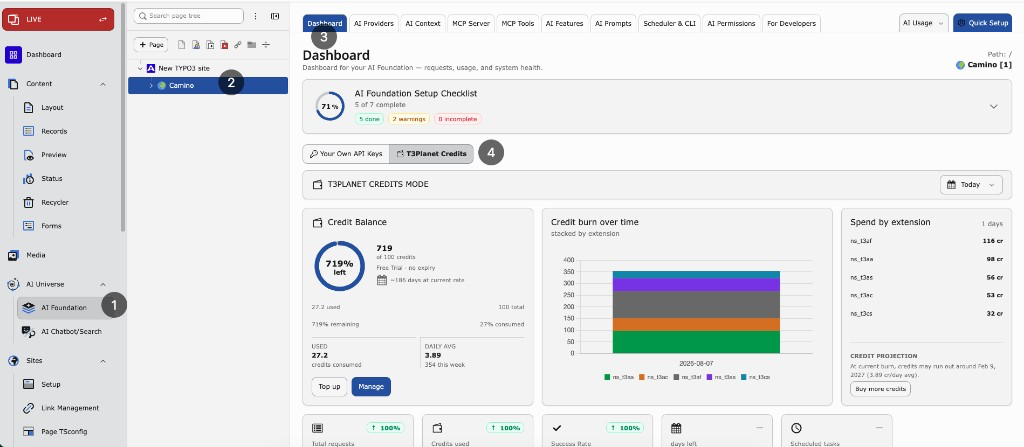
Credits Dashboard — remaining balance, credit burn over time, spend by extension, and period KPIs.
What it shows
- Credit balance — remaining credits from T3Planet
- Usage charts — credit use and requests for the selected period
- KPI cards — requests, tokens, credits used, success rate
- Recent requests — the latest AI requests from the local request log for the current period filter (not a fixed “last hour” window). See AI Usage below for the full filterable history.
Tip
Remaining balance comes from T3Planet. Local charts and recent requests come from the request log. They are related, but not always identical.
Period filter
Use Today, Yesterday, 7 / 14 / 30 days, or a custom range. Charts, KPIs, and the recent-requests list follow this filter.
AI Usage
Path: AI Foundation > AI Usage
Use AI Usage to confirm that AI calls ran through T3Planet Credits and to inspect individual requests.
What to look for
For Credits traffic, the provider value is:
t3planet_credits
Column glossary
- Module / extension — which product triggered the call (for example T3 AI, AI Search, AI Chatbot)
- Model — model used for that request
- Tokens — input and output token count
- Credits — credits charged for a successful Credits request
- Status — success or error for that call
- Provider —
t3planet_creditswhen Credits handled the request; otherwise your own API provider id
Filter and search
In AI Usage, narrow the log by:
- Date range — same period idea as the Dashboard (today, last N days, or custom)
- Provider — filter to
t3planet_creditsto see only Credits traffic - Status — success vs failed/error rows
- Module / extension — when you need traffic from one product only
Use these filters when the recent list on the Dashboard is not enough.
How to verify Credits
- Activate Credits.
- Run one AI action that uses AI Foundation — for example, generate a meta description in T3 AI.
- Open AI Usage.
- Filter by provider
t3planet_credits(or scan the latest rows). - Confirm a new row for that action.
From Dashboard, open a recent request or go to AI Usage when you need filters, older history, or failed-request details.