
Developer's Guide
This chapter covers the technical aspects of integrating the Focal Point Editor in your TYPO3 templates and custom extensions.
Namespace
The extension uses the namespace:
Nng\NnfocalpointViewHelpers
The extension provides two ViewHelpers for easy frontend integration.
Registering the Namespace
Add the namespace to your Fluid templates:
{namespace nnfocalpoint=Nng\Nnfocalpoint\ViewHelpers}Or use the XML namespace syntax:
<html xmlns:nnfocalpoint="http://typo3.org/ns/Nng/Nnfocalpoint/ViewHelpers"
data-namespace-typo3-fluid="true">ObjectPositionViewHelper
Returns a CSS object-position value based on the focal point coordinates.
Class: Nng\Nnfocalpoint\ViewHelpers\ObjectPositionViewHelper
Arguments:
| Argument | Type | Required | Description |
|---|---|---|---|
| fileReference | mixed | Yes | The file reference object or array |
| cropVariant | string | No | The crop variant to get the focal point for (default: default) |
| fallback | string | No | Fallback value if no focal point is set (default: 50% 50%) |
Usage:
<img src="{image.publicUrl}"
style="object-fit: cover; object-position: {nnfocalpoint:objectPosition(fileReference: image, cropVariant: 'default')}" />Output:
<img src="/fileadmin/image.jpg"
style="object-fit: cover; object-position: 50% 30%" />With fallback:
<img src="{image.publicUrl}"
style="object-fit: cover; object-position: {nnfocalpoint:objectPosition(fileReference: image, fallback: 'center top')}" />FocalPointViewHelper
Returns the raw focal point data for a specific crop variant.
Class: Nng\Nnfocalpoint\ViewHelpers\FocalPointViewHelper
Arguments:
| Argument | Type | Required | Description |
|---|---|---|---|
| fileReference | mixed | Yes | The file reference object or array |
| cropVariant | string | No | The crop variant to get the focal point for (default: default) |
| as | string | No | Variable name to assign the focal point to |
Usage (inline):
<f:debug>{nnfocalpoint:focalPoint(fileReference: image, cropVariant: 'default')}</f:debug>Usage (with variable):
<nnfocalpoint:focalPoint fileReference="{image}" cropVariant="default" as="fp">
    <f:if condition="{fp}">
        <p>Focal point: {fp.x} / {fp.y}</p>
        <div style="position: absolute; left: {fp.x * 100}%; top: {fp.y * 100}%;"></div>
    </f:if>
</nnfocalpoint:focalPoint>Return value:
Returns an array with x and y keys (values 0-1), or null if no focal
point is set:
['x' => 0.5, 'y' => 0.3]Data Format
Focal points are stored in the sys_file_reference.tx_nnfocalpoint_points field
as a JSON string:
{
  "default": {"x": 0.5, "y": 0.3},
  "landscape": {"x": 0.9, "y": 0.712},
  "portrait": {"x": 0.2, "y": 0.5}
}Coordinate System:
x: 0= left edgex: 1= right edgey: 0= top edgey: 1= bottom edgex: 0.5, y: 0.5= center of the image
Accessing Focal Points in PHP
From FileReference Object
use TYPO3\CMS\Core\Resource\FileReference;

/** @var FileReference $fileReference */
$focalPointsJson = $fileReference->getProperty('tx_nnfocalpoint_points');
$focalPoints = json_decode($focalPointsJson, true) ?: [];

// Get focal point for a specific variant
$defaultFocalPoint = $focalPoints['default'] ?? null;
if ($defaultFocalPoint) {
    $x = $defaultFocalPoint['x'];
    $y = $defaultFocalPoint['y'];
}From Extbase FileReference
use TYPO3\CMS\Extbase\Domain\Model\FileReference;

/** @var FileReference $fileReference */
$originalResource = $fileReference->getOriginalResource();
$focalPointsJson = $originalResource->getProperty('tx_nnfocalpoint_points');
$focalPoints = json_decode($focalPointsJson, true) ?: [];Custom Integration Examples
The following examples show how to use the focal point data in your templates. The result ensures that the important part of the image remains visible when the container is scaled or cropped.
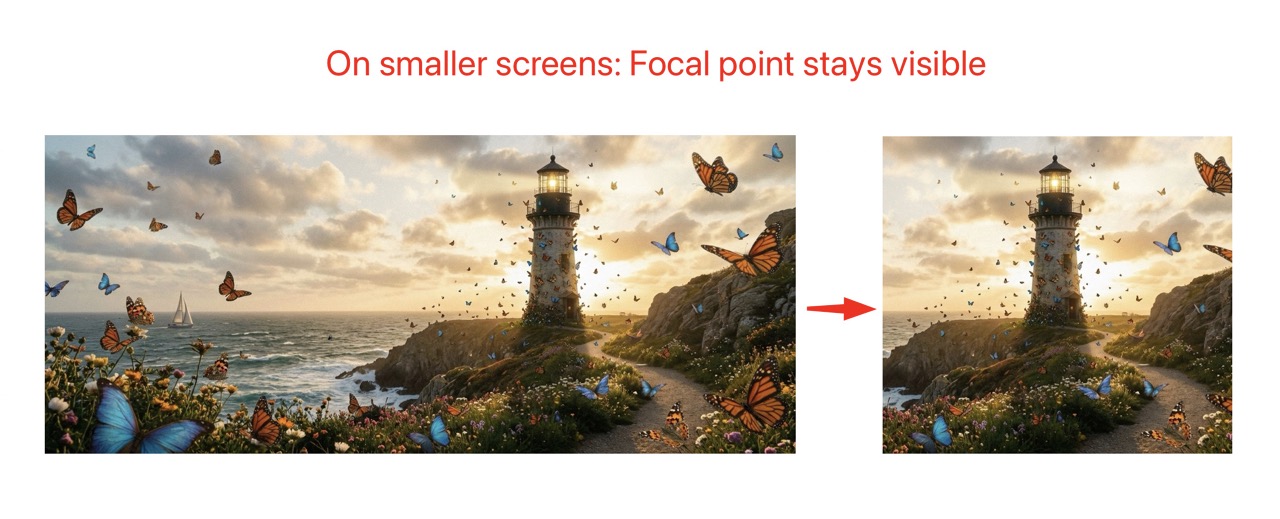
Using object-position with the focal point coordinates keeps the subject
visible regardless of container dimensions.
Responsive Images with Picture Element
<picture>
    <source media="(max-width: 768px)"
            srcset="{f:uri.image(image: image, cropVariant: 'mobile', width: '768c')}" />
    <source media="(min-width: 769px)"
            srcset="{f:uri.image(image: image, cropVariant: 'default', width: '1920c')}" />
    <img src="{f:uri.image(image: image, cropVariant: 'default', width: '1920c')}"
         alt="{image.alternative}"
         style="object-fit: cover; object-position: {nnfocalpoint:objectPosition(fileReference: image, cropVariant: 'default')}" />
</picture>Background Image with Focal Point
<nnfocalpoint:focalPoint fileReference="{image}" cropVariant="hero" as="fp">
    <f:variable name="bgPosition" value="{f:if(condition: fp, then: '{fp.x * 100}% {fp.y * 100}%', else: 'center center')}" />
</nnfocalpoint:focalPoint>

<div class="hero"
     style="background-image: url('{image.publicUrl}'); background-position: {bgPosition};">
</div>Data Attributes for JavaScript
<nnfocalpoint:focalPoint fileReference="{image}" cropVariant="default" as="fp">
    <img src="{image.publicUrl}"
         data-focal-x="{fp.x}"
         data-focal-y="{fp.y}"
         class="js-focal-image" />
</nnfocalpoint:focalPoint>Extending the Extension
Custom Form Element
The focal point form element is registered in ext_localconf.php:
$GLOBALS['TYPO3_CONF_VARS']['SYS']['formEngine']['nodeRegistry'][1702100000] = [
    'nodeName' => 'focalPointElement',
    'priority' => 40,
    'class' => \Nng\Nnfocalpoint\Form\Element\FocalPointElement::class,
];You can create a custom form element by extending FocalPointElement and
registering it with a higher priority.
Custom ViewHelper
Create custom ViewHelpers by extending the existing ones:
namespace YourVendor\YourExtension\ViewHelpers;

use Nng\Nnfocalpoint\ViewHelpers\ObjectPositionViewHelper;

class CustomObjectPositionViewHelper extends ObjectPositionViewHelper
{
    public function render(): string
    {
        $position = parent::render();
        // Add custom logic
        return $position;
    }
}API Reference
FocalPointController
Class: Nng\Nnfocalpoint\Controller\FocalPointController
Handles AJAX requests for the backend modal.
Methods:
wizardAction(ServerRequestInterface $request): ResponseInterface- Returns JSON data for the focal point wizard modal, including image URL, dimensions, crop variants, and existing focal points.
imageAction(ServerRequestInterface $request): ResponseInterface- Returns image data for a specific crop variant.
FocalPointElement
Class: Nng\Nnfocalpoint\Form\Element\FocalPointElement
Custom FormEngine element that renders the focal point button and hidden input.
Extends: TYPO3\CMS\Backend\Form\Element\AbstractFormElement
ObjectPositionViewHelper
Class: Nng\Nnfocalpoint\ViewHelpers\ObjectPositionViewHelper
Extends: TYPO3Fluid\Fluid\Core\ViewHelper\AbstractViewHelper
Methods:
render(): string- Returns CSS object-position value (e.g., "50% 30%")
FocalPointViewHelper
Class: Nng\Nnfocalpoint\ViewHelpers\FocalPointViewHelper
Extends: TYPO3Fluid\Fluid\Core\ViewHelper\AbstractViewHelper
Methods:
render(): mixed- Returns focal point array or renders children with focal point variable