
For Editors
The extension provides two content elements, both available in the Special Elements group of the TYPO3 content element wizard.
Note
Both widgets are only visible on the frontend when the administrator has enabled Load Scripts in Site > Rek.ai and provided a valid Script URL. If neither condition is met, the content elements render nothing.
The "Rek.ai Recommendations" Content Element
The Rek.ai Recommendations content element (internal CType: rekai_recommendations) renders
a personalised content recommendations widget. Add it to any page column using the standard TYPO3
content element wizard.
Content Element Tabs
General (tab)
The standard TYPO3 general tab. The Header field (if shown) is part of the default TYPO3 header palette and is independent of the Rek.ai widget header described below.
Display (tab)
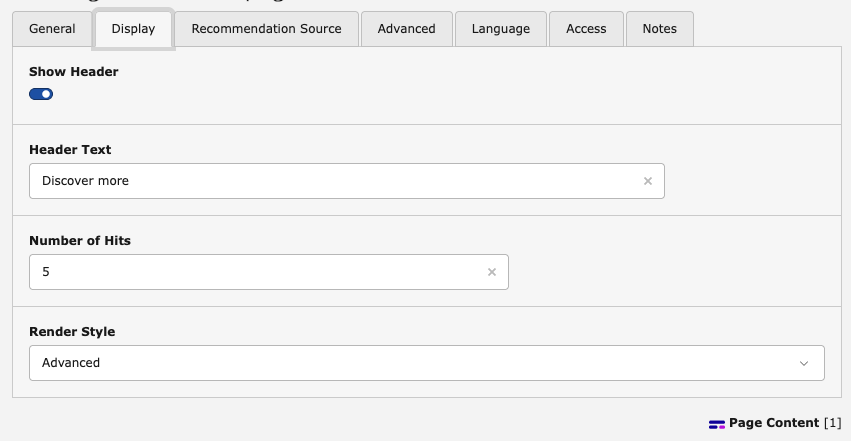
Display settings for the recommendations widget.
- Show Header
- Toggle (on by default). When enabled, the widget displays a header above the recommendations list.
- Header Text
- (only visible when Show Header is on)
The text displayed as a header above the recommendations. Defaults to
Discover more. - Number of Hits
- How many recommendation links the widget should display. Accepts a value between 1 and 20. Default: 5.
- Hit Title Max Length
- Maximum number of characters rendered for each recommendation link title. Accepts a value
between 1 and 99. Default: 20. Maps to the
data-titlemaxlengthattribute. - Render Style
-
Controls the visual layout of the recommendations:
- Pills
- Displays recommendations as pill-shaped badges (default).
- List
- Displays recommendations as a multi-column list. The number of columns is controlled by Number of Columns (see below).
- Advanced
- Uses Rek.ai's advanced rendering mode. Refer to the Rek.ai documentation for details.
- Number of Columns
- (only visible when Render Style is set to List ) Number of columns in the list layout. Accepts a value between 1 and 6. Default: 2.
Recommendation Source (tab)
These settings control which pages Rek.ai considers as recommendation candidates.
- Recommendation Source
-
Defines the scope of pages passed to Rek.ai:
- Current page (default)
- No explicit root path is set; Rek.ai uses its own default scope.
- Use only subpages of the current page
- Limits recommendations to the direct or indirect children of the current page
(
data-userootpath="true"). - Use subpages from a specific level
- Limits recommendations to subpages starting from a specific page tree level
(
data-userootpath="true"+data-rootpathlevel). The Root Path Level and Select Subtree Pages fields appear when this option is selected.
- Root Path Level
- (only visible when Recommendation Source is set to Use subpages from a specific level ) The tree level (1–10) from which subpages are used as the recommendation pool.
- Select Subtree Pages
- (only visible when Recommendation Source is set to Use subpages from a specific level )
Optional multi-page selector. When pages are selected, their URL slugs are passed to Rek.ai
as a
data-subtreeattribute (comma-separated), further narrowing the subtree scope. - Exclude child nodes of the starting point
- When enabled, only the pages directly at the root path level are included; their children are excluded.
Advanced (tab)
- Extra Attributes
-
Arbitrary HTML data attributes added verbatim to the
<div class="rek-prediction">element. Use this to pass custom configuration to the Rek.ai script that is not covered by the standard fields.Example value:
data-foo="bar" data-baz="qux"Warning
The value of this field is output without HTML escaping (
f:format.raw). Only enter trusted values here.
Resulting HTML
Based on the editor settings, the extension renders a <div> element with data-* attributes
that the Rek.ai script reads to configure the widget. For example:
<div class="rek-prediction"
     data-headertext="You might also like"
     data-nrofhits="4"
     data-renderstyle="list"
     data-listcols="3"
     data-userootpath="true"
     data-rootpathlevel="2">
</div>With Use specific pages selected:
<div class="rek-prediction"
     data-nrofhits="5"
     data-renderstyle="pills"
     data-subtree="/news/,/blog/articles/">
</div>The "Rek.ai Questions and Answers" Content Element
The Rek.ai Questions and Answers content element (internal CType: rekai_qna) renders a
Rek.ai Q&A widget that displays relevant questions and answers sourced from your content. Add it
to any page column using the standard TYPO3 content element wizard.
Content Element Tabs
General (tab)
The standard TYPO3 general tab.
Options (tab)
- Show Header
- Toggle (on by default). When enabled, the widget displays a header above the Q&A list.
- Header Text
- (only visible when Show Header is on)
The text displayed as a header above the Q&A widget. Defaults to
Discover more. - Number of Hits
- How many Q&A items to display. Use 0 for no limit. Default: 0.
- Branch Mode
-
Controls which pages are used as the Q&A source:
- None (default)
- No branch restriction; Rek.ai uses its own default scope.
- Current branch
- Restricts Q&A results to the branch of the current page (equivalent to
data-userootpath="true"). - Specific pages
- Allows selecting one or more pages directly. Requires the Specific pages field.
The selected pages' URL slugs are passed as
data-subtree. - Current page only
- Returns only questions whose answer is on the current page (
data-currentpagequestions="true").
- Specific Pages
- (only visible when Branch Mode is set to Specific pages )
A multi-page selector. The selected pages' URL slugs are passed to Rek.ai as a
data-subtreeattribute (comma-separated). - Tags
- Optional comma-separated list of tags. Only Q&A items that match at least one of the specified tags are shown.
- Hide link to answer page if same page
- When enabled, the link to the answer page is hidden if the answer is located on the page where the widget is placed.
- Hide link to answer page
- When enabled, no link to the answer page is rendered regardless of whether it is the current page.
- Disable highlighting
- When enabled, Rek.ai's keyword highlighting in answers is turned off.
Advanced (tab)
- Extra Attributes
-
Arbitrary HTML data attributes added verbatim to the
<div class="rek-prediction" data-entitytype="rekai-qna">element. Use this to pass custom configuration to the Rek.ai script that is not covered by the standard fields.Example value:
data-foo="bar" data-baz="qux"Warning
The value of this field is output without HTML escaping (
f:format.raw). Only enter trusted values here.
Resulting HTML
The extension renders a <div> element with the data-entitytype="rekai-qna" attribute so
that the Rek.ai script identifies it as a Q&A widget. For example:
<div class="rek-prediction"
     data-entitytype="rekai-qna"
     data-headertext="Related Questions"
     data-nrofhits="10"
     data-userootpath="true">
</div>With Specific pages selected and tag filtering:
<div class="rek-prediction"
     data-entitytype="rekai-qna"
     data-subtree="/faq/,/support/"
     data-tags="returns,shipping"
     data-foo="bar">
</div>