Quicko - Der Clubmanager 

Extension key

clubmanager

Package name

quicko/clubmanager

Version

1.2

Language

en

Author

WirkWerk & codemacher

License

This document is published under the Creative Commons BY 4.0 license.

Rendered

Tue, 28 Oct 2025 13:14:50 +0000

Keywords

member, management, organization, association, federation, club, quicko

Copyright

2022

Email

post@quicko.software

TYPO3

The content of this document is related to TYPO3 CMS, a GNU/GPL CMS/Framework available from typo3.org .

It is maintained as part of this third party extension.

If you find an error or something is missing, please: Report a Problem

Extension Manual

This documentation is for the TYPO3 extension 'clubmanager'.

Extension short description

This extension implements a member management system with multiple frontend listings for clubs and associations based on Extbase & Fluid and uses the latest technologies provided by TYPO3 CMS. The functions can be customized individually for your club through many other professional extensions. More information: Quicko.software.


Table of Contents:
Introduction 

This chapter gives you a basic introduction about the TYPO3 CMS ext:clubmanager.

What does it do? 

The ext:clubmanager extension is the basis for managing clubs or associations with TYPO3.

Main features 

  • Members incl. their location management via the list module, i.e. each member can be assigned several locations.
  • Freely selectable categorization of members and their locations possible, e.g. as board members or certificate holders via TYPO3 categories.
  • Highlighting of members by their membership type (e.g. Basic, Gold, Silver, Bronze)
  • Frontend lists, respectively registers incl. extended single view
  • Frontend output as member list, location list or by locations per city
  • Automated frontend login generation for members (using felogin)
  • Automated e-mail dispatch incl. templates for frontend login data
  • Scheduler task for reminder of first frontend login
  • Service for monitoring e-mails sent by the system
  • Integrated 2-click solution for e.g. Google Maps and Youtube iFrames, extensible with ext:cookieman.
  • Dummy member data creation for testing is possible via Upgrade Wizard Task.

The free version of "Quicko - The Clubmanager" can be extended for professional applications: Addons

Screenshots 

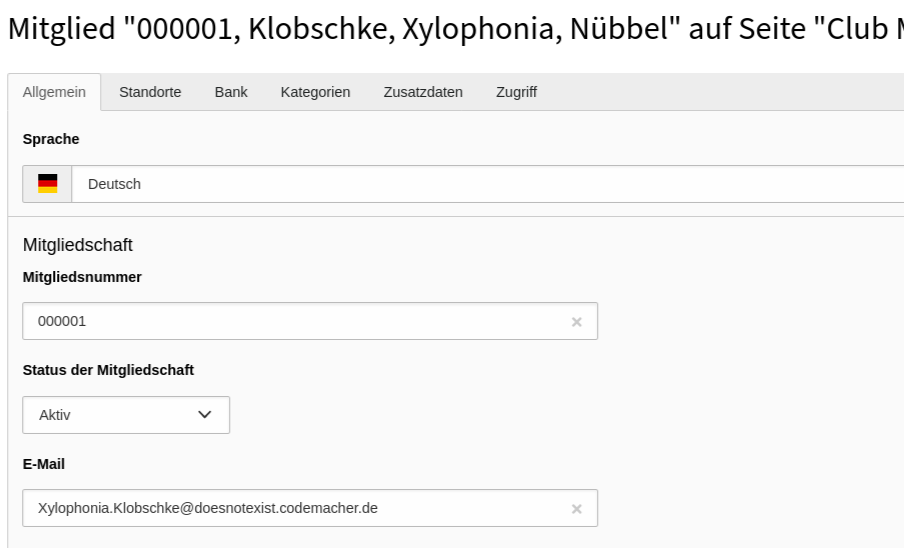
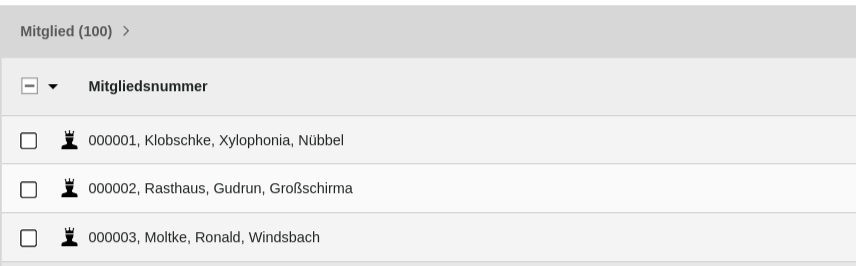
List of members 

List view of members

Members in the "List" view.

Member Details 

Detail view of members

Member in the "Detail" view.

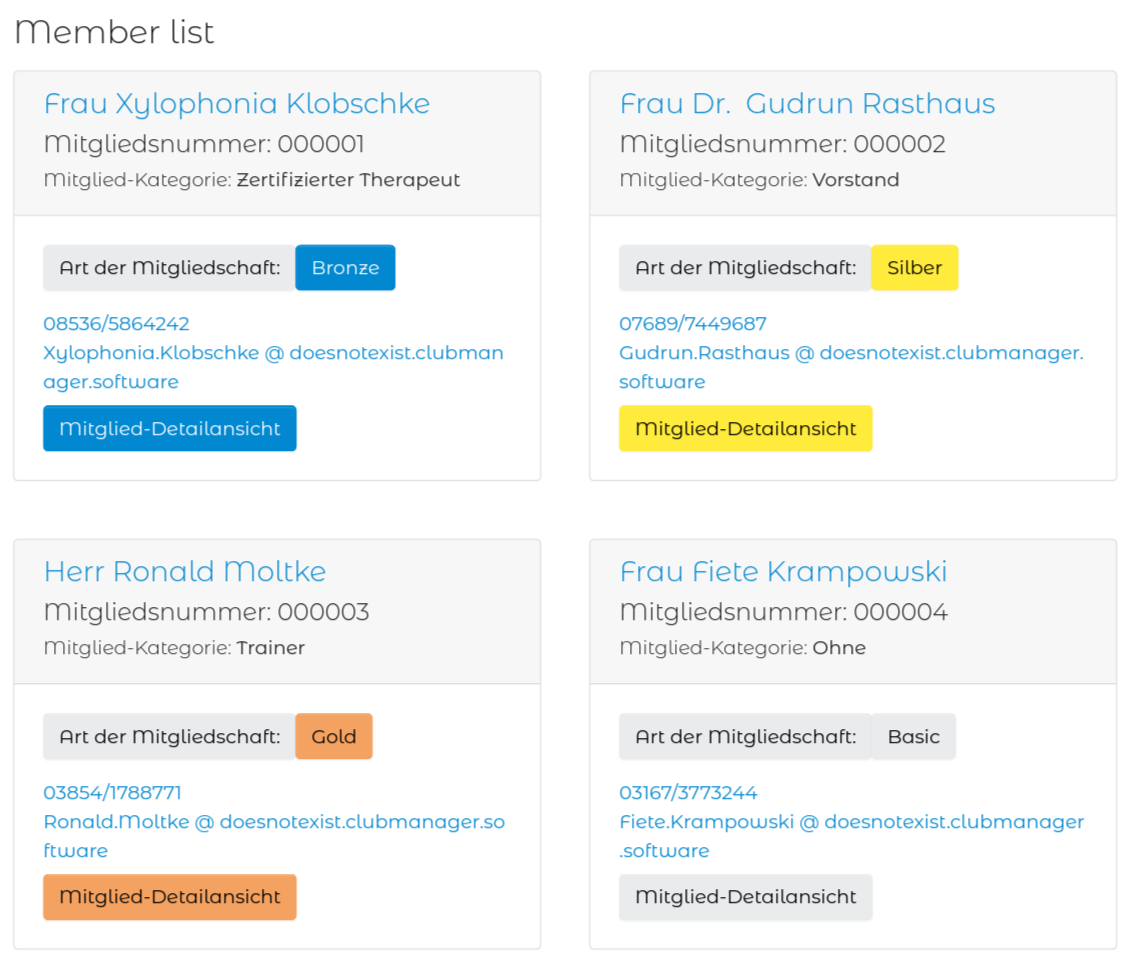
Frontend member list 

List view of members in frontend

Frontend register view of all members

Need Support? 

If you need private or personal support, ask one of the developers at https://quicko.software for it.

Be aware that this support may not be free of charge!

Quick installation 

In a composer-based TYPO3 installation you can install the extension EXT:clubmanager via composer:

composer require quicko/clubmanager
Copied!

In TYPO3 installations above version 11.5 the extension will be automatically installed. You do not have to activate it manually.

If you have a legacy installation without composer, you can download and install it via the "Extensionmanager"

Update the database scheme 

Open your TYPO3 backend with t3start:system-maintainer permissions.

In the module menu to the left navigate to Admin Tools > Maintanance, then click on Analyze database and create all.

Clear all caches 

In the same module Admin Tools > Maintanance you can also conveniently clear all caches by clicking the button Flush cache.

Quick configuration 

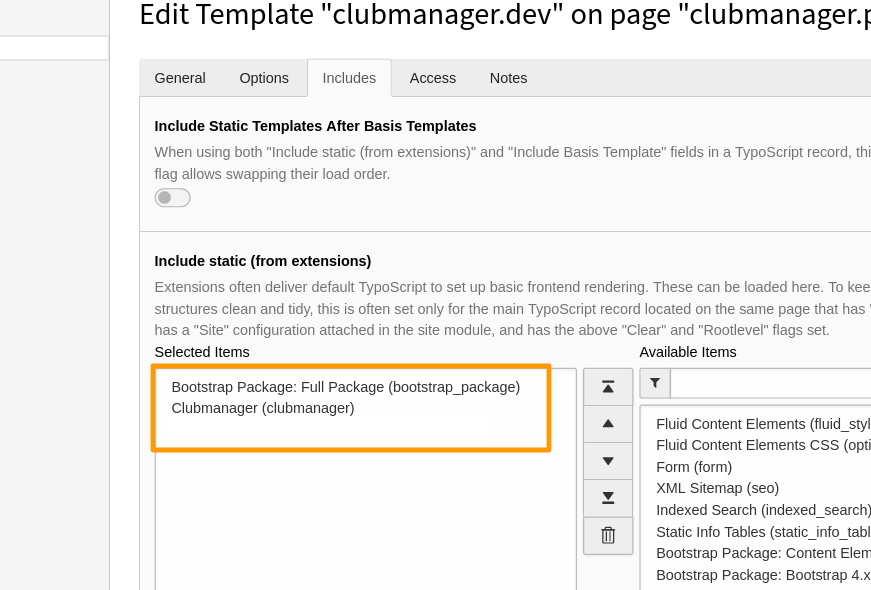
Include TypoScript template 

It is necessary to include at least the basic TypoScript provided by this extension.

  1. Go to module Web > Template and chose your root page. It should already contain a TypoScript template record.
  2. Switch to view Info/Modify and click on Edit the whole template record.
  3. Switch to tab Includes and add the following templates from the list to the right: Clubmanager (clubmanager).
Include static Typoscript

Include at least Clubmanager (clubmanager) Typoscript

Read more about possible configurations via TypoScript in the Configuration section.

Further reading 

Create some initial content 

Create member records 

Before any member record can be shown in the frontend those need to be created.

  1. Go to the module Web > List
  2. Go to the "Member Storage" folder that you created in the first step.
  3. Use the + icon in the topbar Create new record.
  4. Then use the New record icon Clubmanager > Member.
  5. Fill out all desired fields and click Save.
Create new member with web > list module

Create new member with Web > List module

More information about this record can be found here: member record.

Create member and location categories 

Categories are not mandatory but make it easier to structure member and location records. If you want to make use of special categories for your members and their locations have a look at the category record.

Add plugins: display members in the frontend 

Plugins are used to render a defined selection of member records in the frontend.

Follow these steps to add a plugin respectively for list and detail views to a page:

Member/Location list page 

While there are own templates for different listings, creating pages with these listings is the same for all list views (Member/Location/Cities).

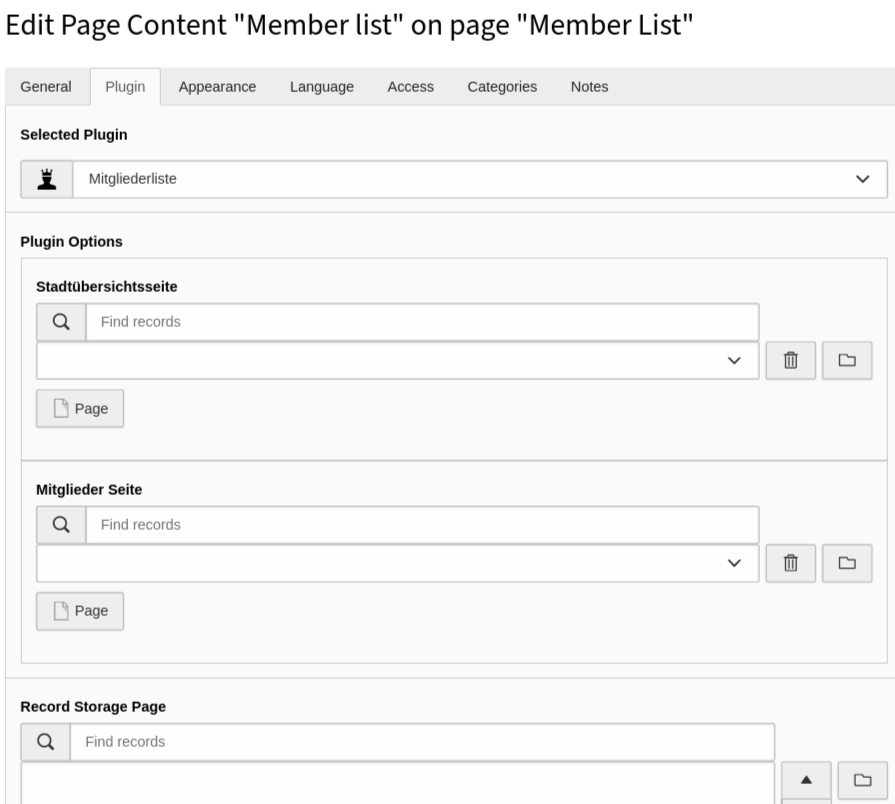
Create new plugin with web > page module

Create new plugin with Web > Page module

  1. Go to module Web > Page and to the previously created page "Member list".
  2. Add a new content element and select the entry, depending on your listing: Clubmanager > Member list.
  3. Switch to the tab Plugin where you can define the plugins settings.

    1. The selected view is already Member list.
    2. The settings here are normally set global with the Global extension configuration and TypoScript! You can overwrite the global setting by selecting another Record Storage Page you created in the beginning of the tutorial, or use this if you don't use the global setting.

      Change global settings with plugin options

      Change global settings with plugin options

    3. Save the plugin.

Member/Location detail page 

  1. Go to module Web > Page and to the previously created page "Member detail".
  2. Add a new content element and select the entry Plugins > Member single view.

Cities list page 

Although the inclusion of Clubmanager > City output is the same, as described in Member/Location list page, it has a different function. The plugin shows all cities where members have locations and thus enables a city filter. As a visitor you get additionally displayed how many hits there are per city.

Member per city page 

Again, the inclusion of the plugin is identical with Member/Location list page. This list is displayed when a frontend visitor comes over the Cities list page and has its own fluid template.

Read more about the plugin configuration in chapter plugin.

Have a look at the frontend 

Load the "Member list". "Location list" or "Cities list" page in the frontend and you should now see the member records, location records or cities filter as output. A click on the name or the detail-button should show the record on the detail page. You want to change the way the records are displayed? Have a look at the chapter Templating

Create placeholder data 

WARNING 

Run upgrade wizard 

  • You must have admin rights.
  • Go to Admin Tools > Upgrade.
  • Click Run Upgrade Wizard
  • Click on Execute in the wizard Create member placeholder data for clubmanager extension.
  • Click Yes to confirm that you understand that the data of some tables will be deleted and rewritten!
  • Click on Perform updates!

1000 member records with associated location and frontend user record were created. In addition, system categories were created for sorting of member and site records. The system categories will be created on the root page of your pagetree. You can transfer them afterwards to your "Sys Categories Storage".

Quick templating in Fluid 

EXT:clubmanager is using Fluid as templating engine. If you are not experienced with Fluid yet you can read more about it in the chapter Templates.

Copy the Fluid templates that you want to adjust to your sitepackage extension.

You find the original templates in EXT:clubmanager/Resources/Private/Templates/ and the partials in EXT:clubmanager/Resources/Private/Partials/.

To override the standard clubmanager templates with your own you can use the TypoScript constants to set the paths:

TypoScript constants
plugin.tx_clubmanager {
   view {
      templateRootPath = EXT:mysitepackage/Resources/Private/Extensions/Clubmanager/Templates/
      partialRootPath = EXT:mysitepackage/Resources/Private/Extensions/Clubmanager/Partials/
      layoutRootPath = EXT:mysitepackage/Resources/Private/Extensions/Clubmanager/Layouts/
   }
   mailView {
      templateRootPath = EXT:mysitepackage/Resources/Private/Extensions/Clubmanager/Templates/Email
      partialRootPath = EXT:mysitepackage/Resources/Private/Extensions/Clubmanager/Partials/Email
      layoutRootPath = EXT:mysitepackage/Resources/Private/Extensions/Clubmanager/Layouts/Email
   }
}
Copied!

Add these lines to the file EXT:mysitepackage/Configuration/TypoScript/constants.typoscript in your sitepackage.

Of course all ViewHelpers provided by TYPO3 can be used.

Extension Configuration 

Some general settings can be configured in the Extension Configuration.

  1. Go to Admin Tools > Settings > Extension Configuration
  2. Choose clubmanager

The settings are divided into several tabs and described here in detail:

Properties

Basic 

UID of the default storage page for members storagePid 

storagePid

storagePid
type

int

Default

Define the parent folder for member records. Important if you want to generate placeholder data with Upgrade wizard. See Create placeholder data for details.

UID of category parent for member uidCategoryMember 

uidCategoryMember

uidCategoryMember
type

int

Default

Define the parent category for member categories

UID of category parent for location uidCategoryLocation 

uidCategoryLocation

uidCategoryLocation
type

int

Default

Define the parent category for location categories

UID of the default city detail page defaultDetailCityPage 

defaultDetailCityPage

defaultDetailCityPage
type

int

Default

Define the default city detail page

UID of the default member detail page defaultDetailMemberPage 

defaultDetailMemberPage

defaultDetailMemberPage
type

int

Default

Define the default member detail page

UID of the default location detail page defaultDetailLocationPage 

defaultDetailLocationPage

defaultDetailLocationPage
type

int

Default

Define the default location detail page

Fe-user-login 

UID of the Default fe_users storage page feUsersStoragePid 

feUsersStoragePid

feUsersStoragePid
type

int

Default

Define the storage folder where fe_users are automatically stored

UID of the default UserGroup for FE Users defaultFeUserGroupUid 

defaultFeUserGroupUid

defaultFeUserGroupUid
type

int

Default

Define the default UserGroup for FE Users in Member records

UID of the Default fe_users login page feUsersLoginPid 

feUsersLoginPid

feUsersLoginPid
type

int

Default

Define the default fe_users login page where users are directed to via e-mail link. Can be overwritten by TypoScript feUsersLoginPid!

UID of the default target page after logout defaultTargetLogoutPage 

defaultTargetLogoutPage

defaultTargetLogoutPage
type

int

Default

Define the default target page after logout from frontend login

Mail 

Number of attempts for a mail delivery mailTries 

mailTries

mailTries
type

int

Default

6

Define how often a mail delivery via System > Scheduler-Task is tried, when it failed before. See section Mail service task for more information.

TypoScript reference 

Properties

General setup 

Set this in your EXT:mysitepackage/Configuration/TypoScript/setup.typoscript

Change your theme css 

Set your own CSS-theme by changing page.includeCSS.theme
page {
 includeCSS {
  theme = EXT:clubmanager/Resources/Public/Scss/Theme/Theme.scss
 }
}
Copied!

General constants 

Set this in your EXT:mysitepackage/Configuration/TypoScript/constants.typoscript

Persistence storage folder storagePid 

storagePid

storagePid
type

int

Default
Path

plugin.tx_clubmanager.persistence

Scope

Plugin, TypoScript Setup

Define the storage folder pid for your member data

plugin.tx_clubmanager.persistence.storagePid = 887366
Copied!

Settings 

It is possible to overwrite existing Extension Configuration with this typoscript settings.

Frontend users login pid feUsersLoginPid 

feUsersLoginPid

feUsersLoginPid
type

int

Default
Path

plugin.tx_clubmanager.settings

Scope

Plugin, TypoScript Setup

Define the default fe_users login page where users are directed to via e-mail link. Overwrites Extension Configuration feUsersLoginPid!

plugin.tx_clubmanager.settings.feUsersLoginPid = 458788
Copied!

TSconfig reference 

You can change the backend forms for the records member & location with the following Page & User TSconfig

Important TSconfig

Clubmanager member record 

Change the User TSconfig to disable not needed fields in member records for your backend editors. Use Page TSconfig to remove not needed elements in dropdown-fields or to add some and to rename field labels.

In addition, the member record has five predefined fields that you can use for your individual data.

  • customfield1
  • customfield2
  • customfield3
  • customfield4
  • customfield5

User TSconfig 

page.TCEFORM.tx_clubmanager_domain_model_member {
    starttime.disabled = 0
    endtime.disabled = 0
    cancellationWish.disabled = 0
    reducedRate.disabled = 0
    state.disabled = 0
    feuser.disabled = 0
    directDebit.disabled = 0
    iban.disabled = 0
    bic.disabled = 0
    account.disabled = 0
    mainLocation.disabled = 0
    subLocations.disabled = 0
    altBillingName.disabled = 0
    altBillingStreet.disabled = 0
    altBillingZip.disabled = 0
    altBillingCity.disabled = 0
    altBillingCountry.disabled = 0
    ident.disabled = 0
    title.disabled = 0
    firstname.disabled = 0
    midname.disabled = 0
    lastname.disabled = 0
    zip.disabled = 0
    street.disabled = 0
    city.disabled = 0
    country.disabled = 0
    email.disabled = 0
    phone.disabled = 0
    company.disabled = 0
    personType.disabled = 0
    salutation.disabled = 0
    level.disabled = 0
    addAddressInfo.disabled = 0
    dateofbirth.disabled = 0
    categories.disabled = 0
}
Copied!

Page TSconfig 

TCEFORM {
    tx_clubmanager_domain_model_member {
        // Set this to 0 if your member categories have no subcategories.
        // 0,1 is useful when using the placeholder data.
        categories.config.treeConfig.appearance.nonSelectableLevels = 0,1

        salutation {
            removeItems =
            altLabels {
                default = LLL:EXT:your_sitepackage/Resources/Private/Language/locallang_db.xlf:tx_clubmanager_domain_model_member.salutation.default
            }
            addItems {
                divers = LLL:EXT:your_sitepackage/Resources/Private/Language/locallang_db.xlf:tx_clubmanager_domain_model_member.salutation.divers
            }
        }
        customfield1 {
            label = LLL:EXT:your_sitepackage/Resources/Private/Language/locallang_db.xlf:tx_clubmanager_domain_model_member.customfield1.default
        }
    }
}
Copied!

Clubmanager location record 

Change the User TSconfig to disable not needed fields in location records for your backend editors. Use Page TSconfig to remove not needed elements in dropdown-fields or to add some and to rename field labels.

User TSconfig 

page.TCEFORM.tx_clubmanager_domain_model_location {
    salutation.disabled = 0
    title.disabled = 0
    firstname.disabled = 0
    midname.disabled = 0
    lastname.disabled = 0
    company.disabled = 0
    street.disabled = 0
    addAddressInfo.disabled = 0
    zip.disabled = 0
    city.disabled = 0
    state.disabled = 0
    country.disabled = 0
    latitude.disabled = 0
    longitude.disabled = 0
    image.disabled = 0
    info.disabled = 0
    categories.disabled = 0
    phone.disabled = 0
    mobile.disabled = 0
    fax.disabled = 0
    email.disabled = 0
    website.disabled = 0
    socialmedia.disabled = 0
    youtubeVideoUrl.disabled = 0
}
Copied!

Page TSconfig 

TCEFORM {
    tx_clubmanager_domain_model_location {
        salutation {
            removeItems =
            altLabels {
                default = LLL:EXT:your_sitepackage/Resources/Private/Language/locallang_db.xlf:tx_clubmanager_domain_model_location.salutation.default
            }
            addItems {
                divers = LLL:EXT:your_sitepackage/Resources/Private/Language/locallang_db.xlf:tx_clubmanager_domain_model_location.salutation.divers
            }
        }
    }
}
Copied!

Use Routing to rewrite URLs 

This section will show you how you can rewrite the URLs for clubmanager detail views using Routing Enhancers and Aspects. TYPO3 Explained has an chapter Introduction to routing that you can read if you are not familiar with the concept yet. You will no longer need third party extensions like RealURL or CoolUri to rewrite and beautify your URLs.

How to rewrite URLs with clubmanager parameters 

On setting up your page you should already have created a site configuration. You can do this in the backend module Site Managements > Sites.

Your site configuration will be stored in /config/sites/<your_identifier>/config.yaml. The following configurations have to be applied to this file.

Any URL parameters can be rewritten with the Routing Enhancers and Aspects. These are added manually in the config.yaml:

  1. Add a section routeEnhancers, if one does not already exist.
  2. Choose an unique identifier for your Routing Enhancer. It doesn't have to match any extension key.
  3. type: For clubmanager, the Extbase Plugin Enhancer (Extbase) is used.
  4. extension: the extension key, converted to UpperCamelCase.
  5. plugin: the plugin name of clubmanager could be city, member or location.
  6. After that you will configure individual routes and aspects depending on your use case.
/config/sites/<your_identifier>/config.yaml
routeEnhancers:
  ClubmanagerCity:
    type: Extbase
    extension: Clubmanager
    limitToPages:
      - /*YOUR PIDS HERE */
    plugin: City
    routes:
      -
        routePath: '/{city}'
        _controller: 'Cities::detail'
        _arguments:
          city: city
    aspects:
      city:
      type: SanitizeValue
      tableName: tx_clubmanager_domain_model_location
      columnName: city
  ClubmanagerMember:
    type: Extbase
    extension: Clubmanager
    limitToPages:
      - /*YOUR PIDS HERE */
    plugin: Member
    routes:
      -
        routePath: '/{ident}'
        _controller: 'Member::detail'
        _arguments:
          ident: member
    aspects:
      ident:
        type: PersistedAliasMapper
        tableName: tx_clubmanager_domain_model_member
        routeFieldName: ident
  ClubmanagerMemberList:
    type: Extbase
    extension: Clubmanager
    limitToPages:
      - /*YOUR PIDS HERE */
    plugin: MemberList
    routes:
      -
        routePath: '/page/{currentPage}'
        _controller: 'Member::list'
        _arguments:
          currentPage: currentPage
    defaultController: 'Member::list'
    defaults:
      currentPage: ''
    aspects:
      currentPage:
        type: StaticRangeMapper
        start: '1'
        end: '100'
  ClubmanagerLocation:
    type: Extbase
    extension: Clubmanager
    plugin: Location
    routes:
      -
        routePath: '/{location}'
        _controller: 'Location::detail'
        _arguments:
          location: location
    aspects:
      location:
        type: PersistedAliasMapper
        tableName: tx_clubmanager_domain_model_location
        routeFieldName: slug
  ClubmanagerLocationList:
    type: Extbase
    extension: Clubmanager
    plugin: LocationList
    routes:
      -
        routePath: '/page/{currentPage}'
        _controller: 'Location::list'
        _arguments:
          currentPage: currentPage
    defaultController: 'Location::list'
    defaults:
      currentPage: ''
    aspects:
      currentPage:
        type: StaticRangeMapper
        start: '1'
        end: '100'
Copied!

Using limitToPages 

It is recommended to limit routeEnhancers to the pages where they are needed. This will speed up performance for building page routes of all other pages.

/config/sites/<your_identifier>/config.yaml
routeEnhancers:
  ClubmanagerCity:
    type: Extbase
    extension: Clubmanager
    limitToPages:
      - 20
      - 21
    plugin: City
    # routes and aspects will follow here
Copied!

About routes and aspects 

In a nutshell:

  • routes will extend an existing route
    (means: your domain and page path) with arguments from GET parameters, like the following controller/action pair of the location detail view.
  • aspects can be used to modify these arguments.
    You could for example map the ident of the current member or the slug (or better: the optimized slug) of the current location. Different types of Mappers and Modifiers are available, depending on the case.
  1. URL of location detail page without routing:
https://www.example.com/location-list/location-detail/?tx_clubmanager_member[action]=detail&tx_clubmanager_member[controller]=Member&tx_clubmanager_member[location]=1&cHash=
Copied!
  1. URL of location detail page with routes:
https://www.example.com/location-list/location-detail/1/?cHash=
Copied!
  1. URL of location detail page with routes and aspects:
https://www.example.com/location-list/location-detail/firstname-lastname-company-city/
Copied!

The following example will only provide routing for the location list and detail view:

/config/sites/<your_identifier>/config.yaml
routeEnhancers:
  ClubmanagerLocation:
    type: Extbase
    extension: Clubmanager
    plugin: Location
    routes:
      - routePath: '/{location}'
        _controller: 'Location::detail'
        _arguments:
          location: location
    aspects:
      location:
        type: PersistedAliasMapper
        tableName: tx_clubmanager_domain_model_location
        routeFieldName: slug
Copied!

Please note the placeholder {location} in routeEnhancer ClubmanagerLocation:

  1. First, you assign the value of the location parameter (tx_clubmanager[location]) in _arguments.
  2. Next, in routePath you add it to the existing route.
  3. Last, you use aspects to map the slug of the given argument.

Both routes and aspects are only available within the current Routing Enhancer.

The names of placeholders are freely selectable.

Common routeEnhancer configurations 

Basic setup (including Member, MemberList, Location, LocationList, Cities) 

Prerequisites:

The plugins for member List View, member Detail View, location List View, location Detail View, cities List View and members per city List View are on separate pages.

Result:

  • Member Detail view: https://www.example.com/member-list/member-detail/ident/
  • Pagination: https://www.example.com/member-list/page/2/
  • Location Detail view: https://www.example.com/location-list/location-detail/firstname-lastname-company-city/
  • Pagination: https://www.example.com/location-list/page/2/
  • Members per city List view: https://www.example.com/cities-list/members-per-city/city/
/config/sites/<your_identifier>/config.yaml
routeEnhancers:
  ClubmanagerCity:
    type: Extbase
    extension: Clubmanager
    limitToPages:
      - 90
      - 91
    plugin: City
    routes:
      -
        routePath: '/{city}'
        _controller: 'Cities::detail'
        _arguments:
          city: city
    aspects:
      city:
        type: SanitizeValue
        tableName: tx_clubmanager_domain_model_location
        columnName: city
  ClubmanagerMember:
    type: Extbase
    extension: Clubmanager
    plugin: Member
    routes:
      -
        routePath: '/{ident}'
        _controller: 'Member::detail'
        _arguments:
          ident: location
    aspects:
      ident:
        type: PersistedAliasMapper
        tableName: tx_clubmanager_domain_model_member
        routeFieldName: ident
  ClubmanagerMemberList:
    type: Extbase
    extension: Clubmanager
    plugin: MemberList
    routes:
      -
        routePath: '/page/{currentPage}'
        _controller: 'Member::list'
        _arguments:
          currentPage: currentPage
    defaultController: 'Member::list'
    defaults:
      currentPage: ''
    aspects:
      currentPage:
        type: StaticRangeMapper
        start: '1'
        end: '100'
  ClubmanagerLocation:
    type: Extbase
    extension: Clubmanager
    plugin: Location
    routes:
      - routePath: '/{location}'
        _controller: 'Location::detail'
        _arguments:
          location: location
    aspects:
      location:
        type: PersistedAliasMapper
        tableName: tx_clubmanager_domain_model_location
        routeFieldName: slug
  ClubmanagerLocationList:
    type: Extbase
    extension: Clubmanager
    plugin: LocationList
    routes:
      -
        routePath: '/page/{currentPage}'
        _controller: 'Location::list'
        _arguments:
          currentPage: currentPage
    defaultController: 'Location::list'
    defaults:
       currentPage: ''
    aspects:
       currentPage:
        type: StaticRangeMapper
        start: '1'
        end: '100'
Copied!

Localized pagination 

Not done yet

Scheduler tasks 

Scheduler tasks provided by ext:clubmanager

Mail service task 

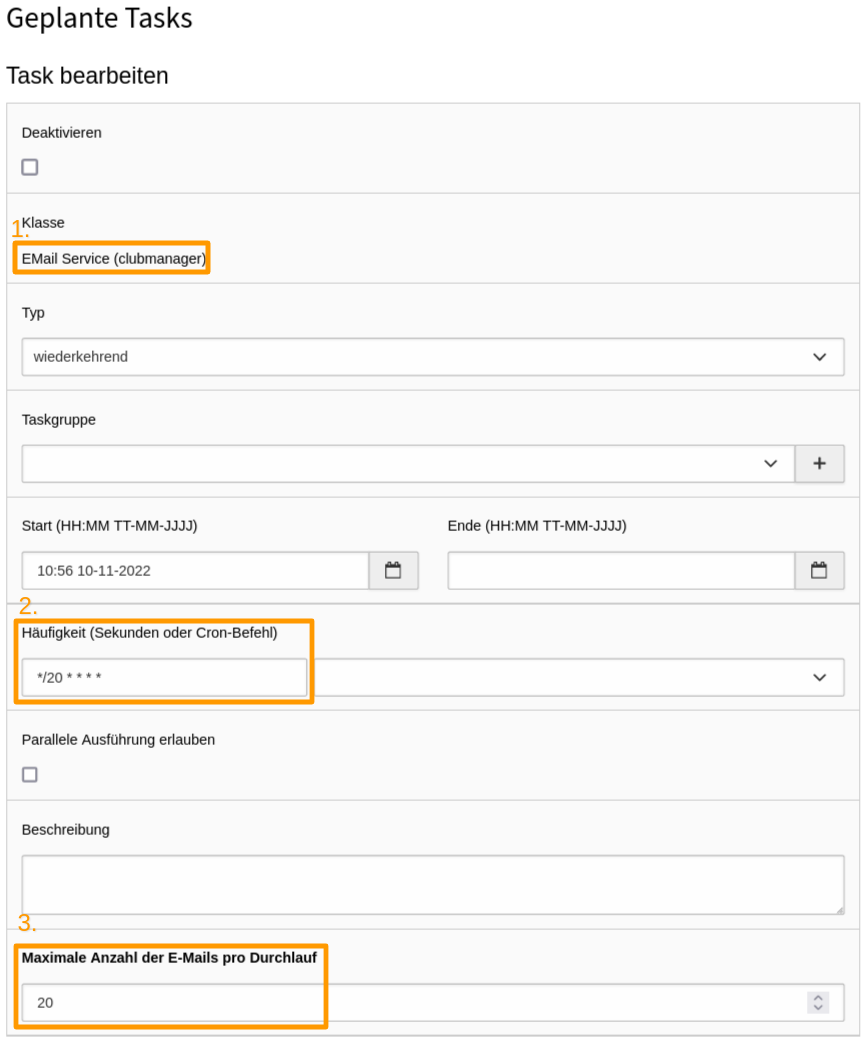
The ext:clubmanager automatically generates e-mails for certain actions. To send them automatically, the scheduler task EMail Service (clubmanager) must be set up and triggered in short intervals if possible.

  1. Go to the module System > Scheduler
  2. Use the + icon in the topbar Create new task
  3. Set dropdown Class to clubmanager > EMail Service (1.)
  4. Set task frequency (2.) to a short interval. */1 * * * * ensures that the task is executed every minute.
  5. Set Maximum number of emails per run (3.) to a number, which fits to the needs of your club. If the number of members is high, it makes sense to increase the Maximum number of emails per run.
  6. After you have filled in all required fields click Save.
Create new task `EMail Service (clubmanager)`

Create new task clubmanager > EMail Service

Member login reminder task 

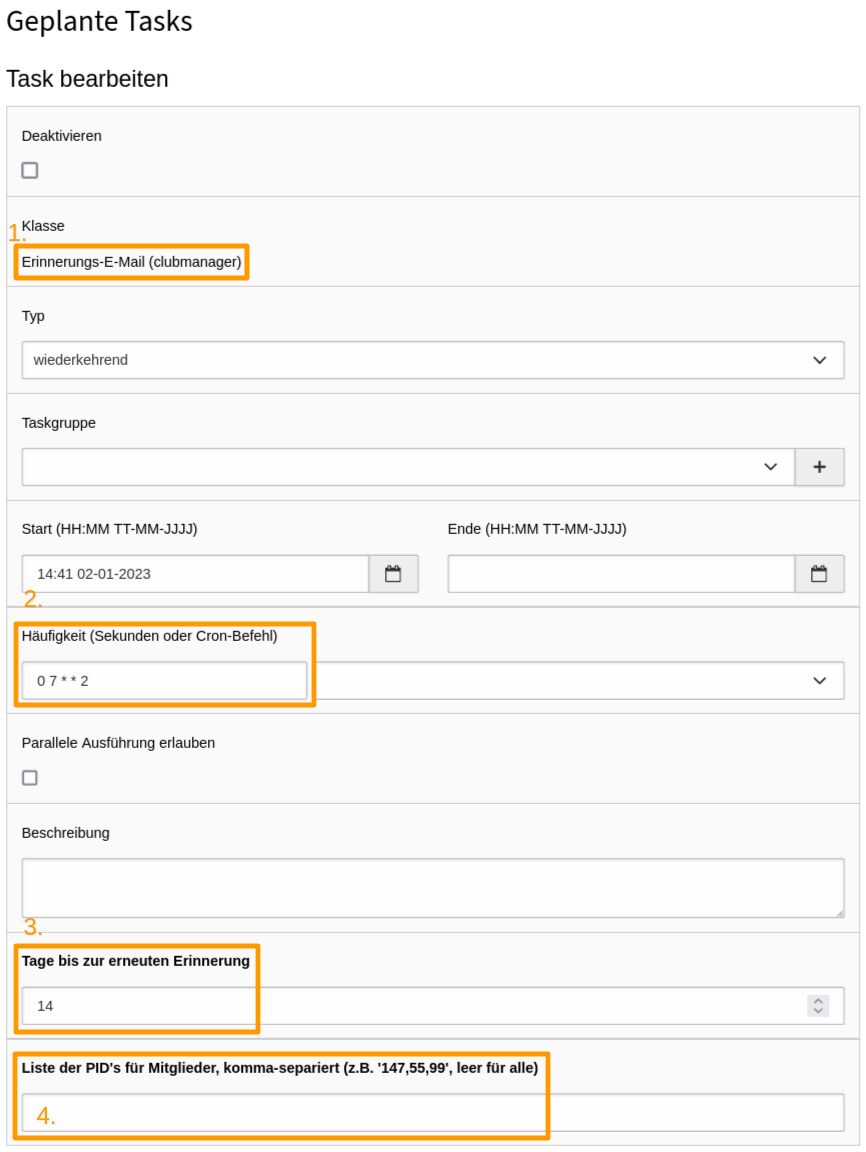
The basic version of ext:clubmanager provides the scheduler Task Reminder Email (clubmanager), which can be used by which members who have never logged in to the member area before get a reminder e-mail after a predefined interval to do so.

  1. Go to the module System > Scheduler
  2. Use the + icon in the topbar Create new task
  3. Set dropdown Class to clubmanager > Member login reminder (1.)
  4. Set task frequency (2.) to the shortest possible interval. 0 7 * * 2 ensures that the task is executed every tuesday at 7am.
  5. Set Days until reminder (3.) to a number of days, after which a member is to be reminded again. The lower the number of days, the higher the probability that a member will perceive the message as spam.
  6. Set List of PIDs for members, comma-separated (4.) if only members from certain folders should receive a reminder email. If the field is empty, all members who have never logged in will receive an email.
  7. After you have filled in all required fields click Save.
Create new task Reminder email (clubmanager)

Create new task clubmanager > Reminder email

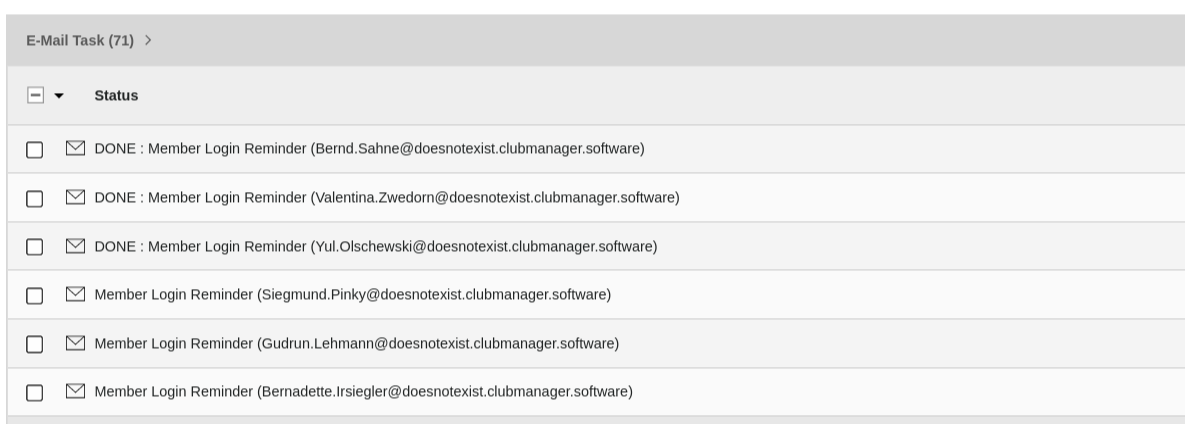
At the set time, the scheduler runs Task Reminder Email (clubmanager) and creates a new reminder email for all active(!) members who have never logged in before, a new Email Tasks Member Login Reminder. During the next automatic execution of the EMail Service scheduler task, all open Email Tasks will be processed one after the other.

Email task table with member login reminder emails

Email task table with Member Login Reminder emails

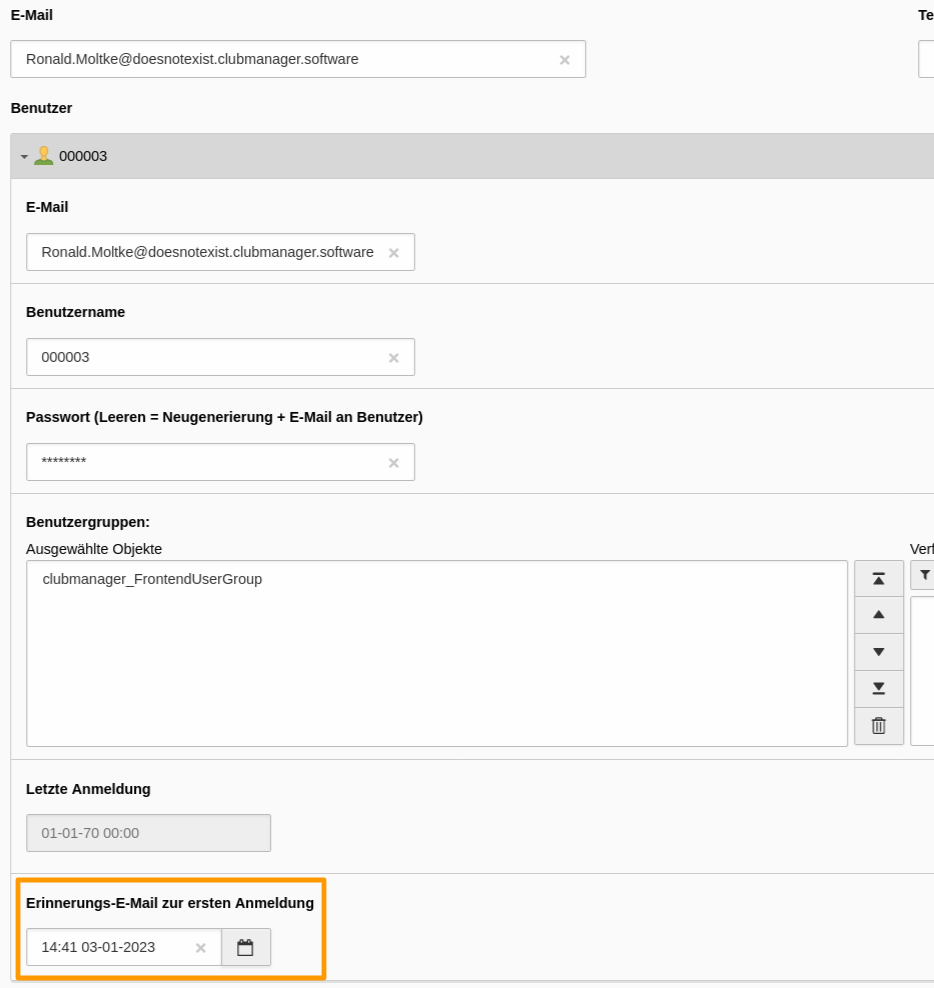
Timestamp for last reminder email for the first registration in frontend-user data

Timestamp for Reminder email for the first registration in frontend-user data

Config felogin 

Important steps

Felogin: Include static TypoScript template 

  1. Install ext:felogin
  2. Go to module Web > Template and chose your root page. It should already contain a TypoScript template record.
  3. Switch to view Info/Modify and click on Edit the whole template record.
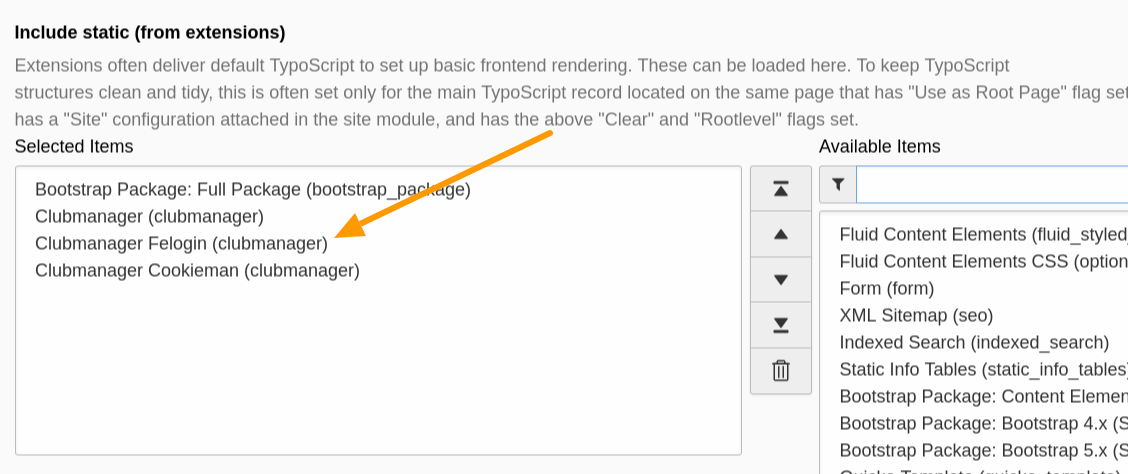
  4. Switch to tab Includes and add the following templates from the list to the right: Clubmanager Felogin (clubmanager).
Include static felogin typoscript

Include at least Clubmanager Felogin (clubmanager) typoscript

.. info::

Now you're ready to setup the pagetree, if not done yet, the default felogin usergroup and to configure some TypoScript!

Felogin pagetree 

Your page tree should look like that:

Home
├── ...
├── Login page
│  └── Restricted content
├── Logout target page
├── ...
└── Storage
   ├── ...
   ├── Frontend User
   └── ...
Copied!

Create default frontend user group 

  1. Go to the module Web > List
  2. Move to Storage > Frontend User in your pagetree.
  3. Click on + Create new record on top of the page.
  4. Click on Frontend Access > Website Usergroup.
  5. Fill in the Group Title and Save.

Important global configuration 

  1. Go to Admin Tools > Settings > Extension Configuration
  2. Choose clubmanager and then Tab Fe-user-login.
  3. Set the uid where your fe_users should be stored > feUsersStoragePid
  4. Set the uid of your default fe_users group > defaultFeUserGroupUid
  5. Set the uid of your default fe_users login page to generate the correct link send out by e-mail > feUsersLoginPid
  6. Set the uid of your default target page after logout > defaultTargetLogoutPage
  7. In case you want to change it, set also the lifetime of the password recovery links send out by e-mail > passwordRecoveryLifeTime
  8. In tab Mail set the number of attempts for a mail delivery.

Felogin TypoScript 

Change the following TypoScript in your own Sitepackage!

Setup 

Have a look at the ext:clubmanager > felogin localization TypoScript Setup and change wording in your own sitepackage to your needs.

Path to felogin setup
EXT:clubmanager/Configuration/TypoScript/Felogin/setup.typoscript
Copied!

Constants 

Have a look at the ext:clubmanager > felogin TypoScript constants and change them in your own sitepackage to your needs.

Path to felogin constants
EXT:clubmanager/Configuration/TypoScript/Felogin/constants.typoscript
Copied!

Change default core mail templates 

  1. [MAIL] layoutRootPaths: EXT:core/Resources/Private/Layouts/,EXT:backend/Resources/Private/Layouts/,EXT:mysitepackage/Resources/Private/Extensions/Sysmail/Layouts/
  2. [MAIL] partialRootPaths: EXT:core/Resources/Private/Partials/,EXT:backend/Resources/Private/Partials/,EXT:mysitepackage/Resources/Private/Extensions/Sysmail/Partials/
  3. [MAIL] templateRootPaths: EXT:core/Resources/Private/Templates/Email/,EXT:backend/Resources/Private/Templates/Email/,EXT:mysitepackage/Resources/Private/Extensions/Sysmail/Templates/

Afterwards you can overwrite the core templates in your sitepackage and fit them to your needs!

How to setup felogin 

Important steps

Default content elements 

  1. In your pagetree click on Login page
  2. Insert + Content some default content which is shown if members are not logged in yet.
  3. Set Tab Access > Usergroup Access Rights > Hide at login.
  4. Save the contentelement and create a + New one.
  5. Insert a welcome message and stuff which is shown if members are successfully logged in.
  6. Set Tab Access > Usergroup Access Rights > Show at any login.
  7. Create new pages beneath your login page and Edit page properties.
  8. See Tab Access and set Usergroup Access Rights to your felogin_usergroup you created here: :ref:Create default frontend user group <configFeLoginCreateDefaultFeuserGroup>.
  9. At least insert + Content > Text > Text & Media to say "Logout successful" on page Logout target page.

Testing your felogin setup 

  1. Go to the module Web > List
  2. Go to the "Member Storage" folder that you created in Create some initial content.
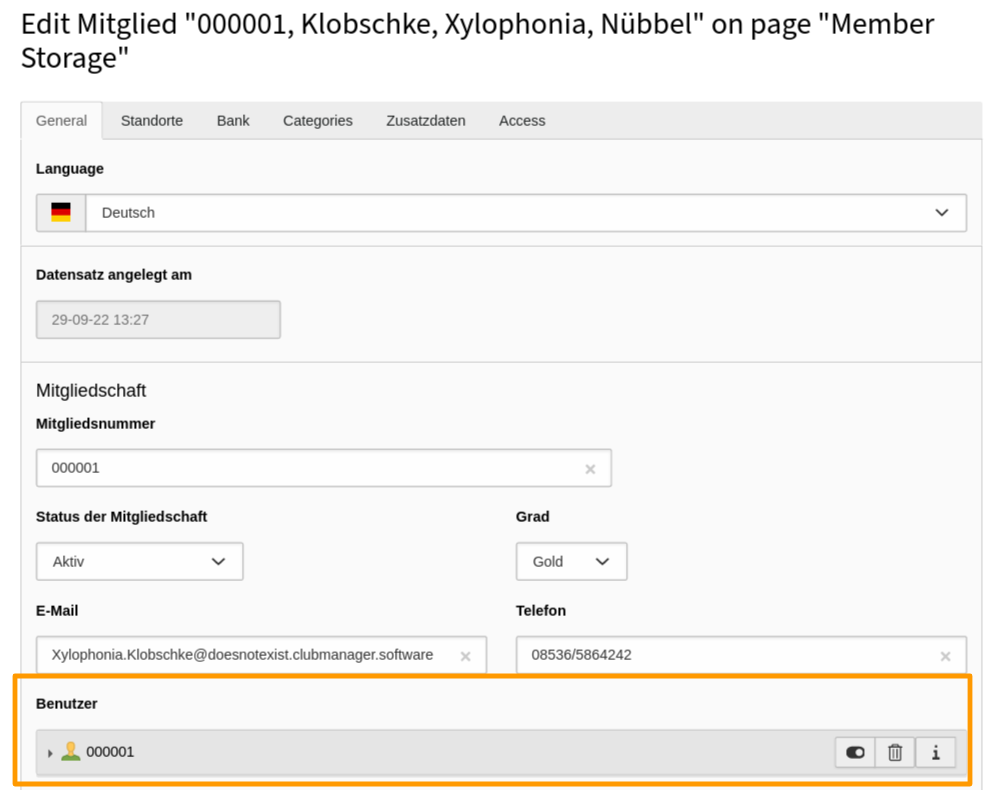
  3. Open a test member with Edit record and have a look at section Frontend User. Now you can (+ Create new) create a Frontend User for this member or edit an exiting one.

    Connected frontend user for member

    Connected frontend user for member

  4. Set/Change Username and change the Password to some easy to remember string for testing. Then save the member data.

  5. Load the "Login page" in the frontend and try to login.

Setup member login reminder task 

Config cookieman 

Out-of-the-box ext:clubmanager has integrated a content blocker for Youtube in the Fluid-template for the detail view of the locations and thus offers a 2-click solution for the display of Youtube movies within the Clubmanager list and detail views.

EXT:clubmanager/Resources/Private/Partials/Youtube.html
Copied!

Important steps

Cookieman: Include static TypoScript template 

  1. Install ext:cookieman
  2. Go to module Web > Template and chose your root page. It should already contain a TypoScript template record.
  3. Switch to view Info/Modify and click on Edit the whole template record.
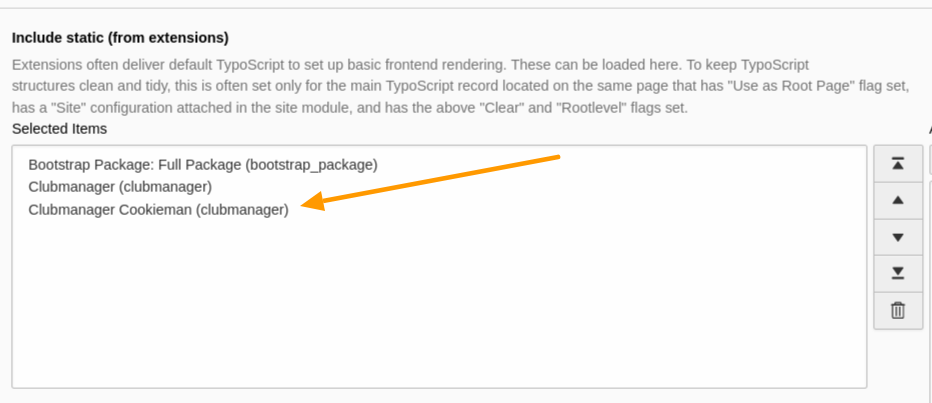
  4. Switch to tab Includes and add the following templates from the list to the right: Clubmanager Cookieman (clubmanager).
Include static cookieman typoscript

Include at least Clubmanager Cookieman (clubmanager) typoscript

.. info::

You do not need to integrate any cookieman static typoscript templates. All of this is done with Clubmanager Cookieman (clubmanager) Typoscript.

Cookieman TypoScript 

Setup 

Have a look at the ext:clubmanager > cookieman TypoScript Setup and change wording etc. in your own sitepackage to your needs.

Path to cookieman setup
EXT:clubmanager/Configuration/TypoScript/Cookieman/setup.typoscript
Copied!

The plugin.tx_cookieman.settings are set for all EXT:clubmanager requirements. Better you do not change this but add the settings according to your specific needs in your own Sitepackage.

Constants 

Have a look at the ext:clubmanager > cookieman TypoScript constants and change wording etc. in your own sitepackage to your needs.

Path to cookieman constants
EXT:clubmanager/Configuration/TypoScript/Cookieman/constants.typoscript
Copied!

Users manual 

  • Description of the member data model and the maintenance of members and their locations for editors
  • Description of available frontend plugins
  • How to create an exclusive frontend login area for members

Records 

ext:clubmanager uses multiples records which are described here in detail.

Categories can be used to filter and sort members and locations or to provide additional information.

Member records to organise your club and the memberships. The member records can be displayed by the plugin.

Location records are always directly linked to a member record. Members can have one main location and several secondary locations. Location records can be displayed by the plugin and are sortable out-of-the-box by city.

E-Mail Tasks are automatically generated by the plugin to send different emails to members and to be able to track the sending of the emails.

Categories 

Categories are not mandatory but make it easier to structure member and location records. The category records themselves are supplied by the TYPO3 Core and might be shared with other extensions.

Create member and location categories 

  1. Go to the module Web > List
  2. Go to the "Sys Categories Storage" folder that you created in the first step at Recommended page structure or alternatively use your "Member Storage".
  3. Use the + icon in the topbar Create new record.
  4. Then use the New record icon Content > Category.

    Create new sys category with web > list module

    Create new sys category with Web > List module

  5. First of all create two parent categories: Locations & Members and Save them.
  6. Now you have to remember the ID's of these two categories and enter them in the Global extension configuration! The ID's can be found out by hovering the mouse pointer over the icon of the the respective category.

    Find out id of important member and location sys category

    Find out id of important member and location sys category

  7. Now create the required member and location categories and in the field Parent set the check mark for the parent category.

Important properties for sys categories 

Important Fields

Description

Title

Title of the category. This field is required!

Parent category

The parent category is used to build a category tree. Therefore select the parent of the current category.

Member 

The member record is obviously the most important record in this extension. It is used to organise the memberships of your club, association or company.

Add member record 

Members can be added in ext:clubmanager only in the <List module>.

Member record data 

The member record is divided into tabs:

Member Tab: General 

Here the general data concerning the membership are recorded.

Membership 

All important data regarding the membership status is recorded here.

Field:

Description:

Membership number

Membership Number. Must be individual.

Membership status.

A membership can have different statuses:

  • "Not set": default member record.
  • "Requested": this status is used when an application is being processed. This status is also set automatically when an application is submitted via the online form. The application automation requires the ext:clubmanager_pro module.
  • "Active": the status for active members. Only active members appear in the frontend listings. Also, only "active" members are used for billing. For automatic billing the module ext:clubmanager_billing is required.
  • "Resting": this status is for members who want to temporarily put their membership on hold without cancelling.
  • "Cancelled": this status is used for members whose membership has permanently expired because notice has been given or dues have not been paid.

Level

By default, a membership has a "Basic" level. Here you can further levels/grades can be offered, e.g. to highlight members in the frontend- listing and/or to offer additional information about the single view:

  • "Basic": standard level of membership
  • "Bronze": Bronze membership
  • "Silver": Silver membership
  • "Gold": Gold membership

Reduced membership

Here it can be set that only a reduced fee is e.g. for children, young people or pensioners. For automatic billing the module ext:clubmanager_billing is required.

Cancellation requested

Here a member can be marked so that the membership is cancelled after the end of the current billing period. For automatic billing the module ext:clubmanager_billing is required.

Beginning of membership

Membership start date.

End of membership

Date for the end of membership

Email

Main email of the member. This is used for the ext:clubmanager module Mail-Journal to send e-mails. Not intended for publication.

Phone

Main telephone number to contact. Not for publication intended.

User

The frontend user associated with the member to login to the closed member area. See also Relation: frontend user

Member/Person 

Here is recorded whether the member is a person or a company, as well as the name of the member or the direct contact person for the membership. These data are also used for the postal address, for payment requests, or payment confirmations.

Field:

Description:

Type of person

Membership can be requested by the following "person types" by default:

  • "natural person": private individual
  • "Legal person": company, association, etc.

Salutation

Salutation of the member

Academic Title

Academic title of the member

First Name

First name of member

Middle Name

Middle name of member

Last Name

Last name of member

Date of birth

Date of birth of the member, e.g. for automatic sending of congratulations.

Address 

This is where the postal address data is recorded. For payment requests, or payment confirmations, this address is also used, if in the ref:Tab Bank - Alternative Billing Address <recordMemberTabBankAltBillingAddress> no other address is stored.

Field:

Description:

Company

Member's company

Address suffix

Member's address suffix

Street

Street of the member

Postal code

Postal code of the member

City

Location of member

Country

Country of member

Member Tab: Locations 

Different locations can be linked to each member. These are used for presentation in the frontend and displayed in listings. With the ext:clubmanager there is the possibility to display a listing of all locations of members as well as to offer a categorization of member locations according to the the city. See plugins for more information.

Main Location 

See also Record > Location

Sub Location 

See also Record > Location

Member Tab: Bank 

The member's bank details are recorded here if the member participates in the direct debit, which is usually the standard for clubs and associations. For payment requests, or payment confirmations an alternative billing address can be created.

Direct Debit 

Field:

Description:

Participates in direct debit

Is 'true' or 'false'. If 'true', then the fields with the account data must also be filled in.

Account holder

Name of the account holder for direct debit.

IBAN

Alternative Billing Address 

Field:

Description:

Name

Name for payment requests, or payment confirmations.

Street

Member Tab: Categories 

Here, members can be additionally categorized, e.g., according to completed certifications, as members of the board of directors or membership of other bodies.

Member Tab: Additional Data 

In this tab, 5 fields are available for free assignment by default.

  • customfield1
  • customfield2
  • customfield3
  • customfield4
  • customfield5

The designation can be changed with the following TCEFORM:

TCEFORM {
    tx_clubmanager_domain_model_member {
        customfield1 {
            label = LLL:EXT:your_sitepackage/Resources/Private/Language/locallang_db.xlf:tx_clubmanager_domain_model_member.customfield1.default
        }
    }
}
Copied!

Member Tab: Access 

Field:

Description:

Visible

Only visible member records are displayed in the frontend if. the membership status is > active.

Record created on

Invariant timestamp for the initial creation of the member record.

Relations 

Member records can have relations to other records. These are described in more detail here.

Frontend-Benutzer 

This relation handles the frontend-user for a member.

Field:

Description:

Username

The username for the frontend login is freely selectable, but must be be unique. By default, when using the Placeholder datathe member number is used.

Password (Empty = Regenerate + email to user).

Password is never sent in plain text. Users get an e-mail with the request to assign a password, if the password field is empty, or the existing password is deleted here and the member record is saved. The mail is sent with the ext:clubmanager Email Service.

User Groups

Frontend users are automatically assigned to group clubmanager_FrontendUserGroup.

Last login

Shows the date of the last login. If a member has never logged in, it will say 01-01-70 00:00. In this case the member will receive a reminder e-mail for the first login when the corresponding Member login reminder task is set up.

First login reminder email.

If a First login reminder email is generated for a member, the timestamp of this e-mail is set here. The member will then receive a new First login reminder e-mail only after the days until reminder has expired in the Member login reminder task.

Locations 

Basically, Main location and Other locations have the same data structure. While there can be only one main location, many Other locations are possible. See Record > Location for more information.

Location 

Location data records are always linked to a member data record and can only be created and edited via the associated member record. Basically, Main location and Other locations have the same data structure. While there can be only one main site, there are many Other locations possible. With the :ext:clubmanager there is the possibility to output a list of all locations of members as well as to offer a categorization of member locations by the city. See plugins for more information.

Add location record 

Location data records are always linked to a member data record and can only be created and edited via the associated member record. So first open the member record with the 'List module' and switch to the tab Locations.

Location record data 

The location record is divided into the tabs:

Location Tab: General 

This is where the general data concerning the site is recorded.

Slug 

The URL fragment for the member's single view. It is formed by default from the following data from the location record: {Firstname}-{Lastname}-{Company}-{City}

Address 

The address of the location is recorded here. From these data Longitude and Latitude in the ref:Tab Geography <recordGeographyTab> are determined.

Field:

Description:

Company

Company of the site

Address suffix

Street of the location

ZIP CODE

Postal code of the location

City

City of the location

Country

Country of the location

State

State of the location

Contact person 

The contact person for the location is entered here. This can vary from location to location and may differ from the actual member.

Field:

Description:

Salutation

Salutation of contact person

Academic Title

Academic title of contact person

First Name

First name of contact person

Middle Name

Last name of contact person

Location Tab: Geography 

From the address of the location here automatically longitude and latitude. is determined. This is done either directly with the Save of the member or manually by clicking Search GPS coordinates.

Field:

Description:

Longitude

Longitude to determine the location with a map provider.

Latitude

Latitude to determine the location with a map provider.

Searches for the coordinates to the specified location address

Location Tab: Meta 

Detailed additional information about a location, primarily for display in the Detail View of the member.

Field:

Description:

Additional Information

RTE field for detailed descriptions of a location and the ability to format them.

Image

Image of the member to display in List-View and/or Detail-View.

Youtube Video ID

Youtube Video ID to be displayed in List-View and/or Detail-View.

Sites can be additionally categorized here, e.g. by sport, subject, etc.

Location Tab: Contact 

This tab handles the contact data for a location.

Field:

Description:

Phone

Phone number (will be linked automatically in the frontend).

Mobile

Mobile number (will be linked automatically in the frontend).

FAX

Fax number

E-mail

E-mail address (will be linked automatically in the frontend).

Url

Website address (will be linked automatically in the frontend)

Location Tab: Social Media 

Each location can have any number of different social media relations. See Relation: Social Media.

Location Tab: Access 

Field:

Description:

Start

If a location is only to be displayed for a limited time, the start time can be set here.

Relations 

Location records can have relations to other records. These are described in more detail here.

Social Media 

This relation handles the social media data for a location.

Field:

Description:

Visible

If contact data is set to invisible with this switch, they will not appear in the frontend listing and will not be used for internal purposes like for example for an export with clubmanagerexport.

Type

Social Media Relation Type:

  • Facebook
  • Instagram
  • Youtube
  • Twitter
  • ...

Url

Url for linking to social media service.

Email Tasks 

Important steps

Automatic password recovery email 

  1. Open an existing member and open the connected Frontend User. Clear the Password Input and save the member data. Now you can see, that a new password is automatically generated.
  2. What happens next is, that an "E-Mail Task" is generated which will send an E-Mail to the "Frontend Users" so he can reset the password.

Change core mail settings 

The "ext:clubmanager" uses the TYPO3 core mail settings, which have to be changed in the LocalConfiguration.php. Therefor open Admin Tools > Settings > Configure Installation-Wide Options > Mail and adjust the following settings to your needs:

  1. [MAIL] defaultMailFromAddress > your-email@your-site.tld
  2. [MAIL] defaultMailFromName > Your Name
  3. [MAIL] defaultMailReplyToAddress > no-reply@your-site.tld
  4. [MAIL] defaultMailReplyToName > Your Name

Change clubmanager mail templates 

To override the standard ext:clubmanager mail templates with your own you can use the TypoScript constants to set the paths. Add these lines to the file EXT:mysitepackage/Configuration/TypoScript/constants.typoscript in your sitepackage. and fit the templates to your needs.

TypoScript constants
plugin.tx_clubmanager {
   mailView {
      templateRootPath = EXT:mysitepackage/Resources/Private/Extensions/Clubmanager/Templates/Email
      partialRootPath = EXT:mysitepackage/Resources/Private/Extensions/Clubmanager/Partials/Email
      layoutRootPath = EXT:mysitepackage/Resources/Private/Extensions/Clubmanager/Layouts/Email
   }
}
Copied!

Email Task Record 

Email task are always generated, when emails were send out by the ext:clubmanager itself. The reason for this is to have an overview of the club's email processes and to be able to follow up in case of doubt if there were errors in the dispatch.

Email tasks are titled after the process that triggered them and could not be renamed by an editor.

Field:

Description:

Visible

Only visible tasks are processed by the EMail Service scheduler task

Status

Shows if an email task is Open, Done or Failed

Open attempts for delivery

Shows how many attemps for delivery have taken place and how often the delivery is still attempted

E-Mail Generator Class

Shows the used mail generator

E-Mail Generator Arguments

Shows the used mail generator arguments

Last processing

Shows the datetime of the last processing

Last error time

Shows the datetime of the last failure

Error message

In case of a failed processing the reason is displayed here

Plugins 

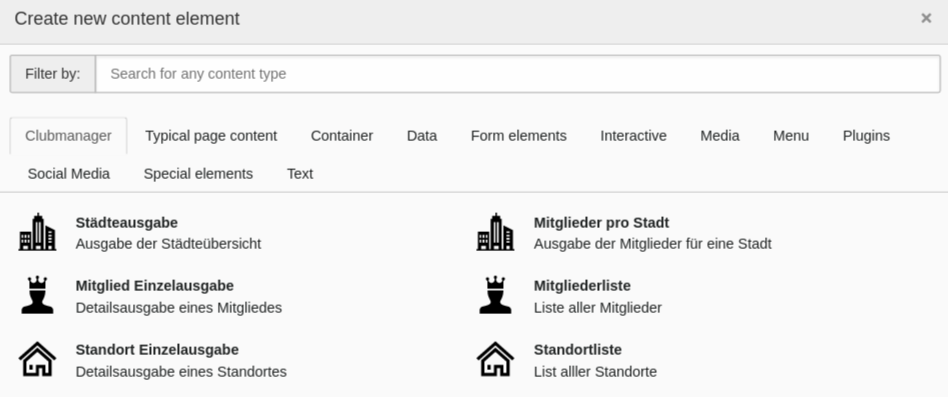
The clubmanager plugin is used to output a defined list of member or, more useful, location records.

It can be created by adding a content element from tab Clubmanager and by selecting the desired plugin type.

Adding a content element for clubmanager listings

Adding a content element for clubmanager listings

The available actions are:

List of members 

Displays an unfiltered list of all member records.

Members single view 

This is the detail view to the member-list.

Location list 

Displays an unfiltered list of all location records.

Location single output 

This is the detail view to the Location list.

City overview 

Displays a list of all cities with location records.

Locations per city 

This is the list view to the City overview.

Templates 

EXT:clubmanager is using Fluid as templating engine. If you are used to Fluid already, you might skip this section. You can get more information in the TYPO3 Documentation TYPO3 Explained: Fluid.

Use a site package extension 

It is recommended to always store overwritten templates in a custom TYPO3 extension. Usually this is done in a special extension called the site package.

If you do not have a site package yet you can create one manually following this Official Tutorial: Site Package.

There is also a site package generator available (Provided by Benjamin Kott).

Create a directory called EXT:mysitepackage/Resources/Private/Extensions/Clubmanager for example and create 3 directories therein called Templates, Partials and Layouts. In these directories you can store your version of the Fluid templates that you need to override.

If you want to change a template, copy the desired files to the directory in your site package. If the template is in a sub folder you have to preserve the folder structure.

For example the template:

EXT:clubmanager/Resources/Private/Templates/Location/Detail.html
Copied!

would have to be copied to

EXT:mysitepackage/Resources/Private/Extensions/Clubmanager/Templates/Location/Detail.html
Copied!

Since your site package extends the extension clubmanager you should require clubmanager in your composer.json:

EXT:mysitepackage/composer.json
{
   "require": {
      "quicko/clubmanager": "^1.0"
   }
}
Copied!

And / or ext_emconf.php:

ext_emconf.php
$EM_CONF[$_EXTKEY] = [
    // ...
    'constraints' => [
        'depends' => [
            'clubmanager' => '1.0.0-1.99.99',
        ],
        // ...
    ],
];
Copied!

ViewHelpers 

It is common to use the Fluid ViewHelper with the Xml-namespace <f:. The view helpers supplied by TYPO3 are documented in the ViewHelper Reference.

Any other ViewHelpers from other extensions can be used by using a namespace declaration like

<html xmlns:f="http://typo3.org/ns/TYPO3/CMS/Fluid/ViewHelpers"
     xmlns:cm="http://typo3.org/ns/Quicko/Clubmanager/ViewHelpers"
     xmlns:x="http://typo3.org/ns/Vendor/SomeExtension/ViewHelper"
     data-namespace-typo3-fluid="true">
...
</html>
Copied!

Then ViewHelpers of EXT:clubmanager can be used with any Xml-namespace you like to declare but we recommend to use the prefix cm:.

Overriding templates 

In the most common case, where you want to override the standard clubmanager template with your own templates you can use the TypoScript constants to set the paths:

TypoScript constants
plugin.tx_clubmanager {
   view {
      templateRootPath = EXT:mysitepackage/Resources/Private/Extensions/Clubmanager/Templates/
      partialRootPath = EXT:mysitepackage/Resources/Private/Extensions/Clubmanager/Partials/
      layoutRootPath = EXT:mysitepackage/Resources/Private/Extensions/Clubmanager/Layouts/
   }
   mailView {
      templateRootPath = EXT:mysitepackage/Resources/Private/Extensions/Clubmanager/Templates/Email
      partialRootPath = EXT:mysitepackage/Resources/Private/Extensions/Clubmanager/Partials/Email
      layoutRootPath = EXT:mysitepackage/Resources/Private/Extensions/Clubmanager/Layouts/Email
   }
}
Copied!

If needed, multiple fallbacks can be defined with TypoScript setup:

TypoScript setup
plugin.tx_clubmanager {
   view {
      templateRootPaths {
         99 = EXT:mysitepackage/Resources/Private/Extensions/Clubmanager/Templates/
      }
      partialRootPaths {
         99 = EXT:mysitepackage/Resources/Private/Extensions/Clubmanager/Partials/
      }
      layoutRootPaths {
         99 = EXT:mysitepackage/Resources/Private/Extensions/Clubmanager/Layouts/
      }
   }
}
Copied!

Clubmanager Pro 

The extension for professional use 

  • Backend module for member management
  • Mail journal module for mail task management
  • Dynamic registration process for new members via web form
  • Automated cancellation process for members
  • Prioritization of members (e.g. for advertising purposes)

Clubmanager Billing 

Payment processing made easy 

  • Extension of member management with bank data
  • Set up different contributions and payment frequency
  • One-time admission fee possible
  • Collect membership fees: Submit collection file for house bank
  • Invoice dispatch via e-mail
  • Invoice retrieval in personalized login area
  • Search functions

Clubmanager Calendar 

More information is coming soon 

  • Appointment scheduling
  • Booking appointments for members
  • More to come

Clubmanager Conference 

More information is coming soon 

  • Event Management
  • Bookings with costs
  • More to come

Clubmanager Statistics 

More information is coming soon 

  • Membership development statistics
  • Visitor analysis
  • More to come

Clubmanager Privacy 

More information is coming soon 

  • Operation possible without cookie manager
  • Automated data disclosure for members
  • More to come

Sitemap