
Aspect Ratio Field
Imaginator adds an Aspect ratios field to the content element's mediaAdjustments palette. It appears only on content types that render images.
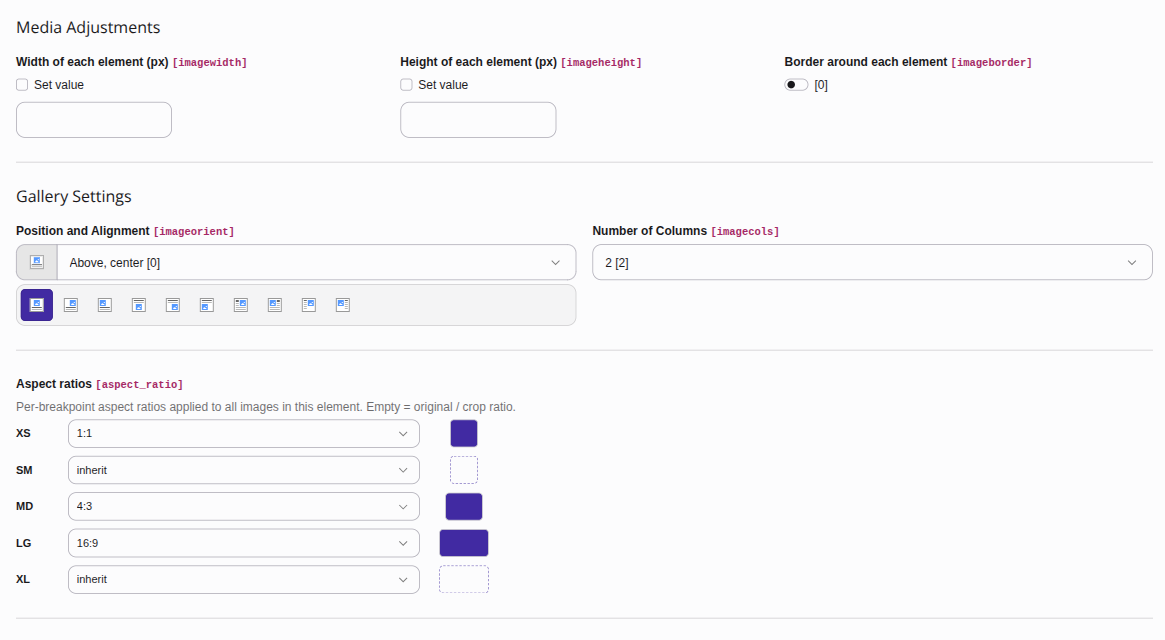
The Aspect ratios field: each design-system breakpoint picks a ratio (or inherits the next-smaller one), previewed as a swatch.
The field stores a per-breakpoint ratio map as a JSON string, for example:
{"xs": "1:1", "md": "4:3", "lg": "16:9"}Keys are breakpoint aliases (md, lg, …) or
literal min-widths in pixels (768; 0 is the base). A breakpoint that is
absent or set to auto inherits the next-smaller ratio.
A value may also be a fixed CSS height ("600px") instead of a "W:H"
ratio: that tier pins the height while the width climbs the ladder. Use for e.g.
a full-width hero. See Fixed-height tiers.
Binding the field
The raw column can be passed straight into the ViewHelper; no DataProcessor is needed:
<i:image image="{ref}" aspectRatio="{ce.data.aspect_ratio}"
alt="{ce.data.header}"/>The ViewHelper decodes the JSON map and resolves it to per-breakpoint
<source> tiers using the configured
breakpoints.
Content Blocks
When EXT:content_blocks is installed, the same field is available as a field type so block authors can declare it in YAML:
- identifier: aspect_ratio
  type: AspectRatio
allowedRatios: '16:9,21:9' # optional; defaults to the full setallowedRatios is a comma-separated list of the ratios offered in the editor.
Omit it to expose the full default set.
Note
The Content Blocks integration is optional. The field type class only loads
when EXT: is present.