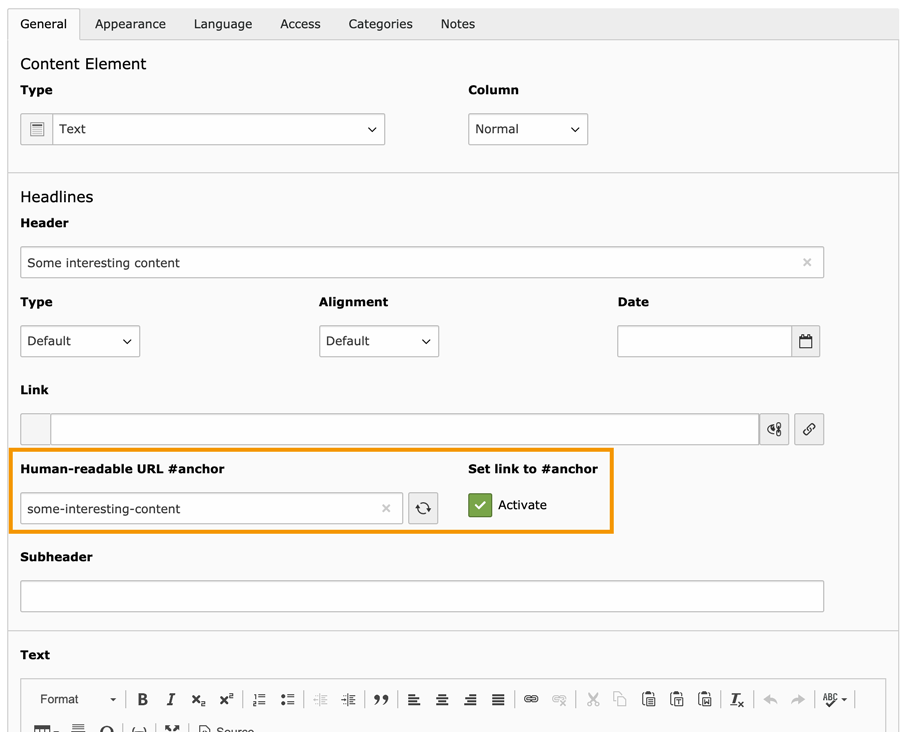
Adds a slug field for human-readable anchors ("domain.com/page/#my-section") to TYPO3 content elements. By default, this anchor is rendered as the header's id attribute.
"Speaking URLs" are a must-have feature for web pages. TYPO3 v9 and newer provide the Routing feature for this.
Former TYPO3 versions needed the third-party extensions RealURL or CoolUri.
TYPO3 also provides the navigational content elements "Section index" and "Section index of subpages from selected pages",
which will build a list of pages and their included content elements.
These content elements will be linked by their unique id, for example:
https://www.example.org/a-sub-page/#c123
Copied!
This works on a technical level, but it is not human-readable.
What does it do?
First of all, this extension provides human-readable URL fragments for TYPO3 content elements:
Furthermore, the extension allows to set anchor links next to the header.
An editor can activate these with a checkbox for individual content elements.
Note
In fact, you can see both features in action on this very documentation page:
Hover your mouse over a heading. A link symbol will appear. This is the anchor link.
Click on this anchor. Your browser will jump to this section. A readable fragment will be added to the URL.
There are several ways in TYPO3 to link directly to a content element:
Content elements "Section index" and
"Section index of subpages from selected pages".
These menus will automatically provide a list of links to
content elements on (selected) subpages.
Rich text editor (RTE)
You can set individual links to content elements in the RTE through
the Link Browser.
Link fields
You can e.g. add a link to the content element's header.
Whenever the subsequent requirements are fulfilled,
the human-readable URL anchor will be used in these links.
When will my URL anchor be used?
TYPO3 will use your human-readable URL anchor if the following
requirements are met:
Of course, the backend field for the URL anchor must be filled.
Your header must be visible in the frontend (not set to "Hidden").
Otherwise, links to this content element will still use the default,
which is the element's unique id.
Using the anchor fields
1.) Getting human-readable anchors
You can use the following text field to set a more readable anchor for a
TYPO3 content element.
The button on the right allows you to automatically generate an anchor from the
current contents of the header field.
You can, of course, modify the anchor afterwards.
Text field for a human-readable URL anchor
2.) Extra: Adding a new link next to the header
Please hover your mouse cursor over a heading in this tutorial.
Do you see the link symbol showing up next to it?
It allows you to navigate to this section of the page–exactly like the
menu links which were mentioned in the preface above.
If you activate this checkbox in your content element (and you filled the
URL anchor field), a link like this will be added to the header:
Checkbox to show an additional link anchor next to the header
Note
You may not see this checkbox. That would mean that your administrator has
disabled it.
Mass editing of anchors
The List module makes it possible to display the content of several
fields at once and gives you the ability to edit several records with one action.
This allows you, for example, to quickly add human-readable anchors to all content elements
on a page at once.
Click the Show columns button and enable the field "Human-readable URL #anchor".
A table with content elements in the List module. The anchor field is already enabled
and visible as the last column the right.
Select the content elements you want to update, then click the Edit columns button
Using the Edit columns button will open the header field together with every enabled column in the list.
Selecting records for editing in TYPO3 v13 and newer
Edit the anchor fields of multiple content elements
Mass editing of anchors using the buttons on the right, with manual adjustments as needed
Note
The buttons to generate an anchor from the header's contents will only work if the header field
is visible in the editing form. Otherwise, you can only manually edit the human-readable anchor.
Correct syntax for URL anchors
Please be aware that only a limited set of characters can be used for
such an URL anchor (officially called a "fragment identifier").
These are technical limitations.
Also, all URL anchors on the same page must be unique! If you use the
same URL anchor in two or more content elements on the same page, they will
be automatically appended with increasing numbering when saving.
If you write a non-supported character in the URL anchor field, it will be
replaced when you leave the field or save the content element.
Tip
For your convenience, you can e.g. fill the URL anchor field with
"Learn all about Product X".
When you leave the field or save the content element, it will be converted to
"learn-all-about-product-x".
The following characters are allowed in this field:
ASCII characters (a–z)
digits (0–9)
underscores (_)
hyphens (-)
periods (.)
As soon as you leave the field (or the content element is saved) …
… all characters are converted to lowercase.
… HTML elements are removed completely.
… space characters are converted to the hyphen character.
… special characters (e.g. äöü߀) are converted to ASCII equivalents.
Tip
Readability: The URL anchor does not have to match your header exactly.
But it will be more understandable for your website's visitor if it
reflects the content of this text section.
Upgrade notes (breaking changes) for certain versions.
Installation
The extension needs to be installed as any other extension of TYPO3 CMS.
Perform the following steps:
Get the extension
Use composer: Use composer require sebkln/content-slug
Use the Extension Manager: Select "Get extensions". Press the
"Update now" button and search for the extension key content_slug.
Download the latest version by using the Import button, or click on the
extension's title to download a version of your choice.
Activate the extension in the TYPO3 backend module
Admin Tools > Extensions.
If you are using TYPO3 11.4 (or later) and composer, all extensions are
automatically considered as active.
Include one of the Site sets or TypoScript sets
You can choose from three available sets.
See Choosing a set for a recommendation based on your type of content elements.
Customize configuration and templates
This extension adds the
fragmentIdentifier
variable to the Fluid templates
of content elements.
For EXT:fluid_styled_content, ready to use templates are already provided.
If you use a different base for your content elements
(e.g. EXT:content_blocks or EXT:bootstrap_package),
you will need to extend the Fluid templates yourself.
The extension provides an example of how to add the fragment-related backend fields
to your content blocks in this file:
ContentBlocks/Basics/ContentElements/Header.yaml
With version 6.0.0, the TypoScript configuration is split into three sets.
This is a breaking change in any case!
This change lets you use the extension with various templating solutions, like Content Blocks or Bootstrap Package.
If you upgrade, you will need to adjust the import of the Site Set or the TypoScript set (include_static_file in TypoScript records).
The Site set with identifier sebkln/content-slugno longer exists.
The TypoScript set "Speaking URL fragments (anchors)" was renamed to "Speaking URL fragments (Basic configuration)".
It no longer contains the template overrides for Fluid Styled Content.
As the file path remains unchanged, the set will continue to load.
When upgrading this extension, include one of the three new Site sets or TypoScript sets.
The page Choosing a set contains an overview and recommendations based on your type of content elements.
Upgrading from EXT:content_slug 1.x to 2.x
Version 2.0.0 allows to configure the URL fragment with TypoScript. Depending on
how you customized Fluid templates, this can be a breaking change.
We can differentiate between the two Header partials and the Section Index
templates:
Potentially breaking: Header partials
Formerly, the Header/All.html partial transferred two additional variables to
the Header/Header.html partial:
This has changed.fragmentIdentifier is still used as the variable name
in the Header/Header.html partial. But instead of the raw contents of the
tx_content_slug_fragment field, it now contains the complete URL fragment
configured with TypoScript:
fragmentIdentifier: fragmentIdentifier,
Copied!
This should only be a breaking change if you use one of the Header
partials directly from this extension and customized the other one in your
sitepackage.
Should be non-breaking: "Section Index" templates
Both "Section Index" templates were simplified, using the new TypoScript
variable fragmentIdentifier.
The default configuration provides the same URL fragment as before
(a combination of UID and human-readable fragment).
If you customized these templates in your sitepackage, this should not be
a breaking change – the tx_content_slug_fragment database field is still
available, after all. And if you adjusted the prefix, this will remain the same.
Attention
Nonetheless, I advise that you update all templates with the new
TypoScript variable. This ensures that the URL fragment is configured at a
central place.
Learn about template paths, Fluid variables and HTML markup.
Considerations
By default, this extension will generate the following HTML markup for
TYPO3 content element headers:
<header><h1id="c35-section-of-interest"class="">
This is the header of an interesting part of my article
<!-- This link is only rendered if 'Set link to #anchor' is activated --><aclass="headline-anchor"href="#c35-section-of-interest">#</a></h1></header>
Copied!
As you can see, the fragment identifier is used as an id attribute in HTML.
This id can then be referenced in a link.
Potential issue
Warning
A URL fragment could accidentally match the id of an element in the
website's HTML template (e.g. "#main-navigation").
This template-related identifier could be styled with CSS, or be accessed with
JavaScript. Most likely, this would end in unexpected side effects.
By adding the uid of the current TYPO3 content element, we'll circumvent this
potential issue.
Tip
You can remove or adapt the default prefix or configure a suffix instead.
The extension provides TypoScript configuration
with stdWrap support for this.
Depending in your project, it might be a solution to use id attributes containing
uppercase characters for templating, for example "mainNavigation" or a prefix like "JS_navigation".
Site Settings
If you included one of the Site sets, the extension can be configured via Site settings.
If disabled, fragment links are replaced even if the content element's
header is hidden. Use this with care!
See TypoScript Setup Reference for details.
TypoScript Constants
If you included one of the TypoScript sets, the extension can be configured via TypoScript constants.
If disabled, fragment links are replaced even if the content element's
header is hidden. Use this with care!
See TypoScript Setup Reference for details.
By default, this extension renders the human-readable fragment as an id attribute
on the content element's header. Therefore, a given fragment will not be used
for content elements that have a hidden (non-rendered) header.
If you disable this setting, fragment links are replaced even if the content element's
header is hidden. You will then need to render this attribute on a different HTML tag.
You will also need to hide the checkbox "Set link to #anchor",
or migrate the corresponding HTML markup as well.
Recommendation: add the id attribute to the Fluid layout of content elements.
<divid="c{data.uid}"class="frame frame-{data.frame_class} frame-type-{data.CType} frame-layout-{data.layout}{f:if(condition: data.space_before_class, then: ' frame-space-before-{data.space_before_class}')}{f:if(condition: data.space_after_class, then: ' frame-space-after-{data.space_after_class}')}"><f:ifcondition="{data._LOCALIZED_UID}"><aid="c{data._LOCALIZED_UID}"></a></f:if><!-- Add these lines: --><f:ifcondition="{fragmentIdentifier}"><divid="{fragmentIdentifier}"></div></f:if><!-- etc. --></div>
Copied!
Assemble the
fragmentIdentifier
variable
This variable will be available in every content element template
and allows to configure the complete URL fragment at a central place.
Attention
This variable is also processed in the following classes:
The custom DataProcessor
FragmentIdentifierProcessor
, which will
process the URL fragments for the "Section Index" content elements.
The
ModifyFragment
event listener, which allows to overwrite fragments for
links set in the rich text editor or in TCA fields of type
link
.
lib.contentElement {
variables {
// Build a complete fragment identifier with possible prefix and suffix:
fragmentIdentifier = COA
fragmentIdentifier {
if.isTrue.field = tx_content_slug_fragment
10 =< plugin.tx_contentslug.urlFragmentPrefix
20 = TEXT20.field = tx_content_slug_fragment
30 =< plugin.tx_contentslug.urlFragmentSuffix
stdWrap.trim = 1
}
}
}
Copied!
Use
FragmentIdentifierProcessor
for "Section Index" menus
The menu content elements of type "Section Index" are built with DataProcessors.
To get the configured
fragmentIdentifier
variable for each of the
linked content elements in these menus, the custom
FragmentIdentifierProcessor
is needed.
// Process 'fragmentIdentifier' variable in section menus:
tt_content.menu_section.dataProcessing.10.dataProcessing.20.dataProcessing.5 = fragment-identifier
tt_content.menu_section_pages.dataProcessing.10.dataProcessing.20.dataProcessing.5 = fragment-identifier
Copied!
Sanitize custom data with
postUserFunc
In case you append or prepend some custom strings, you can use the fragment
evaluation to sanitize the completed URL fragment again:
Note the spelling: with# in the anchor link, without# in
the id attribute!
Also important: if header_layout is set to default, the Header.html
partial is called a second time. Therefore, we need to transfer our additional
variables again:
The TYPO3 content elements "Section Index" and "Section Index of subpages from selected pages"
are provided by EXT:fluid_styled_content and EXT:bootstrap_package.
Both content elements render a list of pages, including anchor links to the content elements on each page.
By default, the content elements will be linked by their unique id, for example
https://www.example.org/a-sub-page/#c123.
The new Fluid condition will check if a fragment identifier is given for the
content element.
Note
The human-readable fragment can only be rendered if the header is not hidden.
Therefore, we also need to check if the header_layout is set to 100.
This is taken care of in the custom DataProcessor,
which must be added to both Section Index menus.
If available, the configured fragment identifier is then rendered
(identical to the anchor link in Header.html).
Otherwise, the default anchor to the content element is rendered (#c123).
1. Adding fragment fields to additional content elements
The custom fields of EXT:content_slug are added to the TCA palette headers.
This palette is used by most of the content elements in the TYPO3 core.
Some extensions might not use this palette, though. Instead, a reduced or
custom palette is used to display the header field with some selected
fields in the backend.
A good example is EXT:beautyofcode.
This useful extension by developer Felix Nagel allows to render code examples
with syntax highlighting and line numbers.
It uses the reduced palette header (mind the missing s at the end).
Solution A: Replace the palette
One possible way to add the fragment-related fields is to replace the header palette for its CType:
Solution C: Add the fragment fields to another palette
Some custom content element might use a completely new palette to render the
header field with some extras. In this case, you can use the TYPO3 API to
add the fields to this palette.
You need to adjust the name of the custom palette (line 3) and set the
position to before or after an existing field in this palette (line 5).
\TYPO3\CMS\Core\Utility\ExtensionManagementUtility::addFieldsToPalette('tt_content', // Table for TYPO3 content elements'custom_palette', // The palette which should contain the fragment fields'--linebreak--, tx_content_slug_fragment, tx_content_slug_link', // The fields, rendered in a new line'after:some_field'// Position of the fragment fields);
Copied!
Warning
While you could add the fragment fields to the existing header palette,
be aware of the consequences: this would also add them to CTypes like
shortcut and html, which will not render the header in the frontend
(by default).
2. Removing the uniqueInPid evaluation
What does the uniqueInPid evaluation even do?
It's a mechanism that prevents duplicate field values on the same page.
This is very helpful for our URL fragments, as they need to be
unique on each page (otherwise the browser can not distinguish the anchor links).
Why would I even consider to remove it then!?
Imagine a website with translated content on the same page.
The uniqueInPid evaluation does not distinguish between languages.
That means you can not have identical anchor links in e.g. English and German.
In practice this seldom is an issue. But it might become one
if you want to use technical terms or brand names as anchors
(e.g. https://www.example.org/info/#typo3).
How to remove it from the list of eval functions
Caution
I strongly advise to only remove this evaluation on websites with few and
well-trained editors that fully understand the consequences.
The following code removes uniqueInPid from the list of eval functions.
You must not remove the other two evaluations!
// Original:
$GLOBALS['TCA']['tt_content']['columns']['tx_content_slug_fragment']['config']['eval'] = 'trim,Sebkln\\ContentSlug\\Evaluation\\FragmentEvaluation,uniqueInPid';

// Remove the evaluation for all content elements:
$GLOBALS['TCA']['tt_content']['columns']['tx_content_slug_fragment']['config']['eval'] = 'trim,Sebkln\\ContentSlug\\Evaluation\\FragmentEvaluation';

// Or, maybe better: only remove it for selected content elements:
$GLOBALS['TCA']['tt_content']['types']['beautyofcode_contentrenderer']['columnsOverrides']['tx_content_slug_fragment']['config']['eval'] = 'trim,Sebkln\\ContentSlug\\Evaluation\\FragmentEvaluation';
$GLOBALS['TCA']['tt_content']['types']['textpic']['columnsOverrides']['tx_content_slug_fragment']['config']['eval'] = 'trim,Sebkln\\ContentSlug\\Evaluation\\FragmentEvaluation';
While the DataProcessor can process TypoScript references (
=<
)
to other cObjects inside
fragmentIdentifier
,
lib.contentElement.variables.fragmentIdentifier
must not be a
reference by itself.
// This would work:
lib.contentElement {
    variables.fragmentIdentifier < lib.yourCustomFragment
}

// This would work:
lib.contentElement {
    variables.fragmentIdentifier = COA
    variables.fragmentIdentifier {
        10 =< lib.yourCustomFragment
    }
}

// This will not work:
lib.contentElement {
    variables.fragmentIdentifier =< lib.yourCustomFragment
}