
General
On this tab, you can make the general settings. You can decide whether the element is visible or not, give it a meaningful name and identifier and define all the fields that are needed.
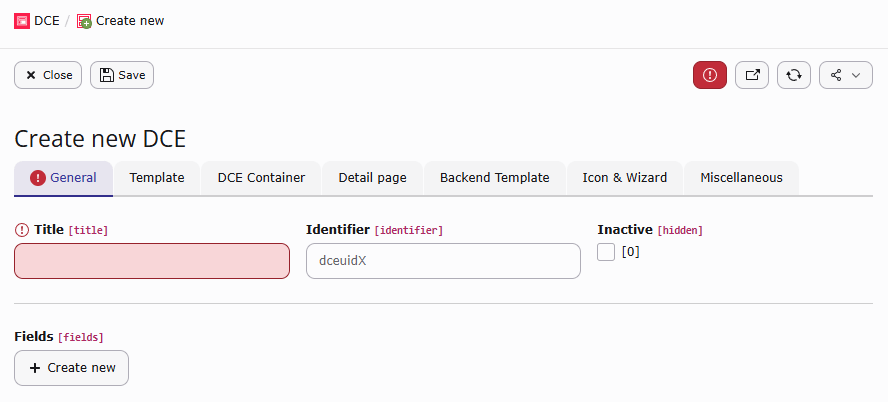
Title
This is the name of the DCE, which is also shown in the type selection of a content element. You can point to LLL: references here and translate the title for different languages.
Identifier
The identifier is used to generate the CType for content elements based on this DCE. Enter the identifier without the
dce_ prefix. For example, the identifier what_ever generates the CType dce_what_ever. When the identifier
remains empty, DCE generates dce_dceuid<uid>. The identifier must be lowercase; underscores are allowed.
Examples for values entered in the identifier field: teaser or what_ever.
Inactive
When the DCE is inactive or hidden, it is not shown as the type when a content element is created. It is only shown in the DCE BE module.
Fields
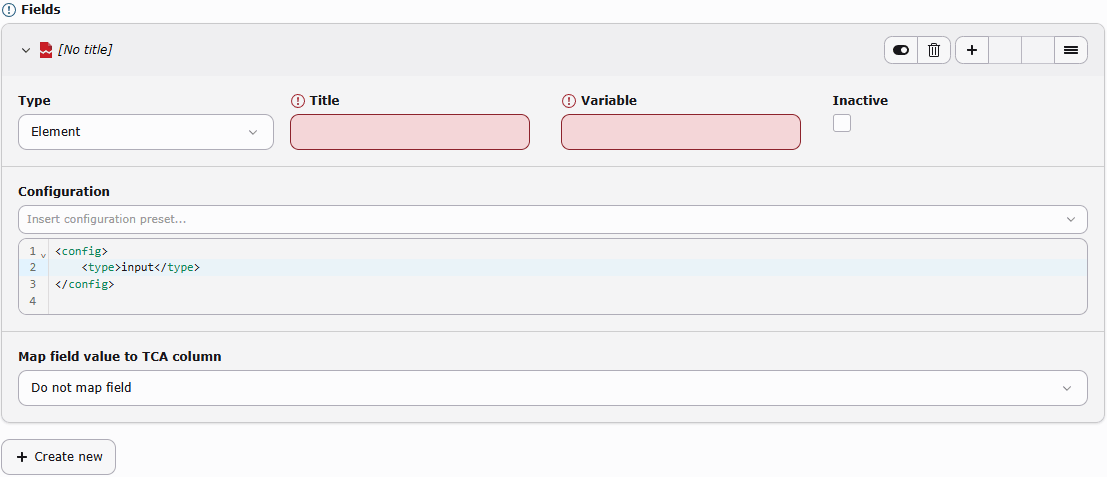
In the fields section, you can add a number of different fields that this DCE should contain. A DCE can be saved without fields, but no usable CType or TCA registration is generated until it contains at least one active field.
A field has three types available:
- Element This is a field in your new content element, like a text field, a checkbox, an image or a whole rich text editor (RTE). The composition for this field is done in the configuration. You can use field types and options supported by TYPO3 FlexForm data structures.
- Tab This creates a new tab register. All fields that are defined below this tab are shown in BE on a new tab page. You may also rename the first "General" tab by creating a tab as the first item.
- Section It is highly encouraged to not use sections anymore! Check if DCE Container can help you or use EXT:container for your purposes.
Common to all types is the title field, where you define a speaking label for the editor.
You can use an LLL: reference here. A Tab also has a required variable, which is used as its FlexForm sheet
identifier, and can be marked as inactive.
Caution
When you add/update tabs and/or rearrange fields, the FlexForm structure changes! Already existing content elements with FlexForm data, need to get migrated, afterwards.
Field options
For the default type Element you have to define a title (with LLL: support) and a variable name which is
to be used in the Fluid template. Variable names have to be written in lowerCamelCase and the variable names must
be unique inside each DCE.
Note
The configuration for the fields is stored in FlexForm (XML) format. Look for <el> in the FlexForms section
of the T3DataStructure
documentation to get detailed information for the definition of the field configuration.
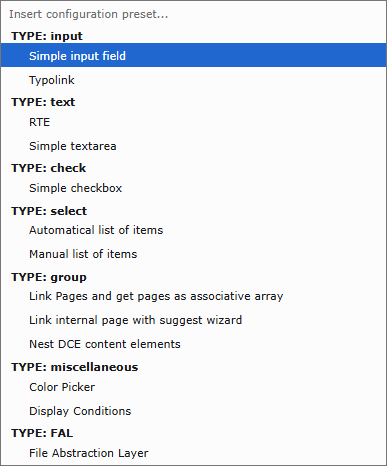
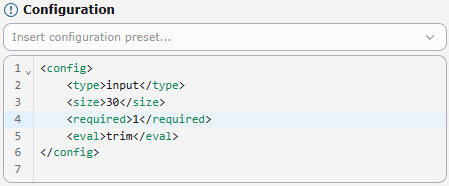
To make it a bit easier there is a handy select box provided with the most used possible input field types. If you select one entry the corresponding FlexForm XML code is inserted in the configuration input field.
For fields which use the TCA types group, select, inline or file, there are additional configuration attributes provided by DCE available.
dce_load_schema
<dce_load_schema>1</dce_load_schema>When adding a group field and link it with e.g. News (by Georg Ringer), then the field contains a comma-delimited list with uids of the selected news. That is not very useful in Fluid templates.
But when this attribute is activated, the used table is inspected. If an Extbase model and repository exist for this
table then the repository is instantiated and a findByUid() is called for every uid. The complete Extbase models are
then taken over to the Fluid template (as an array).
If the table is not part of an Extbase extension, the corresponding record is loaded from the database and handed over as an associated array.
Note
Automatic Extbase model and repository resolution is intended for one table. Group fields containing records from multiple tables can be resolved by the associative-array fallback when their stored values contain the table name.
Using the table tt_content and adding content elements which are based on another DCE, automatically the corresponding DCE will be loaded and filled. In the template of the second DCE the template of the inserted DCE can be called and rendered:
<f:for each="{field.otherDces}" as="otherDce">
    {otherDce.render -> f:format.raw()}
</f:for>You need to use the raw view helper of Fluid because otherwise the rendered HTML will be escaped.
If you use the f:format.html view helper the curly braces get escaped and variables will not be interpreted anymore.
It is also possible to access directly the value of single fields:
{otherDce.get.fieldName}dce_load_entity_class
<dce_load_entity_class>VendorName\Extension\Domain\Model\YourModel</dce_load_entity_class>Uses this class (and its repository) instead of guessing the model class name from table name.
dce_get_fal_objects
<dce_get_fal_objects>1</dce_get_fal_objects>This option is evaluated while schema loading is active, so both dce_load_schema and dce_get_fal_objects are
required. A field with type=file or a relation to sys_file_reference returns an array of
TYPO3\CMS\Core\Resource\FileReference objects. A relation to sys_file returns an array of
TYPO3\CMS\Core\Resource\File objects.
dce_ignore_enablefields
<dce_ignore_enablefields>1</dce_ignore_enablefields>For records loaded through DCE's associative-array database fallback, this option removes restrictions for fields such as deleted, hidden, starttime and endtime. It does not change the query settings of an Extbase repository.
dce_enable_autotranslation
<dce_enable_autotranslation>1</dce_enable_autotranslation>If you load a page via group field, then always this page is loaded, regardless of the language that is just used. Using this attribute shows the translated page if it exists.
For pages, DCE uses TYPO3's getPageOverlay() handling. For other records, it uses getLanguageOverlay().
dce_skip_translation
<dce_skip_translation>1</dce_skip_translation>When a DCE field got this option set, DCE fields act like l10n_mode => 'exclude' in TCA. Normally FlexForms does
not support this behaviour.
In backend, a field with this option set is only visible, when:
- You are on default language (
sys_language_uid = 0) or - the translated DCE content element has no
l18n_parentset
To achieve this, DCE modifies the displayCond for the field, in XML configuration - when you already defined some
display conditions, they get merged (using <and>).
In frontend, the field value will get overwritten by the field value of the l18n_parent-element, no matter which values
are stored in pi_flexform.
This feature is not supported for section fields.
Special Thanks to Silverback (https://silverback.st/) who sponsored this feature!