
Template
On this tab, you define the template which is used for displaying the content of the DCE in the FE. You can use the full power of Fluid at this place.
Template type
Tip
There are several templates a DCE can have. These options apply to all of them.
File
The option File let you choose a file that contains the Fluid content that should be used as the template for this DCE. The file name is selected in the "Template file (fluid)" input field.
This option makes it possible that you put the templates under revision control due to the fact that the files are stored in the file system.
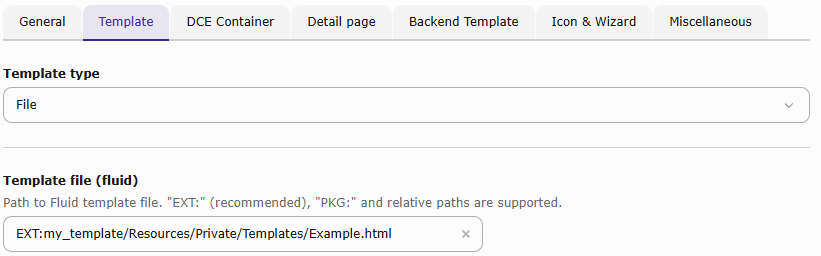
The template file can be referenced using one of the following path types:
EXT:references a file inside a TYPO3 extension and is the recommended syntax. For example:EXT:my_template/Resources/Private/Templates/Example.html.PKG:references a file inside a Composer package. Separate the package name and the path within the package with a colon. For example:PKG:vendor/my-template:Resources/Private/Templates/Example.html.- A relative path is resolved from TYPO3's public web root. The template file is therefore publicly accessible. For
example:
fileadmin/templates/Example.html.
The configured value must resolve to a file-system path. FAL link syntax such as t3://file=uid=1 is not supported.
If the configured path is invalid or the file does not exist, DCE treats the template as empty and produces no output.
Inline
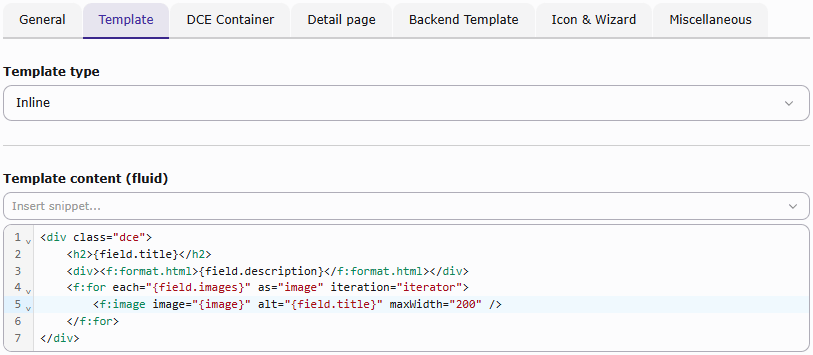
The default template type Inline lets you edit the Fluid template directly in DCE's code textarea in the "Template content (fluid)" field.
No namespace declaration
The dce namespace is registered globally and does not need to be declared in each Fluid template.
Do not retain the former ArminVieweg\Dce\ViewHelpers namespace declaration. If an explicit declaration is required,
use the current namespace:
{namespace dce=T3\Dce\ViewHelpers}
<div class="dce">
    Your template goes here...
</div>Usually, the namespace line should simply be omitted.
Dynamic Templating
With the select box in the "Template content (fluid)" section you can insert variables and view helpers into the template. The selected variable or view helper is inserted at the current cursor position in the template.
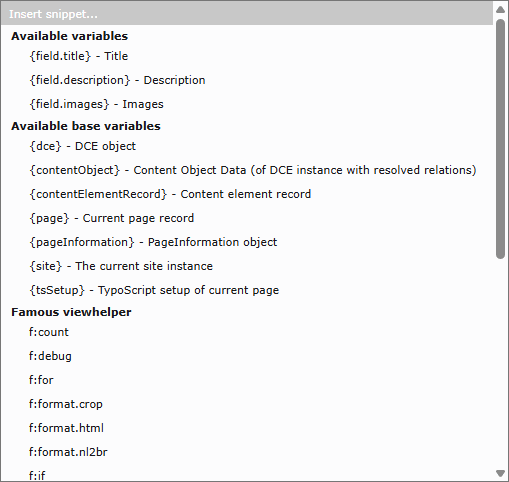
There are several groups inside the select box, which offers you help to work with Fluid:
- Available variables
- Available base variables
- Famous view helpers
- DCE view helpers
Available variables
- This group shows all previously defined variables. You have to save the DCE before newly created fields appear in the
- dropdown field. All custom variables are available with:
{field.nameOfVariable}Available base variables
Besides the custom variables, the following base variables are available when rendering an individual DCE:
{dce}- The DCE object. To access field values use:{dce.get.fieldName}{contentObject}and{data}- The content object row, this DCE instance is based on. It contains all tt_content properties as array.{contentElementRecord}- The content element as aTYPO3\\object.CMS\\ Core\\ Domain\\ Record Interface {page}- The current page record (only available in frontend){pageInformation}- The PageInformation object (only available in frontend){site}- The current site instance (only available in frontend){tsSetup}- TypoScript setup of the current page (only available in frontend)
Container templates are different: they receive {dces}, an array of DCE instances, and do not receive {dce}.
The {contentElementRecord} variable can be passed to TYPO3's f:render.text ViewHelper to render a field:
<f:render.text record="{contentElementRecord}" field="header" />Famous view helper
This group lists often used view helpers provided by Fluid itself. Detailed information about Fluid ViewHelpers is available in the official TYPO3 Fluid ViewHelper Reference.
- f:count
- f:debug
- f:for
- f:format.crop
- f:format.html
- f:if
- f:image
- f:link.email
- f:link.external
- f:link.page
- f:render
DCE view helpers
DCE also provides own view helpers, which can help using the field data in Fluid.
Tip
When you select a DCE view helper from the dropdown above inline code editor, you will get an example pasted to the current cursor position.
dce:arrayGetIndex
Normally you can access array values with {array.0}, {array.1}, etc. if they have numeric keys. This view helper
converts named keys to numeric ones. Furthermore if you are able to set the index dynamically (i.e. from variable).
Index default is 0.
Example:
{array -> dce:arrayGetIndex(index:'{iteration.index}')}dce:explode
Performs trimExplode (of GeneralUtility) to given string and returns an array.
Available options are: delimiter (default: ,) and removeEmpty (1).
Example:
{string -> dce:explode(delimiter:'\n')}dce:fal
Get file references in FAL. The option contentObject must pass the contentObject to the view helper, the option field must contain the variable name of the field which contains the media.
Example:
<f:for each="{dce:fal(field:'thisVariableName', contentObject:contentObject)}" as="fileReference">
    <f:image src="{fileReference.uid}" alt="" treatIdAsReference="1" />
</f:for>Note
You do not need to use the FAL view helper anymore, to access your images.
With both <dce_load_schema>1</dce_load_schema> and
<dce_get_fal_objects>1</dce_get_fal_objects> in your FAL field configuration, the FAL references are resolved
automatically and can be passed to <f:image image="{fileReference}" />.
dce:fileInfo
Useful to fetch informations about a single sys_file record, you need to deal with when using section fields.
Most common attributes are: title, description, alternative, width, height, name, extension, size and uid.
Example (when working with sections):
<f:for each="{field.section}" as="entry">
    <f:for each="{entry.images -> dce:explode()}" as="imageUid">
        <f:image src="file:{imageUid}" width="350" /><br />
        Width: <dce:fileInfo fileUid="{imageUid}" attribute="width" />px
    </f:for>
</f:for>dce:format.addcslashes
Add slashes to a given string using the PHP function "addcslashes".
Available option is: charlist (default: ').
Example:
<dce:format.addcslashes>{field.myVariable}</dce:format.addcslashes>{field.myVariable -> dce:format.addcslashes()}dce:format.replace
Performs str_replace on given subject.
Example:
{field.text -> dce:format.replace(search: 'foo', replace: 'bar')}dce:format.stripslashes
Strips slashes from given subject. The option performTrim (default: 0) also performs a trim when enabled.
Example:
{field.text -> dce:format.stripslashes(performTrim: 0)}dce:format.strtolower
Performs strtolower on given subject and converts string to lower case.
Example:
{field.text -> dce:format.strtolower()}dce:format.tiny
Removes tabs and line breaks.
Example:
<dce:format.tiny>
    Removes tabs and
    linebreaks.
</dce:format.tiny>dce:format.ucfirst
Convert a string's first character to uppercase.
Example:
{variable -> dce:format.ucfirst()}dce:format.wrapWithCurlyBraces
Use this view helper if you want to wrap something with curly braces {}. Available options are: prepend and append, which add strings before or after the given variable, but inside of curly braces.
Example:
<dce:format.wrapWithCurlyBraces prepend="" append="">{field.myVariable}</dce:format.wrapWithCurlyBraces>dce:isArray
Checks if given value is an array. Example:
{variable -> dce:isArray()}dce:thisUrl
Returns the URL of the current page. Available options are: showHost (default: 0), showRequestedUri
(default: 1) and urlencode (default: 0).
Example:
{dce:thisUrl(showHost:1, showRequestedUri:1, urlencode:0)}