
Sup header 

Extension key

sup_header

Package name

traw/sup-header

Version

1.0.0

Language

en

Author

Thomas Rawiel

License

This document is published under the Creative Commons BY 4.0 license.

Rendered

Fri, 10 Apr 2026 17:53:58 +0000


Add a button to TCA fields that adds sup, sub or other html.

The allowed tags and their labels can be changed with an EventListener <events>

Installation 

How to install the extension

Usage 

Usage example with TYPO3 Fluid Styled Content


Configuration 

Add Button to TCA fields 

How to add the button to your TCA field

Add your own tags 

How to add your own html tags, remove allowed html tags or add/ change the tags' labels


Reference 

PSR-14 events 

Reference for the events


Table of Contents:
Installation 

Install this extension via composer:

composer require traw/sup-header
Copied!

or add it to your extension's composer.json file:

"require": {
    "typo3/cms-core": "^12 || ^13",
    "traw/sup-header": "^1.0"
}
Copied!

Add Button to TCA fields 

You will need your own extension or site distribution.

Add the button in your extension's TCA Overrides.

Add the button to tt_content header and subheader field
if(\TYPO3\CMS\Core\Utility\ExtensionManagementUtility::isLoaded('sup_header')) {
    $GLOBALS['TCA']['tt_content']['columns']['header']['config'] = array_merge_recursive(
        $GLOBALS['TCA']['tt_content']['columns']['header']['config'],
        [
            'fieldControl' => [
                'tx_supheader_control' => [
                    'renderType' => 'addIconTextField',
                ],
            ],
        ]
    );
    $GLOBALS['TCA']['tt_content']['columns']['subheader']['config'] = array_merge_recursive(
        $GLOBALS['TCA']['tt_content']['columns']['subheader']['config'],
        [
            'fieldControl' => [
                'tx_supheader_control' => [
                    'renderType' => 'addIconTextField',
                ],
            ],
        ]
    );
}
Copied!

Add your own tags 

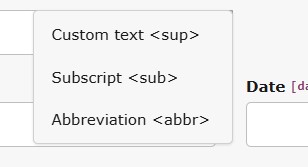
Here's an example how to add a abbr html tag, remove the br tag and change the default label of the sup tag

The resulting dropdown after the example code has been added

The resulting dropdown after the example code has been added

Add or remove tags 

To add your own tags, you will need to create an EventListener that listens to the AllowedTagsEvent

EventListener to change the available tags
<?php

namespace MyVendor\MyExt\EventListener;

use TRAW\SupHeader\Events\AllowedTagsEvent;

class MyTagsEventListener
{
    public function __invoke(AllowedTagsEvent $event)
    {
        //add a single html tag
        $event->addAllowedTag('abbr');

        //remove a single html tag
        $event->removeAllowedTag('br');
    }
}
Copied!

Add or change labels (PSR-14 event) 

If you want to add a label for your tag or change the default labels, add another EventListener that listens to the LabelFileEvent

EventListener to add and change labels
<?php

namespace MyVendor\MyExt\EventListener;

use TRAW\SupHeader\Events\LabelFileEvent;

class MyLabelsEventListener
{
    public function __invoke(LabelFileEvent $event)
    {
        $event->addLabelFile('EXT:my_ext/Resources/Private/Language/mylabels.xlf');
    }
}
Copied!
The corresponding label addLabelFile
<?xml version="1.0" encoding="utf-8" standalone="yes"?>
<xliff version="1.2" xmlns="urn:oasis:names:tc:xliff:document:1.2">
    <file source-language="en" datatype="plaintext" original="EXT:myext/Resources/Private/Language/locallang.xlf"
          date="2025-01-26T20:22:32Z" product-name="sup_header">
        <header/>
        <body>
            <trans-unit id="supheader.label.sup" resname="supheader.label.sup">
                <source>Custom text</source>
            </trans-unit>
            <trans-unit id="supheader.label.abbr" resname="supheader.label.abbr">
                <source>Abbreviation</source>
            </trans-unit>
        </body>
    </file>
</xliff>
Copied!

TYPO3 docs - Events

Add or change labels (locallangOverride) 

There's also the possibility to override the locallang labels. TYPO3 docs - Custom translations

In your ext_localconf.php add

ext_localconf.php
 $GLOBALS['TYPO3_CONF_VARS']['SYS']['locallangXMLOverride']['EXT:sup_header/Resources/Private/Language/locallang.xlf'][]
        = 'EXT:my_ext/Resources/Private/Language/Overrides/locallang-supheader.xlf';
$GLOBALS['TYPO3_CONF_VARS']['SYS']['locallangXMLOverride']['de']['EXT:sup_header/Resources/Private/Language/locallang.xlf'][]
    = 'EXT:my_ext/Resources/Private/Language/Overrides/de.locallang-supheader.xlf';
Copied!

PSR-14 events 

AllowedTagsEvent 

The AllowedTagsEvent is responsible for the final list of allowed html tags that will appear in the dropdown.

$allowedTags

$allowedTags
Type
array
Required

true

The event holds an array with the allowed html tags

AllowedTagEvent Functions 

addAllowedTag(string $tag)

addAllowedTag(string $tag)
Type
string
Required

true

Add a single tag to the list of allowed html tags

$event->addAllowedTag('abbr');
Copied!

removeAllowedTag(string $tag)

removeAllowedTag(string $tag)
Type
string
Required

true

Remove a single tag to the list of allowed html tags

$event->removeAllowedTag('abbr');
Copied!

setAllowedTags(array $allowedTags)

setAllowedTags(array $allowedTags)
Type
array
Required

true

Set the full list of allowed tags, overrides the default list

$event->setAllowedTags(['sup', 'abbr', 'strong']);
Copied!

getAllowedTags()

getAllowedTags()

Get the full list of allowed tags

$list = $event->getAllowedTags();
Copied!

__toString()

__toString()

Get the full list as a comma-separated string

$listString = (string)$event;
//or
$listString = $event->__toString();
Copied!

LabelFileEvent 

The LabelFileEvent is responsible for the available labels in the TYPO3.lang variable

$labelFiles

$labelFiles
Type
array
Required

true

The event holds an array with references to language label files (xliff), e.g. EXT:my_ext/Resources/Private/Language/locallang.xlf

LabelFileEvent Functions 

getLabelFiles()

getLabelFiles()

Get an array of language label files

$event->getLabelFiles();
Copied!

setLabelFiles(array $labelFiles)

setLabelFiles(array $labelFiles)

Set an array of language label files

$event->setLabelFiles([
    'EXT:my_ext/Resources/Private/Language/locallang.xlf',
    'EXT:my_ext/Resources/Private/Language/my_other_locallang.xlf',
]);
Copied!

addLabelFile(string $labelFile)

addLabelFile(string $labelFile)
Type
string
Required

true

Add a single language label file

$event->addLabelFile('EXT:my_ext/Resources/Private/Language/locallang.xlf');
Copied!

removeLabelFile(string $labelFile)

removeLabelFile(string $labelFile)
Type
string
Required

true

Remove a single language label file

$event->removeLabelFile('EXT:sup_header/Resources/Private/Language/locallang.xlf');
Copied!

Screenshots 

The button added for tt_content header field

The button added for tt_content header field

The html tag dropdown with the default allowed tags

The html tag dropdown with the default allowed tags

The resulting frontend output

The resulting frontend output

Usage 

Usage example with TYPO3 Fluid Styled Content.

The following code is just an example. If you wish to use it, it should be placed inside your own extension or site distribution.

Add the button to the header field 

Configuration/TCA/Overrides/tt_content.php
$GLOBALS['TCA']['tt_content']['columns']['header']['config'] = array_merge_recursive(
    $GLOBALS['TCA']['tt_content']['columns']['header']['config'],
    [
        'fieldControl' => [
            'importControl' => [
                'renderType' => 'addIconTextField',
            ],
        ],
    ]
);
Copied!

Add a typoscript setting 

constants.typoscript
plugin.tx_myext {
    settings {
        allowedHeaderTags = <sub><sup><br>
    }
}
Copied!
setup.typoscript
lib.contentElement {
    settings {
        allowedHeaderTags = {$plugin.tx_myext.settings.allowedHeaderTags}
    }
}
Copied!

Allow the tags to be rendered by Fluid 

When we have the setting in typoscript, we can access it in fluid and pass it to the stripTags ViewHelper

<f:format.stripTags allowedTags="{settings.allowedHeaderTags}">{header}</f:format.stripTags>
Copied!

Example: Override header partial 

Resources/Private/Partials/Header/Header.html
<html xmlns:f="http://typo3.org/ns/TYPO3/CMS/Fluid/ViewHelpers" data-namespace-typo3-fluid="true">
<f:if condition="{header}">
    <f:switch expression="{layout}">
        <f:case value="1">
            <h1 class="{positionClass}">
                <f:link.typolink parameter="{link}"><f:format.stripTags allowedTags="{settings.allowedHeaderTags}">{header}</f:format.stripTags></f:link.typolink>
            </h1>
        </f:case>
        <f:case value="2">
            <h2 class="{positionClass}">
                <f:link.typolink parameter="{link}"><f:format.stripTags allowedTags="{settings.allowedHeaderTags}">{header}</f:format.stripTags></f:link.typolink>            </h2>
        </f:case>
        <f:case value="3">
            <h3 class="{positionClass}">
                <f:link.typolink parameter="{link}"><f:format.stripTags allowedTags="{settings.allowedHeaderTags}">{header}</f:format.stripTags></f:link.typolink>            </h3>
        </f:case>
        <f:case value="4">
            <h4 class="{positionClass}">
                <f:link.typolink parameter="{link}"><f:format.stripTags allowedTags="{settings.allowedHeaderTags}">{header}</f:format.stripTags></f:link.typolink>            </h4>
        </f:case>
        <f:case value="5">
            <h5 class="{positionClass}">
                <f:link.typolink parameter="{link}"><f:format.stripTags allowedTags="{settings.allowedHeaderTags}">{header}</f:format.stripTags></f:link.typolink>            </h5>
        </f:case>
        <f:case value="6">
            <h6 class="{positionClass}">
                <f:link.typolink parameter="{link}"><f:format.stripTags allowedTags="{settings.allowedHeaderTags}">{header}</f:format.stripTags></f:link.typolink>            </h6>
        </f:case>
        <f:case value="100">
            <f:comment> -- do not show header -- </f:comment>
        </f:case>
        <f:defaultCase>
            <f:if condition="{default}">
                <f:render partial="Header/Header" arguments="{
                    header: header,
                    layout: default,
                    positionClass: positionClass,
                    link: link}" />
            </f:if>
        </f:defaultCase>
    </f:switch>
</f:if>
</html>
Copied!

Sitemap