Introduction 

What does it do? 

The Indexed Search Engine provides two major elements to TYPO3:

  1. Indexing: An indexing engine which indexes TYPO3 pages on-the-fly as they are rendered by TYPO3's frontend. Indexing a page means that all words from the page (or specifically defined areas on the page) are registered, counted, weighted and finally inserted into a database table of words. Then another table will be filled with relation records between the word table and the page. This is the basic idea.
  2. Searching: A plugin you can insert on your website which allows website users to search for information on your website. By searching the plugin first looks in the word-table if the word exist and if it does all pages which has a relation to that word will be considered for the search result display. The search results are ordered based on factors like where on the page the word was found or the frequency of the word on the page.

Features of the indexer 

The indexing engine has several features:

  • HTML data priority: 1) <title>-data 2) <meta-keywords>, 3) <meta- description>, 4) <body>
  • Indexing external files: Text formats like html and txt and doc, pdf by external programs (catdoc / pdftotext)
  • Wordcounting and frequency used to rate results
  • Exact or partial search
  • Searching freely for sentences (non-indexed).
  • NOT case-sensitive in any ways though.

Features of the search frontend (the plugin) 

The search interface has several options for advanced searching. Any of those can be disabled and/or preset with default values:

  • Searching whole word, part of word, sentence
  • Logical AND and OR search including syntactical recognition of AND, OR and NOT as logical keywords. Furthermore sentences encapsulated in quotes will be recognized.
  • Searching can be targeted at specific media, for instance searching only indexed PDF files, HTML-files, Word-files, TYPO3-pages or everything
  • The engine is language-sensitive based on the multiple-language feature of the TYPO3 CMS frontend.
  • Searching can be performed in specific sections of the website.
  • Results can be sorted descending or ascending and ordered by word frequency, weight, location relative to page top, page modification date, page title, etc.
  • The display of search results can be intelligently divided into sections based on the internal page hierarchy. Thus results are primarily grouped by relation, then by hit-relevance.

Installation 

This extension is part of the TYPO3 Core, but not installed by default.

Table of contents

Installation with Composer 

Check whether you are already using the extension with:

composer show | grep indexed
Copied!

This should either give you no result or something similar to:

typo3/cms-indexed-search       v12.4.11
Copied!

If it is not installed yet, use the composer require command to install the extension:

composer require typo3/cms-indexed-search
Copied!

The given version depends on the version of the TYPO3 Core you are using.

Installation without Composer 

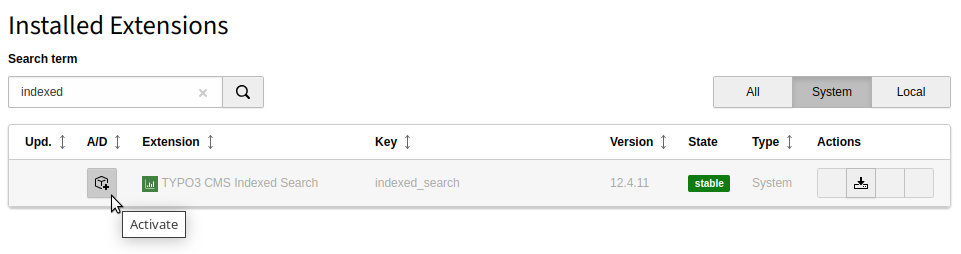
In an installation without Composer, the extension is already shipped but might not be activated yet. Activate it as follows:

  1. In the backend, navigate to the Admin Tools > Extensions module.
  2. Click the Activate icon for the Indexed Search extension.
Extension manager showing Indexed Search extension

Extension manager showing Indexed Search extension

Backend module "Indexing" 

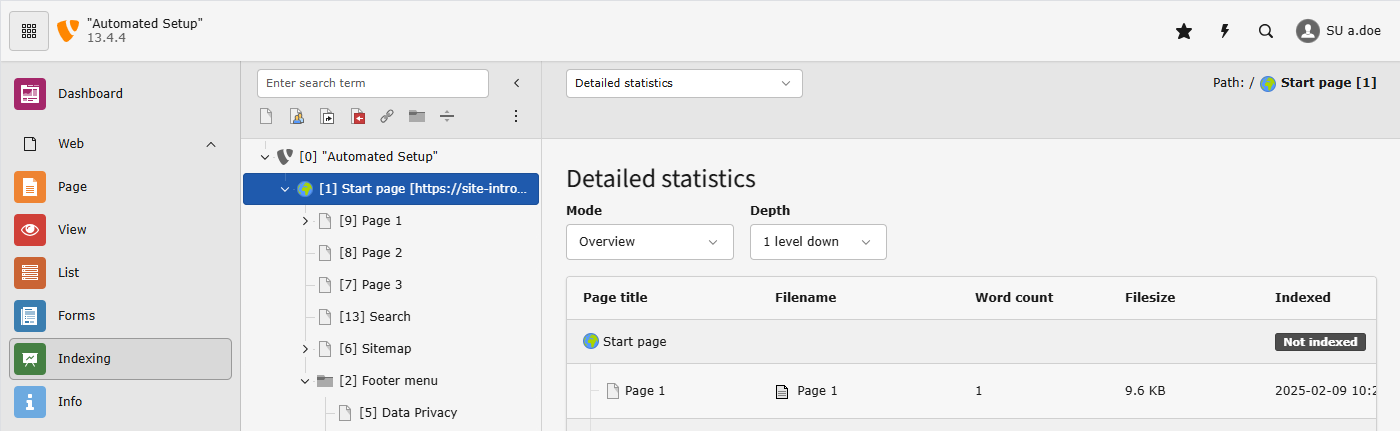
The system extension Indexed Search provides the backend module Web > Indexing where administrators or power editors can view search statistics and remove listings from the search index.

TYPO3 backend overview with the Indexing module opened

Open the module via Web > Indexing

Submodule "Detailed statistics", module "Indexing" 

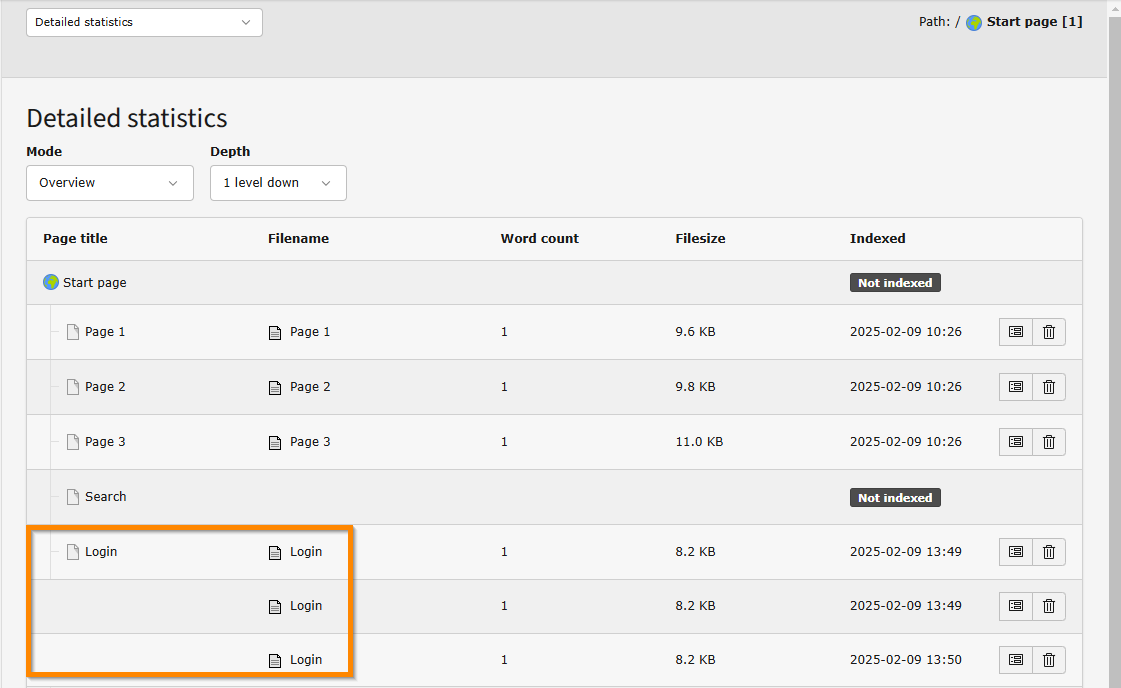
In the Web > Indexing module (sub module Detailed statistics) you can see an overview of indexed pages:

Screenshot of the "Detailed statistics" in module "Web > Indexing" in the TYPO3 backend

The "Login" page is indexed 3 times, the "Search" page not at all.

It can happen that a page is indexed multiple times. In the screenshot above the page "Login" is indexed multiple times, once for each user group that logged in.

Pages containing a plugin sometimes have a large number of indexes, for example a page displaying the detail view of a page will be indexed once for each news that is being displayed.

In this module you can also delete the index of a page. It will then be re-indexed next time it is opened in the frontend or visited by a crawler.

Submodule "General statistics", module "Indexing" 

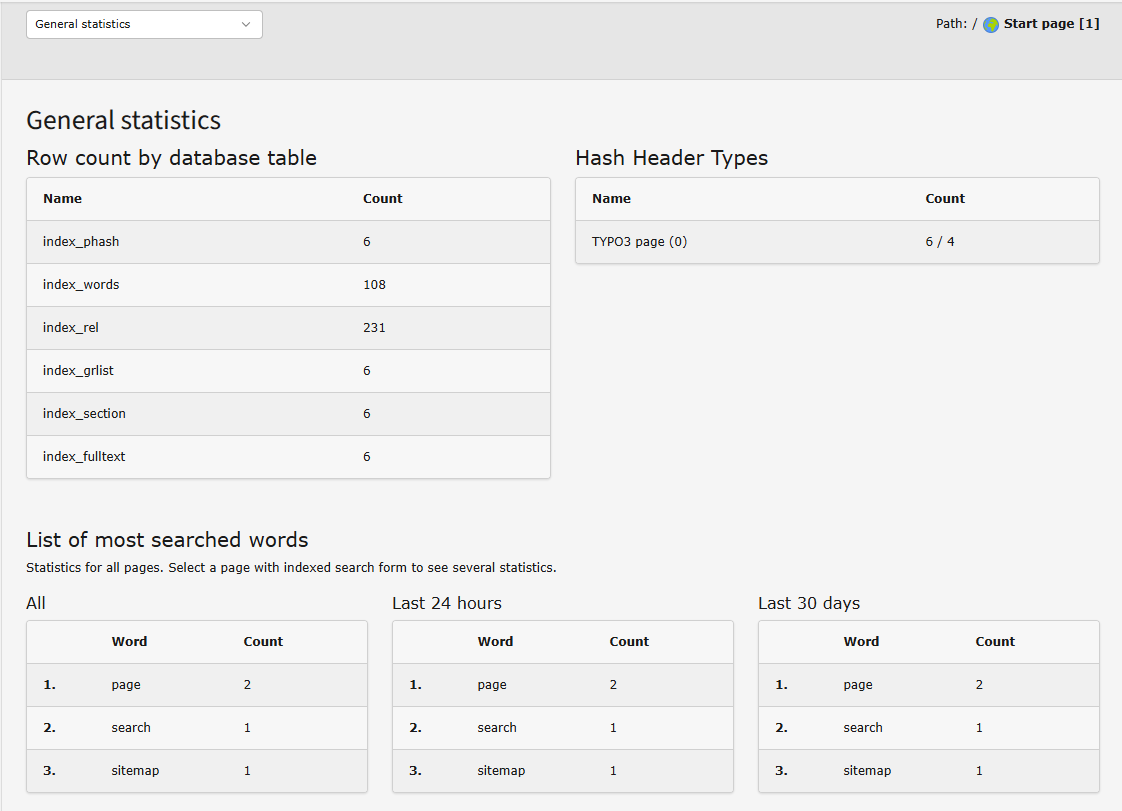
Screenshot of the "General statistics" in module "Web > Indexing" in the TYPO3 backend

See statistics like the most frequently searched words or that table usage

Submodule "List of indexed pages", module "Indexing" 

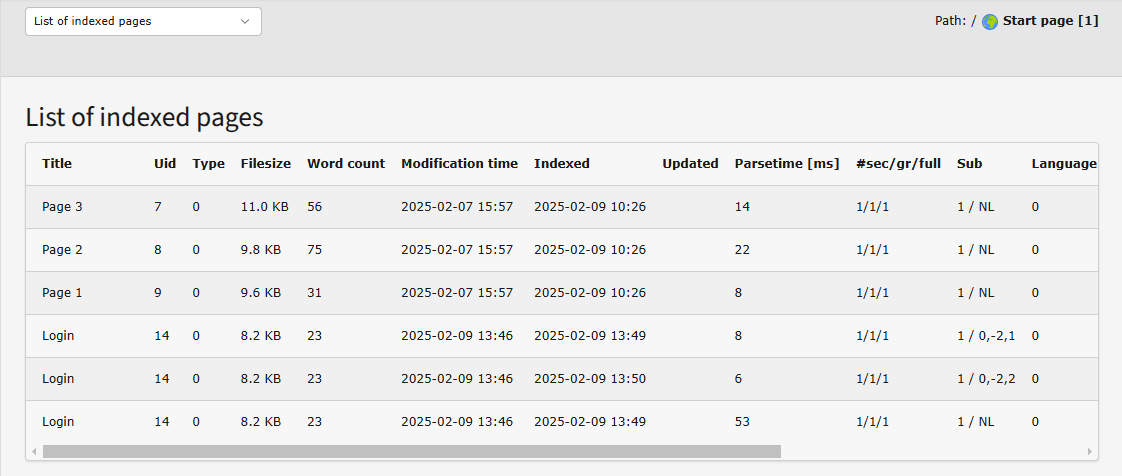
This view shows a list of indexed pages with all the technical details:

Screenshot of the "List of indexed pages" in module "Web > Indexing" in the TYPO3 backend

Technical details for each page, including size, language, word count, modification time etc.

Trouble shooting: Backend module "Indexing" does not show 

If the backend module "Indexing" is not visible, and you have an editor account, your permissions might not be sufficient.

If you have an administrator account and still cannot see the module check the following:

  • Is indexed search installed?
  • Did you delete the cache and reload the backend?
  • Was the module disabled via TSconfig?

Indexing Configurations 

Setting up the "crawler" extension 

Before you can work with Indexing Configurations you must make sure you have set up the extension tomasnorre/crawler and have a cron-job running that will process the crawler queue as we fill it. For this, please refer to the Manual of the Crawler extension.

Generally about Indexing Configurations 

Indexing configuration sets up indexing jobs that are performed by a cron-script independently of frontend requests. The "crawler" extension is used as a service to perform the execution of queue entries that controls the indexing.

You can create an indexing configuration in the Web > List module in on any page. Where to place the configuration depends on the type of data that should be indexed. See following sections.

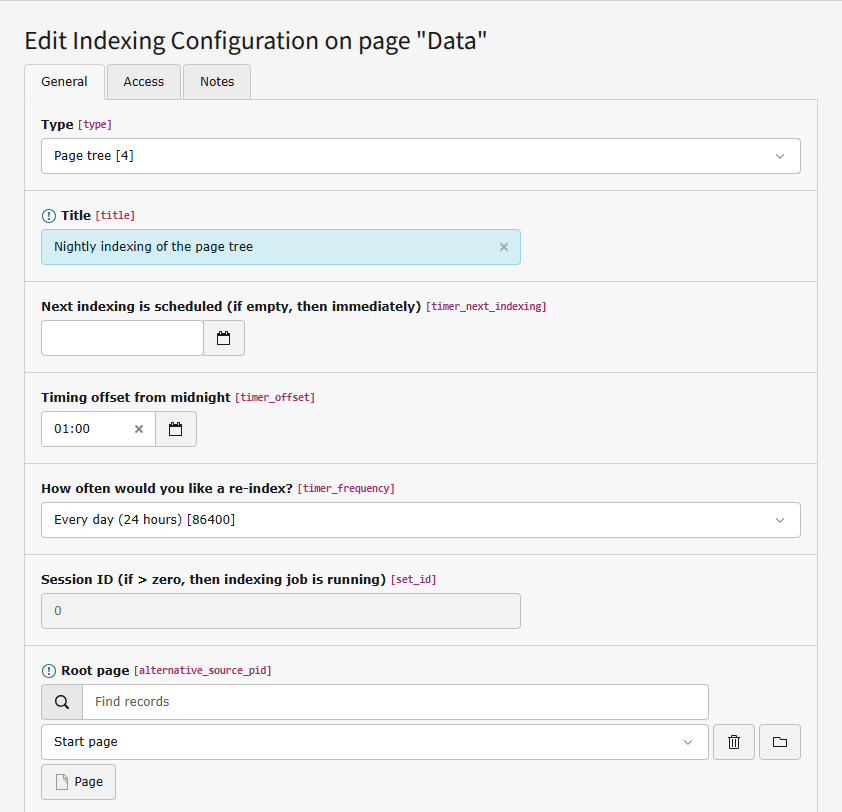
Screenshot of an indexing configuration record in the List module of the TYPO3 backend

Common parameters in Indexing Configurations

The "Session ID" requires a show introduction: When an indexing job is started it will set this value to a unique number which is used as ID for that process and all indexed entries are tagged with it. When the processing of an indexing configuration is done it will be reset to zero again.

Periodic indexing of the website ("Page tree") 

You can have the whole page tree indexed overnight using this indexing configuration of type "Page tree":

  • Type: Page tree
  • Root page: Your start page
  • Depth: 4 Levels (or as many as there are)

Using the Web > List module create this indexing configuration in a system folder on your site.

For each page a combination of parameters is calculated based on the "crawler" configurations for the "Re-index" processing instruction (See "crawler" extension for more information) and those URLs are committed to the crawler log plus entries for all subpages to the processed page (so that each of those pages are indexed as well.)

The rest of the configuration, for example with which parameter to call the pages is made in the tomasnorre/crawler extension.

Periodic indexing of records ("Database Records") 

You can also use the Indexing Configuration to index single records.

Location: You must place the indexing configuration on the page where you want the search results to be displayed. For example when you want to index news entries, place the configuration on the page that contains the single view plugin of news.

  • Type: "Database Records"
  • Table to index: For example: "News"
  • Alternative Source Page: The page that contains the records, for example the news folder
  • Fields: For example: "title, short, text"
  • GET parameter string: For example: "&tx_news[action]=show&tx_news[news]=###UID###". The chash will be automatically attached. This must correspond with what the plugin takes of parameters.

If a record is removed its indexing entry will also be removed upon next indexing. The UID of the record is saved in the index for that purpose.

Indexing External websites ("External URL") 

Using the crawler extension, you can index external websites using Indexing Configurations.

  • External URL: https://example.org
  • Depth: 1 Level
  • Enter sub-URLs in which not to descend: https://example.org/black_hole

Location: You should place the Indexing Configuration on a "Not- in-menu" page in the root of the site for instance. The page must be "searchable" since the external URL results are bound to a page in the page tree, namely the page where the configuration is found.

Indexing directories of files ("Filepath on server") 

You can also have directories of files on your server indexed periodically, using the type "Filepath on server".

  • Filepath: fileadmin/user_upload/my_pdfs
  • Limit to extensions: pdf, txt
  • Depth: 2 Levels

Location: The Indexed Search configuration should be located on a not- in-menu page, just like the "External URL" type required. Same reasons; results are bound to a page in the page tree.

For each directory:

  1. all files are indexed and
  2. all sub-directories added to the crawler queue for later processing.

Showing the search results 

By default the search results are shown with no distinction between those from local TYPO3 pages, records indexed, the file path and external URLs. The only division that follows is that of the page on which the result is found.

However, you can configure to have a division of the search results into categories following the Indexing Configurations.

To obtain this categorization you must set TypoScript configuration in the Setup field like this:

packages/my_site_package/Configuration/Sets/MySet/setup.typoscript
plugin.tx_indexedsearch.settings.defaultFreeIndexUidList = 0,6,7,8
plugin.tx_indexedsearch.settings.blind.freeIndexUid = 0
Copied!

The "defaultFreeIndexUidList" is uid numbers of indexing configurations to show in the categorization! The order determines which are shown in top.

The categorization is only displayed, when the "Category" selector in the "Advanced" search form is set to "All categorized". You can preset the selector to use this setting by default: plugin.tx_indexedsearch.settings.defaultOptions.freeIndexUid.

For example:

packages/my_site_package/Configuration/Sets/MySet/setup.typoscript
plugin.tx_indexedsearch.settings.defaultOptions.freeIndexUid = -2
Copied!

Searching in a specific category 

In the advanced search users can pick a special category from the "Category" selector to limit results to this Indexing Configuration.

You can also limit the search form by default by setting 0 for pages or the UID of an Indexing Configuration for any other indexing type:

packages/my_site_package/Configuration/Sets/MySet/setup.typoscript
# Search only in pages
plugin.tx_indexedsearch.settings.defaultOptions.freeIndexUid = 0

# Search only in news, use uid of the Indexing Configuration
plugin.tx_indexedsearch.settings.defaultOptions.freeIndexUid = 42
Copied!

Grouping several Indexing Configurations in one search category 

You might find that you want to group the results from multiple Indexing Configurations in the same category.

This can be done by creating a special type of indexing configuration which only points to other Indexing Configurations:

  • Type: Meta configuration
  • Indexing Configurations (chose those that should be included)

This Indexing Configuration is not used during indexing but during searching only.

Disable frontend-initiated indexing 

If you choose to index your site using Indexing Configurations you can disable indexing through the user requests in the frontend. This is done via the module Admin Tools > Settings > Extension Configuration.

Toggle the configuration option "Disable Indexing in Frontend".

General 

The most basic requirement for the search engine to work is that pages are getting indexed. That will not happen by just installing the plugin! You will have to set up in TypoScript that a certain page should be indexed. That is needed for several good reasons. First of all not all sites in a TYPO3 database might need indexing. So therefore we disable it on a per-site basis. Secondly a single site may have frames and in that case we need only index the page-object which actually shows the page content.

Lets say that you have a PAGE object called "page" (that is pretty typical), then you will have to set this config-option:

page.config.index_enable = 1
Copied!

When this option is set you should begin to see your pages being indexed when they are shown next time. Remember that only cached pages are indexed!

This is documented in CONFIG section of the TSref. Please look there for further options. For instance indexing of external media can also be enabled there.

Languages 

The plugin supports all system languages in TYPO3. Translation is done using the typo3.org tools.

If you want to use eg. danish language that will automatically be used if this option is set in your template (the value is the internal language key):

config.language = da
Copied!

Settings editor 

New in version 13.3

The new backend module Site Management > Settings provides an overview of sites which offer configurable settings and makes them editable.

When the site sets of indexed_search are included, the settings provided by those sets become available in the editor.

You can find the available site settings in module Site Management > Settings

You can change individual settings here. If the site settings are writable you can hit the Save button and the settings will be written directly to the site settings.

If the settings are not writable you can click the YAML export button to export the settings. These can then be added by a developer with sufficient rights.

The available settings are also described in detail in chapter Site set "Indexed Search".

TypoScript 

Plugin settings 

Changed in version 13.3

Each of the following options is defined for the TypoScript setup path plugin.tx_indexedsearch.settings.

Target pid 

If your installation uses Site sets, the target pid can also be set in the Settings editor.

targetPid

targetPid
Type

boolean

Default

empty

Path

plugin.tx_indexedsearch.settings

Set the target page ID for the Extbase variant of the plugin. An empty value (default) falls back to the current page ID.

Display result number 

displayResultNumber

displayResultNumber
Type

boolean

Default
Path

plugin.tx_indexedsearch.settings

Display the numbers of search results.

Display level 1 sections 

displayLevel1Sections

displayLevel1Sections
Type

boolean

Default

1

Path

plugin.tx_indexedsearch.settings

This selects the first menu for the "sections" selector - so it can be searched in sections.

Display level 2 sections 

displayLevel2Sections

displayLevel2Sections
Type

boolean

Default
Path

plugin.tx_indexedsearch.settings

This selects the secondary menu for the "sections" selector - so it can be searched in sub sections. This setting only has an effect if displayLevel1Sections is true.

Display level X all types 

displayLevelxAllTypes

displayLevelxAllTypes
Type

boolean

Default
Path

plugin.tx_indexedsearch.settings

Loaded are, by default:

If displayLevelxAllTypes is set to true, then the page records for all evaluated IDs are loaded directly.

Display forbidden records 

displayForbiddenRecords

displayForbiddenRecords
Type

boolean

Default
Path

plugin.tx_indexedsearch.settings

Explicitly display search hits, although the visitor has no access to it.

Media list 

mediaList

mediaList
Type

string

Default

empty

Path

plugin.tx_indexedsearch.settings

Restrict the file type list when searching for files.

Root pid list 

If your installation uses Site sets, the rootPidList can also be set in the Settings editor.

rootPidList

rootPidList
Type

string (list of integers, separated by comma)

Default

empty

Path

plugin.tx_indexedsearch.settings

A list of integers which should be root pages to search from. Thus you can search multiple branches of the page tree by setting this property to a list of page ID numbers.

If this value is set to less than zero (eg. -1), the search will be performed in ALL parts of the page tree without regard to branches at all. An empty value (default) falls back to the current root page ID.

Default free index UID list 

defaultFreeIndexUidList

defaultFreeIndexUidList
Type

string (list of integers, separated by comma)

Default

empty

Path

plugin.tx_indexedsearch.settings

List of Indexing Configuration UIDs to show as categories in the search form. The order determines the order displayed in the search result.

Exact count 

exactCount

exactCount
Type

boolean

Default
Path

plugin.tx_indexedsearch.settings

Force permission check for every record while displaying search results. Otherwise, records are only checked up to the current result page, and this might cause that the result counter does not print the exact number of search hits.

By enabling this setting, the loop is not stopped, which causes an exact result count at the cost of an (obvious) slowdown caused by this overhead.

See property show.forbiddenRecords for more information.

Results 

results

results
Type

Array

Default

empty

Path

plugin.tx_indexedsearch.settings

Various crop/offset settings for single result items.

Length of the cropped results title 

results.titleCropAfter

results.titleCropAfter
Type

int

Default

50

Path

plugin.tx_indexedsearch.settings

Determines the length of the cropped title.

Crop signifier for results title 

results.titleCropSignifier

results.titleCropSignifier
Type

string

Default

...

Path

plugin.tx_indexedsearch.settings

Determines the string being appended to a cropped title.

Length of the cropped summary 

results.summaryCropAfter

results.summaryCropAfter
Type

int

Default

180

Path

plugin.tx_indexedsearch.settings

Determines the length of the cropped summary.

Crop signifier for the summary 

results.summaryCropSignifier

results.summaryCropSignifier
Type

string

Default

...

Path

plugin.tx_indexedsearch.settings

Determines the string being appended to a cropped summary.

Length of a summary to highlight search words 

results.markupSW_summaryMax

results.markupSW_summaryMax
Type

int

Default

300

Path

plugin.tx_indexedsearch.settings

Maximum length of a summary to highlight search words in.

Character count next to highlighted search word 

results.markupSW_postPreLgd

results.markupSW_postPreLgd
Type

int

Default

60

Path

plugin.tx_indexedsearch.settings

Determines the amount of characters to keep on both sides of the highlighted search word.

Characters offset from the right side of a highlighted search word 

results.markupSW_postPreLgd_offset

results.markupSW_postPreLgd_offset
Type

int

Default

5

Path

plugin.tx_indexedsearch.settings

Determines the offset of characters from the right side of a highlighted search word. Higher values will "move" the highlighted search word further to the left.

Divider for highlighted search words 

results.markupSW_divider

results.markupSW_divider
Type

string

Default

...

Path

plugin.tx_indexedsearch.settings

Divider for highlighted search words in the summary.

Excludes doktypes in path 

results.pathExcludeDoktypes

results.pathExcludeDoktypes
Type

string

Default

empty

Path

plugin.tx_indexedsearch.settings

Excludes doktypes in rootline.

Example:

plugin.tx_indexedsearch.settings {
    results {
        pathExcludeDoktypes = 254
    }
}
Copied!

Exclude folder (doktype: 254) in path for the result.

/Footer(254)/Navi(254)/Imprint(1) -> /Imprint.

plugin.tx_indexedsearch.settings {
    results {
        pathExcludeDoktypes = 254,4
    }
}
Copied!

Exclude folder (doktype: 254) and shortcuts (doktype: 4) in path for result.

/About-Us(254)/Company(4)/Germany(1) -> /Germany.

Default options 

defaultOptions

defaultOptions
Type

Array

Default

empty

Path

plugin.tx_indexedsearch.settings

Setting of default values.

Please see the options below.

Default: Operand 

defaultOptions.defaultOperand

defaultOptions.defaultOperand
Type

boolean

Default
Path

plugin.tx_indexedsearch.settings

0
All words (AND)
1
Any words (OR)

Default: Sections 

defaultOptions.sections

defaultOptions.sections
Type

string (list of integers, separated by comma)

Default
Path

plugin.tx_indexedsearch.settings

Default: Free index UID 

defaultOptions.freeIndexUid

defaultOptions.freeIndexUid
Type

int

Default

-1

Path

plugin.tx_indexedsearch.settings

Default: Media type 

defaultOptions.mediaType

defaultOptions.mediaType
Type

int

Default

-1

Path

plugin.tx_indexedsearch.settings

Default: Sort order 

defaultOptions.sortOrder

defaultOptions.sortOrder
Type

string

Default

rank_flag

Path

plugin.tx_indexedsearch.settings

Default: Language UID 

defaultOptions.languageUid

defaultOptions.languageUid
Type

string

Default

current

Path

plugin.tx_indexedsearch.settings

Default: Sort desc 

defaultOptions.sortDesc

defaultOptions.sortDesc
Type

boolean

Default

1

Path

plugin.tx_indexedsearch.settings

Default: Search type 

defaultOptions.searchType

defaultOptions.searchType
Type

int

Default

1

Path

plugin.tx_indexedsearch.settings

Possible values are 0, 1 (any part of the word), 2, 3, 10 and 20 (sentence).

Default: Extended resume 

defaultOptions.extResume

defaultOptions.extResume
Type

boolean

Default

1

Path

plugin.tx_indexedsearch.settings

Blind 

blind

blind
Type

Array

Default

empty

Path

plugin.tx_indexedsearch.settings

Blinding of option selectors / values in these (advanced search).

Please see the options below.

Blind: Search type 

blind.searchType

blind.searchType
Type

boolean

Default
Path

plugin.tx_indexedsearch.settings

Blind: Default operand 

blind.defaultOperand

blind.defaultOperand
Type

boolean

Default
Path

plugin.tx_indexedsearch.settings

Blind: Sections 

blind.sections

blind.sections
Type

boolean

Default
Path

plugin.tx_indexedsearch.settings

Blind: Free index UID 

blind.freeIndexUid

blind.freeIndexUid
Type

boolean

Default

1

Path

plugin.tx_indexedsearch.settings

Blind: Media type 

blind.mediaType

blind.mediaType
Type

boolean

Default
Path

plugin.tx_indexedsearch.settings

Blind: Sort order 

blind.sortOrder

blind.sortOrder
Type

boolean

Default
Path

plugin.tx_indexedsearch.settings

Blind: Group 

blind.group

blind.group
Type

boolean

Default
Path

plugin.tx_indexedsearch.settings

Blind: Language UID 

blind.languageUid

blind.languageUid
Type

boolean

Default
Path

plugin.tx_indexedsearch.settings

Blind: Desc 

blind.desc

blind.desc
Type

boolean

Default
Path

plugin.tx_indexedsearch.settings

Blind: Number of results 

blind.numberOfResults

blind.numberOfResults
Type

string (list of integers, separated by comma)

Default

10,25,50,100

Path

plugin.tx_indexedsearch.settings

List of amount of results to be displayed per page. Sending a different amount via GET or POST will result in the default value being used to prevent DoS attacks.

Blind: Extended resume 

blind.extResume

blind.extResume
Type

boolean

Default

1

Path

plugin.tx_indexedsearch.settings

[tsref:plugin.tx_indexedsearch]

Overriding the Fluid template 

Changed in version 13.3

It is recommended to use the site set settings to override the template paths if possible.

The plugin "Indexed Search" can be extended with custom templates. You need a custom site package to achieve this.

The paths to the templates can also be extended in the Settings editor.

EXT:site_package/Configuration/Sets/SitePackage/settings.yaml
indexedsearch:
  view:
    templateRootPath: 'EXT:site_package/Resources/Private/Extensions/IndexedSearch/Templates/'
    partialRootPath: 'EXT:site_package/Resources/Private/Extensions/IndexedSearch/Partials/'
    layoutRootPath: 'EXT:site_package/Resources/Private/Extensions/IndexedSearch/Layouts/'

Copied!

Now copy the Fluid templates that you want to override in the according paths in your custom site package extension. For example to override the search form copy the file EXT:indexed_search/Resources/Private/Partials/Form.html to EXT:site_package/Resources/Private/Extensions/IndexedSearch/Partials/Form.html and make your changes in the latter file.

Overriding the template paths via TypoScript 

If you need to override the Fluid templates from multiple locations or for legacy reasons you do not use site sets yet, you can use TypoScript to override the template root paths:

The plugin "Indexed Search" can be extended with custom templates:

EXT:my_extension/Configuration/TypoScript/setup.typoscript
plugin.tx_indexedsearch.view {
  templateRootPaths {
    0 = EXT:indexed_search/Resources/Private/Templates/
    10 = {$plugin.tx_indexedsearch.view.templateRootPath ?? $indexedsearch.view.templateRootPath}
    20 = EXT:my_extension/Resources/Private/Templates/
  }

  partialRootPaths {
    0 = EXT:indexed_search/Resources/Private/Partials/
    10 = {$plugin.tx_indexedsearch.view.partialRootPath ?? $indexedsearch.view.partialRootPath}
    20 = EXT:my_extension/Resources/Private/Partials/
  }
}
Copied!

The configuration in this TypoScript snippet will make the plugin look templates in the following order:

  • Paths in my_extension (Index 20)
  • Paths defined by constant and if not defined by settings (Index 10)
  • Fall back to the default indexed_search templates (Index 0)

HTML content 

HTML content is weighted by the indexing engine in this order:

  1. <title>-data
  2. <meta-keywords>
  3. <meta-description>
  4. <body>

In addition you can insert markers as HTML comments which define which part of the body-text to include or exclude in the indexing:

The marker is <!--TYPO3SEARCH_begin--> or <!--TYPO3SEARCH_end-->.

Rules:

  1. If there is no marker at all, everything is included.
  2. If the first found marker is an "end" marker, the previous content until that point is included and the preceding code until next "begin" marker is excluded.
  3. If the first found marker is a "begin" marker, the previous content until that point is excluded and preceding content until next "end" marker is included.
  4. If there are multiple marker pairs in HTML, content from in between all pairs is included.

Use of hashes 

The hashes used are md5 hashes where the first 7 chars are converted into an integer which is used as the hash in the database. This is done in order to save space in the database, thus using only 4 bytes and not a varchar of 32 bytes. It's estimated that a hash of 7 chars (32) is sufficient (originally 8, but at some point PHP changed behavior with hexdec-function so that where originally a 32 bit value was input half the values would be negative, they were suddenly positive all of them. That would require a similar change of the fields in the database. To cut it simple, the length was reduced to 7, all being positive then).

Analysing the indexed data 

The indexer is constructed to work with TYPO3's page structure. Opposite to a crawler which simply indexes all the pages it can find, the TYPO3 indexer MUST take the following into account:

  • Only cached pages can be indexed.
  • Pages in more than one language must be indexed separately as "different pages".
  • Pages with plugins may have multiple indexed versions based on what is displayed on the page: For example a single view page for news must be indexed once for each news that is displayed on it.
  • Pages with access restricted to must be observed!
  • Because pages can contain different content whether a user is logged in or not and even based on which groups he is a member of, a single page (identified by the combination of id/type/language/arguments) may even be available in more than one indexed version based on the user-groups.

How pages are indexed 

First of all a page must be cacheable. For pages where the cache is disabled, no indexing will occur.

The "phash" is a unique identification of a "page" with regard to the indexer. So an entry in the index_phash table equals 1 resultrow in the search-results (called a phash-row).

A phash is a combination of the page-id, type, sys_language id, gr_list, MP and the cHash parameters of the page (function setT3Hashes()). If the phash is made for EXTERNAL media (item_type > 0) then it's a combination of the absolute filename hashes with any "subpage" indication, for instance if a PDF-document is splitted into subsections.

So for external media there is one phash-row for each file (except PDF-files where there may be more). But for TYPO3-pages there can be more phash-rows matching one single page. Obviously the type-parameter would normally always be only one, namely the type-number of the content page. And the cHash may be of importance for the result as well with regard to plugins using that. For instance a message board may make pages cacheable by using the cHash params. If so, each cached page will also be indexed. Thus many phash-rows for a single page-id.

But the most tricky reason for having multiple phash-rows for a single TYPO3-page id is if the gr_list is set! This works like this: If a page has exactly the same content both with and without logins, then it's stored only once! If the page-content differs whether a user is logged in or not - it may even do so based on the fe_groups! - then it's indexed as many times as the content differs. The phash is of course different, but the phash_grouping value is the same.

The table index_grlist will always hold one record per phash-row (of item_type=0, that is TYPO3 pages). But it may also hold many more records. These point to the phash-row in question in the case of other gr_list combinations which actually had the SAME content - and thus refers to the same phash-row.

External media 

External media (pdf, doc, html, txt) is tricky. External media is always detected as links to local files in the content of a TYPO3 page which is being indexed. But external media can the linked to from more than one page. So the index_section table may hold many entries for a single external phash-record, one for each position it's found. Also it's important to notice that external media is only indexed or updated if a "parent" TYPO3 page is re-indexed. Only then will the links to the external files be found. In a searching operation external media will be listed only once (grouping by phash), but say two TYPO3 pages are linking to the document, then only one of them will be shown as the path where the link can be found. However if both TYPO3 pages are not available, then the document will not be shown.

Access restricted pages 

A TYPO3 page will always be available in the search result only if there is access to the page. This is secured in the final result query. Whether extendToSubpages is taken into account depends on the join_pages-flag (see above). But the page will only be listed if the user has access.

However a page may be indexed more than once if the content differs from usergroup to usergroup or just without login. Still the result display will display only one occurrence, because similar pages (determined based on phash_grouping) will be detected.

The tricky scenario 

Say that a page has a content element with some secret information visible for only one usergroup. The page as a whole will be visible for all users. The page will be indexed twice - both without login and with login because page content differs. The problem is that if a search is conducted and matching one of the secret words in the access restricted section, then the page will be in the search result even if the user is not logged in!

The best solution to this problem is to allow the result to be listed anyway, but then HIDE the resume if the index_grlist table cannot confirm positively that the combination of usergroups of the user has access to the result. So the result is there, but no resume shown (The resume might contain hidden text).

External media 

Equally for external media they are linked from a TYPO3 page. When an external media is selected we can be sure that the page linking to it can be selected. But we cannot be sure that the link was in a section accessible for the user. Similarly we should make a lookup in the index_grlist table selecting the phash/gr_list by the phash_t3-value of the section record for the search-result. If this is not available we should not display a link to the document and not show resume, but rather link to the page, from which the user can see the real link to the document.

index_phash 

This table contains references to TYPO3 pages or external documents. The fields are like this:

phash 

Changed in version 13.0

The field has been transformed to a varchar field, full md5 hashes are stored.

Field
phash
Description

Stores an md5 hash.

This is a unique representation of the 'page' indexed.

For TYPO3 pages this is a serialization of id,type,gr_list (see later), MP and additional query parameters (which enables 'subcaching' with extra parameters). This concept is also used for TYPO3 caching (although the caching hash includes the all-array and thus takes the template into account, which this hash does not! It's expected that template changes through conditions would not seriously alter the page content)

For external media this is a serialization of 1) unique filename id, 2) any subpage indication (parallel to query parameters). gr_list is NOT taken into consideration here!

phash_grouping 

Changed in version 13.0

The field has been transformed to a varchar field, full md5 hashes are stored.

Field
phash_grouping
Description

Stores an md5 hash.

This is a non-unique hash exactly like phash, but WITHOUT the gr_list and (in addition) for external media without subpage indication. Thus this field will indicate a 'unique' page (or file) while this page may exist twice or more due to gr_list. Use this field to GROUP BY the search so you get only one hit per page when selecting with gr_list in mind.

Currently a search result does not either group or limit by this, but rather the result display may group the result into logical units.

item_mtime 

Field
item_mtime
Description

Modification time:

For TYPO3 pages: the SYS_LASTCHANGED value

For external media: The filemtime() value.

Depending on config, if mtime hasn't changed compared to this value the file/page is not indexed again.

tstamp 

Field
tstamp
Description

time stamp of the indexing operation. You can configure min/max ages which are checked with this timestamp.

A min-age defines how long an indexed page must be indexed before it's reconsidered to index it again.

A max-age defines an absolute point at which re-indexing will occur (unless the content has not changed according to an md5-hash)

static_page_arguments 

Field
static_page_arguments
Description

The Static Page Arguments - URL parameter that are used for caching.

For TYPO3 pages: These are used to re-generate the actual url of the TYPO3 page in question

For files this is an empty array. Not used.

item_type 

Field
item_type
Description

An integer indicating the content type,

0 is TYPO3 pages

1- external files like pdf (2), doc (3), html (1), txt (4) and so on. See the class.indexer.php file

item_title 

Field
item_title
Description

Title:

For TYPO3 pages, the page title

For files, the basename of the file (no path)

item_description 

Field
item_description
Description
Short description of the item. Top information on the page. Used in search result.

data_page_id 

Field
data_page_id
Description
For TYPO3 pages: The id

data_page_type 

Field
data_page_type
Description
For TYPO3 pages: The type

data_filename 

Field
data_filename
Description
For external files: The filepath (relative) or URL (not used yet)

contentHash 

Changed in version 13.0

The field has been transformed to a varchar field, full md5 hashes are stored.

Field
contentHash
Description
md5 hash of the content indexed. Before reindexing this is compared with the content to be indexed and if it matches there is obviously no need for reindexing.

crdate 

Field
crdate
Description
The creation date of the INDEXING - not the page/file! (see item_crdate)

parsetime 

Field
parsetime
Description
The parsetime of the indexing operation.

sys_language_uid 

Field
sys_language_uid
Description
Will contain the value of the language of the page being indexed.

item_crdate 

Field
item_crdate
Description
The creation date. For files only the modification date can be read from the files, so here it will be the filemtime().

gr_list 

Field
gr_list
Description
Contains the gr_list of the user initiating the indexing of the document.

index_section 

Points out the section where an entry in index_phash belongs.

phash 

Changed in version 13.0

The field has been transformed to a varchar field, full md5 hashes are stored.

Field
phash
Description
The md5 hash of the indexed document.

phash_t3 

Changed in version 13.0

The field has been transformed to a varchar field, full md5 hashes are stored.

Field
phash_t3
Description

The md5 hash of the "parent" TYPO3 page of the indexed document.

If the "document" being indexed is a TYPO3 page, then phash and phash_t3 are the same.

But if the document is an external file (PDF, Word etc) which are found as a LINK on a TYPO3 page, then this phash_t3 points to the phash of that TYPO3 page. Normally it goes like this when indexing: 1) The TYPO3 document is indexed (this has a phash-value of course), then 2) if any external files are found on the page, they are indexed as well AND their phash_t3 will become the phash of the TYPO3 page they were on.

The significance of this value is that indexed external files may have more than one record in "index_section" (with the same phash), a record for each parent page where a link to the document was found! There are details about this in the section of this document that describes the complexities of indexing pages.

rl0 

Field
rl0
Description
The id of the root-page of the site.

rl1 

Field
rl1
Description
The id of the level-1 page (if any) of the indexed page.

rl2 

Field
rl2
Description
The id of the level-2 page (if any) of the indexed page.

page_id 

Field
page_id
Description
The page id of the indexed page.

uniqid 

Field
uniqid
Description
This is just an autoincremented unique, primary key. Generally not used (i think)

index_fulltext 

For free text searching, e.g. with a sentence, in all content: title, description, keywords, body.

This table is used when basic.useMysqlFulltext extension configuration is enabled.

phash 

Changed in version 13.0

The field has been transformed to a varchar field, full md5 hashes are stored.

Field
phash
Description
The md5 hash of the indexed document.

fulltextdata 

Field
fulltextdata
Description
The total content stripped for any HTML codes.

index_grlist 

This table will hold records related to a phash-row. Records in this table confirms that certain gr_lists would actually share the same content as represented by phash-row - even though the phash-row may be indexed under another login. The table is used during result-display to positively confirm if the current user may see the resume (which otherwise might contain secret info). Please see discussion far above.

index_words, index_rel 

Words-table and word-relation table. Almost self-explanatory.

Both tables are not used when basic.useMysqlFulltext extension configuration is enabled.

For the index_rel table some fields require explanation:

count 

Field
count
Description
Number of occurrences on the page

first 

Field
first
Description
How close to the top (low number is better)

freq 

Field
freq
Description
Frequency (please see source for the calculations. This is converted from some floating point to an integer)

flags 

Field
flags
Description

Bits, which describes the weight of the words:

8th bit (128) = word found in title,

7th bit (64) = word found in keywords,

6th bit (32) = word found in description,

Last 5 bits are not used yet, but if used they will enter the weight hierarchy. The result rows are ordered by this value if the "Weight/Frequency" sorting is selected. Thus results with a hit in the title, keywords or description are ranked higher in the result list.

Known problems 

Searching for hy-phen-at-ed words 

When using the fulltext index feature, searching for words with hyphens in them ("Berners-Lee") will yield no results when MySQL is used as database server. MariaDB does not have this problem.

The reason for this behavior is that the MySQL fulltext parser indexes words with hyphens as two words: "Berners Lee".

Another problem is that the "fulltext search minimum word length" setting ft_min_word_len default value is 4, which means that three-letter words are not indexed at all. Of "Berners-Lee", only "Berners" will be in the index.

Sitemap