
Configuration
All the settings for the extension can be made through the TYPO3 Extension Configuration module.
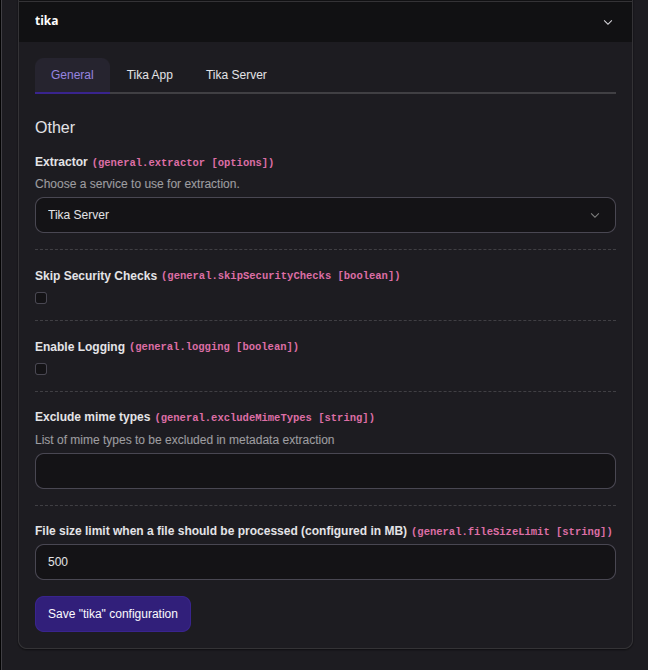
Extractor
Simply select what service you would like to use, either
- Tika App(not recommended)
- Tika Server(recommended)
Depending on that, configure the necessary settings for your service on the according settings tab.
About Tika variants
Each variant has its advantages and its drawbacks.
Server - variant (recommended)
The Server variant is the best one by set on supported features and is more performant as the App, but requires additional service and maintenance.
App - variant (not recommended)
So for example the App requires Java Runtime to exec and spawn a new java process for each processed file, but no network traffic for send files via wire.
Skip Security Checks
Disables EXT:tika's built-in security gate that blocks extraction when the connected Tika version is known to be vulnerable. Defaults to off and should stay off.
Warning
Enabling
skip re-exposes your installation to the known vulnerabilities the gate protects against, in particular:
- CVE-2025-54988 (Apache Tika)
Only turn it on as a temporary measure when you cannot update Apache Tika (v. 3.2.3+) yet, and you fully understand and accept the risk. Prefer updating the underlying service, over skipping the check.
Untrusted documents processed while this is enabled may be able to exploit the extraction backend.
Enable Logging
Enables the logging for extraction actions.
Show Tika Backend Module
Enables a Tika module within the Solr backend module (experimental, only works with Tika server, will be removed.)
Exclude mime types
Expects a list of mime types to be excluded in metadata extraction.
File size limit...
Expects a file size limit in MB when a file should be processed. (Defaults to 500)