
Note
All Apache Tika Server versions prior v. 3.2.2 are vulnerable against CVE-2025-54988 please update the Tika server.
Configuration of Tika Server
Requirements
Tika Server v3.2.2+ is required.
- Running and configured Apache Tika service. For example the docker container
Note
It is possible to run and manage the Tika Server on TYPO3 host, (not recommended). if the "Tika Server Jar Path" is provided.
This feature is still available but will be removed soon. See: #135
See also
Refer to our solr-ddev-site Tika integration to setup the Tika Service via Docker on hosts with ARM-Based processors.
- Setting EXT:tika to use the Apache Tika server connection.
Setup EXT:tika for Tika Server
Open Extension settings for EXT:tika General tab and choose "Tika Server" as Extractor.
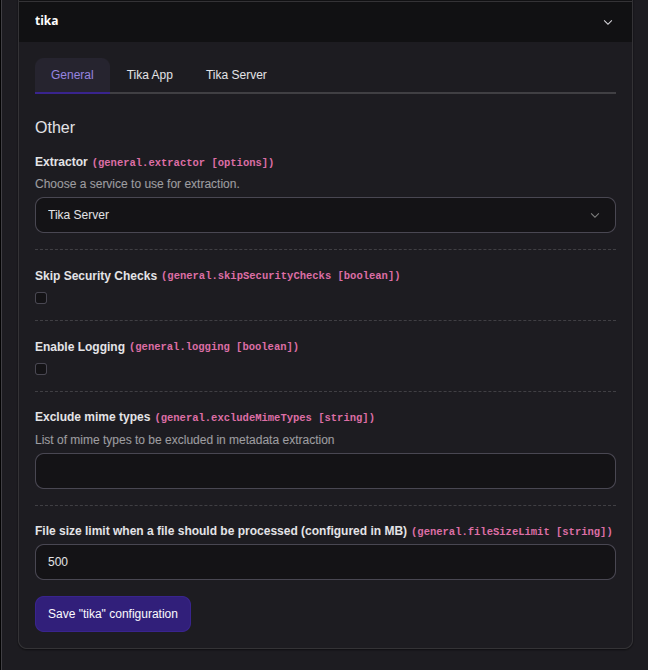
Extension configuration for EXT:tika - Choosing Server extractor in General tab
After that open the Server tab and paste the connection infos/data according fields.
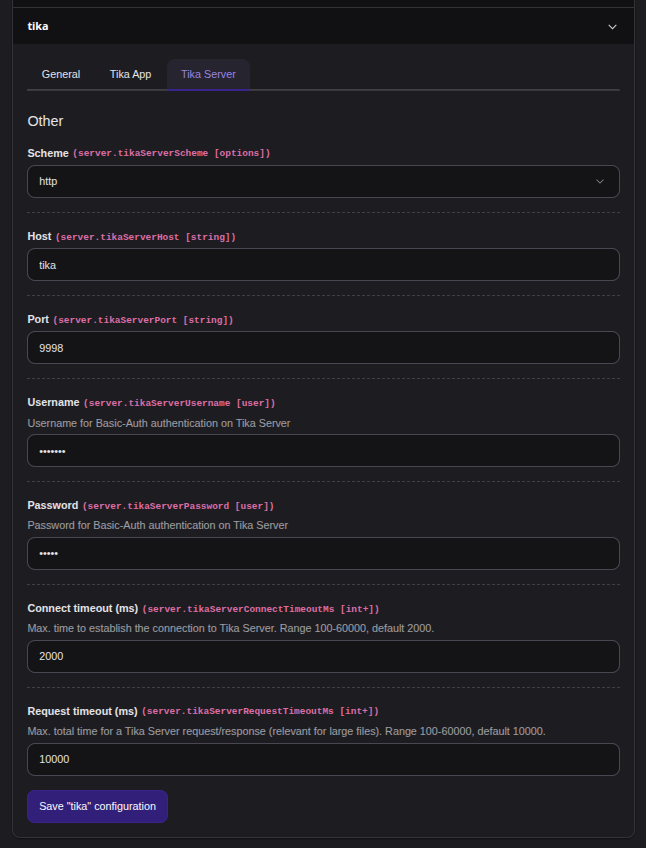
Extension configuration for EXT:tika - Provide the connection infos/data for Tika Server
Authentication and timeouts
The Server tab also offers a few fields to tune the HTTP client used to talk to the Tika Server:
- Username, then Password: credentials for HTTP Basic-Auth, in case the Tika Server is protected by a reverse proxy. Both fields are masked in the Extension Configuration module the same way EXT:tika previously masked the Solr Cell credentials.
- Connect timeout (ms) / Request timeout (ms): how long to wait for the connection to be established, and for the whole request/response, before giving up.
Both accept
100to60000milliseconds and are clamped to that range; defaults are2000and10000.
Advanced: raw Guzzle client options
Everything above only covers the settings most installations need, exposed as typed, validated fields in the Extension Configuration module.
For anything else the underlying Guzzle HTTP client supports (TLS verification, a proxy, client certificates, ...), set it directly in your installation's config/ (or config/):
$GLOBALS['TYPO3_CONF_VARS']['EXTENSIONS']['tika']['tikaServerGuzzleOptions'] = [
    'verify' => false,
    'proxy' => 'http://proxy.example.com:8080',
    'headers' => [
        'X-My-Custom-Header' => 'foo',
    ],
];Keys here must already be valid Guzzle request options and take precedence over everything computed from the Extension Configuration module - including overriding the computed
auth
,
connect_ or
timeout
if set explicitly under the same key names.
The array is merged in with
\TYPO3\, the same mechanism TYPO3 itself uses to merge additional. over Local.
That means nested options merge key by key instead of being replaced wholesale - the
headers
example above adds
X- without losing the default
User- header that TYPO3 already sets for every outgoing request.
See Check if it works for test instructions.