Introduction 

What does it do? 

The extension provides charts for various Matomo reports via the Reporting API.

The default parameters of the widgets can be adjusted to your needs, for example, in the Visits per month widget display 24 month instead of 12 months.

Screenshots 

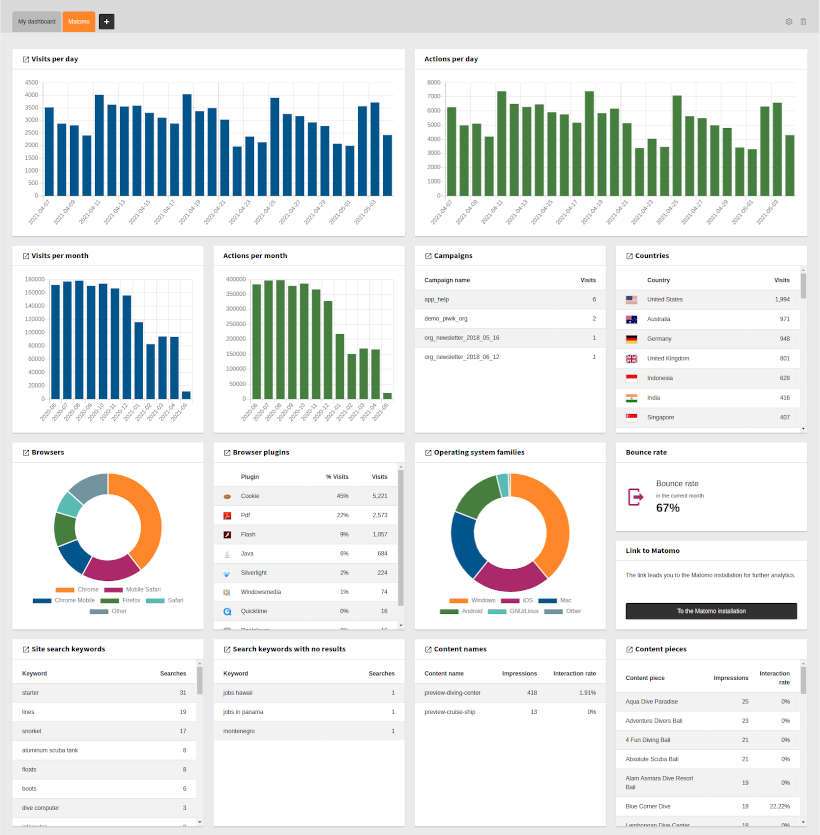
Example for a Matomo Dashboard

Example for a Matomo Dashboard

No Matomo instance at hand? 

You can use the Matomo demo installation for evaluation. Just enter the following settings into the site configuration:

Base URL of the Matomo instance
https://demo.matomo.cloud/
Site ID
1
Authentication token
(leave empty)

Release management 

This extension uses semantic versioning which basically means for you, that

  • Bugfix updates (for example, 1.0.0 => 1.0.1) just includes small bug fixes or security relevant stuff without breaking changes.
  • Minor updates (for example, 1.0.0 => 1.1.0) includes new features and smaller tasks without breaking changes.
  • Major updates (for example, 1.0.0 => 2.0.0) breaking changes which can be refactorings, features or bug fixes.

The changes between the different versions can be found in the changelog.

Dashboard 

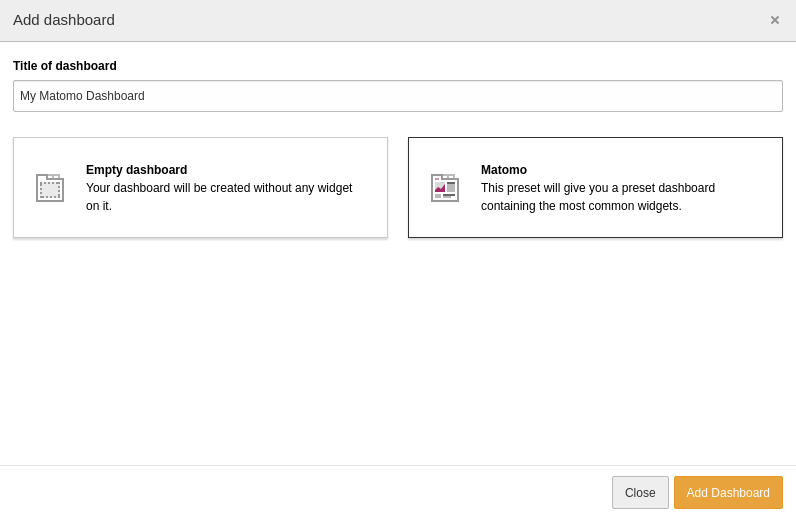
You can add the widgets to every TYPO dashboard. For your convenience, there is also a preset available with the most common widgets. You can select it when creating a new dashboard:

Select the Matomo dashboard preset

Select the Matomo dashboard preset

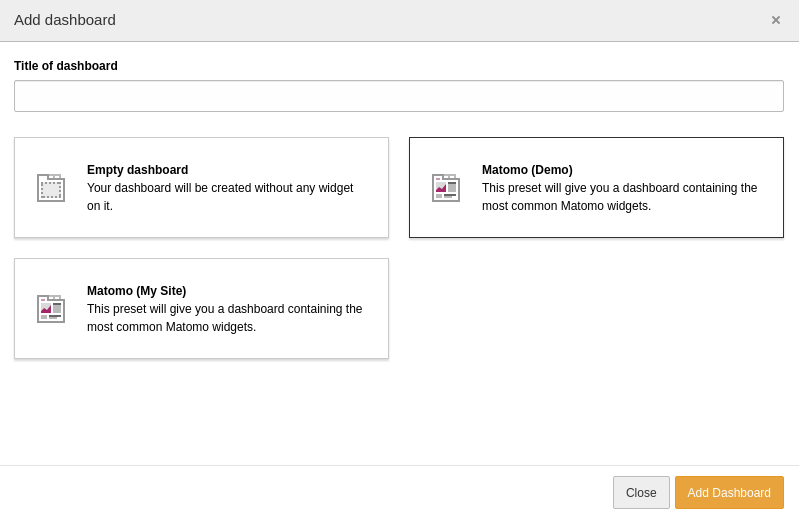
If you have a multi-site TYPO3 installation which connects to different Matomo instances there are presets for each configured Matomo instance available:

Select one of the Matomo dashboard preset

Select one of the Matomo dashboard preset

Widgets 

You can add the Matomo widgets like any other widget to a dashboard. Please note, that the widgets have to be enabled in the site configuration and the permissions for editors have to be granted to be able to use these widgets.

The following widgets are available. A link to the corresponding page in Matomo is displayed via in icon in the header bar of the widget if the report is available.

Actions per day 

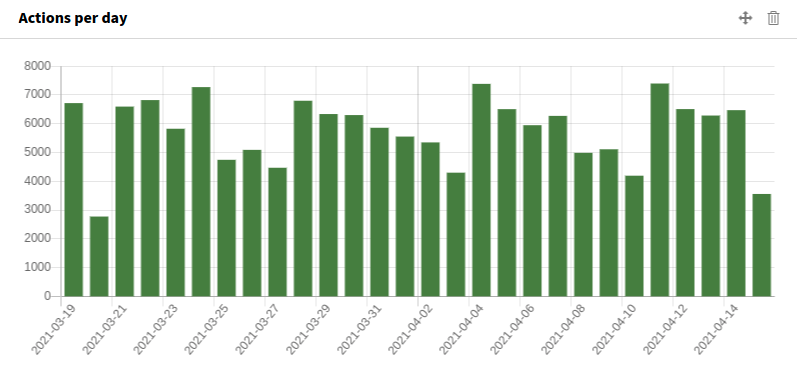
This widget displays the number of actions per day for the last 28 days (including the current day). Actions are:

  • Page views
  • Downloads
  • Clicks on outlinks
Widget Actions per day

Widget Actions per day

Matomo module
VisitsSummary
Active widgets value in config.yaml
actionsPerDay
Default configuration parameters in the Configuration/Services.yaml file
matomo_widgets.actionsPerDay.parameters
  • period: day
  • date: last28

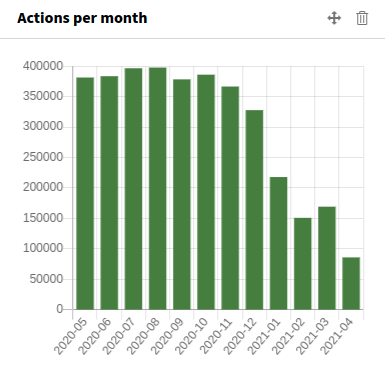
Actions per month 

This widget displays the number of actions per month for the last 12 months (including the current month). Actions are:

  • Page views
  • Downloads
  • Clicks on outlinks
Widget Actions per month

Widget Actions per month

Matomo module
VisitsSummary
Active widgets value in config.yaml
actionsPerMonth
Default configuration parameters in the Configuration/Services.yaml file
matomo_widgets.actionsPerMonth.parameters
  • period: month
  • date: last12

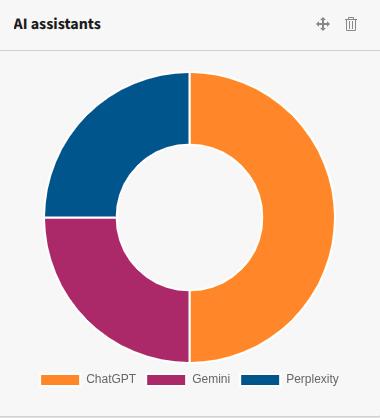
AI assistants 

The AI assistants for the last 28 days shows this widget:

Widget AI Assistants

Widget AI Assistants

Matomo module
Referrers
Active widgets value in config.yaml
aiAssistants
Default configuration parameters in the Configuration/Services.yaml file
matomo_widgets.aiAssistants.limit
5
matomo_widgets.aiAssistants.parameters
  • period: range
  • date: last28
  • filter_sort_column: nb_visits
  • filter_sort_order: desc

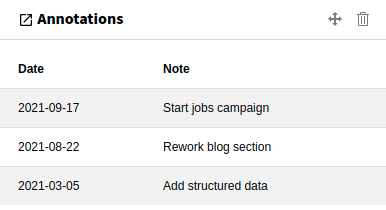
Annotations 

Display a list of the recent annotations in the last 365 days:

Widget Annotations

Widget Annotations

Matomo module
Annotations
Active widgets value in config.yaml
annotations
Default configuration parameters in the Configuration/Services.yaml file
matomo_widgets.annotations.parameters
  • period: 'month'
  • date: 'today'
  • lastN: 365

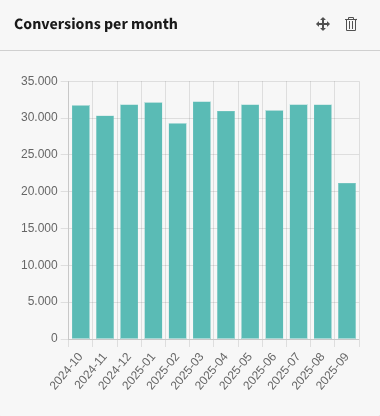
Conversions per month 

This widget displays the number of conversions per month for the last 12 months (including the current month). For this, you have to define at least one goal.

Widget Conversions per month

Widget Conversions per month

Matomo module
Goals
Active widgets value in config.yaml
conversionsPerMonth
Default configuration parameters in the Configuration/Services.yaml file
matomo_widgets.conversionsPerMonth.parameters
  • period: month
  • date: last12

Create annotation 

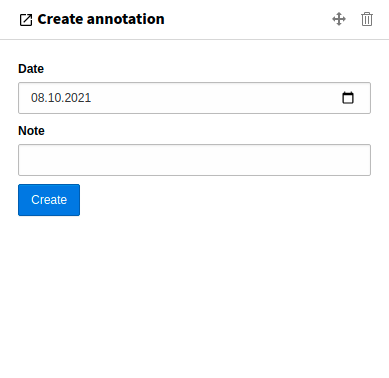
This widget provides a form to create an annotation conveniently from the TYPO3 backend:

Widget Create annotation

Widget Create annotation

After submitting the form, a notification is displayed in the upper right corner of the browser window. If the creation of the annotation was successful, the Note field will be cleared.

Matomo module
Annotations
Active widgets value in config.yaml
createAnnotation

Bounce rate 

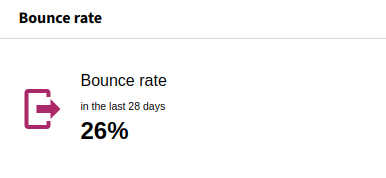
The bounce rate for the last 28 days shows this widget:

Widget Bounce Rate

Widget Bounce rate

Matomo module
VisitsSummary
Active widgets value in config.yaml
bounceRate
Default configuration parameters in the Configuration/Services.yaml file
matomo_widgets.bounceRate.parameters
  • period: range
  • date: last28
matomo_widgets.bounceRate.subtitle
in the last 28 days (incl. today)

Browser plugins 

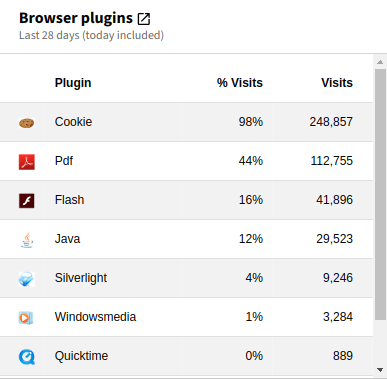
This report shows which browser plugins your visitors had enabled in the last 28 days:

Widget Browser Plugins

Widget Browser Plugins

Matomo module
DevicePlugins
Active widgets value in config.yaml
browserPlugins
Default configuration parameters in the Configuration/Services.yaml file
matomo_widgets.browserPlugins.parameters
  • period: range
  • date: last28
  • filter_limit: 50
  • filter_sort_column: nb_visits
  • filter_sort_order: desc

Browsers 

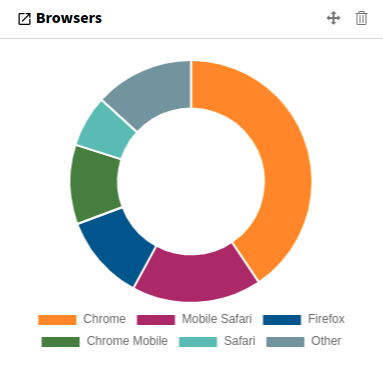
The browser share for the last 28 days shows this widget:

Widget Browsers

Widget Browsers

Matomo module
DevicesDetection
Active widgets value in config.yaml
browsers
Default configuration parameters in the Configuration/Services.yaml file
matomo_widgets.browsers.limit
5
matomo_widgets.browsers.parameters
  • period: range
  • date: last28
  • filter_sort_column: nb_visits
  • filter_sort_order: desc

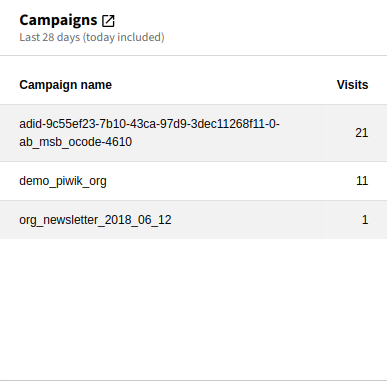
Campaigns 

Displays a report of the campaigns for the last 28 days:

Widget Campaigns

Widget Campaigns

Matomo module
Referrers
Active widgets value in config.yaml
campaigns
Default configuration parameters in the Configuration/Services.yaml file
matomo_widgets.campaigns.parameters:
  • period: range
  • date: last28
  • filter_limit: 30
  • filter_sort_column: nb_visits
  • filter_sort_order: desc

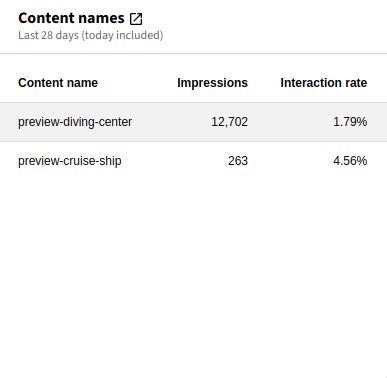
Content names 

The content name report is part of content tracking. The widget displays the names, impressions and interaction rate of the content the visitors viewed and interacted with.

Widget Content Names

Widget Content Names

Matomo module
Contents
Active widgets value in config.yaml
contentNames
Default configuration parameters in the Configuration/Services.yaml file
matomo_widgets.campaigns.parameters:
  • period: range
  • date: last28
  • filter_limit: 50
  • filter_sort_column: nb_impressions
  • filter_sort_order: desc

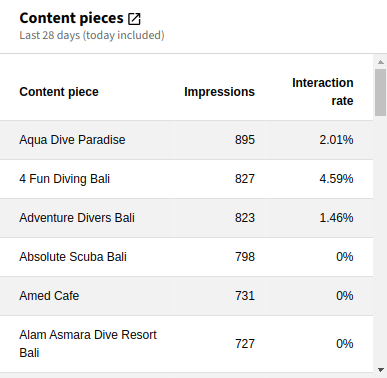
Content pieces 

The content piece report is part of content tracking. The widget displays the pieces, impressions and interaction rate of the content the visitors viewed and interacted with.

Widget Content Pieces

Widget Content Pieces

Matomo module
Contents
Active widgets value in config.yaml
contentPieces
Default configuration parameters in the Configuration/Services.yaml file
matomo_widgets.campaigns.parameters:
  • period: range
  • date: last28
  • filter_limit: 50
  • filter_sort_column: nb_impressions
  • filter_sort_order: desc

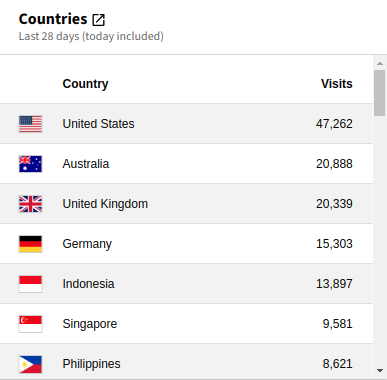
Countries 

Shows a list of countries from which the website was visited in the last 28 days:

Widget Countries

Widget Countries

Matomo module
UserCountry
Active widgets value in config.yaml
countries
Default configuration parameters in the Configuration/Services.yaml file
matomo_widgets.country.parameters:
  • period: range
  • date: last28
  • filter_limit: 50
  • filter_sort_column: nb_visits
  • filter_sort_order: desc

Custom dimensions 

With custom dimensions any custom data can be assigned to visitors or actions. Before a custom dimension can be used as a dashboard widget it has to be configured for a site.

The columns for a custom dimension widget depend on the scope of the custom dimension.

Matomo module
CustomDimensions
Default configuration parameters in the Configuration/Services.yaml file
matomo_widgets.customDimension<idDimension>.parameters:
  • period: range
  • date: last28
  • filter_limit: 50
  • filter_sort_column: nb_visits
  • filter_sort_order: desc

The <idDimension> is the ID of the custom dimension as available in the Matomo configuration.

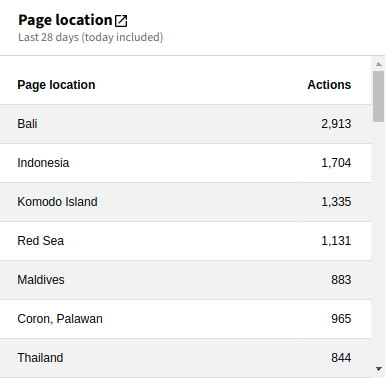
Scope "action" 

Example widget for a custom dimension with scope "action"

Example widget for a custom dimension with scope "action"

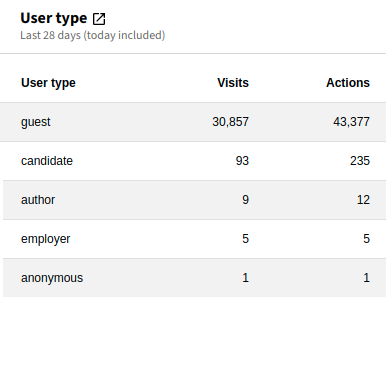
Scope "visit" 

Example widget for a custom dimension with scope "visit"

Example widget for a custom dimension with scope "visit"

JavaScript errors 

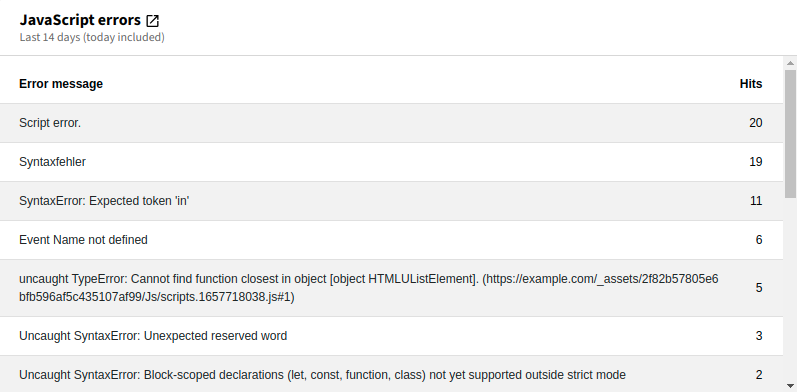
Displays a list of JavaScript errors that occurred in the last 14 days:

Widget JavaScript errors

Widget JavaScript errors

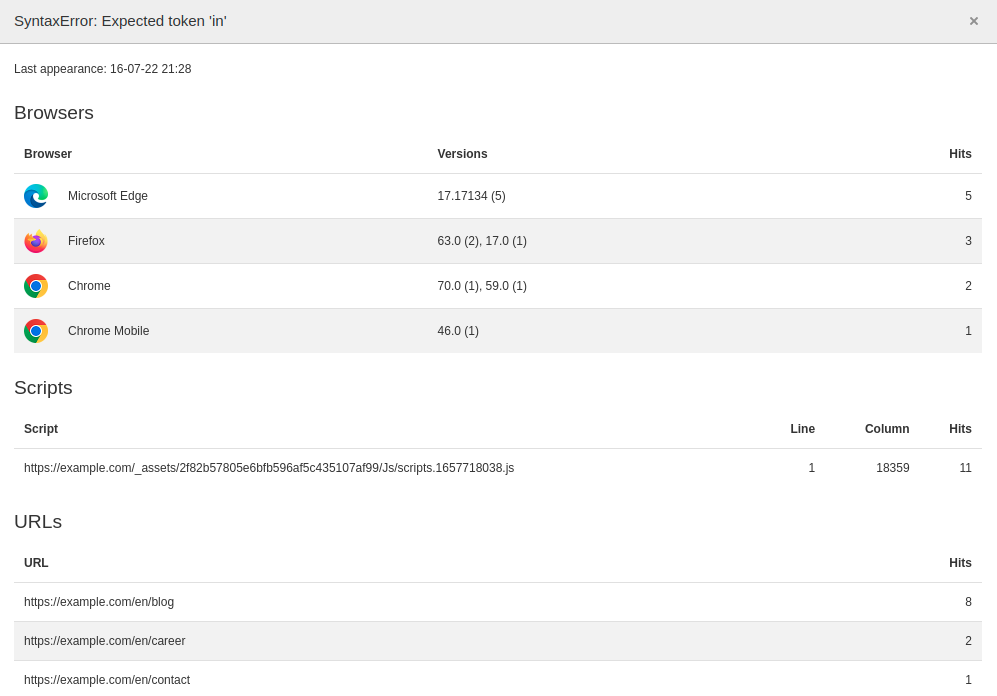
Clicking on the message opens a modal with details to this message:

Modal with details for a specific error

Modal with details for a specific error

Matomo module
Events
Active widgets value in config.yaml
javaScriptErrors
Default configuration parameters in the Configuration/Services.yaml file
matomo_widgets.javaScriptErrors.parameters:
  • period: range
  • date: last14
  • filter_limit: 50
  • filter_sort_column: nb_events
  • filter_sort_order: desc

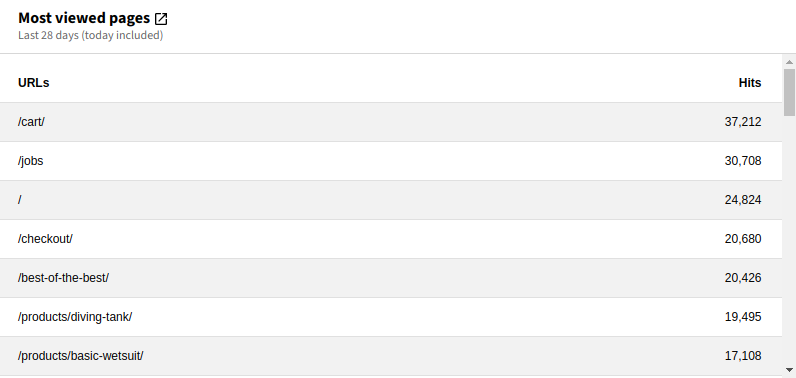
Most viewed pages 

Show the most viewed pages of a site for the last 28 days:

Widget Most viewed pages

Widget Most viewed pages

Matomo module
Actions
Active widgets value in config.yaml
mostViewedPages
Default configuration parameters in the Configuration/Services.yaml file
matomo_widgets.mostViewedPages.parameters:
  • period: range
  • date: last28
  • filter_sort_column: nb_hits
  • filter_sort_order: desc

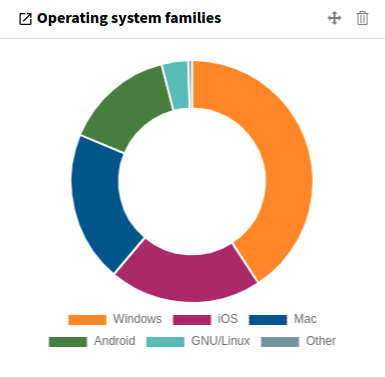
Operating system families 

The operating system families used by the visitors for the last 28 days:

Widget Operating system families

Widget Operating system families

Matomo module
DevicesDetection
Active widgets value in config.yaml
osFamilies
Default configuration parameters in the Configuration/Services.yaml file
matomo_widgets.osFamilies.limit:
5
matomo_widgets.osFamilies.parameters:
  • period: range
  • date: last28
  • filter_sort_column: nb_visits
  • filter_sort_order: desc

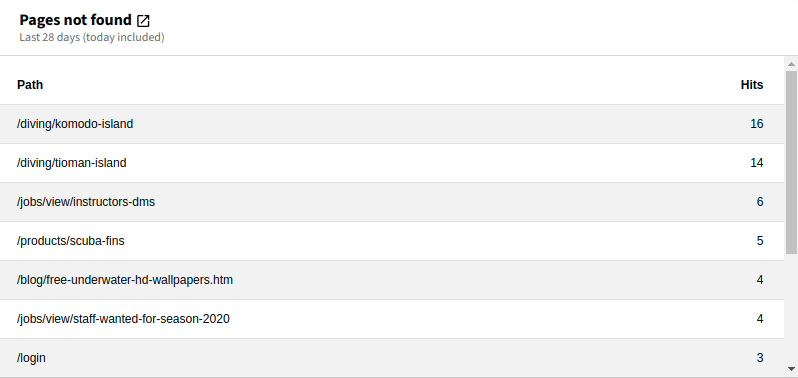
Pages not found 

List of pages in the last 28 days which returned a status code 404 (not found):

Widget Pages not found

Widget Pages not found

Matomo module
Actions
Active widgets value in config.yaml
pagesNotFound
Default configuration parameters in the Configuration/Services.yaml file
matomo_widgets.siteSearchKeywords.parameters:
  • period: range
  • date: last28
  • filter_limit: 50
  • filter_sort_column: nb_hits
  • filter_sort_order: desc

Site search keywords 

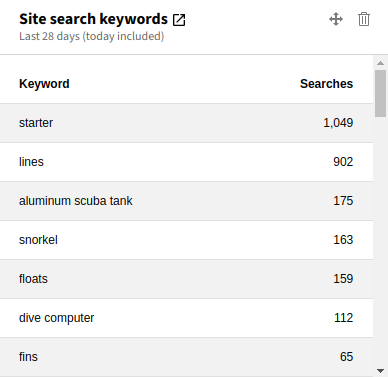
Overview of the search keywords that visitors searched for on the internal search engine:

Widget Site search keywords

Widget Site search keywords

Matomo module
Actions
Active widgets value in config.yaml
siteSearchKeywords
Default configuration parameters in the Configuration/Services.yaml file
matomo_widgets.siteSearchKeywords.parameters:
  • period: range
  • date: last28
  • filter_limit: 50
  • filter_sort_column: nb_visits
  • filter_sort_order: desc

Site search keywords with no result 

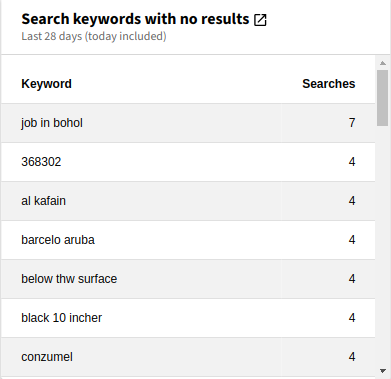
List of the site search keywords that did not return any search result:

Widget Site search keywords with no result

Widget Site search keywords with no result

Matomo module
Actions
Active widgets value in config.yaml
siteSearchNoResultKeywords
Default configuration parameters in the Configuration/Services.yaml file
matomo_widgets.siteSearchNoResultKeywords.parameters:
  • period: range
  • date: last28
  • filter_limit: 50
  • filter_sort_column: nb_visits
  • filter_sort_order: desc

Visits per day 

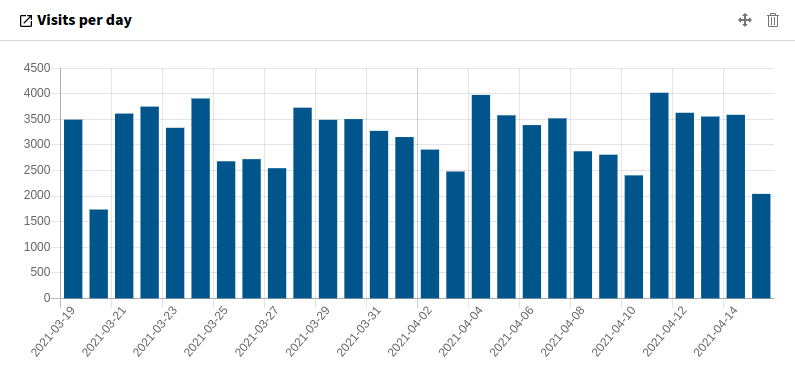
This widget displays the number of visits per day for the last 28 days:

Widget Visits per day

Widget Visits per day

Matomo module
VisitsSummary
Active widgets value in config.yaml
visitsPerDay
Default configuration parameters in the Configuration/Services.yaml file
matomo_widgets.visitsPerDay.parameters:
  • period: day
  • date: last28

Visits per month 

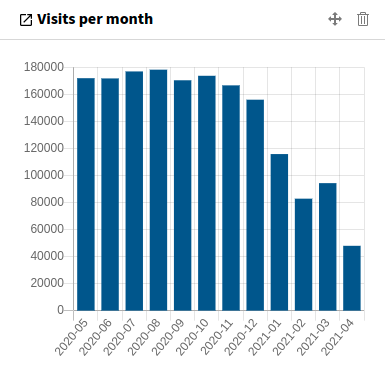
This widget displays the number of visits per month for the last 12 months:

Widget Visits per month

Widget Visits per month

Matomo module
VisitsSummary
Active widgets value in config.yaml
visitsPerMonth
Default configuration parameters in the Configuration/Services.yaml file
matomo_widgets.visitsPerMonth.parameters:
  • period: month
  • date: last12

Installation 

Target group: Administrators

The recommended way to install this extension is by using Composer. In your Composer-based TYPO3 project root, just type:

composer req brotkrueml/typo3-matomo-widgets
Copied!

and the recent version will be installed.

In a legacy installation you can also install the extension from the TYPO3 Extension Repository (TER).

The extension offers some configuration which is explained in the Configuration chapter.

Configuration 

Target group: Developers, Integrators

Site configuration 

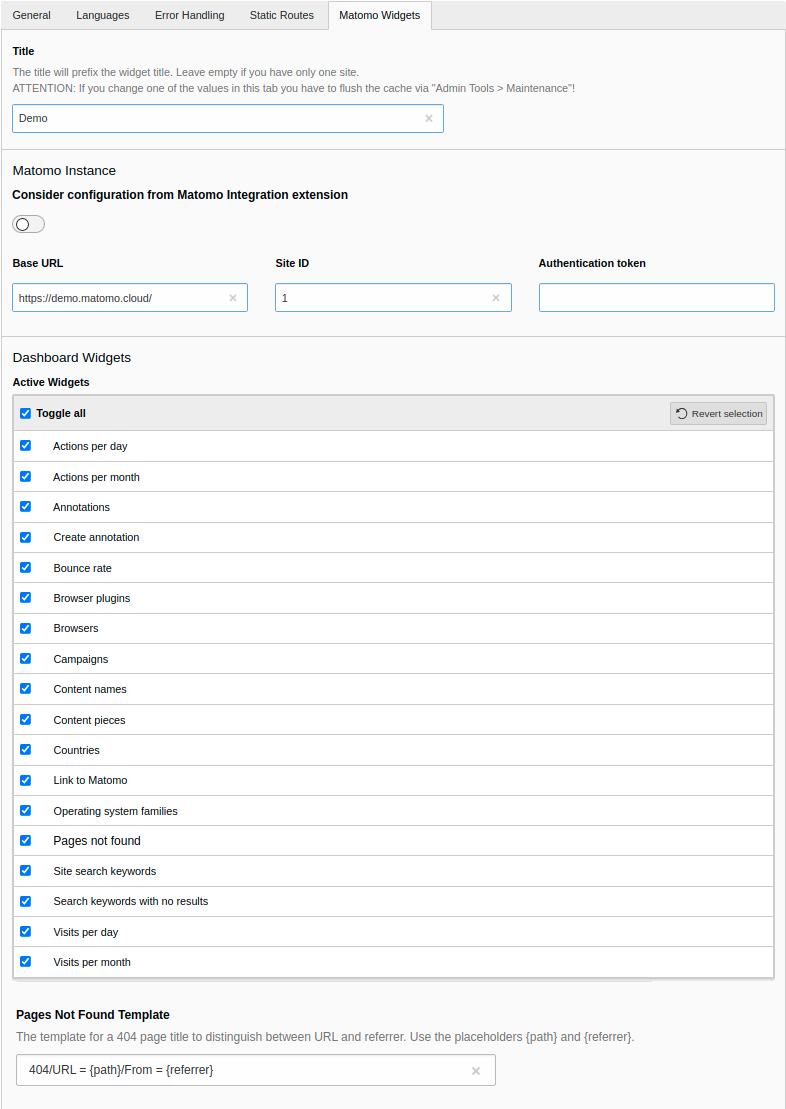
To configure the extension, go to Site Management > Sites and select the appropriate site configuration. Click on the Matomo Widgets tab:

Options in the site management

Options in the site management

Title
The title will prefix the widget title. You can leave it empty if you only have one site. But you should define a title when connecting multiple Matomo instances with your TYPO3 installation to differentiate them in the dashboard.
Consider configuration from Matomo Integration extension
This field is only displayed with installed and activated Matomo Integration extension. Enable this option to use common configuration (like base URL and site ID) from the "Matomo Integration" extension. In this case the common configuration is hidden from this tab.
Base URL

Enter the URL of your Matomo instance. This field is only available when Consider configuration from Matomo Integration extension is deactivated.

Site ID
Enter the site id for the website. This field is only available when Consider configuration from Matomo Integration extension is deactivated.
Authentication token

Enter the authentication token (token_auth).

See the Matomo documentation for how to generate a token_auth.

Active Widgets
You can activate or deactivate each available widget for a site. Deactivated widgets cannot be selected in the dashboard.
Pages Not Found Template

Enter the template to specify the page title for pages which are not found. See How to track error pages in Matomo for more information. Please use the placeholders {path} for the path/URL and {referrer} for the referrer. This field is only available when Consider configuration from Matomo Integration extension is deactivated.

Default: 404/URL = {path} /From = {referrer}

Configuration keys 

The values from the Sites module are stored in the according YAML file. Following is a list of the possible keys and values.

matomoWidgetsActiveWidgets

matomoWidgetsActiveWidgets
type

string

Default

''

Comma-delimited list of the widget names. You can find the according widget value in the widget overview as "Active widgets value".

matomoWidgetsConsiderMatomoIntegration

matomoWidgetsConsiderMatomoIntegration
type

bool

Default

false

With installed Matomo Integration extension the URL and the site ID are taken from the configuration of that extension.

matomoWidgetsCustomDimensions

matomoWidgetsCustomDimensions
type

array

Default

[]

Configuration for custom dimensions, see Custom dimensions.

matomoWidgetsIdSite

matomoWidgetsIdSite
type

int

Default

''

The site ID to track into.

matomoWidgetsPagesNotFoundTemplate

matomoWidgetsPagesNotFoundTemplate
type

string

Default

'404/URL = {path}/From = {referrer}'

The template for a 404 page, see How to track error pages in Matomo for more information.

matomoWidgetsTitle

matomoWidgetsTitle
type

string

Default

''

The widgets are prefixed with this title.

matomoWidgetsTokenAuth

matomoWidgetsTokenAuth
type

string

Default

''

The authorisation token pro retrieving the data via the API.

matomoWidgetsUrl

matomoWidgetsUrl
type

string

Default

''

The URL of the Matomo installation.

Custom dimensions 

Custom dimensions cannot be configured via the Site Management module as there is currently no possibility to add IRRE elements to a site configuration by an extension. So, custom dimensions have to be configured manually in the config/sites/*/config.yml file:

config/sites/your_site/config.yml
matomoWidgetsActiveWidgets: 'actionsPerDay,actionsPerMonth'
matomoWidgetsCustomDimensions:
  -
    scope: 'visit'

    idDimension: 1
    title: 'User Type'
    description: 'Displays the custom dimension for the user type'
  -
    scope: 'action'
    idDimension: 4
    title: 'Page Location'
    description: 'Display the custom dimension for the page location'
matomoWidgetsIdSite: 1
matomoWidgetsTitle: ''
matomoWidgetsTokenAuth: ''
matomoWidgetsUrl: 'https://demo.matomo.cloud/'
Copied!

You begin the configuration for a custom dimension with the key matomoWidgetsCustomDimensions as shown in line 2 of the example. It is followed by an array which describes the custom dimensions:

scope (required)
The scope can be action or visit.
idDimension (required)
The id of the custom dimension as given in the Matomo configuration.
title (optional)
Give a meaningful title for the custom dimension. If it is left out or empty, the title will be Custom Dimension <idDimension>. You can also use a localisation string starting with LLL:. The title is shown as the widget title and in the Add widget modal.
description (optional)
The description is used in the Add widget modal. If it is left out or empty, it is not used. You can also use a localisation string starting with LLL:.

Configuration independent from a site 

It is possible to add widgets for one or more Matomo site IDs independently of a site configuration. YAML files in the config/matomo_widgets/ folder are included at build time in addition to the sites. Add a YAML file for each Matomo site, for instance demo.yaml. The configuration keys can be used, such as:

config/matomo_widgets/demo.yaml
matomoWidgetsActiveWidgets: 'actionsPerDay,bounceRate,visitsPerDays'
matomoWidgetsIdSite: 1
matomoWidgetsTitle: 'Demo'
matomoWidgetsUrl: 'https://demo.matomo.cloud/'
Copied!

Permission of widgets 

You have to grant access for editors to use some or all of the Matomo widgets. You can find more information in the Dashboard manual.

Cache configuration 

The extension stores the data retrieved from the Matomo instance in a cache for better performance. You can adjust the cache configuration, have a look into ext_localconf.php of this extension for the current configuration.

Widget configuration 

The widgets provided by this extension are a starting point. You can adjust some parameters sent to the Matomo instance for each widget. An example would be to raise the displayed number of days for the Visits per month widget from 12 months to 24 months.

Example:

EXT:your_site_package/Configuration/Services.yaml
parameters:
   matomo_widgets.visitsPerMonth.parameters:
      period: 'month'
      date: 'last24'  # default value: 'last12'
Copied!

period and date are parameters from the Matomo Reporting API. There are some more that might be interesting for you.

You can find all configuration parameters in the chapter Widgets.

PSR-14 events 

Target group: Developers

Have a look into the event dispatcher documentation if you are not familiar with PSR-14 events.

BeforeMatomoApiRequestEvent 

This event provides a possibility to adjust the site ID and the authentication token just before making the request to the Matomo API. This may be helpful in a big multi-site installation where you added a configuration independent from a site.

The event \Brotkrueml\MatomoWidgets\Event\BeforeMatomoApiRequestEvent provides the following methods:

->getIdSite()
Returns the site ID.
->setIdSite()
Sets the site ID.
->getTokenAuth()
Returns the authentication token.
->setTokenAuth()
Sets the authentication token.

Example 

Dependent on the host name the current backend user is using we change the site ID:

EXT:your_extension/Classes/EventListener/BeforeMatomoApiRequestEventListener.php
<?php

declare(strict_types=1);

namespace YourVendor\YourExtension\EventListener;

use Brotkrueml\MatomoWidgets\Event\BeforeMatomoApiRequestEvent;
use Psr\Http\Message\ServerRequestInterface;
use TYPO3\CMS\Core\Attribute\AsEventListener;
use YourVendor\YourExtension\Mapping\MatomoSiteMapper;

#[AsEventListener(
    identifier: 'your-extension/before-matomo-api-request',
)]
final readonly class BeforeMatomoApiRequestEventListener
{
    public function __construct(
        private MatomoSiteMapper $matomoSiteMapper,
    ) {}

    public function __invoke(BeforeMatomoApiRequestEvent $event): void
    {
        $hostName = $this->getRequest()->getServerParams()['REMOTE_HOST'];
        if ($idSiteFromHostName = $this->matomoSiteMapper->getIdSiteFromHostName($hostName)) {
            $event->setIdSite($idSiteFromHostName);
        }
    }

    private function getRequest(): ServerRequestInterface
    {
        return $GLOBALS['TYPO3_REQUEST'];
    }
}
Copied!

Translation 

Target group: Developers, Integrators

All strings are translatable. Translations are managed on Crowdin. Click the button below to help translating!

Crowdin localization status

Override translations 

You can override translations in the usual way. Have a look into the according TYPO3 documentation: Custom translations.

However, if you feel that a translation provided by the translation server could be improved, please suggest an alternative on Crowdin.

Upgrade 

From version 3.x to 4.0 

No migration necessary.

From version 2.x to 3.0 

No migration necessary.

The date ranges for the following widgets have been changed:

Old configuration: current month
period: month date: today
New configuration: last 28 days
period: range date: last28

You can define your custom date ranges as described in the widget configuration.

From version 1.x to 2.0 

No migration necessary.

From version 0.3 to 1.0 

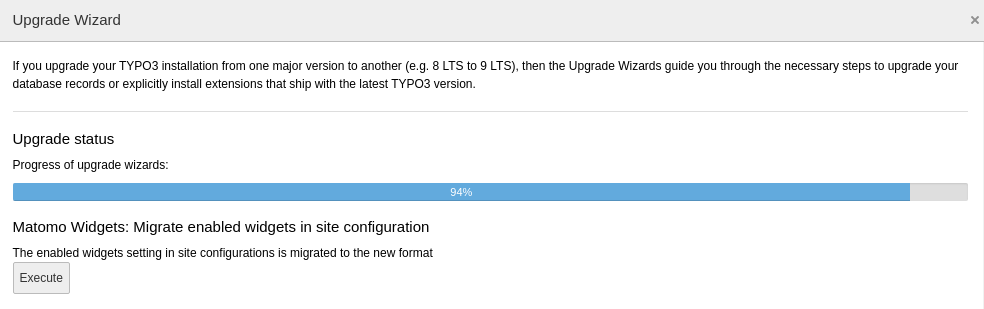
In version 1.0 the format changed how the active widgets for a site are stored in the site configuration. For the migration of this configuration an upgrade wizard is available.

The migration can be started in the TYPO3 backend via Admin Tools > Upgrade > Upgrade Wizard.

Migrate configuration in backend

Migrate configuration in backend

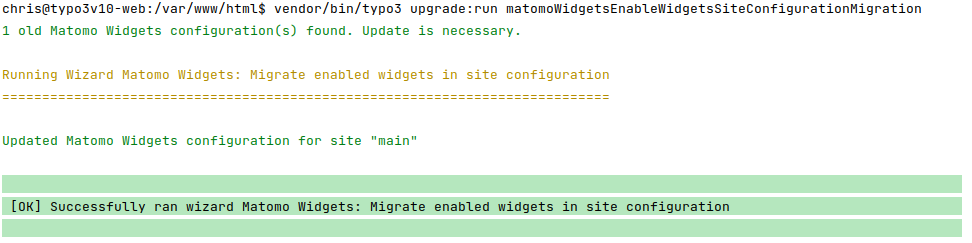
Alternatively, you can also execute the migration wizard on a TYPO3 console:

Migrate configuration on console

Migrate configuration on console

The migration wizard updates:

  • File config/<site_identifier>/config.yaml

From version 0.2 to 0.3 

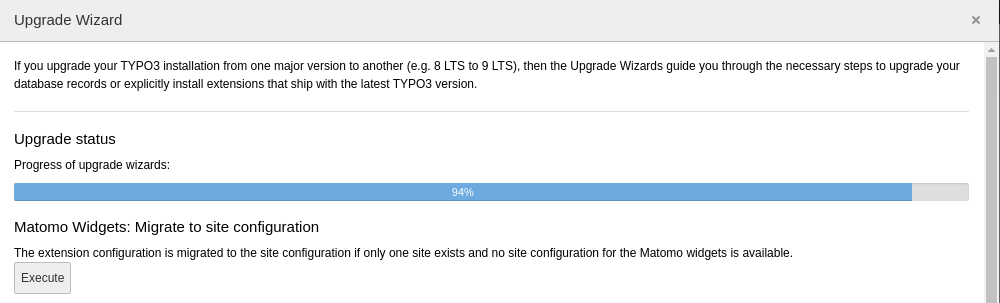
To allow the configuration of more than one Matomo instance the configuration moved from the extension configuration to the site management.

Migrating from extension configuration to site configuration 

The migration can be started in the TYPO3 backend via Admin Tools > Upgrade > Upgrade Wizard.

Migrate configuration in backend

Migrate configuration in backend

Alternatively, you can also execute the migration wizard on a TYPO3 console:

Migrate configuration on console

Migrate configuration on console

The migration wizard updates:

  • File typo3conf/LocalConfiguration.php
  • File config/<site_identifier>/config.yaml

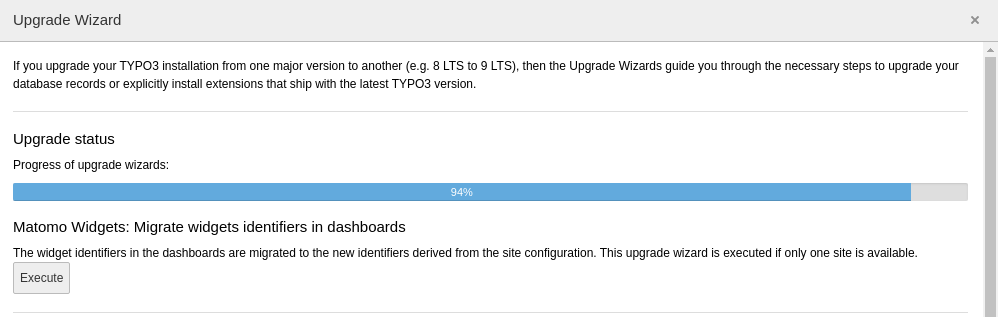
Migrating the dashboard widgets 

As the identifiers of the dashboard widgets have changed they can also be migrated to the new identifiers. If multiple site configuration exist the widgets have to be assigned manually to the dashboards again.

The migration can be started in the TYPO3 backend via Admin Tools > Upgrade > Upgrade Wizard.

Migrate dashboard widgets in backend

Migrate dashboard widgets in backend

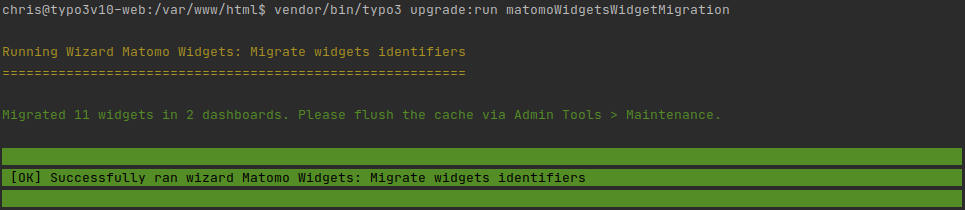
Alternatively, you can also execute the migration wizard on a TYPO3 console:

Migrate dashboard widgets on console

Migrate dashboard widgets on console

The migration wizard updates:

  • Table "be_dashboards"

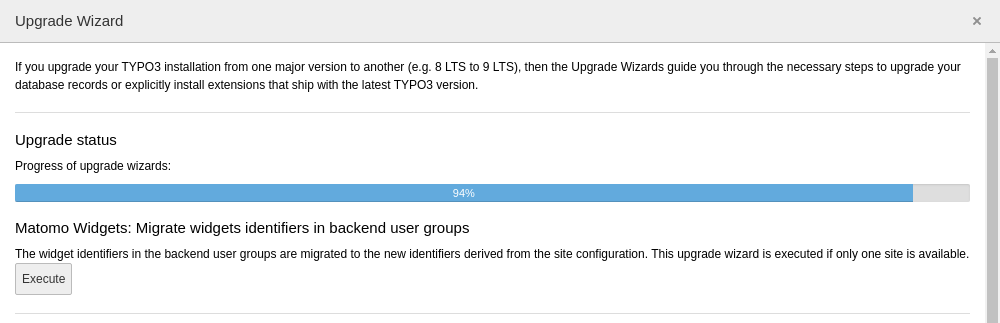
Migrating the backend user group configuration 

Use this upgrade wizard to migrate the widget identifiers to the new format. If multiple site configuration exist the widgets have to be assigned manually to the backend user groups again.

Migrate widgets identifiers of backend user groups in backend

Migrate widgets identifiers of backend user groups in backend

Alternatively, you can also execute the migration wizard on a TYPO3 console:

Migrate widgets identifiers of backend user groups on console

Migrate widgets identifiers of backend user groups on console

The migration wizard updates:

  • Table "be_groups"

Changelog 

All notable changes to this project will be documented in this file.

The format is based on Keep a Changelog, and this project adheres to Semantic Versioning.

Unreleased 

4.0.0 - 2025-11-26 

Added 

  • Compatibility with TYPO3 v14

Changed 

  • Matomo 5.4+ is required (#60)

Removed 

  • Compatibility with TYPO3 v12 (#53)

3.4.0 - 2025-10-09 

Added 

  • Widget "AI assistants" - requires Matomo 5.5+ (#64)

3.3.0 - 2025-09-23 

Added 

  • Widget "Conversions per month" (#52)

Fixed 

  • Countries are not localized in countries widget
  • Default "Pages Not Found" template does not match with recommended template from Matomo FAQ (#61, only relevant for new installations)

3.2.3 - 2025-09-20 

Fixed 

  • Double title in some widget types with TYPO3 >= 13.4.6

3.2.2 - 2025-06-30 

Removed 

  • Import of Matomo Widget configuration in site configuration (introduced with v3.2.0) (#58)

3.2.1 - 2025-06-18 

Fixed 

  • Symlinked site configuration file is not taken into account

3.2.0 - 2025-06-15 

Added 

  • Allow import of Matomo Widget configuration in site configuration (#54)

Fixed 

  • Call to undefined method WidgetConfiguration::getAdditionalCssClasses() in TYPO3 v13.4.14 (#56)

Removed 

  • Compatibility with EXT:matomo_integration version 1

3.1.2 - 2024-12-02 

Fixed 

  • Using configuration from EXT:matomo_integration with relative URLs throws error

3.1.1 - 2024-09-23 

Fixed 

  • Table widgets lost styling with TYPO3 v13.3

3.1.0 - 2024-04-09 

Added 

  • Display of date range in table widgets (#50)

3.0.0 - 2024-02-19 

Added 

  • Compatibility with TYPO3 v13

Changed 

  • Date ranges of various widgets from current month to last 28 days

Removed 

  • Compatibility with TYPO3 v11 (#40)

2.4.0 - 2024-01-16 

Added 

  • Compatibility with Symfony 7

2.3.0 - 2023-12-15 

Added 

  • Widget "Most viewed pages" (#47)

Fixed 

  • Table content with numbers is right-aligned again in TYPO3 v12

2.2.1 - 2023-07-21 

Fixed 

  • Proxy configuration is not taken into account (#46)

2.2.0 - 2023-05-21 

Added 

  • Content Security Policy for configured Matomo servers in backend for TYPO3 v12 (#45)

2.1.1 - 2023-04-01 

Fixed 

  • Error when opening a site configuration in TYPO3 v12.3 (#44)

2.1.0 - 2023-01-07 

Added 

  • Configuration independent of a website (#41)
  • PSR-14 event BeforeMatomoApiRequestEvent to adjust site ID and auth token (#42)
  • Hide sensitive parameters (auth token) in back traces for PHP >= 8.2

Fixed 

  • Deprecations in PHP 8.2

2.0.0 - 2022-10-09 

Added 

  • Compatibility with TYPO3 v12 (#36)

Removed 

  • Compatibility with TYPO3 v10 LTS (#37)
  • Compatibility with PHP 7.4 and 8.0 (#39)
  • Upgrade wizard for version 1.0 (#38)

1.7.0 - 2023-01-07 

Added 

  • Configuration independent of a website (#41)
  • PSR-14 event BeforeMatomoApiRequestEvent to adjust site ID and auth token (#42)

1.6.0 - 2022-09-19 

Added 

  • Browser version to JavaScript error details modal (#34)

1.5.0 - 2022-06-13 

Removed 

  • Compatibility with PHP 7.2 and 7.3

1.4.0 - 2022-04-04 

Added 

  • Site ID to the "Link to Matomo" widget link (#33)

1.3.0 - 2022-02-25 

Added 

  • Widget "Create annotation" (#25)
  • Widget "JavaScript errors" (#29, #32)
  • Widget "Pages not found" (#30)
  • Compatibility with Symfony 6

1.2.0 - 2021-10-20 

Added 

  • Widget "Annotations" (#21)

Changed 

  • The Matomo Widgets configuration must be stored in the site configuration's config.yaml, imports are not supported anymore (#24, #26)

Fixed 

  • Exception thrown by YamlFileLoader in TYPO3 v11.5.0 (#24)

1.1.2 - 2021-09-26 

Fixed 

  • ExtensionManagementUtility::isLoaded() in Services.yaml throws error in TYPO3 v11.4

1.1.1 - 2021-09-22 

Fixed 

  • Undefined logger in YamlFileLoader (#20)

1.1.0 - 2021-08-30 

Added 

  • Option to use configuration of base URL and site ID from EXT:matomo_integration

1.0.2 - 2021-08-01 

Fixed 

  • Consider imports of widget settings into site configuration (#19)

1.0.1 - 2021-07-26 

Fixed 

  • Set fallback for undefined array key in PHP8

1.0.0 - 2021-05-04 

Added 

  • Link from widget to corresponding Matomo report if available (#7)
  • Widget "Browser plugins" (#12)
  • Widget "Content names" (#8)
  • Widget "Content pieces" (#9)
  • Widget "Site search keywords" (#14)
  • Widget "Site search keywords with no results" (#15)
  • Widget for custom dimensions (#6)

Changed 

  • Raise minimum required version to TYPO3 10.4.15 and TYPO3 11.2.0
  • Use selectCheckBox in site configuration for active widget selection instead of checkboxLabeledToggle, an upgrade wizard is available (#10)

Fixed 

  • Correct widget titles with site prefix for "Countries" und "Link to Matomo"

Removed 

  • Upgrade wizards for version 0.3 (#11)

0.3.2 - 2021-01-11 

Changed 

  • Raise minimum required version to TYPO3 10.4.11

Fixed 

  • Show dashboard widgets in non-composer installation

0.3.1 - 2020-12-22 

Added 

  • Compatibility with TYPO3 v11

0.3.0 - 2020-11-27 

Added 

  • Multi-site capability (#1)
  • Parameters for data providers are overridable

Changed 

  • Inject background colours into GenericDoughnutChartDataProvider

0.2.0 - 2020-07-17 

Added 

  • Widget "Countries"

Changed 

  • Generalise widget configuration

Fixed 

  • Correct bar label in bar chart
  • Dashboard is usable with an incorrect configuration (#2)

0.1.0 - 2020-07-06 

Initial release

Sitemap