
Usage
The fp-fileprotector extension is managed from the File Protection backend module under Files.
After configuring a storage to be protected, the folder tree displays the protection status of each folder within that storage.
Every folder within a protected storage can have access rules that control which users may access the files within that folder.
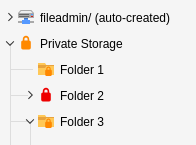
Folder tree of a protected file storage. Lock icons on folders indicate their protection status.
Folder icons are color-coded based on their accessibility:
- Green Lock
- Everyone can access the folder.
- Orange Lock
- Access is restricted by an access rule.
- Red Lock
- No one can access the folder (e.g. when the storage denies access by default and no access rule has been created).
You can also see whether a protection rule is defined directly on a folder or inherited from a parent folder:
- Folder icon is a lock symbol
- A specific access rule is defined for this folder.
- Folder icon has a small lock badge
- The access rule was inherited from a parent folder.