
Managing posts
List of all accounts
Here you will find a list of all created accounts.
You can filter this list by type in the upper area of the table.
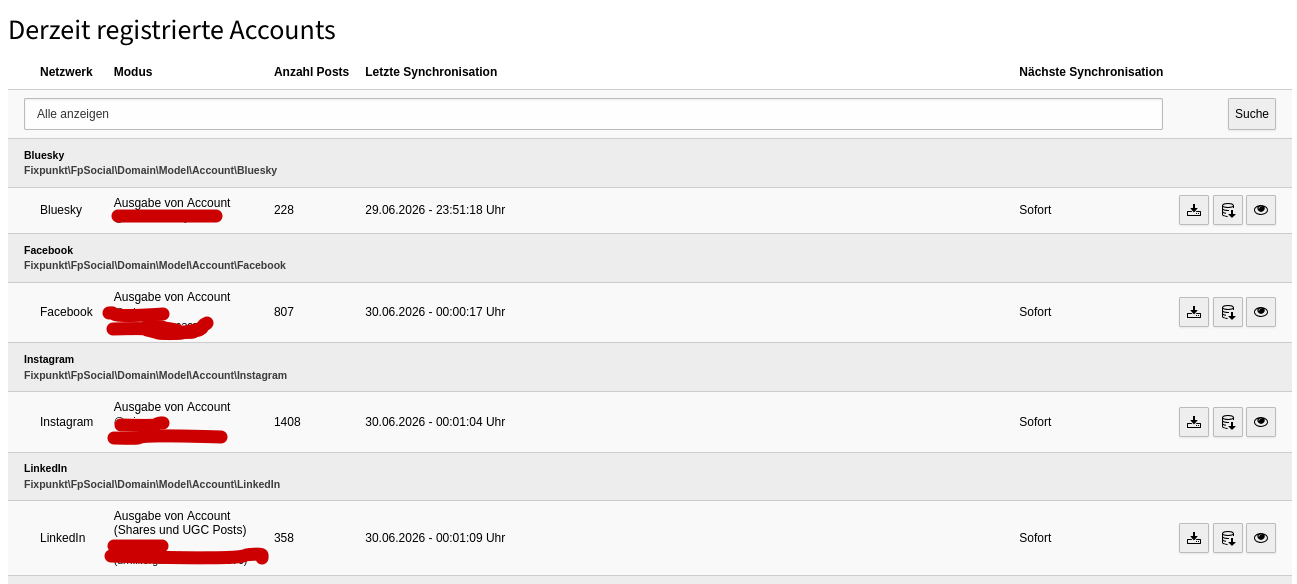
The following information is provided here:
- Network: The network from which the data is to be pulled.
- Mode: The account from which, and the mode in which, the data is read.
- Number of posts: The number of posts imported so far.
- Last synchronization: This shows you when the last attempt to synchronize the account was made. If this was not successful, the point in time of the last successful synchronization is also displayed, along with an error message.
- Next synchronization: This shows you the synchronization interval.
The following actions are possible:
- Synchronize: Synchronizes - depending on the social network - a certain number of the newest posts.
- Deep synchronization: Synchronizes the entire account. With the help of a wizard, all available posts are imported one after another.
- Show posts: Click here if you want to display all posts that have already been imported.
Account view
In the account view you can see all posts imported with the account.
Here you have the following options:
- Preview images: If several preview images are available, you can select the current image as the preview image by clicking the respective image and the "Select this image as preview image" button.
- Show posts: By clicking "Open post" you can display the post in the relevant network.
- Show & hide: By clicking "Hide / show this post" you can hide or show the post in the frontend.
- Synchronize: By clicking "Re-synchronize post" you can re-import the post.
If you have deleted a post in the network, you can apply this deletion by re-synchronizing the post.