

Backend Login
All other backend indicators only take effect after login (topbar, toolbar, logo, theme). Yet the moment with the highest risk of confusion is the login itself — anyone who accidentally logs into live instead of staging only notices afterwards. The backend login indicator closes this gap by showing a colored environment badge directly on the backend login screen.
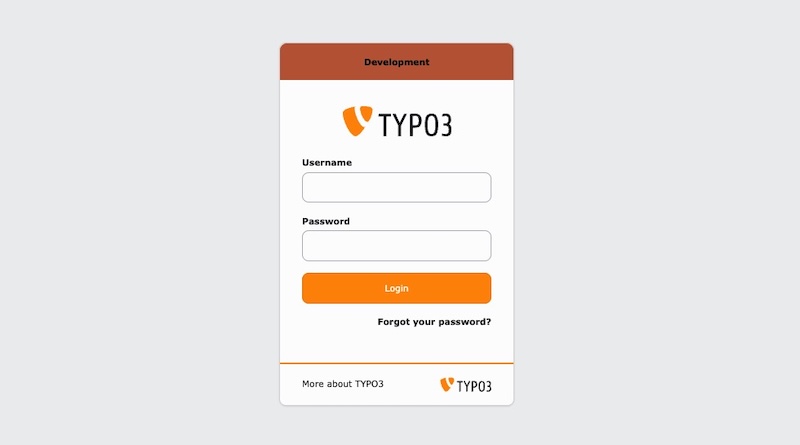
Backend Login Example
The badge is injected via a listener on the
Modify. It is attached directly to
the login card (above the logo, or below the card footer), matching the card's
rounded corners and font. If the login card markup is not found — e.g. with an
alternative login provider (OIDC/SSO extensions) — it falls back to a
full-width banner at the top or bottom of the page.
You can register the indicator in your ext_:
use KonradMichalik\Typo3EnvironmentIndicator\Configuration\Handler;
use KonradMichalik\Typo3EnvironmentIndicator\Configuration\Indicator;
use KonradMichalik\Typo3EnvironmentIndicator\Configuration\Trigger;

Handler::addIndicator(
    triggers: [
        new Trigger\ApplicationContext('Production/Staging')
    ],
    indicators: [
        new Indicator\Backend\Login([
            'text' => 'Staging',
            'color' => '#00ACC1',
        ])
    ]
);Additional optional configuration keys:
text(string): The badge text. Default is the current application context.color(string): The badge background color as a hex value. Default is#bd593a. The text color is calculated automatically for optimal contrast.position(string): The badge position,toporbottom. Default istop.description(string): An optional descriptive line shown below the badge text (e.g. "Data is overwritten nightly from live").
Note
There is no backend user yet on the login screen, so the Admin and Backend User Group triggers cannot resolve and are treated as "not fulfilled" — a configuration gated by them will not activate on the login screen. Application Context, IP Address and Custom work as usual.
The backend login badge can be disabled globally via the extension configuration.